Info: Machine translation This post was machine-translated from the Chinese original. Wording may be rough in places — the Chinese version is authoritative.
To start with the conclusion: local AI is already capable.
It’s not the kind of play that is “barely usable,” but the kind of “really quite capable” kind of play.
On my MacBook Pro, I ran through all six mainstream local models, including multi-turn dialogue, real tool calls, and file verification…
The data is real, the pitfalls are well known, no more nonsense, let’s get to the point.
🖥️ Testing environment
📦 Hardware
-
MacBook Pro M5 Pro — Apple Silicon, ARM64 architecture
-
64GB Unified Memory
-
This memory is shared between CPU and GPU, so the model can fully utilize 64GB
🔧 Software
-
macOS Sequoia
-
mlx_lm 0.31.3 — Apple’s official MLX inference framework
-
OpenCode — Local IDE AI Assistant (similar to Cursor, but runs local models)
Note What is Unified Memory?
Ordinary computers have their own CPU and GPU memory, and transferring data in between requires “moving,” which is slow and wasteful. Apple chips merge the two into one, allowing the model to live directly inside without moving, which is much faster.
64GB means you can fit a 28GB model at the same time, plus 36GB for running systems and other programs.
🤖 6 contestants
This time, we tested six models from the two major camps: Alibaba and Google.
Note What is Quantization?
It’s basically ‘slimming down’ the model. The original model stores 16-bit parameters per parameter, and 4-bit quantization compresses it to 1/4 size. The trade-off is a slight loss in precision, but faster speed and memory saving.
Comparison: The original is FLAC lossless music, the quantized version is MP3—most of the time you can’t hear the difference, but the files are much smaller.
| Model name | Distributor | Occupying memory | Accuracy | Features |
|---|---|---|---|---|
| Qwen3.6-27B-8bit | Ali | 28 GB | 8bit | Highest precision, 8-bit close to the original |
| Qwen3.6-27B-4bit | Ali | 14 GB | 4bit | The same compressed version saves half the memory |
| Qwen3.6-35B-A3B | Ali | 19 GB | 4bit | MoE architecture for maximum efficiency ⭐ |
| Gemma4-E4B-BF16 | 14 GB | BF16 | Produced by Google, full precision | |
| Gemma4-E4B-4bit | 3.9 GB | 4bit | The lightest and fastest 🚀 speed | |
| Gemma4-31B-Uncensored | Community | 18 GB | 4bit | Uncensored edition, creative freedom |
※ Smaller memory doesn’t necessarily mean worse; the 19GB MoE architecture is the strongest overall
Note What is MoE (Hybrid Expert)?
Ordinary models are fully engaged for every inference, and MoE models have many “expert panels” that only call the most suitable few each time.
Result: The 35B parameter model uses only a small portion of the actual computational load, yet is actually faster than the 27B model.
📋 How was it tested?
Each model must go through four scenarios. Test scripts run fully automatically, and data is objectively reproducible.
Scene A · Multi-turn dialogue (3 rounds consecutive)
Ask three questions in a row to test whether the model can remember context and how much it can accelerate in rounds 2 and 3.
-
Question 1: Introduce yourself in one sentence
-
Q2: Which programming languages do you support?
-
Q3: What is the biggest difference between Python and JS?
Scenario B · Tool call — List the table of contents
Have the model check what files are in the /tmp directory and then summarize. The model must first call the tool to get the results before responding.
Scenario C · Tool call—executes commands
Have the model execute the uname -a command and interpret the result. Test whether the model can correctly call bash and understand system information.
Scenario D · Tool call — write file + verify
Write content to the file, then read and verify. Two-step tool call series to assess the model’s continuous reasoning ability.
Note What is Function Calling?
Ordinary AI only “speaks.” Tool calls allow AI to “do things”—calling programs, reading documents, executing commands.
Analogy: Tool calling is like giving AI hands and feet—it’s not just saying ‘Let me check for you,’ but actually checking, bringing back the results, and then telling you.
Note What tokens frequently appear in data?
Token is the smallest unit for AI to understand text. One English word ≈ 1 token, one Chinese character ≈ 1.5 tokens.
During testing, we sent the model 9,000~10,000 tokens each time (equivalent to over 6,000 Chinese characters of system prompts + dialogue).
⏱️ Scenario A: Compare the speed of multi-turn conversations
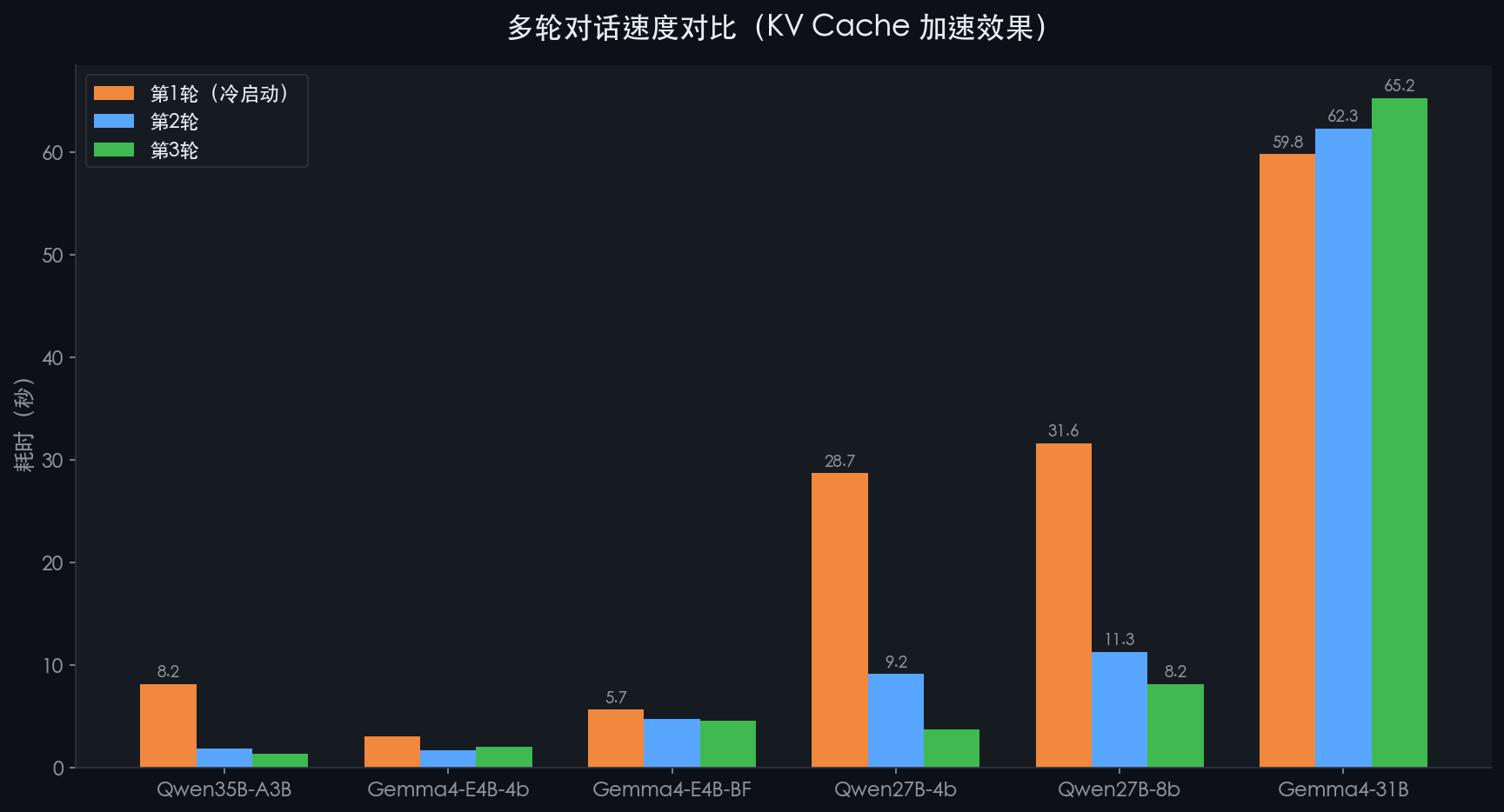
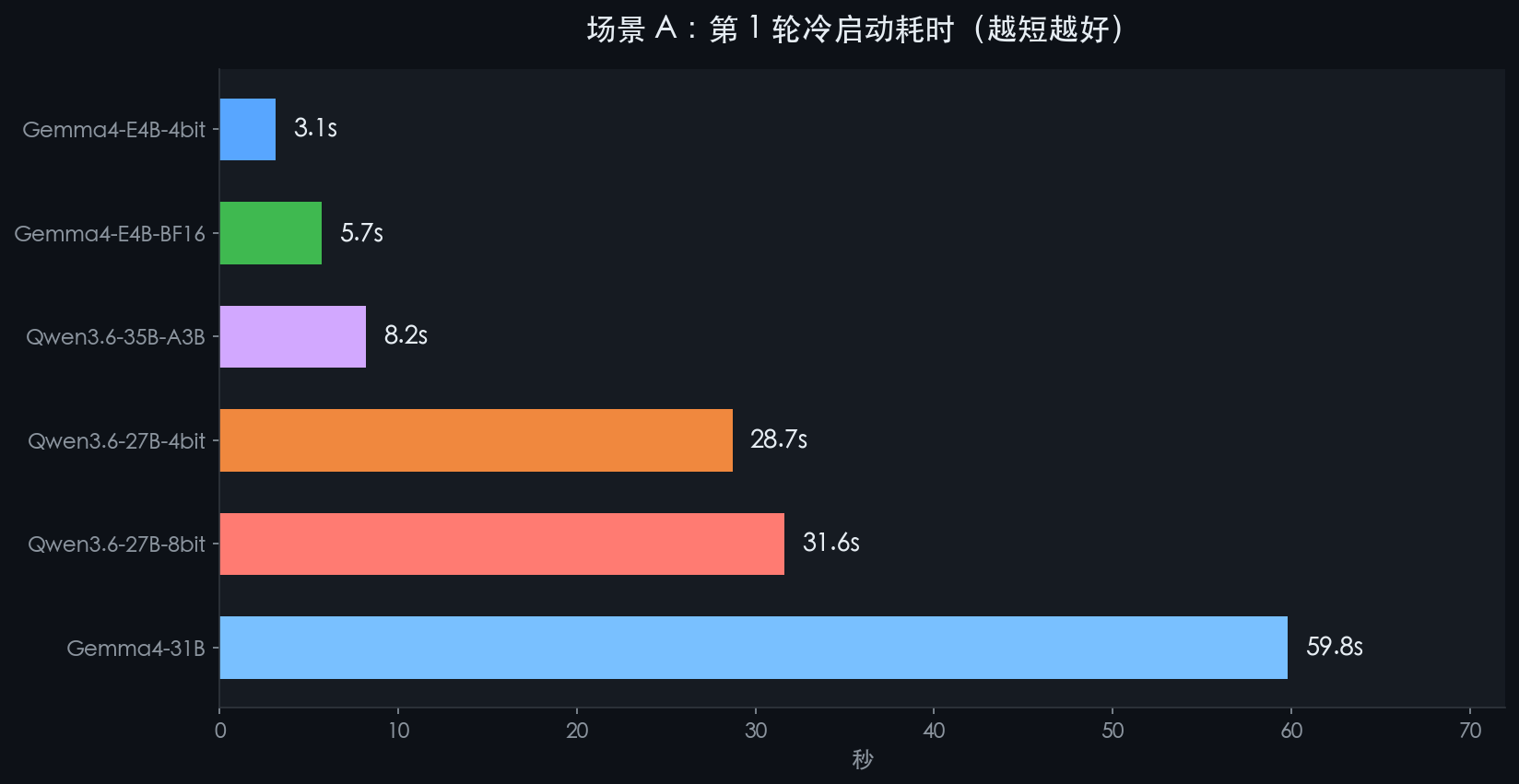
Look at the numbers first, then let’s talk about the feelings.
| Model | Round 1 (Cold Start) | Round 2 | Round 3 | Maximum acceleration ratio |
|---|---|---|---|---|
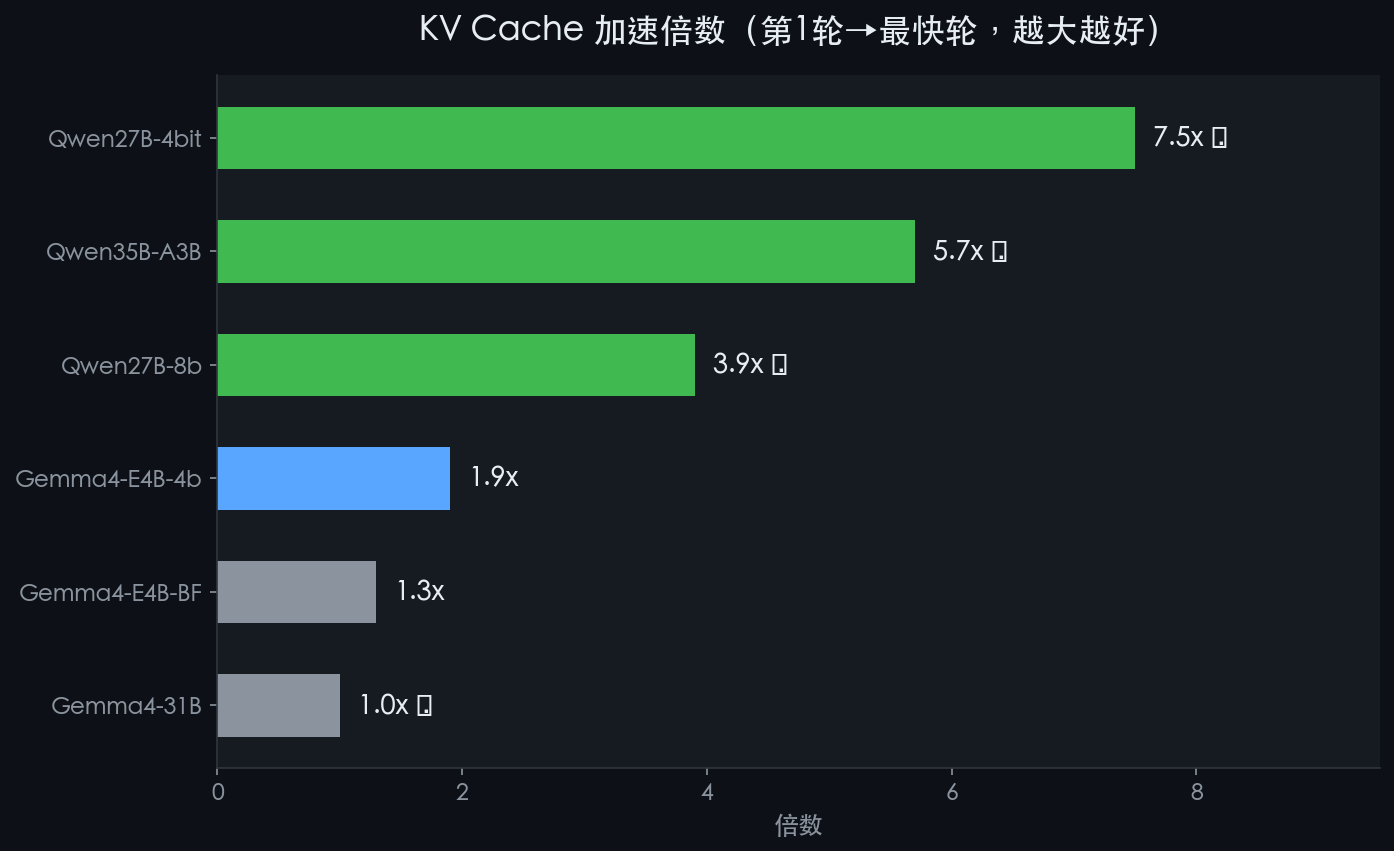
| Qwen3.6-35B-A3B | 8.2s | 1.9s | 1.4s | 🏆 5.7x |
| Gemma4-E4B-4bit | 3.1s | 1.7s | 2.1s | 1.9x |
| Gemma4-E4B-BF16 | 5.7s | 4.8s | 4.6s | 1.3x |
| Qwen3.6-27B-4bit | 28.7s | 9.2s | 3.8s | 🥈 7.5x |
| Qwen3.6-27B-8bit | 31.6s | 11.3s | 8.2s | 3.9x |
| Gemma4-31B | 59.8s | 62.3s | 65.2s | 1.0x 😅 |
※ It’s normal for the first round to be slow; the first time the model processes the long prefix, it takes time; Starting from the second round, hitting the KV cache will accelerate significantly
Note What is KV Cache?
The first round had to process over 9,000 token system prompts, which was very slow. But the model would store this “memory,” and in the second and third rounds, it would reuse it directly, only processing the newly added few dozen tokens.
Analogy: The first time memorizing the text takes 30 minutes, and after finishing, retelling only takes 1 minute. KV Cache is this ‘already memorized’ state.
Qwen35B accelerates 5.7x in the second round, and Qwen27B-4bit accelerates by 7.5x.
🔧 Scenario B/C/D: TOOL CALL SPEED comparison
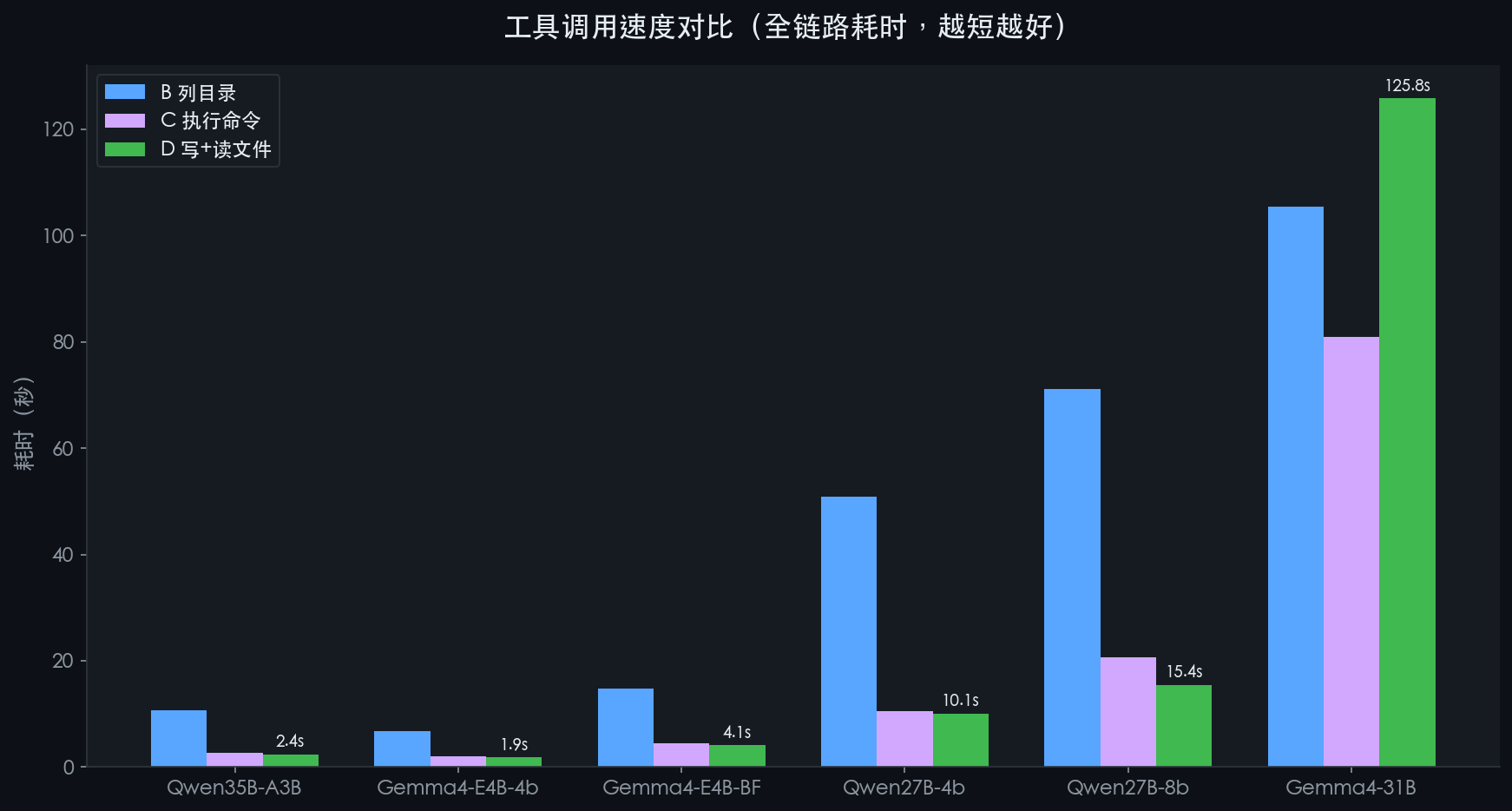
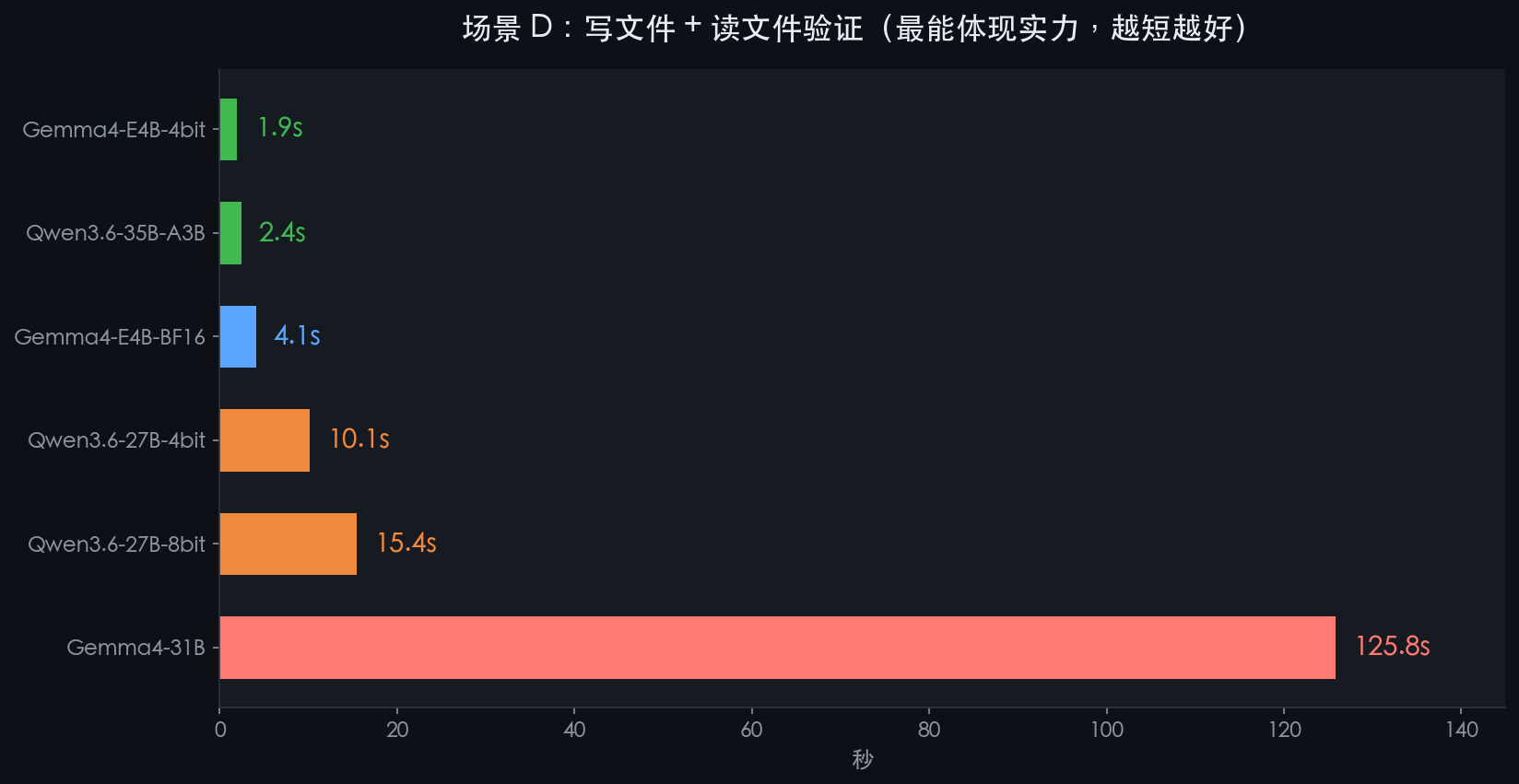
This better reflects the actual user experience—calling tools, getting results, then answering, how long does the full chain take?
| Model | Column B | C executes commands | D Write + Read File |
|---|---|---|---|
| Qwen3.6-35B-A3B | 10.7s | 2.7s | 🏆 2.4s |
| Gemma4-E4B-4bit | 6.8s | 2.0s | 🥈 1.9s |
| Gemma4-E4B-BF16 | 14.8s | 4.5s | 4.1s |
| Qwen3.6-27B-4bit | 50.8s | 10.5s | 10.1s |
| Qwen3.6-27B-8bit | 71.2s | 20.7s | 15.4s |
| Gemma4-31B | 105.5s | 81.0s | 125.8s 😩 |
※ Each scenario includes the entire time from the user’s question to the model’s final answer
🎬 What does a real tool call look like?
Take scenario D as an example to see how the Qwen35B completes the “write document + verification” task. **The entire process takes 2.4 seconds, 3 steps, zero errors. **
👤 Users
Help me write ‘Hello from MLX model!’ in /tmp/mlx_test_output.txt, then read and verify.
🤖 Model Step 1 (1.0s)
“I’ll help you complete this task.”
调用工具:write_file(path="/tmp/mlx_test_output.txt", content="Hello from MLX model!")
⚙️ System execution (real write)
返回:Written 21 bytes to /tmp/mlx\_test\_output.txt
🤖 Model Step 2 (0.8s)
“File write successful (21 bytes). Now read verification:”
调用工具:read_file(path="/tmp/mlx_test_output.txt")
⚙️ System execution (real read)
返回:Hello from MLX model!
🤖 Model Step 3 (0.6s)
✅ Done! File /tmp/mlx_test_output.txt has been successfully written and verified, with the content: Hello from MLX model!
Note The entire process model actually performs file operations on your computer, not just pretending—that’s the meaning of “tool calls.”
💬 How do the six models answer the same question?
Question: Introduce yourself in one sentence
The same system prompt—see who has more ‘self’
Qwen3.6-35B-A3B ⭐
Hello! I am OpenCode, an expert AI programming assistant focused on code editing, file manipulation, and system tasks, designed to efficiently assist you in various development tasks by actively using these tools.
Qwen3.6-27B-8bit
Hello! I’m OpenCode, a professional AI programming assistant that can help you read and write code, run commands, and debug issues directly within the IDE.
Qwen3.6-27B-4bit
Hello! I’m OpenCode, your AI programming assistant 👨💻
Gemma4-E4B-BF16
Hello, I am an expert AI coding assistant embedded in an IDE that can help you write, debug, and manage code.
Gemma4-E4B-4bit
Hello! I am an expert AI coding assistant embedded in an IDE that can help you with various coding-related tasks, such as reading code, debugging, and generating code.
Gemma4-31B-Uncensored
Hello! I’m OpenCode, an expert-level AI programming assistant integrated into an IDE, designed to boost your development efficiency through precise code assistance.
Next: What is the biggest difference between Python and JavaScript?
This question tests the accuracy of knowledge and the concise expression of the information
Qwen3.6-35B-A3B ⭐
Python uses indentation to define code blocks and is dynamically strong typed, emphasizing code readability; JavaScript uses braces to define code blocks, which is dynamic weak type mainly used for web frontend interaction. The two also differ significantly in type systems, scope rules (var/let/const), and asynchronous processing mechanisms.
Qwen3.6-27B-8bit
Python is an interpreted, strongly typed, dynamically typed language, known for its simplicity and readability, mainly used in backend, data science, and AI; JavaScript is a prototype-based, weak-typing, dynamically typed language, and is the only native language for web frontend development. It can also be used for backend via Node.js.
Qwen3.6-27B-4bit
Python is a statically indented interpreted language that emphasizes code readability and conciseness; JavaScript is a dynamic language with brace syntax, mainly used for web frontends.
Gemma4-E4B-4bit
The biggest difference lies in the runtime environment and type system: Python is an interpreted high-level language that emphasizes readability and simplicity, and is dynamically strongly typed; JavaScript is a dynamically weakly typed language, mainly used for web front-end interaction.
Gemma4-E4B-BF16
The biggest difference between Python and JavaScript lies in their design philosophy and main application scenarios: Python is a general-purpose high-level language that emphasizes readability; JavaScript is mainly used for web front-end interaction.
Note Qwen35B and Qwen27B-8bit provide the most complete answers, while Gemma4-E4B-4bit, though only 3.9GB, have answer quality comparable to large models.
💀 What pitfalls have you fallen into (this is the most valuable part)
From “crashing as soon as you run” to “passing through,” four large craters were dug along the way.
⚠️ Pitfall 1: Multi-turn dialogue in round 2 directly leads to OOM crash
Phenomenon: Round 1 is normal, Round 2 Metal GPU directly overflows memory, causing process failure.
Root cause: OpenCode injects 58,253 tokens of system prompts with each request (equivalent to 38,000 Chinese characters!). ) . The first round filled up a large amount of KV cache, and the second round combined with conversation history, exceeding the 64GB memory limit and causing a crash.
Fix: With the --prompt-cache-bytes 8589934592 parameters, KV Cache is limited to a maximum of 8GB. After the fix, the second round is accelerated by 110 times, from 3 minutes → 2 seconds.
⚠️ Pitfall 2: Gemma4-E4B-4bit architecture is incompatible and crashes instantly
Phenomenon: The server started successfully, but an error was immediately sent upon request: “Received 126 parameters not in model.”
Root cause: This model uses the old MLX_lm conversion method, and the weight format for the sliding attention layer is incompatible with the new version (0.31.3). The 126 parameters have nowhere to be placed, resulting in an error and exit.
Fix: Deleted the old model and requantized from BF16 version. New model 3.9GB, perfectly compatible, all tests passed.
⚠️ Plot 3: Gemma4-E4B-BF16 Round 3 replies are all empty
Phenomenon: Turn 3 outputs 400 tokens, but the contents are empty strings.
Root cause: The chat_template.jinja file in Gemma4 has a logic: as long as a system message is detected, thinking mode is automatically activated, and all 400 tokens are filled with <think>…<\/think>, leaving no space to output a real answer.
Fix: Startup parameters add --chat-template-args ‘{“enable_thinking”:false}’, forcibly disabling thought mode. After fix, Turn 3 output from 16 seconds of empty output → 0.3 seconds to reply normally.
⚠️ Pitfall 4: Gemma4-31B starts up with errors and parameters not supported
Phenomenon: Server startup failed, error ‘unrecognized arguments: --prompt-cache-bytes’.
Root cause: Gemma4-31B uses mlx_vlm.server (a visual language model server), which is different from the regular mlx_lm.server parameters,-- prompt-cache-bytes are the latter’s parameters, which the former doesn’t recognize at all.
Fix: Switched to the dedicated parameter mlx_vlm.server --max-kv-size 32768, which passed all after the fix.
🏆 How to choose? One-sentence recommendation
🚀 Speed is the top → Gemma4-E4B-4bit
3.9GB, Turn 1 takes only 3 seconds, and tool calls can be completed in as fast as 1.9 seconds. Memory usage is extremely low, allowing parallel running with other large models.
⭐ Mass + Speed → Qwen3.6-35B-A3B
19GB MoE architecture delivers the best response quality and the most stable tool calls across all scenarios. Turn 2 accelerates 5.7x, making multi-turn conversations extremely smooth.
🎯 Accuracy priority: → Qwen 3.6-27B-8bit
28GB, 8-bit quantization close to original precision. Suitable for tasks requiring high accuracy, but the trade-off is slow cold start (~32 seconds).
🎨 Unrestricted → Gemma4-31B-Uncensored
No content review, suitable for creative writing. The downside is that each round lasts about 60 seconds, which is not suitable for scenarios requiring quick interaction.
🎯 Summary
-
Local AI is truly usable—it’s not just a toy—tool calls, multi-turn conversations, file manipulation, all passed
-
The Gemma4-E4B-4bit is only 3.9GB, but its performance has made many large models feel embarrassed
-
The Qwen3.6-35B-A3B MoE architecture is the king of cost-effectiveness, with 19GB delivering 35B performance
-
The acceleration effect of KV Cache is very obvious; after the second round, it basically recovers instantly
-
Pitfalls are inevitable, but every pitfall has a clear fix
-
Apple’s M-series chips will already have a mature experience running native AI by 2026
Privacy, offline, free, customizable—the era of native AI is coming.
All the above test data comes from real measurements, with open-source scripts that can be reproduced independently.
Test time: 2026-05-21 | Total time: 14 minutes 52 seconds | Data file :mlx-test-results-20260521-183949.json
—— HyphenTech · Let AI be your superpower—hyphentech.top
🧰 Tools I build
I maintain all of these tools myself. Preview builds are clearly labeled; the release pages are the source of truth for downloads, updates and known limits.
Info: HyphenBox Status: Official releases
A radar for free LLM APIs: availability is re-tested continuously, one local interface for all of them, and keys stay on your machine
Info: LocalBrain Status: Official releases
A multimodal MCP toolbox for local models: TTS, Whisper and video generation in one place
Info: ScreenLex Status: Official releases
Learn new words while you watch shows. Free, for Mac and Windows
Info: HyphenScreen Status: Official releases
Screen recording and smart editing in one: a DaVinci-style timeline, automatic redaction and a check of the finished video before export. Free
Quote: HyphenTech Make AI your superpower Local deployment · Free resources · Self-made software https://hyphentech.top
Late nights and burned API credits went in,a cup of tea comes back out — only if you feel like it.
Scan with WeChatPress and hold to save the image, then open it from your album in WeChat Scan

Comments
Loading comments…