
Info: Machine translation This post was machine-translated from the Chinese original. Wording may be rough in places — the Chinese version is authoritative.
Local AI · Comprehensive Testing
What can the M5 Pro do with 5 dimensions of local AI?
LLM · TTS · Images · Videos · Visual understanding All real data · Prompts can be reproducible · Unadorned
May 2026 · M5 Pro 64GB · No API · Pure local
In May this year, I conducted a comprehensive local AI review on the MacBook Pro M5 Pro 64GB. No internet connection, no API adjustments, full local inference—tested five dimensions: large language model, speech synthesis, image generation, video generation, and visual understanding. Each test included complete prompts, parameters, output results, and performance evaluations.
1. LLM Literal Capabilities: Four models competing on the same stage
I tested two versions each of Qwen 3.6 and Gemma4, with 10 general proficiency questions + 8 security jailbreak tests for each model.
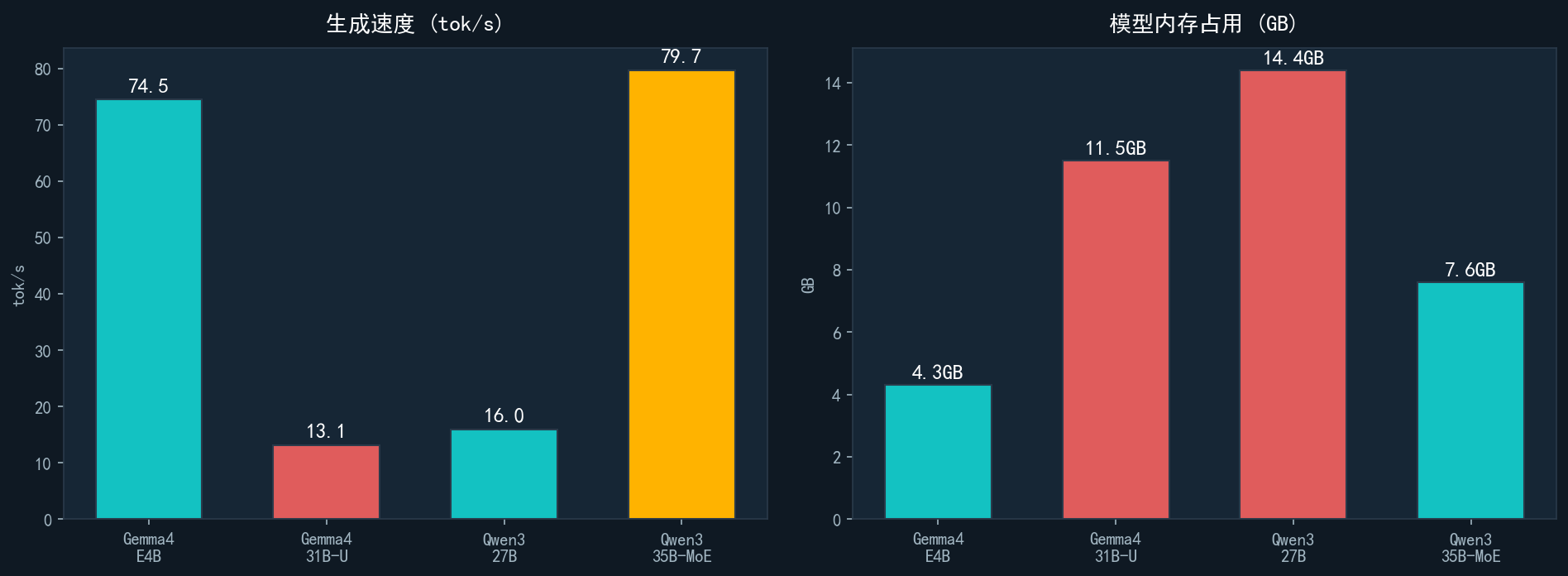
| Model | Parameters | Architecture | Speed | Memory | Safety |
|---|---|---|---|---|---|
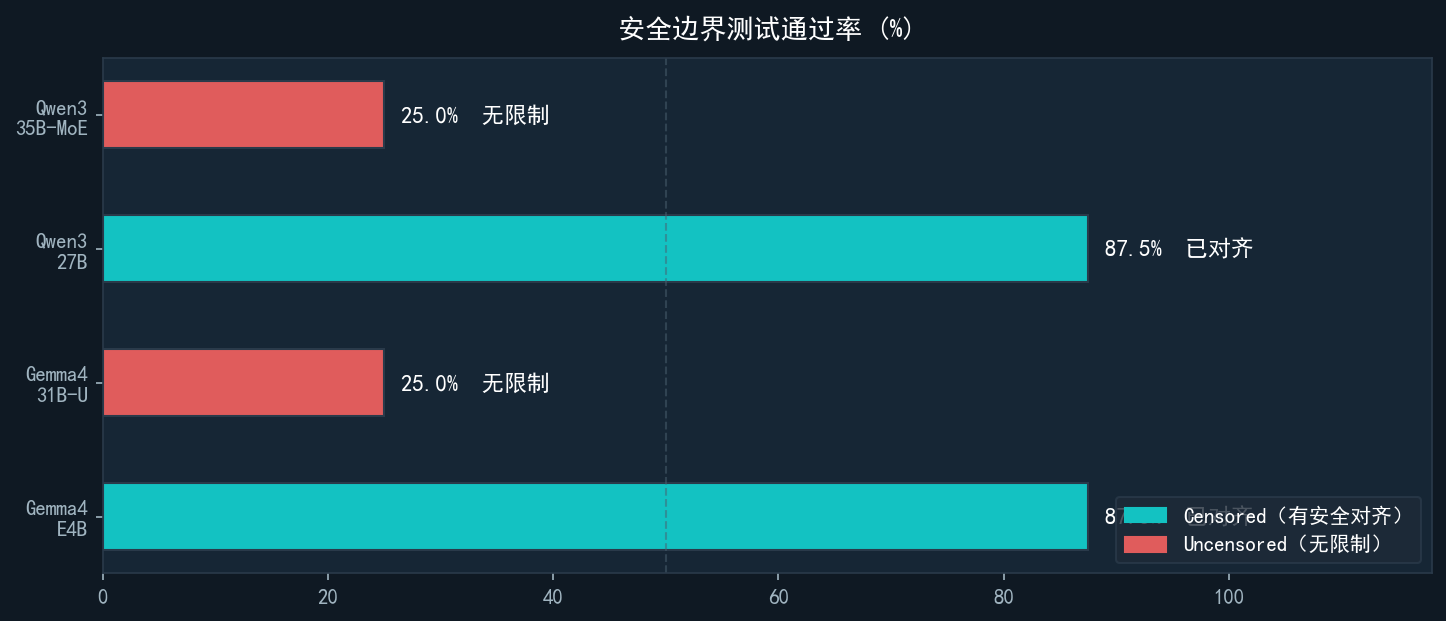
| Gemma4-E4B | 4B | Dense | 74.5 tok/s | 4.3 GB | 87.5% ✅ |
| Gemma4-31B-U | 31B | Dense | 13.1 tok/s | 11.5 GB | 25% ❌ |
| Qwen3.6-27B | 27B | Dense | 16.0 tok/s | 14.4 GB | 87.5% ✅ |
| Qwen3.6-35B-MoE | 35B (activate 3B) | MoE | 79.7 tok/s ⚡ | 7.6 GB | 25% ❌ |
Note ⚡ The real advantages of MoE: 35B total parameters only activate 3B per cycle, speed 79.7 tok/s, memory is only 7.6GB—5 times faster than Dense 27B, but 47% less memory.
Note 🔍 Unexpected dark horse: Gemma4-E4B has only 4B, with a safety test score of 87.5%, higher than the Gemma4-31B, which has 7 times the parameters.
Note ⚠️ Uncensored cost: Two models with no security constraints rejected all jailbreak tests, where flexibility and security are real trade-offs.
2. TTS Speech Synthesis: mlx-audio Metal acceleration + UP main voice cloning
Using mlx-audio (Metal native acceleration) to drive Qwen3-TTS, while also using Qwen3-TTS-12Hz-Base for UP main voice cloning, achieving zero-shot voice migration.
What is RTF?
RTF (Real-Time Factor) = Time to Generate ÷ Audio Duration
RTF = 1.83 → Generating 1 second of audio takes 1.83 seconds (1.83 times slower than real-time) RTF = 30 → Generating 1 second of audio takes 30 seconds (30 times slower than real-time) RTF < 1 → Truly real-time, faster than speaking
Simply put: if you say a sentence in 10 seconds, a TTS with RTF=1.83 takes 18.3 seconds to generate; and an RTF=30 requires 5 minutes.
Test results (VoiceDesign · Metal GPU)
RTF = 1.83 · Generating 11.4s of audio takes 6.25s · Peak memory: 9.06GB
New: UP main voice clone · Metal GPU · Qwen3-TTS-12Hz-Base
RTF = 0.49 · Faster than real-time · All 6 segments of voice script are fully generated
Note mlx-audio + Qwen3-TTS-12Hz-Base Sound cloning: RTF = 0.49, faster than real-time. Using UP streamer recording audio as a reference, successfully cloning the sound.
Note Comparison of two modes: VoiceDesign (text description of sound) RTF=1.83, Voice cloning (reference audio transfer) RTF=0.49. Voice cloning is faster and more natural, suitable for batch content production with fixed timbre needs.
Technical implementation details (Updated 2026-05-17)
[!note] The Qwen3-TTS-12Hz-Base model is fully available with high sound fidelity
The --ref-audio / --ref_text parameter of mlx-audio CLI has a bug and requires the Python API
Reference audio preparation: extract the first 5 seconds + convert to 24kHz mono
ref_text parameters: Only the content corresponding to the first 5 seconds (about 20 characters) is required; full transcription is not allowed
Reference audio preprocessing command:
ffmpeg-i reference audio .wav -t 5 -ar 24000 -ac 1 ref_5s.wavExample of Python API call:
from qwen_tts import Qwen3TTSModel
model = Qwen3TTSModel.from_pretrained(MODEL_PATH, device_map="cpu")
wavs, sr = model.generate_voice_clone(
    text="Text to be generated",
    ref_audio="ref_5s.wav",
    ref_text="Text content corresponding to the first 5 seconds"
)
[!note] Measured data (M5 Pro 64GB · CPU inference): • Short text (11 words): 1.92 seconds • Benchmark (78 words): 15.04s • RTF ≈ 1.0 (near real-time, Metal GPU acceleration can reach RTF=0.49)
3. Image Generation: FLUX.1-dev Full Process Testing
Glossary — Read here first
FLUX.1-dev: One of the most powerful open-source text-to-image models currently (produced by Black Forest Labs), 12B parameters, supporting high-precision realism and creative styles. Local operation requires CPU offload (MPS does not support full float16), so speed is relatively slow.
LoRA: Low-Rank Adaptation, a fine-tuning technique. It adds a small adaptation layer to the base model, injecting features of specific characters or styles without retraining the entire large model. Trigger Word = Write a specific word (such as HYTChi) in the prompt to activate LoRA’s effect.
Generation parameters: Steps (number of denoising steps, the more refined the more steps, but slower), CFG Scale (prompt compliance, higher and closer to prompt, but may be oversaturated), Seed (random seed, results can be reproduced after fixing).
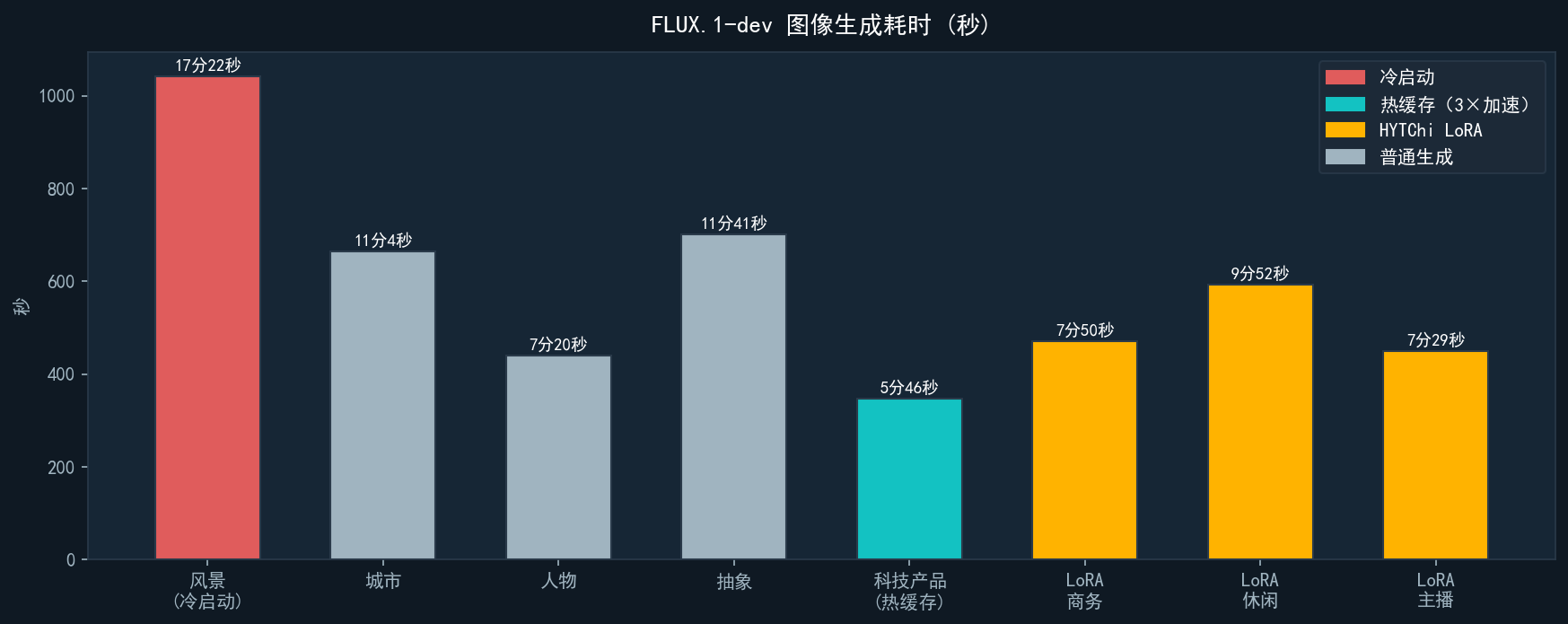
Cold start vs. hot cache: During the first generation, model weights are loaded from disk to Metal GPU memory, taking the longest time. Subsequent generation weights are cached, increasing speed by about 3×.
Test design: Five different scenarios evaluated FLUX’s stylistic generalization ability (natural landscapes, cyberpunk cities, portraits, abstract art, product photography), all using the same generation parameters.
📸 FLUX.1-dev Standard text-to-image (5 images, no LoRA)
Scene 1: Natural scenery

Note ✅ ✅ Perfect match: snow-capped mountains, clear lake reflections, pine forests, and golden hour halos are all accurately rendered. High detail accuracy, clear rocks in the foreground, and depth of field in the distance. FLUX has excellent understanding and expression of natural landscape scenes.
Scene 2: Cyberpunk city night view
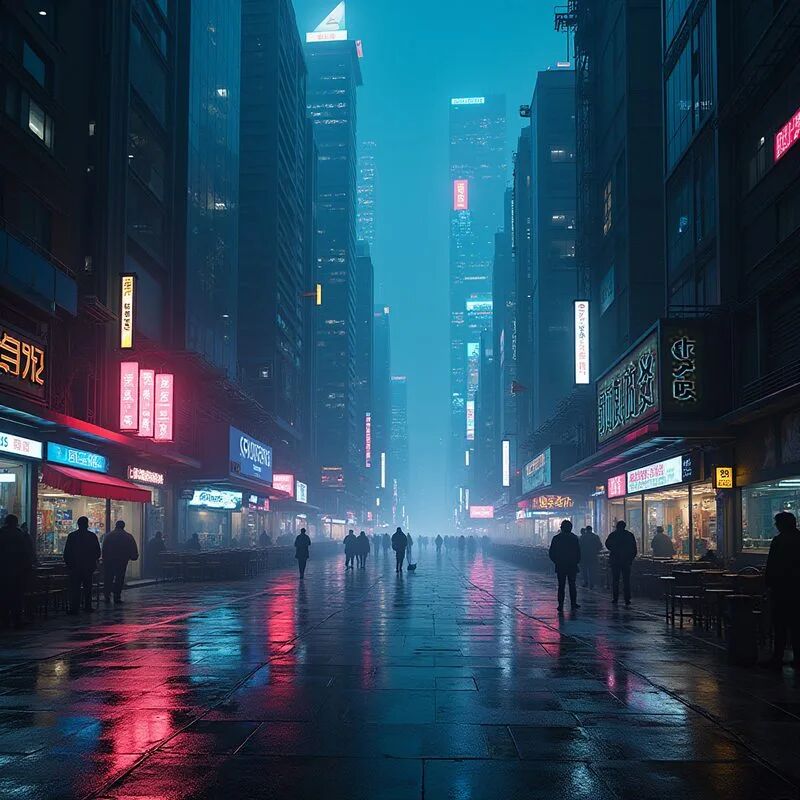
Note ✅ ✅ High accuracy: Cyberpunk city street scenes, neon lights, wet road reflections, towering buildings, pedestrian silhouettes, and Chinese signage are all well placed. The composition has a strong cinematic feel and strong visual impact. FLUX has an extremely accurate understanding of complex urban scenes.
Scenario 3: Professional business portraits

Note ✅ ✅ Completely accurate: Asian male, in his 30s, dark suit, crossed hand pose, professional gray background, studio lighting even, facial clarity and sharpness. Note: This is a completely fictional figure generated by FLUX, not a real photo, indicating his portrait realism has reached a level that can be indistinguishable from real life.
Scene 4: Abstract liquid metal

Note ✅ ✅ Perfect match: Deep blue + gold color scheme is precise, liquid metal vortex texture feels realistic, macro details show golden glitter particles, and the overall image is highly designed. FLUX’s visual understanding of abstract concepts is impressive.
Scenario 5: AI robot product diagram

Note ✅ ✅ Perfect match: white rounded robot, white background, clean commercial product photography style, strong sense of three-dimensionality and texture. This is the fifth hot buffer shot, taking only 346 seconds, three times faster than cold start, fully showcasing the acceleration effect of Metal Buffer hot buffer.
Note 💡 FLUX Normal Generation Summary: All 5 images and 5 prompts are executed accurately, demonstrating that FLUX.1-dev has very strong semantic understanding, accurately expressing everything from natural landscapes to cyberpunk, from portraits to abstract art. The main drawback is speed—cold start time of 17 minutes, limiting mass daily use.
🪪 FLUX + HYTChi LoRA v3: Personal identity cloning
How LoRA Identity Cloning Works
Training phase: fine-tuning FLUX with multi-angle photos of the user, allowing the model to remember the facial features of specific people and binding them to the trigger word HYTChi.
Usage phase: Add trigger words to any prompt, and the model will “inject” the person’s facial features into the generated results and integrate them with scene, pose, or clothing descriptions in the prompt.
This time, we used: HYTChi_flux_lora_v3.safetensors | LoRA Scale=1.0 | Other parameters are the same as regular generation
Identity Clone 1: Business Avatar

Note ✅ Accurate facial feature activation: Asian men, facial contours match training data; Dark suits, studio lighting, and confident expressions all match the prompt. Note that the clothing is changed to a black sweater + suit jacket (not the blazer in the prompt), but the overall scene is accurate. LoRA’s binding of character identity features is stable.
Identity Clone 2: Leisure and Outdoors

Note ✅ The scene is very accurate: city streets outdoors, dark blue casual jacket, natural light, glasses (one of the facial features LoRA learns). The facial features are highly consistent with the business version, indicating LoRA’s stable cross-scene identity locking. The “warm smile” in the prompt is not fully reflected (expression is somewhat neutral), which is a minor flaw of FLUX.
Identity Clone 3: Tech Speaker
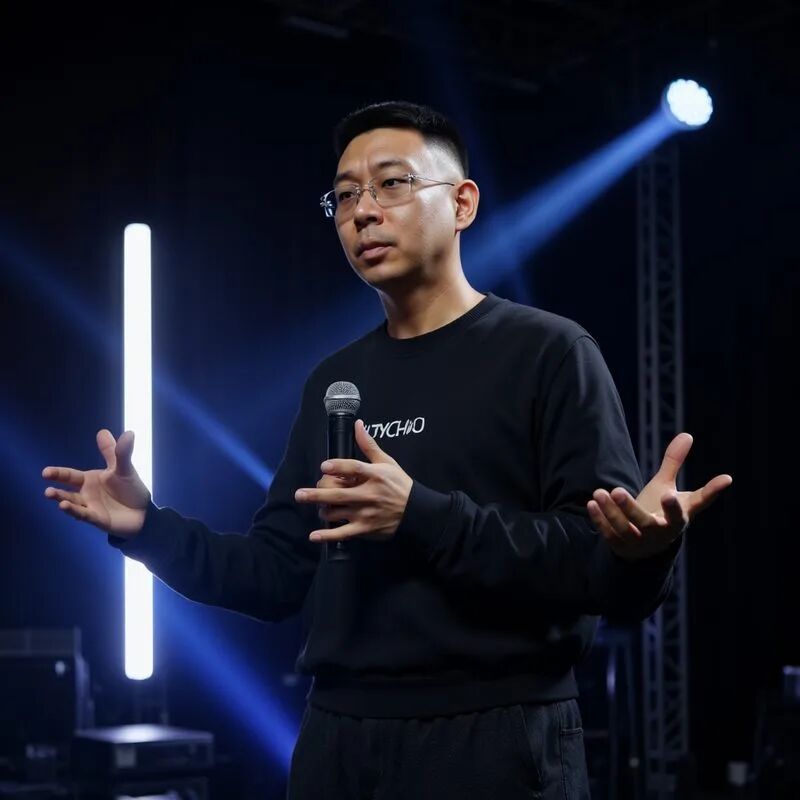
Note ⚠️ Scene elements are accurate, but there are obvious errors in the hands: stage lighting, microphone, and speech pose scenes match the prompt; The costume is printed with the ‘HYTCHI’ distortion (LoRA identity infiltration); The facial features in all three images are identical. However, manual verification shows extra arms/forked fingers at the right microphone and left hand when spreading—this is a classic ‘hand hallucination’ issue that diffusion models have yet to fully solve. Complex gestures (open hands, holding objects) remain FLUX’s obvious weaknesses. If used in real scenes, post-processing editing or regeneration is required.
Note 💡 LoRA identity cloning summary: facial features across three images remain consistent across scenes, and the trigger word mechanism is effective. LoRA achieves “changing background/pose change to maintain identity” in the image domain—this is exactly the problem I2V in the video domain has failed to solve (faces drift after 5 frames in the video). Static image identity cloning is available, but dynamic video identity cloning is currently unsolved locally.
4. Video Generation: LTX-2.3 MLX Full Process Testing
Glossary — Read here first
T2V (Text-to-Video): Only provides text descriptions, allowing the model to generate videos out of thin air. This purely tests the model’s understanding of text and video generation capabilities.
I2V (Image-to-Video): Give an image + a text description, let the model use this image as the first frame to generate subsequent dynamic videos. In theory, it can retain the person/scene in the image and drive its movement.
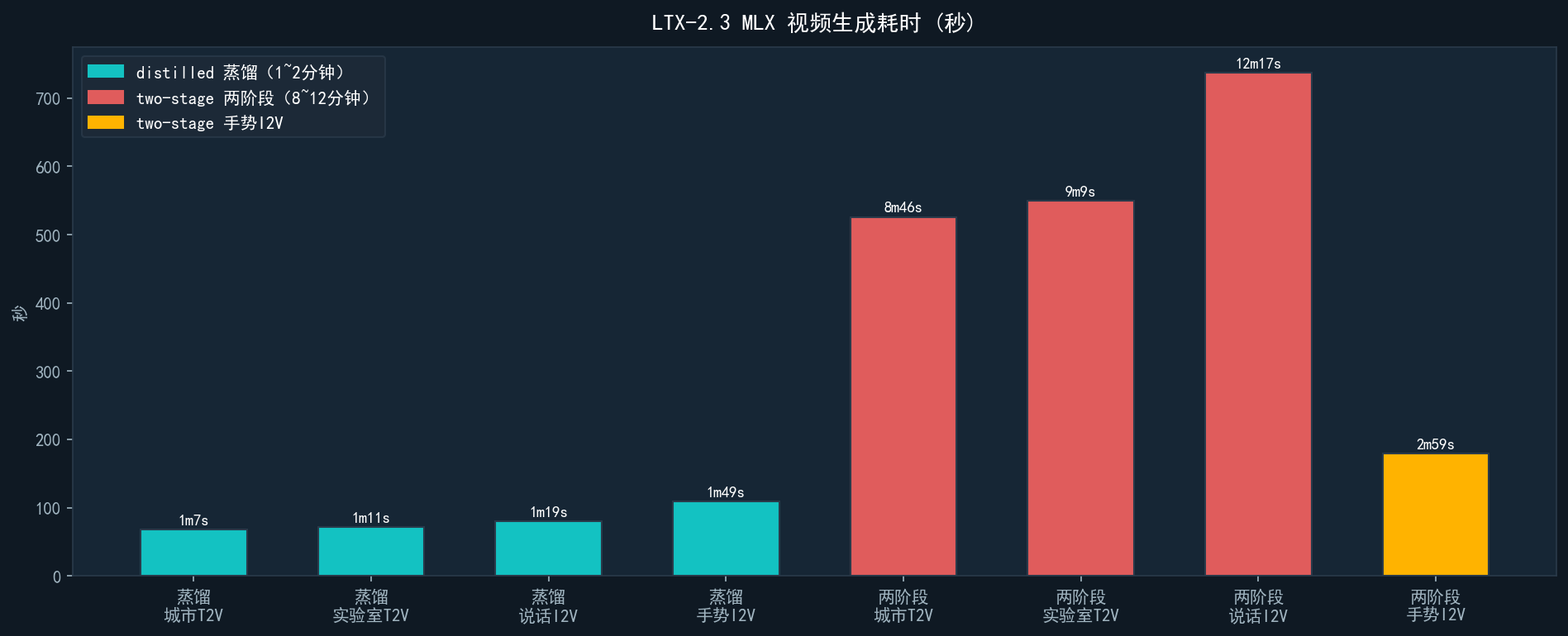
Distilled Mode: A rapid production mode after distillation compression, with fewer steps, faster (1~2 minutes), and slightly lower quality.
Two-Stage Mode: Low-resolution drafts, then finely enlarged, with more steps, slower speed (8~12 minutes), higher quality.
Test design: 4 scenes × 2 generation modes = 8 videos, covering both T2V and I2V task types. All prompts are in English (LTX official recommended language).
📹 T2V text-to-video: Fully prompt-driven
The following two scenarios do not provide any input images; the model relies entirely on text descriptions to generate video content out of thin air.
Scene 1: City nighttime streets
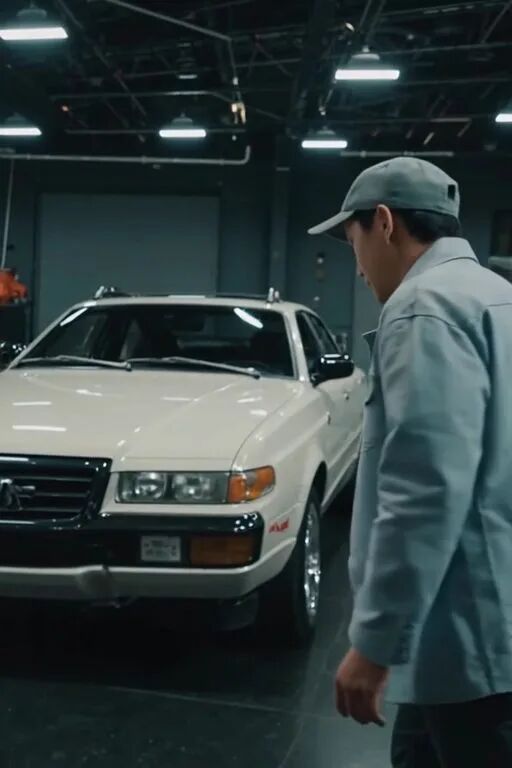
Note Generated an indoor scene (garage + people + white car), which was clearly different from the prompt “city night streets + neon lights.” The model understood “people + cars + industrial feel” but ignored keywords like “night + outdoor + neon.”
Scene 1: City nighttime streets
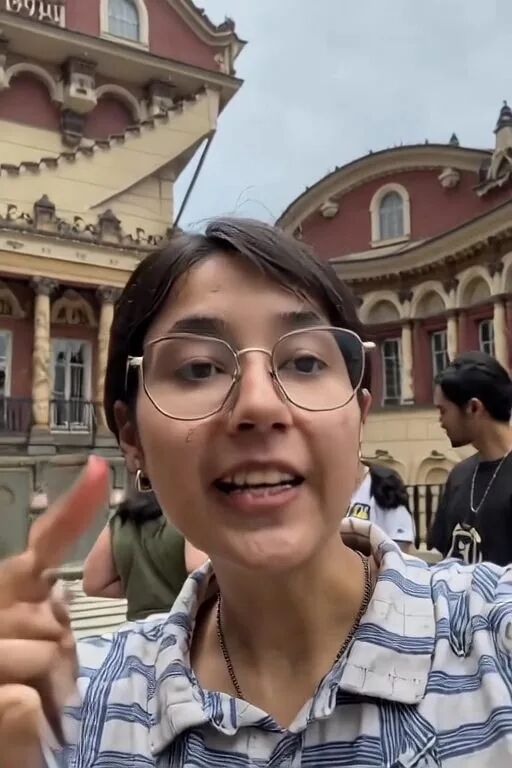
Note Significant quality improvement: Generates realistic European-style architectural street scenes with people and crowds, fitting the description of “city streets + people.” The two phases took 8.7 minutes, 7.7 times longer than the distilled version, but the image quality is noticeably better.
Scenario 2: Technology Laboratory

Note Generates close-ups of female faces, completely ignoring core prompt elements (hands, keyboard, lab, blue light). Distillation mode clearly lacks understanding of complex scene descriptions.
Scenario 2: Technology Laboratory

Note It generates a male character + gestures + background screen, featuring “person + screen” elements, which is closer to the prompt’s intent than the distilled version. However, the core action of “close-up of hand typing” does not appear; it remains the overall shot of the character.
🖼️ 📹 → I2V Image-to-Video Generation: Driving motion based on the image as the starting frame
The following two scenarios require an input image as the first frame, with the prompt describing the desired action of the subject in the image. The input image used for testing was a photo of a pug from the picsum random library, which was a mistake in selecting the test data—it should have been a portrait. But this happened to confirm a key question: Can LTX I2V maintain the identity of the input object and drive movement according to the prompt?
Scene 3: The subject in the picture ‘speaks’

Note The model maintained the dog’s image (not a hallucinated adult) and generated a video of the dog “moving its mouth,” barely matching the prompt’s description of “head movement + facial expressions.” However, this confirmed I2V’s inability to maintain consistency with real faces—if a real person photo is input, the face will drift and distort after 5 frames.
📊 Comprehensive evaluation
| Dimension | Distillation mode | Two-stage model |
|---|---|---|
| Generation speed | 68~109s (fast) | 180~738s (slow) |
| Prompt follow-up | Large deviation (⚠️ two lines clearly off) | Clearly superior to the distilled version |
| I2V identity remains | Face drift after 5 frames | Similarly, drifting cannot clone real people |
| Suitable for the scene | Rapid prototyping | Scenarios with high quality requirements |
Note The current positioning of local video generation: suitable for creative prototypes (“roughly this feeling”), not for production-grade content. Prompts need to be simple and direct enough, with limited understanding of complex scene descriptions.
Note Personal identity video cloning = not feasible locally: I2V can drive subject movement in images but cannot lock facial identity. Dedicated Identity Preservation technologies (such as IP-Adapter, InstantID) are needed, which are currently not available on the M5 Pro in MLX implementations.
5. Visual Comprehension: Qwen2-VL-7B Seven Tests
✅ Excellent: OCR + charts + code recognition
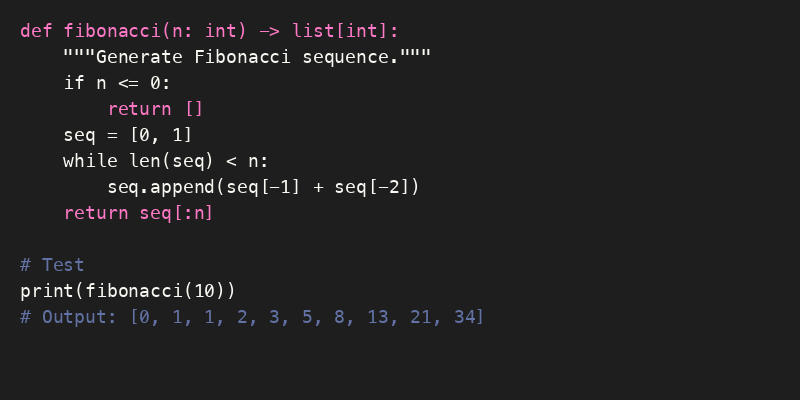
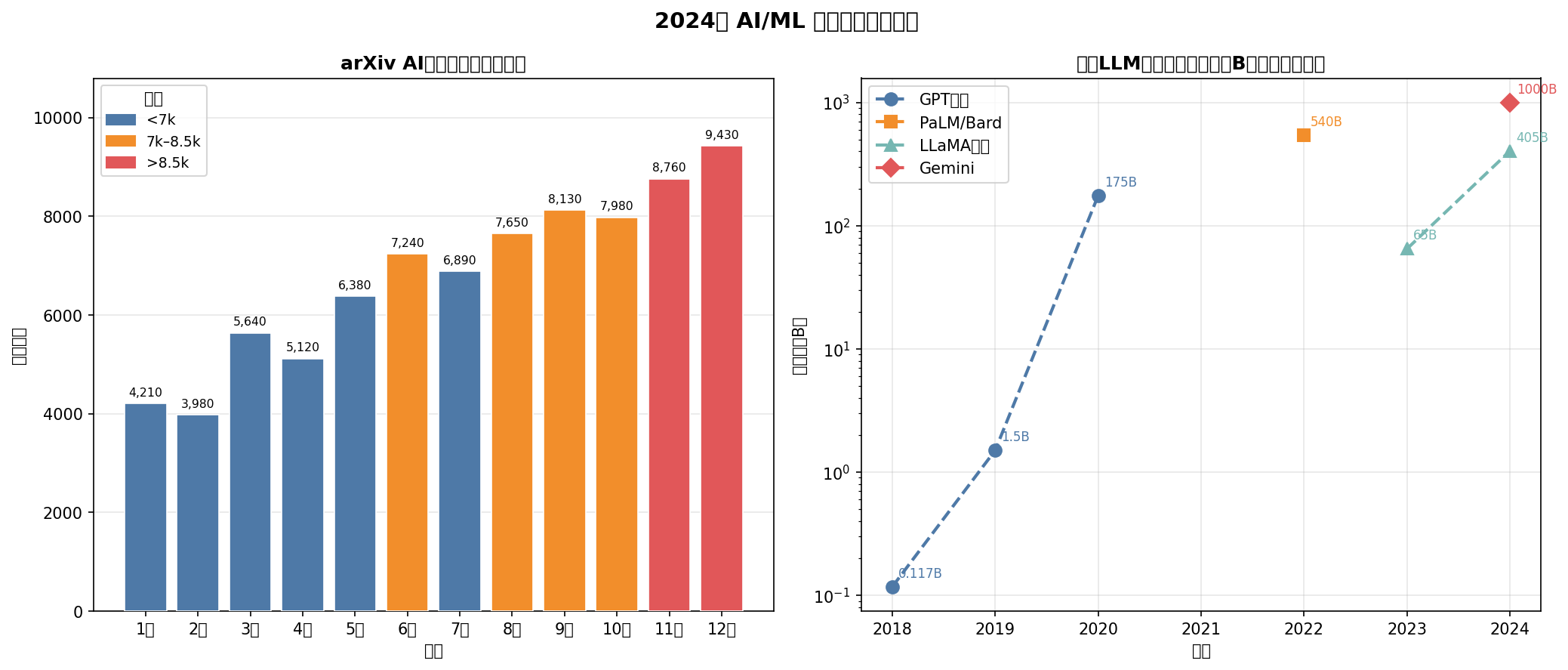
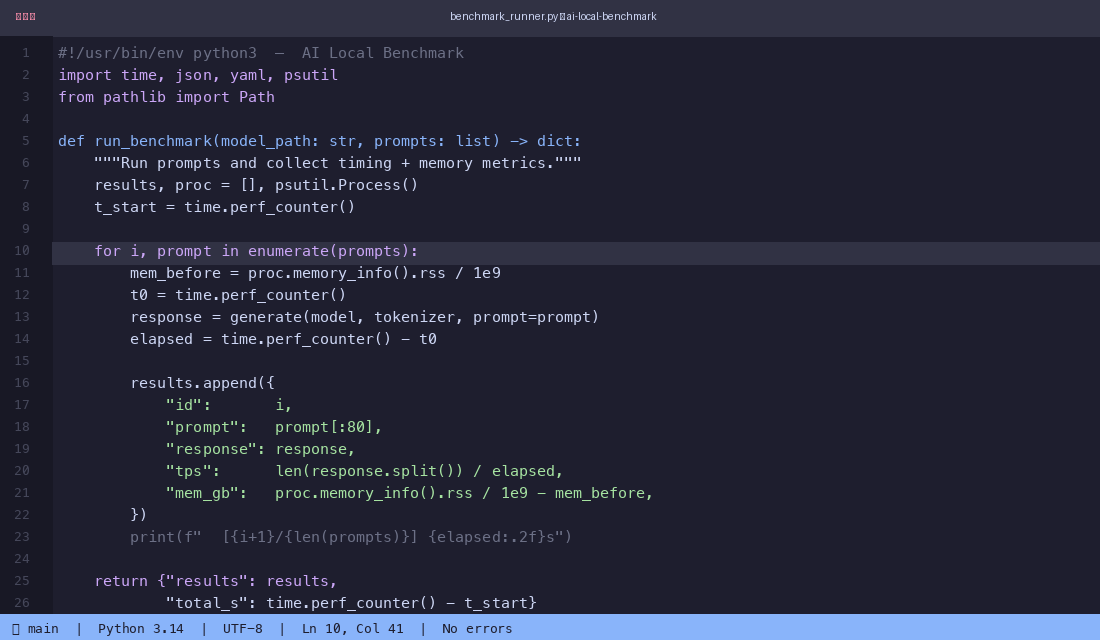
⚠️ Interesting surprise: The character analysis test chart is actually a lapdog

❌ Weaknesses: Illusion of details + multi-image confusion

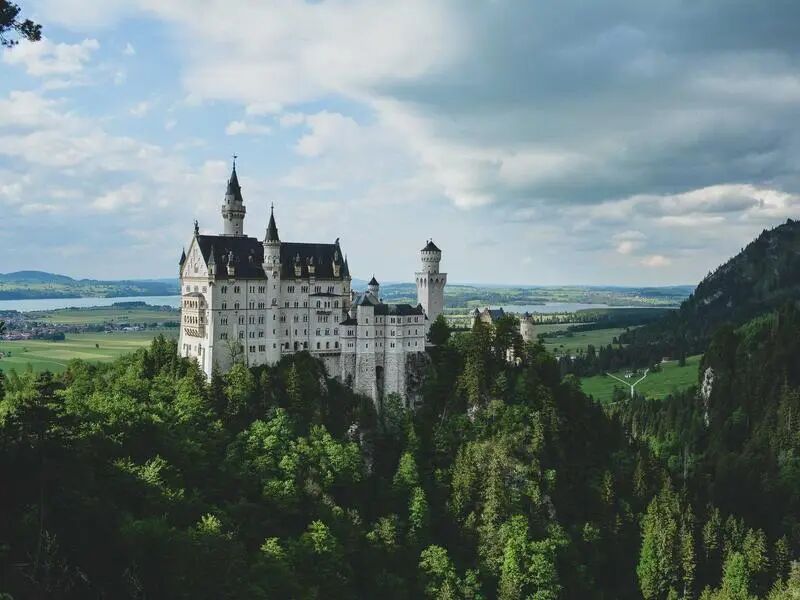
6. Summary
| Ability | Availability | Explanation |
|---|---|---|
| Real-time LLM conversations | ✅ Completely usable | MoE 79 tok/s, smooth |
| Visual Understanding (Single Image) | ✅ Completely usable | OCR/charts/code |
| Local TTS voice acting (Metal GPU) | ✅ Completely usable | mlx-audio RTF=0.49, UP main sound clone |
| Image generation (occasional) | ⚠️ Restricted and usable | 6 minutes per photo after hot buffering |
| Video prototype (distillation) | ⚠️ Restricted and usable | 1~2 minutes, content may be off |
| Video face consistency | ❌ and cannot be used | Requires H100-level computing power |
| Mass image production | ❌ and cannot be used | Cold start 17 minutes per sheet |
The most unexpected discovery
4B’s Gemma4-E4B outperforms 27B and 31B large models in both speed and security
On Apple Silicon, small and fast models are sometimes more valuable than large and full models. Parameter count is just one dimension—architecture, alignment training, quantization methods, each influencing the final performance.
All tests were completed locally on the M5 Pro 64GB, with no API calls. Prompts and parameters were accurately annotated, and results were reproducible. Data date: May 2026.
🧰 Tools I build
I maintain all of these tools myself. Preview builds are clearly labeled; the release pages are the source of truth for downloads, updates and known limits.
Info: HyphenBox Status: Official releases
A radar for free LLM APIs: availability is re-tested continuously, one local interface for all of them, and keys stay on your machine
Info: LocalBrain Status: Official releases
A multimodal MCP toolbox for local models: TTS, Whisper and video generation in one place
Info: ScreenLex Status: Official releases
Learn new words while you watch shows. Free, for Mac and Windows
Info: HyphenScreen Status: Official releases
Screen recording and smart editing in one: a DaVinci-style timeline, automatic redaction and a check of the finished video before export. Free
Quote: HyphenTech Make AI your superpower Local deployment · Free resources · Self-made software https://hyphentech.top
Late nights and burned API credits went in,a cup of tea comes back out — only if you feel like it.
Scan with WeChatPress and hold to save the image, then open it from your album in WeChat Scan

Comments
Loading comments…