
Info: Machine translation This post was machine-translated from the Chinese original. Wording may be rough in places — the Chinese version is authoritative.
Note This article is generated based on a local large model horizontal review file and was first published on HyphenTech. This article comes with a video version and is distributed across major platforms

Five large models make the same movie report—who really knows how to do the work?
The same prompt, the same material, delivered the three-piece set of Excel + Word + PPT. This time, not just slogans, just the documents.
HyphenTech · 2026-05-31 · Local Horizontal Review
This test was like pulling five colleagues into a meeting room, handing out the same stack of materials, and then saying: Before the end of work today, hand me an Excel analysis sheet, a Word report, and a PPT presentation.
The contestants were Codex, Claude, DeepSeek V4 Flash Free, GLM, MiniMax. Initially, each model collected its own movie data, but to ensure fairness in “file generation,” the film data collected and organized by Codex was ultimately used as a reference material. First, it should be clarified: **DeepSeek did not conduct data search testing this round, so it is not suitable as a complete end-to-end sample for comparison.
Note Therefore, the judgment criteria for this article are “experience + delivery usability”: looking at the data collected earlier, and also whether the model can produce verifiable, readable, and reportable Excel, Word, and PPT after providing unified materials. This article will no longer give specific scores to avoid disguising subjective experience as precise quantification.
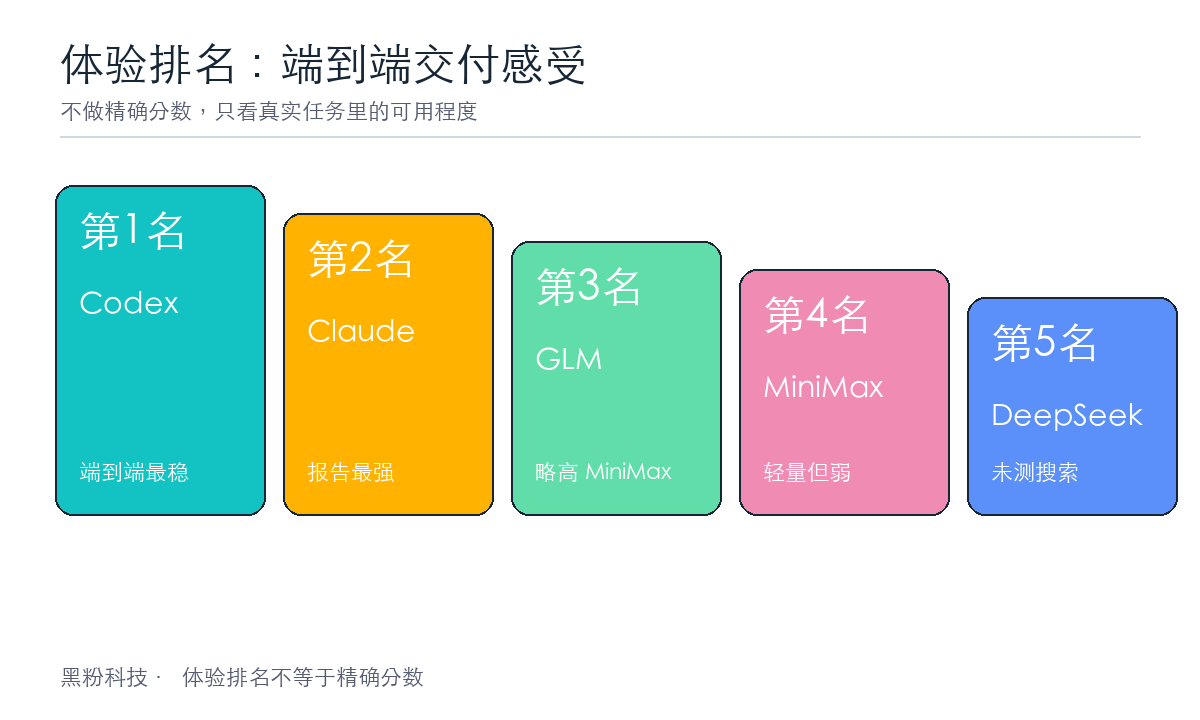
To start with the conclusion: Codex narrowly beats Claude
If I were to sum up one sentence: **Codex first, Claude second, GLM third, MiniMax fourth, DeepSeek fifth. ** This time, Codex used GPT-5.5 in-center inference, Claude Code used Opus 4.8 inference. Codex won end-to-end, especially in data collection and Excel papers; Claude won in report analysis and risk explanation, but overall lagged slightly behind. The last three positions were not far behind; GLM was only slightly better than MiniMax, and DeepSeek ranked last because it did not conduct data search testing.
| Experience rankings | Model | The strongest point | Obvious shortcomings |
|---|---|---|---|
| 1 | Codex | Data collection, Excel formulas, charts, and consistency of the three-piece set | Word is slightly shorter in depth |
| 2 | Claude | Report depth, anomaly description, and overall narrative | Excel charts lack native native chemistry |
| 3 | GLM | The overall structure is slightly better than the MiniMax | PPT/Word experiences are not ideal |
| 4 | MiniMax | Cheap price, sufficient text length | Weak in Excel, PPT, and structured formatting |
| 5 | DeepSeek | Document generation is framed | Data search was not tested; PPT and Word experience was weak |
※ This is an experience ranking, not an exact quantitative score; DeepSeek did not participate in the data search section test.
| Model | Test configuration | Price information | The meaning of putting it into experience |
|---|---|---|---|
| Codex | Reasoning in GPT-5.5 | $20/month | It offers the strongest end-to-end capability, with prices close to Claude’s |
| Claude Code | Reasoning in Opus 4.8 | $20/month | The report quality is the strongest, but overall slightly lower than Codex |
| GLM International Pro | Pro package | Discount: $81 for 3 months; Official website data usage is about 15 times that of Claude Code | The volume is large, but this time it ranked third in the experience |
| MiniMax | MiniMax 2.7 | 290 RMB per year | Obviously cheap, suitable for lightweight use, but delivery quality is not in the top tier |
| DeepSeek | No data search tests were conducted | Price comparisons are not included in this round | It is impossible to make a complete end-to-end cost-performance assessment |
※ Prices are recorded based on the information provided by the user this time; actual subscription prices may vary depending on region, promotion, and package.
What exactly makes the test difficult to answer?
On the surface, this question is “movie data analysis,” but in reality, it tests three model capabilities: data cleaning, office document generation, and cross-file consistency.
-
Excel must be verifiable: After cleaning, data, statistical analysis, Top 5, and regional summaries must all use formulas; do not just paste results into them.
-
Word should be like a report: 1500-2500 words, covering data scope, missing items, anomalies, box office, ratings, type regions, box office vs. scoring insights.
-
PPT should be presentable: 6-8 pages, each with one core message, preferably with visualizations like bar charts or pie charts.
-
The three-piece set must be consistent: For example, total box office and Top 1 films—in Excel, Word, or PowerPoint, they must not compete with each other.
Note The biggest fear for these tasks is “looking very complete.” Because models can easily write Word smoothly and make PPTs look nice, but if Excel formulas are wrong or statistical standards are floating, the entire report ends up as a hard-to-finish error notebook.
Objective indicator: first open the document and read
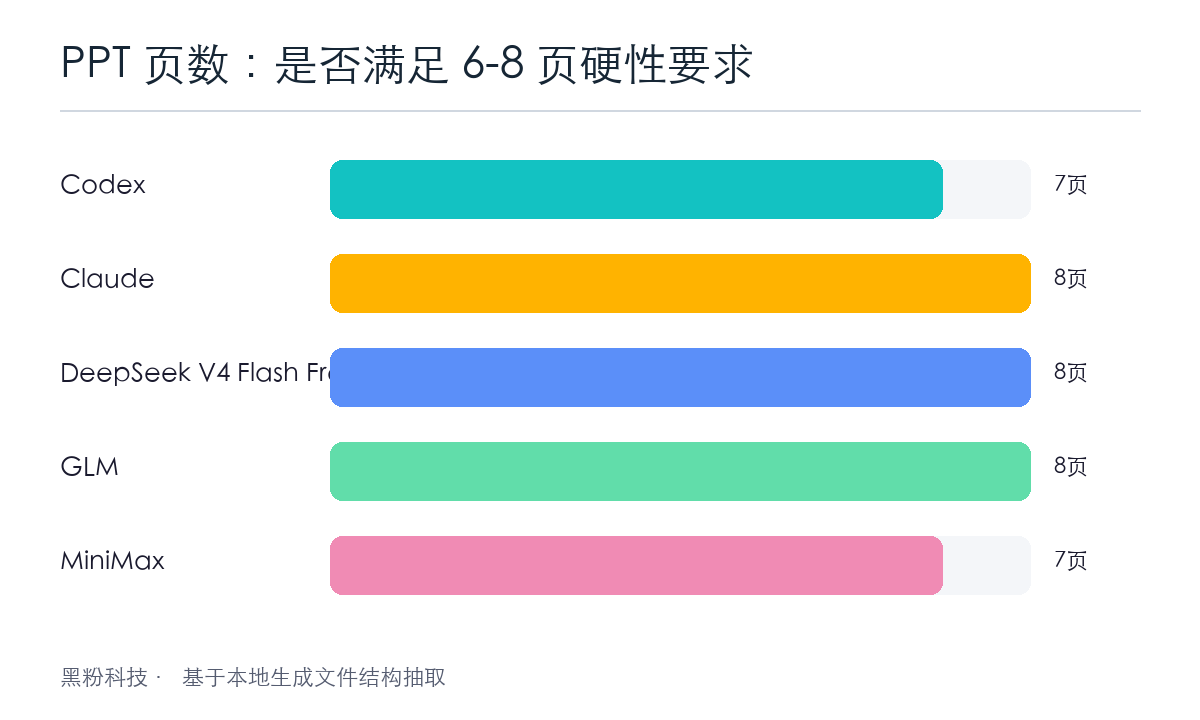
I won’t talk about my experience for now; let’s just extract the finished structure of each model: how many formulas Excel has, whether there are charts, how much body text Excel has, whether there are header hierarchies and tables, whether PPT meets page count requirements, and whether there are actually charts or images. But note, number of objects does not equal quality of experience, especially in PPT, where GLM, MiniMax, and DeepSeek all have weaker reading experiences.
| Model | Excel formulas | Excel charts | Word Count | Word title | Word spreadsheet | Number of PPT pages | PPT visualization |
|---|---|---|---|---|---|---|---|
| Codex | 172 | 2 | 1713 | 6 | 1 | 7 | 5 PPT charts |
| Claude | 139 | 0 | 2338 | 9 | 2 | 8 | 4 chart images |
| DeepSeek | 51 | 2 | 2210 | 6 | 3 | 8 | 4 PPT charts |
| GLM | 78 | 0 | 2230 | 0 | 4 | 8 | 10 PPT charts |
| MiniMax | 6 | 0 | 2347 | 0 | 0 | 7 | No clear charts |
※ These numbers are extracted from local xlsx/docx/pptx file structures; Word titles refer to the actual heading style, not the main text that says “one, two, three.”
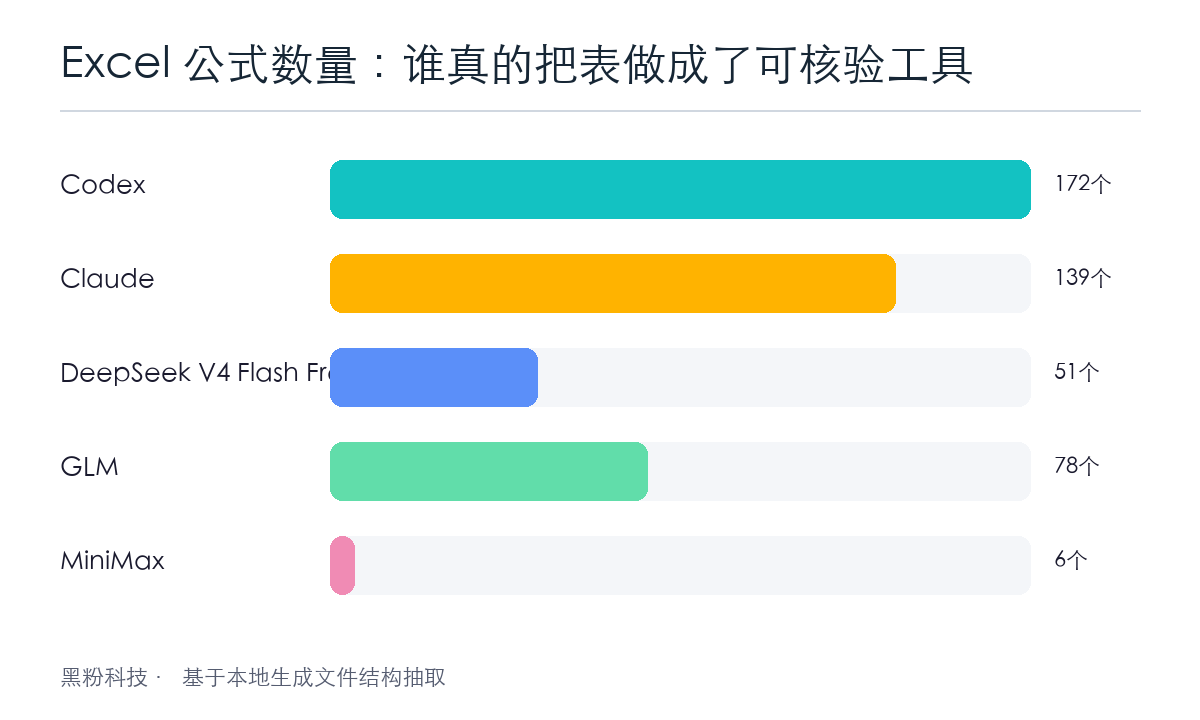
Here’s a crucial turning point: Codex and Claude both use a lot of formulas, indicating they understand that ‘key statistical cells need to be implemented with Excel formulas.’ MiniMax only has 6 formulas, basically just ‘having a statistics page,’ and it’s still quite short of a verifiable analysis table.
Another watershed is style and structure. Word in Claude, Codex, and DeepSeek all have real heading hierarchies; GLM and MiniMax write “one, two, three” in the main text, but don’t use Word heading styles. The human eye can understand them, but machine directories, navigation panes, and subsequent automatic layout are less user-friendly.
Codex: Like a cautious data engineer
Codex’s biggest highlight is Excel. Its `movie_analysis.xlsx` has 172 formulas, two tables, and a statistics page covering genre average box office/scores, Top 5 box office scores, top 5 ratings, number of regional films and total box office, plus 2 native Excel charts.
More importantly, it is quite restrained with data caliber. For example, if the box office field contains exact values, “>=” lower limits, or missing values, Codex explicitly uses “confirmable lower limit caliber”: exact box office is counted as original, `>=` is only counted at the lower limit, missing items are not filled in or estimated.
This is a very important quality in data work: if I don’t know, I just say I don’t know; I can only confirm the lower limit, so don’t pretend to know the true value.
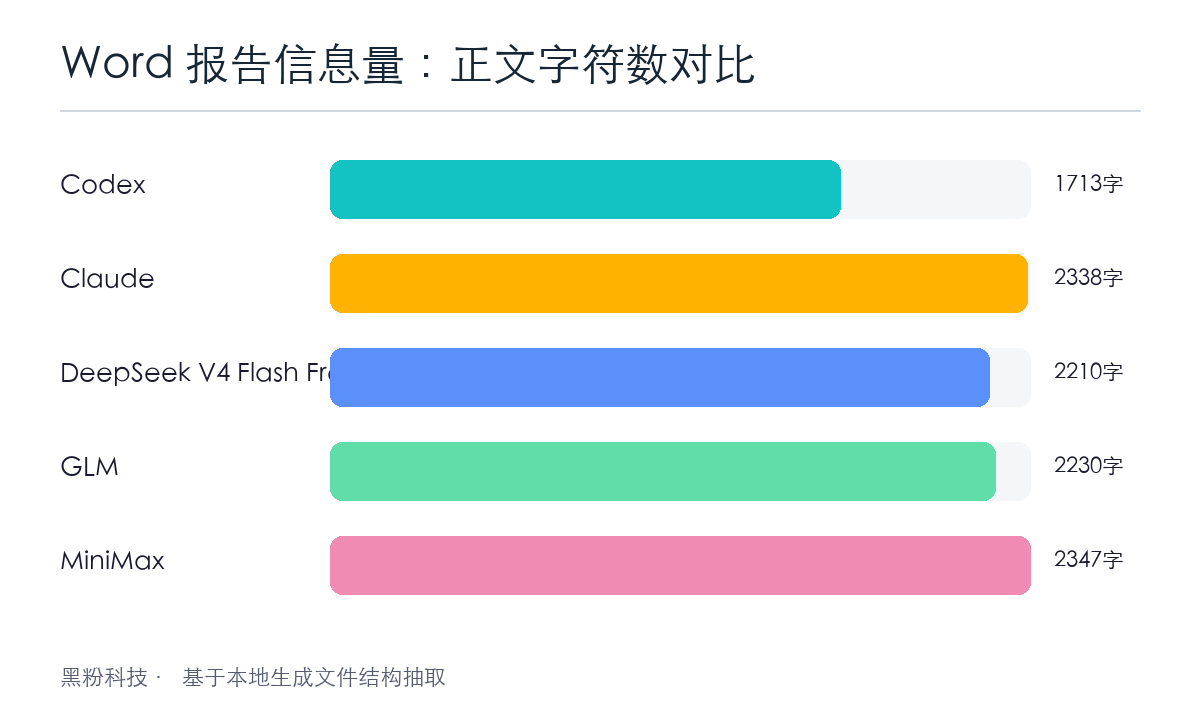
Its Word report is 1713 words, within the required 1500-2500 words, with a clear structure but a bit less “explanatory” compared to Claude. It reads like a standard analysis report—clean, conservative, and easy to follow; but if you want to post on the official account, the emotions and insights need further processing.
Note Codex’s one-sentence review: This time, I used GPT-5.5 for inference. Excel is the strongest, most stable, and the three-piece set is consistent; The weakness is that the reports aren’t good enough for storytelling.
Claude: Like a senior analyst who writes reports
Claude’s strength is very clear: **It knows readers need to understand data quality before the conclusions. **
Its Word report has 2,338 words, 9 headings, and 2 tables, making it the model most resembling a “formal consulting report” among the five models. It doesn’t just mention missing information, but specifically points out: only 8 out of 30 films have a box office value, with only 3 with precise values; 13 films lack ratings; “Zhong Kui” and “The Voice of the Forest” have a logical contradiction of “having ratings but no ratings”; “Once a Thief” and “Memento” are suspected to be classic re-releases, with ratings possibly cumulatively historically accumulated.
This part is a big plus. Because real data analysis isn’t about “ranking numbers”; it first tells you: **Which of these numbers are trustworthy, which can only be referenced, and which might be misleading. **
Claude’s Excel is also good, with 139 formulas, but no native Excel charts; The PPT uses 4 chart images for visualization. This strategy is pragmatic: it doesn’t necessarily make everything into native Office objects, but the final reading experience is complete.
Note Claude’s one-sentence review: This Claude Code uses inference from Opus 4.8. It is best at interpreting data, alerting to risks, and feels like a version you can directly hand over to your boss.
DeepSeek: The biggest problem is that it doesn’t test data searches
DeepSeek’s first impression is good: Excel has 3 sheets, including a dedicated “chart” page; Word has 2,210 words and 3 tables; PPT has 8 pages and also charts. But this time I must clarify: DeepSeek did not test the prerequisite data search section, so it is not a complete end-to-end comparison sample.
The most typical problem is in Excel. It uses formulas similar to `AVERAGEIF(清洗后数据!C:C,A5,…)` in type statistics, but the original type fields are often multi-tag strings like “plot / mystery / crime.” Without wildcards, many inclusion relationships don’t match, making statistical results prone to distortion.
Note These kinds of errors are very hidden: the table does contain formulas, and the formulas look decent, but they don’t answer the real questions you’re asking.
Its report also has a caliber issue: on one hand, it says “the lower limit does not include averages and rankings,” while on the other hand it has to complete Top 5 and regional statistics. This choice isn’t necessarily wrong, but it requires a very clear explanation of “why the lower limit is excluded.” Otherwise, users will see Codex/Claude counting 8 films with box office results, while DeepSeek only uses 3 exact box office numbers, naturally narrowing the horizontal conclusion.
Note DeepSeek’s one-sentence review: The file generation has a framework but did not participate in the data search test; Additionally, the formula and Word/PPT experience are not stable enough, so it is ranked last.
GLM: Slightly better than MiniMax, but not very user-friendly
GLM made 8 slides, and the file can extract 10 native PPT chart objects. But that doesn’t mean its PPT experience is good. In practice, like MiniMax and DeepSeek, it’s still far from a “comfortable presentation to talk about,” just a bit smoother in overall structure.
But GLM’s Word has a typical problem: the main text appears to be divided into chapters, but the document structure lacks the actual heading style. In other words, it looks like a title is written on paper, but it doesn’t tell Word, ‘This is really a heading.’
Its Excel has 78 formulas, which is slightly better than MiniMax, but it doesn’t have Excel charts. Overall, the impression is: GLM can complete the basic framework and offers a slightly better user experience than MiniMax; But if you want rigorous data drafts and a PPT that can be directly displayed, it still requires a lot of manual rework.
Note GLM’s one-sentence review: Overall slightly better than MiniMax, but PPT, Word, and data drafts are all less convenient.
MiniMax: Plenty of words, but the faint office automation vibe
MiniMax’s Word has 2,347 words, which is sufficient just by length; The PPT is also 7 pages, meeting the requirement of 6-8 pages. But its problem is: **many parts are just “written out,” not “actionable office documents.” ** Its advantage is more about the price: 290 RMB/year, which is indeed cheap.
Excel only has 6 formulas and no charts; Word has no real heading hierarchy or tables; PPT has no obvious chart objects. This kind of delivery is fine if it’s just for people to quickly read through the pages, but if you want to keep verifying, modifying, reporting, or reusing them, it becomes quite difficult.
What’s even more troublesome is that the report states “22 titles are scored, 8 are missing,” while the unified materials and other stable outputs show 17 titles rated and 13 missing. This inconsistency in metrics is a major flaw in office tasks.
Note MiniMax’s one-sentence review: cheap and easy to write, but delivering the complex Office trio is a hassle; The experience is slightly lower than GLM.
What this cross-section really measured was not “who is smarter.”
Many people test large models and like to ask a difficult question and see if the answer is impressive. But office tasks are different. Office tasks test: **Can you turn a pile of dirty data into a file that others can continue to use? **
| Ability dimension | Outstanding performance | This time, the representative model is present |
|---|---|---|
| Data conservatism | Do not fill in missing items, do not make arbitrary estimates at lower limits, and proactively explain abnormalities | Claude / Codex |
| Excel engineering | Multiple formulas, verifiable on the statistics page, and charts | Codex |
| Report the narrative | Let’s talk about data quality first, then conclusions and risks | Claude |
| Demo packaging | The PPT page count meets standards, charts are sufficient, and key points are clear | GLM / Claude |
| End-to-end consistency | Excel, Word, and PPT indicators do not compete with each other | Codex / Claude |
※ These are the five key dimensions I recommend when evaluating office agents.
Note If you want to put AI into a real workflow, don’t just look at “whether it writes.” Look at whether it leaves files that can be checked, modified, and held accountable.
Choose based on real delivery scenarios
| Model | Recommended scenarios | Notes |
|---|---|---|
| Claude | In-depth reporting, management briefings, and analysis requiring risk alerts | Excel charts lack native native chemistry |
| Codex | Data drafts, formula tables, verifiable analysis links | Writing also needs polishing |
| GLM | Quick PPT presentations and visualization of first drafts | Word styles and data rigor need to be reviewed |
| DeepSeek V4 Flash Free | You need to quickly build a complete framework for the first draft | Formula matching and statistical standards must be carefully reviewed |
| MiniMax | Generate long explanatory articles or lightweight drafts | It is not recommended to directly undertake the complex Office trio-suite delivery |
If you ask me how I actually use it: I have Codex first do data cleaning and Excel drafts, then Claude writes reports and risk explanations, and finally, depending on the audience, GLM assists with PPT visual drafts. Single-model all-inclusive is certainly convenient, but multi-model collaboration is closer to real production.
The following files are the final test data
Movie Large Model Testing .zip
Note In short
In this test, Claude was most like a reliable analyst, Codex most like a data engineer, GLM most like a colleague skilled at demos, DeepSeek was like a well-finished intern who needed review, and MiniMax was better suited for writing rather than directly delivering complex office tools.
🧰 Tools I build
I maintain all of these tools myself. Preview builds are clearly labeled; the release pages are the source of truth for downloads, updates and known limits.
Info: HyphenBox Status: Official releases
A radar for free LLM APIs: availability is re-tested continuously, one local interface for all of them, and keys stay on your machine
Info: LocalBrain Status: Official releases
A multimodal MCP toolbox for local models: TTS, Whisper and video generation in one place
Info: ScreenLex Status: Official releases
Learn new words while you watch shows. Free, for Mac and Windows
Info: HyphenScreen Status: Official releases
Screen recording and smart editing in one: a DaVinci-style timeline, automatic redaction and a check of the finished video before export. Free
Quote: HyphenTech Make AI your superpower Local deployment · Free resources · Self-made software https://hyphentech.top
Late nights and burned API credits went in,a cup of tea comes back out — only if you feel like it.
Scan with WeChatPress and hold to save the image, then open it from your album in WeChat Scan

Comments
Loading comments…