

Current public release
Versions, changes and supported installers all come from the same public release records.
LocalBrain
A local AI toolbox for transcription, speech, images, video, and MCP tools. Features vary by platform version.
View public downloads and updates ↗Info: Machine translation This post was machine-translated from the Chinese original. Wording may be rough in places — the Chinese version is authoritative.
LocalBrain Local Security Testing: A Concise Tutorial
This article solves just one question: **In a completely local, self-authorized environment, how can LocalBrain run a security check from start to finish and leave evidence that can be verified? **
They don’t teach you to enter real platforms, nor do they teach you to bypass authorization. The range is an isolated virtual machine I built myself, and all the test data is fabricated.
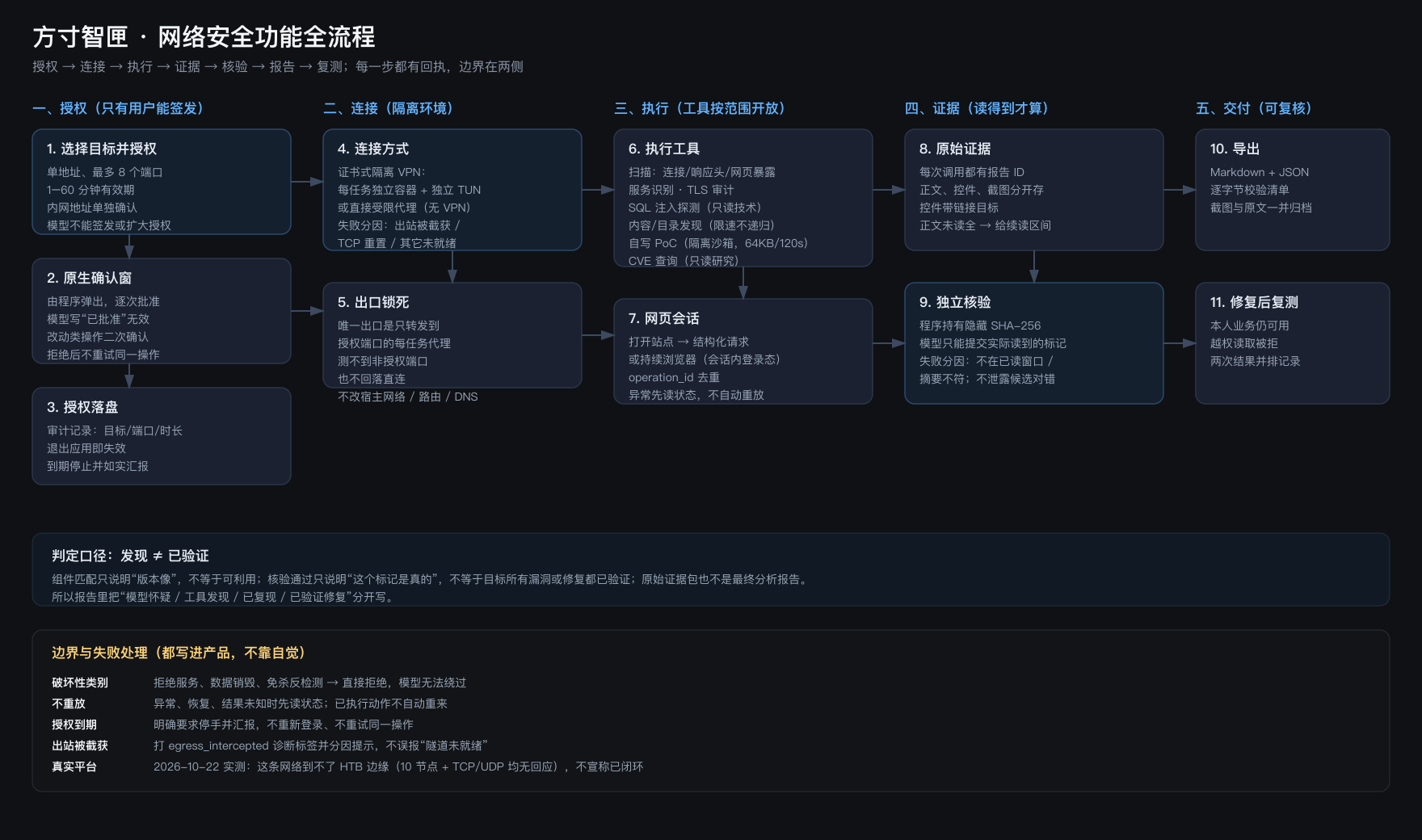
Let’s start with the conclusion
A complete local security test actually involves five steps:
- You authorize (the program does not accept permissions issued by the model itself);
- The actuator runs in an isolated environment (one container per task, with the export only to the authorized port);
- The model decides what to look for and how to read it;
- Program verification tags (the model only submits what it actually reads);
- Export Report (Markdown + JSON + Byte-byte Checklist).
The easiest thing to get stuck isn’t the model, but the missing range in step 1.
First, confirm three things
| Inspection items | How to see it | What happens if it doesn’t meet the standards? |
|---|---|---|
| Installed version 2.1.1 | About the page | The old edition did not continue reading, verify the causes, or complete the round |
| Isolation environment ready | The Cybersecurity Workspace will display the Docker status | No inspection can be performed when not ready |
| There are local models running around | Conversations can be answered normally | If the model is unavailable, the tool call will not start |
The model is only responsible for judgment; execution, authorization, and evidence retention are all on the program side. This is the biggest difference between this set of tools and security tools.
2. Prepare the shooting range
Of the three options, I usually use the first two.
Local mall containers
docker run -d --name lab-shop -p 8080:3000 bkimminich/juice-shop
Host access http://127.0.0.1:8080, executor access http://172.17.0.1:8080.
Isolated virtual machine (tested this time)
I set up two ARM virtual machines in Parallels:
| Goal | Address | Explanation |
|---|---|---|
| Windows 11 clone + IIS | 10.37.129.3:8082 |
Normal page /docs/quickstart.html; Exposed page /backup/client-config.txt |
| Ubuntu + Juice Shop | 10.37.129.4:3000 |
Containers run in virtual machines, and data falls on virtual machine disks |
Here’s a pitfall: the executor is in the container and by default, it can’t access the Parallels Host-Only segment. My approach is to add two layers of channels for forwarding—the host is a listener, and in the isolated environment, it publishes again, without changing the route, DNS, or proxy.
Your own assets
As long as you have written authorization, you can fill in the domain name or internal network address. If you don’t have authorization, don’t start—there’s no exception to this rule.
3. Interface Operations: From Authorization to Reporting
Step 1: Create target authorization
Open Cybersecurity Workbench → Security Check and fill in the following under ‘Target Authorization’:
| Field | Fill in what to do |
|---|---|
| Address | A single address, such as 172.17.0.1, cannot write a subnet |
| Port | 38082, multiple with commas, up to 8 commas |
| Validity period | From 15 minutes to a maximum of 60 minutes; Exiting the app also becomes invalid |
| Intranet address | Private segments must be confirmed separately |
Then expand the Advanced Range. This step determines what the model can do:
- Service and Version Identification (nmap)
- SQL injection detection (sqlmap, read-only technology)
- TLS/SSL Configuration Auditing (SSLSSCAN)
- Content/Directory Discovery (feroxbuster) ← For backups and hidden directories, rely on it
- Web interaction (login, forms, and sessions)
- SSH remote session (with credentials required)
- Self-write PoC execution (isolated sandbox, 64KB / 120 seconds)
Click ‘Add to List.’ Note: Add will not start checking; it will only add the target to the list.
Step 2: Bind the connection method
In ‘Range Connection and Remote Conversation’, select:
- Direct Restricted Proxy: No VPN, the actuator connects directly to the authorized port, used at the local range;
- Isolating VPN: Certificate-based OpenVPN configuration, suitable for platform target devices.
Select and click ‘Bind connection method.’
Step 3: Leave the goal to the conversation
Check the target from the list, and the system will generate a draft dialogue. At this point, add your request, for example:
Check whether the site has anonymous downloadable backups or configuration files; Once found, read it and submit the tags you actually read for verification.
After confirmation, manually send—only then does sending truly begin.
Step 4: Native confirmation
The execution tool will pop up a native confirmation window; click “Allow.” Writing “Approved” in the model’s parameters is invalid.
Step 5: Watch how it works
The normal order is as follows:
security_context → 确认授权
security_web_open → 建会话
security_scan_content → 目录发现
security_web_request / browser → 逐个读取
security_read_report → 读结构化原文(可分页)
security_submit_proof → 提交标记核验
security_export_report → 导出证据
Step 6: Read the results
The report table of contents contains report.md, report.json, and manifest.json. The list is for byte-byte verification; don’t just look at the main report text.
Verification results only have two options: “pass/fail.” If it fails, it will tell you “not in the read window” or “abstract does not match”—but it won’t tell you whether the candidate is correct, which is intentional; otherwise, it becomes a trial-and-error oracle.
4. Four real pitfalls
| Phenomenon | The reason | Processing |
|---|---|---|
| Execution failure: Only accepts published local services | The actuator only recognizes ports that have been published in the isolated environment | Use forwarding containers to publish the range port to the local gateway |
| Authorization denied: Does not include content_discovery scope | Didn’t check ‘Content/Directory Discover’ when authorizing | Go back to the authorization area and check ‘Rebuild’ |
| The model only looks at the homepage and documentation before finishing | Without directory discovery capabilities, I can only follow the links | Add the scope of content discovery, or the question clearly requires enumeration |
| The export is empty, but the check shows it passes | The summary script returns true to the empty array | Look at the export quantity, don’t just look at the Boolean value |
The third one impressed me most: for the same question and the same model, when the content discovery was open, it completed discovery and verification in 10 minutes and 20 seconds; when it wasn’t enabled, it guessed 25 paths in 17 minutes, just missing which directory.
5. Determination and Boundaries
- Discovery does not equal verification. Component matching only indicates version appearance; Verification passing only indicates the mark is authentic; The original evidence package is also not the final analysis report.
- Only test targets you own or have written authorization. Crossing the line violates Articles 285 and 286 of the Criminal Code and the Cybersecurity Law.
- Destructive categories (denial-of-service, data destruction, anti-kill detection) are all rejected—don’t even think about bypassing them.
- Test data is conducted using fictitious accounts and synthetic data; real user data is not included in the inspection scope.
- Native window approval, restart and recovery including to-do operations, and real HTB closed-loop — I haven’t finished inspecting these items yet, so I won’t mark them as completed.
6. Follow the checklist as done
- [ ] Installed version 2.1.1, Docker status is ready
- [ ] The shooting range is accessible (open it once in the browser).
- [ ] Authorization: Single address, ≤8 port, sufficient duration
- [ ] To find hidden files, check “Content/Directory Discovery”
- [ ] Confirm the internal network address separately
- [ ] Bind a ‘Directly Restricted Agent’
- [ ] Select the target to enter the conversation, specify clearly and send manually
- [ ] The native confirmation window allows it one by one
- [ ] Check after export
manifest.json - [ ] Screenshots and receipts are archived, and failed rounds are also kept
By following these ten steps, what you get is not a chat record of “AI says it finished scanning,” but a report that others can review.
Self-made software
Versions, changes and supported installers all come from the same public release records.
HyphenBox
A free model API radar and local router, with ongoing availability checks and keys kept on your device.
View public downloads and updates ↗ScreenLex
Turn subtitles from your own films and shows into an English vocabulary library, entirely offline.
View public downloads and updates ↗HyphenScreen
Screen recording and editing with a Resolve-style timeline, automatic redaction and pre-export checks.
View public downloads and updates ↗Late nights and burned API credits went in,a cup of tea comes back out — only if you feel like it.
Scan with WeChatPress and hold to save the image, then open it from your album in WeChat Scan







Comments
Loading comments…