
Info: Machine translation This post was machine-translated from the Chinese original. Wording may be rough in places — the Chinese version is authoritative.
Summary LocalBrain provides workspace security review and authorized network checks. Network checks only perform port connections and HTTP response headers; they must first pass local isolation verification before the user clarifies the authorization target. This article supplements a real startup fault investigation, repair, and test data, and also explains which results still cannot be considered official installation package acceptance. 2026-10-03·HyphenTech
LocalBrain Network Security Test: Locked in an isolated sandbox, it doesn’t run by default, only released after authorization
In the past couple of days, I added a feature to LocalBrain that even I hesitated to do: proactive network testing on authorized targets. To put the conclusion first—it defaults to not running, and I spend much more effort on “making it run” than on “making it run.”
Why would a local AI toolbox touch something as dangerous as network testing? Because I have my own needs: I have several machines and services on hand, wanting to casually check whether a port is open and whether a service’s response head is correct. But once these capabilities are integrated into a tool that can be driven by conversation, the first reaction should be caution—what if the model initiates it itself? What if it points to an address it shouldn’t? What if it follows the network and finds something else on my local machine? This article will explain how I block each of these three “what ifs” one by one.
Let’s first talk about what it can and cannot do
Authorized Network Check can only perform two types of low-impact checks: connection check (whether a port on a certain IP is available) and HTTP response header check (take back the response header and check). These are the two. Not a full-function scanner, does not scan port segments, and does not send attack payloads. Response header inspection currently uses plaintext HTTP, so it cannot be considered as an HTTPS certificate or TLS configuration audit that already supports it.
The targets that can be tested are also tightly blocked: must be a single and definite IP—does not accept domain names, network segments, wildcards, and even bypasses IPv4 mapping addresses are rejected; Up to 8 ports at once; Valid for 1 to 60 minutes; Up to 8 authorizations can be attached simultaneously; And all are stored only in memory, once you exit the application, it’s gone. To test local or intranet, you have to check a separate authorization; without it, you can’t even point to 127.0.0.1.
These restrictions are not suggestions but hard thresholds in the code; if you fill in a wrong one, it will be rejected immediately.
The first “what if”: Will the model start on its own?
No. This one is the foundation.
Authorizing all network check operations—creating authorization, running validation, running tests—are all buttons you click in the settings interface, none registered as tools that the model can call. The model saying “Let me test it for you” in a dialogue cannot be used to perform network checks. The simplified process still requires manually selecting the target authorization, then clicking “Authorize and run check”; Auto-filling does not automatically grant permissions.
Shifting ‘can measure’ from ‘whether the tool is willing’ to ‘whether the person grants authorization’ is the first line I use when using any dangerous ability.
The second ‘what if’: Will it point somewhere it shouldn’t or touch something else on the device?
This was the most painstaking part; I tried two different approaches to get it right.
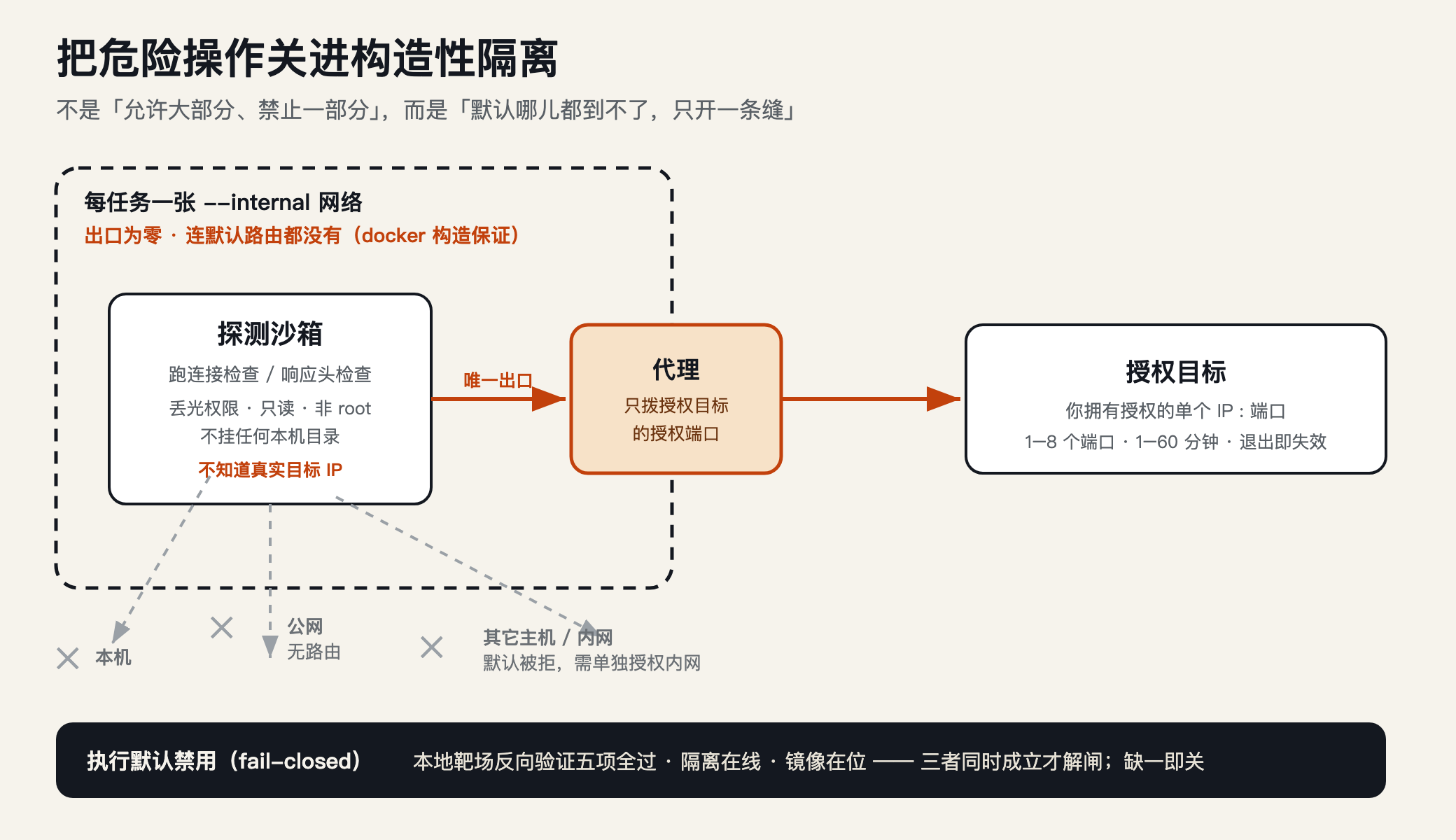
The test had to run in an isolated environment. I chose Colima and Docker—to build the smallest dedicated Linux virtual machine (2 cores, 2GB, --mount none, not any local directory from me). LocalBrain only used this dedicated instance and didn’t touch other dockers on your machine.
At first, I thought it was pretty natural: make the test container online, then use firewall rules to ‘only allow the authorized IP and port, lose everything else.’ But in Docker 29, it messed up—it completely rewrote the internal iptables chain, and the allowed rule I added had a hit count of 0, and I couldn’t even connect to the authorized port. Competing with Docker for the firewall chain was neither reliable nor would fail with version changes.
Later, I changed my fundamental approach: ** not “allow most, prohibit some,” but “by default, nothing can be reached, only a crack open.” ** Each test task starts a Docker --internal network — this kind of container in the network, I tested it, and it doesn’t even have a default route, and it can’t connect to both cross-network and public networks (NC detection always times out). The zero exit isn’t blocked by rules; it’s Docker’s constructed guarantee.
So how can it still detect the authorization target? The only gap is that each task is equipped with a small proxy that only forwards to the authorization target. The test container only connects to this proxy, and it never knows what the real target’s IP is — it only writes to the proxy, and the proxy only forwards to the authorization address. The proxy and test run in two different containers: the test container can run probes but can’t go anywhere; the proxy has an exit but only dials to that one address. Both containers lose all permissions, have read-only file systems, run non-rooted, have limited memory and process counts, and do not attach to any local directories.
This design limits probe traffic to the proxy path per task, but it cannot guarantee absolute security: containers, virtual machines, and proxies themselves remain security dependencies that need maintenance, and the five range checks cannot replace a complete security audit.
The third ‘what if’: How do I know this isolation is truly valid, not what I thought it was?
This is what I care about most. The biggest fear of security features is ‘looks closed, but actually has gaps.’ So I didn’t let it run by default, but added a local range reverse validation: click it, the program creates a one-time shooting range itself, then uses a real test loop to run five things—
- Can the authorized target be properly detected by the agent? (It must be possible)
- Should we block unauthorized ports on the same target? (Yes, we should block them)
- Bypass the proxy and connect directly to the target. Is there a way? (No, not)
- Can it connect to the public network? (No, it doesn’t)
- Click Stop. Can you clean up the containers and network of the task? (It must be cleanly dismantled)
Only when all five things pass will the program write a validation record and execute will be released. On my machine, it took about 4 seconds to run the entire set and all five passed. As long as the isolated environment is offline, or the image is missing, or the validation record is missing, the execution automatically returns to disabled—I call this fail-closed: if anything goes wrong, it goes to ‘off’; if not, it goes to ‘on’.
After verifying, I casually stopped the isolated virtual machine, and the panel immediately displayed “Offline Isolation Environment · Execution disabled.” This is exactly the effect I want: once the isolation is removed, the capability automatically locks out.
Interface: Name by specific function, users choose solutions, no longer recording stage numbers
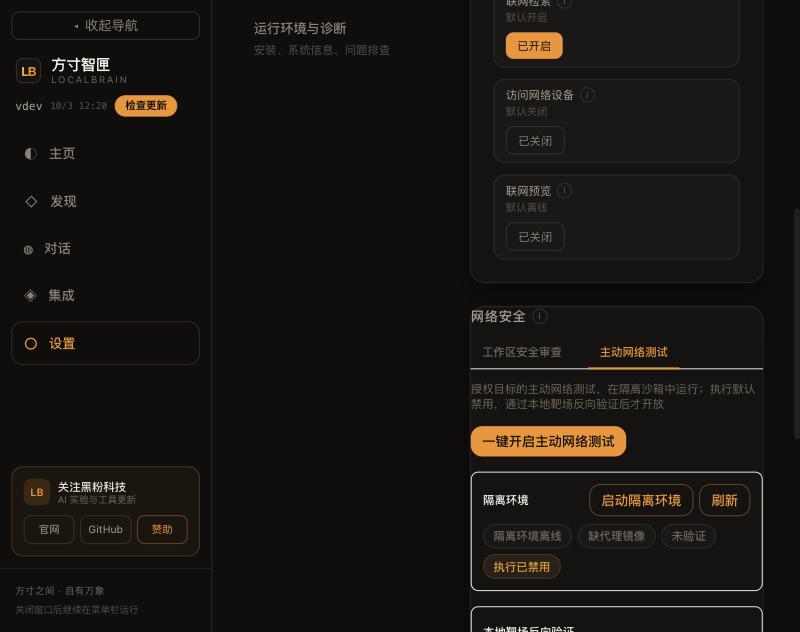
After finishing the features, I went to the interface with the “Instantly Tell What the Name Says”: In the system access settings, leave only one “Network Security” section, with two tabs named by function—
- Workspace Security Review: Read the code, dependencies, and configurations of the authorized workspace. Executing local testing and dependency audit commands still requires further confirmation; Dependency audits may access software repositories, so it cannot be simply described as completely offline. Working directory restrictions are not system sandboxes.
- Authorized Network Check: For clearly authorized IPs and ports, perform connection and response head checks in a dedicated isolated environment.
The name simply states the function, no longer called “which stage.” When Colima, Docker, and Lima dependencies are installed, the program can automatically prepare isolation environments, fill up images, and perform local reverse validation. Machines without dependencies still need to complete an installation first; applications currently do not silently install system software for you. The screenshot of the old interface below shows the original entry point, not the acceptance screenshot of the current patch interface.
One real failure: the terminal can start, but the application cannot find Lima
This time, the model didn’t answer wrong, but the application startup environment had a problem. The interface reported: limactl not in PATH. The program had already found the absolute path to Collima, but Colima would then call Lima; Applications launched from the desktop did not inherit the full search path from the terminal, so the second dependency couldn’t be found.
I restarted the dedicated instance using a streamlined environment with only the system directory and repeated the same error. Then I added the actual local tool directory to the subprocess environment and isolated the virtual machine for successful startup, taking about 8 seconds. This time was measured under the condition that the local machine already had dependencies and image caches, not the time taken for the first installation on a new machine.
Fix: No writing to the user’s shell configuration, nor requiring the software to be reinstalled. Instead, it handled the process mechanically: retaining the original search path and supplementing the existing common tool directories to ensure Colima and its subprocesses run in a consistent environment. At the same time, three other reliability issues were addressed:
- Start logs for continuous reading, limiting only the retention length without stopping reading. Avoid processes and applications waiting for each other after the pipeline is filled with logs.
- Time-consuming commands are executed in the background thread, so the interface does not have to wait for the isolated environment to start before responding.
- Refresh the state after an error no longer clears errors; Dedicated instance startup explicitly prohibits automatically switching the user’s default Docker context.
These fixes do not branch based on model names, nor do they mask runtime faults by modifying model prompts.
Local range testing: If authorized targets can be detected, it must also prove that no other targets can be detected
On October 3, 2026, I retested on an Apple Silicon Mac using real Colima and Docker actuators. The test was a one-time local test range created by the test program, without using public websites for testing.
| Verification projects | Expectations | This result |
|---|---|---|
| Authorized targets are accessed through proxies | reachable | Pass |
| Same as the target unauthorized port | Rejected | Pass |
| Bypass the agent and connect directly to the target | and cannot be reached | Pass |
| Detection containers connect to the public network | and cannot be reached | Pass |
| After stopping, remove the task container and network | Complete the cleanup | Pass |
The five reverse validations combined took about 4.43 seconds. Another full link test took 7.61 seconds, covering the validation record, creating authorization, rejecting unacknowledged execution, returning successful connection check after confirmation, revoking authorization, and cleaning the range. After testing, the original validation state was restored, leaving a permanently open execution switch without testing.
Here, “pass” only means that the local device link and the five boundaries mentioned above are valid. It does not mean penetration testing has been conducted, nor does it mean Windows, Linux, or every virtualization environment has passed.
Simplified operation: three steps are enough, with details left to the advanced options
The fixed version summarizes daily operations into three steps:
- Prepare Environment: Click “One-Click Prepare and Check Environment”. Automatically start the dedicated instance, complete the image, then run local validation. If the image is online but missing, it will also be filled, so you don’t need to skip the preparation directly.
- Choose a solution: Web service should pre-fill port 80, development service should pre-fill port 8080, both should select connection and response headers; SSH service should pre-fill port 22, only checking connections. You can also customize it. The solution will not help you fill in the target IP, nor will it expand the authorization scope.
- Confirm authorization and run: Enter the IP you have authorized to check, verify the port, check the authorization declaration, and click the button. Check type, validity period, and internal network authorization are in the advanced options and can still be manually adjusted.
Environment status and five authentication details are folded by default and can be expanded when troubleshooting is needed. If illegal content is mixed into port input, it will be directly rejected, rather than quietly deleting the error and executing it for the user.
**Version Notes: The above process and runtime fixes have been verified in development code and local real executors. The existing 1.5.7 download package does not automatically include this modification; It can only be written as distribution capability after the official installation package update and native interface acceptance are completed. **
Honestly state the border
- This isolation and reverse authentication system currently only passes tests on my Mac. Windows and Linux installation packages have the same feature, but isolation has not been tested on either end—fortunately, it is also fail-closed, and both ends must run reverse authentication locally before they can be released.
- Only two types of low-impact inspections—connection checks and response heads—are not scanners.
- The Linux version itself still supports preview.
- The isolation environment requires you to install Docker/Colima locally, but by default, it is not installed in the app.
- The test result is ‘tool discovery’; not having your manual review doesn’t mean it’s a ‘verified conclusion’—I wrote this directly under the runtime output.
The biggest takeaway from this feature is: giving a tool that can be driven by dialogue with danger capabilities—the real workload isn’t about ‘implementing the function,’ but about ‘locking it in a box where even if you want to do evil, there’s no way out, and prove that the box is real.’ It can run, but it only takes a small part of my effort; Making it run by default and proving it can’t run is the real deal.
🧰 Tools I build
I maintain all of these tools myself. Preview builds are clearly labeled; the release pages are the source of truth for downloads, updates and known limits.
Info: HyphenBox Status: Official releases
A radar for free LLM APIs: availability is re-tested continuously, one local interface for all of them, and keys stay on your machine
Info: LocalBrain Status: Official releases
A multimodal MCP toolbox for local models: TTS, Whisper and video generation in one place
Info: ScreenLex Status: Official releases
Learn new words while you watch shows. Free, for Mac and Windows
Info: HyphenScreen Status: Official releases
Screen recording and smart editing in one: a DaVinci-style timeline, automatic redaction and a check of the finished video before export. Free
Quote: HyphenTech Make AI your superpower Local deployment · Free resources · Self-made software https://hyphentech.top
Late nights and burned API credits went in,a cup of tea comes back out — only if you feel like it.
Scan with WeChatPress and hold to save the image, then open it from your album in WeChat Scan

Comments
Loading comments…