Info: Machine translation This post was machine-translated from the Chinese original. Wording may be rough in places — the Chinese version is authoritative.
Summary Windows is responsible for turning NVIDIA graphics cards into local text agents, while Mac handles larger models and complete multimedia chains with unified memory. It’s not about one replacing the other, but about two different local AI solutions. 2026-09-04·HyphenTech
8 GB VRAM can run local AI: How to choose between Windows and Mac?

Last night, I installed LocalBrain on my Windows laptop—RTX 4070 Laptop, 8 GB VRAM, driver 546.26. The model was ready, the graphics card was accepted, and then I sent the first “Hello” message, which got a whole red message.
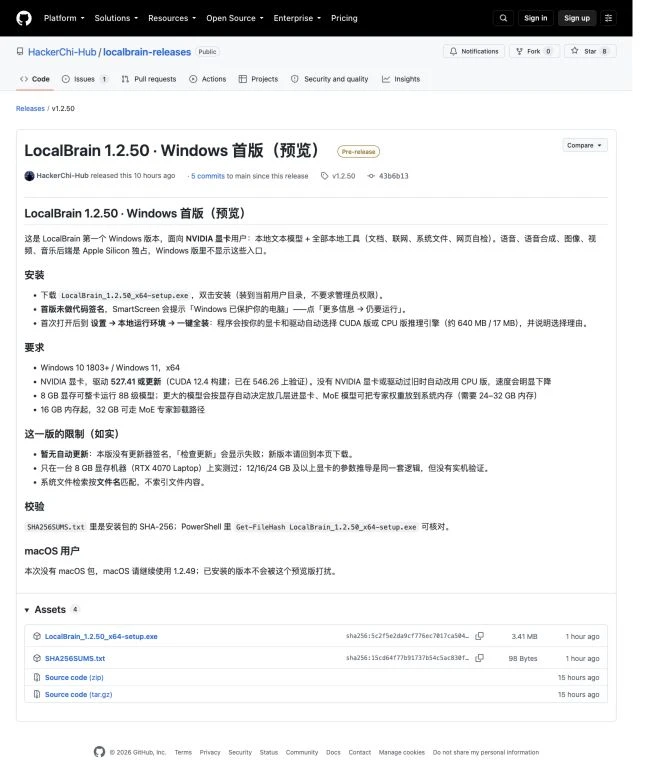
To start with the conclusion: **Of the three systems, macOS is the full version, Windows has ‘local text models + all local tools’ from this version onward, while Linux doesn’t have installation packages yet. **This version of Windows doesn’t update automatically, nor does it have code signatures. Below, I’ll clearly list the reasons for each item, along with those three failures.
▍What is the current status of the three systems?
| System | Version | What is it? | Nothing |
|---|---|---|---|
| macOS 13+, Apple Silicon | 1.2.49 Official Release | Local text models (MLX and llama.cpp), speech transcription, speech synthesis, images, video, music, all local tools, and automatic in-app updates | — |
| Windows 10/11 x64, NVIDIA graphics card | 1.2.50 Preview Version | Local text models (llama.cpp CUDA), all local tools (documents, networking, system files, web self-check), dialogue and proxy loops | Voice, images, video, music; Automatic updates; Code signing |
| Linux | None | — | All of them |
Windows version installation package 3.4 MB, installed in the current user directory, does not require administrator privileges.
The half Windows lacks isn’t ‘not ready yet’—it’s that it can’t be done: speech transcription, speech synthesis, images, video, and music—all five backend ends—run on Apple’s mlx, and Windows doesn’t have corresponding features to start. So I chose to keep these entry points completely undisplayed, instead of leaving a row of grayed, error-reporting buttons.
For the half that can run, Windows and macOS use the same set of code: how to push the context window, how to loop tool calls, how to rescue file writing failures—not a single word off on either side. The forks only focus on two things: how to read the hardware, where to start at runtime.
Why do Windows versions now? Let’s start with the numbers: Steam’s July 2026 hardware survey shows 8 GB of VRAM accounts for 25.3%. The top single card rankings are RTX 4060 laptops and desktops with 8 GB—this is the largest group wanting to run models locally, while LocalBrain previously only ran on Apple Silicon. The money flow is also clear: who’s making money: graphics card manufacturers earn from upgrades to larger VRAM, so they have no incentive to tell you that an 8GB card can fully run an 8B model; The platform hosting the model earns traffic, and the model itself is free; I don’t make money — LocalBrain has no paid version or in-app purchases; both models and inference engines are downloaded directly from public repositories to your machine, and there’s no place on this chain where I can get paid for. What you lose is electricity bills, hard drive, and a 640 MB download per time. The cost falls on my end: I only have an 8 GB card, and this week I only had a Windows machine for the first time, so the 8 GB level is just a test, and anything above is just a derivation.
▍What can 8 GB of VRAM actually run?
There’s only one issue on Mac: unified memory, with the model and system competing for the same pool. Windows discrete graphics have two accounts: weights and KV cache have to be pushed into VRAM, and the unfilled portion is relegated to system memory, dropping speed by four to five times. So before starting the Windows model, you first calculate “where to place the weights,” then use the same calculation to push the context window and GPU layer count—both numbers must come from the same calculation, otherwise you’ll get contradictory startup parameters like calculating windows for the whole card but only uninstalling half the layers.
- Full Card: Weight plus minimum KV can fit everything, all stacked graphics cards—this is the main battleground for 8GB cards;
- MoE expert memory placement: Can’t fit but the model is MoE and system memory should be no less than 1.2 times the weight. Expert weight removes memory and focuses on the graphics card. Quality follows the large model, speed is limited by memory bandwidth;
- Partial Uninstall: If none of the above apply, calculate how many layers can be inserted per layer by volume, and run the rest on the CPU. Write the rest truthfully on the card.
There’s no rigid ‘8 GB dedicated’ number: 1 GB of VRAM for display and drivers, 0.5 GB for compute buffer, and the rest is pushed out based on the model’s built-in KV cost. After 8 GB, the 12, 16, and 24 GB cards are automatically relaxed. I tested two models on this machine:
| Model | Volume | Window | Existing occupied | Speed |
|---|---|---|---|---|
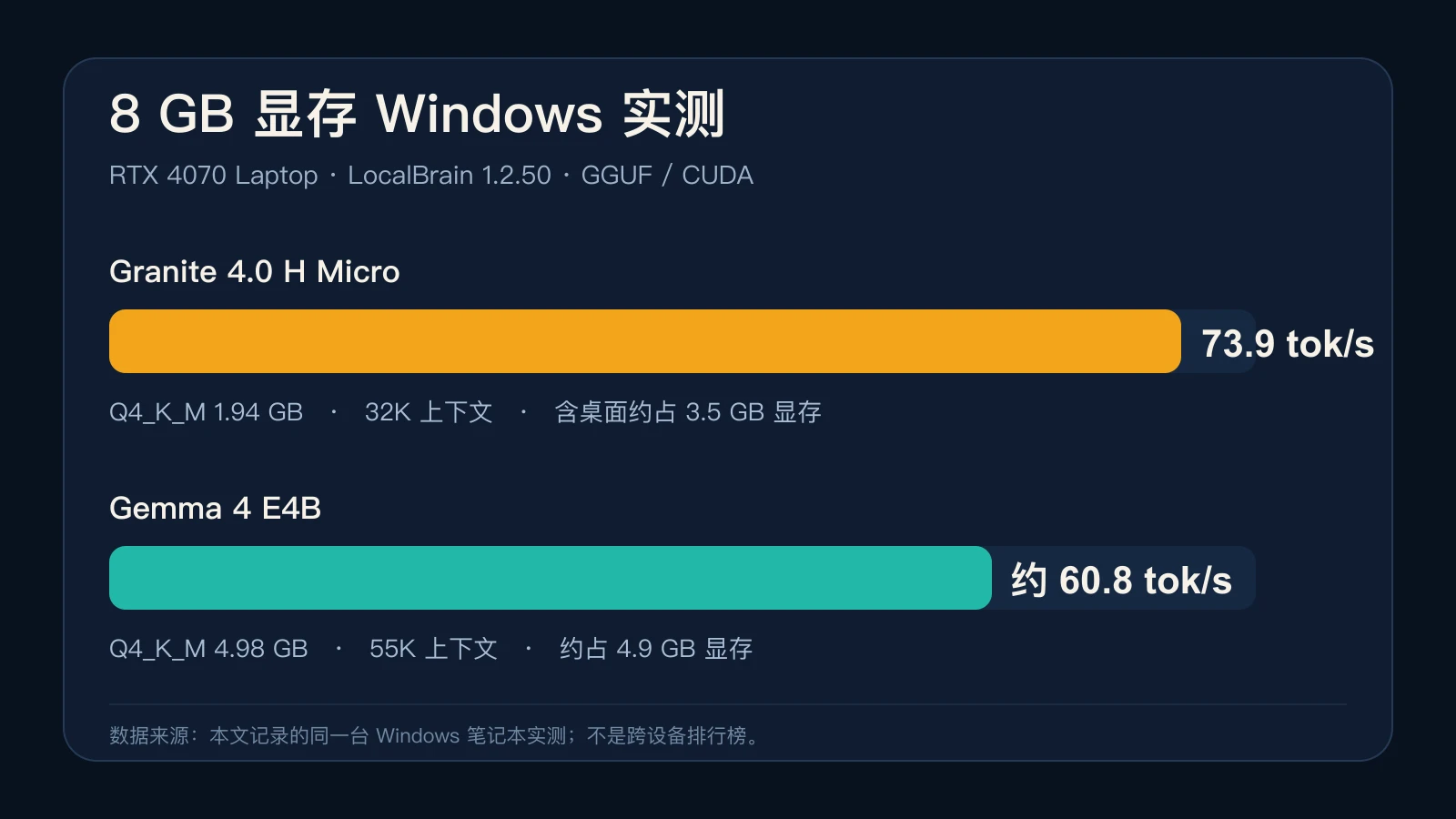
| Granite 4.0 H Micro Q4_K_M | 1.94 GB | 32K | 3.5 GB (including 1.1 GB of desktop) | 73.9 token/s |
| Gemma 4 E4B Q4_K_M | 4.98 GB | 55K (56,320) | 4.9 GB | About 60.8 tokens/s |
RTX 4070 Laptop 8 GB, driver 546.26, KV cache q8_0, llama.cpp b10705 CUDA 12.4 version.
By the way, about drivers. llama.cpp CUDA 12.4 package, according to 12.4’s own requirements, requires drivers above 551.61; But CUDA 11 already had subversion compatibility; programs written in 12.x can run as long as the driver supports 12.0, while the Windows threshold is 527.41. My 546.26 directly recognized the graphics card, 8187 MiB. So the software’s judgment line is drawn at 527.41—judging 551.61 will misjudge a large number of machines that still run normally as unusable. If you don’t have an NVIDIA graphics card or the driver is too old, it will modify it to a pure CPU version and include the reason for this choice in the installation progress.
I didn’t crop the model catalog according to my own 8GB card. Four new 8GB versions have been added: Qwen3 8B, Gemma 4 E4B, Granite 4.0 H Micro, Qwen3.6 35B-A3B; All the original 27B and 30B entries are kept, and the card is written on your machine to see which path it will take. 35B-A3B is MoE; 21.79 GB can’t fit any consumer-grade graphics card, but as long as the system memory is over 27 GB, expert weighting can run it. The quantization mode defaults to the highest level the local VRAM can handle; the 24 GB card automatically drops to Q5 or Q6 without any changes. I can’t test these large memory entries myself—I only have this 8 GB card—the deduction chain has unit tests to follow, but the actual data depends on feedback from people using larger graphics cards. This is the same approach as last time I stuffed an 85 GB Qwen 3.8 Flash Next into a 64 GB Mac: that time they left the N-gram table on the SSD, this time they left expert weights in memory—both first figuring out which weights must be permanently retained, then deciding where to place the rest.
▍For the same thing, what are Windows and Mac each good at?
If the goal is to “let local models do the work for me,” Windows’ advantage is off-the-shelf NVIDIA graphics cards: the 8 GB range can already run an entire 8B-level quantization model, then connect to networking, file, and document tools. The trade-off is that memory and memory are split into separate accounts; once large models need partial uninstallation, speed drops significantly.
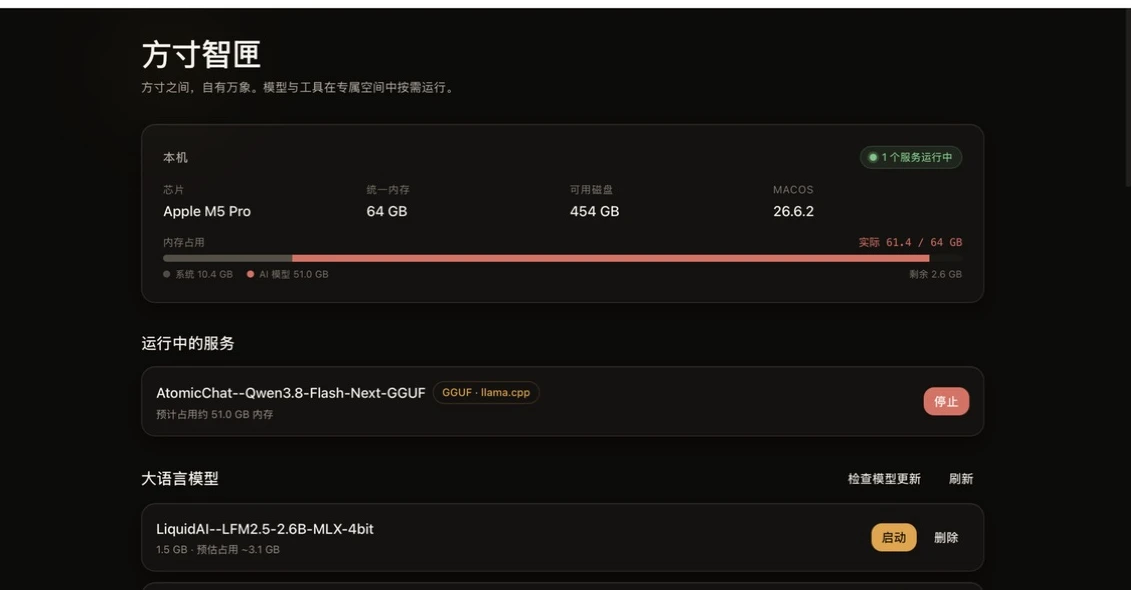
The Mac’s advantage isn’t a single score, but unified memory and a complete workflow. Models, KV cache, and system share the same memory pool; a 64 GB machine can keep models with much larger video memory capacity locally; In the same environment, you can continue transcription, voiceover, raw images, video, and music. In the next real shot, a GGUF model with about 51 GB of space is running on a 64 GB M5 Pro, and the system still clearly shows how much each model and system occupies.
What truly determines the experience is “what can be done after the model.” The first version of Windows already includes documentation, networking, system files, and web self-checks; Mac currently also has a local runtime environment for voice, images, video, and music. Therefore: if you only handle text proxy, code, and data processing, prioritize your NVIDIA graphics card; If you want to keep listening, speaking, seeing, and generating on one machine, Apple Silicon is more suitable.

▍Three Failures on the First Day of Installation
Back to the red text at the beginning. This version was installed from scratch on my own machine, and all three failures happened within the first hour after installation—the kind you could never hit on a developer machine.
**First time (22:11). **I only installed the GGUF inference engine and then started chatting——llama.cpp Since Python was not needed anyway, this would be normal on Windows. As a result, every round of dialogue would trigger seven local tool subprocesses, four of which (TTS, Whisper, Image, Video) had no backend on Windows. After all failures, the chat would pile all failures into a red text. Two issues: the tool list was a static seven-item table, not cut by platform; When all tools were unavailable, the conversation itself died. The fix was to split the list into two parts by platform: Windows only kept Documents, Network, and System; When the tool environment was not installed, it returned to normal dialogue and prompted to install in settings.
**Second time (22:44). **After installing the repaired package, I sent another “Hello,” with a red text change to a line: Unknown MCP service TTS is not allowed. The reason is that the frontend explicitly passes the full set of seven items to the backend, but I only clipped the list in the default path of “not passing the list”—the repair location and the requested entry location are not the same, and only the default parameters were tested. Now, each layer is guarded by one principle: the frontend draws the list by platform, while the backend skips services that are on the whitelist but not on this platform; Names outside the whitelist are still rejected, which is a safety line preventing arbitrary module execution and cannot be relaxed.
**Third time (06:35). **The tool environment was installed, and the model replied that it could connect to the internet. I asked it to search for ten AI news articles today, but after 51 seconds, all search engines failed. I directly called that networking tool to reproduce: with the proxy environment variable, results came in 1.7 seconds; without it, all overseas engines timed out, and the other three domestic engines reported ‘System cannot find the specified file.’ The root cause was that the program launched from the Start menu lacked a proxy environment variable—most Windows proxy clients only set system proxies without environment variables, while the network tool only recognized environment variables and a port detection table; Additionally, it wrote macOS’s location to the curl path. After fixing, without any environment variables, it read from the registry to the system proxy and got the result in 2.6 seconds.
Of these three attempts, the most noteworthy is the third verification method: my development environment always has proxy variables, and running the network there always works—fake green. **To verify Windows’ networking features, you must remove all environment variables before running. **
▍Why doesn’t Windows update automatically, and Linux doesn’t have packages?
Update packages must be signed with an offline private key, and the client must use the built-in public key to verify and sign before installing them. This private key is on my Mac, and the Discipline is not CI; And Tauri does not support cross-compiling Windows packages from macOS. Together, the Windows package comes from Windows machines, and the private key is on Mac—neither can reach the other. This version of Windows therefore lacks the updater signature, so “Check for Updates” always shows failure, and new versions require manual installation on the download page. The last time I bumped into this wall was yesterday in the HyphenBox article: same private key discipline, same cross-compilation limit, but the conclusion remains unchanged.
There’s an even more hidden limitation: Tauri’s static update list has only one top-level version number, shared by all platforms. The fact that two platforms are stuck in different versions can’t be expressed in this format—just raising the version number causes the other platform to repeatedly download old packages. So this time, Windows 1.2.50 was released as a pre-release, while macOS’s official version was still stuck at 1.2.49; only when Mac released 1.2.50 could the two platform records be merged into one list. I put a barrier on the merge list script: if the versions on both ends don’t match, it will be rejected.
Linux has no packages, for a different reason than HyphenBox. HyphenBox is essentially a router, running the same network code across all three systems; LocalBrain needs to run the model locally, and each platform is a complete set of real tests for download, decompression, driver detection, and memory planning. The code leaves loopholes for Linux—platform fork modules, Python runtime addresses—but the inference engine assets aren’t matched, I don’t have a Linux tester, and half of mlx is even less likely to have it. No time is promised here.
Code signing also doesn’t work. If the Windows installation package isn’t signed, SmartScreen will block it once. Click ‘More info → still need to run.’ This is a ‘No Money for Certificate’ interception, not a security check result—but you shouldn’t let it go just because I said that: the download page includes SHA-256, check it yourself.
▍Download and Get Started
| Your system | Download which | Requirements |
|---|---|---|
| macOS 13+ | LocalBrain_1.2.49_aarch64.dmg |
Apple Silicon, starting at 8 GB of unified memory |
| Windows 10 1803+ / 11 | LocalBrain_1.2.50_x64-setup.exe |
NVIDIA graphics card, driver 527.41 or above; Starting at 16 GB of memory, MoE experts recommend 32 GB of memory |
| Linux | None at the moment | — |
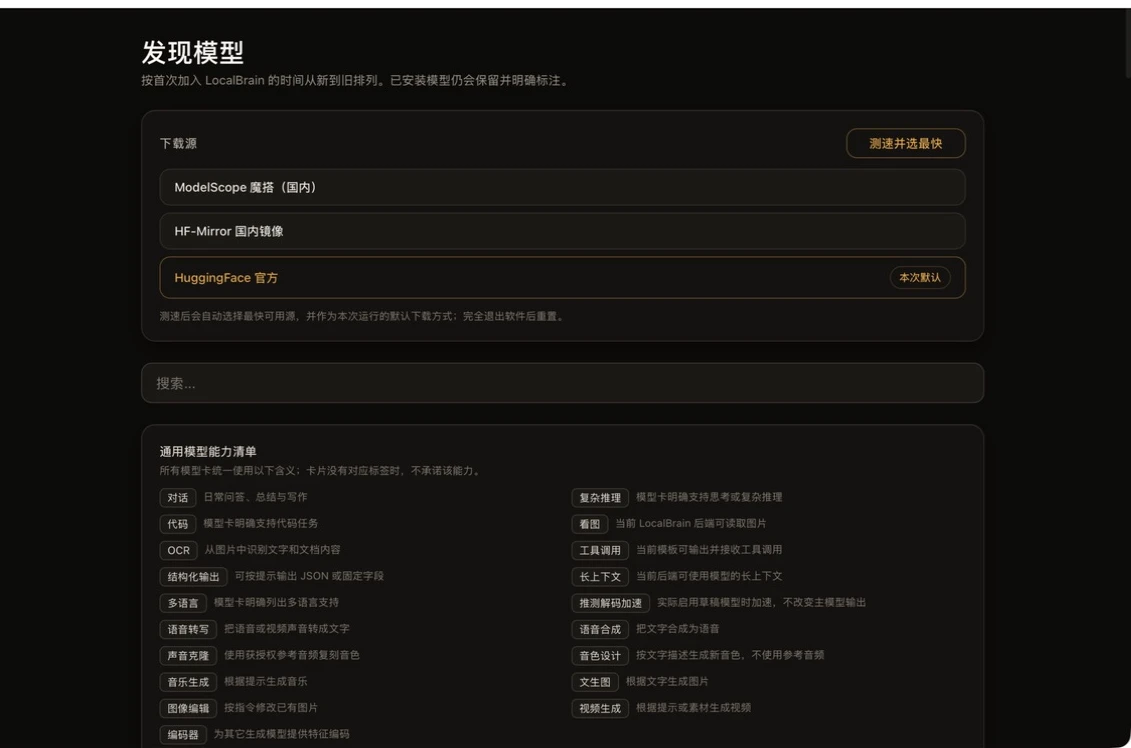
- After installation, open it, go to “Set → Local Runtime Environment” and click “One-Click Full Installation”: The program will automatically select either the CUDA version or CPU inference engine (CUDA version about 640 MB) by clicking on the graphics card and driver, then install a tool environment of about 200 MB. Both steps will specify what is being installed and why;
- Go to ‘Discover’ to download an 8GB model, Qwen3 8B or Gemma 4 E4B, both works. The ‘minimum video memory’ on the card is calculated according to your card;
- Go back to the ‘Home’ to launch the model, then go to ‘Dialogue’—networking, reading and writing native files, creating documents. The model decides when to call it;
- You can install it without an NVIDIA graphics card, but it runs on the CPU version, which is much slower. The program will clearly indicate the installation progress in the installer.
Tip Download page: https://github.com/HackerChi-Hub/localbrain-releases/releases (Windows version under v1.2.50 pre-release)
Summary: A Windows laptop with 8 GB of VRAM, combining local text models and local tools is already usable The two 8GB models ran at 73.9 and about 60.8 tokens/s respectively, with Windows from 32K to 55K. After fixing those three tools, the internet, file, and document tools all worked. The multimedia half won’t come to Windows in the short term; Linux has no schedule, so automatic updates require waiting for the private key to be transferred. My judgment only covers the 8 GB tier—the window and uninstall path on larger graphics cards are the same deduction, but there’s no actual data. If you’re using 12, 16, or 24 GB graphics cards, please send me your results.
HyphenTech self-developed software
| Products | In a word | Status |
|---|---|---|
| HyphenBox | Free large model API radar + local unified routing | Official Updates (from version 1.0.0) |
| LocalBrain | Turn your computer into a private AI box: manage transcription/voiceover/raw images/video/MCP all in one place | Officially updated |
| ScreenLex ScreenLex | Local movie subtitles become a review English vocabulary, fully offline | Officially updated |
- HyphenBox: https://github.com/HackerChi-Hub/hyphenbox-release/releases
- LocalBrain: https://github.com/HackerChi-Hub/localbrain-releases/releases
- ScreenLex ScreenLex: https://github.com/HackerChi-Hub/screenlex-download/releases
🧰 Tools I build
I maintain all of these tools myself. Preview builds are clearly labeled; the release pages are the source of truth for downloads, updates and known limits.
Info: HyphenBox Status: Official releases
A radar for free LLM APIs: availability is re-tested continuously, one local interface for all of them, and keys stay on your machine
Info: LocalBrain Status: Official releases
A multimodal MCP toolbox for local models: TTS, Whisper and video generation in one place
Info: ScreenLex Status: Official releases
Learn new words while you watch shows. Free, for Mac and Windows
Info: HyphenScreen Status: Official releases
Screen recording and smart editing in one: a DaVinci-style timeline, automatic redaction and a check of the finished video before export. Free
Quote: HyphenTech Make AI your superpower Local deployment · Free resources · Self-made software https://hyphentech.top
Late nights and burned API credits went in,a cup of tea comes back out — only if you feel like it.
Scan with WeChatPress and hold to save the image, then open it from your album in WeChat Scan

Comments
Loading comments…