Info: Machine translation This post was machine-translated from the Chinese original. Wording may be rough in places — the Chinese version is authoritative.
Summary LocalBrain 1.4.8 connects to the second local video engine, LTX-2.5, and writes a quoted line, which the person in the screen will say. On a 64 GB M5 Pro, a 4-second video lasts about 2 minutes, with a peak of 25 GB; The default runtime parameter is originally 54 GB. The 43.4 GB weight is directly connected to ModelScope domestically, and the discovery page can be downloaded with one click. 2026-09-30·HyphenTech
LTX-2.5, free local run, with effects comparable to blockbuster films
At 23:15 on September 29, I had the LTX-2.5 generate a 4-second video on a 64 GB M5 Pro: a girl by the café window looked at the camera and said, “Welcome back!” Today we are testing a brand new video model.". After 128 seconds, the video was released, and Whisper’s transcription matched every word in the quotation marks for the prompt. In the same generation, the peak value recorded by /usr/bin/time was 54.0 GB—64 GB on a machine, eating up 54 GB for a 4-second video. This is clearly incorrect.

First, the conclusion: **LTX-2.5 can natively play audio videos on a 64 GB Mac, 4 seconds, about 2 minutes; That 54 GB is not what the model wants; it’s the two default values at runtime. After changing it, the peak is 25.3 GB, and the time consumption remains unchanged. **LocalBrain 1.4.8 connects it as a second local video engine, allowing one-click download on the discovery page, and direct connection via ModelScope in China.
▍What is LTX-2.5 and how is it related to H3?
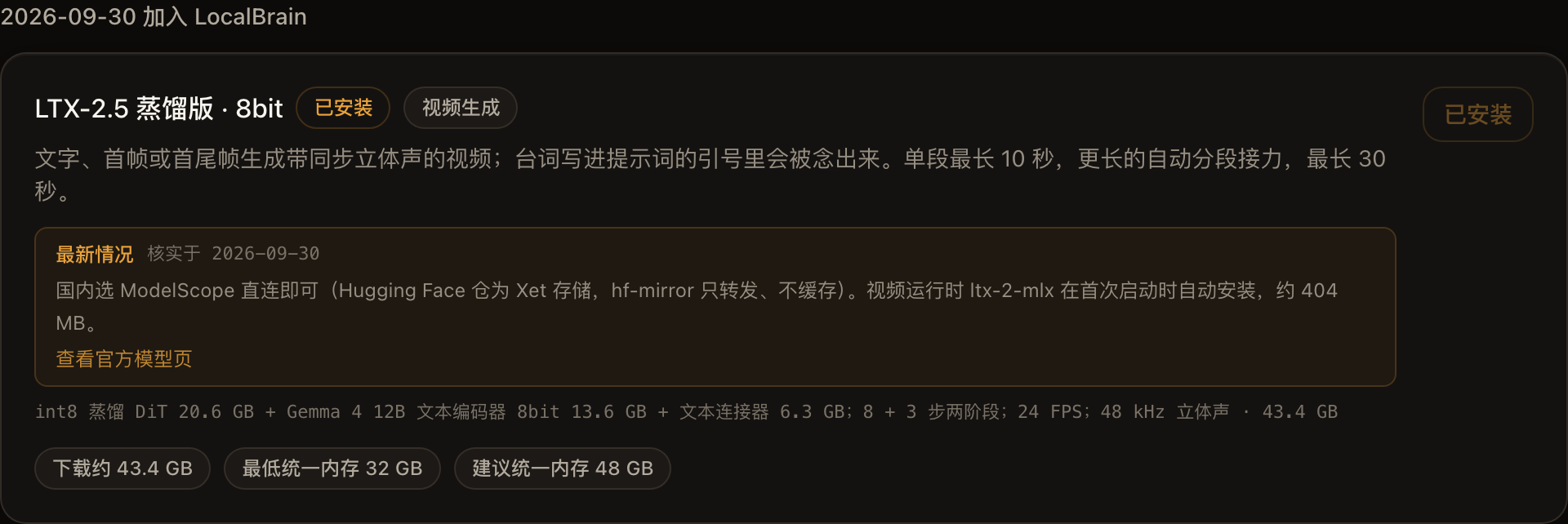
LTX-2.5 is Lightricks’ open-weighted audio and video model, generating both images and sound together. This unit runs the Q8 distilled version of mlx-community, totaling 43.4 GB. The main portion is the distilled DiT of the int8 20.6 GB, the Gemma 4 12B text encoder 8-bit 13.6 GB, and the text connector 6.3 GB; the rest are the video and audio decoder, vocoder, and spatial amplifier.
The distilled version means the steps are completely crushed: first samples 8 steps at half-resolution, then doubles and then fine-tunes 3 steps, totaling 11 steps, with no step count adjustment and no turbo function. Output is fixed at 24 frames per second, with 48 kHz stereo sound. Frame rate must be 8n+1, width and height must be multiples of 64—requesting 480 height returns 448, LocalBrain will first adhere to the size it can hold before output.
LocalBrain already had the MiniMax H3. The two engines now share the same video panel, with differences in capability and speed:
| LTX-2.5 q8 distilled version | MiniMax H3 | |
|---|---|---|
| What can be done? | Text generation, first frame, first and last frame | FL2VA: text generation, frame at the end of the frame; REF2VA: up to 9 reference images |
| Sound | 48 kHz stereo, and the lines in quotation marks are spoken | 32 kHz stereo |
| Model package | 43.4 GB | FL2VA 4bit 38.5 GB, REF2VA 8bit 64.5 GB |
| 3-second ‘Landscape Camera’ template | 98 seconds (1024×576) | 382 seconds (960×544, REF2VA complete 30 steps) |
| 3-second “Make the image move” template | 107 seconds (576×1024) | 193 seconds (544×960, FL2VA Turbo 4 speeds) |
The time spent in the table is all from the same machine, the same template, and their respective default parameters. Different resolutions and step counts only indicate ‘who is faster in daily use,’ not a comparison of computing power between two models.
▍How to test this time
The machine is a MacBook Pro M5 Pro, 64 GB of unified memory, macOS 26.7. Time consumption is measured by wall clock seconds, including model loading; Memory is measured by the physical peak usage of processes recorded by the kernel, which is the same number as the “peak memory footprint” printed by /usr/bin/time -l, and the Metal memory cache is also included. Lines are verified using local Whisper large-v3-turbo transcription.
Each prompt only runs once, and the entire finished image is kept as is, without any pickups. So the following conclusions can prove “how fast it runs, how much memory it occupies, what happened this time”—it cannot prove that batch generation is this stable.
▍Tested: Speed, Visuals, and Sound
| Fragment | Time-consuming | Process peak |
|---|---|---|
| 1024×576 · 4 seconds to speak people | 126~130 seconds | 25.3 GB |
| 1024×576 · 3-second text generation template | 98 seconds | 25.4 GB |
| 576×1024 · 3-second first frame / first and last frame template | 107 / 117 seconds | 28.0 / 28.5 GB |
| 1024×576 · 10 seconds | 354 seconds | 27.4 GB |
| 1024×576 · 20 seconds, automatic relay two-stage | 745 seconds | First tier 27.3 GB, second tier 36.8 GB |
| A 4-second cold start is performed by MCP | 181 seconds, including loading | — |
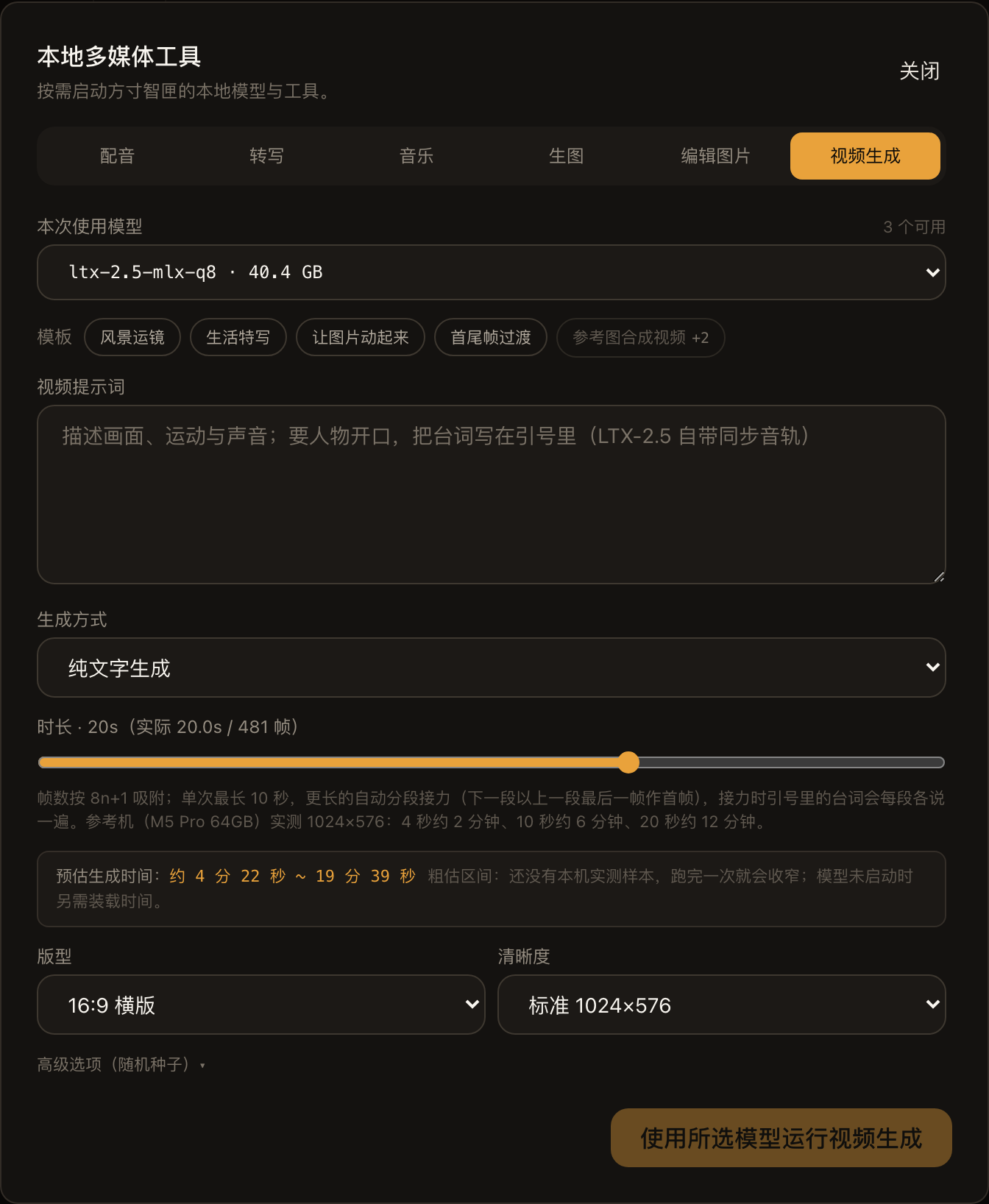
Duration and time are basically linear: 4 seconds 2 minutes, 10 seconds 6 minutes, 20 seconds just over 12 minutes. The memory for the 20-second line should be discussed separately; we’ll expand on that when we talk about it later.
The speaker’s part is the most surprising part. The character type, expressions, and gestures in the picture all follow the lines, and Whisper translates it to the line written in the prompt. After switching to mlx-community’s file, the same seed runs again: the characters, composition, and gestures are all the same, except the motorcycle outside the window becomes a parked car; The dialogue is complete, but the ending says half an extra line: “Welcome to…”.
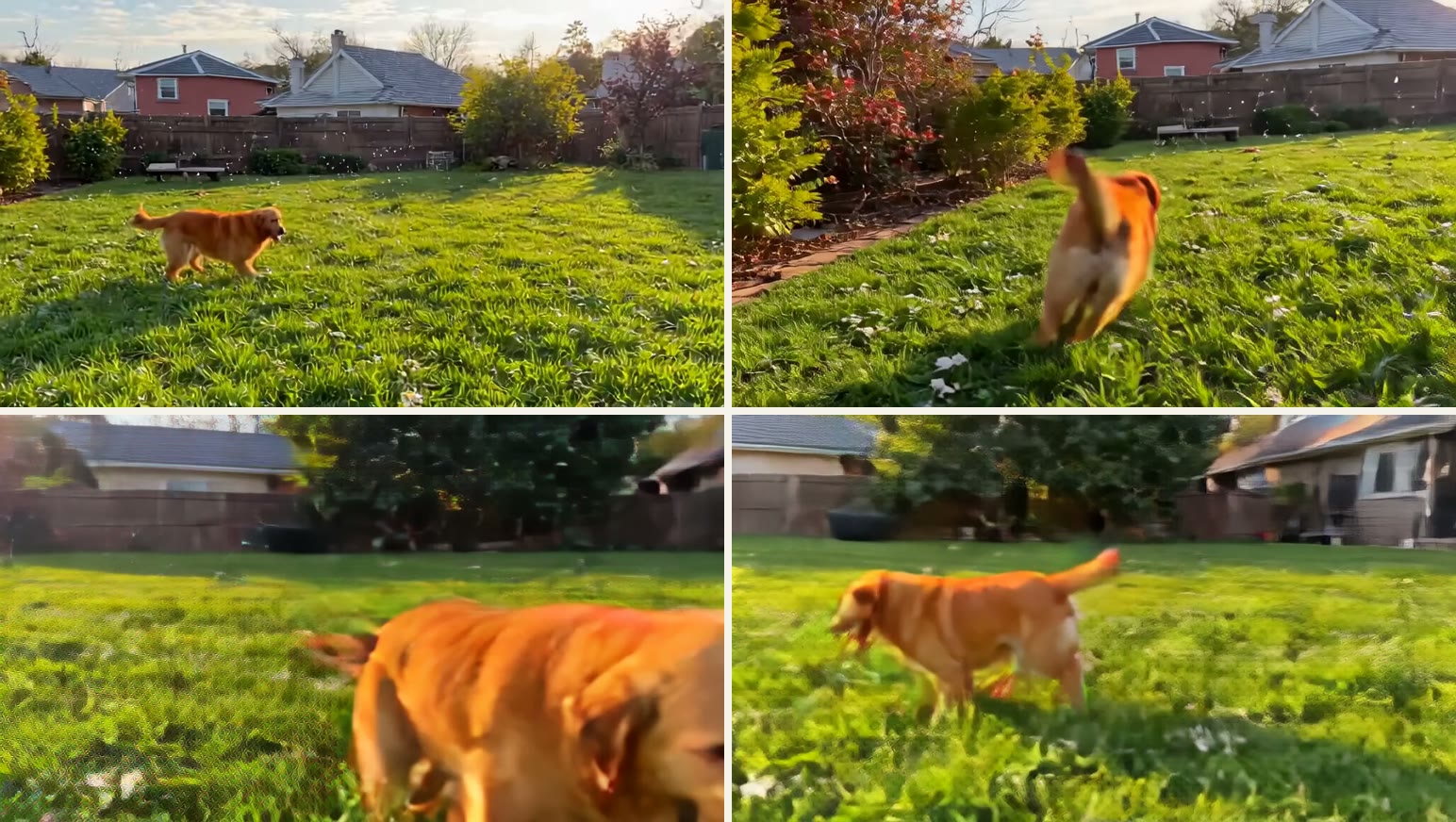
It also has some very obvious flaws. The 10-second puppy chasing bubbles, the background drifts from a red brick house to another beige house in the second half, the soap bubbles in the prompt barely appear, and the few frames where the puppy rushes to the camera are blurred together. The 4-second steam train, the first half of the steam rises from the bridge pier and disconnects from the front of the train. The longer the footage, the easier it is to “forget” the opening scene — this is clearly visible in the 10-second sample.
▍Where does the 54 GB come from?
Back to the 54 GB at the beginning.
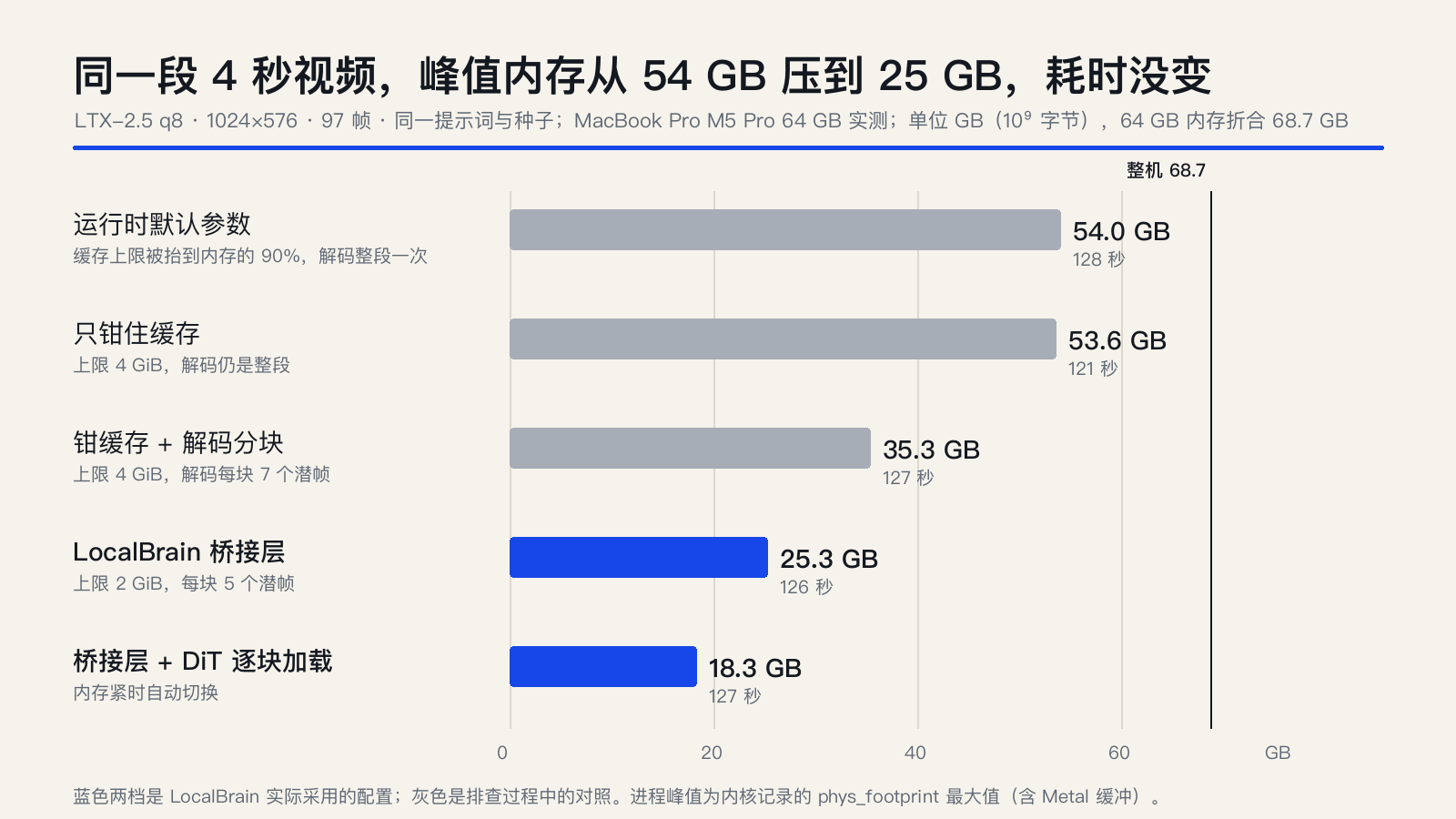
During runtime, I use MLX memory every 0.25 seconds. After aligning in stages, I found that the maximum actual usage is only 21.5 GiB, with the remaining thirty-plus GB saved by two things:
First, when encoding prompts, the Gemma encoder raises the MLX cache limit to 90% of the system’s memory. The released buffer is not returned to the system but is stored as a backup, so it keeps growing; The built-in --low-ram (setting the cache limit to 0) at runtime is also overridden by this step and has never taken effect.
Second, decoding is never divided into chunks. When estimating the memory needed for decoding at runtime, only one layer of tensor is used, which is about 40 times lower than the actual measurement. With a default 8GB budget, it is always considered “fit well,” so the entire segment is decoded at once.
LocalBrain’s bridge layer changed two things: the cache limit was set to 2 GiB, so anyone adjusting it would revert to that number afterward; Decoding was split by 5 latent frames per block. For the same video, the peak value dropped from 54.0 GB to 25.3 GB, taking 128 seconds versus 126 seconds. Comparing block decoding to whole segment decoding frame-by-frame, PSNR averaged 44.5 dB, lowest 40.9 dB, with no visible seam at block boundaries.
When memory is tightened, the bridge layer changes to load DiT blocks from disk. Under the old 4-bit encoder layout, this could reduce to 18.3 GB; Now, the page downloads an 8-bit encoder, and the encoding prompt steps alone require about 25.5 GB, which is the lower limit.
▍Domestic downloads: Xet and ModelScope
The Hugging Face repository for this model is Xet storage. hf-mirror only performs 302 redirects to Xet files, transferring requests abroad without caching—without proxy, so it basically can’t be loaded.
The solution is to switch sources. The two libraries in mlx-community have the same image on ModelScope. I compared the file lists on both sides one by one, only missing ModelScope’s built-in configuration.json and .gitattributes, all large files have exactly the same SHA-256. On September 30, I downloaded directly from ModelScope, 19 files totaling 43.38 GB, with aria2c running at about 44 MiB per second, crossing SHA-256 files one by one.
The discovery page can always test speed between ModelScope, HF-Mirror, and Hugging Face to choose the fastest one. This time, I patched up a loophole: ModelScope’s list actually lists SHA-256 for every file. Previously, LocalBrain didn’t read it, so the model built from Magic only competed for size. Starting from version 1.4.8, I also checked the content. With a weight of over 40GB, it would report failure on the spot, so it wouldn’t fail only when it was generated.
As for why it’s Q8: mlx-community’s model card says the bf16’s DiT is about 38 GB per year, which on a 64 GB machine takes up 96% of the budget; int8 drops to 57%. They also made int4, but didn’t release it without passing their own quality check.
▍Not a single byte of the file is changed
LocalBrain uses a fixed-commit runtime called ltx-2-mlx, which was originally written in a different directory layout: the text encoder should be set to text_encoder/, and DiT should have 96 biases for the video feedforward layer. The mlx-community files don’t match either way: the encoder is at gemma4-12b-ltx-v1/, and DiT doesn’t have these biases.
The easiest way is to download the modified file, but then the SHA-256 of the file doesn’t match upstream, and update checks become ineffective. I chose another approach: keep the file as is, have a compatibility layer patch in the generation process—add a full zero bias when loading DiT, and recognize gemma4-12b-ltx-v1/ when looking for the encoder. Zero padding is numerically equivalent to the original layout: on September 29, I tested that the original layout DiT is this one plus 96 full zero tensors, and after reconstruction, SHA-256 is consistent.
▍How 30 seconds came about: Relay
It can generate up to 241 frames per run, which is 10 seconds. The H3 panel can be pulled up to 30 seconds. To ensure both engines work equally, requests longer than 10 seconds are split by the bridge layer: the fewest segments, the frame count as evenly split, the last frame of the next and above segments as the first frame, and the overlapping frame is removed during stitching.
The 20-second coastal aerial footage is made by connecting two segments at 10 seconds each. The seam falls between frames 240 and 241, with an average difference of 1.11 between adjacent frames, similar to the median of 1.10 over 24 frames. Even when zoomed in frame by frame, you can’t find any jumps. The sound is a bit off: 0.4 seconds after the seam is 3.35 dB louder than before, the biggest fluctuation in the entire segment, then drops back.
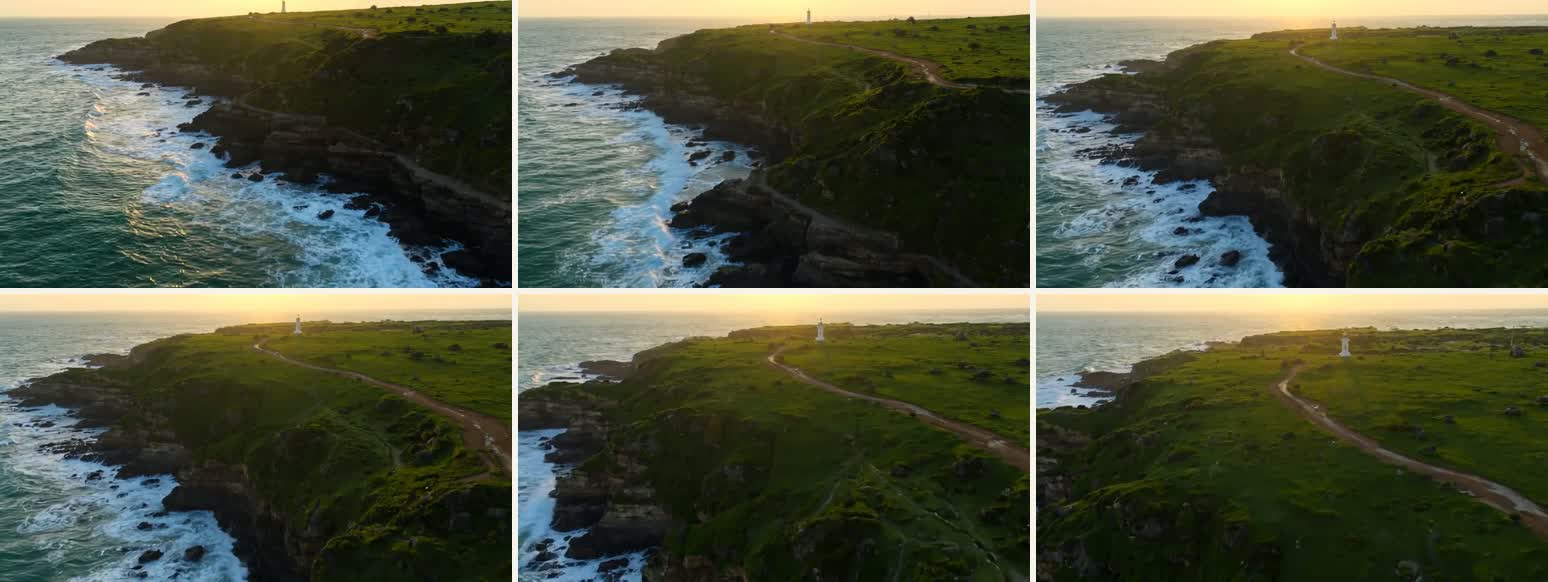
This also allowed me to discover a loophole in the memory model. The first segment peaked at 27.3 GB, the second segment at 36.8 GB, an extra 9.5 GB, while the bridge layer originally predicted only 26.6 GiB. The reason lies in the first frame: When generating with the first frame (or last frame), each token is given a denoising mask at runtime, so DiT time step scheduling becomes one copy per token. A 3-second first frame template also adds 2.65 GB. 1.4.8 Includes this factor and estimates each segment separately by whether it has a first frame; Currently, the six tested points in this file are all predicted to be no less than the actual test, with a maximum of 1.4 GB higher.
There’s also a usage pitfall in relays: each segment uses the same prompt, so the quotation lines are said once in each segment. **For videos where characters need to speak, keep them under 10 seconds. **
▍Who is paying the bill, and why is it being done now?
This time, the LTX-2.5 project took the most time not the model itself, but the two accounts that others tacitly accepted.
The first is memory. The two default values at runtime—cache capped to 90% and decoding without chunking—are fine on large memory machines, but on a 64 GB Mac, the peak is 54 GB, and other models have to make way. Changing them doesn’t take any speed; this bill shouldn’t be paid by the user in the first place.
The second payment is downloads. Starting May 23, 2025, Hugging Face will require newly registered users and organizations to default to Xet storage: files are split into about 64 KB blocks for deduplication, uploads save data, updates only transmit the changed parts, and this is a real savings for both the platform and uploaders. The cost is passed on to domestic users: images like hf-mirror, which cache by whole files, can’t handle Xet blocks and can only forward requests abroad. ModelScope handles this traffic, and mlx-community’s warehouse has a mirror with the same name there. Who’s silent? The download tool itself—when stuck abroad, it won’t tell you why it’s slow.
As for why now: Lightricks released LTX-2.5 open authority in August, while also operating the paid online platform LTX Studio and hosting API. Open authority trades ecosystem and reputation; it’s clear how cloud services make money—it’s more like two legs for open-source model companies. My reason is more direct: the same 3-second template, H3’s REF2VA takes 382 seconds, the model package is 64.5 GB, I need a faster local engine that can still speak on a 64 GB machine. LocalBrain itself is free and relies on voluntary sponsorship.
▍Defects and boundaries
- Long clips drift: In the latter half of the 10-second half, the background changes to a house, and the secondary element (soap bubble) in the prompt may be completely absent.
- Unstable sound volume: The same bridging layer produces raw loudness ranging from −8.4 to −43.8 LUFS. LocalBrain uniformly pulls to −16 LUFS, but the lighter one only yields −18.9 LUFS after pulling.
- The faces were only tested for two fictional characters, each with a direct face and small gestures. Whether the profile, big gestures, and multi-person shots are stable this time cannot be proven.
- A 32 GB Mac is sufficient as planned (minimum about 25.5 GB), but I don’t have a 32 GB machine in hand, so I haven’t tested it.
▍Who is suitable for it, and how to get started
| You want it | Select |
|---|---|
| Let the person on screen say the designated lines | LTX-2.5 |
| 3~10 seconds, fast | LTX-2.5 |
| Give a set of reference images of people, products, and scenes, and take photos according to the pictures | H3 REF2VA |
| Frames at the beginning and end are fixed, with the model filling in the middle | Both are fine, LTX-2.5 is faster |
Step 4: Find the LTX-2.5 Distilled Version · 8bit in the “Discover” section. After speed testing, select ModelScope domestically and download 43.4 GB. Then select it as a video model in the settings. The first time you start, LocalBrain will automatically install its runtime, about 404 MB. Finally, write a prompt in the dialog under “Tools → Video Generation,” or click a template first.
If you have an Apple Silicon over 64 GB, want people in your video to speak according to your lines, but don’t want to upload your footage to the cloud, it’s worth installing. If you only have 32 GB, or want consistency in reference images or 2K production, don’t rush to get involved: I haven’t tested the former, and the latter two can’t be done with the LTX-2.5 version. My suggestion is to use a template to run a 3-second video, see if the speed and sound are satisfactory, then drag it further.
Summary: On a 64 GB Mac, local audio and video are usable, but the cost is time and a bit of patience 4 seconds is about 2 minutes, 10 seconds is about 6 minutes, 20 seconds is about 12 minutes, with peak memory of 25~37 GB; You can say lines in quotation marks, and the longer the video, the easier it is to drift. Suitable for those with Apple Silicon over 64 GB in hand who want the person in the frame to speak according to your lines but don’t want to upload the material to the cloud. If you want image consistency, 2K finished video, or only 32 GB of memory, don’t rush to get involved.
Tip Download page: https://github.com/HackerChi-Hub/localbrain-releases/releases ModelScope: https://modelscope.cn/models/mlx-community/ltx-2.5-mlx-q8 Runtime: https://github.com/MrMoferFRAN/ltx-2-mlx
🧰 Tools I build
I maintain all of these tools myself. Preview builds are clearly labeled; the release pages are the source of truth for downloads, updates and known limits.
Info: HyphenBox Status: Official releases
A radar for free LLM APIs: availability is re-tested continuously, one local interface for all of them, and keys stay on your machine
Info: LocalBrain Status: Official releases
A multimodal MCP toolbox for local models: TTS, Whisper and video generation in one place
Info: ScreenLex Status: Official releases
Learn new words while you watch shows. Free, for Mac and Windows
Info: HyphenScreen Status: Official releases
Screen recording and smart editing in one: a DaVinci-style timeline, automatic redaction and a check of the finished video before export. Free
Quote: HyphenTech Make AI your superpower Local deployment · Free resources · Self-made software https://hyphentech.top
Late nights and burned API credits went in,a cup of tea comes back out — only if you feel like it.
Scan with WeChatPress and hold to save the image, then open it from your album in WeChat Scan

Comments
Loading comments…