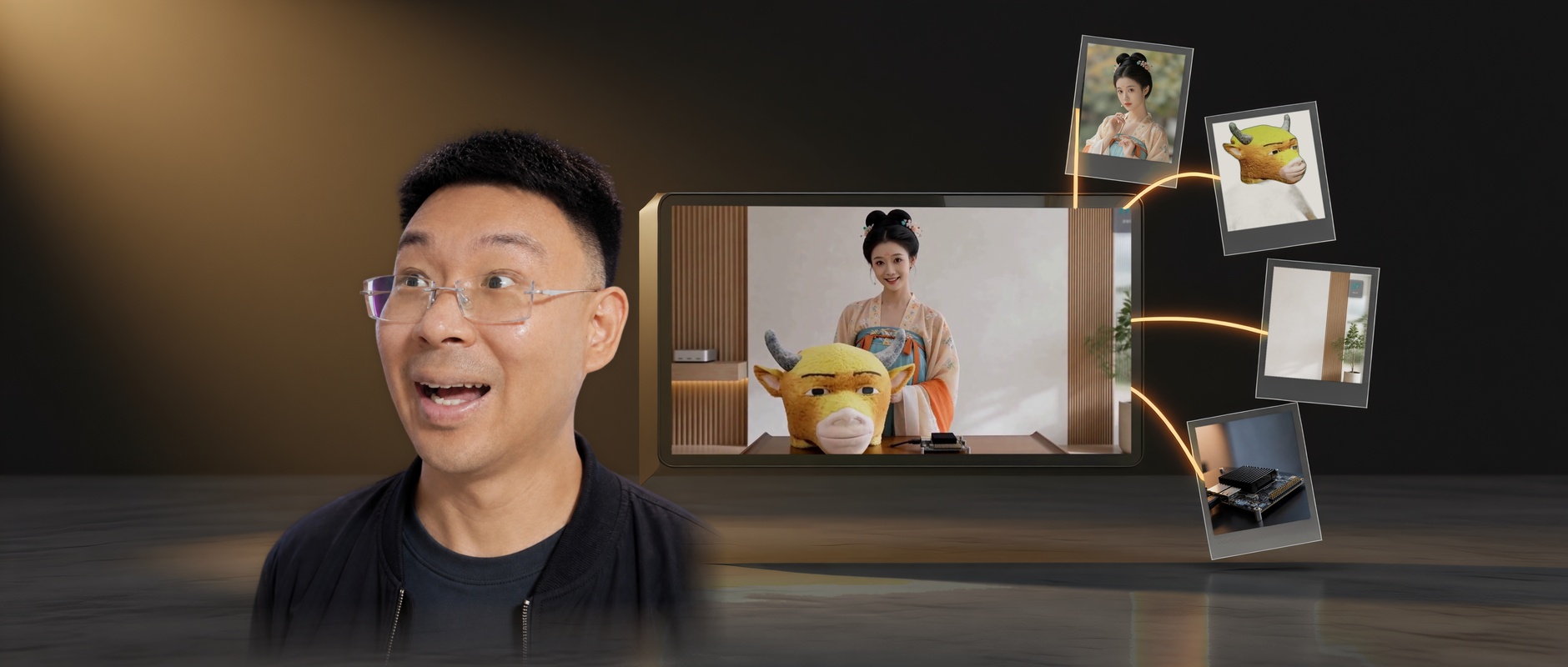
Info: Machine translation This post was machine-translated from the Chinese original. Wording may be rough in places — the Chinese version is authoritative.
Summary I handed the images of people, rooms, and props in order to the local MiniMax H3, which generated stereo videos based on the images. Four reference images, a 3-second video, the 64GB M5 Pro ran for 601.8 seconds, all four items were in the frame, and even the logo sign on the wall was brought over. 2026-09-11·HyphenTech
Local H3 multi-reference image test: all 4 images used, 3-second video runs for 10 minutes

On the evening of September 11, I handed four images to LocalBrain’s local H3 video backend: a Hanfu portrait, a plush ox head, a room with white walls and wooden strips, and a development board with a heatsink—all three seconds long. After 601.8 seconds, she held the ox head and placed it next to the development board, looked up, and smiled at the camera. None of the four items were lost, even the HyphenTech logo sign in the upper right corner of the room was brought over as is.
First, the conclusion: **Multiple reference images work well on a 64 GB Mac; the more reference images, the more similar they are, but the slower it gets. **Four images take 35% more time than plain text, and the available memory is reduced by 9.3 GB; It also copies details from reference images, cooperating what you want and what you don’t. This feature was introduced in version 1.2.64, and 1.2.65 fixed the estimated time taken for the first generation.
▍What exactly is a multi-reference image?
The MiniMax H3 is MiniMax’s open-weighted audio-video generation model: the image is generated together with 32 kHz stereo, at 24 frames per second, with an official claim duration of 4~15 seconds. It has two checkpoints: two models, not two modes of the same model:
| Checkpoints | What can you eat? | Fitting |
|---|---|---|
| FL2VA (Front-End Frame) | Plain text, or 1~2 images as the opening or closing frames | Set the beginning and end, and let the model fill in the middle |
| REF2VA (Multiple Reference Images) | Up to 9 images, 3 videos, 3 audio clips, totaling no more than 12 files | Give a set of characters, scenes, and props, then reshoot according to the description |
For example: FL2VA images are handed to the photographer for two freeze-frame photos, and the photographer is asked to fill in the middle; REF2VA images are given to the crew with a set book, the main characters, rooms, and props are all set, and the shots and actions are reshot according to the script.
At the same quantization level, except for the middle 33B generation model (DiT), the other files are identical, making it impossible to tell them apart by folder. LocalBrain only recognizes the config.json tasks field in the model package: if you declare ref2va, multi-reference images will be displayed; otherwise, the original plain text, first frame, end frame, and segmented stitching are retained. Both packages can be installed simultaneously and switched anytime in the workbench.
The complete H3 is actually divided into three parts: H3-Context-IR first reads your text, images, audio, and video and rewrites it into a structured description; H3-Base generates 768p video based on the description; H3-Regenerate-2K then regenerates the result back to 2K. **This device only runs the middle section of H3-Base. **Context-IR is a MiniMax-hosted service and is not part of open source; The official 2K regeneration is said to be ready before release.
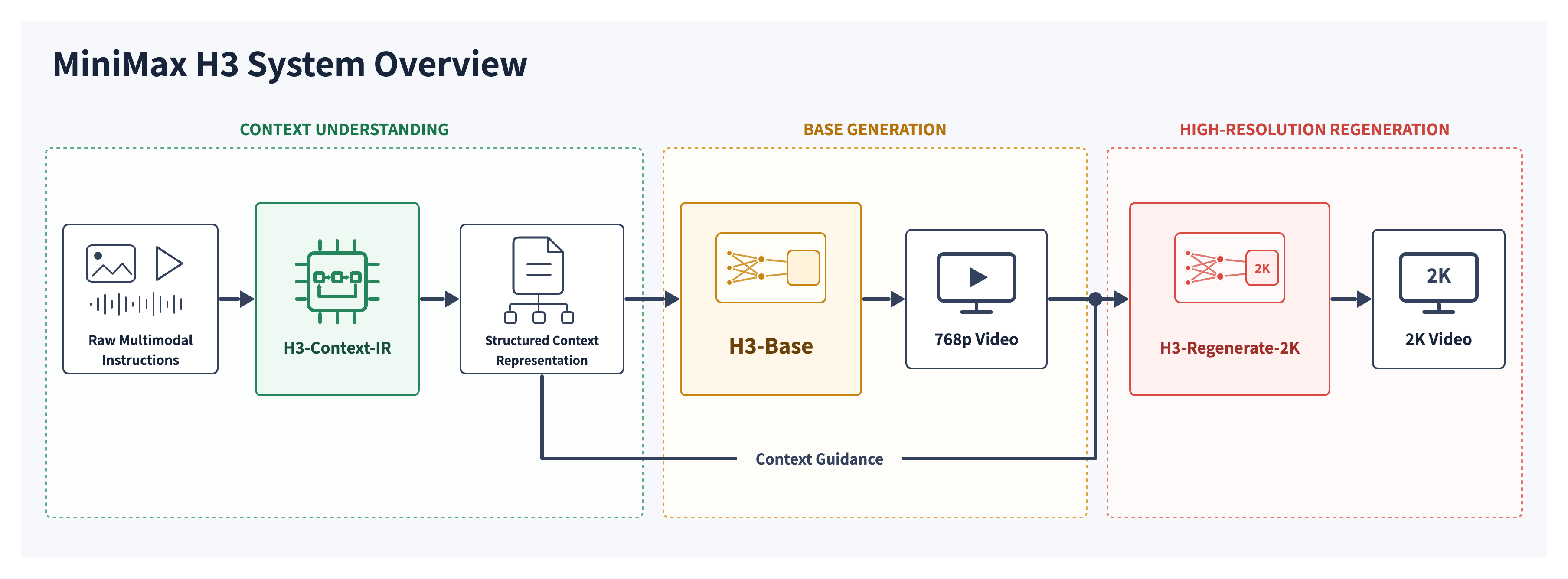
This leads to a direct consequence: the step in the official link that rewrites the plain language into a structured description is not available locally. REF2VA relies on a six-paragraph English description, which you have to write yourself. Later, I’ll explain how LocalBrain helps you get started.
Why does MiniMax want to open-source this model, and what is it after? Just look at how it cuts the mold. What is released is the 33B generative model itself, which can be directly deployed by SGLang, vLLM, diffusers, and ComfyUI; The two segments that most affect the final quality are Context-IR and 2K regeneration, which are left on the interfaces of their own open platforms. The official 2K reproduction process also requires adjusting its interface. My understanding is: open authority takes the ecosystem, the full effect remains on the platform, and neither side is affected. The local path costs you yourself: machines, electricity costs, and waiting times, a 3-second video takes 7.5~10 minutes; In exchange, images are not uploaded and no automatic review in the hosting chain.
▍How to test this time
- Machines and Software: M5 Pro, 64 GB of unified memory; mlx-serve 26.8.4; ddalcu converted REF2VA 8-bit package, total 69.3 GB.
- Fixed Parameters: 960×544, 73 frames per second (3.04 seconds), 30 steps, 42 seeds, cache enabled.
- Description: Write each group’s reference image separately. Photos 0 and 1 are the same scene (slowly walking in the wooden corridor, smiling back), and can be directly compared; Photos 2 are taken to the room in the reference image and turned around to bow; Photos 4 are taken holding the bull head and placed next to the development board.
- Request path: The test script directly calls LocalBrain’s video bridge layer, and both the interface and MCP pass through this layer at the end. The interface also checks through each item to confirm that the parameters it gives (reference graph order, 30 steps, no turbo) match the test request.
- What to record: the time taken from sending the request to receiving the video, and the maximum memory reduction available during generation; Each video is evenly sampled at 6 frames and viewed one by one, checking whether features in the image appear on the reference.
What can’t be proven this time is clear: each group only ran once, so the seed is fixed, which doesn’t prove the success rate; 3 seconds is shorter than the official 4-second minimum to keep each group under waiting time, so the official shot recommendation is over 4 seconds; No more than 4 images were tested, nor other resolutions; The sound only matched specs (32 kHz stereo and image length), so whether it sounds good isn’t the conclusion this time.
▍0, 1, 2, 4 reference images: Display the results as they are
| Reference image | Time-consuming | Much more than pure text | Memory reduction | What appeared in the scene? |
|---|---|---|---|---|
| 0 sheets (plain text) | 446.6 seconds | — | 29.1 GB | An ordinary Hanfu woman, whose face has nothing to do with the reference image |
| 1 photo: People | 491.1 seconds | +10% | 34.0 GB | High bun, floral hairpin, off-white embroidered outer robe, teal inner skirt, orange tie all included—her face shape is close |
| 2 cards: Characters + rooms | 501.9 seconds | +12% | 34.8 GB | The room is almost a direct copy of the second image, with the characters from the first image, turning, bowing, and walking according to description |
| 4 cards: Character + Minotaur + Room + Development Board | 601.8 seconds | +35% | 38.4 GB | All four were present: she held the ox’s head and placed it beside the development board, then looked up and smiled |
Memory reduction is the maximum amount of memory available during generation. All four videos are at 960×544 fps, 73 fps, and each has a 32 kHz stereo audio track.
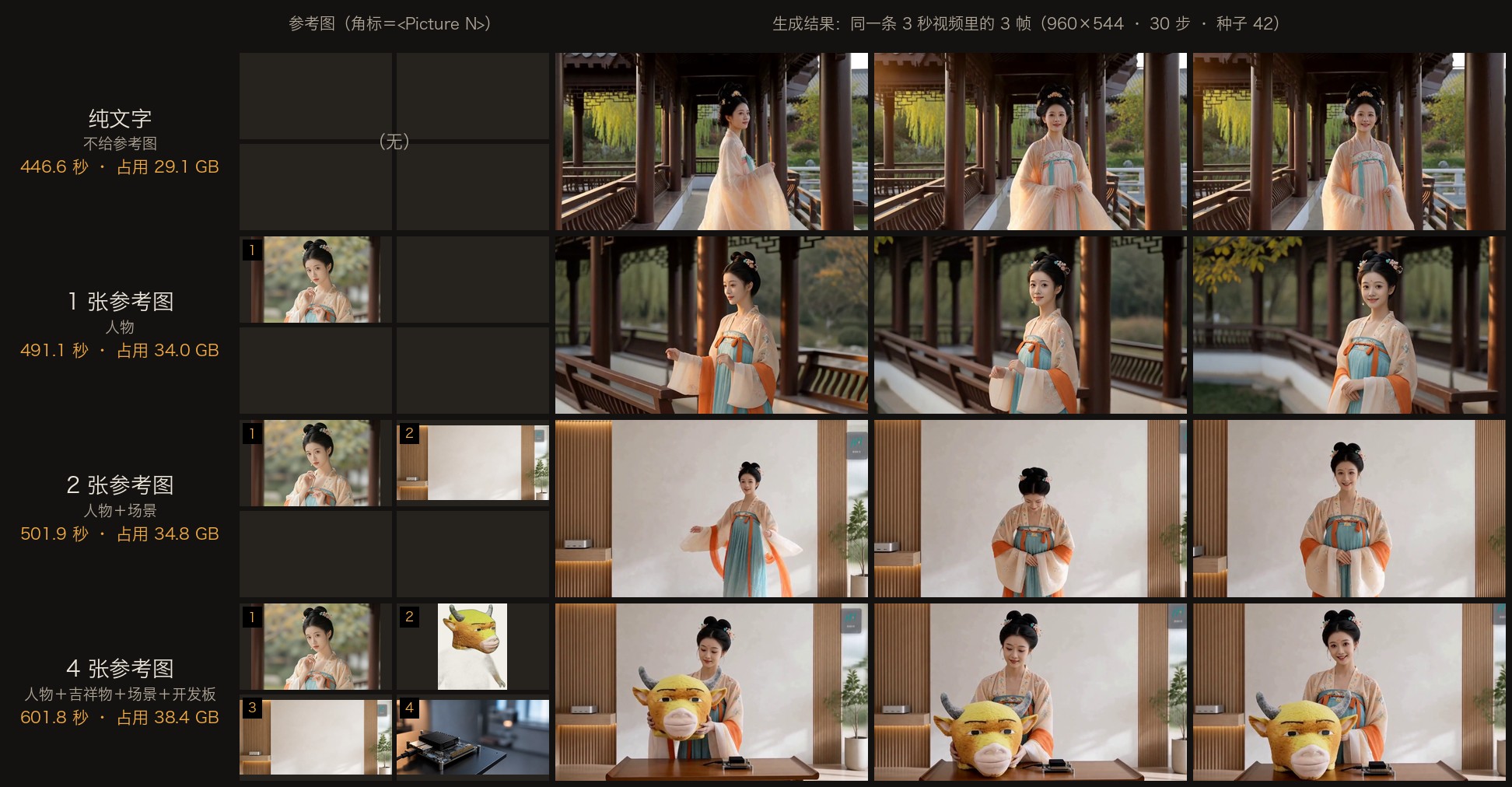
The most direct are the first two lines. In the pure text set, the description only says “pale peach-colored Hanfu, wooden corridor,” and the model is given to a standard Hanfu woman, which looks good but is different from the reference image. Add one portrait: the flower hairpin on the bun, the embroidery on the outer robe, the teal-green inner skirt, and the orange tie all match; The face shapes are similar, but if you look closely, the features still differ, but not exactly identical.
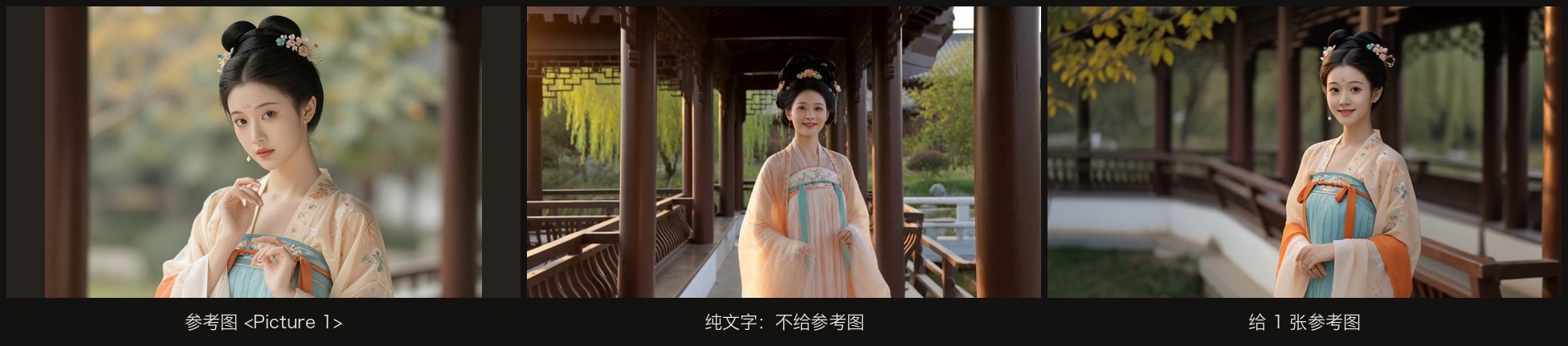
One thing to clarify: according to the official format, the character definitions in the group of images in one image also include the hairpin, flower hairpin, teal-green inner skirt, and orange tie in text, so the matching of the costumes isn’t entirely due to the illustration; The face shape, hairpin style, and the embroidery on the outer robe can only be taken from the picture.
Why do more reference images slow down? The official architecture diagram is very clear: the reference images first pass visual encoding, then are arranged into the same sequence along with the text, and then fed into the 33B Transformer along with the video and audio to be generated. The longer the sequence, the slower each step becomes.
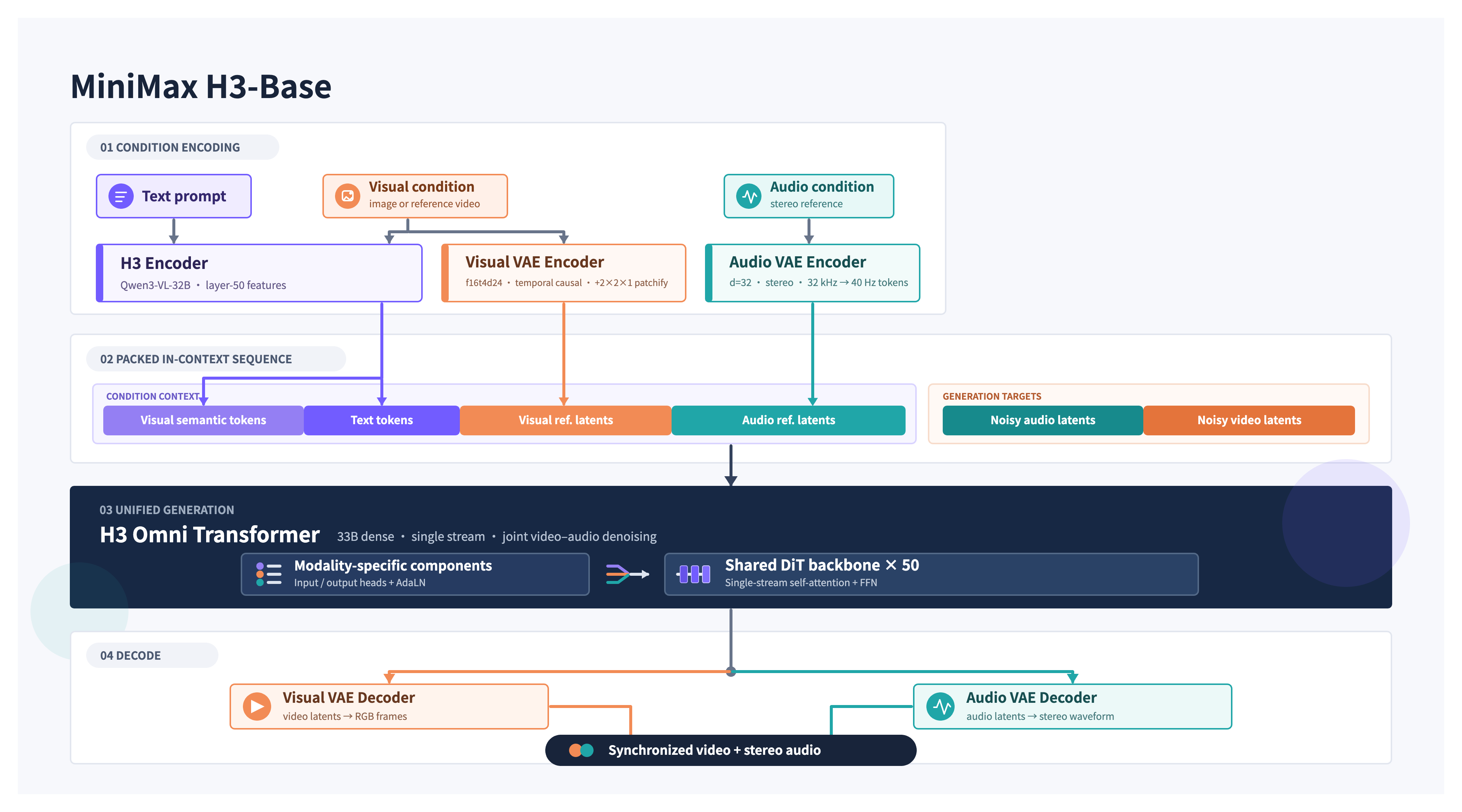
Local logs quantified this: each reference image had an extra 384~512 rows in the sequence, totaling 1908 rows across 4 images. In the 30-step sampling, accelerated caching directly reused 13~14 steps, which only took a few milliseconds; Another 7 steps only reused attention. For the complete calculation step, plain text took 31.6 seconds, 4 images took 47.6 seconds, an increase of 51%; The multi-step multiplexed steps were almost unaffected, so the total time only increased by 35%.
For memory, load the text encoder (the 8-bit version of Qwen3-VL-32B, resident 26.57 GB), release immediately after encoding, then install DiT (resident 20.46 GB), with neither occupying simultaneously. The official says 33B is about 13B in the AdaLN modulation branch, so you can calculate before uninstalling it during inference. The local logs show a line saying “13B modulation weights released.” The reference image lengthens the sequence, and the middle result during sampling increases. The four images push the available memory reduction from 29.1 GB to 38.4 GB.
▍It will copy exactly what you want and what you don’t want
For the two images in the group, I originally only wanted to borrow the room’s white wall and wooden strips. But the silver mini unit on the left shelf and the logo sign in the upper right corner all appeared in the generated screen. The logo graphics were saved, but the four small characters “HyphenTech” below blurred into unrecognizable strokes. I didn’t mention a single word about these two items in the description.
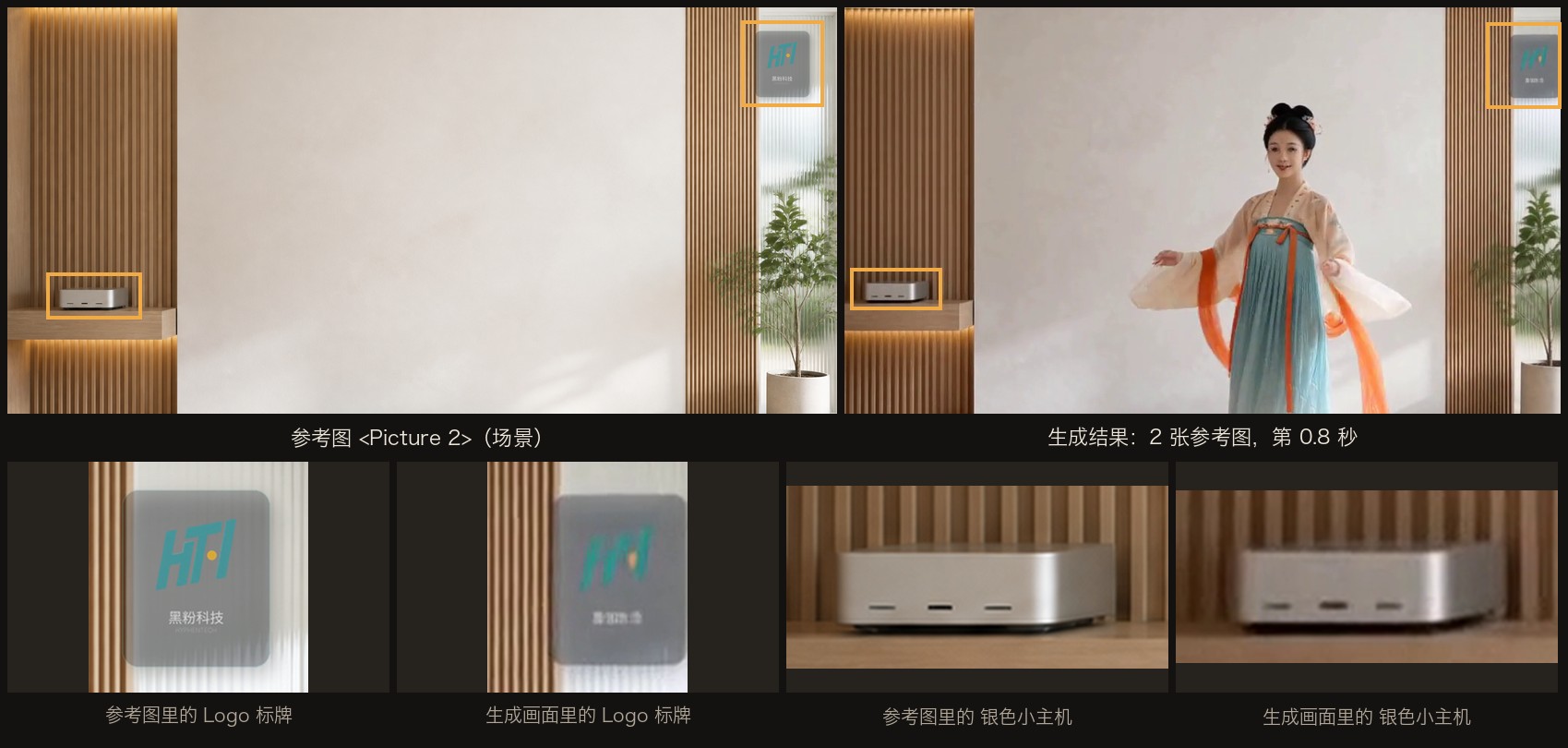
Copying is exactly REF2VA’s main job: whatever is in the reference image, it tries to keep what it wants. The official writing guide divides retention levels into four levels: full retention (fully_preserved), partial retention (partially_preserved), feature migration (attribute_transfer), and weak reference (weak_reference), all clearly stated in the description. All my groups wrote full retention, and the result was indeed not missed; replacing with weak references would reduce how much would be copied, but I didn’t test this time.
Three usages:
- **For things you don’t want to appear, crop them out from the reference image first. **Logos, watermarks, text, and passersby all count; logos not mentioned in the description are still brought in;
- **Reference images don’t need to be large. **On the inference side, only scale according to target size: 768×512 is used as is, 1920×940 is reduced to 1024×512, 824×1031 is reduced to 640×800, and no matter how large the image, it won’t add extra detail;
- **Order is the number. **The first card is
<Picture 1>, and the description uses the number to indicate it, so swapping the order is equivalent to changing the role.
▍Why doesn’t Turbo turn on?
The FL2VA package includes a Turbo LoRA, which can produce images in 4 steps, making it the default for both frame models and the frames. The official REF2VA package doesn’t include it, and mlx-serve’s code only enables Turbo for models that don’t support reference images, with a note stating that LoRA hasn’t been validated on REF2VA. So I’ll do a verification: temporarily put FL2VA’s Turbo LoRA into the REF2VA directory, run 4 steps using one reference image and the same seed.
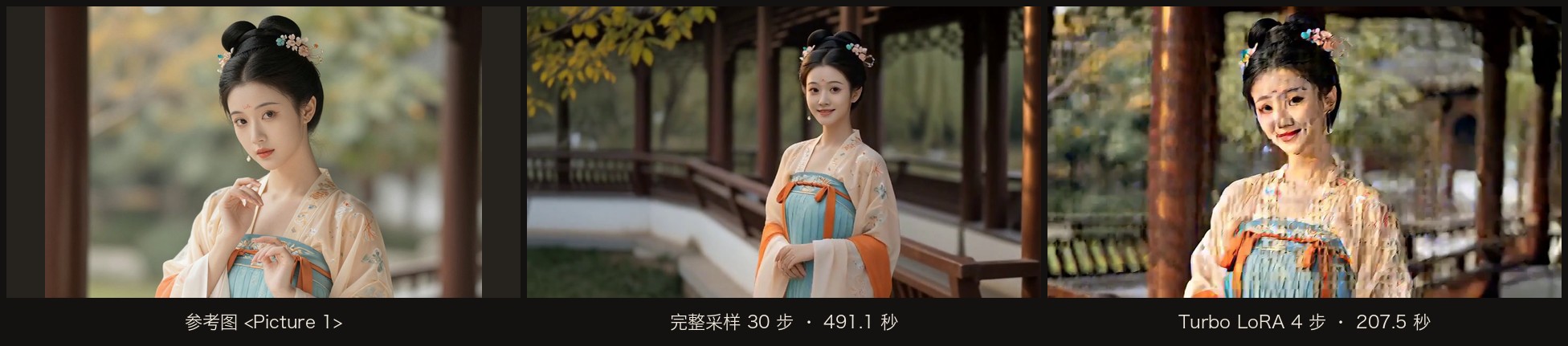
207.5 seconds, 2.4 times faster, but the image was unusable: the screen was full of block artifacts and color block noise, facial spots appeared, but only the hairpin and color scheme were still recognizable. So LocalBrain’s rule was: only if the package contains Turbo LoRA and it does not declare ref2va is Turbo provided. Even if someone copies LoRA files into the REF2VA directory, the interface will not automatically check the box and write the reason next to the box. After testing, I restored the directory to the original 15 files upstream.
▍How to use it in LocalBrain
This is your first time hearing about LocalBrain, so you can first check out the introduction . If it’s already installed, the app will prompt you to update to 1.2.65.
- **Download the model. **On the ‘Discover’ page, find ‘MiniMax H3 REF2VA · Multiple reference images.’ The whole pack is about 69 GB, with the card rated as GiB at 64.5; minimum 64 GB, with 96 GB of memory recommended.
- **Open the workbench. **In the dialog box, enter
/工具Open ‘Local Multimedia Tools’, switch to ‘Video Generation’, select REF2VA for the model, and select ‘Multiple Reference Images (People/Style/Scenes, up to 9 images)’ for ‘Generation Mode’. The original four methods for the first and last frame models are unaffected. - **Add reference images. **Click “+ Add Reference Image” to select multiple PNG or JPEG images at once. The thumbnail angle marker is
<Picture N>, ← → the order of adjustment, ✕ delete; duplicates or more than 9 images will prompt “N images skipped.”
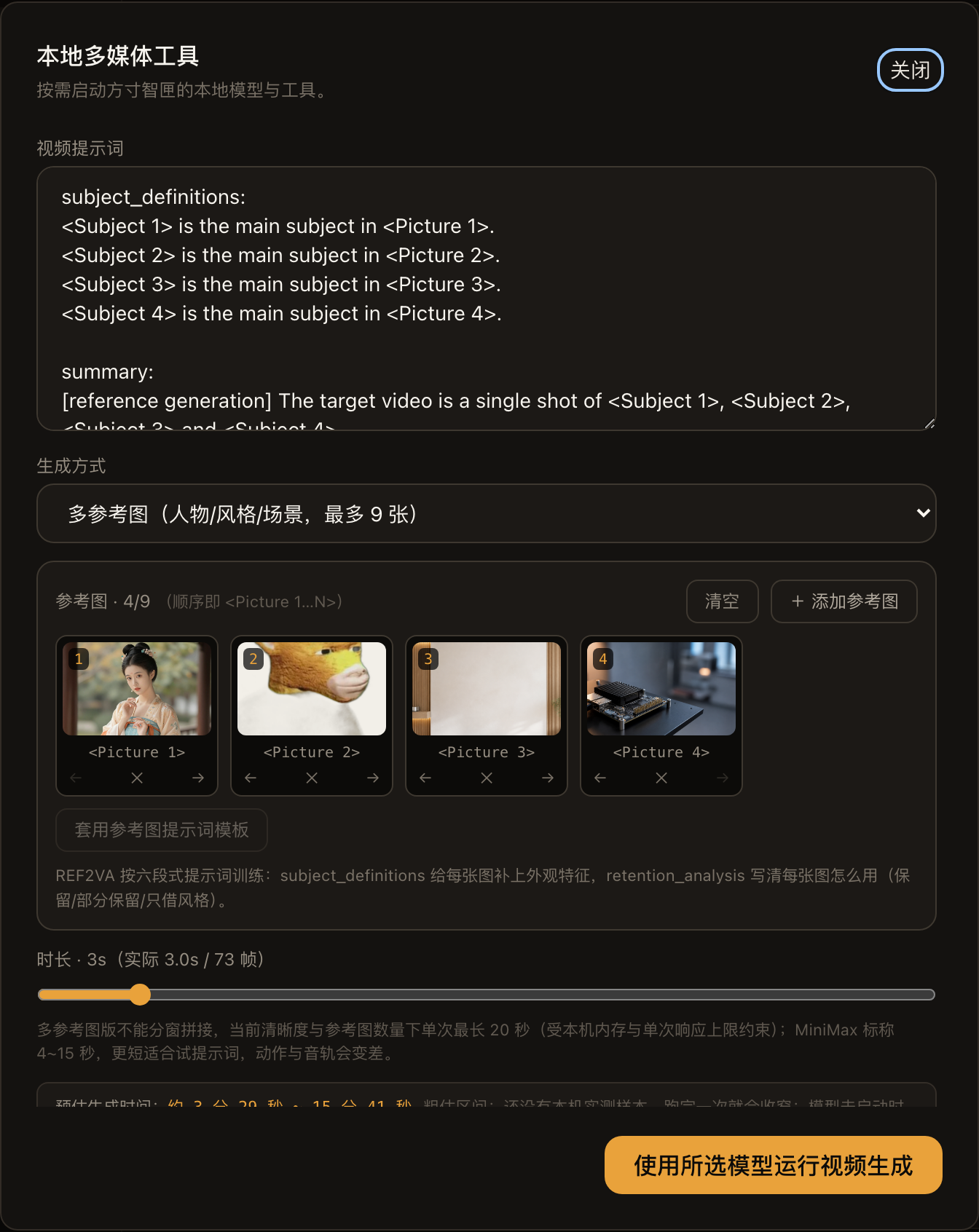
- **Write a description. **First, write the image you want in one sentence, then click ‘Apply Reference Image Prompt Template’: LocalBrain Generate a six-section framework, with one image taken for each image first
<Subject N>, put in the line you wrote[Shot 1]. The rest is to add appearance features to each Subject; the official recommendation is to use all English characters. Below is the original text for the group of four images; you can follow and modify accordingly:
subject_definitions:
<Subject 1> is the young woman in <Picture 1>, with black hair in a high bun decorated with small floral hairpins, a pale peach Hanfu robe over a turquoise inner skirt and an orange sash.
<Subject 2> is the plush yellow bull mascot head in <Picture 2>, with fuzzy golden fur, short curved grey horns and a cream muzzle.
<Subject 3> is the bright minimal studio in <Picture 3>, with a plain white wall, vertical light-wood slat panels and a small potted plant.
<Subject 4> is the small black single-board computer with a finned heatsink in <Picture 4>.

summary:
[reference generation] The target video is a single shot of <Subject 1> in <Subject 3>, holding <Subject 2> and setting it down on a desk beside <Subject 4>.

retention_analysis:
<Subject 1> (appears in [Shot 1]): fully_preserved - her face, high bun with floral hairpins and pale peach Hanfu robe are retained.
<Subject 2> (appears in [Shot 1]): fully_preserved - its golden fur, grey horns and cream muzzle are retained.
<Subject 3> (appears in [Shot 1]): fully_preserved - the white wall, light-wood slats and potted plant are retained as the setting.
<Subject 4> (appears in [Shot 1]): fully_preserved - the black board and its finned heatsink are retained.

detailed_description:
The target video is in a realistic cinematic style with soft natural light.
[Shot 1] A medium shot frames <Subject 1> in <Subject 3>, holding <Subject 2> against her chest with both hands. She steps to a low wooden desk, sets <Subject 2> down beside <Subject 4>, then looks up at the camera and smiles as the camera slowly pushes in.

overall_soundscape:
Quiet room tone, soft footsteps, the rustle of silk and a light soft thud as the plush head is set on the desk.

non_diegetic_music:
N/A
The official recommendation is detailed_description to write 350~500 English words; mine only has about 60 words, which is enough for a simple single shot. If writing English is tiring, you can install the official MiniMax h3-prompt-writing skill into Claude Code or Codex, and have it write according to the official Ref2VA writing guide. After writing, copy it back:
npx skills add https://github.com/MiniMax-AI/MiniMax-H3 --skill h3-prompt-writing
- **Check the estimate before running. **Use 3~4 seconds for the most efficient description, then extend the final version. The official claim is 4~15 seconds; LocalBrain calculates the maximum single time for this machine at 960×544 based on local memory and the maximum response limit of 20 seconds. The default step count is 30, the maximum is 50, and the Turbo turns gray with the reason explained.
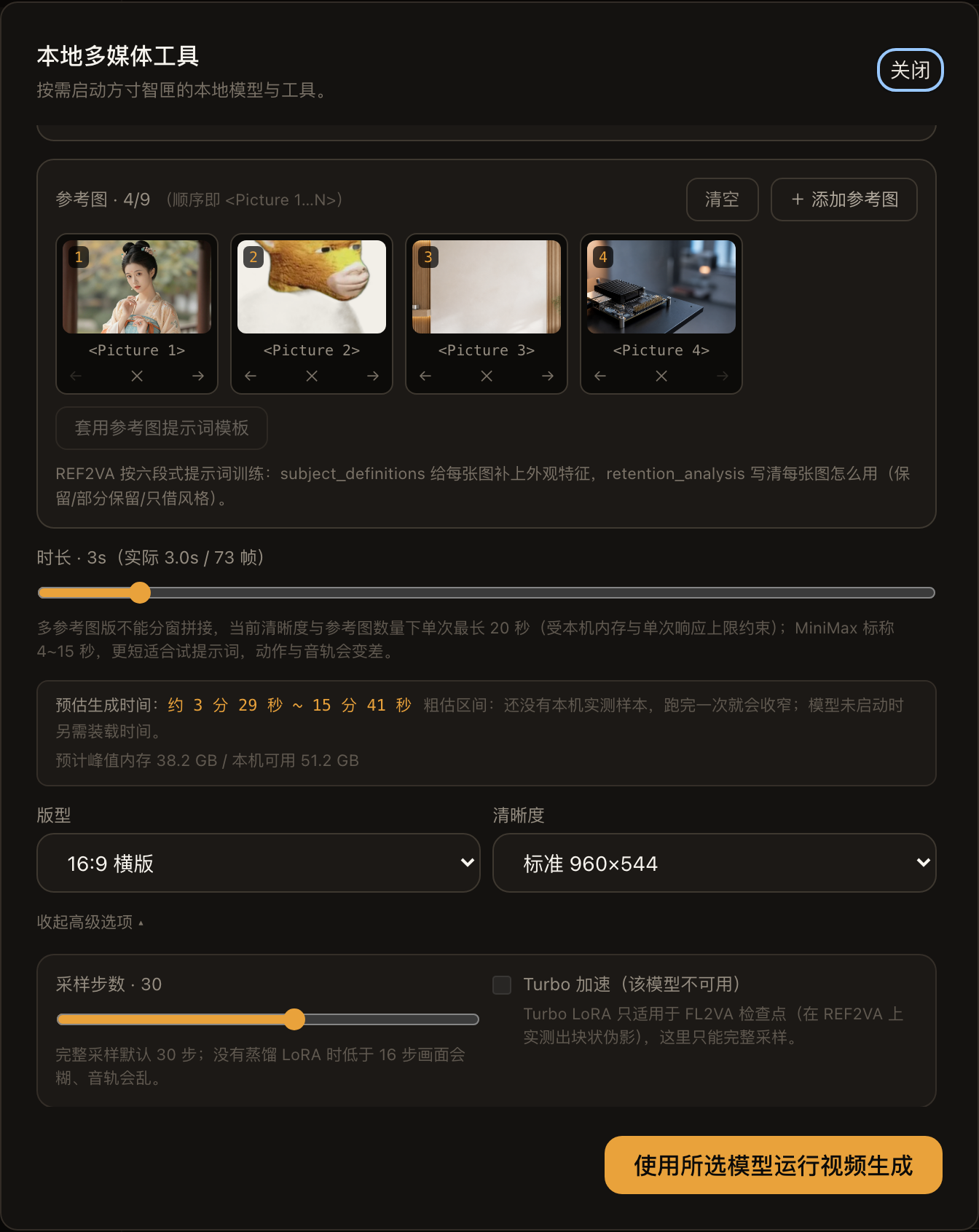
The first time I ran it, the machine didn’t have such samples yet, so the estimated range was wide: the set of four images showed 3:29~15:41, but the actual measured time was 601.8 seconds within the range; After running once, I narrowed it according to the actual test on the machine. 1.2.64 borrowed Turbo’s estimation benchmark here, estimating 3-second video as 41~187 minutes. 1.2.65 changed it to use sampling methods to separate benchmarks.
The peak memory of 38.2 GB was calculated before generation based on this request. The budget is the smaller of the two: 80% of the unified memory, or the total is minus 2 GB and then subtracting other running backends. This 64 GB machine has 51.2 GB. If it can’t fit, turn off the acceleration cache first; if not, refuse before loading and explain the reason, so the memory won’t burst halfway.
- **Let AI do the work. **LocalBrain also adds
ref_imagesparameters to the MCPgenerate_videotool (local image path, up to 9 images). Clients like Claude Code and Codex can directly upload reference images after connecting. The parameters have been integrated into the bridge layer, but this test did not run the MCP client end-to-end.
▍Cost and Boundaries
- Time: 3-second video, 7.5~10 minutes (0~4 reference images); longer videos were not tested this time. 8-bit saves memory, not time: The model card specifies this task is stuck in computing power, with a weight of about 192,000 floating-point operations per byte.
- Memory: 64 GB is the only level I’ve tested; in 4 images, the available memory dropped by 38.4 GB. Other memory settings are determined by LocalBrain according to the above budget; With this algorithm, machines with less than 48 GB of memory can’t fit the loading step.
- Disk: REF2VA package 69.3 GB, with each frame model at the beginning and end.
- Resolution: Only native H3-Base, official default short side 768; 2K regeneration not open source.
- Description: No official Context-IR rewrite for you; you have to write the six-paragraph format yourself. Templates and official skills can help.
- Input: Officially supports reference videos (up to 3 segments) and reference audio (up to 3 segments). This version of LocalBrain only accepts reference images.
- License: MiniMax H3 Community License. According to the mlx-serve model card, the licensing region does not include the EU, UK, South Korea, or the US. For commercial use, first read the original text of License.
Summary: On a 64 GB Mac, local multi-reference image videos can be used, but the price is time Use all 4 reference images, and you can keep the characters, rooms, and props; A 3-second video takes 7.5~10 minutes, with up to 38.4 GB of available memory, and details in the reference images will be copied directly. Suitable for those with Apple Silicon over 64 GB, who want characters and scenes consistent and don’t want to upload images to the cloud. If you want 2K shots, batch output, or less than 48 GB of memory, don’t rush to get involved. My suggestion is to start with one person image and 3~4 seconds to describe it, then add scenes and props when satisfied.
Tip Download page: https://github.com/HackerChi-Hub/localbrain-releases/releases Model Card: https://huggingface.co/ddalcu/MiniMax-H3-REF2VA-MLX-Serve-8bit Official Warehouse: https://github.com/MiniMax-AI/MiniMax-H3
🧰 Tools I build
I maintain all of these tools myself. Preview builds are clearly labeled; the release pages are the source of truth for downloads, updates and known limits.
Info: HyphenBox Status: Official releases
A radar for free LLM APIs: availability is re-tested continuously, one local interface for all of them, and keys stay on your machine
Info: LocalBrain Status: Official releases
A multimodal MCP toolbox for local models: TTS, Whisper and video generation in one place
Info: ScreenLex Status: Official releases
Learn new words while you watch shows. Free, for Mac and Windows
Info: HyphenScreen Status: Official releases
Screen recording and smart editing in one: a DaVinci-style timeline, automatic redaction and a check of the finished video before export. Free
Quote: HyphenTech Make AI your superpower Local deployment · Free resources · Self-made software https://hyphentech.top
Late nights and burned API credits went in,a cup of tea comes back out — only if you feel like it.
Scan with WeChatPress and hold to save the image, then open it from your album in WeChat Scan

Comments
Loading comments…