
Info: Machine translation This post was machine-translated from the Chinese original. Wording may be rough in places — the Chinese version is authoritative.
Summary Models, warehouses, software, workflows Four-piece set + three ideas you can copy directly Broken down from Greg Isenberg’s podcast · 2026-09-15

Last week, Greg Isenberg released a 38-minute solo podcast called “Local AI Clearly Explained.” I listened from start to finish, going back three times to listen to the same sentence.
Most people ask, “Is this model smarter than the strongest model in the cloud?” The question is—is it good enough for this job? Running on my own machine, will it make the product better?
—— Greg Isenberg
Once the question changes, the whole matter takes on a different nature.
I casually checked the official model card for the Gemma 4 to see what level the “old laptop” really was. The result was this: **The E4B uses about 4.5 GB of memory at 4-bit quantization; The smaller E2B uses about 2.9 GB. ** A 2021 laptop with 16 GB of RAM is more than enough to run.
That machine gathering dust in a drawer—configuration has never been a problem. **It’s that we never thought about what it could do. **
What exactly is “local AI”? It can be summed up in one sentence
**Local AI = the model runs on hardware you can control. ** That’s all there is to it, nothing else. This hardware can be a MacBook, Windows laptop, Android phone, iPhone, browser, Raspberry Pi, or the workstation in the office.
Cloud AI = the model runs on someone else’s place; you access it via a web page or API. That’s the only difference.
To put it into a less rigorous but very useful example: cloud AI is like sending your family’s ledgers to an accounting firm—they’re professional, but the books have to be sent out; Local AI hires an accountant to sit in your living room, a bit less skilled, but the ledger has never left your home even once.
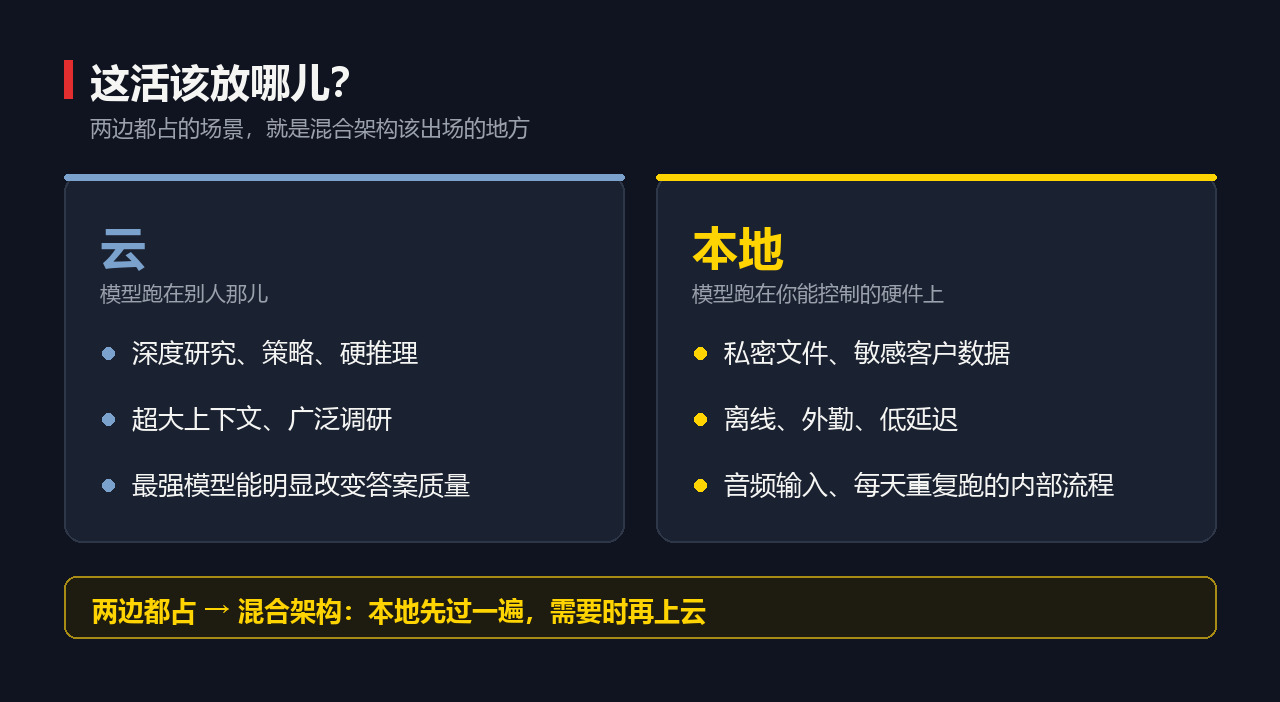
| It should be used | It should be local |
|---|---|
| In-depth research, strategy, hard reasoning | Private files and sensitive customer data |
| Extensive context and extensive research | Offline, fieldwork, low latency |
| The strongest model can significantly change answer quality | Audio input and daily repeat of internal processes |
Scenarios occupied by both sides are where hybrid architectures should step in
Four-piece set: Just remember this map
This time, I’ll split the entire space into four parts. I think this is the most valuable structure in the whole film, more effective than any recommended tool.
- (1) Model — Brain files. Gemma, Llama, Qwen, and Mistral are all families, not individual models
- (2) Warehouse — Where to find models? The answer is Hugging Face: model cards, licenses, formats, benchmark scores, quantized versions
- (3) Software — For most people, there are only two who are responsible for running the model: LM Studio and Ollama
- (4) Workflow — The product you create around the first three items
The first three items are all parts, the fourth is the business. The last three ideas all grow on this one.
Important $13 billion — Nvidia’s acquisition of Hugging Face Officially announced on 2026-09-03, including up to $1 billion in employee retention equity packages
While recording this issue, Greg said, “I remember Hugging Face is currently being acquired for $13 billion.” This has already been finalized, and it’s the second largest acquisition in Nvidia’s history.
Important The “warehouse” layer of the four-piece set was bought by the hardware company.
Demolition mechanism: These numbers determine whether you can get on board
The concept sounds good, but it only counts when it comes to the machine. The numbers below come from Google’s official model card and do not include contextual overhead.
| Model | Positioning | BF16 | 8-bit | 4-bit |
|---|---|---|---|---|
| E2B | Mobile / Edge / Browser | 11.4 GB | 5.7 GB | 2.9 GB |
| E4B | The most practical tier for starting locally | 17.9 GB | 8.9 GB | 4.5 GB |
| 12B Unified | Notebook | 26.7 GB | 13.4 GB | 6.7 GB |
| 26B A4B | Each token activates 4B of MoE | 57.7 GB | 28.8 GB | 14.4 GB |
| 31B | Server-level / local workstations | 69.9 GB | 34.9 GB | 17.5 GB |
Small model context window 128K, medium 256K; E2B/E4B/12B natively support video and audio
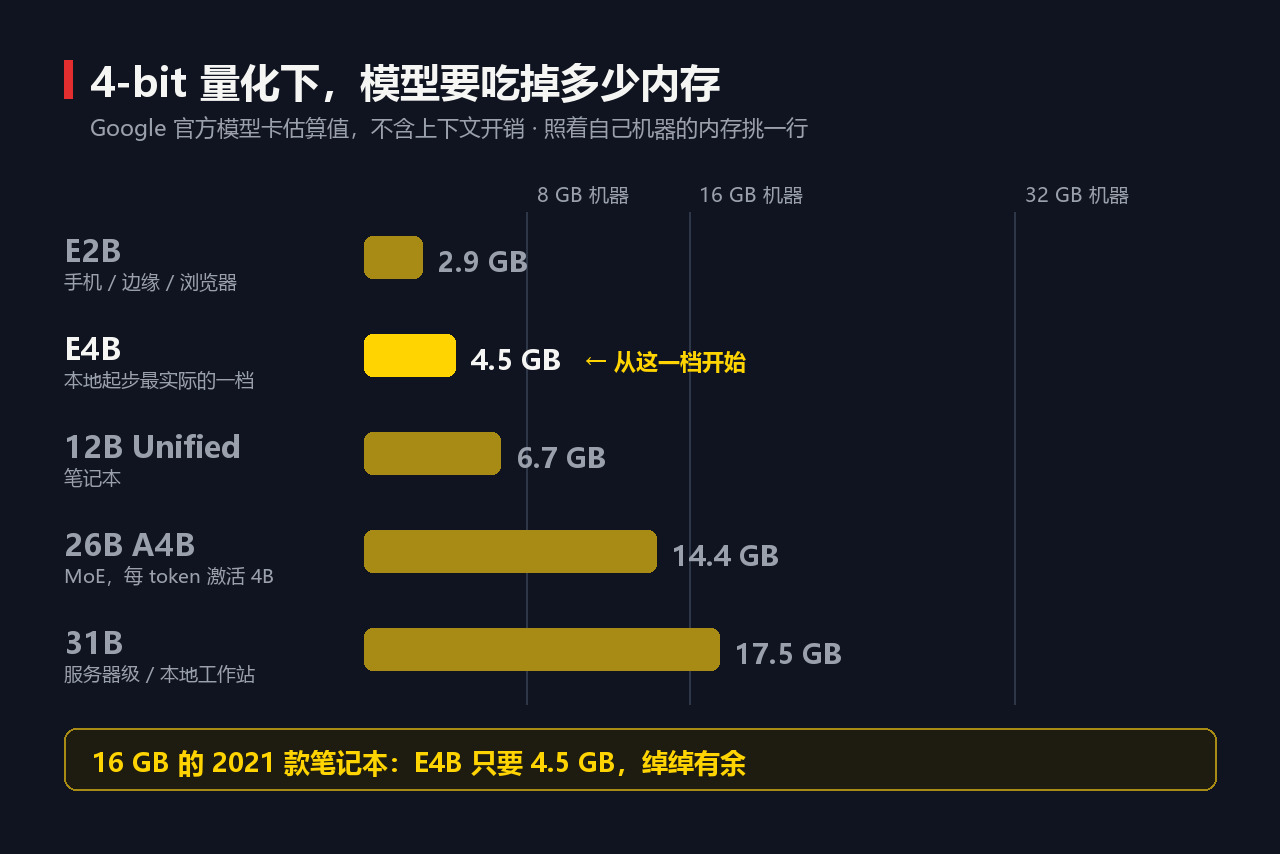
Compare memory: 8 GB, honestly starting from the smallest one; 16 GB, E4B quantitative models can produce useful things; 32 GB, larger workflows have more space; With powerful GPUs or workstations, those big machines become realistic.
There is another layer many people don’t know: dedicated models
- EmbeddingGemma: Turns text into vectors, letting you search your documents and work orders by definition. 308 million parameters, under 200 MB of memory after quantization, supports over 100 languages
- FunctionGemma: Structured function call that changes “The model gave me an answer” to “The model lets the software do the next step.” There are already 270m fine-tuned versions working on offline device control
- Additionally, there are visualization, security filtering, and interpretability
Tip On the first day, you can ignore all of this for now. Start with E4B, run a workflow, then move it.
Pour some cold water on it: this isn’t that beautiful
Warning This podcast is sponsored by Google. Greg himself said this 57 seconds into the show, and he’s very open about it. But the result is that the whole video focuses on Gemma and Google’s on-device toolchains. The four-piece framework is unrelated to the vendor—use it as is; Decide which model to choose, you have to compare it horizontally.
** The question of “is enough” depends on testing, not trust. ** The method is simple: for the same 10 materials, run one using the local model and the other with the cloud frontier model, then look at them side by side—did the local one catch the same problem? Are the quotations correct? Is the format preserved? What is missed?
This comparison will directly tell you where the dividing line is. **If you say “local is enough” before running this round, that’s faith, not judgment. **
There are also a few points that are Greg’s personal judgments and not facts: for example, “these industries are still using software from the early 2000s,” which comes from the system he saw when his own home leaked; for example, “there is a 24-month window period,” which lacks data support; or he said Microsoft’s Phi series “I haven’t seen it run well in many scenarios,” without providing test conditions. It’s acceptable to listen to opinions but not to use them as evidence.
As for myself—I haven’t done the actual benchmark scores on that old laptop yet, but after running them, I’ll release a separate issue listing the first token latency and throughput together. Before that, these numbers are official standards, not my actual tests.
Who is laughing, who is crying, who is silent
Info: Who profited Hardware sellers. Nvidia spent $13 billion to buy a model repository, not for charity—when computing power returns to devices, whoever sells the device makes a living. Those doing on-device runtimes also make money: Google expanded LiteRT-LM from Android all the way to Swift API and JavaScript API, and AI Edge Gallery is now available on macOS. This isn’t a casual demo—it’s a legitimate channel setup.
Info: Who lost out? The portion of cloud revenue charged by tokens — high-frequency, repetitive, and reasonably difficult batch processing is the first to run away. There are also those vertical industry software interfaces stuck twenty years ago: the moat changed from “your data is with me” to “whose review list is more accurate,” and the list is something one person can create by interviewing ten customers.
Info: Who remains silent? The pay-as-you-go side. They have no motive to tell you which tasks shouldn’t be uploaded at all.
Important The silent side’s position is often the conclusion.
This isn’t the first time computing power has gone backward. Mobile photography has gone the same way: in the early days, photo editing had to be uploaded to the cloud, but later the entire computational photography system was stuffed back into the ISP and NPU on the side of the device. The reason for dragging computing power back then is exactly the same as today’s—latency, privacy, high frequency. The difference is that the photography model is preset by the manufacturer, so you have no choice; this time, the model can be downloaded, replaced, and you can choose it yourself.
Three ideas, just copy them directly
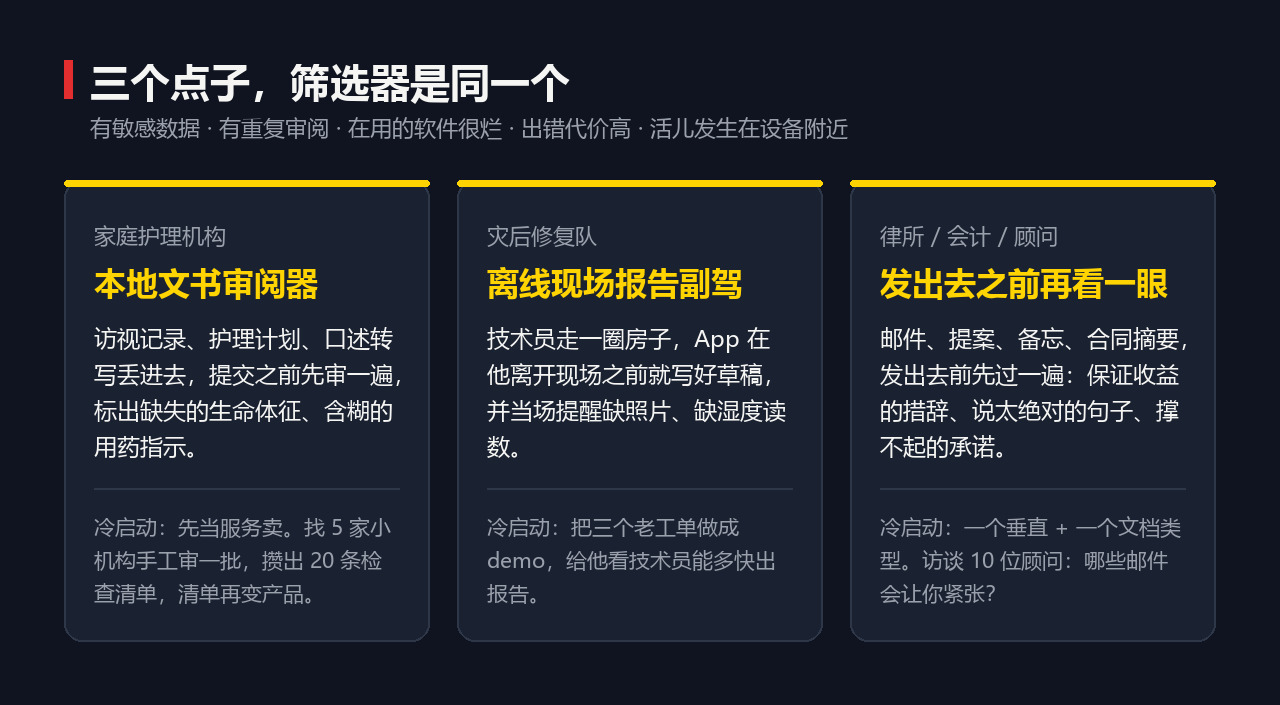
First, give the filter, which is more important than the idea itself: **Find a type of customer that meets all five criteria—sensitive data, repetitive review work, terrible software in use, high cost of errors, and work happening near the device. ** Where all five criteria are together, that’s the interesting area.
Idea 1: Local document reviewer for home care agencies
Nurses and caregivers come to your door, and when you return, you have to write visit records, update care plans, handle billing, and ensure compliance. If you miss a detail, billing is delayed; if records are vague, it’s extra administrative work; if visitation and care plans don’t match, that’s risk.
The first version was made into a local desktop application for institutions: insert the records, nursing plans, and oral transcripts, review them before submission, and mark them — “This record mentions dizziness but lacks vital signs,” “The caregiver wrote about medication changes, but subsequent instructions are unclear,” “This record may not support the declared service level.”
Tip How to cold start: Sell as a service first, don’t start with a product. Find five small agencies and help them review a batch of records, run them locally but manually review them first, noting down the 20 recurring issues. These 20 questions become a checklist, which then turns into a product.
Idea 2: The post-disaster recovery team’s offline on-site report to the front passenger seat
For tasks like flood, fire, and mold treatment, technicians take photos on site, record voice messages, document damages, and finally report to the homeowner and insurance claims adjuster. This work is visually and physically demanding, and is far from the desk.
The first version was made into a mobile app: the technician walked around the house, and before he left the site, the app would draft the report and remind them on the spot—“You mentioned the basement, but there are no photos of the basement,” “You took photos of ceiling damage, but no hygrometer readings.”
There’s another seriously underestimated point: **“The explanation to the homeowner is too technical; it’s a version he can understand.” ** The house is flooded, and people are at their most irritable. To be clear, it’s part of the product itself.
Tip Demo is extremely easy: send me three senior worker orders, and I’ll show you how quickly your technician can produce a report.
Tip 3: Professional service—“Take another look before shipping”
Law firms, accountants, wealth advisors, headhunters, consultants—almost every firm does the same thing: someone writes client emails, proposals, memos, contract summaries, then asks someone else to take a look before sending them.
- Wealth advisor: The label sounds like the wording “guaranteed returns”—this is a red line
- Law firm: Refers to sentences that are too absolute
- HR: Mark employee information that should not appear in this thread
- Agent: Mark commitments that the contract cannot support
- Accounting: Numbers that do not match markers and attachments
Greg called this schmuck insurance and casually gave a domain name saying, ‘You should take it.’ **Why does it sell so well? **Because the buyer is already doing this. You’re not educating the market; you just give them a faster first round, and this one is closer to their customer data.
Tip Cold start: one vertical + one document type. Only do “independent wealth advisor email reviews,” avoid big banks just yet. Interview 10 advisors and ask a particularly specific question—which emails make you nervous?
The thing I can do tonight
Even if you don’t plan to do a single idea, this set is worth learning because it will change the way you handle your own documents.
Create a folder on your desktop and throw in 10 items that truly matter to your work—sales call records, meeting minutes, old idea notes, customer work orders. Then have the local model produce a file: a weekly business pulse, or “What exactly changed in the customer conversation,” or regrouping feature requests by the real pain points behind them.
Important What you want is a file, not a conversation. Answers in the chat window are gone when closed; only reusable products truly change workflows.
After a round, it goes like this: model reads folders → models write files→ you check → you change workflows → run again. After a few rounds, you start to notice two things: which private data is trapped in folders and can’t be exited, and which review actions you repeat every week.
Get started with the steps, follow the order
| Path | Whoever it suits you | Key moves |
|---|---|---|
| LM Studio | No code written at all | Search for Gemma 4 → machine, choose E4B or old E2B → choose the quant version → chat directly; Then open the local server in the developer area |
| Ollama | It can type two lines of command | ollama pull gemma4; ollama run gemma4:e4b; The local API is on port 11434 |
| Google AI Edge + LiteRT-LM | To make a real app | The model is installed on a mobile phone/browser/desktop/edge device |
The third path is from “local AI is a demo” to “local AI is a product.”
Don’t type “Hello” in the first sentence—it’s a waste. Go straight to the business prompt: Read these customer records and turn them into a one-page memo—why is the customer worried, what’s changed, which issue the company should fix first this week. Then paste a batch of real work orders in. At that moment, you’ll realize: Not a single word of this prompt was ever sent. **
Once you stop treating local AI as a “benchmark comparison” but as a “product conversation,” this becomes easy to understand.
—— Greg Isenberg
There are only five questions to ask yourself: **Where does the work happen? Where is the data? Where is the equipment? Where is the trust issue? Where is that annoying review cycle that repeats every week? ** After answering these five questions, the idea comes from yourself, not from your own ideas.
Summary: In short As for that dusty laptop—just 4.5 GB. It’s always been enough, just never let it work.
Original video: Greg Isenberg “I’m Obsessed With Local AI. Here’s Why,” 38 minutes 46 seconds, released September 8, 2026, this issue sponsored by Google. Model parameters, memory usage, and context windows are from the official Google AI for Developers model card; Hugging Face acquisition data comes from Bloomberg and CNBC reports on September 3, 2026.
🧰 Tools I build
I maintain all of these tools myself. Preview builds are clearly labeled; the release pages are the source of truth for downloads, updates and known limits.
Info: HyphenBox Status: Official releases
A radar for free LLM APIs: availability is re-tested continuously, one local interface for all of them, and keys stay on your machine
Info: LocalBrain Status: Official releases
A multimodal MCP toolbox for local models: TTS, Whisper and video generation in one place
Info: ScreenLex Status: Official releases
Learn new words while you watch shows. Free, for Mac and Windows
Info: HyphenScreen Status: Official releases
Screen recording and smart editing in one: a DaVinci-style timeline, automatic redaction and a check of the finished video before export. Free
Quote: HyphenTech Make AI your superpower Local deployment · Free resources · Self-made software https://hyphentech.top
Late nights and burned API credits went in,a cup of tea comes back out — only if you feel like it.
Scan with WeChatPress and hold to save the image, then open it from your album in WeChat Scan

Comments
Loading comments…