Info: Machine translation This post was machine-translated from the Chinese original. Wording may be rough in places — the Chinese version is authoritative.
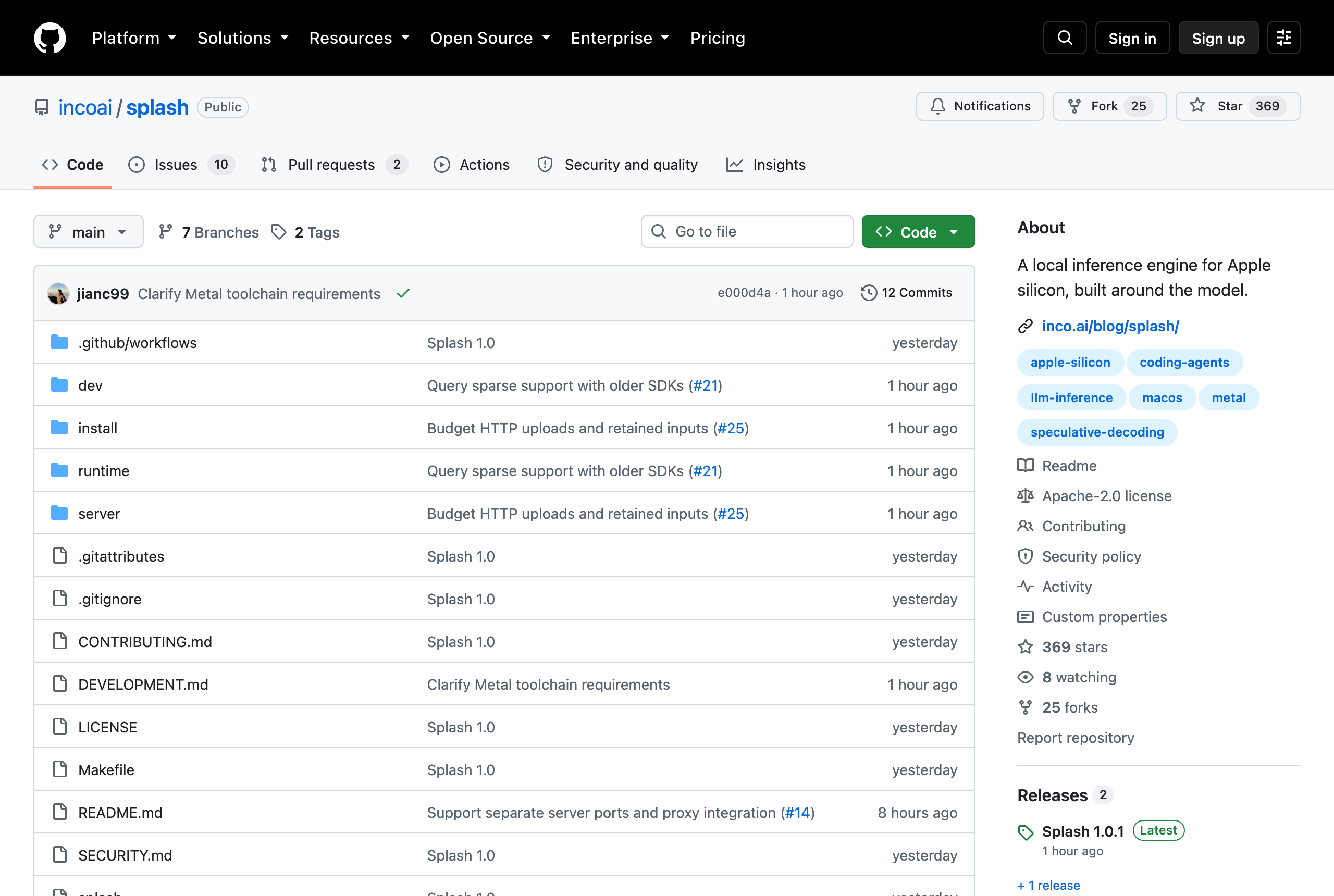
The day before yesterday, Inco AI open-sourced an inference engine designed exclusively for Apple chips, called Splash. The first part of the README slaps the numbers in the face: on a 48GB M5 Pro, the Qwen 3.8-27B decoding speed is twice that of the second-fastest engine, and the first token takes only 282 milliseconds when the 32K context cache hits. I installed it and tested it all day. Here’s the conclusion: the engine is real, and that double speed is true, but when I wrote Chinese articles with it, the acceleration dropped to only 44%. Same machine, same model, same engine, code 79.3 tok/s, Chinese 25.6 tok/s, a difference of 3.1 times.
First, let’s be clear: where does its speed come from?
Splash’s speed isn’t mystique; its core is one thing—speculative decoding. It gives each model a much smaller “draft model” called DFlash 2, with only 5 layers and 1.18 GiB. When generating the draft, it first guesses 7 tokens at once, then the 27B large model performs a once forward computation, verifying all 7 tokens together. If you guess correctly, you earn for free, and if you guess wrong, you start over from the wrong person.
The closest analogy is the candidate association for input methods. If you type ‘speculative solution,’ it provides ‘speculative decoding,’ and you just press Enter to get through; If it gives ‘speculative explanation,’ you have to go back and start over. When you guess correctly, typing is fast; when you guess wrong, typing is more exhausting than typing word by word yourself. This gambling method isn’t new; it has been in the CPU for thirty years—branch prediction: if you predict correctly, the pipeline runs smoothly; if you mispredict, the entire pipeline is emptied and reinstalled. The difference is that if the CPU guesses wrong, it only loses a few clock cycles; if the draft model guesses wrong, it voids all seven proposals at once, which is much more costly.
So speculative decoding has a very strong premise: What you write must be predictable. This sentence is the master switch for all the numbers that follow.
Actual test: The same machine is 3.1 times worse
My machine is an M5 Pro, 20-core GPU, 64GB unified memory, macOS 26.7, which is a notch better than Inco’s own test machine (16-core GPU, 48GB). brew install incoai/tap/splash After installing the 213MB main unit, I downloaded the 17.4GB model package (another 35B package was 20.9GB). There is a line in the boot log worth noting: Kernel policy for GPU family 10 with 20 cores—It recognized my GPU core count, selected the corresponding precompiled kernel preset, and loaded in 9 seconds. The memory ledger is also very clear: weight 14.12 GiB, draft 1.18 GiB, visual encoder 0.87 GiB, with fixed usage totaling 17.86 GiB, and the remaining KV cache dynamic budget cap is 32.94 GiB.
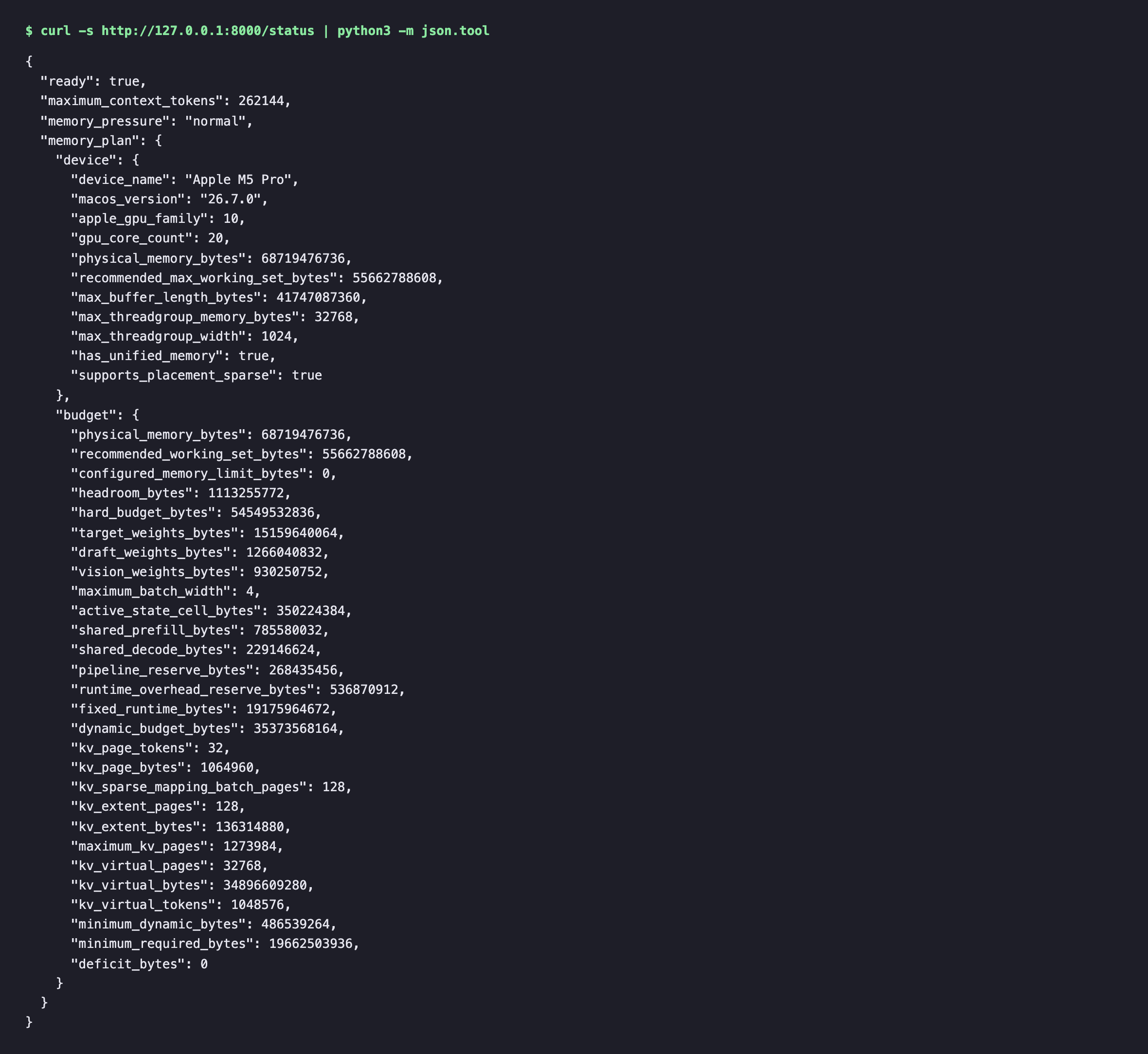
You don’t need to guess these numbers—its /status interfaces are all laid out, and the one above is the machine’s return as is (only indentation and formatting are done).
I prepared three sets of problems, 4 in each set, running 3 times each, turning off thinking, with an output limit of 512 tokens. Code questions involved writing parser, asynchronous modification, and TypeScript generics; Chinese questions involved writing the opening of the live stream, expanding explanations, and writing the conclusion of articles—tasks I do every day. To break down the factors of “language” and “genre,” I added a set of English prose as a comparison—this step is crucial; otherwise, the test would only show that Chinese is slow, not where it is slow.
| What I write | Decoding speed | Draft acceptance rate | Each verification sends out tokens |
|---|---|---|---|
| Code | 79.3 tok/s | 63.2% | 5.45 |
| English prose | 33.5 tok/s | 20.8% | 2.44 |
| Chinese narration/articles | 25.6 tok/s | 11.9% | 1.84 |
The attribution is very clean. From code to prose, acceptance dropped from 63.2% to 20.8%. This is the genre’s fault; the next word in prose is hard to guess; From English prose to Chinese prose, it dropped from 20.8% to 11.9%. This is the language’s fault. The draft model was obviously fed English and code.
You don’t need to check my table for this difference; Splash’s built-in web interface will automatically output the speed. On the same machine, during the same session, I first asked a Chinese question, then had it write a Python segment:
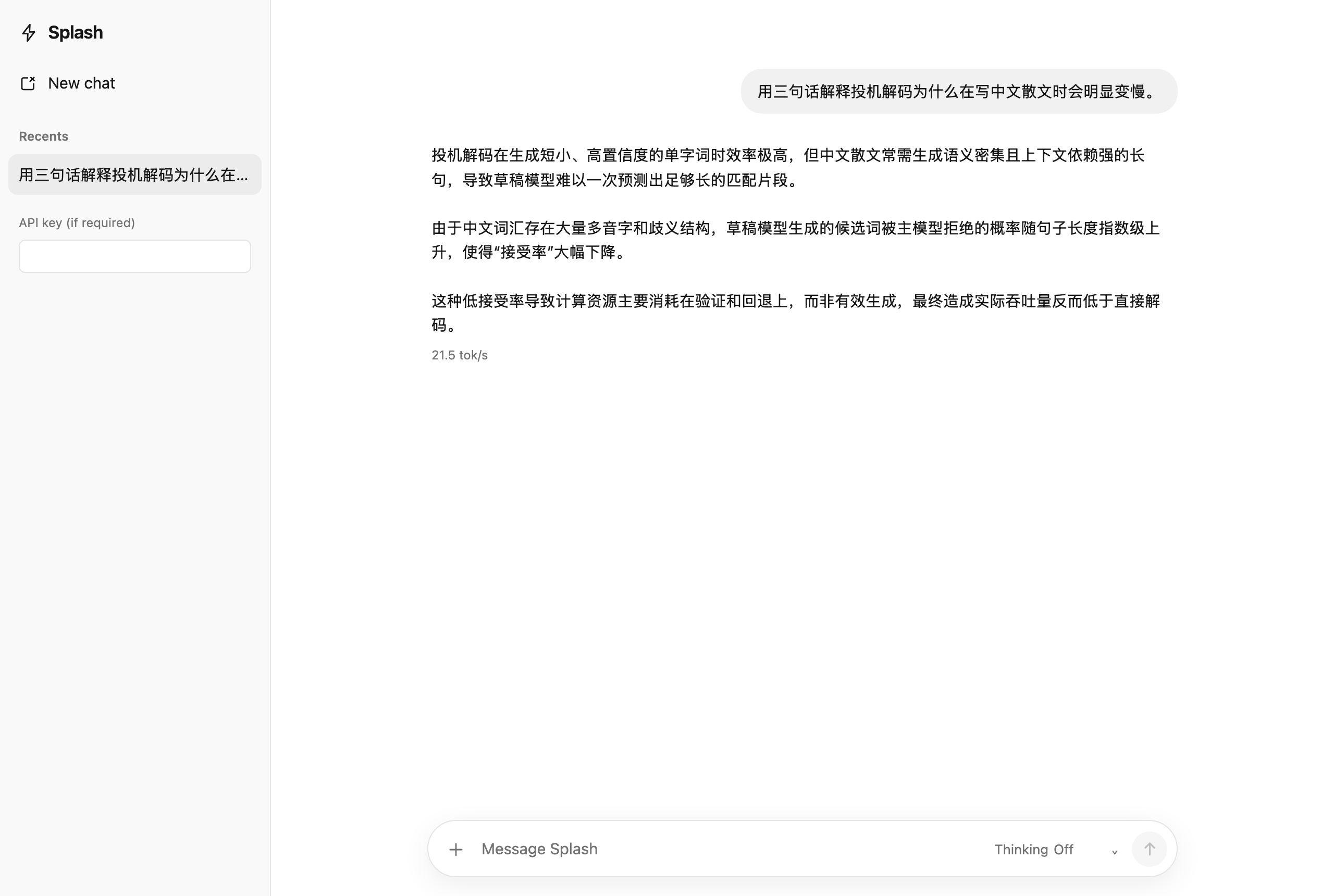
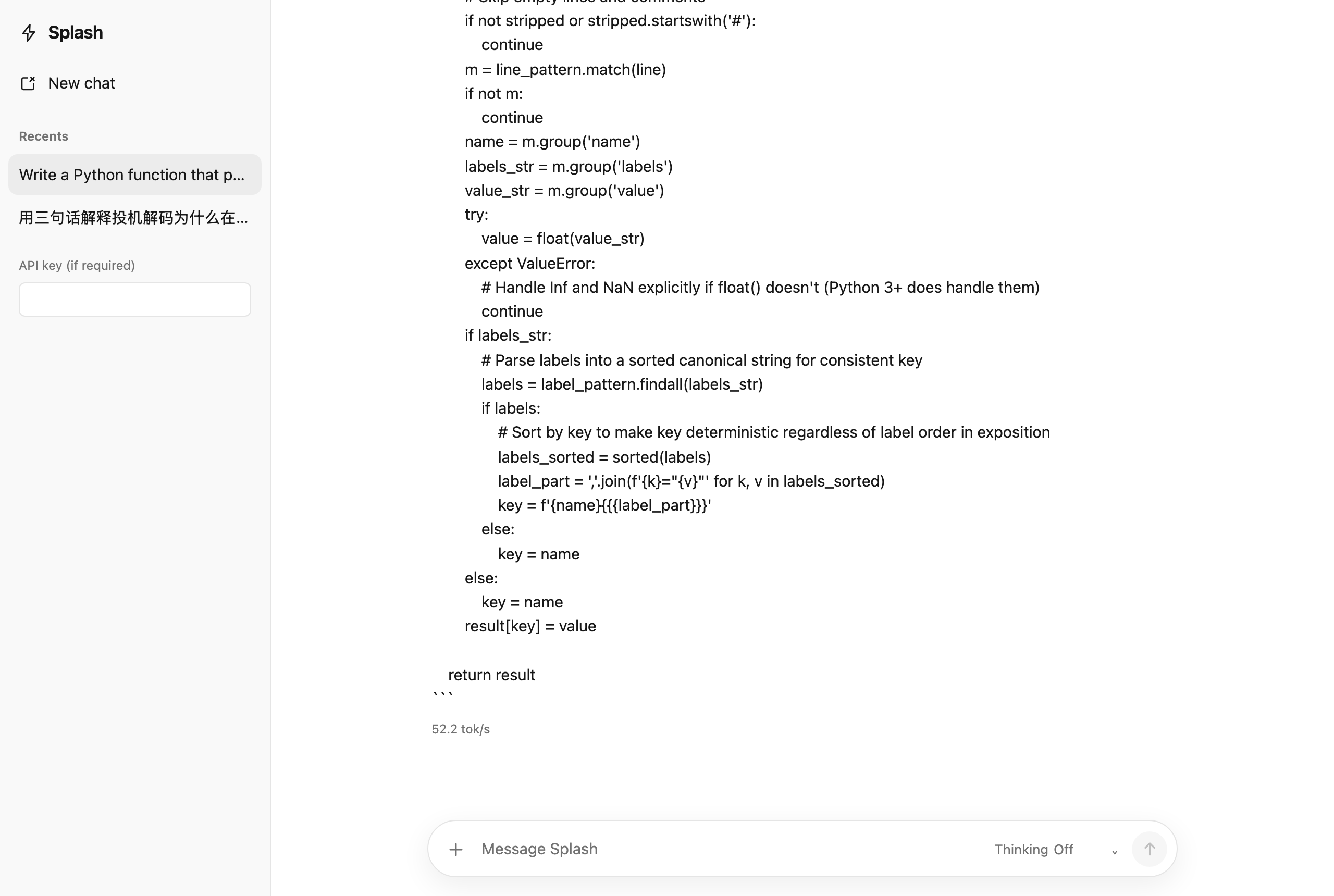
21.5 versus 52.2, so the interface is directly 2.4 times different. These two numbers are lower than the 25.6 and 79.3 in my benchmark table, because the interface readings are generated in a single run, the time spent waiting for the first token is also included, and the questions aren’t the same batch — the standards differ, so you can’t mix references with the table above. But the fact that code is faster than Chinese also holds true in the product’s own reading. By the way, that Chinese answer was written by the model itself, and it explained the reason more accurately than I did: computing power is mainly spent on validation and rollback, not on effective generation.
At first, I didn’t quite believe the acceptance rate number, so I found a way to verify it. DFlash 2 raises 7 tokens per step, and the large model validates the entire block at once and spits out at least 1 block. That would mean there should be an identity: number of output tokens = number of validations + number of accepts, where validation count = number of drafts ÷ 7. I applied data from 24 test runs, with an error of ±1.0 tokens. The equation holds true, indicating my understanding of the mechanism is correct. The result from the reverse solution is even more interesting: the large model’s bare forward rate is 13.8 to 14.4 times per second, the three loads basically unchanged. This is exactly how limited memory bandwidth should be—the cost of moving 14 GiB weights has nothing to do with what you write, so the speed difference comes entirely from “how many tokens can be generated per verification”—5.45 codes and 1.84 Chinese codes.
This script has already been played out in video encoding. Still images are compressed to tens of KB, and the frame rate overflows as soon as the camera flickers, because predictable content is cheaper. Speculative decoding just applies the same rule to tokens—so when you see “average speed,” you should first ask: what kind of frame is being tested?
Push forward a step. In the past, when asked “How fast is my Mac running 27B?”, the answer was a number: bandwidth divided by model size, which belongs to the machine. Now there is no single answer—same machine, same engine, 79.3 and 25.6. Splash didn’t make my M5 Pro faster; 14 forwards per second is a bandwidth-nailed floor; it changed how many tokens can be exchanged for each 14 GiB weight. Speed is no longer a machine’s property; it’s determined by the machine and what you write.
I checked all the numbers the manufacturer could reproduce, and the results are as follows:
| Indicators | Inco announces (16 cores / 48GB) | My test (20 cores / 64GB) |
|---|---|---|
| 32K cache replays the first token | 282 ms | 300 ms |
| 32K prefill rate | 363 tok/s | 450 tok/s |
| 32K cold read tokens | 96 seconds | 71 seconds |
The cache is a hard reproduction, 282 versus 300, and it does reuse 31,872 out of 31,881 tokens; I added another real refill (a few more words in the same context), the first token is 434 milliseconds, slightly slower than precise replay, matching its claim that “you have to pay for new tokens for a real round.” I am faster in cold read and prefill, so the difference of four extra cores makes sense. But by the way, the 71-second cold read is a real pain—the first time you let it read a 32K piece of code, you have to wait over a minute, and it doesn’t have much magic here.
In the end, I set up the same upstream weight for comparison. Splash’s list states that its 27B comes from a specific commit of mlx-community/Qwen3.8-27B-4bit, so I set a 14.98 GiB weight based on that commit number, checked SHA-256 file by file, and ran the same problem using the naive mlx-lm without speculative decoding: code 16.6 tok/s, Chinese 17.8 tok/s. So Splash’s net acceleration relative to “completely non-speculation” is 5.11 times for code and 1.44 times for Chinese.
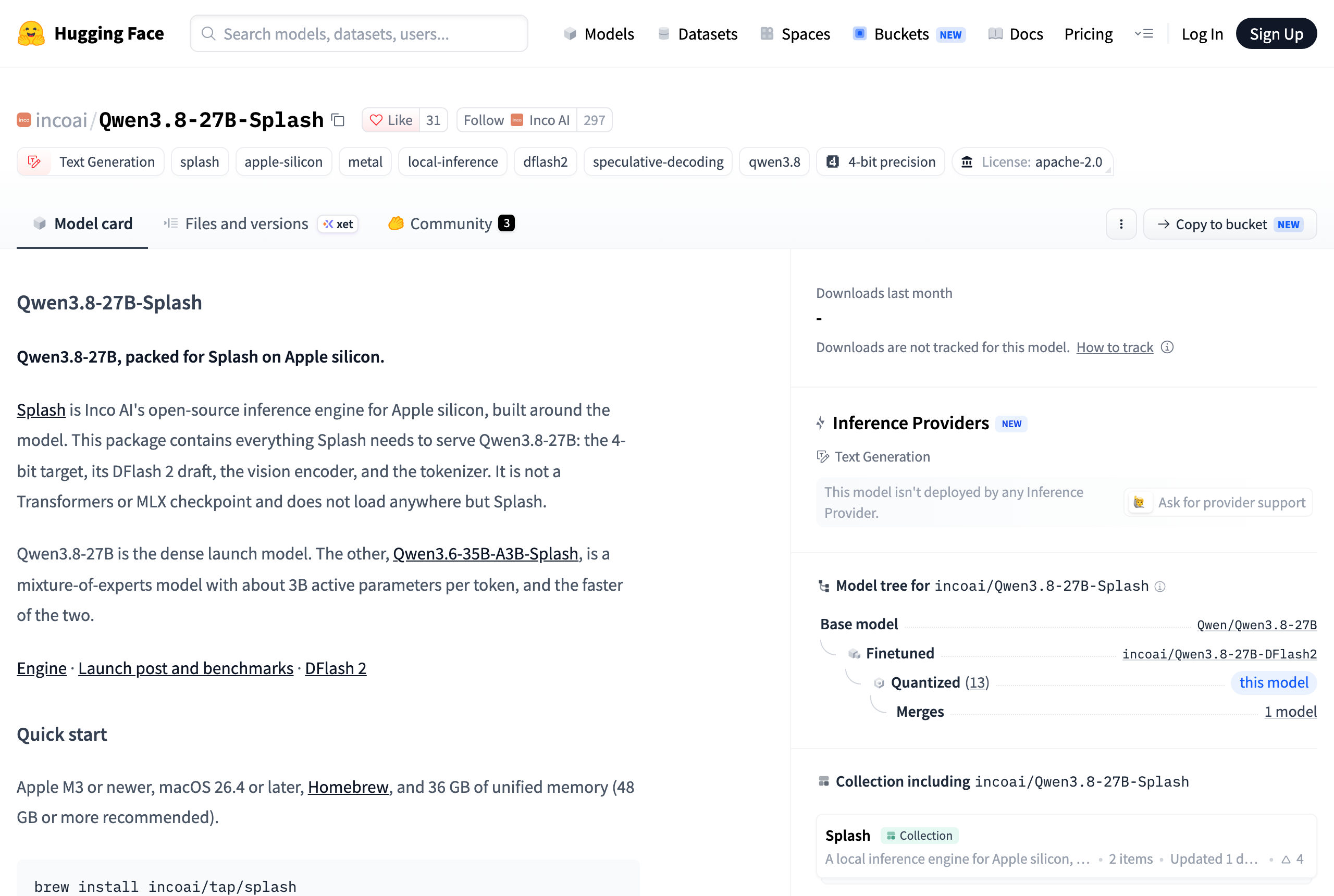
The model card lists the upstream repository and specific commit numbers, so I get exactly the same weight, not another 4-bit conversion.
What can these numbers prove, and what can’t be proven?
First, let’s talk about my main flaws in this round of testing—there are four major ones.
**First, my problem isn’t theirs. ** Inco used the coding problems from NVIDIA SPEED-Bench, and I used four questions I wrote myself. I ran the code questions at its original standard (Think, Medium, 1024 upper limit) and got 58.9 tok/s, with an acceptance rate dropping to 48.3%—the announced 74 was between my two configurations. This only shows that I’m on the same level as it, not as if I reproduced 74.
**Second, I didn’t test that 7.3x speed. ** Inco said its cache hit is 7.3 times faster than the second-fast engine, but that’s cross-engine comparison—I didn’t install the reference engine. The ‘cold read of 71 seconds vs. replay of 300 milliseconds’ measured by ‘cold read of 71 seconds versus 300 milliseconds of playback’ is the difference between hot and cold for the same engine. The two things can’t be verified by each other, so no one should use my numbers to prove it.
**Third, and most critical: I chose the wrong baseline. ** I compared it to a “completely unspeculative naive MLX,” but the one running on my own computer wasn’t it. I translated my own LocalBrain code, and when v1.2.70 started llama.cpp, it was already passing --spec-draft-model and --spec-type draft-dflash, and DFlash 2 was automatically downloaded as a companion component for Qwen 3.8-27B—meaning my active link had already been speculatively decoding. That 5.11x was compared to a competitor weaker than my current one, and for what I actually use, Splash’s net gain must be even smaller, and I haven’t tested it yet.
Graphics card manufacturers used to report peak computing power like this: nominal values hold on specific operators, but actual load is another matter; the denominator is hidden in the footnotes, and whoever picks the competitor wins. I was praising Inco for being quite honest in choosing competitors—it compared oMLX, which already used multiple tokens for prediction, not the weakest one—but I ended up falling right into the same trap.
**Fourth, the version I tested is no longer the one you installed now. ** I tested 1.0 throughout, and 1.0.1 was released on the morning of the day I wrote this, so the Homebrew recipe has already been referenced. It changes memory handling, shared prefix multiplexing under concurrency, and prefill scheduling, and also adds --port that was written in the README in 1.0 but not actually on the command line. Single request decoding is unlikely to be affected, but I didn’t retest concurrency part, so don’t just apply my numbers directly.
There’s one more thing I haven’t touched at all: the cost of quality. Its weight is tiled 4-bit, and KV cache is 8-bit (/status The interface says symmetric_int8). The developer who wrote the MTPLX engine warned on release day that certain layers of Qwen3.8-27B are especially sensitive to quantization. Speed is not wasted, but I can’t say how high the cost this time.
Who is earning, who is silent
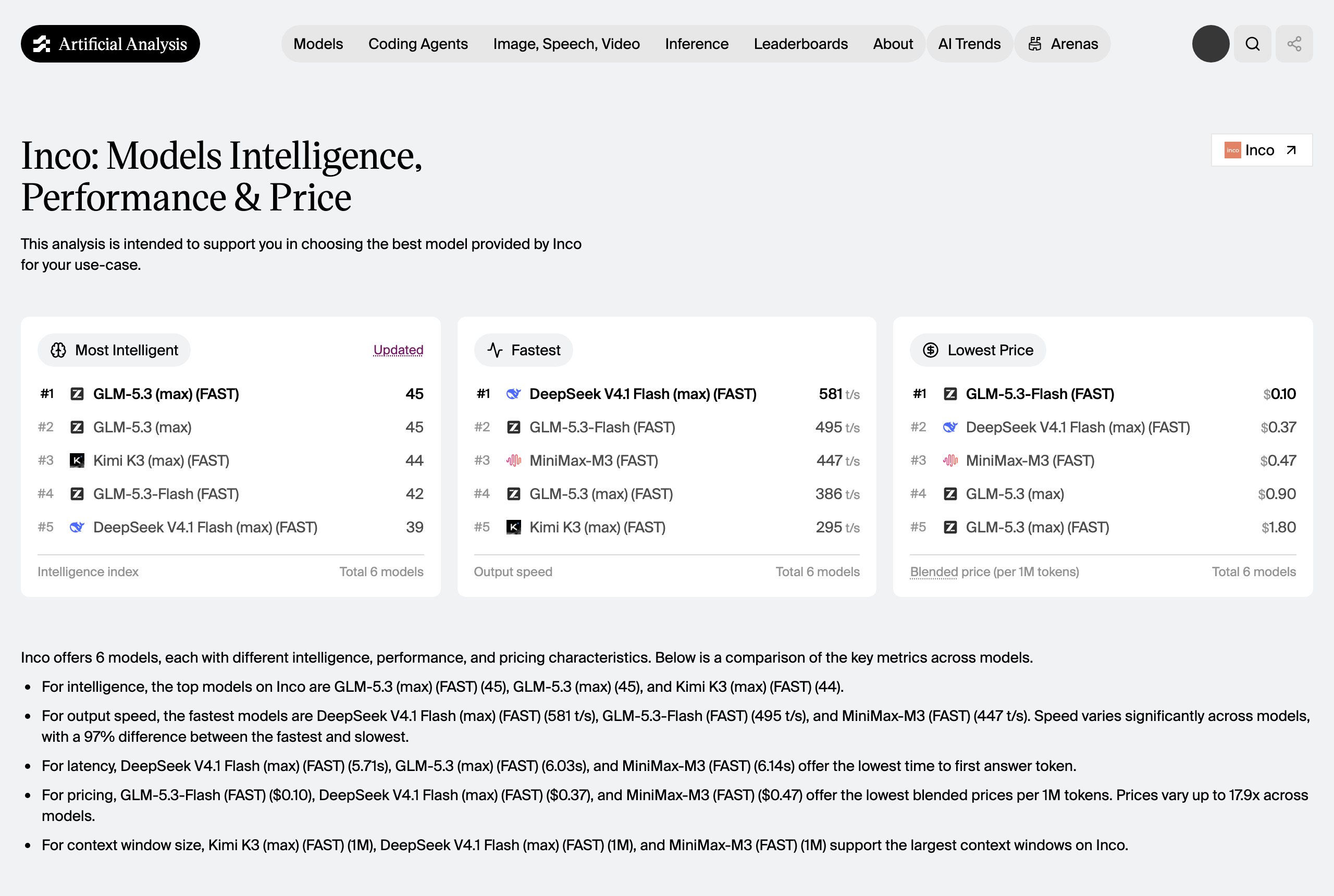
Inco is not a Mac software company; its main business is data center inference. On the Artificial Analysis provider list, Kimi K3, MiniMax-M3, GLM-5.3, and GLM-5.3-Flash all have the highest output speeds. Open-sourcing a Mac engine means turning the same technology into a brand—the end of its blog post says it is hiring.
LM Studio is the channel winner; Bionic 1.1.5 directly included Splash in the experimental backend, which is my strongest proof that it’s not an empty shell: LM Studio won’t give a fake engine a first-class citizen status.
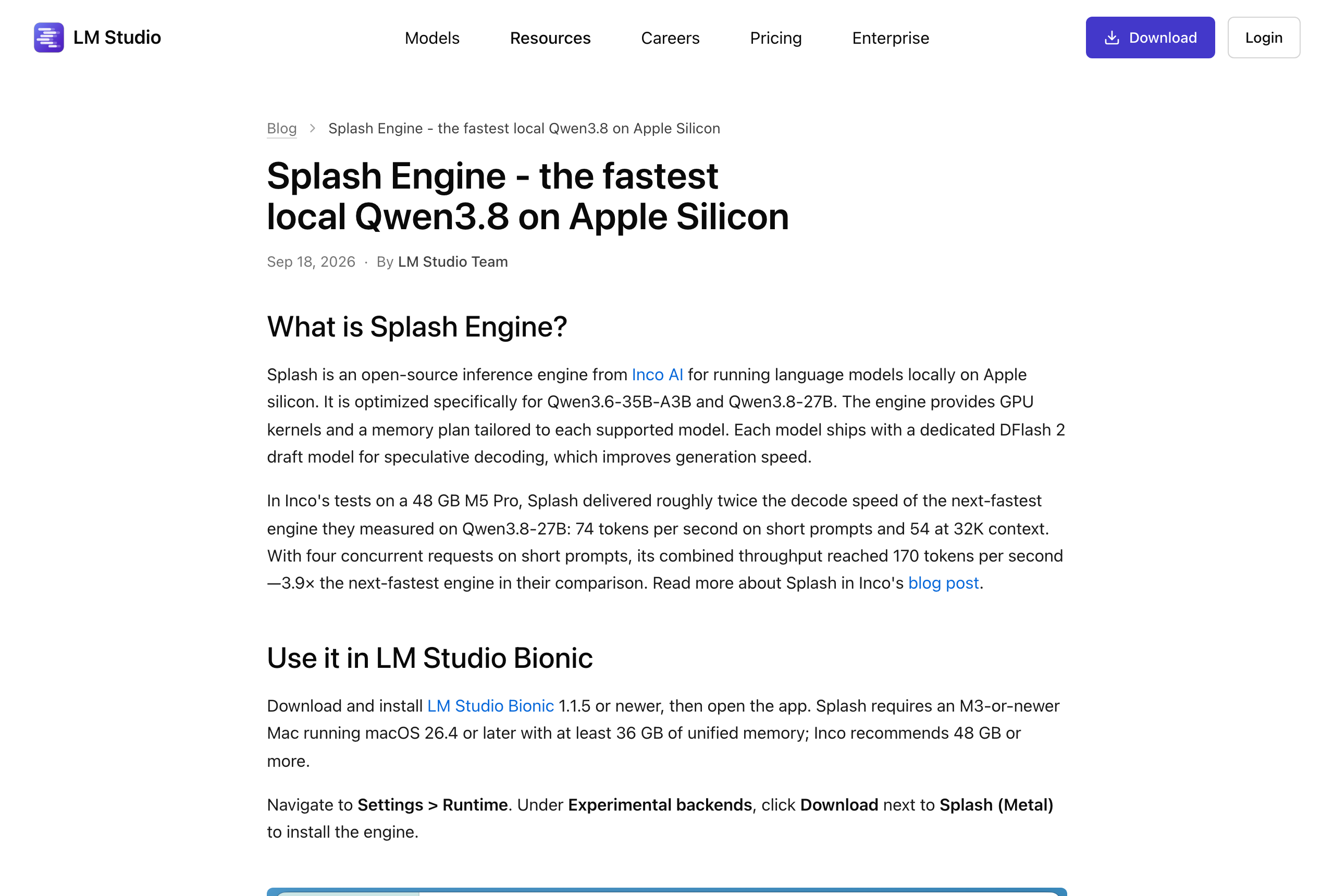
Apple is also a beneficiary, with the recommended specs starting at 48GB, requiring M3 or later. M1 and M2 users can’t get in with extra memory, and the chip gate has already filtered out people.
Who loses out? A 36GB machine just passed the line, and the fixed model plus draft account for 17.86 GiB, leaving very tight KV margin; Creators mainly in Chinese received the smallest gain among the three groups, 1.44 times.
The most noteworthy thing is the silent side: ** So far, no one has published the acceptance rate for non-coding loads. ** Inco’s benchmark sheet only contains coding questions; the draft model is trained with no corpus or written about. The side reporting numbers according to the coding benchmark has no motivation to tell you that Chinese will drop to 12%; this silence itself is a conclusion. And as long as this number is not published, the local reasoning benchmark becomes incomparable—anyone can pick a coding question to report, and coding happens to be the smoothest guessing and decoding round. It also points to a real gap—the Chinese draft model. DFlash 2 is no longer new; on Hugging Face incoai/Qwen3.8-27B-DFlash2, it had 401,108 downloads in the past 30 days. The technology is ready, but the lack is someone feeding Chinese corpus into it. Whoever makes it will have to recalculate the cost-effectiveness of the local Chinese-generated version.
I plan to connect it to LocalBrain (this is the plan, not the finished one)
At this point, I need to clarify: the following section is a plan, not a single line of code has been implemented yet, and there is no timetable.
I want to take it because I’m already halfway down this path. LocalBrain now manages four runtime environments—mlx-env, torch-env, self-managed llama.cpp, and a dedicated Prism build for Bonsai 2’s three-value quantization. The speculative decoding layer is also running: when the window is smaller than 64K, there is a draft file, and there is a unified memory path, it will attach DFlash 2. Looking back now, there are two details that I find quite proud: when the window reaches 64K, the draft automatically closes because the draft magnifies peak memory during large context; After adding the draft, if the available window counts to 0, it rejects the draft to preserve the main model—optional acceleration cannot turn a model that could start into a bootable one. So connecting Splash as a fifth backend is not starting from scratch.
But there are two obstacles that need to be addressed first, and I don’t want to get over it vaguely. **First, it only eats its own packaged models. ** Ordinary MLX or Transformers checkpoints are never loaded; they must be Splash packages. Today there are only two: Qwen3.8-27B and Qwen3.6-35B-A3B. LocalBrain’s design premise is “arbitrary import,” and architecture recognition is deliberately made unrelated to architecture—it reads GGUF metadata, uses architecture names only as key prefixes, and if you can’t get it, explicitly state “KV cost unknown” without pretending to understand. These two philosophies conflict; if you take them, it only means “one more high-performance exception,” not “one more general-purpose backend.” I don’t intend to call this the latter. **Second, the memory ledger needs to be recalculated. ** Splash’s memory budget capped at 50.8 GiB, and LocalBrain’s hardware-aware window planning needs to be realigned with it; otherwise, if both sides are counted separately, users will run into inexplicable allocation failures.
Before that, I want to add a test: Splash applies to my current LocalBrain plus llama.cpp and DFlash 2, the same Qwen 3.8-27B, same batch of Chinese and English problems. Both sides are speculating on decoding; the only differences are Splash’s dedicated Metal kernel, batch scheduling, and memory planning. That number is the real criterion for deciding whether the value is worth using and what I need to do next; After testing, I will release the results along with the caliber in this article.
Whoever suits you, don’t rush
Let’s make a judgment: its ranking is reversed from the vendor’s order. Inco puts “2× decoding” at the start of the README. After testing for a day, I think the order should be reversed: ** Cache reuse first, memory planning second, decoding acceleration only third. ** The cache is completely language-friendly; 32K context reboot takes 300 milliseconds, and for multi-turn agents, it’s the boundary between usable and unusable agents. Memory planning is about calculating the budget at startup; if it can’t fit, it prints budget details and stops to prevent crashes halfway through—this is engineering taste, not performance metrics. Decoding acceleration is the worst off-limit: code 5.11 times, Chinese 1.44 times. Whoever gets it depends on what they write.
Worth installing: People who use local models as the backend for coding agents. 5x is real, and with 32K context reboot, it takes only 300 milliseconds (while cold read takes 71 seconds). The multi-round agent loop feels different. The machine threshold is M3 or above, macOS 26.4 or above, 36GB RAM, and 48GB is more comfortable.
Don’t rush: Mainly for people who write Chinese using it. 1.44 times faster, and at 25.6 tok/s, writing long drafts is still slow, and the online interface is faster and more convenient. Spending 17.4GB hard drive and a whole day of hassle for 44%—you can calculate that yourself.
Don’t count on it: Use it instead of a general local inference solution. Two models, format locked, your existing GGUF library won’t work either. It solves the problem of “pushing both models to the limit,” not “everything can run.”
That’s exactly the bet it bets. llama.cpp and MLX are like a model zoo—they can run anything, and everything is pretty good; Splash, on the other hand, only takes two, but the kernel precompiles them according to the exact tensor shape of these two models, trains drafts specifically for the target model, and pre-calculates memory plans based on known sizes. If you bet correctly, local inference will converge to a few thoroughly polished combinations like a game console; If you bet wrong, it’s just a toy that can only run two models. LM Studio connects it to the first-class citizen backend on day zero, at least indicating that an important channel is pushing the former.
My own conclusion: install it and use it as a backend for coding; Chinese drafts should take a different path. As for connecting to LocalBrain, first test the missing comparison — after all, I just caught a weak competitor in this article, so I can’t repeat it.
Title, code, and source of evidence
An article about benchmark scores being incomparable, but your own benchmark scores are comparable. So all the questions are posted below.
Code Questions (Speculative decoding with favorable winds; vendors benchmark this genre is also used):
1. 写一个 Python 函数,把 Prometheus 文本格式解析成 {指标名: float},跳过注释、处理 label
2. 把 fetch_all() 改写成用 asyncio.gather 的异步版,保持每项独立的错误处理
3. 用 TypeScript 写 chunkByTokenBudget<T>(items, cost, budget):贪心装箱不超预算,
   单项超预算就抛错
4. 写个 bash 脚本,找出目录下所有 .safetensors 并按 MiB 倒序打印
Chinese questions (the kind I write every day):
1. 为一期讲「本地推理引擎为什么能比通用引擎快一倍」的视频写约 300 字口播开场,
   第一句就抛出反直觉的事实,不要「大家好」这类套话
2. 把「投机解码让小模型先猜、大模型一次性批量验证」扩写成 300 字,面向没有技术背景
   的读者,不要比喻堆砌,要有具体数字感
3. 写约 300 字,主题是「为什么厂商自己发的性能基准不能直接采信,但也不该一概否定」,
   给出两条具体判断方法
4. 为一篇讲 Mac 本地部署的文章写约 300 字结尾,落到读者能立刻执行的一件事上
The English essay questions correspond to the English versions of these four Chinese essays.
There are only two key points in measurement, both of which are prone to errors:
# 坑一:不能按 SSE chunk 数算 token。投机解码下,一次被接受的多个 token 会在同一个
# chunk 里一起吐出来;按 chunk 计数会系统性低估 Splash,把结论往「厂商吹牛」那边推。
ctok  = usage["completion_tokens"]          # 只认 usage,chunk 数仅作交叉校验
tok_s = ctok / (t_last - t_first)           # 分母是首个 token 之后的解码区间

# 坑二:接受率要取 /metrics 的增量。服务端计数器是累计的,必须在每个请求前后各抓
# 一次求差,否则前面跑过的题会把后面的稀释掉。
m0 = get_metrics()
r  = stream_once(prompt, max_tokens=512, reasoning="none")
m1 = get_metrics()
drafted   = m1["splash_drafted_tokens_total"]        - m0["splash_drafted_tokens_total"]
accepted  = m1["splash_accepted_draft_tokens_total"] - m0["splash_accepted_draft_tokens_total"]
acc_ratio = accepted / drafted
After finishing this article, I ran through the entire set again, and the result is worth mentioning: the number of drafts and acceptance counts are the same byte by byte — code 4851/2904, English 15645/3249, Chinese 11277/1446, not a single number changed; The speed fluctuated by 2% to 6%, code 79.3 became 77.3, Chinese 25.6 became 24.1. So you have a count of which digit these numbers should be trusted: acceptance rate is the nature of the model and content, stable; tok/s carries the machine’s state at the time, so the difference in the single digit doesn’t matter.
Other sources of verification:
- Splash source code and README:github.com/incoai/splash (Apache-2.0; 1.0 released on 2026-09-18, 1.0.1 released on 2026-09-20, this article tests 1.0)
- Inco AI releases blog post and full benchmark table: inco.ai/blog/splash
- LM Studio Integration Instructions: lmstudio.ai/blog/splash-engine (from Bionic 1.1.5)
- Model package and source submission: incoai/Qwen3.8-27B-Splash on Hugging Face
- Data center third-party rankings: Artificial Analysis’s provider rankings
- Local tests: M5 Pro / 20-core GPU / 64GB / macOS 26.7; problems, scripts, and raw results are in the next section
🧰 Tools I build
I maintain all of these tools myself. Preview builds are clearly labeled; the release pages are the source of truth for downloads, updates and known limits.
Info: HyphenBox Status: Official releases
A radar for free LLM APIs: availability is re-tested continuously, one local interface for all of them, and keys stay on your machine
Info: LocalBrain Status: Official releases
A multimodal MCP toolbox for local models: TTS, Whisper and video generation in one place
Info: ScreenLex Status: Official releases
Learn new words while you watch shows. Free, for Mac and Windows
Info: HyphenScreen Status: Official releases
Screen recording and smart editing in one: a DaVinci-style timeline, automatic redaction and a check of the finished video before export. Free
Quote: HyphenTech Make AI your superpower Local deployment · Free resources · Self-made software https://hyphentech.top
Late nights and burned API credits went in,a cup of tea comes back out — only if you feel like it.
Scan with WeChatPress and hold to save the image, then open it from your album in WeChat Scan

Comments
Loading comments…