Info: Machine translation This post was machine-translated from the Chinese original. Wording may be rough in places — the Chinese version is authoritative.
Summary Capabilities, scenarios, spot prices, software, and industry ecosystem explained all at once HyphenTech · 2026-09-28
I put the AI capabilities of Mac, Windows, and Linux together in a table. The first thing that popped up wasn’t the winner, but a somewhat counterintuitive fact: ** the largest daily entry point, the most worry-free local personal experience, and the most complete industrial production stack—possibly three systems each. **
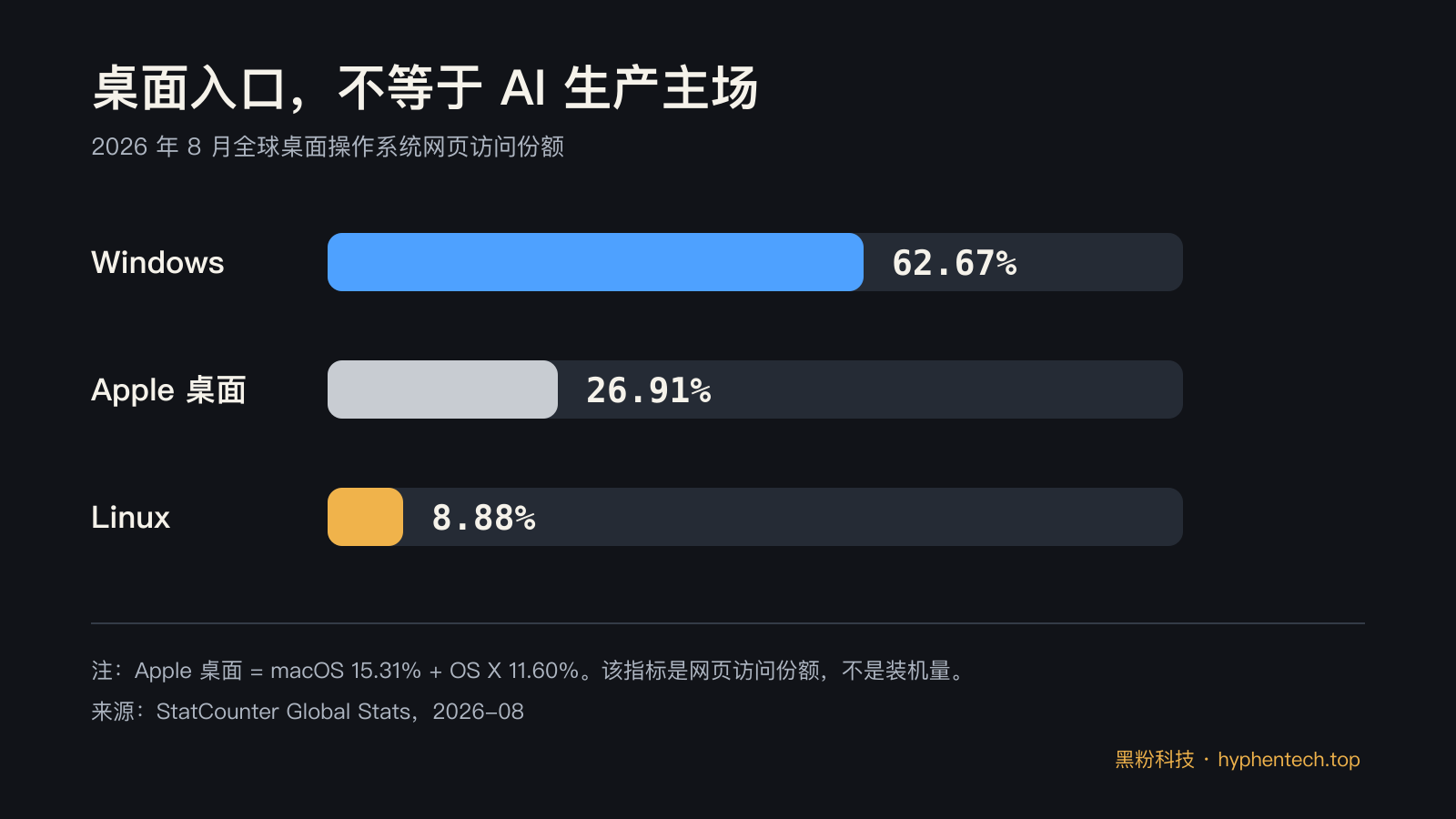
In August 2026, StatCounter recorded a global desktop web visit share of 62.67% for Windows, 26.91% for macOS and OS X combined, and 8.88% for Linux. However, when NVIDIA introduced CUDA on WSL, it clearly stated that the industry’s AI tools, models, frameworks, and libraries are mainly distributed on Linux.
The most common system on the desktop and the most user-friendly system in the server room are not the same match at all. StatCounter Data|NVIDIA CUDA on WSL
This isn’t a benchmark article on the same hardware. Mac unified memory, Windows discrete graphics cards and NPUs, Linux servers and multi-GPU environments can’t just count how many words per second to fairly close the case. What really matters is: can the model fit, can the software be used directly, who repairs it if it breaks, and whether you can still change cards, frameworks, or vendors after three years.
🎯 Mac: Trap complexity within the machine
The AI advantage of Macs isn’t that “Apple chips are always faster than graphics cards,” but that it’s unified memory. Apple’s MLX framework allows the CPU and graphics processor to use shared memory directly, so arrays don’t have to be transferred back and forth between two physical memory blocks; Official examples cover language model training, LoRA fine-tuning, Stable Diffusion, and Whisper.
This is very realistic for local large models. Even if a traditional PC has 64GB of system memory, when the model is actually run by the graphics card, it still faces the challenge of dedicated memory capacity. Unified memory on Macs allows larger quantization models to fit into the same memory pool.
The cost is clear: system, application, model weight, and context all compete for this memory, and after purchase, upgrades are basically impossible. **64GB unified memory is not the same as a 64GB professional graphics card, but it is often a shortcut for individual users to reach large model capacity thresholds with lower power consumption. **
Currently, the M6 Mac mini in China mainland starts at 6999 yuan, with a standard 16GB RAM and a maximum of 32GB; The M5 Pro version starts at 12999 yuan, with up to 64GB of unified memory and 307GB/s memory bandwidth. Apple also announced the LM Studio’s generational performance multiple, but those numbers are tests by manufacturers on their own devices and cannot prove it surpasses any single PC graphics card.
Mac is best suited for three types of work: quietly running local assistants, transcription, and knowledge bases; calling AI while producing finished products with Final Cut Pro, Logic Pro, Xcode, or Adobe; running personal automation long-term on a low-maintenance device.
Its shortcomings are also concentrated: no CUDA, no GPU replacement, large-scale training and multi-card expansion are not its main battles. Back in the mobile era, Apple relied on integrated hardware and software control experiences; In the AI era, this scenario became “less driver fiddling, more one-time memory payment.”
🔍 Windows: The largest entry point, the most choices, and the most variables
Windows’ strength isn’t a single tech stack, but the ability to choose. You can buy a slim Copilot+ PC, a workstation with 32GB of VRAM on an RTX 5090, or build your own with an AMD graphics card, gaming laptop, branded commercial PC, or build your own PC. NVIDIA’s official specs show the RTX 5090 comes with 32GB of GDDR7; AMD’s Radeon AI PRO R9700 is also 32GB, consumes 300W, and supports both Windows and Linux.
Microsoft is trying to hide these differences under a unified interface. The threshold for Copilot+ PC includes over 40 TOPS of NPUs; Windows ML automatically searches for suitable hardware to execute the backend, and if it fails, it can roll back to the GPU or CPU. Foundry Local offers over 20 open-source languages and voice models through interfaces compatible with OpenAI.
Copilot+ PC Development Guide|Windows AI Solution Comparison
But NPUs have a boundary that is easily hidden by advertising: 40 TOPS means it’s suitable for low-power on-device functions, not automatically becoming a large model training card. The specific application also needs to be adapted to Windows AI API, ONNX models, or vendor execution backends.
Buying a computer with an NPU only proves you have dedicated hardware; it doesn’t mean Ollama, ComfyUI, PyTorch, and every old software will instantly fill it up.
Windows is best suited for office users, those who share a machine for gaming and AI, teams relying on Adobe, Office, AutoCAD, or a wide range of industry software, and those who want to start with graphical interface tools before gradually moving into local models.
LM Studio, Ollama, ComfyUI, DaVinci Resolve, and Blender all have mature entry points; When you need Linux tools, you can even access WSL. The problem is that “being able to choose” also means “choosing one”: whether the graphics card brand, driver version, CUDA or ROCm, native or WSL, and NPU compatibility all become maintenance costs.
Back then, Windows became the desktop standard by supporting massive numbers of PCs and software; now it wants to enable CPU, GPU, NPU, and cloud models to all connect to the same application. Who profited? Microsoft guarded the desktop entry point, while OEMs and chip manufacturers sold a new round of AI PCs. Who pays? Users pay not only for hardware but also for drivers, backend, and compatibility checks.
⚡ Linux: Not the most user-friendly desktop, but the most complete production line
If the task escalates from “Can it run on my computer?” to “Can the team train, deploy, monitor, and scale?”, Linux’s advantages will suddenly expand. The official PyTorch installation page supports three systems simultaneously, but Linux directly lists CUDA and ROCm routes; NVIDIA’s NGC directory offers over 80 containerized software and SDKs; PyTorch and TensorFlow containers are updated monthly and can be deployed on bare metal, virtual machines, and Kubernetes.
PyTorch Local Installation|NVIDIA NGC Container
This is Linux’s true moat: it’s not about having more desktop buttons, but about researching code, drivers, containers, inference servers, scheduling systems, and cloud machines, which usually speak the same language. Training can be done using PyTorch, services can connect vLLMs, Triton, or containers, and scaling continues with Kubernetes; From a single card to multiple nodes, the migration path is the shortest.
Don’t get too excited about “open source and free” either. AMD’s ROCm 10.0 already covers both Linux and Windows, but the official compatibility matrix still requires alignment of firmware, drivers, and user-mode component versions. Linux waives operating system licensing fees, not operational maintenance costs.
Driver conflicts, kernel version, container permissions, monitoring, and security updates all require someone to be responsible. ROCm 10.0 Compatibility Matrix
Linux is best suited for model training, inference services, labs, enterprise private deployments, multi-GPU workstations, and agents that require long unattended sessions. It’s not ideal for people who just want to open Office, Adobe, or some vertical industry software and get started.
Back then, cloud computing pushed Linux into the foundation of infrastructure through open interfaces and automation; AI did not overturn this division of labor; instead, it elevated the importance of containers, drivers, and clusters to another level.
💰 With spot prices added, will the conclusion on cost-effectiveness change?
Yes, and first, we need to fix the comparison criteria. Below is the tax-included display price I obtained from the Chinese mainland sales page on September 28, 2026: only complete machines clearly marked as “in stock” are included, without using launch price, seafood market price, pre-order price, or disguising the price of a graphics card as a complete computer. National subsidies, trade-in vouchers, and regional vouchers are excluded from the unified price due to different qualifications.
| System solution | Same-day in-stock hardware | Tax-inclusive display price | AI can use memory calibers | What does this money buy? |
|---|---|---|---|---|
| Getting started with macOS | Mac mini, M6, 16GB unified memory, 256GB solid-state drive | 6999 NTD | 16GB is shared by the system, CPU, and graphics processor | Compact size, low power consumption, and ready to use as a whole; Suitable for small quantization models, transcription, and personal assistants, but models, applications, and systems often compete for the same memory block |
| Windows in-stock complete machine | HP Shadow Elf 16L, i7-14650HX, 16GB RAM, 1TB SSD, RTX 5060 Ti 8GB, Windows 11 Home Edition | 9299 NTD | 8GB dedicated video memory, plus 16GB of system memory | CUDA software has broader compatibility and larger hard drives; However, the main hardware threshold for local models remains 8GB of VRAM, and 16GB of system memory should not be combined with “24GB VRAM” |
| macOS storage is a priority | Mac mini, M6, 32GB unified memory, 256GB solid-state drive | 9999 yuan | 32GB shared memory pool | Costs 3000 yuan more than the 16GB version, but gets more local model capacity; The trade-off is that the hard drive is still small, and the memory can’t be reinstalled in the future |
| Linux is the same hardware baseline | The above HP system can be customized or dual-boot Linux | Hardware still at 9299 yuan | It depends on the same 8GB dedicated video memory | Linux license increments can be 0 yuan, but the money spent on the machine won’t disappear; You also have to bear the driver, reinstall, compatibility verification, and possible vendor support boundaries |
Apple Chinese mainland purchase page|HP China official store in-stock page
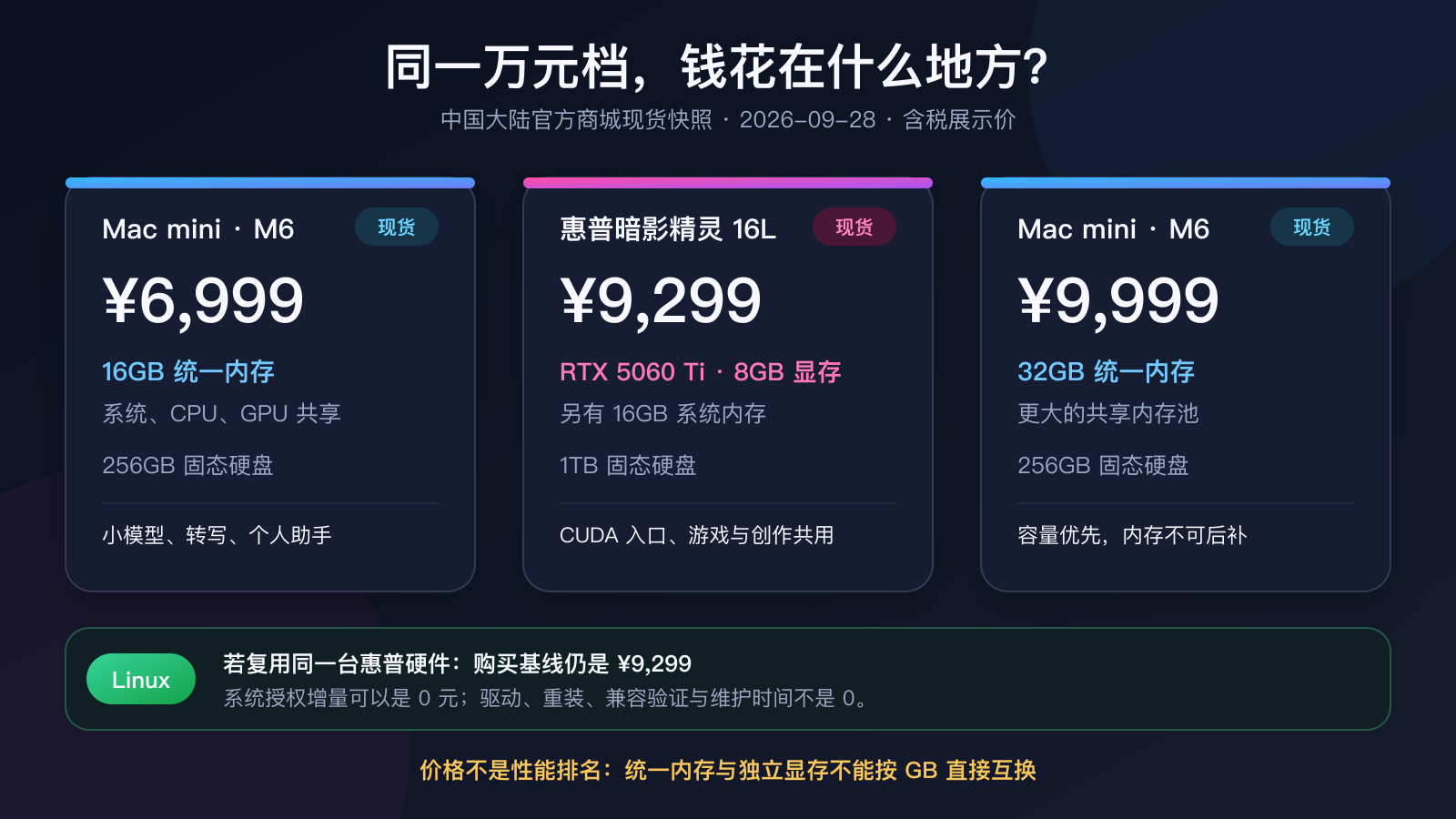
The most interesting thing about this table isn’t who is cheaper, but that around the 9299 yuan price range, two completely different resource allocations emerge: Windows systems spend money on scalable PCs, 1TB storage, and CUDA inputs; For another 700 yuan, Macs shift their focus to the 32GB shared memory pool. The former makes it easier to integrate with existing NVIDIA tools, while the latter allows quantization models larger than 8GB to enter accelerated memory. However, the bandwidth, usage patterns, and software backend of unified memory and discrete video memory are not the same, so you can’t decide winners by GB alone.
Here’s a real-world reminder: on Apple’s purchase page, the M5 Pro, 64GB, and 512GB configurations showed 20,499 yuan, expected shipping in 1–2 weeks, so I didn’t include them in the “spot price” list.
High-end Macs can indeed trade less overall complexity for larger shared memory, but once the budget hits 20,000 yuan, Windows/Linux self-assembled PCs, professional graphics cards, and cloud pay-as-you-go rentals all have to be compared again. Prices change daily; this article retains a dated market snapshot, not a permanent purchase list.
🧩 The real cost is calculated together in hardware, software, and people
Just looking at the purchase price, Linux seems free, Windows usually comes with the whole system, and Mac is the most price-fixed. But once you break down the three-year usage period, the ledger has at least five columns: hardware and memory, power consumption and cooling, commercial software, deployment and maintenance, migration and exit costs.
| Dimension | Mac | Windows | Linux |
|---|---|---|---|
| Local large model capacity | Unified memory is easy to buy with a larger shared pool | Mainly limited by dedicated video memory, cards can be swapped | Same hardware but with multi-card and server routes as the most mature |
| Generative images/videos | energy efficiency and creative chain flow, while CUDA projects are relatively weak | NVIDIA software adaptation is usually the widest | Strongest in batch generation, automation, and servitization |
| Training and fine-tuning | Suitable for personal experiments and small to medium-sized models | Native to the Linux stack is often used to connect to the Linux stack | CUDA/ROCm, multi-card, container main field |
| Office and industry software | Strong creation and development, with some industry software absent | Office, design, engineering, and enterprise software are most comprehensive | Strong browsers and open-source tools, but weak proprietary desktop software |
| Initial threshold | The whole system is simple, but memory upgrades are expensive and cannot be replaced | The price range is the widest, with many installation options | The system is free, and the configuration has the highest learning cost |
| Long-term maintenance | Few variables, constrained by Apple’s strategy | There are many combinations of drivers and hardware | It is highly controllable and most dependent on operational and maintenance capabilities |
The most common mistake here is comparing a 6999 yuan 16GB Mac mini with a 32GB VRAM workstation to “who can run large models”; Or using Linux’s zero licensing fee to pretend engineers can check drivers without cost. The correct unit of comparison is not the operating system, but the complete solution that can accomplish the same task.
🚀 The three ecosystems are actually competing for three different positions
Mac competes for high-value personal workstations: hardware, systems, creative software, and on-device models are all sold together. Windows competes for the largest user entry point: office, gaming, business software, OEMs, and cloud services all come in. Linux competes for production infrastructure: models move from research code into containers, then run to data centers and edge servers.
Why are they now working on operating system-level AI? Because the capabilities of cloud models have already proven that the next wave of value is not just adding another chat webpage, but who controls the default entry points, device-side computing power, and cloud rollbacks. Apple aims for complete machines and high-end memory, Microsoft targets Windows applications and cloud service entry points, chip manufacturers aim for a new round of device upgrades, and the Linux ecosystem takes on the final training and deployment needs.
The part that remains silent is actually the most critical. Apple does not proactively emphasize the exit costs after purchasing memory; PC manufacturers do not list software that has not yet been adapted one by one on the NPU promotional page; The open-source community also does not bear production failures for companies. All three sides are selling “capability,” but users end up with different forms of responsibility allocation.
So, stop asking which system is “the strongest in AI”—first ask where your results will land:
- If you want a quiet, maintenance-efficient personal AI workbench that supports editing and development, prioritize Mac, but local model users should add memory before discussing chip generation.
- If you want compatibility with work, gaming, and design software, and want to choose a graphics card based on your budget, Windows is the most stable; If you want to develop a Linux AI project, treat WSL as a formal work layer, not a temporary patch.
- If you want training, batch inference, container deployment, multi-card expansion, or long-term service, just choose Linux; At the same time, write driver matrices, monitoring, and rollback into the budget.
- If you mainly call ChatGPT, Claude, or domestic cloud models, the gap in AI capabilities among the three systems will narrow significantly. At this point, browsers, file systems, office software, and team collaboration often become more important than local computing power.
Back to the beginning: Windows is the biggest door, Mac is the most polished personal room, Linux is the roaring kitchen of machines. Of course, you can cook at the door, work in the kitchen, run servers in your room, but every crossover costs money, time, or compatibility.
**The truly cost-effective system isn’t the one with the highest peak, but the one that makes you pay the least for irrelevant issues. **
🧠 Main public sources
- StatCounter: Global Desktop Operating System Share: https://gs.statcounter.com/os-market-share/desktop/worldwide/
- Apple: M6 and M5 Pro Mac mini Press Release: https://www.apple.com.cn/newsroom/2026/08/apple-unveils-powerful-mac-mini-with-m6-and-m5-pro/
- Apple MLX Official Warehouse: https://github.com/ml-explore/mlx
- Microsoft: Copilot+ PC Development Guide: https://learn.microsoft.com/en-us/windows/ai/npu-devices/
- Microsoft: Windows AI Solution Comparison: https://learn.microsoft.com/en-us/windows/ai/windows-ai-comparison
- NVIDIA: CUDA on WSL: https://developer.nvidia.com/cuda/wsl
- NVIDIA: AI and HPC Containers: https://developer.nvidia.cn/ai-hpc-containers
- PyTorch: Local installation and computing platform: https://pytorch.org/get-started/locally/
- AMD:ROCm Compatibility Matrix:https://rocm.docs.amd.com/en/latest/compatibility/compatibility-matrix.html
- AMD: Radeon AI PRO R9700 Specifications: https://www.amd.com/en/products/graphics/workstations/radeon-ai-pro/ai-9000-series/amd-radeon-ai-pro-r9700.html
- NVIDIA: GeForce RTX 5090 Specifications: https://www.nvidia.com/en-us/geforce/graphics-cards/50-series/rtx-5090/
🧰 Tools I build
I maintain all of these tools myself. Preview builds are clearly labeled; the release pages are the source of truth for downloads, updates and known limits.
Info: HyphenBox Status: Official releases
A radar for free LLM APIs: availability is re-tested continuously, one local interface for all of them, and keys stay on your machine
Info: LocalBrain Status: Official releases
A multimodal MCP toolbox for local models: TTS, Whisper and video generation in one place
Info: ScreenLex Status: Official releases
Learn new words while you watch shows. Free, for Mac and Windows
Info: HyphenScreen Status: Official releases
Screen recording and smart editing in one: a DaVinci-style timeline, automatic redaction and a check of the finished video before export. Free
Quote: HyphenTech Make AI your superpower Local deployment · Free resources · Self-made software https://hyphentech.top
Late nights and burned API credits went in,a cup of tea comes back out — only if you feel like it.
Scan with WeChatPress and hold to save the image, then open it from your album in WeChat Scan

Comments
Loading comments…