Info: Machine translation This post was machine-translated from the Chinese original. Wording may be rough in places — the Chinese version is authoritative.
Summary It didn’t reduce 64GB to 128GB, but it pushed the hard wall from “total file size” to “active workset, SSD latency, and long context.” HyphenTech · 2026-09-10
If a GGUF model has 84.93GB and your Mac only has 64GB of unified memory, the previous intuition was: don’t install it, it definitely can’t fit it. This judgment is still useful for most dense models, but when faced with new architectures like Qwen 3.8-Flash-Next with massive low-frequency tensors, it starts to become too crude.
llama.cpp v0.4.0 was released on September 5th Beijing time. What 64GB Mac users should pay attention to most is not the addition of an additional model name, but that it officially includes Giant Tensor read-on-demand reading, memory limiting during quantization, and Apple RDMA multi-machine transfer into the main version.
To give you a conclusion: **The 64GB hard wall has loosened, but it hasn’t disappeared. ** “Model files larger than memory” has shifted from inevitable failure to possible startup; Between “able to boot” and “being able to use at high speed for a long time,” there’s an even more complex engineering problem.
🧠 It’s not a memory-saving magic, but rather a change to “which ones must be permanent.”
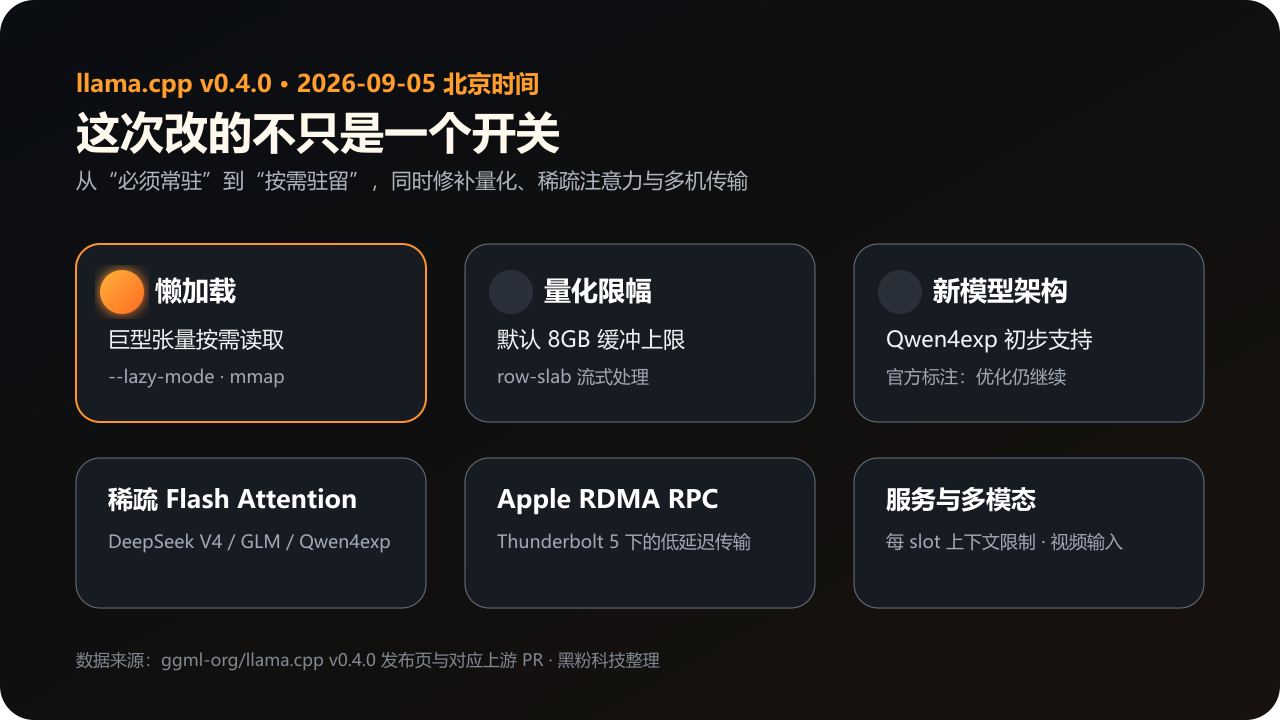
The core of --lazy-mode is very similar to the shift the operating system made after introducing virtual memory years ago: files don’t have to be loaded into the room; the pages that are actually needed now come in. llama.cpp keeps some huge, low-frequency access tensors in mmap files and reads from SSDs when needed, rather than requiring them to occupy memory throughout.
Qwen4exp is a typical beneficiary of this method. Its PLE n-gram hash table is about 97.7GiB, very large, but not every generation hits high-frequency accuracy. Thus, for the first time, the gap between “how large the weight file is” and “how much runtime must be residential” has become a significant difference in this type of model.
Official PR also does not hide the cost. In the upstream test of Gemma 4 E4B, GGUF resident dropped from 4.6GB to 2.8GB, peak RSS dropped from 7.37GB to 6.16GB; Decoding speed dropped from 105.8 tokens/s to about 94.2–94.7 tokens/s, a loss of about 10.7%. This is a memory and I/O exchange, not a free lunch.
🧰 0.4 What else was fixed?
| 0.4 New Abilities | Solving old problems | How should 64GB Mac users understand this? |
|---|---|---|
--lazy-mode |
The giant low-frequency tensor is forced to remain resident throughout | The total file size can exceed memory, but you have to pay SSD latency |
Quantizer --max-buffer-size |
Massive embedding smashed RAM during the quantitative phase | By default, an 8GB buffer is used for row-slab streaming |
| Sparse Flash Attention | The new generation of sparse attention lacks efficient pathways | Paving the way for DeepSeek V4, GLM, and Qwen4exp |
| Qwen3.8-Flash-Next initial support | The new qwen4exp architecture cannot load | There are already entry points that can run it, but the official notes are still pending further optimization |
| Apple RDMA RPC | Multiple Macs use TCP for RPC transmission, resulting in high loss | It’s about reducing transportation taxes, not automatic speed acceleration for dual machines |
| Context limit/video input per slot | Multi-user services and visual models lack fine control | For local service layers like LocalBrain, it makes more sense than a one-time CLI |
🎯 Why now?
This is not a naturally occurring low-level update. Why are they doing this now? ** The new generation of MoE and multimodal architectures is starting to pack a large number of parameters into experts, giant word lists, n-gram hash tables, and sparse attention.
If runtime insists on “everything is always residential,” then even if each token activates only a few experts, local users will be blocked by static file size. The model team wants to expand the new architecture to the local ecosystem llama.cpp wants to maintain the status of the universal local runtime; their interests align here.
Hardware is also pushing this forward. Apple’s opening RDMA to Thunderbolt 5 will make “multiple Macs into one memory pool” a more marketable story; Large quantitative warehouses will also attract more downloads as more people can launch 100 GB models.
But in the end, users pay not just for the machine, but also SSD read/write, warm-up times, long context throttling, and configuration complexity. That’s exactly why I want to separate “loadable” from “worth deploying.”
🧱 64GB True Divide: From “Too Much to Fit” to “How Many Active Jobs Are There”
I don’t want to brush this part off with theoretical formulas. LocalBrain has previously recorded AtomicChat Qwen3.8-Flash-Next IQ4_XS on my 64GB M5 Pro: The full GGUF shard is 84.93GB, with about 45.8GB of weight entering resident and about 39.1GB remaining on the SSD. This proves that files larger than the total system memory are no longer guaranteed to fail. **
Historically, when operating systems introduced paging and virtual memory, they changed “the entire program must be stored in memory” to “the current workset must be stored in memory.” Today, when looking at large models, you can’t just ask how many boxes are in the warehouse, but also how many boxes are being opened simultaneously on the production line.
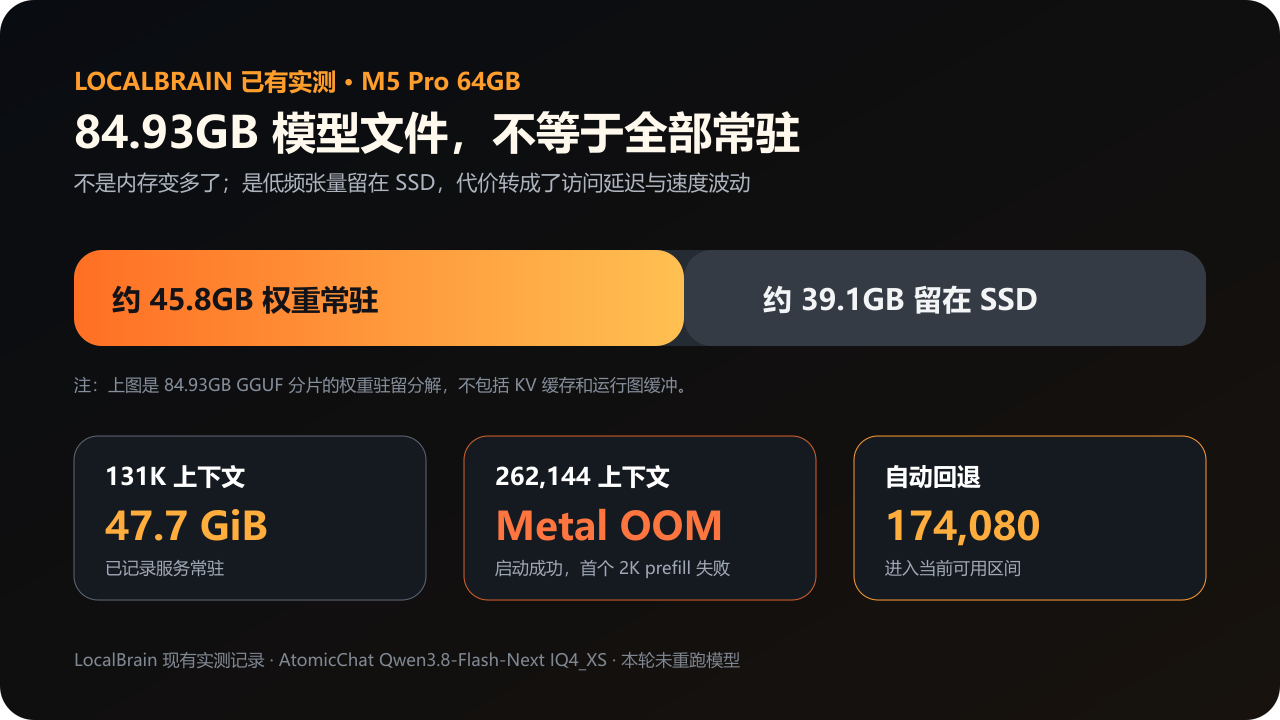
However, when the context is set to 131K, the service resident has reached about 47.7GiB, with a weight of about 42.7GiB, KV cache about 3.2GiB, and the system only has about 10GiB of buffer left.
Then the window was pulled to 262,144. Although the service could start, the first 2K prefill triggered Metal OOM. LocalBrain recorded the failure and automatically reverted the plan to 174,080.
This is the new hard wall: **Active weights + KV cache + Runtime graph buffer + macOS margin + SSD access locality. ** If any one is overestimated, “Boot successful” can become OOM or extremely slow after the real task starts.
Speed is also part of the hard wall. According to LocalBrain’s current records, long contexts near 119K only get about 5.2 tokens/s, while short-context warm-up can reach about 26.5 tokens/s. Back then, CPU/GPU layered offload changed ‘no memory capacity’ to ‘can run but slows down’; today’s lazy loading is essentially a compromise of the same type of project.
⚡ If two Macs are linked together, can RDMA break through a hard wall?
Multi-machine sharding isn’t new to today. What’s truly new is that llama.cpp has started leveraging Apple’s open RDMA on Thunderbolt, trying to bypass TCP stack replication and latency. Its role is more like reducing a shipping tax rather than directly adding the performance of two Macs.
Historically, parallel models in data centers have long been using InfiniBand and RDMA to lower inter-node communication fees. What’s special now is that this route is approaching personal desktops for the first time in the same way as Thunderbolt 5. The mode has become smaller, but the laws of communication physics remain unchanged.
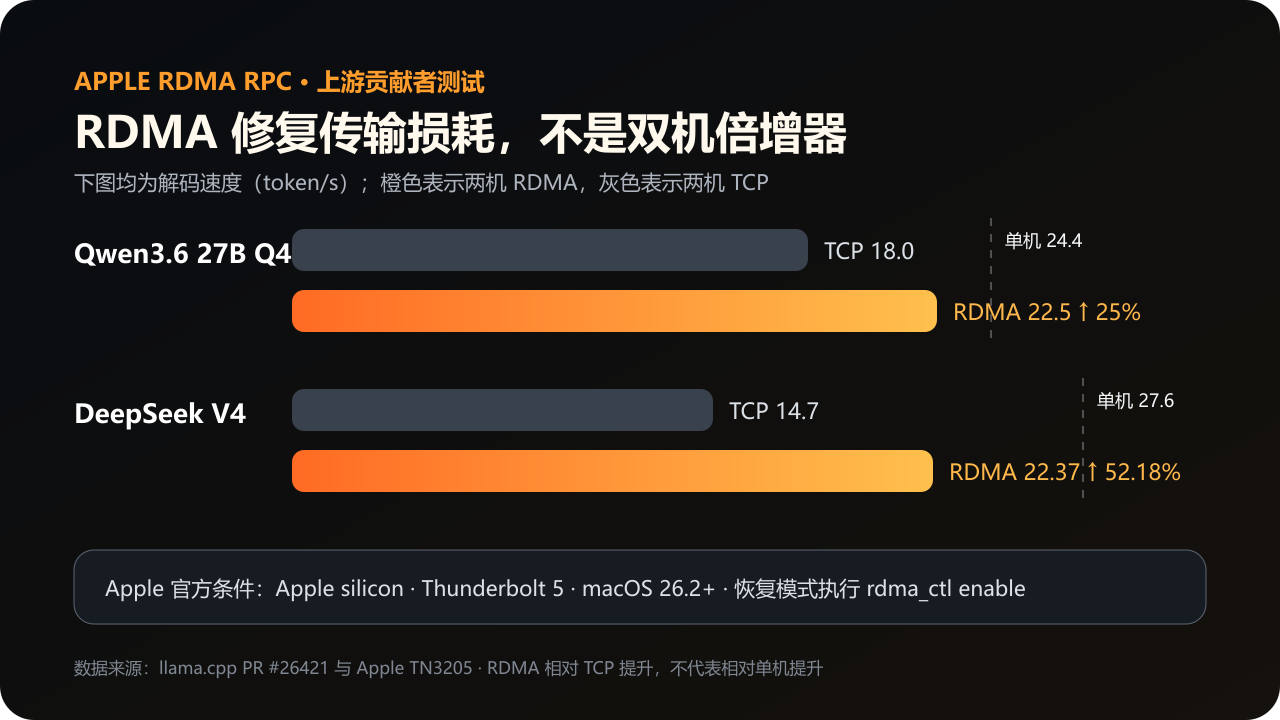
Upstream Qwen 3.6 27B Q4 test showed a single-machine decoding speed of 24.4 tokens/s, with a TCP speed of only 18 on both devices. After switching to RDMA, it returned to 22.5, a 25% improvement over TCP, but still slower than the standalone system.
DeepSeek V4’s two-machine decoding went from TCP’s 14.7 to RDMA’s 22.37, an increase of 52.18%, still not exceeding the single-machine 27.6. Three- and four-node RPCs still failed initialization at that time.
And this isn’t a feature you can enjoy just by having two Macs on Wi-Fi. Apple’s official requirements are Apple Silicon, Thunderbolt 5, macOS 26.2 or later, and you have to run rdma_ctl enable all at once in recovery mode.
During cold starts, model transfers can still last for several minutes. If it’s just for “two Macs looking strong,” this account doesn’t look good.
🛠️ Where is LocalBrain going now?
Here, the three states must be separated. The latest publicly available version is still v1.2.58; my local source code has reached 1.2.61; after 1.2.61, there are 4 more fix submissions for mainline validation. So I won’t make up a “v1.2.62” here; The final number of the next public release can only be based on the release page.
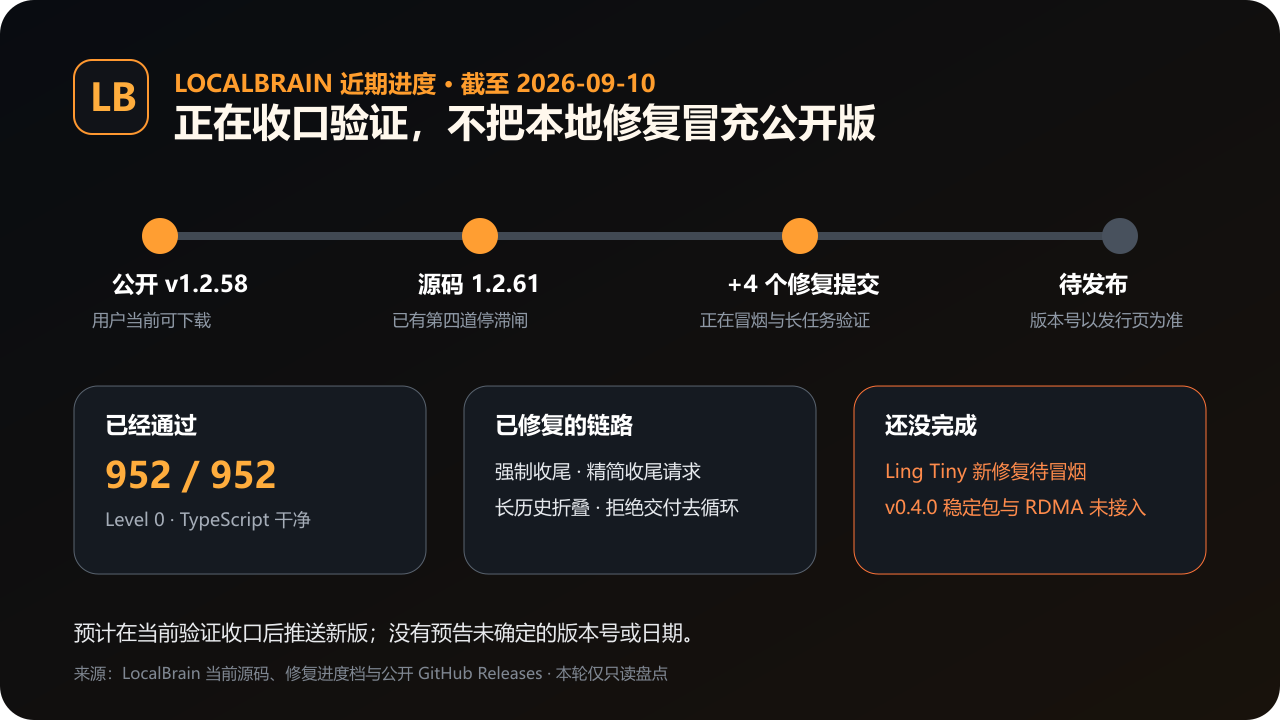
1.2.61 Added a fourth layer of verification stallgate, while also cleaning tool logs, recording true generation times, and handling Windows distribution endpoints. The next four fixes address the four most difficult points for long tasks: forcing a thoughtless finish when delivery is incomplete; Streamlining closing requests; Automatically collapsing old history when continuing long tasks; Including rejected localbrain_deliver in semantic loop checking.
The current evidence is: Level 0 increased from 947/947 to 952/952, TypeScript checks were clean; Level 1 short task smoke has delivered 6 rounds, 595 seconds, and 5,524 bytes of available results.
But Ling Tiny’s previous round of regression exposed 22 invalid self-checks and 85 rejected deliveries; Since the fix has entered the main storyline, new smoke replays are needed. I expect to push a new version soon after this verification is finalized.
LocalBrain’s current fixed llama.cpp is b10705, which already includes the capabilities needed for Qwen4exp and lazy loading, and enables mmap, --lazy-mode auto, --fit off, and full Metal offload for sparse MoE.
But this doesn’t mean it’s already been officially labeled v0.4.0; Nor does it mean Apple RDMA has already handled node discovery, network security, error recovery, and UI in the product. These two things will be included in subsequent stabilization tasks, and a low-level parameter won’t be treated as a delivered feature.
🧮 Who profits, who loses, and who won’t proactively tell you
Giant sparse model publishers naturally benefit: models that were previously excluded by local users due to file size now have the chance to enter 64GB and multi-Mac environments. Thunderbolt 5 peripherals and the high-memory Mac ecosystem will also benefit.
Tools like LocalBrain, which can record OOM, automatically shrink context, and intercept endless loops, will shift their value from “helping you press a start button” to “helping you hold the boundaries of availability.”
The real loss is misinterpreting “loadable” as “suitable for production.” The saved RAM doesn’t disappear; it’s just replaced by SSD throughput, latency, long context throttling, and system stability. Many download pages don’t proactively tell you “how many resident working sets this 84GB file will have on your 64GB Mac,” because this number depends not only on quantization but also on the model architecture and actual access patterns.
🧭 How should you choose now?
- 32–64GB users: Don’t blindly choose any model larger than memory just because of
--lazy-mode. First, confirm whether it really has a large low-frequency tensor that can be retained on demand, and leave room for system and KV cache. - 64GB running Flash-Next: Consider the area around 174K as the tested range between this machine and the current quantization, and do not use a successful 262K boot as valid proof.
- Want to play on two Macs: Only after Thunderbolt 5, macOS 26.2+, and RDMA are enabled in recovery mode will you enter the official support path; First, compare with the single-device baseline; don’t just look at “relative TCP improvement.”
- LocalBrain user: The latest publicly available version is still v1.2.58, and the new version is undergoing final verification; please refer to the actual GitHub releases listing.
My judgment
Quote: My judgment llama.cpp 0.4 expands the “impossible” of a 64GB Mac to “conditional possibility,” but doesn’t turn the device into unlimited memory. Starting today, judging whether a large model can run locally isn’t just about downloading files—you have to look at how it behaves.
I will continue to follow up on the Qwen4exp optimization for llama.cpp 0.4; Once the new version of LocalBrain is officially released, I will provide a downloadable and reproducible complete result.
Main sources of verification
- llama.cpp v0.4.0 Official Release Page
- Lazy Loading and On-Demand Tensor PR #27794
- Apple RDMA RPC Upstream Test PR #26421
- Apple Official TN3205
- LocalBrain Public Release Page
🧰 Tools I build
I maintain all of these tools myself. Preview builds are clearly labeled; the release pages are the source of truth for downloads, updates and known limits.
Info: HyphenBox Status: Official releases
A radar for free LLM APIs: availability is re-tested continuously, one local interface for all of them, and keys stay on your machine
Info: LocalBrain Status: Official releases
A multimodal MCP toolbox for local models: TTS, Whisper and video generation in one place
Info: ScreenLex Status: Official releases
Learn new words while you watch shows. Free, for Mac and Windows
Info: HyphenScreen Status: Official releases
Screen recording and smart editing in one: a DaVinci-style timeline, automatic redaction and a check of the finished video before export. Free
Quote: HyphenTech Make AI your superpower Local deployment · Free resources · Self-made software https://hyphentech.top
Late nights and burned API credits went in,a cup of tea comes back out — only if you feel like it.
Scan with WeChatPress and hold to save the image, then open it from your album in WeChat Scan

Comments
Loading comments…