Info: Machine translation This post was machine-translated from the Chinese original. Wording may be rough in places — the Chinese version is authoritative.
Chatting with ChatGPT to write a script—how far are you from a great video? At least there are dubbing, subtitles, visuals, editing, and final video review in between. If the script is clear, it only solves the question of “what to say”; Whether the audience can understand depends on whether the visuals follow the explanation, if the subtitles match the audio, and whether the final file can actually be played.
Lanshu’s lanshu-create-ai-presenter-video provides a way to turn scripts into videos: hand over the production steps, script checks, and templates to an AI assistant that can read files and execute commands. The client listed by the author includes Codex. This article introduces this workflow, not the one-click video creation feature verified in ChatGPT’s web chat; Whether it can be executed on a specific client depends on tool permissions and the production environment. Since this project was not completed independently, the following distinguishes between the author’s statement and the judgments that can be made based on it.
What can it actually deliver?
According to the author’s documentation, this Skill offers two production routes: digital human explanation and stylized explanation. Both routes start from the theme or complete copy, but the required materials, external services, and final frame sizes differ.
| Route | Main results | It needs to be provided | Generate cost boundaries | The author’s statement on the painting |
|---|---|---|---|---|
| Digital human explanation | Authorized character images appear on screen, accompanied by subtitles and keyword animations | Subject or copy, authorized, clear adult portraits | Voice-over and digital human video generation capabilities are required, which may incur cloud service fees | Any frame size, default 9:16 |
| Stylized explanations | Without using characters on camera, the content is performed line by line in one of nine styles | Themes or copywriting, and you can also provide your own voiceover | The author said the paid part mainly involves voice acting; Bringing your own voice acting can avoid this feature | Genesis 16:9 |
Route and cost descriptions come from warehouse documentation and have not yet been independently validated.
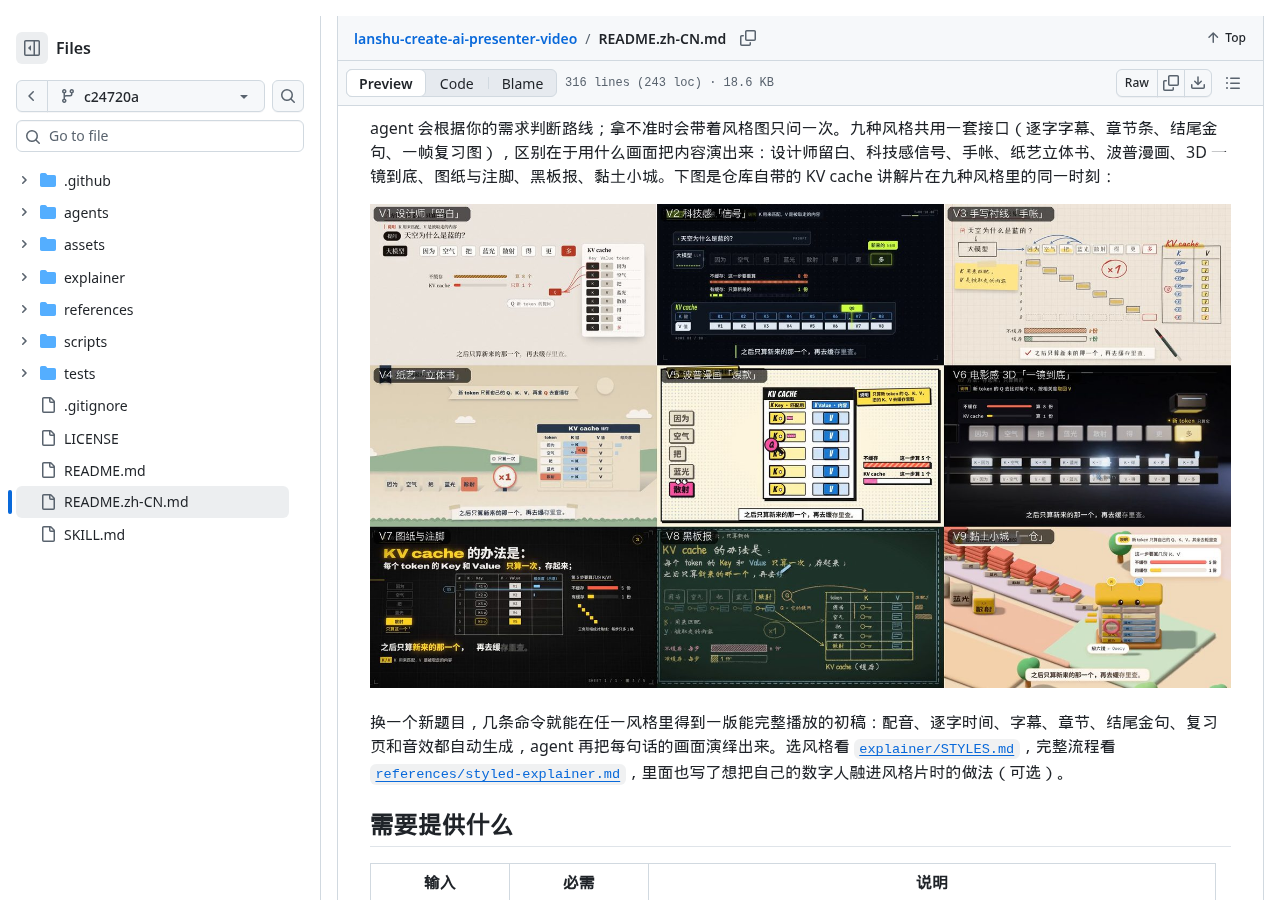
The author offers nine art styles. For example, when explaining software steps, you can study the drawings and footnote routes; If you want abstract relationships to be easy to remember, you can look at paper art pop-up books or clay towns. The basis for choosing an art style should be whether the book can clearly explain this phrase, not which decoration is most common. Warehouse samples show the author’s design direction; after switching to your own title, you still need to recheck whether the visuals correspond to the voiceover.
Skill here is more like a video production ticket
You can think of it as the sorting process when sending packages: if a package is not weighed, it cannot enter the loading stage; If the address is not confirmed, it cannot be shipped directly just because the staff manually checks “Completed.” This skill also requires leaving the corresponding product at each stage, and then the task status is calculated by the inspection script.
The author divides the process into eight stages, from collection and input to acceptance and delivery. Only after the copywriting and the rhythm table pass are they locked onto the content; Only after the dubbing file can be read properly and the recognition report is provided is the sound locked on; Only after the storyboard is approved can the image be generated. Finally, the high-quality master and shareable version are checked for complete playback, whether the volume fluctuates, whether there is a black screen or abnormal freezes. This way, every “completion” must correspond to the file that can be checked.
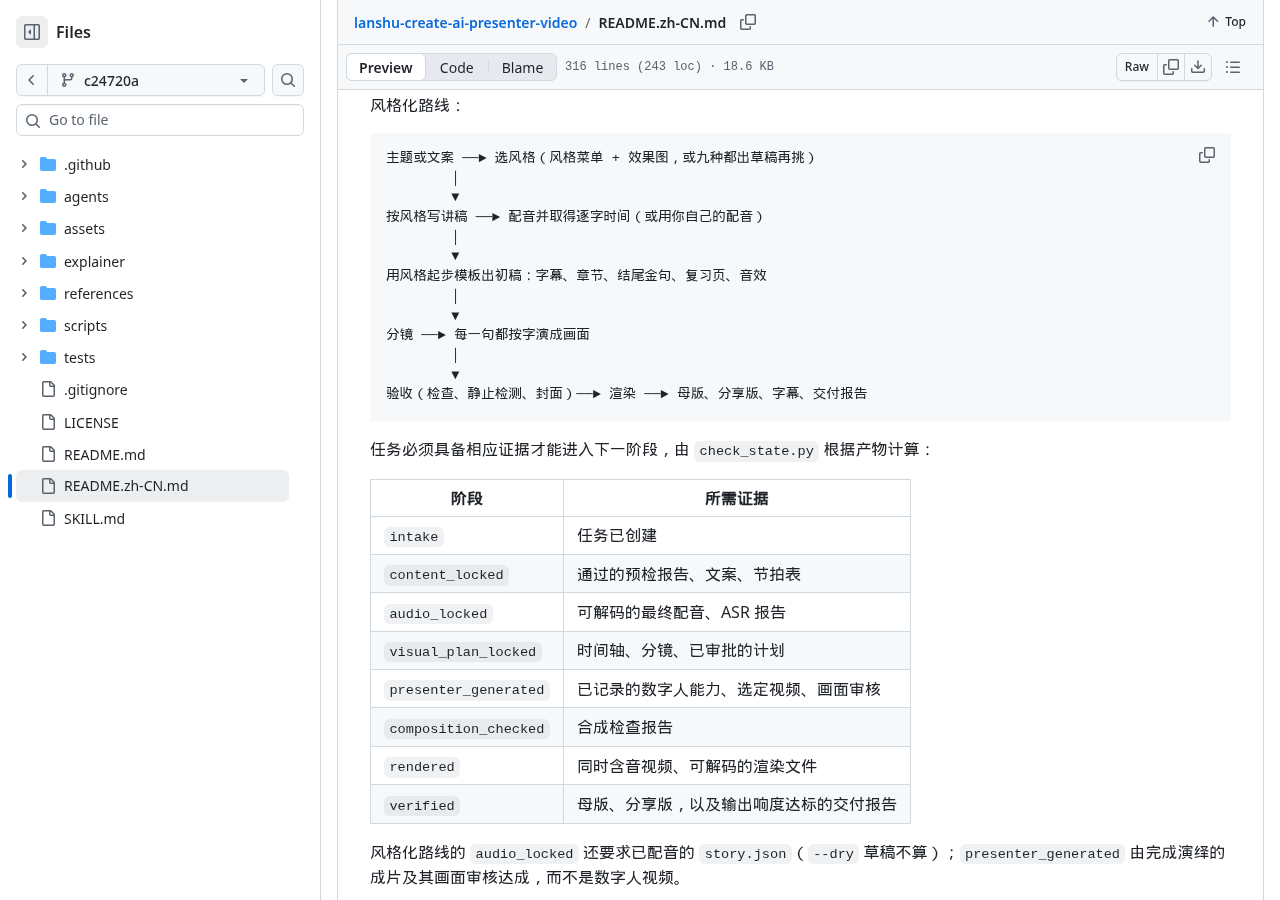
The value of this design is not in replacing creative judgment, but in reducing low-level incidents such as “page display successful, but files delivered but unable to open.” The limitations are clear: scripts can check documents and technical metrics but cannot automatically prove that character consistency, lip movement, gestures, and visual expression are satisfactory. The warehouse still requires normal speed to watch the finished film and records manual footage review.
What environments should be prepared before starting?
- On the client side, the author states that it uses standard SKILL.md and can be used with tools supporting Agent Skills such as Claude Code, Codex, Gemini CLI, Cursor, OpenCode, GitHub Copilot, etc.; Coding agents that can read files and execute shell commands can also follow the workflow. This is a compatibility statement and does not prove that all clients have independently run their work.
- The basic environment requires Python 3.9+, FFmpeg with ffprobe, Bash, jq, awk, and sed.
- The stylized route also requires Node.js, rsync, and Python with numpy. The default dubbing process requires a MiniMax API Key; You can also switch to your own recorded voiceover.
- The digital human route requires at least one callable voiceover, digital human video generation, and lip-sync capabilities, which can be cloud service CLIs, APIs, or local models. The repository does not guarantee these capabilities are included free with the code.
The safest starting point is not to directly copy a long string of commands, but to decide on the route first. If you need a personal brand image, already authorized character images, and accept remote generation costs, you can study the digital human route; If you don’t want to upload character images or the theme relies more on graphic explanations, you can first look at the stylized route. After making your selection, place the repository in the corresponding client’s skills directory and clearly call it using the skill name. Installation and directory instructions can be viewed with verified repository documentation: https://github.com/cclank/lanshu-create-ai-presenter-video/blob/c24720a85d63b1bd494f6447e48a59384733647b/README.zh-CN.md
The code is free, not the entire generation chain
The software and documentation in the repository are licensed under the MIT license, allowing use, modification, and distribution, but must retain copyright and license statements, and the software is provided “as is” without any warranty. Fonts, third-party libraries, and external generation services each have their own terms; just because the main repository is MIT, all dependencies and generated materials cannot be treated as the same license. Original license text at: https://github.com/cclank/lanshu-create-ai-presenter-video/blob/c24720a85d63b1bd494f6447e48a59384733647b/LICENSE
The digital human route also adds an additional issue of material rights. Character images require confirmation of usage rights and confirmation of the person’s adulthood; Voice cloning requires separate explicit authorization; it is not possible to infer or replicate real human voices from photos. The author designed the price before the first paid call, the scale of the sample, and the upper limit for retrys, but the specific price depends on the actual service provider chosen, and existing data is insufficient to provide a unified cost.
Warning The stylization route downloads font subsets from Google Fonts and jsDelivr, and cloud dubbing also requires network and credentials. For projects where materials cannot be shared, network is limited, or requires complete offline access, dependencies must be replaced item by item first; this workflow cannot be considered a purely local solution.
Is it now mature enough to be directly recommended?
At the time of the October 7 grab, the warehouse had 2,372 stars, with instructions for use, dependencies, examples, tests, and limitations all present. The data is quite complete and worth studying how it is arranged for production and acceptance; However, the number of stars is not the quality of the finished film, nor is there continuous snapshot evidence of rapid growth, so it cannot be packaged as a validated, mature recommendation.
More importantly, this time there was no running repository code, no end-to-end tasks completed in Claude Code, Codex, or other clients, nor was there independent verification of cloud service portfolio, failure recovery, or final quality of the final product. Therefore, it is currently more suitable for observation as a fully structured workflow under test, rather than a mature recommendation that has already passed real-world testing.
Who is worth trying?
- Suitable for those who already know how to use coding agents, can install Python and FFmpeg, and are willing to handle Node.js, cloud service credentials, and task directories.
- Suitable for those who frequently produce explainer videos and want to fix authorization, cost confirmation, storyboard approval, technical acceptance, and delivery records into their workflow.
- Suitable for those with their own voiceover or authorized character materials, who can manually review visuals, lip movements, and copyright boundaries.
- It’s not suitable for those who want to get a free video by typing just one sentence, or who can’t use any cloud voiceover, digital human generation, or online font resources.
Back to the title: To get ChatGPT involved in creating an exciting video, first narrow the topic so the script answers a real question paragraph by paragraph; then write each segment’s intended operation, result, or relationship into the storyboard, and finally hand it over to assistants and production tools with the execution environment to complete it. Uncle Lan’s skill provides the second half of the work order and inspection methods. The first time, you can make only a short segment, recording the service, cost, and failure points, then check whether the audio, subtitles, and visuals are the same thing. The brilliance of the video doesn’t come from a single “completed” sentence, but from the audience truly understanding it and the submitted file standing up to playback scrutiny. The project’s effectiveness still needs independent verification. Warehouse entry: https://github.com/cclank/lanshu-create-ai-presenter-video
Project firsthand information
🧰 Tools I build
I maintain all of these tools myself. Preview builds are clearly labeled; the release pages are the source of truth for downloads, updates and known limits.
Info: HyphenBox Status: Official releases
A radar for free LLM APIs: availability is re-tested continuously, one local interface for all of them, and keys stay on your machine
Info: LocalBrain Status: Official releases
A multimodal MCP toolbox for local models: TTS, Whisper and video generation in one place
Info: ScreenLex Status: Official releases
Learn new words while you watch shows. Free, for Mac and Windows
Info: HyphenScreen Status: Official releases
Screen recording and smart editing in one: a DaVinci-style timeline, automatic redaction and a check of the finished video before export. Free
Quote: HyphenTech Make AI your superpower Local deployment · Free resources · Self-made software https://hyphentech.top
Late nights and burned API credits went in,a cup of tea comes back out — only if you feel like it.
Scan with WeChatPress and hold to save the image, then open it from your album in WeChat Scan

Comments
Loading comments…