Info: Machine translation This post was machine-translated from the Chinese original. Wording may be rough in places — the Chinese version is authoritative.
85GB model fitted into a 64GB Mac: I ran Qwen 3.8 Flash Next with LocalBrain
I need to correct my previous judgment first.
When I saw the scale of Qwen 3.8 Flash Next, my first reaction was: 64GB Mac is not suitable. **It has a 125B main model, plus 51B n-gram embedding and 4B MTP. Even if each token only activates about 6B parameters, the model file won’t shrink out of thin air; ordinary four-bit quantization will still squeeze out of 64GB of unified memory.
This judgment is not wrong for ordinary quantization. But Atomic’s release of the specially made M64 shards changes the premise of the problem.
I downloaded Qwen3.8-Flash-Next-AD-3.84bpw-IQ4_XS-M64: 28 model slices plus a Q8 visual projection, with an actual download of about 79.67GiB. Then I gave it to LocalBrain to complete loading, text generation, tool calls, image understanding, and continuous output tests on a 64GB M5 Pro Mac. It doesn’t “can be turned on,” but actually works at about 22.5~26.3 tokens/s.
This article clarifies three things: what makes this model so strong; Why an 85GB file can fit into a 64GB Mac; And why I recommend using LocalBrain to manage this increasingly complex local model.

It is not an ordinary “125B large model”
Qwen Official Model CardDefines Qwen 3.8 Flash Next as a multimodal MoE model with a visual encoder. The main model has about 125B parameters, but each token only activates about 6B; There are 512 experts in the 48th layer, selecting 10 routing experts per round, plus 1 shared expert. The native context is 262,144 tokens, which can be expanded to 1,000,000 tokens.
The most important thing here is not “many parameters,” but that it places different types of parameters in different positions:
| Structure | Scale and Role | Local operation impact |
|---|---|---|
| Main MoE model | 125B, total activation about 6B | To determine the main computational volume, active experts must quickly access it |
| n-gram embedding | An additional approximately 51B | Essentially, it is more like a lookup table, suitable for reading from the SSD by address |
| MTP | About 4B | Used for multi-token prediction to improve generation efficiency |
| Visual encoder | Image-to-text comprehension | A separate mmproj file is required |
The official raw model scores are impressive: GPQA Diamond 91.7, LiveCodeBench v6 91.9, SWE-bench Pro 62.5, SWE-bench Multilingual 81.0, Toolathlon Verified 73.5; on the visual side, RealWorldQA is 88.5, while MathVision scores 90.6 / 95.7 under two official test settings.
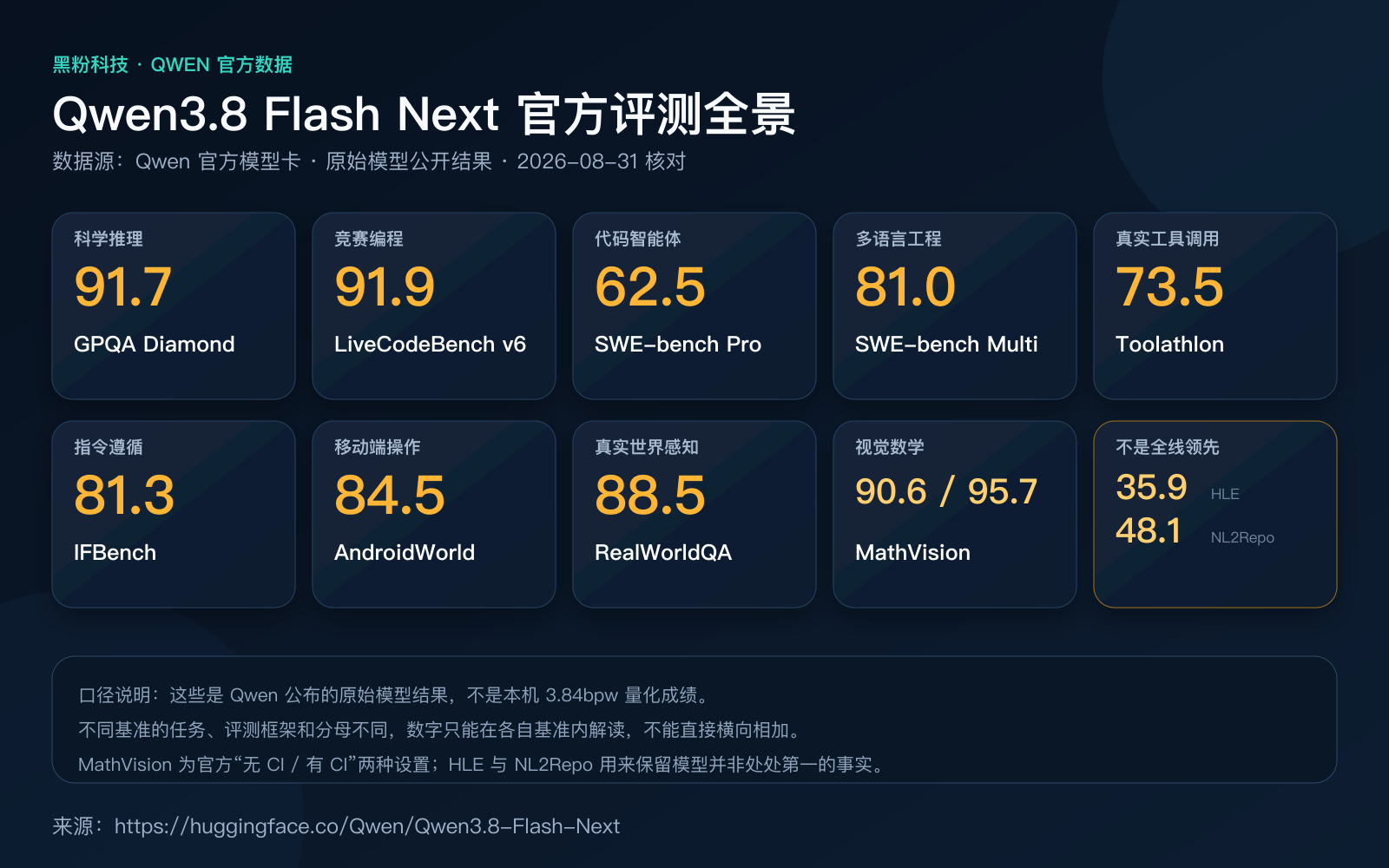
But these numbers must be accompanied by a bold note: **These are Qwen’s published original model reference scores, not the scores I re-ran on Mac from my 3.84bpw quantization. **Quantization causes losses; running frameworks, prompt templates, context, and sampling parameters can also change the results. Directly writing the manufacturer’s benchmark scores as the actual test results is the easiest way to create misleading results.
I didn’t just pick the best-looking scores. In the official table, HLE is 35.9, lower than Claude Opus 4.6’s 40.0; NL2Repo-Bench is 48.1, also lower than the best result of 54.2. These two items are kept in the chart to remind myself: it’s strong in scientific reasoning, competitive programming, tool calling, and visual comprehension, but it doesn’t mean it’s ahead in every task.
Why build this architecture now? In the past, dense models had almost every token touching most of the weight, so as capability increased, the cost per token also increased. MoE first separated “total capacity” from “computation per round,” and this time Qwen used an n-gram lookup table to swap part of the capacity for cheaper storage access. For model vendors and cloud service providers, 6B activation means lower inference costs and higher per-unit computing throughput; For individual users, the cost shifts from pure computation to quantization of quality, memory allowance, and whether SSD and runtime work together.
Therefore, the beneficiaries are not just a group of people who like to tinker with local models. Qwen uses this open weight to validate next-generation architectures in advance; Quant publishers and llama.cpp gain new technology entry points; Apple Silicon users gain a capability path that was previously only available to large memory servers. What gets squeezed out is the old deployment logic of “the size of the model file must be the amount of memory you need,” and a single path that charges by token but cannot keep private data. Hardware manufacturers rarely emphasize this proactively, because it just rightly illustrates: sometimes a larger SSD and smarter shards are more efficient than continuing to stack unified memory.
Note Qwen 3.8 Flash Next enters think mode by default. The official recommendation is to use
temperature=1.0、top_p=0.95、top_k=20、min_p=0、presence_penalty=0in think mode; Usetemperature=0.7、top_p=0.8、top_k=20、min_p=0、presence_penalty=1.5for non-think mode. If local software only switches the “think switch” without linking sampling parameters, the effect will clearly deviate from official settings.
The real breakthrough was leaving 39GB on the SSD
Atomic’s approach is not the traditional “throwing uncomputable layers onto the hard drive.” Ordinary expert weights To generate GB-level traffic per token, temporary fetchs from the SSD are almost inevitably slow to death. The n-gram table is different: the model calculates fixed addresses based on the nearest token, reading only a tiny portion per round.
Previously, CPU/GPU offload usually only moved unoccupied weights to another storage layer, requiring repeated transfers during computation, so once the memory boundaries were crossed, the speed would drop sharply. The key difference in M64 sharding is that what remains on the SSD is not a high-frequency matrix computation expert, but a lookup table read by fixed address. It is not a more aggressive offload but uses the model structure to isolate things that shouldn’t be residing from the start.
Back in 2020, when the M1 integrated the CPU, GPU, and unified memory into the same package, local AI lost one round of back-and-forth transfers between VRAM and main memory; But unified memory still has a physical limit. This time, the M64 doesn’t just expand that memory module, but first determines which parameters don’t even need to be included.
Atomic’s quantization explanation provides a reference: at 36 tokens/s, this part randomly reads about 3MB/s, and NVMe response time is less than the 28ms budget for a single token. More importantly, the publisher placed the n-gram table separately into a GGUF shard. After enabling mmap on Apple Silicon, about 39GB of lookup tables can remain on the SSD rather than being locked into unified memory along with the metal weight.
This is where the M64 suffix truly matters.
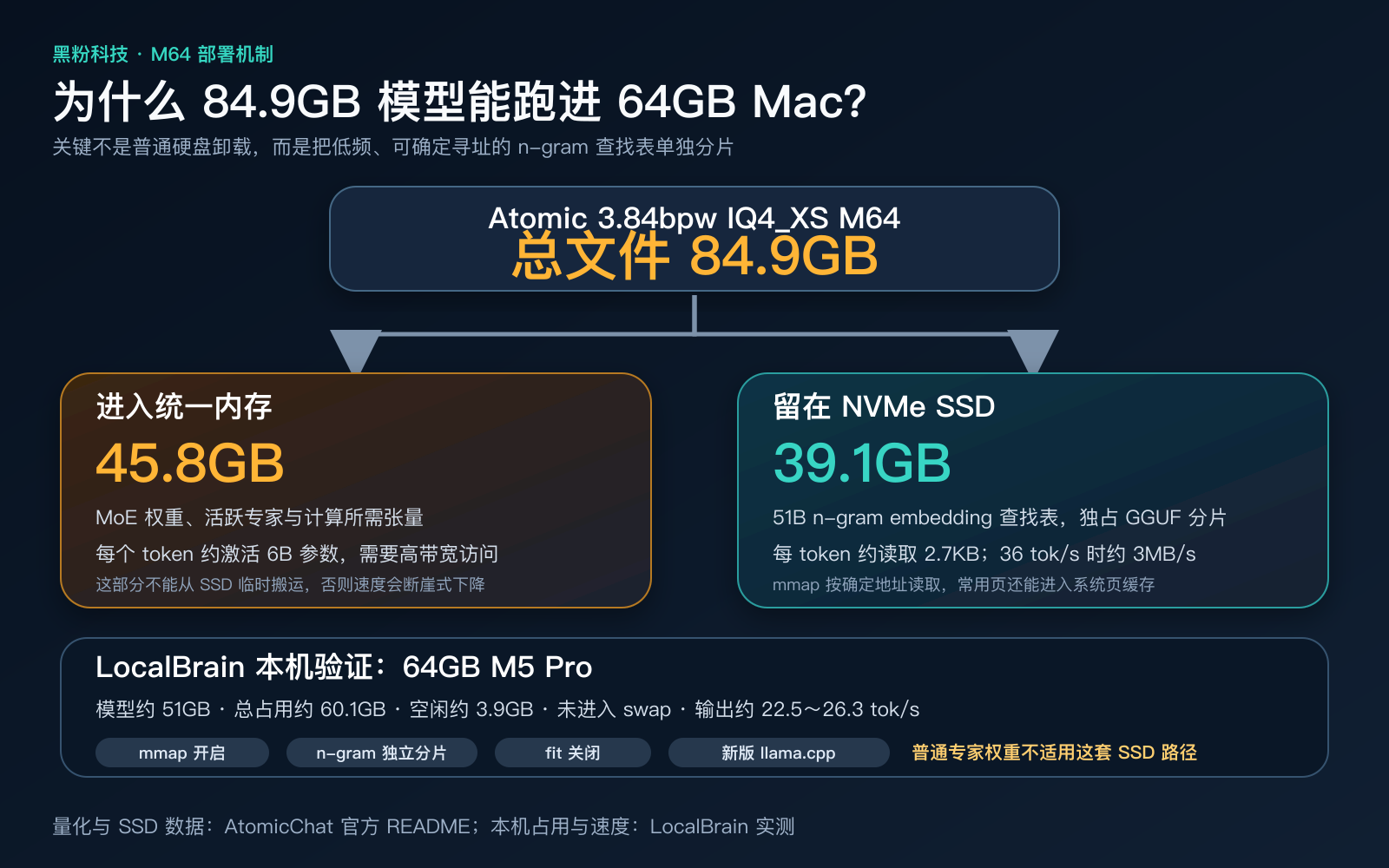
| Atomic quantification | Permanent memory | Stay on the SSD | Total volume | Mean KLD | Same as Top-1 | PPL ratio |
|---|---|---|---|---|---|---|
| 3.84bpw IQ4_XS M64 | 45.8GB | 39.1GB | 84.9GB | 0.2277 | 82.68% | 1.102 |
| 4.27bpw Q4_K_M M64 | 54.5GB | 38.4GB | 92.9GB | 0.0842 | 89.49% | 1.026 |
If you only care about quality, Atomic clearly recommends 4.27bpw: lower KLD, higher Top-1 consistency. But for a 64GB machine, I actually chose 3.84bpw. The reason is realistic: 4.27bpw uses 8.7GB more resident memory than 3.84bpw, and system, context, compute buffer, and visual projection all need more space. No matter how good the quality, running out of memory on the first decoding is pointless.
Warning This isn’t a universal trick that allows all 80GB~90GB GGUFs to run on a 64GB Mac. It relies on the model’s unique n-gram structure, Atomic’s independent sharding, and the new llama.cpp’s support for this architecture. Ordinary large models copying the same parameters are likely to still result in memory overflow.
What did I actually run in LocalBrain?
This setup uses LocalBrain 1.2.23, llama.cpp b10705, and 64GB M5 Pro. All layers are handed over to Metal: mmap enabled, lazy load enabled, fit closed, context set to 32K; Visual testing uses Q8 mmproj. This configuration does not enable DFlash2—it does not actually accelerate the current model or this llama.cpp path.
This is different from my previous experience running 7B, 27B, and 70B quantization on Macs: previously, the main issue was “can all weights be put into unified memory?” and context was usually second-priority; this time, the model file is already larger than physical memory, so deployment first depends on sharded semantics, then quantizing bit width, context, and speed. In other words, just looking at the model name, parameter size, or GGUF file size is no longer enough to judge whether a Mac can run.
Loading takes about 14~18 seconds. LocalBrain runtime shows the model occupies about 51GB, total memory is about 60.1GB, and only about 3.9GB remains, but no swap is made. Here are some results:
| Testing | The result |
|---|---|
| Simple calculation | 29 × 31 = 899, correct answer |
| Text generation | 25.84 token/s |
| Tool call | 26.33 token/s, correctly generated get_weather({"location":"上海"}) |
| Picture comprehension | 24.13 tokens/s, able to recognize the orange LB logo on a black background |
| Continuous generation | 24.51 tokens/s, stable long output process |
| LocalBrain interface test | About 22.5 tokens/s, with prompts accounting for 4,499 tokens |
Atomic reported a reference of 36 tokens/s for the 64GB M5 Max. My M5 Pro reached about 62%~73% of that. Considering GPU size, memory bandwidth, and real prompt length, this speed is reasonable and not abnormally slow.
Last time, I packed 70B-level quantization into my Mac mainly to subtract between quantization bit width and context; This time, there’s an extra layer of “storage allocation by parameter usage.” Both are superficially deployed on-premises, but the real factor that determines success has changed.
There are two boundaries that need to be clarified. First, the quantization error of 3.84bpw is indeed higher than 4.27bpw, so I position it as the “capability limit available on 64GB,” not the best quality version. Second, this type of model is not suitable for maxing out native 262K context right from the start; 32K can already cover code, data analysis, and multi-turn tool tasks, while leaving the system with the final security space.
Why I prefer to leave it to LocalBrain
Of course, the command line can run. The problem is, this model is no longer just a llama-cli -m model.gguf thing that can be fully explained: whether the 28 slices are complete, whether the visual projections match, whether the mmap is open, whether fit is misjudged, whether the context overloads memory, whether the chat template is added to --jinja—any detail that is wrong could result in “model downloaded but unusable.”
LocalBrain’s value goes beyond just providing a chat window. It’s more like a local multimodal model and tool hub on Mac: unified downloading and management of language, speech, image, and video models; Arranging running parameters according to local memory and model structure; Handing over local capabilities via MCP to other AI software calls; Reclaiming resources after tasks are completed. I’ve already introduced its positioning and interface in detail before. You can continue reading: LocalBrain: Turning your Mac into a private AI box.
Historically, local model managers were mostly designed around “one model file, one backend, one chat window.” After stacking multimodal models, sharded GGUF, thinking patterns, and tool calls, users continue to manually maintain each startup command, which only shifts deployment costs from hardware to error troubleshooting time. The reason LocalBrain wants to combine models, runtimes, and local tools is precisely this: it competes for a unified entry point for local capabilities, not just to create another chat client.
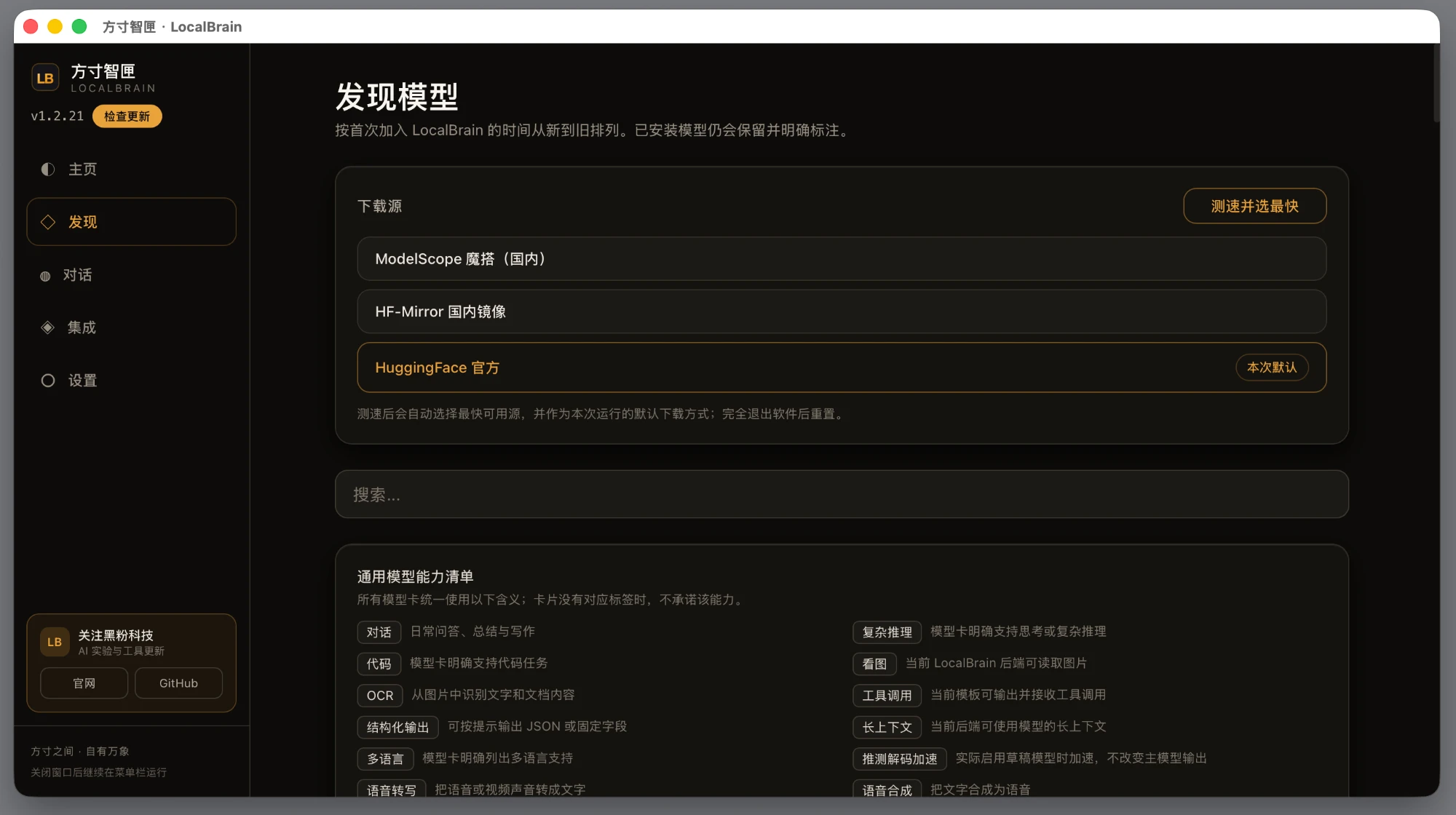
This Qwen 3.8 Flash Next test amplifies the value of this management layer. For special sharding models, the software needs to know that the “total file size” and the “actual resident memory size” are not the same number; For thinking models, the software should also know that the switch should be linked to a set of sampling parameters; For multimodal models, it should treat the main model and mmproj as a complete deliverable.
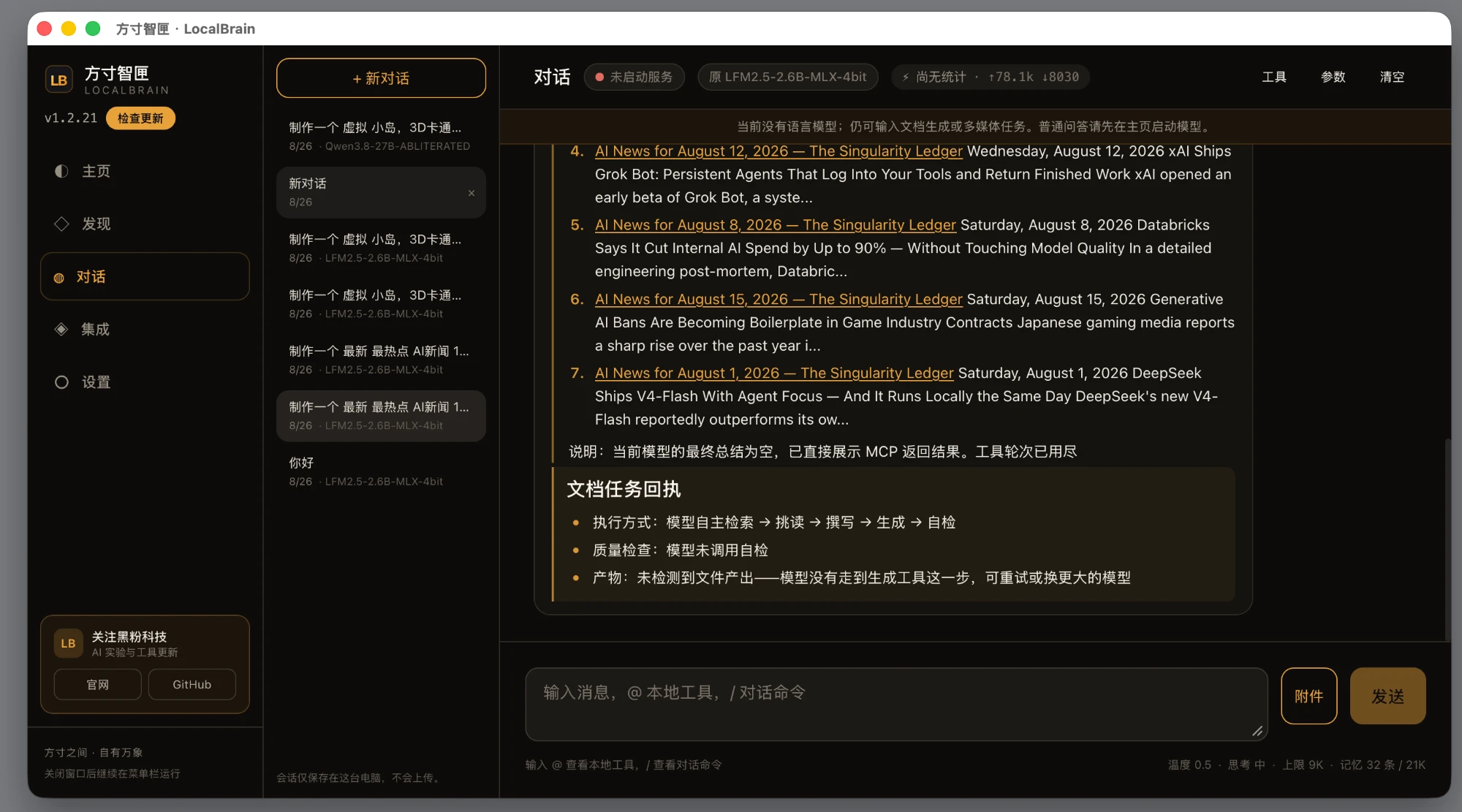
LocalBrain is still rapidly iterating. This time, I didn’t blindly trust auto values; instead, I fixed 32K context, single concurrency, 512 batch, mmap, lazy load, and fit off for this special M64 quantization. This set of test results will continue to feed back into its automatic parameter logic. My goal is not for users to memorize these parameters, but to enable future language models to do as much as possible: recognize structures, estimate resident memory, provide safe context, and then run them directly.
My conclusion: it can run, and it has practical value
What attracts me most about Qwen 3.8 Flash Next isn’t “who 125B beats,” but that it pushes the boundaries of local models a step further: the total file is about 85GB, but 85GB doesn’t necessarily mean you have to go to memory; Activating 6B per token doesn’t mean it only needs one 6B model. Model structure, quantization strategy, sharding method, runtime, and SSD all became the same deployment issue for the first time.
For 64GB Apple Silicon users, my advice is clear:
- Choose Atomic’s 3.84bpw M64; don’t ignore memory just because 4.27bpw quality is better.
- Prepare at least 90GB of available SSD space, use the new llama.cpp, keep mmap and lazy load, and disable auto-fit.
- Start with 32K context and single concurrency runs, then increase your budget; Don’t assume the official 262K is the default for a 64GB Mac.
- If you don’t want to manually maintain sharding, visual projection, and startup parameters, you can directly manage them using the latest version of LocalBrain.
It won’t turn a 64GB Mac into a training server, nor will it equate 3.84bpw with raw precision. But on a quiet, private, token-free personal computer, running an ultra-sparse model with programming, agent, tool call, and vision capabilities at 22~26 tokens/s is no longer just a demonstration, but a native AI that can enter real workflows.
References
- Qwen 3.8 Flash Next Official Model Card
- Qwen3.8 Flash Next Official Code Repository
- AtomicChat M64 GGUF and Quantitative Metrics
- LocalBrain Product Introduction
- Latest LocalBrain Installation Package
🧰 Tools I build
I maintain all of these tools myself. Preview builds are clearly labeled; the release pages are the source of truth for downloads, updates and known limits.
Info: HyphenBox Status: Official releases
A radar for free LLM APIs: availability is re-tested continuously, one local interface for all of them, and keys stay on your machine
Info: LocalBrain Status: Official releases
A multimodal MCP toolbox for local models: TTS, Whisper and video generation in one place
Info: ScreenLex Status: Official releases
Learn new words while you watch shows. Free, for Mac and Windows
Info: HyphenScreen Status: Official releases
Screen recording and smart editing in one: a DaVinci-style timeline, automatic redaction and a check of the finished video before export. Free
Quote: HyphenTech Make AI your superpower Local deployment · Free resources · Self-made software https://hyphentech.top
Late nights and burned API credits went in,a cup of tea comes back out — only if you feel like it.
Scan with WeChatPress and hold to save the image, then open it from your album in WeChat Scan

Comments
Loading comments…