

Info: Machine translation This post was machine-translated from the Chinese original. Wording may be rough in places — the Chinese version is authoritative.
With the same ‘let AI do something for me,’ what do you hope it delivers?
A beautiful picture, a playable video, or a real mini-game where you can press buttons, accept tasks, or change states?
In this Gemini Argon experience data, I left three game projects: “Neon City: The Last Order” for driving delivery, “Echo Maker” that changes scenes with sound, and “Gravity Courier” for switching gravity direction. Different styles test different things.
And on Google’s other side, Flow can’t be summed up as just a “video generator.” It brings generation, editing, material organization, and dedicated creative tools into one workspace.
Looking at these two parts together brings us closer to the question I want to discuss: **How far can Google AI help ordinary people? Will it produce the first version, or will the subsequent modifications, organization, and delivery be less hassle-free? **
First, explain the scope of materials: the game part is based on my existing project files and has done a basic browser review; No complete dialogue generation is generated, and no claim is made to clear the game in one prompt. The Flow section is analyzed based on official data found on October 17, 2026, and will not include the official demo as my personal test score.
1. Don’t confuse Gemini Argon, the tools, and the final product with one thing
Model names are the easiest to fill the title and also make people overlook other conditions.
Google’s official name is Gemini 4 Argon, and the introduction focuses on longer software engineering and knowledge work. For more information about the official entry, you can check the official release notes and Chinese API documentation.
But whether a game project can ultimately be opened is not determined solely by the model name. What tools are used, whether there are local files, which libraries are allowed, and whether changes can be made after problems all affect the results.
You can think of these characters as filming a store-visit video: the model resembles the person involved in the creation, the tools and environment resemble a studio and editing console, and the final output is what the audience truly sees. Changing creators doesn’t mean all equipment and processes are automatically replaced; Highlights in the work don’t mean every step is perfect.
| Look at which floor | This article corresponds to the audience | What should you ask? |
|---|---|---|
| Model | Gemini 4 Argon | Can you understand complex requirements, organize content, and code? |
| Work environment | Tools and file environments available at the time of generation | Can you write files, open results, locate issues, and make modifications? |
| Create products | Google Flow | How to manage and modify materials, and which tools can be reused |
| The final product | Games, graphics, videos, export files | Can users actually use it after receiving it? |
Here, we especially shouldn’t take things for granted: **This article has no evidence that these games were generated within Flow, nor does it attribute all Flow capabilities to Argon. ** Placing both in the same issue is meant to discuss Google’s different creative paths, not to forcibly piece together a nonexistent real-world pipeline.
Once this relationship is clear, when you watch the game, you won’t just have to say, “The model is so strong.”
2. “Neon City”: Drawing a city is not difficult, but making the city’s rules work together is hard
Let’s start with the most intuitive project.
Night, rain lines, intersections, vehicles, glowing mission areas, and mini-maps are all on one webpage. On the left, it tells you to go to the warehouse to get the data box; on the right, it shows the wanted status; below it are durability and collision counts.
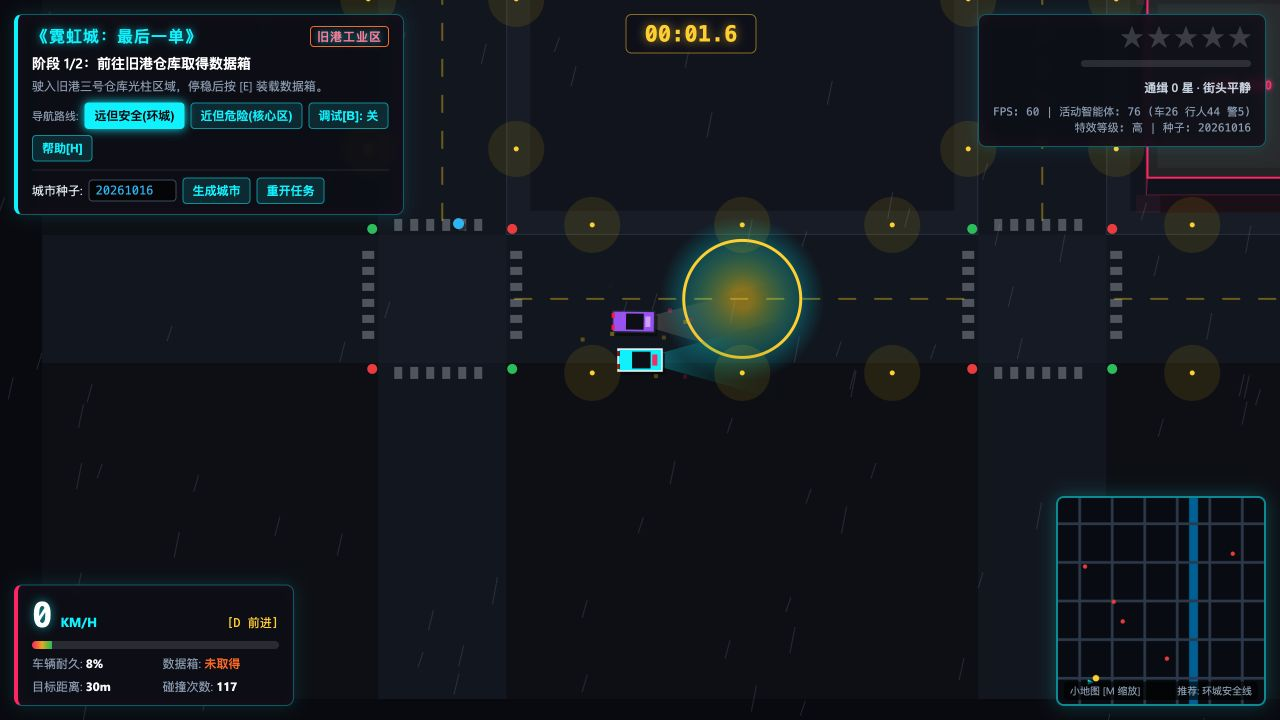
The original theme of this project was not just about “being able to drive a car.” It required vehicles to have routes, pedestrian activity, road connectivity, and changing task phases, and to integrate pursuit, road closure, and route selection into the same city.
Where is it complex? It’s not that there are many elements, but that these elements are interconnected.
Think of it like delivering food during the evening rush: drawing neighborhoods, intersections, and riders is just a map; Riders have to walk along the road, change lanes when roads are blocked, and only trigger delivery when they’re downstairs—that’s the real behavior. Roads, vehicles, and tasks in the game also need this kind of connection.
The “status” often mentioned in programs is very specific here: goods not picked up, goods received, delivered, delivered. It’s like a few lines of progress on a delivery slip; whether the previous step is completed determines whether the next action can happen.
If the car shows loading successful before approaching the warehouse, or the task still asks you to pick up after handing over, no matter how beautiful the visuals are, it won’t save the logic. Screenshots can prove the scene and interface have appeared, but they can’t prove you can complete the entire task.
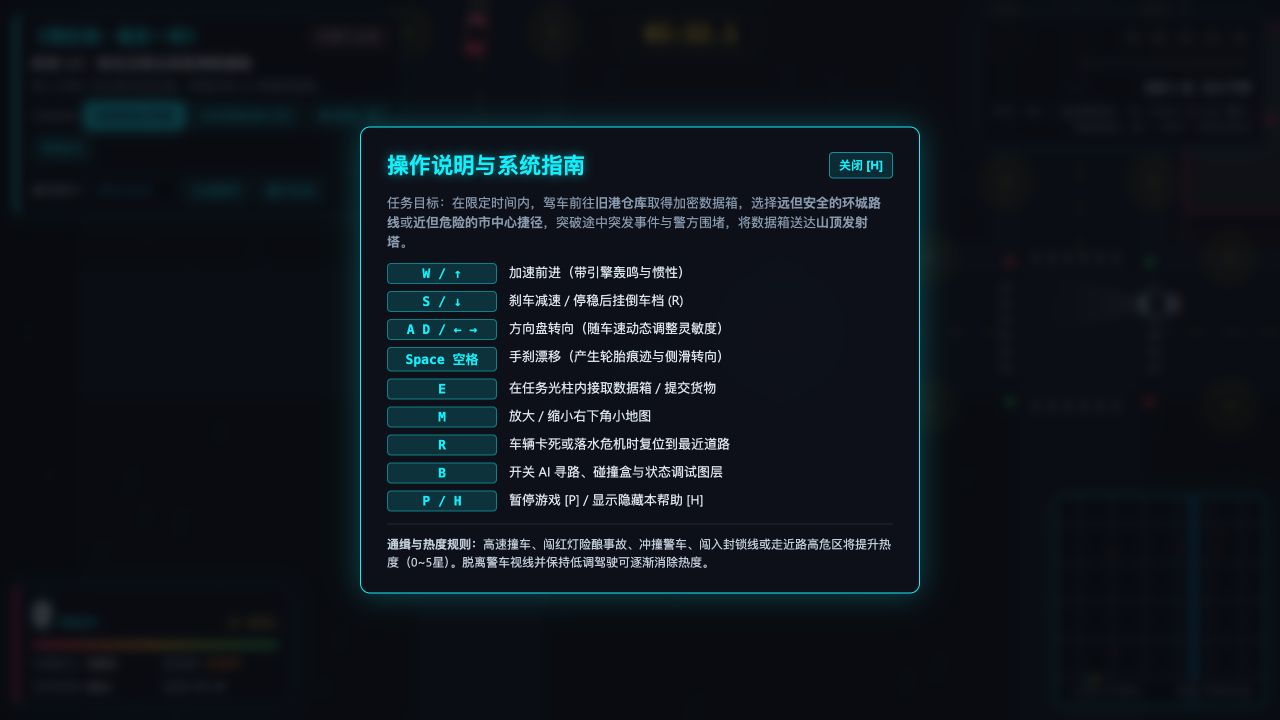
When you actually open the help panel, you can see receiving, submitting, resetting, mini-map, and debug entry. It tells us how to check the item, but the panel says a certain function, so you still have to go back to the game to verify it step by step.
During this recheck, the interface also showed durability at 8% and collision at 109 times. This frame alone cannot judge the quality of the collision system for a game, but it is enough to remind me: frame rate numbers, element count, and true playability are different checks. **
In terms of file organization, it is indeed a single HTML, and static checks did not reveal any external network URLs. This means its delivery method is relatively easy; However, this time it was opened through the local preview service, without additional network disconnection, cross-browser or full pass verification, so “Double-click offline and full process pass” is not included in the transcript.
For ordinary users, such products are best used as interactive prototypes: first turn ideas into visible, open objects, then judge whether the gameplay is worth further polishing. Don’t assume it looks like a game and expect it as a commercial product.
3. “Echo Maker”: When sound begins to change the world, testing is no longer just about picture quality
The second project takes a different approach.
The scene shifts from a dark city to a lighter floating island, with characters standing in a courtyard. The goal is to approach the resonance platform and use the low drum to awaken the stone pillars. The interface lists three sounds in progress: stone drum, piano sound, and wind chimes.

The design in the title is quite clever: the low drum is responsible for the stone pillars, the piano sound is for the light bridge, and the wind chimes are for the airflow. The sound is not just background music, but the way players interact with the environment.
It’s like pressing a switch at home—what you expect isn’t just a “click,” but also the light coming on. Here, pressing the play button should have sound, visual feedback, and scene changes, and all three should point to the same action.
This pushes the model from “setting up a scene” to “making different systems work together”: within what range characters can trigger mechanisms, how mechanisms change terrain, where players return after falling, and whether progress will be lost.
One particularly noteworthy requirement is: silent noise should also be understandable and playable. It tests whether the design considers real-world usage scenarios, not just whether there is sound inside the speaker.
You might find it inconvenient to turn on the sound in the office, or maybe you weren’t wearing headphones on the subway. If a key action only has sound prompts and no visible changes, the so-called “music puzzle” will become “guess if I pressed it correctly just now.” This is why interface feedback and silent readability should be evaluated together with sound generation.
Currently, this project can unlock scenes and enter the starting level; The review shown in this article stays within this scope and does not count the later Mishima clearance, all voice parts restoration, and the final ending as completed.
Additionally, its delivery method differs from “Neon City”: it includes standalone web pages, styles, game scripts, and Three.js libraries that come with the project. Three.js can be understood as a common toolbox used by programs to build 3D scenes. **Multiple files themselves are not a drawback, but if you move a webpage and forget adjacent files, of course, it might not be opened. **
4. “Gravity Courier”: Press a button to see if it’s actually working
The third project brings “delivering packages” into miniature space scenarios.
Its concept is: the robot carries a package and, using gravity devices, changes its direction of movement, turning the original wall or bottom into a road. The first order departs from the central express station and is delivered to the Garden District.
This is a design that’s perfect for examining spatial rules. In reality, you won’t turn the floor into a wall just because you flip your phone sideways; But the program has to define which side of gravity to lean on, what characters rely on to stand firm, and how the camera should keep up.
In other words, changing gravity shouldn’t just mean swapping -Y for another marker on the interface. The character’s falling direction, touchable ground, jump direction, and wrapping behavior all have to change accordingly.
This basic review actually confirmed a one-step interaction: after starting the game, pressing E changed the interface from “Ground Pending Pickup” to “Carrying Delivery,” and the task prompt changed to “Carrying a package and setting out for the Garden district.”


You can compare the two images with the package status and task prompt in the upper left corner to determine if the changes actually occur after pressing the button.
This small change is more convincing than a poster: the input does cause the task status to change. It still only proves the “pick up parcel” step, but it doesn’t mean the three delivery orders and gravity levels have been validated.
The visuals also have areas worth refinement. In the current view, large areas of bright white ground occupy the screen, making reading characters and the scene ahead less comfortable. It reminds us that after 3D objects can be displayed, there are still shots, materials, occlusions, and guidance to be done.
For coding writers, these might just be issues to fix; For players, not being able to find where they are is enough to stop the experience.
5. Among the three projects, what I value more is not “how many lines of code are written.”
Instead, they turn different questions into things that can be examined.
| Project | The most interesting design | What can current materials support? | Nothing can be announced in advance |
|---|---|---|---|
| Neon City | City rules, quests, and route choices | Single-file scenarios and task interfaces already exist | Road closure, pursuit, delivery, and settlement are all reliable |
| Echo the Creator | Sound and terrain mechanisms work in harmony | Initial 3D scenes and objectives can be presented | The three-island progression, silent playability, and ending have all been passed |
| Gravity Courier | Gravity direction combined with delivery tasks | One change in parcel pickup status has been verified | The entire process of switching gravity and three singles has been completed |
The test documents in this material also include animation requirements and repeated questions. If there is no corresponding animation product, it is not counted as a successful delivery; If the same question appears twice, it does not count as two scores.
This way of organizing might not be as lively as “I had AI make five masterpieces at once,” but it makes it easier for you to judge what you can do with it.
If you want to validate ideas, present to friends, create interactive tutorials, or create small prototypes, existing projects already provide an observable starting point. If you want to go directly on the shelves and use them by a large number of users, you also need to add operational testing, compatibility, performance, and pre-release checks.
6. When it comes to Flow, you can’t just focus on the generate button
Games show us “moving from text to actionable products.” Flow cares about another type of creative dilemma: after something is made, how to modify, how to find, how to combine it, and whether common actions can be repeated less often.
In its May 2026 update, Google introduced Flow’s conversational creative agent, asset organization, and dedicated tools built in natural language; These capabilities are not simply synonyms for the same model name. Some features also depend on subscription tier, region, and platform of use. Official Update
You can think of both ways of using them as a home dish.
“Generating a video” is a bit like asking someone to cook a dish; “Managing the entire creative process” also includes preparing ingredients and boxing, adjusting flavors, changing only one dish when you find extra salt, and finally serving it in order.
The first dish is beautifully stir-fried and worth celebrating. But if you change a little every time, you have to turn the whole table over and start over, and making a full table of rice is still exhausting.
This also explains why creators don’t just look at how stunning the first generation is—they also care about whether other content can be preserved during revisions, whether the materials can be found, and whether the established characters and styles can continue to be used.

**What Flow found more valuable to me is treating these repetitive tasks as product issues, rather than forcing users to keep rewriting prompts. ** This judgment is based on its functional direction, not just how many minutes have been saved this time.
7. Six dedicated tools that are more worth seeing for creators than “Another Video Model.”
On September 23, Google introduced six more Flow tools created by creators. By organizing the list by purpose, you can see what tasks it is trying to cover: Official Tool Introduction

| Tools | Officially introduced uses |
|---|---|
| Mondo Sónico | Ambient sound, foley, sound effects, and track output |
| CaptionCast | Transliteration, subtitle styles, and animation |
| ThumbnailForge | Generate covers by combining images, titles, and prompts |
| Surface | Generate textures and preview them to three-dimensional surfaces |
| CollageMotion Pro | Text-driven dynamic collages |
| SwissFlow Studio | The script switches to Swiss-style dynamic graphics |
These are official features, not the results of running through each one one this time, nor do we guarantee that all your accounts will use them for free without any conditions.
Let’s first look at two dynamic examples directly related to daily content production. The following are demos provided on the official page and are not generated from my account; The original demo did not have a soundtrack.
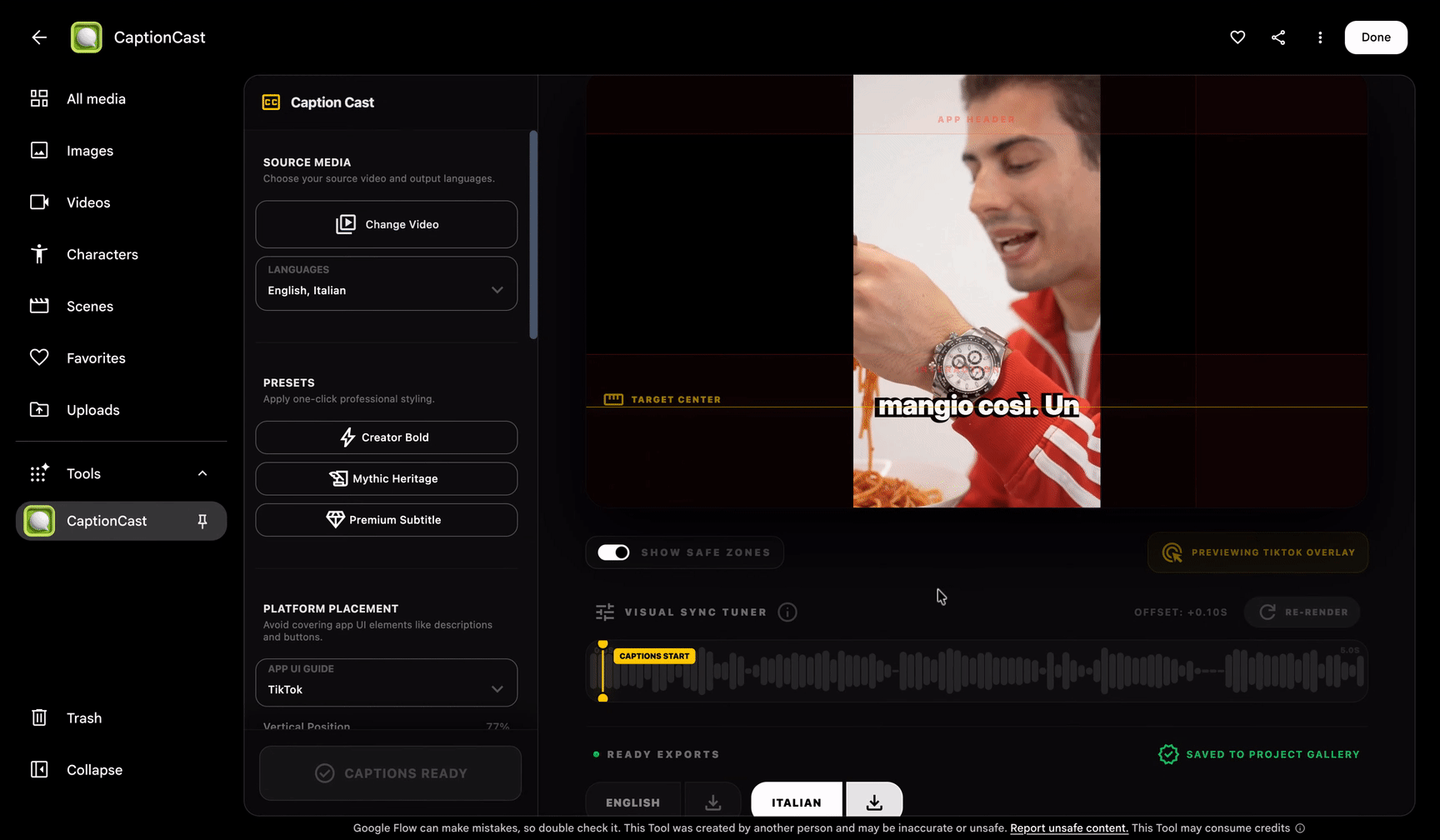
Play official subtitle demonstration
When looking at subtitle tools, it’s important not only to recognize the text but also to see how the text appears with the image and whether the style remains consistent. When actually used in finished Chinese videos, I still separately check the character name, model name, punctuation, and punctuation; This official demonstration did not complete these checks for us.
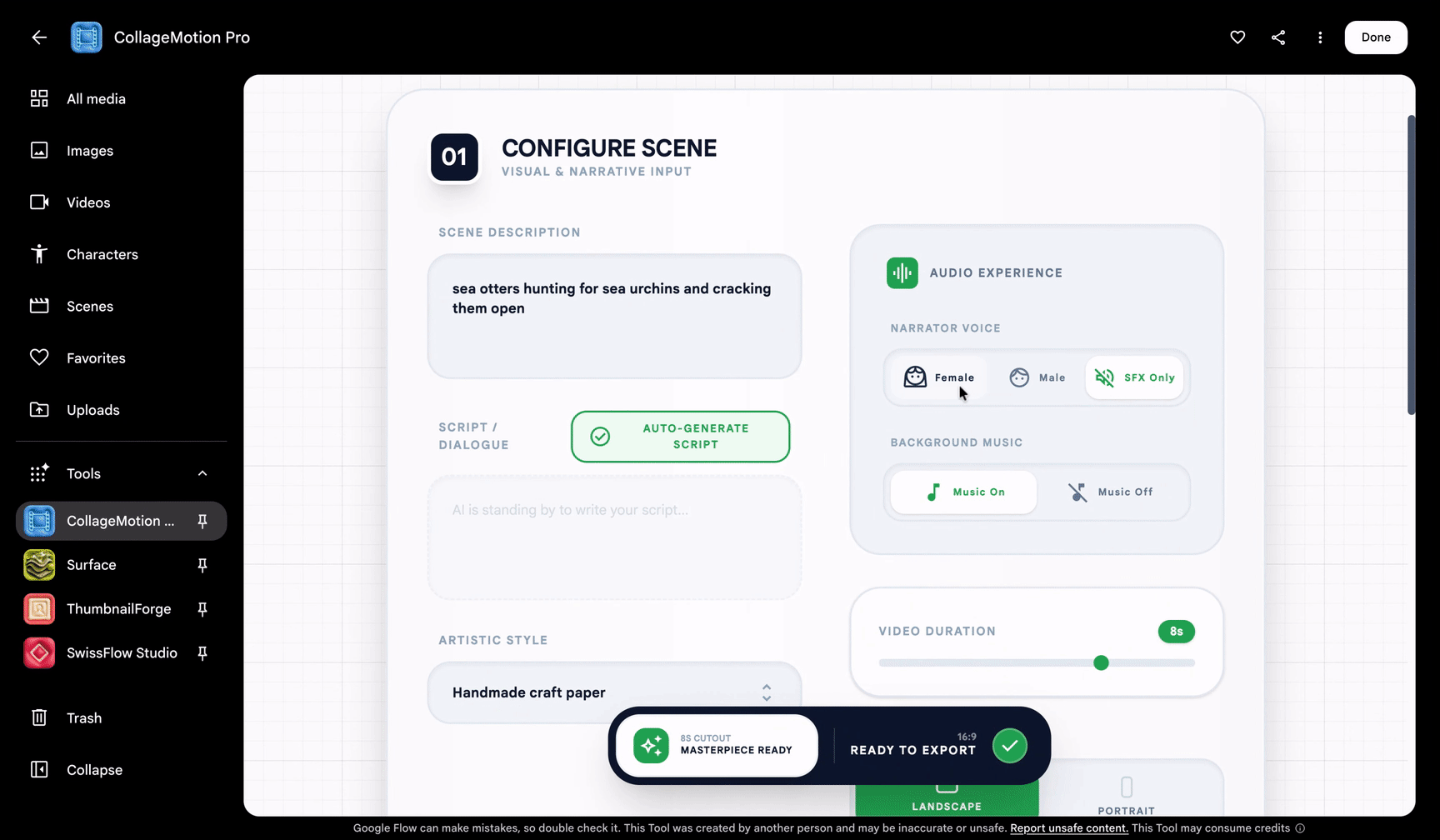
Play official dynamic collage demo
Dynamic collage is better for observing how elements enter, combine, and transition. It helps express relationships and emotions, but once the image moves, the facts used, the identity of the characters, and the rights to the material still need to be verified. Official Demo Source
For those who make text, images, and videos, I prioritize subtitles, covers, collages, and motion graphics, rather than dividing my time just to “try all six.”
The reason is very practical.
When writing a model analysis, you often already have material but lack a scene that clearly explains the relationships. For example, when discussing a local model, you need to explain “why can’t it fit in due to insufficient memory”; a beautiful computer photo is not as clear as a capacity comparison; when discussing a news story, dynamic collage can convey opinions and emotions, but official data should still be supported by real data.
This requires you to first know what task the screen needs to accomplish before choosing a tool. **The more convenient the tool, the less you should mistake “something moving” for “it’s clearly explained.” **
The same applies to covers. Generating covers based on images and titles doesn’t necessarily mean the person looks like the person, the Chinese characters must be correct, or the phone thumbnail must be clearly readable. It may save the production process, not the final selection and acceptance.
Therefore, to me, Flow tools are more like a set of small workbenches accessible by job type, rather than a “universal director” who handles topic selection, argumentation, image creation, editing, and publishing with one click.
8. If I really want to start writing, I will try out samples first, not just the whole issue
The official update on August 27 also mentioned front-end frame control, draft generation at lower resolutions, and export at higher resolutions. Specific capabilities and availability depend on the corresponding mode and current interface; it cannot be understood as all drafts being free to upgrade to the highest specification. Official Notes
The work habits associated with these functions are actually worth learning from: first answer “Is this idea correct?” at low cost, then decide whether to refine it.
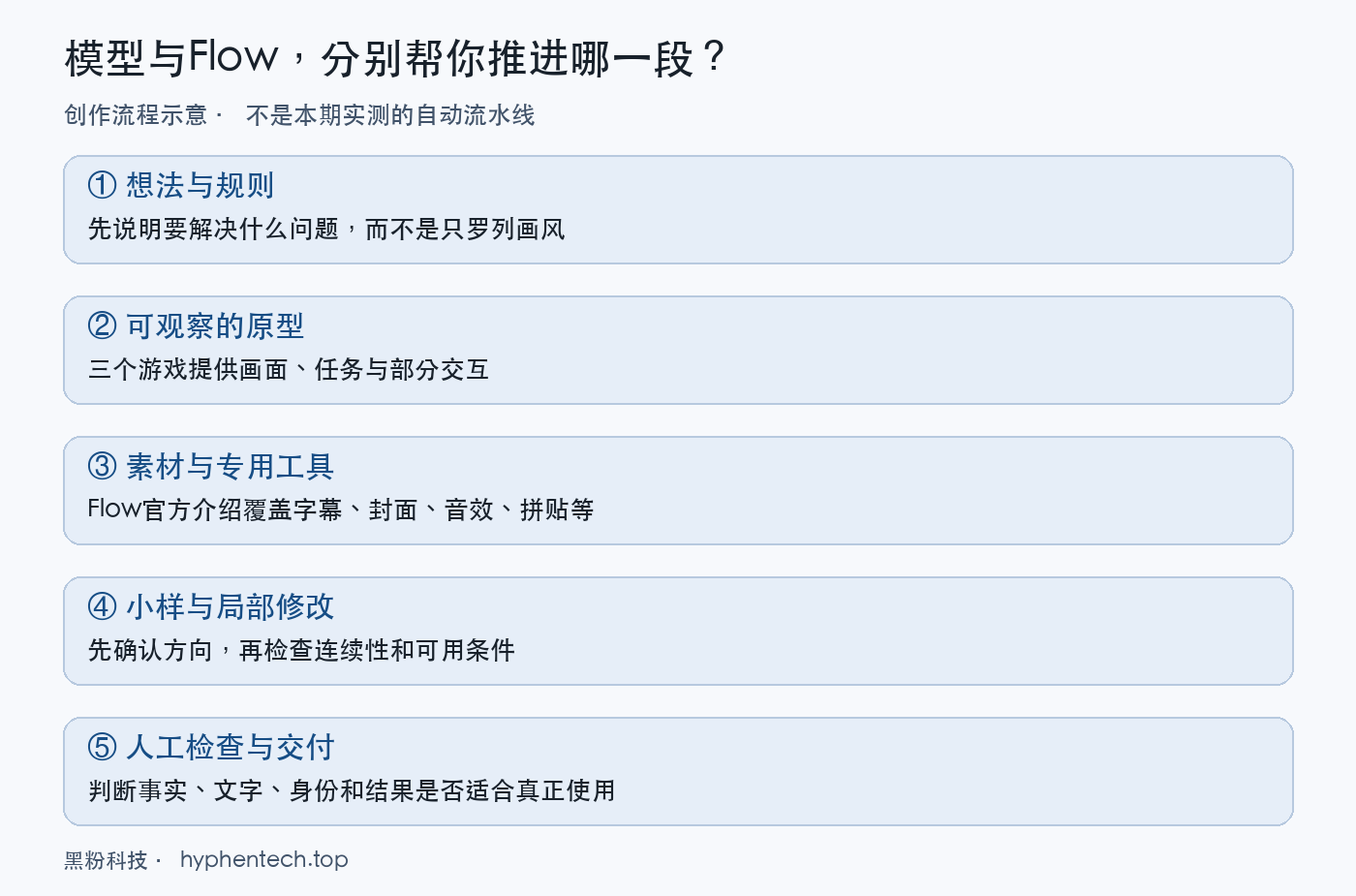
Suppose I want to make a 10-second mechanism animation for an article; this is just an example, not a test for this time. My order would be:
- **First, a question for the visuals. ** What should the audience understand after watching? It’s not about writing a long paragraph about “cinematic feel, ultra-clear definition, and shock.”
- **Provide existing materials and limitations. ** Which images are real products, which text cannot be changed, and which relationships must be maintained.
- **Let’s look at the sample first. ** If the direction is wrong, just modify the structure; don’t rush to improve resolution.
- **Check continuity again. ** Check for conflicts between characters, objects, subtitles, sounds, and actions.
- **Only export and use it last. ** Go back to the actual article or editing project to review; don’t just think it looks good on the generated page.
This isn’t a unique secret to any product, but rather breaking down content creation into small, timely correction steps. Game prototypes are like this, and video creation is the same.
The usage cost should also be calculated according to this complete path. It’s not just about “how much to generate per cycle,” but also about failures, retrys, repeated modifications, rework after downloading, and whether it can actually enter the finished product. There is no corresponding account statement this time, so no seemingly precise but actually unfounded “whole period cost” is not reported.
If the access point requires an international network, you should confirm subscriptions, regions, functional permissions, and limits in advance; Don’t wait until the entire project depends on it only to discover your account lacks key features.
9. My conclusion: One helps you get started, the other is worth studying how to minimize rework
What makes me want to keep watching these three games is that the ideas are no longer just in the chat box. You can open scenes, see tasks, and even verify that a certain interaction has indeed changed the state. It makes it easier for prototypes to enter the stage of “discussing what’s good and what’s wrong.”
Flow offers another direction worth watching: as generation becomes easier, what truly drains creators may be the repeated revisions, material organization, and repeated production actions. If specialized tools can work reliably in these stages, their value may not be less than generating another beautiful video.
Both share the same reminder: **First impression is a reason to keep checking up, not to stop. **
Just because a project can display a 3D scene doesn’t mean the gameplay is complete; Just because a tool claims to support covers or motion graphics doesn’t mean every version it delivers is suitable for your article.
If you just want to start doing something of your own, these skills are worth trying. Taking a small and clear task with the expectation of “this will definitely be fully automated and completed” is more likely to get practical help than going with the expectation that “this will be fully automated.”
What I keep watching is not whether it can make the demo livelier, but whether the round of revisions after the prototype can be reduced and redone a bit, and in the end, I can really keep something I want to use. **
Entry and Materials
- Google Flow Creation Portal
- Gemini 4 Argon Official Release Notes
- Gemini Official Chinese Documentation
- Introduction to Flow Creative Agents and Customization Tools
- Introduction to 6 Flow-specific tools
- Flow Video Control and Export Updates
Verification date: October 17, 2026. The game is a basic review of existing projects; Flow is an official feature summary and creative use analysis; no paid generation or complete tool review was conducted.
Self-made software
Versions, changes and supported installers all come from the same public release records.
LocalBrain
A local AI toolbox for transcription, speech, images, video, and MCP tools. Features vary by platform version.
View public downloads and updates ↗HyphenBox
A free model API radar and local router, with ongoing availability checks and keys kept on your device.
View public downloads and updates ↗ScreenLex
Turn subtitles from your own films and shows into an English vocabulary library, entirely offline.
View public downloads and updates ↗HyphenScreen
Screen recording and editing with a Resolve-style timeline, automatic redaction and pre-export checks.
View public downloads and updates ↗Late nights and burned API credits went in,a cup of tea comes back out — only if you feel like it.
Scan with WeChatPress and hold to save the image, then open it from your album in WeChat Scan







Comments
Loading comments…