Info: Machine translation This post was machine-translated from the Chinese original. Wording may be rough in places — the Chinese version is authoritative.
Note This article was first published on the HyphenTech official WeChat account
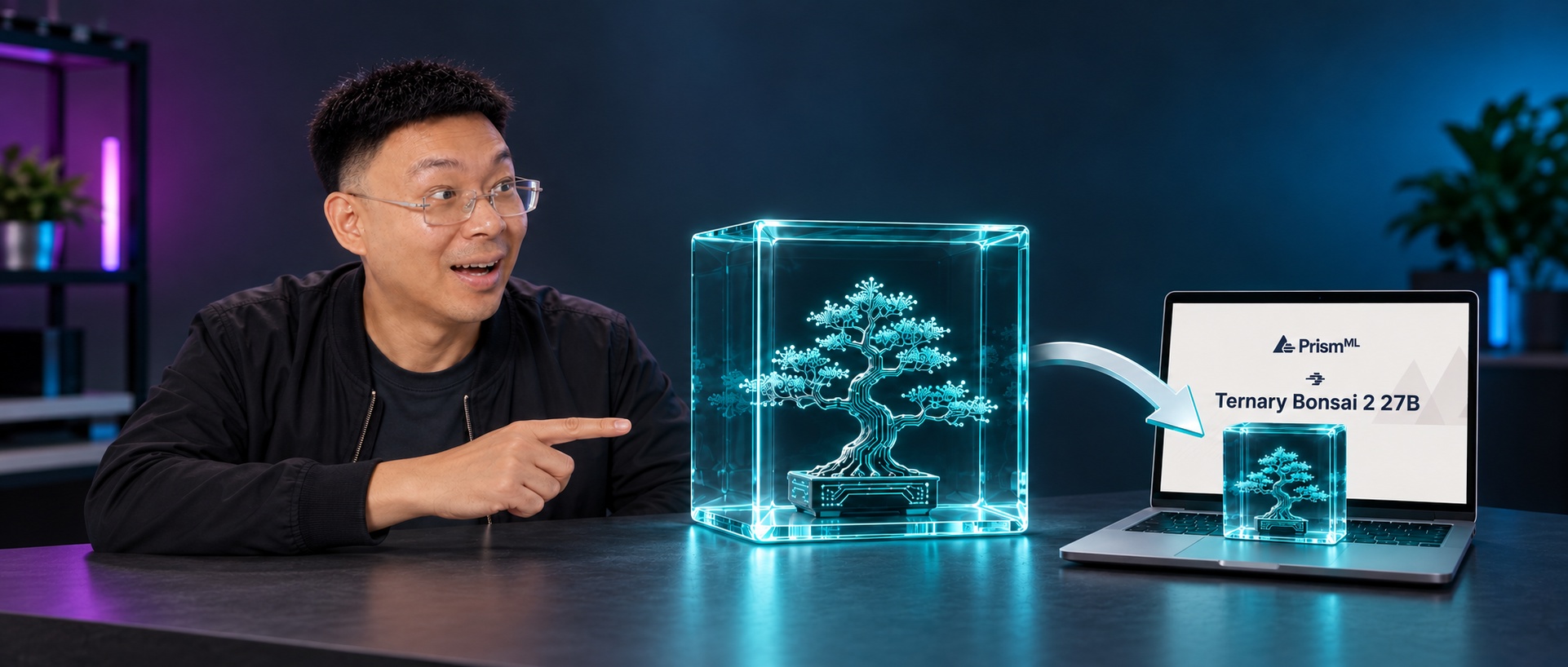
6GB for a 27B Reasoning Mac
Ternary Bonsai 2 27B: 5.93 GB weight, 98.2% power retention, M5 Pro 27.7 tok/s
Note HyphenTech · Official Documentation · 2026-09-19
In mid-September, PrismML released Ternary Bonsai 2 27B. I hadn’t run it on my own machine before writing this article—today’s conclusions all come from the official whitepaper, HF repository, and Bonsai-demo source of truth. Local testing and integration with LocalBrain are planned at the end of the article, first explaining deployment paths, commands, and key pitfalls all at once.
If you look at just one set of numbers: the official white paper cover is very straightforward—~9.1× smaller / 98.2% intelligence retained / 46.8 tok/s on laptop.
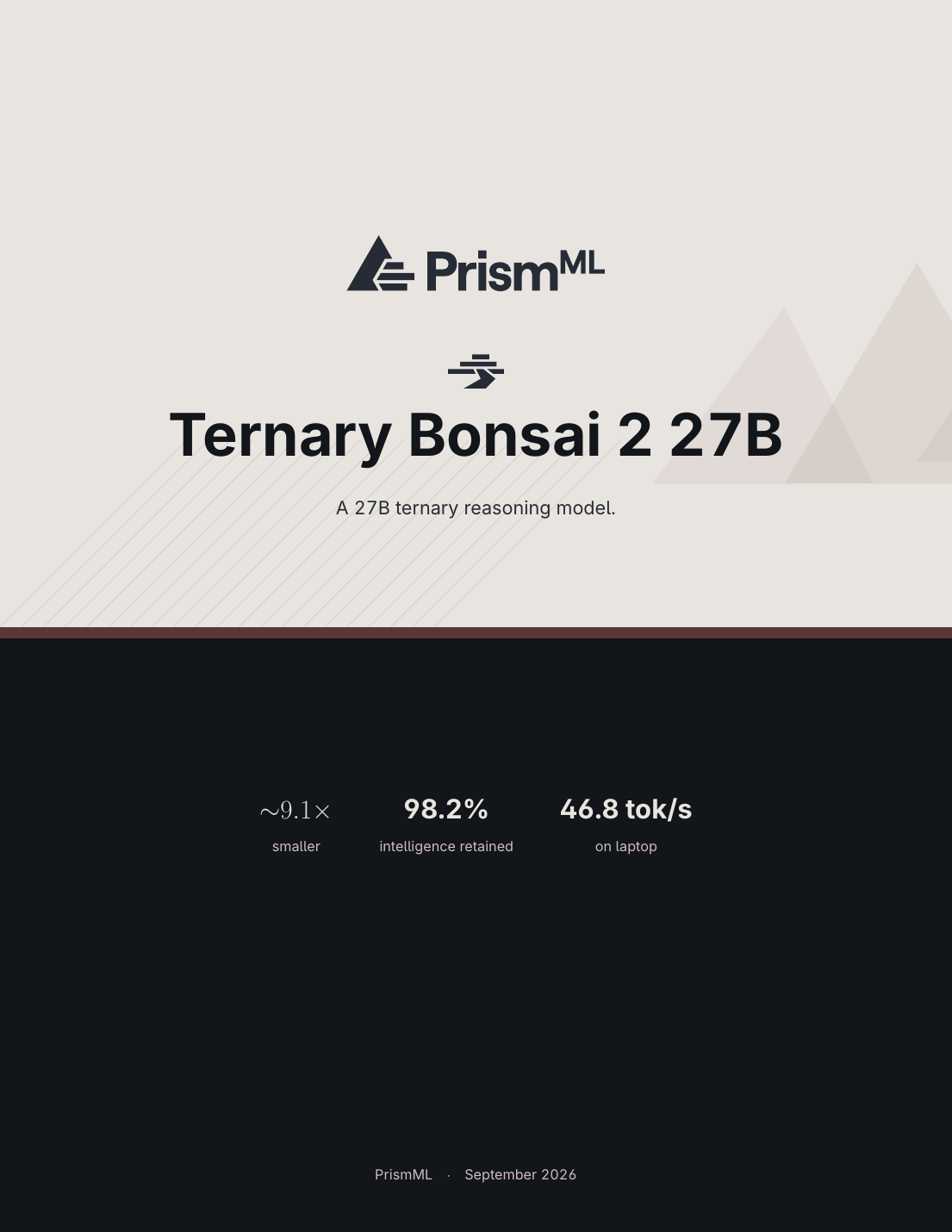
The judgment that 6GB can fit and maintain reasoning isn’t mine; it’s the original baseline of the Qwen 3.8-27B FP16 85.4 → the Bonsai 2 27B’s 83.9, averaging only 1.5 points lost.
🎯 ▍What exactly is it?
The Bonsai series is the result of PrismML’s ternarization (terari) of the 27B-level hybrid-attention language model. The first generation Bonsai 27B used 1-bit (PTQ1_0 / Q1_0), while the second generation Bonsai 2 27B used both PTQ1_0 and PQ2_0 ternary packaging formats, resulting in smaller files and an inference kernel that only llama.cpp PrismML forked to recognize.
Summary: Simply put Ordinary quantization means putting each weight into 2/4/8 bits. Bonsai compresses each weight into three different values (Alterary) {-1, 0, +1}, plus an FP16 group scale (one group of weights per 128 weights). On average, each weight occupies only 1.76 bits (PTQ1_0) or 2.16 bit (PQ2_0), which is 9.1× / 7.4× smaller than FP16’s 16 bits.
But this is not ordinary 1-bit / 2-bit quantization. Bonsai has three key differences:
- Weights should first be used with blockwise Hadamard rotation (block 1024, fixed ±1 symbol), then termarize. This makes it easier to numerically distinguish “positions that should be measured as 0” and “positions that should be retained.”
- hybrid attention: ~75% linear attention + ~25% full attention, total parameters 24.35B language + 0.47B visual tower + 2.54B word embedding = 27.36B. Native context 262 K tokens (the linear part keeps cache small).
- Retaining 0.0976% high-precision tensors (such as in_proj / conv1d / log / dt_bias / norm in the recurrent state path), occupying only 26.2M parameters and about 52MB; This small amount of tensor is neither ternarized nor rotated, which is key to the model maintaining a certain point.
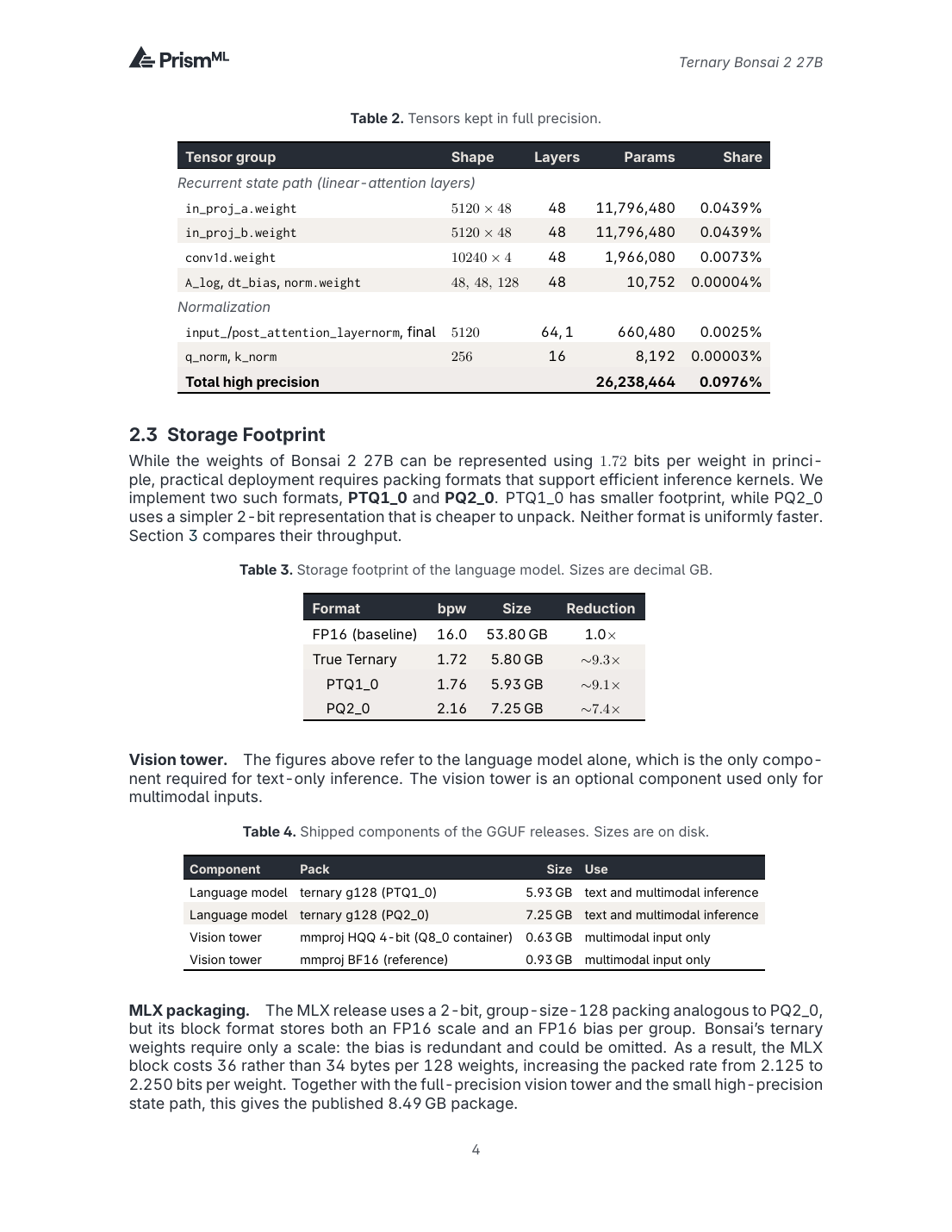
The final two numbers: FP16 baseline 53.80 GB → Ternary Bonsai 2 27B of 5.93 GB (PTQ1_0) / 7.25 GB (PQ2_0).
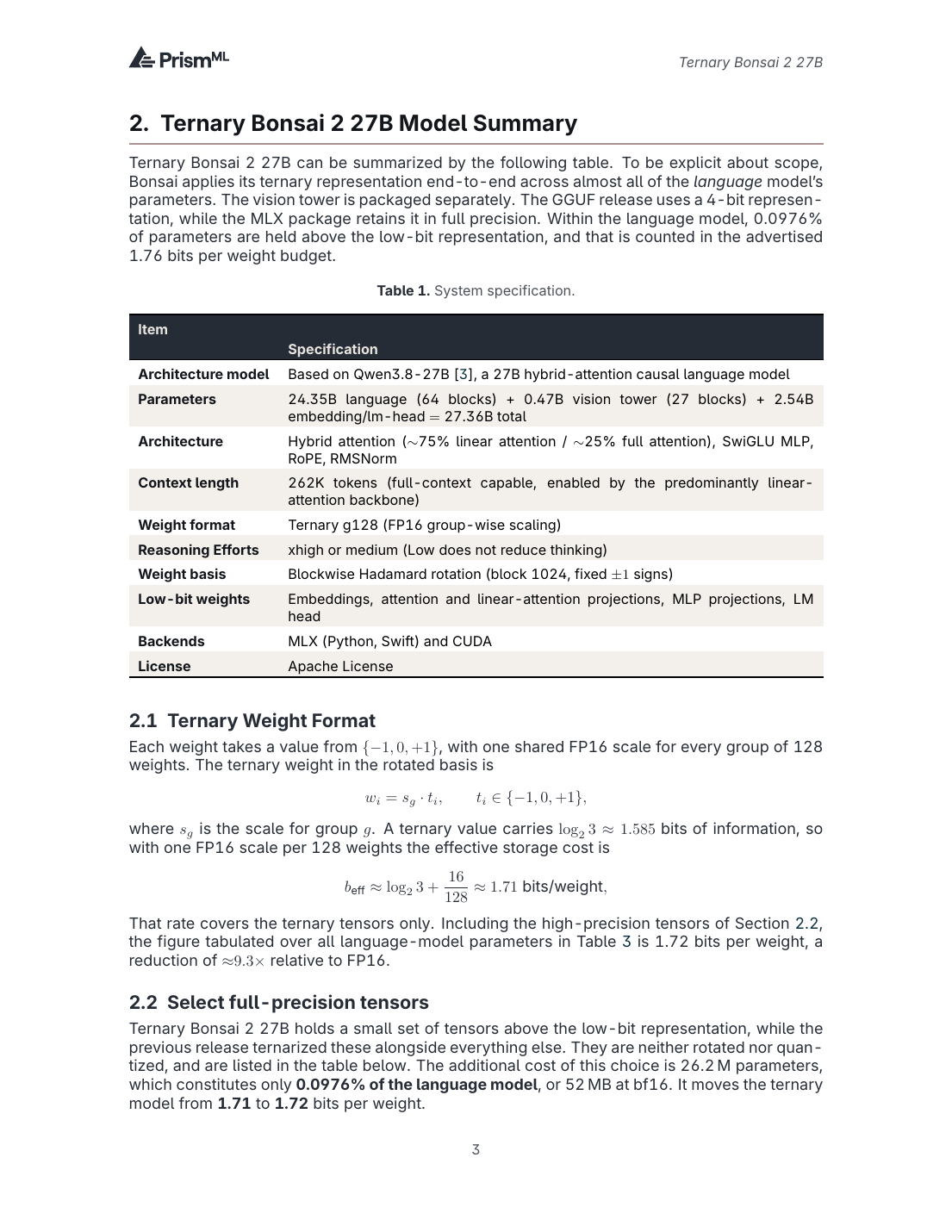
The license is the Apache License, which can be used commercially, fine-tuned, and deployed privately, making it a clean choice for localization tool enthusiasts.
📦 ▍How to choose between the two packaging formats
White paper Table 3/4 directly provides the official recommendation:
| Format | bpw | Volume (Language Model) | When to use it |
|---|---|---|---|
| PTQ1_0 | 1.76 | 5.93 GB | Smaller, faster Ada architecture; Ampere / Hopper / Blackwell / Apple Silicon are slightly slower than PQ2_0 |
| PQ2_0 | 2.16 | 7.25 GB | Slightly larger, but faster on the vast majority of platforms (including Apple Silicon) and is the default option for Mac deployment |
| mmproj (HQQ 4-bit) | — | 0.63 GB | It is only needed for multimodal input |
| mmproj (BF16 reference) | — | 0.93 GB | Same as above, higher precision |
| MLX (2-bit, g128 + bias) | 2.250 | 8.49 GB | When following the MLX Python path, it takes a whole package |
The practical conclusion is straightforward:
- Want Web UI / Local Conversation, path A (llama.cpp fork + Metal) with PQ2_0 + mmproj BF16, disk about 8.18 GB, M5 Pro at ~27 tok/s.
- Want to write Python script integration and install an agent, path B (MLX Python) to download the full MLX package, disk about 8.49 GB.
⚡ ▍How fast can Apple Silicon run?
The official numbers for the llama.cpp Metal backend (PQ2_0 pack):
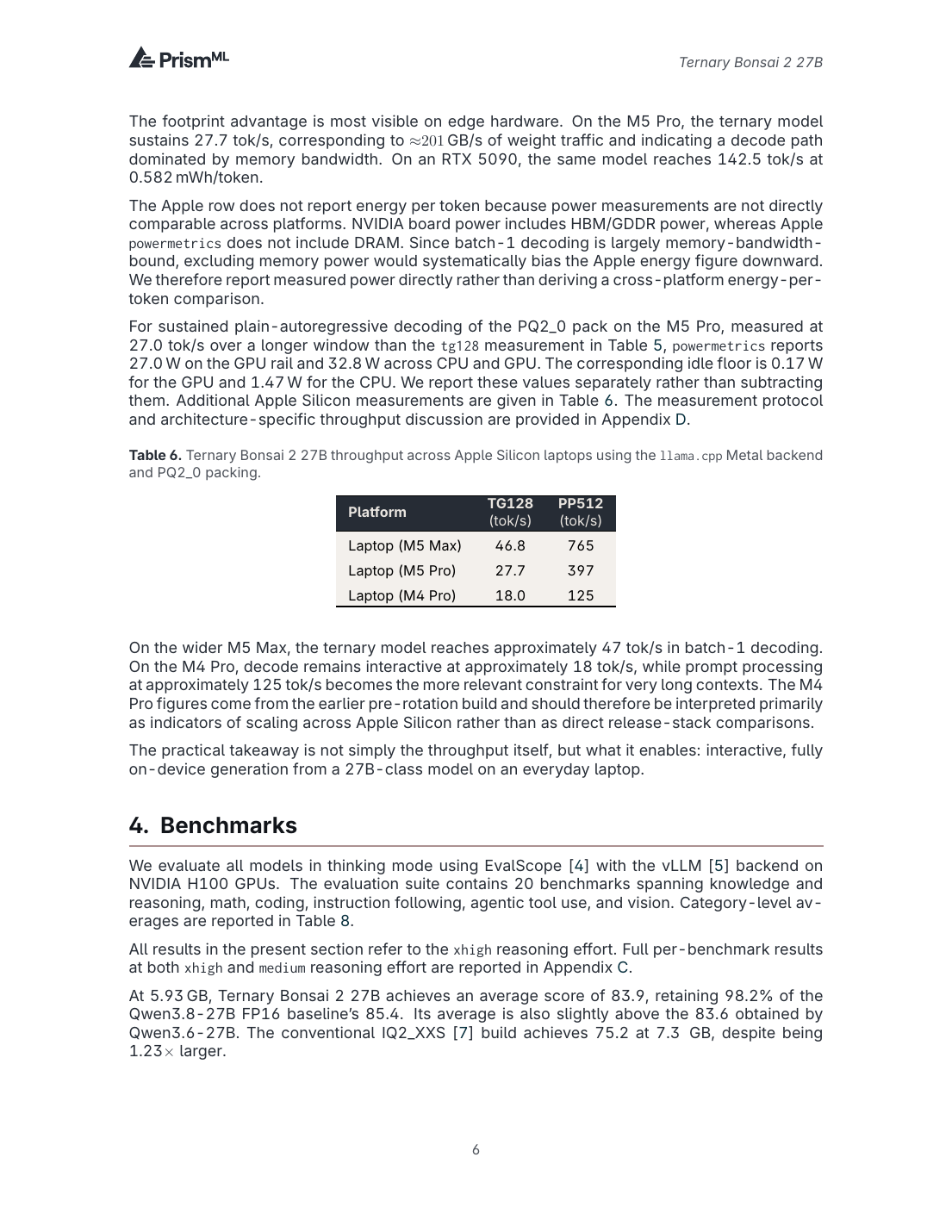
| Model | TG128 tok/s | PP512 tok/s | Memory threshold |
|---|---|---|---|
| M5 Max / 36 GB+ | 46.8 | 765 | Full speed |
| M5 Pro / 24 GB+ (This device) | 27.7 | 397 | Official recommendation: ≥24 GB |
| M4 Pro / 24 GB+ | 18.0 | 125 | Run smoothly but wait |
| 16 GB model | There will be swaps | — | Official performance data is not provided |
The Apple M5 Pro’s 27.7 tok/s translates to a weight throughput of **~201 GB/s—meaning Bonsai 2 is memory-bandwidth-bound on Mac, with the core bottleneck being LPDDR bandwidth rather than hash power. In other words, if you want to go faster, you have to wait for a wider memory bus or switch to the M5 Max. There’s another fact on Apple Silicon: sustained decode on the M5 Pro shows GPU rail 27.0 W, CPU + GPU 32.8 W, no-load noise floor noise GPU 0.17 W / CPU 1.47 W—the kind of power consumption range where you can run 24 hours and the laptop doesn’t get hot.
🧪 ▍How is the ability retention really?
Just looking at the size can be misleading. The Qwen 3.8-27B IQ2_XXS is also 7.3 GB, but the thinking-mode average is only 75.2 / 100. The Ternary Bonsai 2 27B is 83.9 / 100, just 1.5 points lower than the FP16 baseline. **Compression 9.1× with only 1.8% performance loss. **
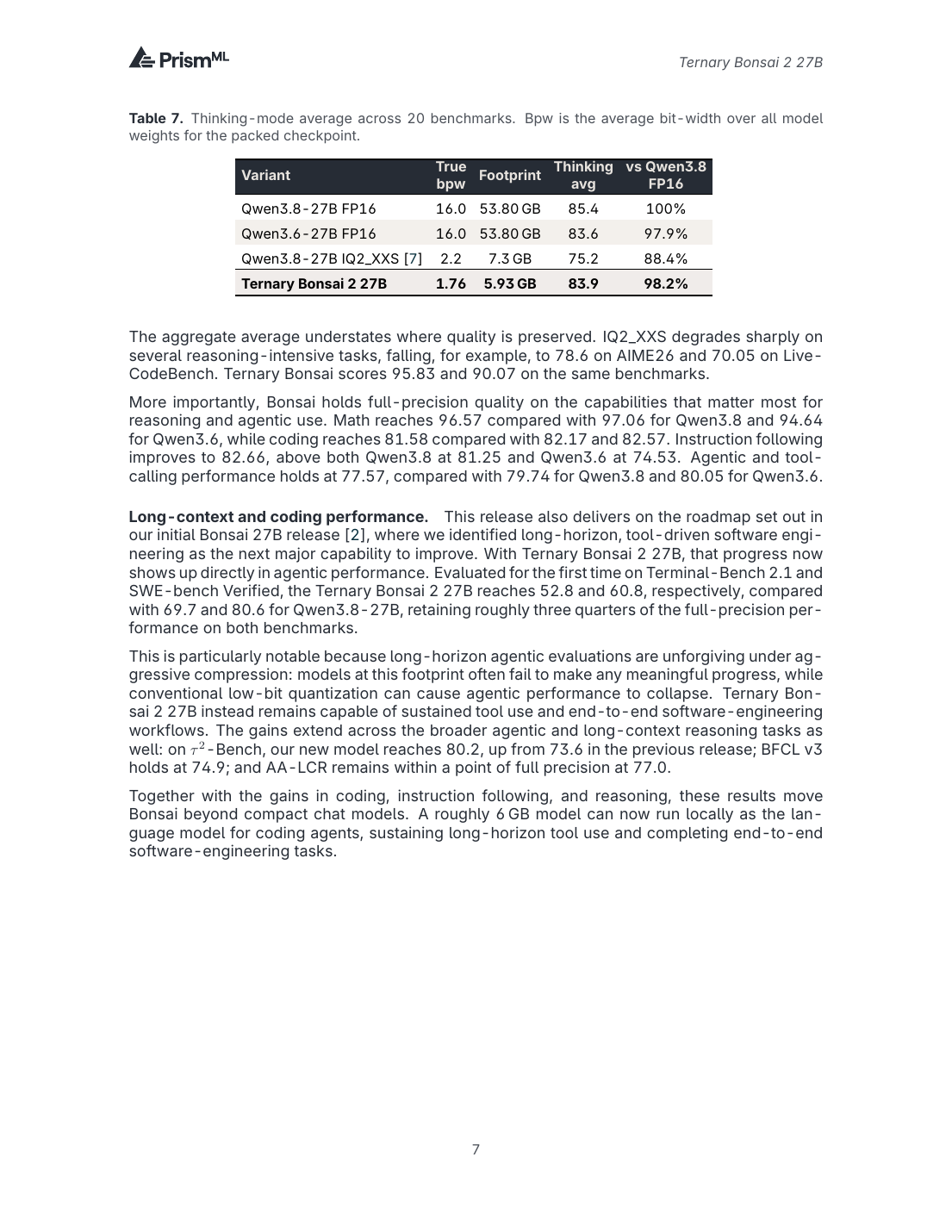
More noteworthy is long context and encoding:
- Terminal-Bench 2.1: 52.8 (vs Qwen 3.8-27B’s 69.7, about 75% reserved)
- SWE-bench Verified: 60.8 (vs 80.6, about 75% reserved)
- τ²-Bench (Agentic Tool Calling): 80.2 (Previous generation 73.6 → This generation increased by 6.6)
- AA-LCR (Long Context Reasoning): 77.0, less than 16 points compared to FP1
Original words from the white paper:
A roughly 6 GB model can now run locally as the language model for coding agents, sustaining long-horizon tool use and completing end-to-end software-engineering tasks.
To translate this sentence for local players: A 64 GB M5 Pro can already run a 27B agent that can “use tools on its own”.
Looking further, the official introduction of an indicator called intelligence density(1/GB) — converting the average benchmark score into “the ability to exchange per unit volume” yields an astonishing result:
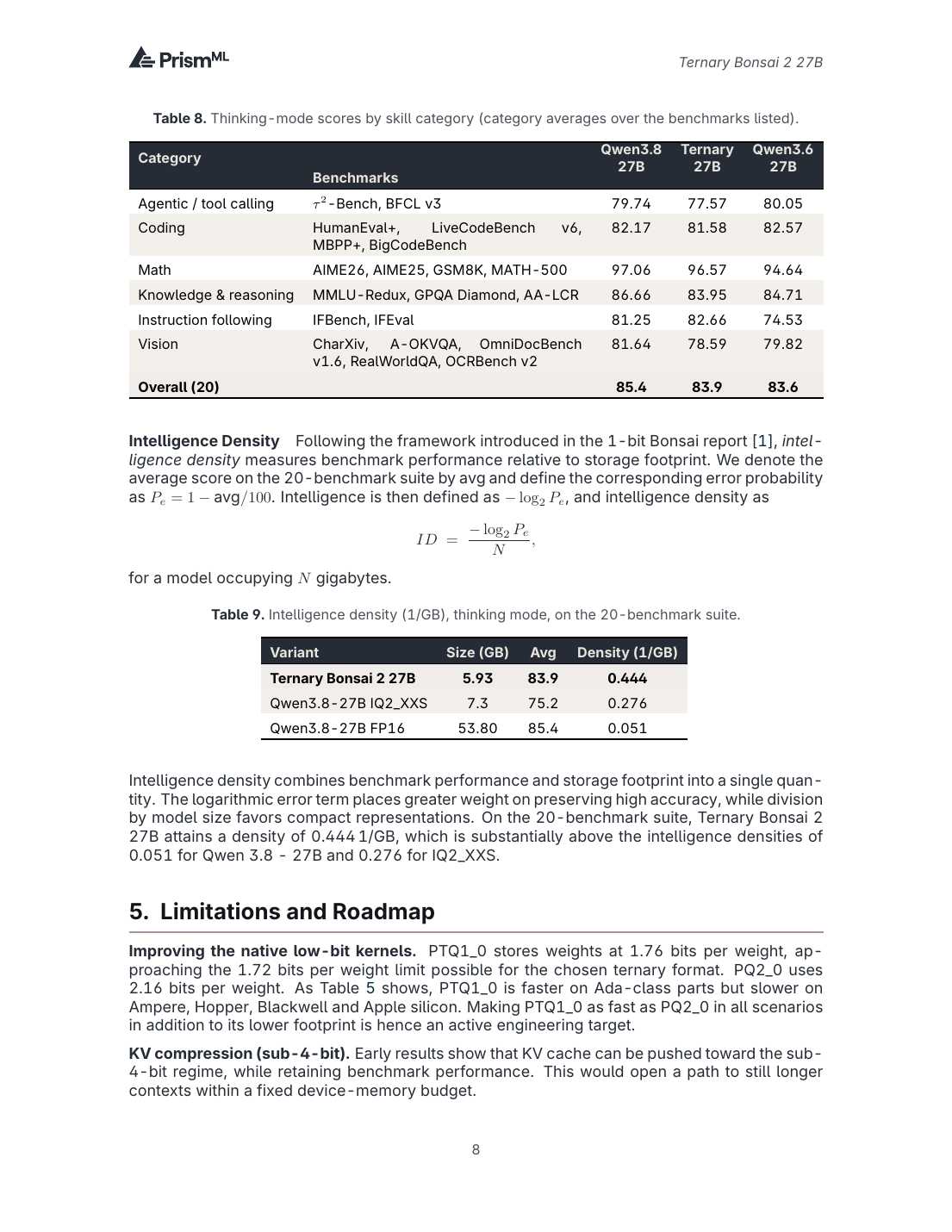
| Model | Size | Average score | Intelligence density (1/GB) |
|---|---|---|---|
| Ternary Bonsai 2 27B | 5.93 GB | 83.9 | 0.444 |
| Qwen3.8-27B IQ2_XXS | 7.3 GB | 75.2 | 0.276 |
| Qwen3.8-27B FP16 | 53.80 GB | 85.4 | 0.051 |
Compared to FP16, it increased by 8.7× and compared to IQ2_XXS, it increased by 1.6×.
Looking at the size-capability curve of the previous generation Bonsai series and the similarly sized Qwen3:
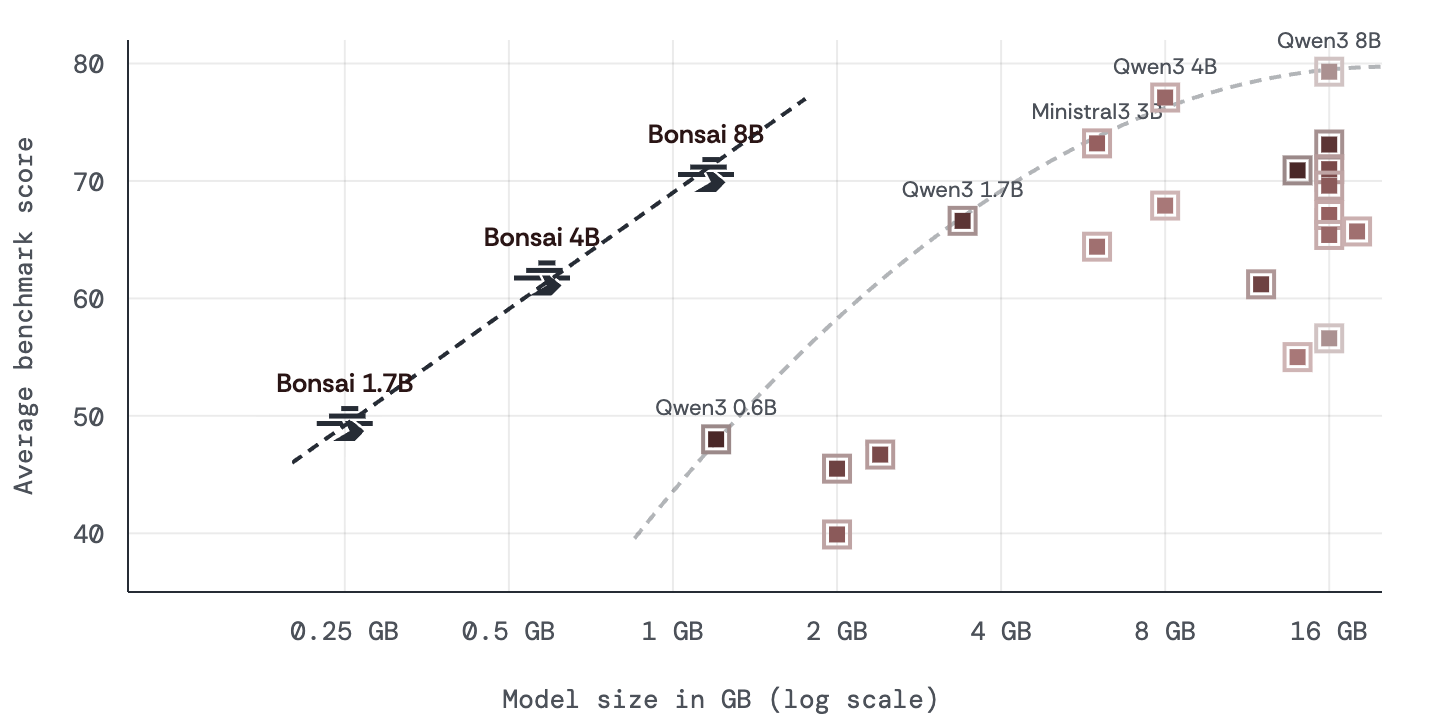
This is the frontier chart of last year’s Bonsai 1.7B / 4B / 8B — at the same size range, Bonsai always outperforms the Qwen3’s Pareto. By the Bonsai 2 27B, the same curve continues: volume drops to ~6GB, and its capability catches up to 98.2% of the full-power FP16 at 27B.
🛠️ ▍Two deployment paths
The official reconciliation table was provided at the start of README: Path A is suitable for “wanting Web UI, local dialogue, and out-of-the-box”; Path B is suitable for “writing Python scripts and product integration”.
| Dimension | Path A:llama.cpp fork + Metal | Path B: MLX Python |
|---|---|---|
| Whoever it suits you | Want a web UI, local conversation, and out-of-the-box functionality | Writing Python scripts and doing product integration |
| Disk | 7.21 GB (PQ2_0) + 0.93 GB (vision) ≈ 8.18 GB | 8.49 GB (including vision tower) |
| M5 Max speed | 46.8 tok/s | Slightly slow (not officially tested) |
| Difficulty | ⭐️ One line ./setup.sh |
⭐️⭐️ Requires mlx-vlm + runtime |
✅ Path A:llama.cpp fork + Metal (most hassle-free, official demo)
Bonsai-demo is the source of truth, and all commands have been verified.
1) System Requirements
- macOS 13+ (Apple Silicon, M1/M2/M3/M4/M5 all work)
- Xcode Command Line Tools (for compilation):
xcode-select --install - Python 3.10+ (for hf CLI)
- Memory: M5 Max / 36 GB+ → full speed 46.8 tok/s; M5 Pro / 24 GB+ → 27.7 tok/s; The 16GB model will be swapped, but the official performance data is not listed
2) Three commands to get it done
git clone https://github.com/PrismML-Eng/Bonsai-demo.git
cd Bonsai-demo
./setup.sh
setup.sh Will automatic:
- Pulling the llama.cpp fork precompiled package for PrismML (Metal backend, including PTQ1_0 / PQ2_0 kernels)
- Download PQ2_0 Weight (approx. 7.21 GB) + mmproj (approx. 0.93 GB)
- Optional Open WebUI (chat interface)
Want to skip Open WebUI to save time and space:
BONSAI_OPENWEBUI=0 BONSAI_CODE_INTERPRETER=0 ./setup.sh
3) Launch Service
./scripts/start_llama_server.sh
Open http://localhost:8080 → browser to chat directly, supporting image uploads (Vision Tower is already in weight).
4) Only Running One Line Problem (No Service Activated)
./scripts/run_llama.sh -p "法国的首都是哪里?"
5) ⚠️ Key Traps
**Absolutely don’t pip install llama-cpp-python and then run this model! **
- stock llama.cpp Does not recognize PTQ1_0/PQ2_0 formats.
- Even more insidious, it pretends to load as Q2_0 and then spits garbage, but never gives any errors—you either don’t see the problem at all, or if you do, it takes a long time to locate.
- You must use PrismML’s fork(
PrismML-Eng/llama.cpp), and./setup.shhas already automatically placed it inbin/mac/llama-server.
🐍 Path B: MLX Python (suitable for developers)
Suitable for those who want to write code, integrate code, call APIs, or build tools.
1) Installation
pip install -U huggingface_hub mlx-vlm
**2) Download the MLX version (Note: the file is different from the GGUF version!) ) **
hf download prism-ml/Ternary-Bonsai-2-27B-mlx-2bit --local-dir bonsai2-27b-mlx
Download content:
model.safetensorsApprox. 8.49 GB (including vision tower)runtime/Folder (loader with Hadamard activation transformation)
3) Install runtime dependencies
pip install -r bonsai2-27b-mlx/runtime/requirements.txt
4) Python Calls
import sys
sys.path.insert(0, "bonsai2-27b-mlx/runtime")

from vision_artifact import load_vl_model, chat_config
from mlx_vlm import generate
from mlx_vlm.prompt_utils import apply_chat_template

model, processor, config = load_vl_model("bonsai2-27b-mlx")

# 纯文本
prompt = apply_chat_template(processor, chat_config(config),
                            "用一句话解释量子计算", num_images=0)
print(generate(model, processor, prompt, [], max_tokens=256, temperature=1.0))

# 带图片
prompt = apply_chat_template(processor, chat_config(config),
                            "这张图里有什么?", num_images=1)
print(generate(model, processor, prompt, ["photo.jpg"], max_tokens=256, temperature=1.0))
5) ⚠️ Three pitfalls in the MLX path
- Ordinary mlx-vlm loader cannot be used;
runtime/vision_artifact.pymust be used. Regular loaders silently skip Hadamard activation transformations, output incorrect results, but no errors. chat_config(config)Can’t Skip — MLX-vlm’s prompt helper relies onmodel_typeFind chat templates.- The MLX version of the language model is 2.25 bpw (the container has an extra bias), not 1.76; its content is equivalent to GGUF, just in different storage formats.
🧪 ▍Verification installed
Any one of these is considered successful:
# 路径 A:单次问答
./scripts/run_llama.sh -p "1+1=?"

# 路径 A:服务在跑
curl -s http://localhost:8080/health

# 路径 B:MLX 加载
python -c "from vision_artifact import load_vl_model; m,p,_=load_vl_model('bonsai2-27b-mlx'); print('OK')"
💡 ▍Which one should you choose?
- Just Want to Chat / Experience: Path A,
./setup.sh+./scripts/start_llama_server.sh, openhttp://localhost:8080. - To build an application / connect an agent: Path B, MLX + Python.
- 16 GB RAM MacBook Air: Barely capable but swappable; recommend more aggressive options like Bonsai-8B or Bonsai-1.7B (both have MLX versions).
🗂️ ▍Local deployment location
According to the AI-Models/RULES.md decision table, both the GGUF and MLX of Bonsai 2 27B are placed under Language-Models/; But because it requires its own forked llama.cpp binary (PTQ1_0 / PQ2_0 kernel), the entire niche is similar to the application + weighted self-contained unit like LongCat-Video-mlx / ComfyUI—so the final result is:
<BigDisk>:/AI-Models/Language-Models/Bonsai-demo/
├── bin/mac/                              PrismML 的 llama.cpp fork 预编译包
│   └── llama-server, llama-cli, ...
├── models/
│   ├── bonsai2-gguf/27B/                 PQ2_0 GGUF(路径 A 默认)+ mmproj-Q8_0
│   └── Ternary-Bonsai-2-27B-mlx-2bit/    MLX 包(路径 B)
├── scripts/                              start_llama_server.sh / run_llama.sh / start_mlx_server.sh ...
├── .venv/                                Python 依赖(含 mlx-vlm)
└── bonsai-2-27b-whitepaper.pdf           白皮书原件
There are two reasons for falling inside Bonsai-demo/: (a) The demo’s start_llama_server.sh uses relative paths to find the model, requiring an additional layer of BONSAI_GGUF to overwrite the weight; (b) The PTQ1_0/PQ2_0 kernel is proprietary to PrismML; drawing Language-Models/GGUF/ alone would lose the binary binding to the fork, making maintenance even harder.
⚠️ Local Deployment Status: At the time of writing** Weights not yet tested** —
models/bonsai2-gguf/27B/There is only one isolated mmproj (some downloads are left), with no PQ2_0 main weight. If you plan to follow this article, just useunset all_proxy && ./setup.shto pull it all at once for the most stable (default is to run GGUF + MLX simultaneously). If you only want to run path B without GGUF, addBONSAI_SKIP_GGUF=1.
🔭 ▍Next step: Run it in LocalBrain
This article only organizes the official documentation and answers questions like “Can it be installed, where to install, and how to install it.” I placed the actual test in the next round of the LocalBrain integration plan, proceeding in the following order:
- Connect the Bonsai 2 27B’s GGUF + mmproj via LocalBrain reference mounts and run **PrismML forks outside of LocalBrain’s built-in llama.cpp b10705—this is the hard threshold for whether it can be selected in LocalBrain multi-model routing.
- Running 6–8 real tasks on three device levels (M5 Max full speed / M5 Pro 24GB smooth running / M4 Pro 24GB long context loading**—including long context writing, agent tool calling, visual Q&A—comparing speed, memory, and first token latency in LocalBrain at four levels: Bonsai 27B, Bonsai 27B Q1_0, Qwen 3.8-27B IQ2_XXS, Ternary Bonsai 27B Q2_g64
- I supplemented the experimental data into a “LocalBrain Local Model” series review, using the same standard as last time with 11 models and 51 GB (Blog slug
localbrain-small-models-lowmem).
If you’re interested in running recently and have your own measured numbers, feel free to share them—I’ll write them in the next article and release them together.
📎 ▍Main sources of verification
- Bonsai-demo Official Warehouse
- Ternary Bonsai 2 27B White Paper PDF (Local Path)
- prism-ml/Ternary-Bonsai-2-27B-gguf (Hugging Face)
- prism-ml/Ternary-Bonsai-2-27B-mlx-2bit (Hugging Face)
- PrismML-Eng/llama.cpp fork (PTQ1_0 / PQ2_0 kernel)
- AI-Models/RULES.md — Directory Attribution and HF Download Specifications (Refer to the AI-Models warehouse rules on your local BigDisk, do not publicly display the CDN)
🧰 Tools I build
I maintain all of these tools myself. Preview builds are clearly labeled; the release pages are the source of truth for downloads, updates and known limits.
Info: HyphenBox Status: Official releases
A radar for free LLM APIs: availability is re-tested continuously, one local interface for all of them, and keys stay on your machine
Info: LocalBrain Status: Official releases
A multimodal MCP toolbox for local models: TTS, Whisper and video generation in one place
Info: ScreenLex Status: Official releases
Learn new words while you watch shows. Free, for Mac and Windows
Info: HyphenScreen Status: Official releases
Screen recording and smart editing in one: a DaVinci-style timeline, automatic redaction and a check of the finished video before export. Free
Quote: HyphenTech Make AI your superpower Local deployment · Free resources · Self-made software https://hyphentech.top
Late nights and burned API credits went in,a cup of tea comes back out — only if you feel like it.
Scan with WeChatPress and hold to save the image, then open it from your album in WeChat Scan

Comments
Loading comments…