Info: Machine translation This post was machine-translated from the Chinese original. Wording may be rough in places — the Chinese version is authoritative.
Note This article is a Chinese compilation of official information from HAO AI Lab / FastVideo, excluding actual tests on HyphenTech devices.
Official introduction to Mac locally generated video FastMetal-QAD
- 3B, 5B, 14B open-source models: Speed, memory, and installation conditions explained all at once
Note HyphenTech · Data Summary · 2026-08-20
First, clarify the nature of the article: **This is not a local test on the machine, nor is it a disguise of official releases in Chinese to pass off as original. **The speed, memory, and image quality descriptions of FastMetal-QAD all come from the official HAO AI Lab, FastVideo repository, and the official model page. There are only two things to do here: organize the English materials into Chinese, and then fill in the conditions that might easily be omitted by saying ‘Mac generates video in 30 seconds.’
Note In short: FastMetal-QAD is an open-source video generation model and MLX runtime designed for Apple Silicon. It does not require CUDA and does not send generation tasks to the cloud; The model’s DiT, sampler, and decoder all run on Mac’s Metal GPU.
▍This time, the release is not a model
The FastVideo team released three tiers at once: 1.3B, 5B, and 14B. They don’t simply split the same set of weights into large, medium, and small cups; rather, they come from different WAN base models, targeting different resolutions and memory settings. 1.3B lowers the local generation threshold; 5B brings 720p to the 16GB unified memory tier; 14B pursues higher quality, but the official targets are directly set as above 36GB.
| Model | Official output | MLX DiT | Target memory |
|---|---|---|---|
| 1.3B | 480p · About 5 seconds | 1.4GB | 16GB+ |
| 5B | 480p / 720p · About 5 seconds | 4.9GB | 16GB+ |
| 14B | 480p / 720p · About 5 seconds | 14GB | 36GB+ |
※ Source: Project release table. DiT size does not equal the download volume of the complete model repository.
This note cannot be skipped. The official 1.4GB, 4.9GB, and 14GB refer to the MLX DiT weight, not all the data after clicking the download button. On August 20, the official Hugging Face interface showed that the three warehouses had about 13.4GB, 19.5GB, and 42.3GB of used storage, because they also included a text encoder, tokenizer, VAE, profile, and the 14B EMA version. The hard drive only left a dozen GB, so even if there was enough memory, downloads would freeze first.
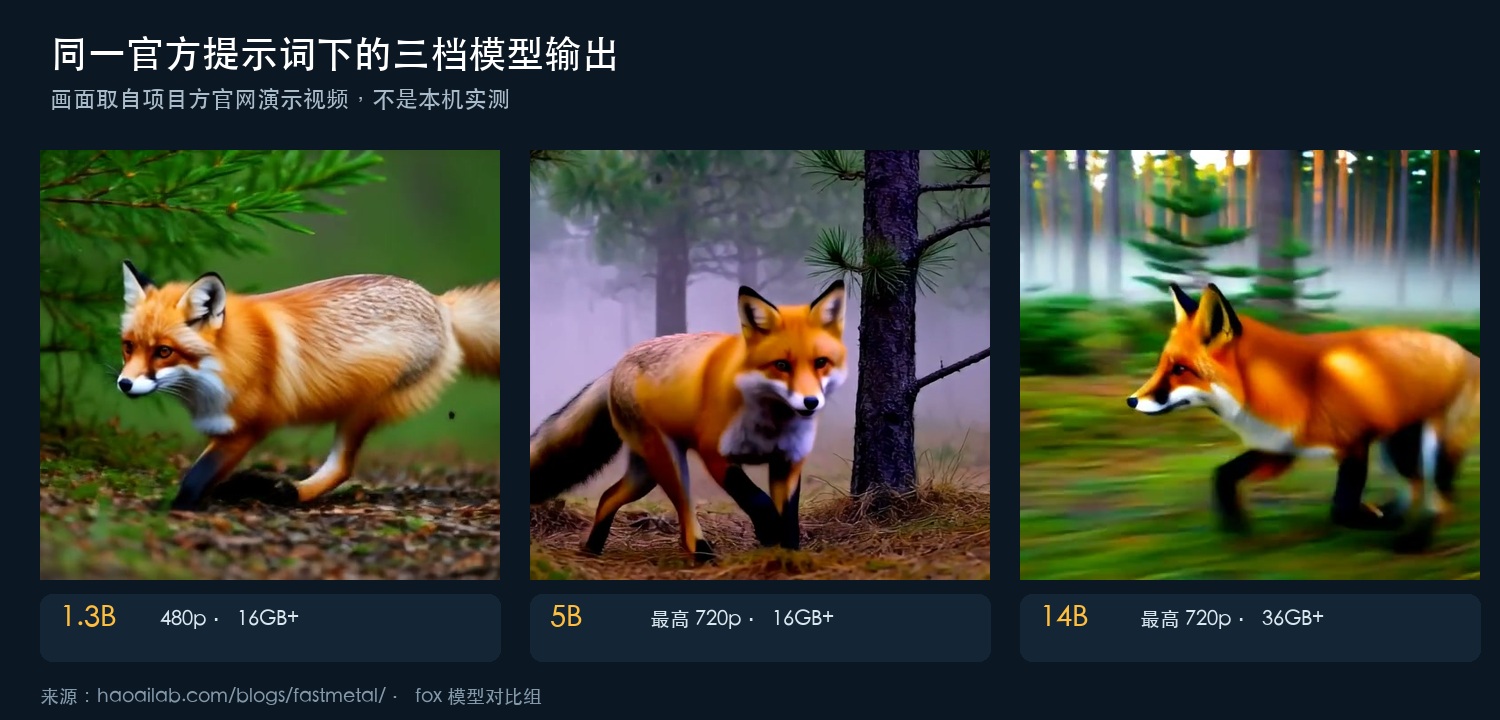
All three models are three-step student models, trained using DMD2 distillation and quantization perception. The project team emphasized that the affine INT8 used at release was not a hard press after training but was trained on the same quantization grid. The goal was straightforward: to control accuracy loss during training, while ensuring the Mac loaded already quantized weights, avoiding repeating quantization at startup.
▍Official speedometer, first check the test conditions
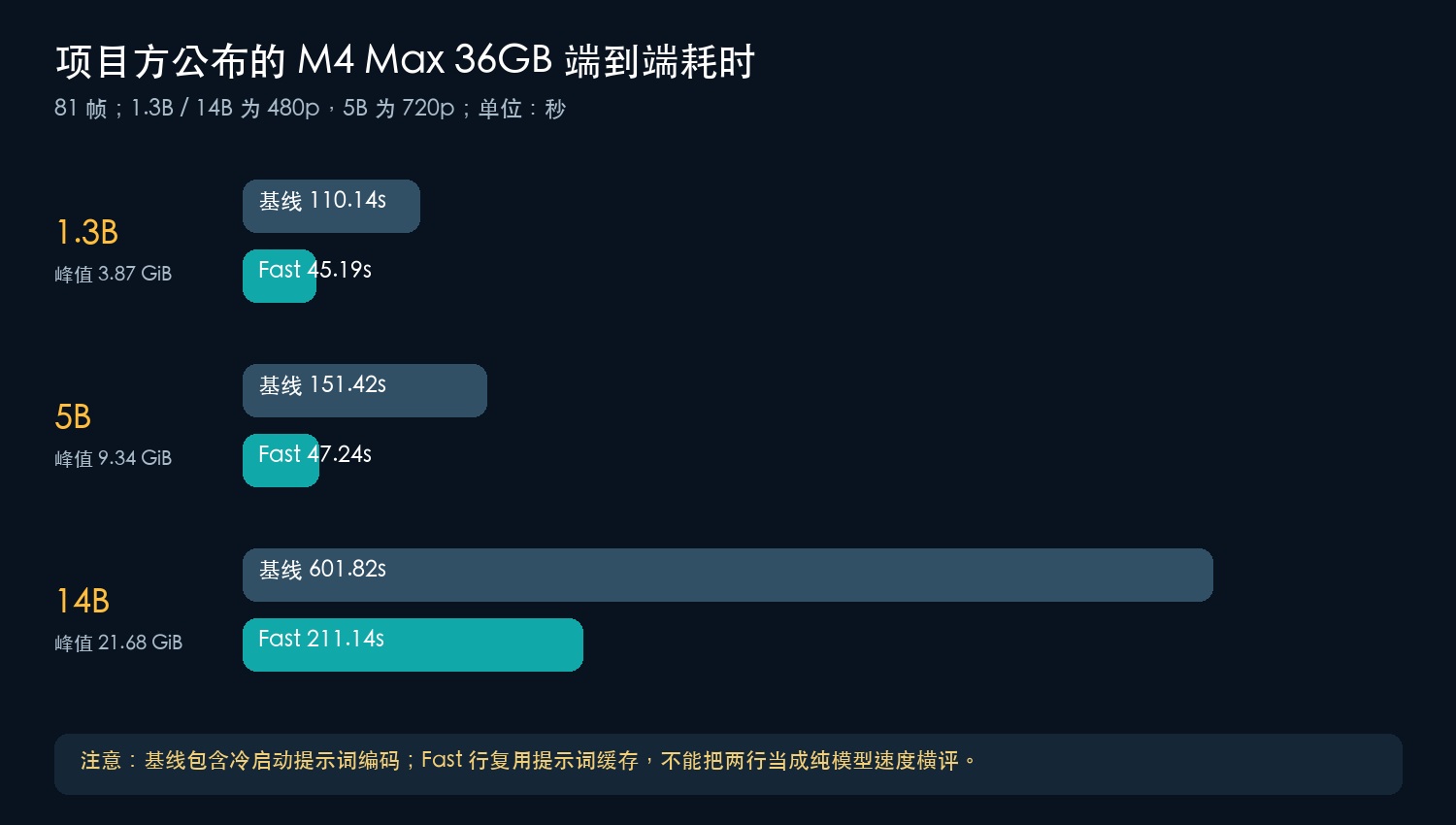
The main table used by the project team was M4 Max, 36GB of unified memory. 1.3B and 14B generated 480×832×81 frames, 5B generated 704×1280×81 frames; 81 frames corresponds roughly to 5 seconds of video. Baseline end-to-end time is not just denoising; it also includes prompt encoding, DiT loading, denoising, decoding, and export.
| Model | Total baseline time taken | Fast mode | Baseline peak |
|---|---|---|---|
| 1.3B · 480p | 110.14 seconds | 45.19 seconds | 3.87 GiB |
| 5B · 720p | 151.42 seconds | 47.24 seconds | 9.34 GiB |
| 14B · 480p | 601.82 seconds | 211.14 seconds | 21.68 GiB |
※ Official caliber: standard three-step decoding with DMD, INT8 DiT, and TAEHV. Fast mode generates frames every N frames, then uses native MLX RIFE frame interpolation.
Note The most easily overlooked is the cache condition. The official caption clearly states: **The baseline line requires a cold start umT5 prompt encoding cost; The fast line reuses the already cached prompt embedding. **1.3B and 14B prompt encoding takes about 18 seconds, 5B about 47 seconds. Therefore, 151 seconds and 47 seconds cannot be directly understood as ‘three times faster with one switch’; there is also a mix of cold and hot start differences.
The same reason also explains the numbers that seem to be fighting on social platforms. The official account has shown ‘1.3B, 480p, 5-second video, about 30 seconds’, and also ‘5B, 720p, 81 frames, 10.3 seconds’. The latter number indicates warm prompt, with both fast and experimental spatial fast enabled. These are additional acceleration configurations, not the cold start baseline shown in the table above. If only the smallest number is left when paraphrased, readers will no longer get the same test.
The project team also repeated 1.3B and 5B on a fanless 13-inch M5 MacBook Air, 24GB unified memory, and 10-core GPU. 1.3B baseline averages 156.2 seconds, Fast 58.2 seconds; 5B baseline 200.1 seconds, Fast 90.7 seconds. The graphics settings are the same as the main watch, but the cost is that the time is about 1.3 to 2 times longer than the M4 Max. The 14B can’t fit the full 81 frames on this machine, so it can only shorten the clip, so the official still lists it above 36GB.
▍How to suppress the memory ledger
Macs do not have dedicated video memory; CPU and GPU share unified memory. FastMetal’s design focus is not to keep all modules resident simultaneously, but to let the largest phase determine the peak, rather than sum all phases. The umT5 text encoder first loads at bf16, and is released once prompt encoding is complete; only after that does it load DiT. The default decoder is not the full Wan VAE, but the smaller TAEHV licensed by MIT.
Denoising loops run MLX’s dense attention and quantization matrix multiplication on the Metal GPU, and three-step DMD sampling is also performed on the device side. DiT’s matrix weights use affine INT8 with group size 64, and normalization layers and modulation tables retain fp16. The model repository directly provides pre-quantized MLX checkpoints, and repeated use of the same prompt hits the content addressing cache. For local tools, these engineering details often affect wait times more than ‘how many fewer parameters are there.’
| Pattern | What was done | What stage is it suitable for? |
|---|---|---|
| Fast | Generate fewer frames and then use RIFE frame interpolation | Quick preview |
| Refine | After generating at low resolution, denoising is done with the same DiT at high resolution | Add details |
| Quality | Switched to full Wan VAE decoding | Final output |
| Prompt enhancement | Local expansion of short prompts and caching | The prompts are incomplete |
| Spatial fast | Amplify latent variables after low-resolution denoise | Experimental acceleration |
| Draft attention | Window attention plus sinks | Experimental exploration |
※ Spatial fast and draft attention are still labeled as experimental in official releases; dense attention remains the default value for final rendering.
▍If you really want to install, check these items first
The official Apple Silicon guide states that the base environment is macOS 14 or later, Python 3.12.4, FFmpeg. It is recommended to create a virtual environment using UV, then install MLX extra. The shortest dependency installation command is: `brew install ffmpeg`, then execute `uv venv --python 3.12 --seed`, activate the environment, and run `uv pip install “fastvideo[mlx]”`.
Model download uses the Hugging Face CLI. Taking 1.3B as an example: `hf download FastVideo/FastMetal-1.3B-QAD --local-dir ./FastMetal-1.3B-QAD`. The older CLI can replace `hf download` with `huggingface-cli download`. 1.3B and 14B use the Wan2.1 text-to-video entry; 5B comes from Wan2.2 TI2V, with different latent geometry and time step conditions. You need to use the project’s dedicated 5B entry and cannot simply copy the 1.3B command and just change the directory.
-
16GB machine: Start with 1.3B; The official peak for 720p at 5B is below 11GiB, but the system and other applications also consume memory.
-
24GB Machine: Both the 1.3B and 5B models have official MacBook Air data; The 14B 81fps full task does not belong in this tier.
-
36GB and above: is the target tier for 14B set by the project team.
-
Hard Drive Space: Prepare according to the full model warehouse; don’t just look at the DiT column.
-
Final quality: Both Fast and Spatial fast reduce the speed of computational switching; For the final product, compare the image with motion stability yourself.
**// What makes FastMetal-QAD truly worth watching isn’t the minimum seconds, but that Mac local video generation finally has a full open-source tier from 16GB to 36GB+. **
▍Official Entry and Reprint Instructions
This article is HyphenTech’s Chinese compilation of official materials, excluding local downloads, runtime, or graphics quality tests. Images are from the official release page and demo video of HAO AI Lab / FastVideo, with charts reformatted based on project data. If local tests are conducted later, a separate article will be published with separate information on the machine, submitted version, commands, random seeds, and original output, to avoid confusion with this official introduction.
$ 官方发布:https://haoailab.com/blogs/fastmetal/
FastVideo:https://github.com/hao-ai-lab/FastVideo
Apple Silicon 安装指南:https://haoailab.com/FastVideo/getting_started/installation/mps/
模型合集:https://huggingface.co/collections/FastVideo/fastmetal
Note How to choose
If you just want a low-barrier experience, start with 1.3B; If you need 720p and balanced memory, go for 5B; If you want 14B, prepare for 36GB or more. All speeds should be read together with resolution, frame rate, cache status, and acceleration switch.
🧰 Tools I build
I maintain all of these tools myself. Preview builds are clearly labeled; the release pages are the source of truth for downloads, updates and known limits.
Info: HyphenBox Status: Official releases
A radar for free LLM APIs: availability is re-tested continuously, one local interface for all of them, and keys stay on your machine
Info: LocalBrain Status: Official releases
A multimodal MCP toolbox for local models: TTS, Whisper and video generation in one place
Info: ScreenLex Status: Official releases
Learn new words while you watch shows. Free, for Mac and Windows
Info: HyphenScreen Status: Official releases
Screen recording and smart editing in one: a DaVinci-style timeline, automatic redaction and a check of the finished video before export. Free
Quote: HyphenTech Make AI your superpower Local deployment · Free resources · Self-made software https://hyphentech.top
Late nights and burned API credits went in,a cup of tea comes back out — only if you feel like it.
Scan with WeChatPress and hold to save the image, then open it from your album in WeChat Scan

Comments
Loading comments…