
Info: Machine translation This post was machine-translated from the Chinese original. Wording may be rough in places — the Chinese version is authoritative.
Summary If the video memory is insufficient, should you replace the graphics card or switch to a different running method? HyphenTech · October 6, 2026
When I saw “12GB graphics card running Qwen3.8-Flash-Next,” my first reaction wasn’t to rush to download it, but to ask: Where did you put the remaining weights? ** If you only look at the memory numbers, it’s easy to treat a project optimization as a physics miracle.
This time, the main character is Strata. It’s not another new model, but a local inference engine designed specifically for this model. I checked the project’s Chinese description, mechanism description, model list, installation, and security documentation. This article introduces the official solution, not tested on my Mac or Windows computer; Performance figures retain the author’s test conditions.
12GB isn’t all your belongings—it’s just a workbench
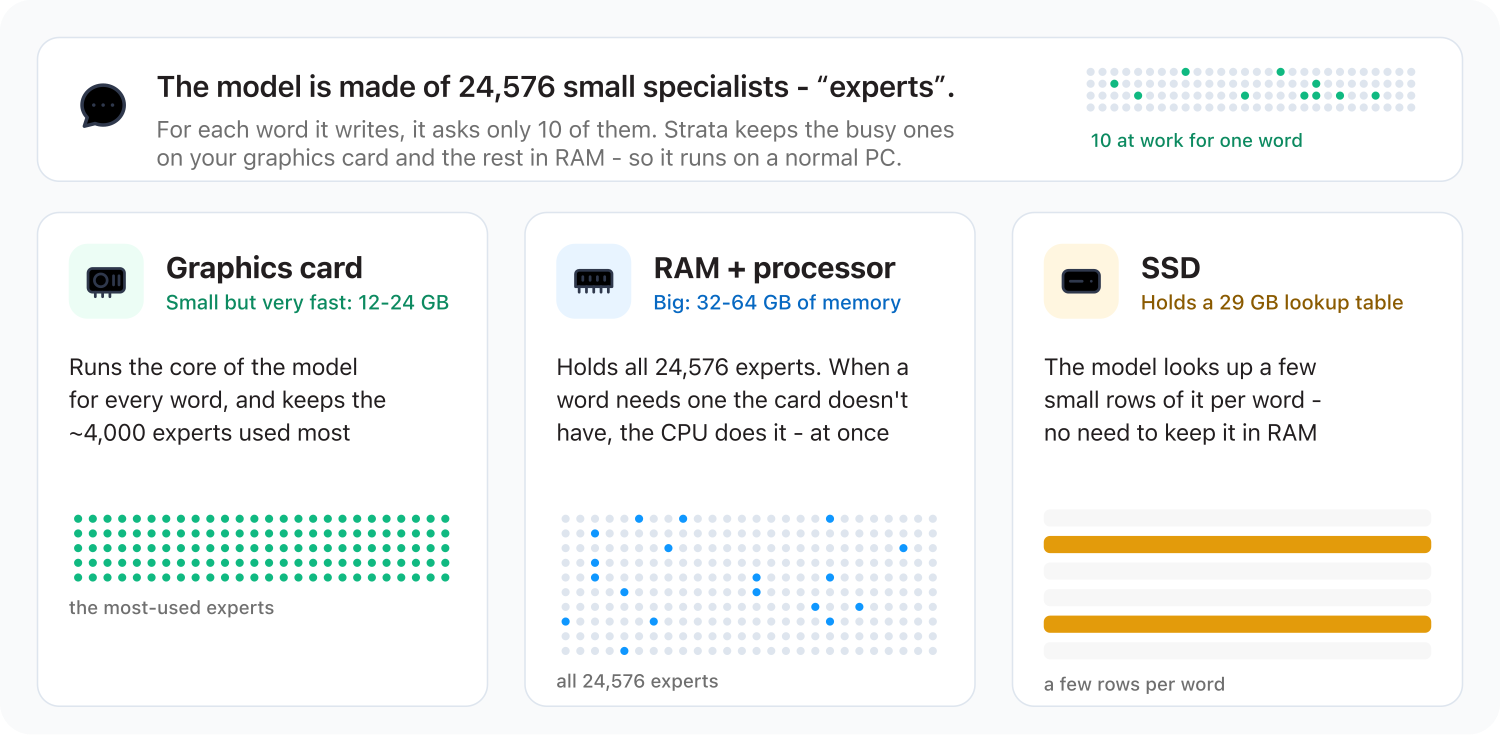
Previously, when looking at local models, the most convenient algorithm was “How many GB of weight? Do I have that much video memory?” Strata changed its role: high-frequency, latency-sensitive parts were assigned to the graphics card, expert weights mainly to memory, some large tables to the SSD, and processors to participate in computation. The graphics card didn’t do the entire job alone.
| Location | Main work | The cost cannot be avoided |
|---|---|---|
| Graphics card and video memory | Key calculations such as attention; Cache commonly used experts | The memory still needs to be installed to run the base and the context-dependent state |
| Processor and memory | Preserve expert weights; Calculate experts who missed the GPU cache | Memory capacity, bandwidth, and CPU performance all affect speed |
| Solid-state drives | Save large lookup tables; Low memory mode may also read experts | Sufficient capacity does not mean low latency; frequent reading of experts will slow down performance |
You can think of it as a restaurant: the graphics card is the workstation, the memory is the prep area, and the SSD is the warehouse. The workbench doesn’t have to be filled with all the ingredients, but the kitchen can’t just disappear out of thin air. If every dish has to be rummaged through the warehouse, “being able to open” and “serving food quickly” are two different things. This metaphor only illustrates division of labor and does not mean that real hardware can be arbitrarily interchanged.
This also easily confuses two concepts: **Using only a few experts at a time does not mean saving only a small number of experts. ** The project documentation describes 48 layers, with 512 experts per layer, totaling 24,576 cross-layer experts; Each layer has 10 routing options, not just the 10 called from the model in the entire response. The next input may require another batch of weights, so the cache is not permanently deleted.
This also explains why the solution cannot be directly promoted to “all large models can run on 12GB graphics cards”: it relies on model architecture and dedicated scheduling implementation. Whether another model is supported must be checked separately; it cannot be based solely on the same GGUF format. See the mechanism in official notes.
94 words per second is fast, but first look at the headline on this report card
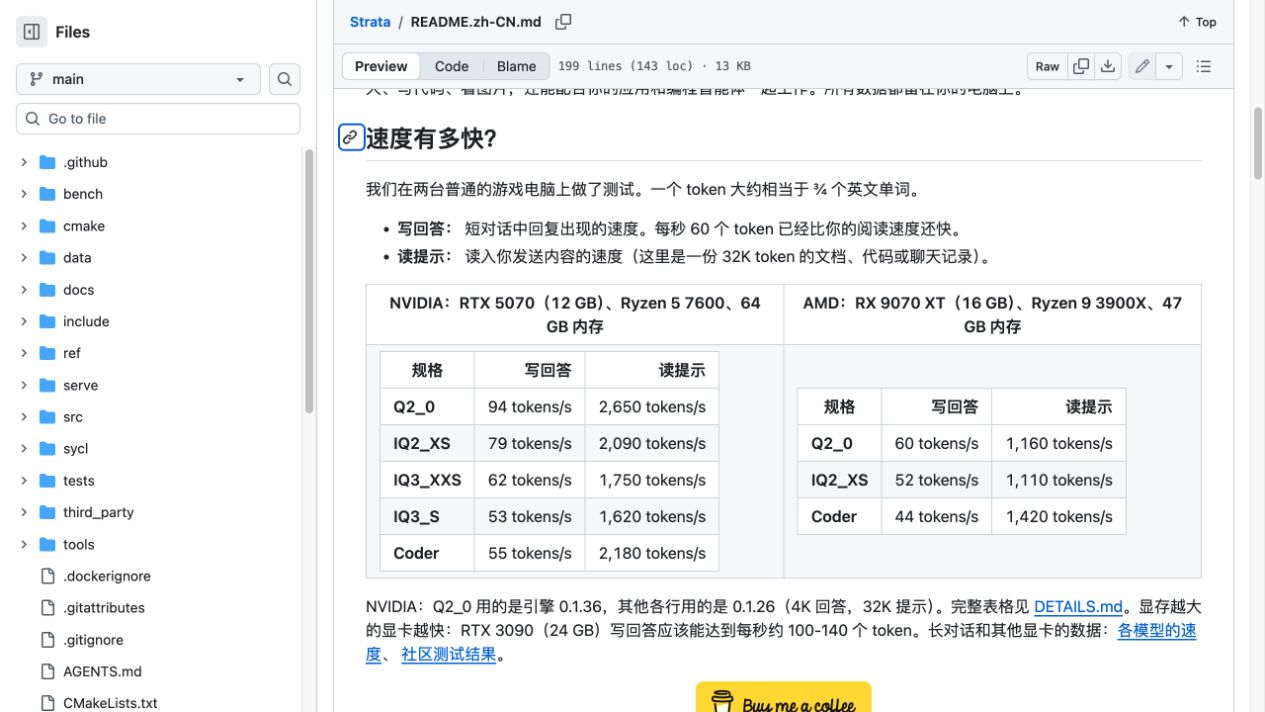
The official NVIDIA test machines are RTX 5070 12GB, Ryzen 5 7600, 64GB DDR5-5200, Windows. This is the result of the whole system combination; you can’t take “12GB” and apply it to all graphics cards of the same capacity. The following uses the standard format from the project model table, with units in words per second, not Chinese characters per second.
| Version | Short context generation | 128K context generation | 32K prompt processing |
|---|---|---|---|
| Q2_0 | 94 | 76 | 2,650 |
| IQ2_XS | 79 | 63 | 2,090 |
| IQ3_XXS | 62 | 49 | 1,750 |
| IQ3_S | 53 | 46 | 1,620 |
| Coder | 55 | 43 | 2,180 |
Project author data, not HyphenTech actual tests. Q2_0 Indexed engine 0.1.36, other summary items 0.1.26; not strictly same version horizontal review.
This table hides two very different waits. Pre-filling means the model reads the data you provide first; Generate is when it starts responding step by step. 4K in a document refers to input context, not 4K words at once. A quick first sentence doesn’t mean a long report is completed quickly.
For example, using the numbers in the table: 32,000÷2,650≈12.1 seconds, which is a pure prompt processing time estimated by throughput, excluding loading, queuing, and other overhead. Generating 1,000 words takes about 10.6 seconds and 18.9 seconds for 94 and 53, respectively. These are arithmetic demonstrations, not actual response time guarantees; Word characters cannot be directly replaced with the same number of Chinese characters.
More importantly, the fastest quantization file does not automatically equal the file that suits you best. Chinese lengthy texts, code modifications, and tool parameters vary in tolerance for error. This article does not have an independent quality review and will not label Q2_0 as “capability lossless” based on speedometers. Original model and speed charts are shown in Official model description.
Why can it speed up? First, guess, then let the large model correct it
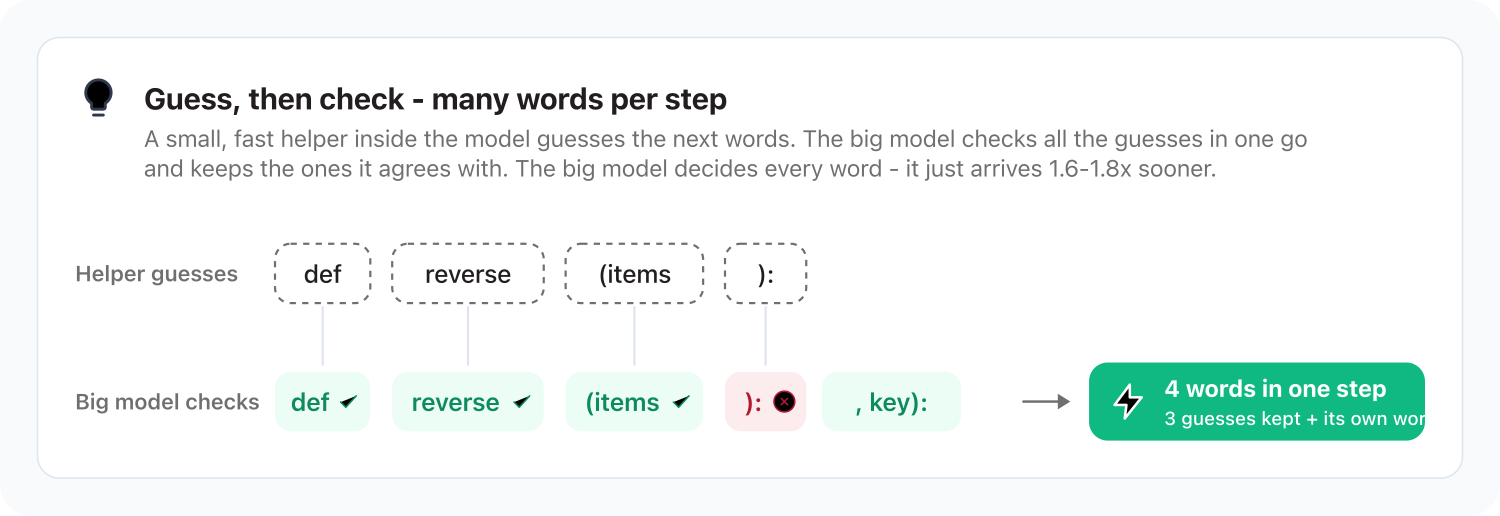
Besides hardware division, Strata also uses the model’s built-in multi-word prediction capabilities: small steps draft subsequent candidates, large models validate in batches, accept suitable parts, and redo incorrect parts. This saves serial back-and-forth rather than leaving all final judgments to small models.
Here’s a seemingly unusual aspect: doing extra “guessing” steps might actually be faster. The reason is that a large model can check multiple candidates at once, diluting expensive access and scheduling costs. If candidate hit rates are low, benefits decrease, so fixed acceleration multipliers cannot be separated from task conditions.
I especially avoid the phrase “every output is exactly the same.” The detailed project documentation states that CPU computation, the distribution of experts between CPU/GPU and the adaptation process may all affect reproduction at zero temperature. **Verification design for speculative decoding does not equate to a project’s commitment to word-by-word or bitwise reproduction. ** For implementation and limitations, see Detailed technical documentation.
The real calculations: video memory, memory, downloads—don’t mix them up with a single number
| Standard quantitative file | Official RAM+VRAM requirements | Experts have about a share of memory |
|---|---|---|
| Q2_0 | 37.6GB | 34GB |
| IQ2_XS | 39.2GB | 35.5GB |
| IQ3_XXS | 47.0GB | 43GB |
| IQ3_S | 54.8GB | 50GB |
This is the model runtime resource specification in the project description, not the download volume or the total system budget that includes the operating system and all background applications.
In other words, “54.8GB less than 64GB” is not a straightforward conclusion. The total RAM and VRAM inside the table are not the same concept as your host’s physical memory; the operating system, browser, long context, and other applications still consume your share. It is recommended to reserve more margin at higher tiers.
Disk is another bill. The model search table is about 29GB of shards, plus expert shards and other components. Installation space is planned at least according to the official requirement of about 80GB of free space, with larger versions requiring more. Don’t think that just because the graphics card is only 12GB, you only need to download about ten GB of files.
| Your goal | Options for consideration | Accept the restrictions first |
|---|---|---|
| 32GB of memory, mainly for coding tasks | Research the Coder pruning edition | Not a complete model; The official documentation has documented issues related to Chinese/CJK |
| 48GB of RAM, hoping to try full expert quantization | Evaluated from Q2_0 or IQ2_XS | Don’t judge by video memory alone; Leave system margin first |
| 64GB of RAM, with many Chinese language and complex tasks | Compare the standard quant tier before making your selection | The high-quality mode consumes more memory, so speed and quality need to be verified separately |
| Pursuing higher-level quantization | Evaluating larger versions like UD-IQ4_XS | Uninstalling the SSD changes the speed and cannot continue using 94 syphems per second |
| Only one 64GB Mac | Don’t simply copy Windows installation tutorials | The official source does not provide a native runtime path for macOS/Metal |
Coder is indeed a real trade-off case: it reduces the number of experts per tier from 512 to 256, lowering the resource threshold, but it cannot be understood as “the full version is smaller and the ability is retained.” The 91.3% cited by the author is the relatively complete model’s SWE-bench score retention ratio, not the 91.3% task success rate; The Chinese language issue is an important reminder when selecting a character.
Larger quantization versions don’t mean 64GB computers can’t boot at all. Experts can partially read from the SSD, but that’s using latency for capacity. The experimental UD-Q4_K_XL listed in the project downloads about 111GB, but in a specified 64GB+12GB graphics setup, it only has about 7–8.5 syphetamines per second. It appears alongside 94 syphetates per second, which just shows: **For the same project, switching the model setup can lead to an order of magnitude difference. **
Windows and Linux have their own paths, but AMD is not just copying NVIDIA
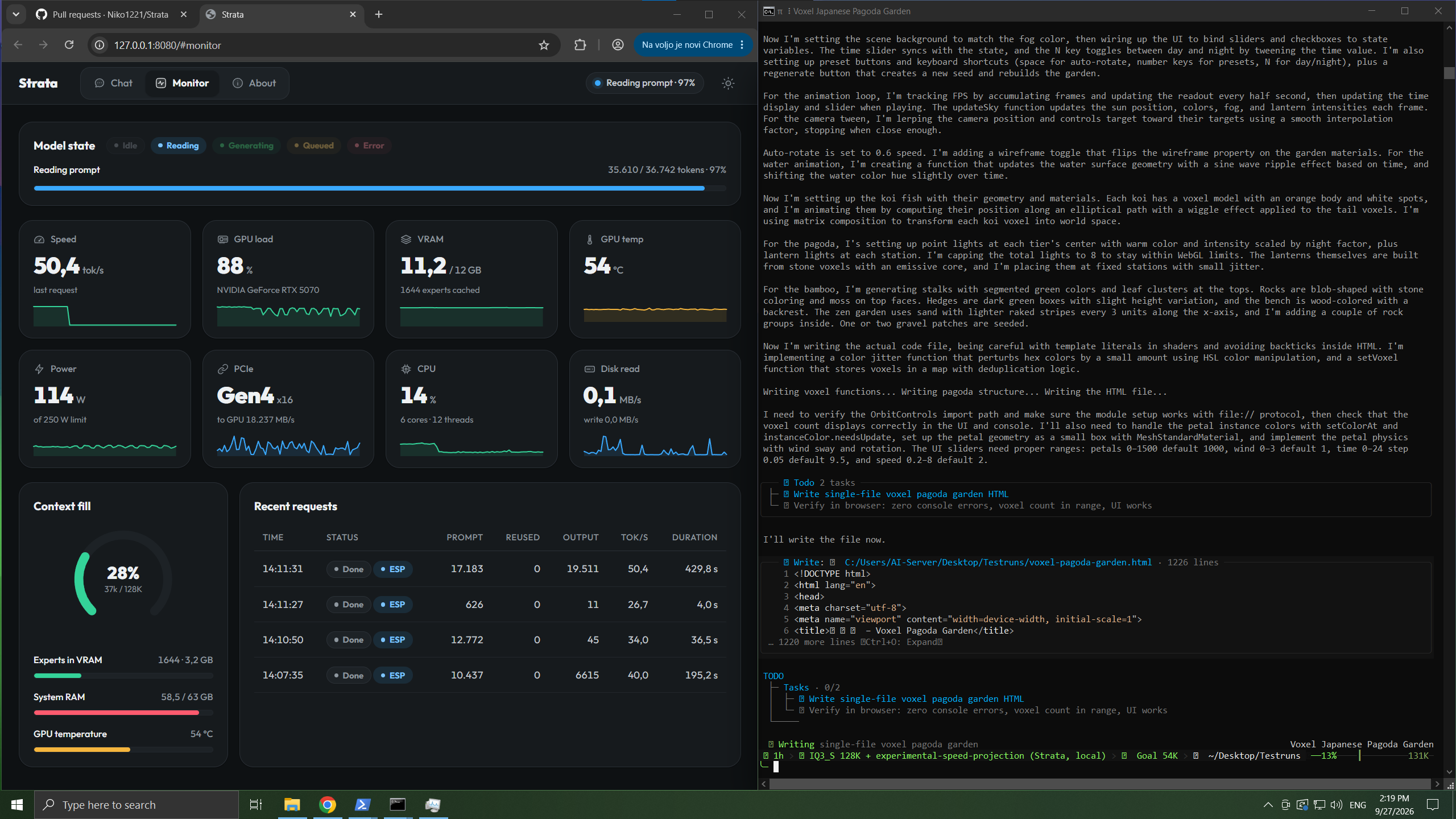
There’s another part of the official interface worth reading: it shows about 11.2GB of VRAM usage, while the system memory is about 58.5GB. This is the state from the author’s demonstration, not a new standalone performance score, but it clearly reminds us that the small VRAM solution doesn’t eliminate the cost of RAM in the main system.
The official installation portals are Windows START-HERE.bat and Linux setup.sh. The initial setup lets you choose the model version, context, and image capabilities before downloading the corresponding files. This article does not perform these portals or install dependencies for you. Before installation, check the graphics card backend, CPU command support, space, and model version; this saves time re-downloading after failure.
The project’s chat and monitoring interface lets you first check if the system loads normally, then test your short Q&A, long data, and target tasks. The official team also released a demo of the RTX 5070 running; The demo proves the author has shown this path, but does not prove I have reproduced it. The interface is more user-friendly than the command line and cannot replace compatibility checking.
| Platform and backend | What can this article confirm? | You can’t make any promises on the spot |
|---|---|---|
| Windows/Linux+NVIDIA CUDA | This is the main official support path | Older graphics cards of the same capacity have the same speed |
| Linux+AMD HIP | There are AMD support documentation and author grades | Which is better than NVIDIA under the same conditions? |
| Windows+AMD HIP | Provides a precompiled installation path | Fully aligned functions and stably validated on all discrete graphics cards |
| macOS + Apple chips | The installation documentation does not list the native Metal/MLX path | 64GB of unified memory can directly copy this backend setup |
Pay special attention to AMD’s graphics features: the Linux route in the documentation uses CPU visual encoding, while Windows HIP has limitations in graphics and calibration. Therefore, “supporting AMD” only indicates the existence of a certain runway and does not mean all features are exactly the same as CUDA. For details, follow Installation Instructions and AMD Instructions.
Can my Mac work? You can study calling the PC, but that doesn’t mean the Mac is running it
This part is actually more useful for Mac users like me: there’s no need to force every machine to natively run all models. Windows or Linux computers handle inference, Mac handles interaction, accessing its services via LAN. The premise is that the other computer truly meets the requirements, rather than hiding missing hardware under the word “LAN.”
| Access methods | Client address illustration | Key differences |
|---|---|---|
| Served on the same computer | http://127.0.0.1:8080/v1 | The loopback address points to the current computer |
| Mac accessing PCs in the local area network | http://PC LAN IP: 8080/v1 | You must use the address of the PC running Strata |
| Service monitors all network cards | 0.0.0.0 | This is the listening setting, not the target address the client should provide |
The official list lists OpenAI-style chat interfaces, Anthropic messaging interfaces, and Responses interfaces. For toolboxes like LocalBrain, it’s worth studying whether the service can be treated as a compatible backend, rather than whether it can allow Mac to launch Strata directly. **This article has not verified the adaptation of streaming, tool calls, images, or inference fields between LocalBrain and Strata, so it cannot be considered fully integrated. **
Before actual integration, start with a single round of text, then check the long context, tool parameters, and visuals item by item. Compatibility with an interface name does not mean fully compatible with every client’s behavior. This step may not sound cool, but it saves more time than discovering that the tool call quietly fails after connecting.
The last pitfall: Local inference does not mean the entire workflow is off-network
When using the same machine, first keep the loop address. If you need a local area network, follow the official security instructions to enable the API key and use a firewall to restrict trusted sources. Do not forward port 8080 to the public network; HTTP on a LAN does not mean it is already encrypted. This only explains the principle and does not modify the listening or firewall for you.
Strata performs local inference and cannot guarantee privacy for external agents. Web searches, third-party tools, telemetry, and remote MCP services can all send content off the computer. Confidential data should be viewed in the complete data stream, not just by which graphics card the model is on. Boundaries can be seen in Project Security Statement.
Open source and free also do not mean zero cost: memory, SSD, electricity, and installation and maintenance are still paid for by the user. The MIT license for project code cannot automatically replace the license conditions set by the model’s own weight. My advice is to first judge whether the machine is suitable for the existing machine, rather than buying hardware based solely on speed numbers.
Quote: My judgment What Strata should focus on is not “12GB creating miracles,” but organizing VRAM, memory, CPU, and SSD into a researchable inference path. Those who already have suitable Windows/Linux computers can carefully evaluate according to the official approach; Those with only Mac should first distinguish between native deployment and PC service calls. Calculate the memory, quality, and interface accounts clearly before deciding if it’s worth the effort.
This article is an official data analysis, not a standalone performance endorsement. If you only remember one question, remember: When it runs, what are the other hardware pieces in the computer doing for the graphics card? ** Next time you see “running a large model with little VRAM,” this question is usually more useful than the advertised numbers.
🧰 Tools I build
I maintain all of these tools myself. Preview builds are clearly labeled; the release pages are the source of truth for downloads, updates and known limits.
Info: HyphenBox Status: Official releases
A radar for free LLM APIs: availability is re-tested continuously, one local interface for all of them, and keys stay on your machine
Info: LocalBrain Status: Official releases
A multimodal MCP toolbox for local models: TTS, Whisper and video generation in one place
Info: ScreenLex Status: Official releases
Learn new words while you watch shows. Free, for Mac and Windows
Info: HyphenScreen Status: Official releases
Screen recording and smart editing in one: a DaVinci-style timeline, automatic redaction and a check of the finished video before export. Free
Quote: HyphenTech Make AI your superpower Local deployment · Free resources · Self-made software https://hyphentech.top
Late nights and burned API credits went in,a cup of tea comes back out — only if you feel like it.
Scan with WeChatPress and hold to save the image, then open it from your album in WeChat Scan

Comments
Loading comments…