
Info: Machine translation This post was machine-translated from the Chinese original. Wording may be rough in places — the Chinese version is authoritative.
Summary On one side is the cloud million window with half the word and a single task at 0.26 yuan; on the other side is a 3.17GB web proxy and a 504MB speculative drafter stuffed into the laptop HyphenTech · 2026-11-18
Looking at the recent first-hand model updates released domestically and internationally side by side, the narrative splits into seemingly contradictory two sides. Cloud giants are busy pouring down long windows and daily call fees: Alibaba released Qwen4-Max supporting 1 million word context, claiming to save up to 50% token compared to the previous generation; Tencent Hunyuan launched Hy4 flash, directly posting a manual blind test order task bill of ¥0.26.
Meanwhile, Hugging Face and GitHub are buzzing with something else—the web operation model KORMo-Web-4B pushed down to 3.17 GB, and the Qwen3.5-0.8B speculative decoding drafter with only 504 MB.
Many friends wondered after reading this: Since a single cloud mission is almost down to 0.26 yuan, do we really need to mess with local small models with our 16GB Macs and 8GB graphics cards? More importantly, under the big companies’ posters saying “Save half the keywords” and “Cost reduced by 18 times,” what prerequisites are hidden behind each brand? I’ve pulled down all the official original images, model card quantization sheets, and release records from these companies, and I’ll break them down one by one for you to see.
1. Unwrap two cloud posters: the long board is solid, but don’t miss the small print and item breakdowns
First, let’s look at the Qwen4-Max launch notes released by Alibaba Tongyi’s official account (verified to have received 14.7K likes). This generation adopts a new MoE architecture, combining native visual understanding with 1M context window on the same base. The official core selling point is that it surpasses Qwen3.8-Max while consuming up to about 50% less tokens per task.
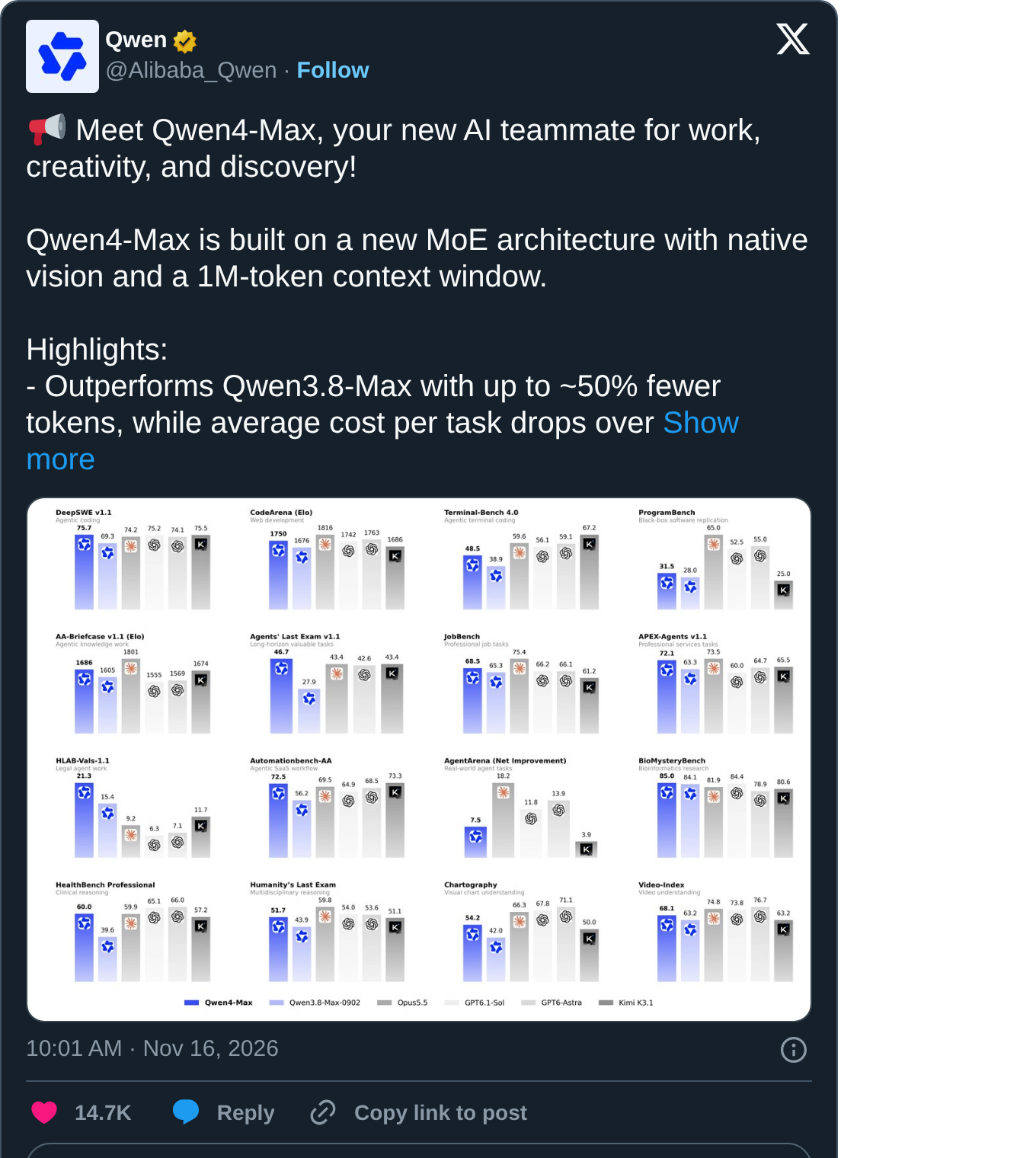
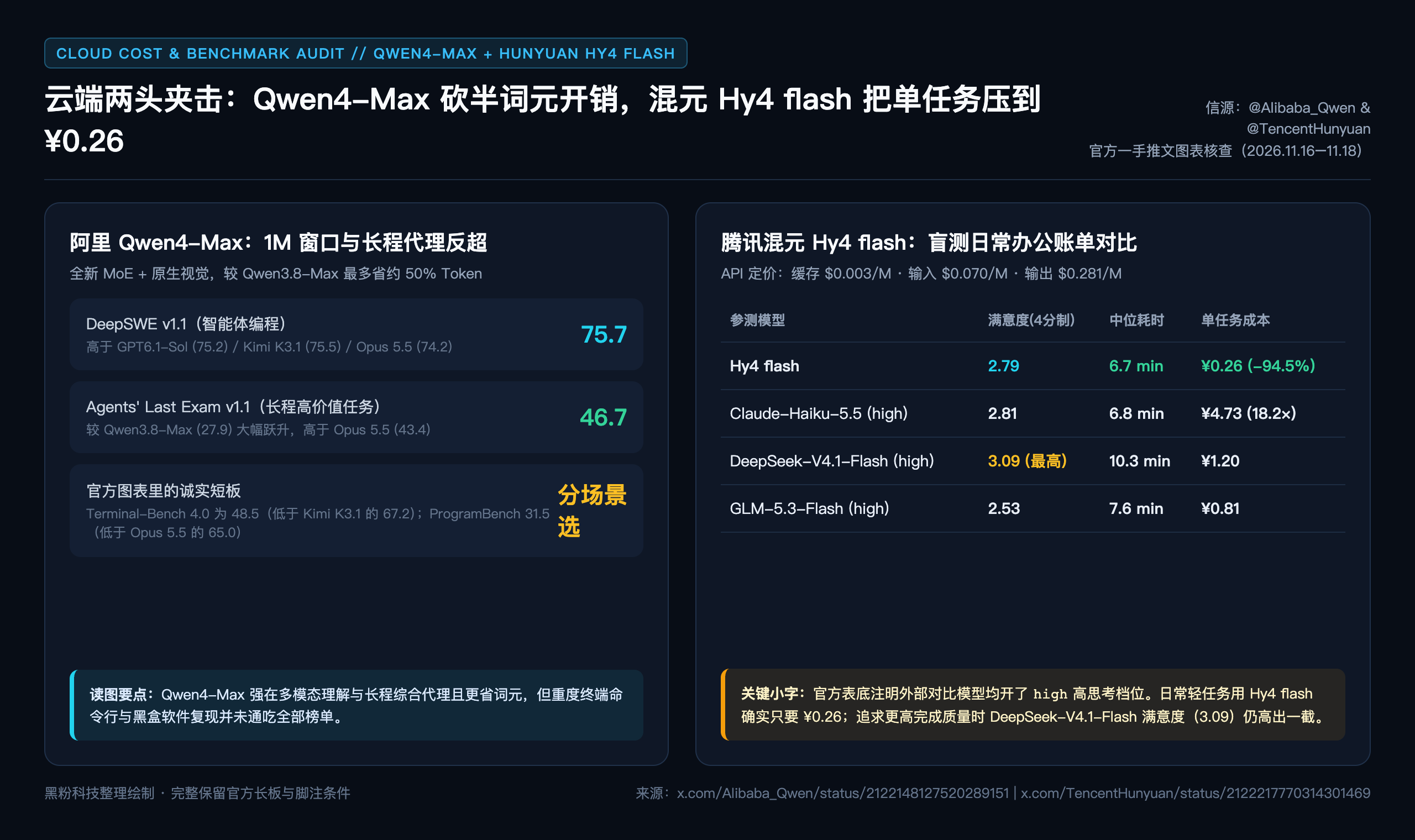
Zooming in on the 16 official bar charts clearly highlights its strengths and weaknesses. In DeepSWE v1.1, which tests agent code revision, Qwen4-Max scored 75.7, slightly outperforming Kimi K3.1 (75.5), GPT6.1-Sol (75.2), and Opus 5.5 (74.2); in the long-range complex task Agents’ Last Exam v1.1, it jumped from Qwen3.8-Max’s 27.9 to 46.7, outperforming Opus 5.5 (43.4).
However, looking at the upper half of the same chart, Terminal-Bench 4.0 (heavy terminal command line), Qwen4-Max scores 48.5, still significantly behind Kimi K3.1’s 67.2 and Opus 5.5’s 59.6; Black-box software reproduction ProgramBench (31.5) also ranks behind Opus 5.5 (65.0). Using it for long documents, analyzing diagrams, and running routine engineering read/write is cost-effective, but heavy terminal troubleshooting shouldn’t blindly trust a single highest score.
Now let’s look at Tencent’s Hy4 flash, which was launched at the same time in Hunyuan. The official API price per million words has been set to extremely low levels: cache hit $0.003, input $0.070, output $0.281.
The daily office manual blind test chart shown in the image shows that Hy4 flash scored 2.79 on a 4-point scale, with a median end-to-end time of 6.7 minutes, while the average spending per task was only ¥0.26; just next was Claude-Haiku-5.5 with a satisfaction rating of 2.81 and 6.8 minutes, but a single task cost ¥4.73—a difference of 18.2 times (a decrease of about 94.5%).
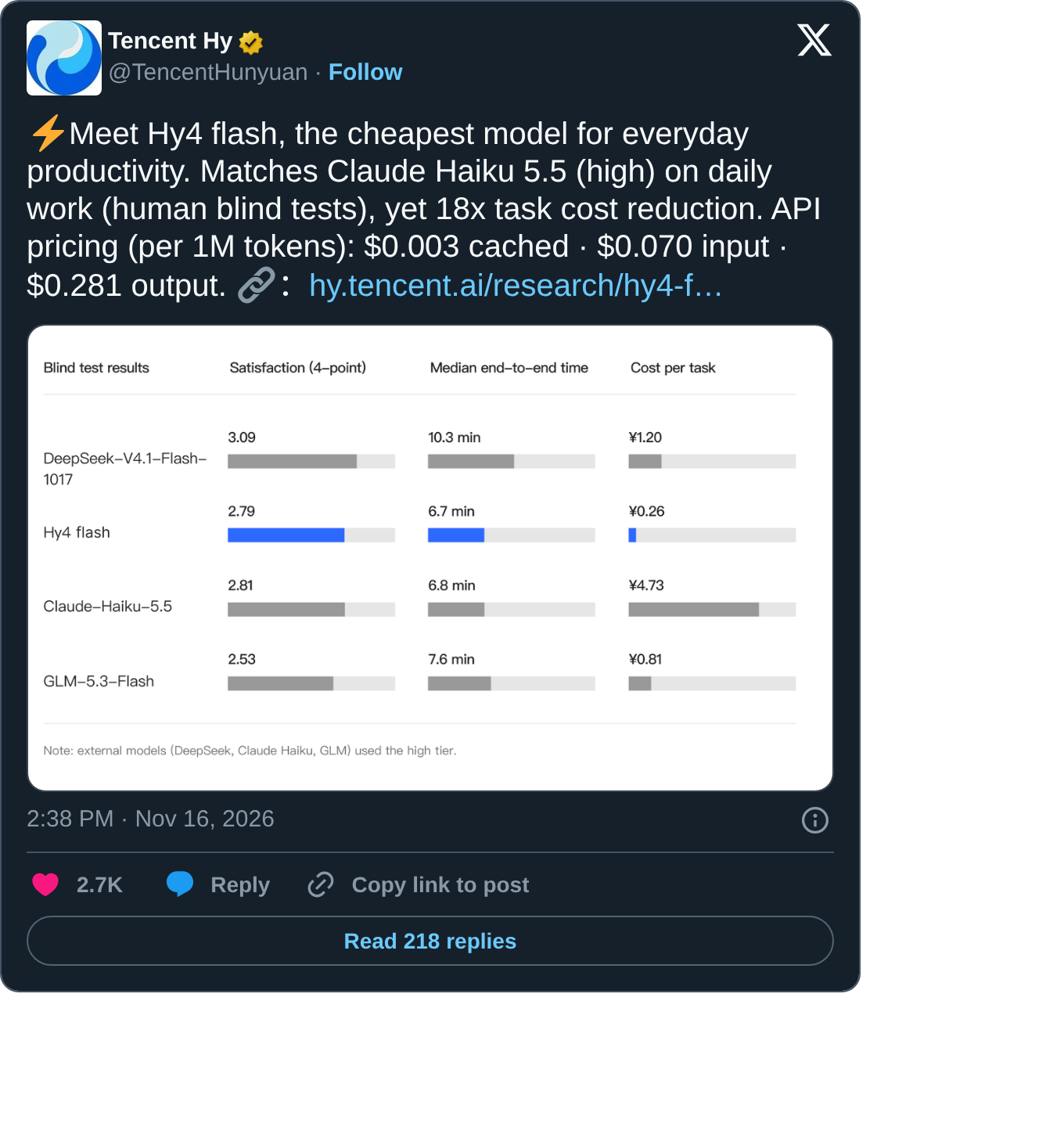
But when reading this table, you must look at the small gray text at the bottom: External comparison models (DeepSeek, Claude Haiku, GLM) were uniformly set to high high during testing.
High thinking levels naturally stretch the reasoning chain and add many intermediate words, so you’ll see the DeepSeek-V4.1-Flash-1017 in the same table take a median time of 10.3 minutes, a single session cost ¥1.20, and the highest satisfaction rate in the entire session is 3.09. Daily summaries, table cleaning, and simple scripts are handed over to Hy4 flash for 2.6 yuan each time, which is indeed cost-saving; But when you hit a tough problem with low margin for error, spending an extra 0.9 yuan to switch back to a high-satisfaction model actually reduces rework.
2. Why is the local side still running 3.17GB web proxy and 504MB drafter?
Since cloud fast models are already so cheap, why is the community still desperately pushing models down to just a few GB or even hundreds of MB? Click on the two new quant repositories Bartowski just uploaded to Hugging Face, and the answer is clear.
The first repository is KORMo-VL_KORMo-Web-4B-GGUF (underlying from KORMo-VL/KORMo-Web-4B, using the commercially viable Apache-2.0 protocol, qwen35 architecture, with a raw checkpoint parameter set of 5B).
Many news reports estimate it as 4.1GB based on experience. I directly checked the warehouse’s original quant file table: the most recommended main tier Q4_K_M actually only 3.17 GB, the more memory-efficient IQ4_XS only 2.85 GB, and up to Q8_0, it is only 5.16 GB (the full-precision BF16 is 9.70 GB). The repository also packaged mmproj visual projection files and used custom tensor allocation rules to reduce the Q4_K_M’s KL divergence to 0.60 times the standard rule.
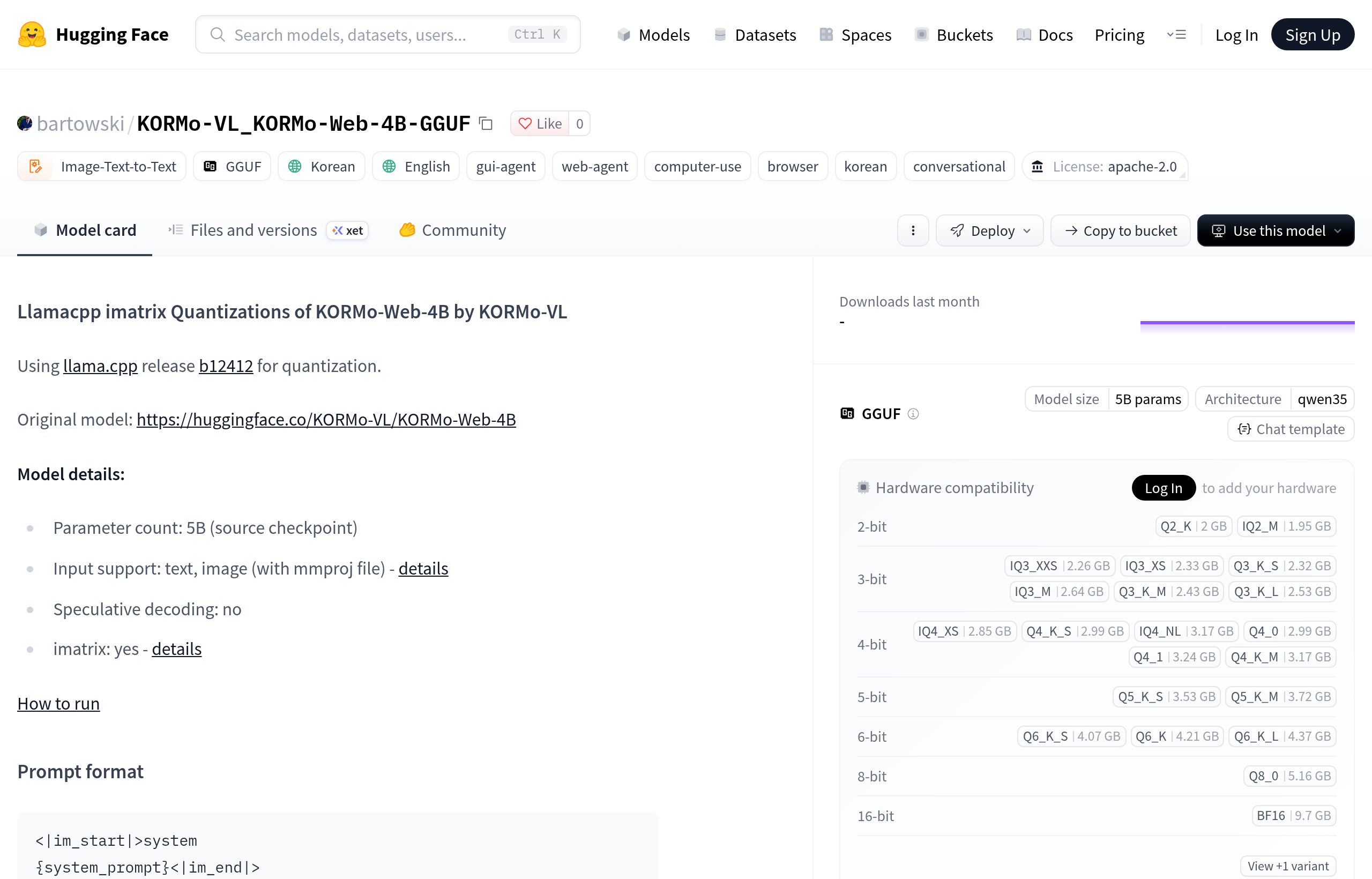
It targets the hardest hard requirement for cloud replace: local browser and desktop interface automation (GUI/Web Agent). If you let AI manage page buttons, fill out internal reimbursement forms, or monitor local webpage status in the backend, and send every full-screen image to the cloud, not only will visual keywords burn money, but all account cookies and internal backend data on the screen will be lost.
3. A 17GB multimodal web model fits perfectly into a Mac with 16GB of unified memory or an 8GB dedicated graphics laptop running around the clock. Of course, its limitations must be made public: the main training tags for this base model are Korean and English, and it has just been quantized and launched. Facing the extremely complex structure of Chinese dynamic webpages in China, click accuracy still needs to be tested in the local sandbox. At this stage, it cannot be treated as a fully automated production script running naked.
The second repository, Qwen3.5-0.8B-Qwen3.8-27B-Draft-GGUF, is a completely different usage. Its origin is nvidia/Qwen3.5-0.8B-Qwen3.8-27B-Draft, distilled by NVIDIA using ModelOpt. After Bartowski quantized, the main file Q4_K_M was only 504 MB (0.50 GB), and IQ4_XS was pushed down to 465 MB, and even the Q8_0 was only 812 MB.
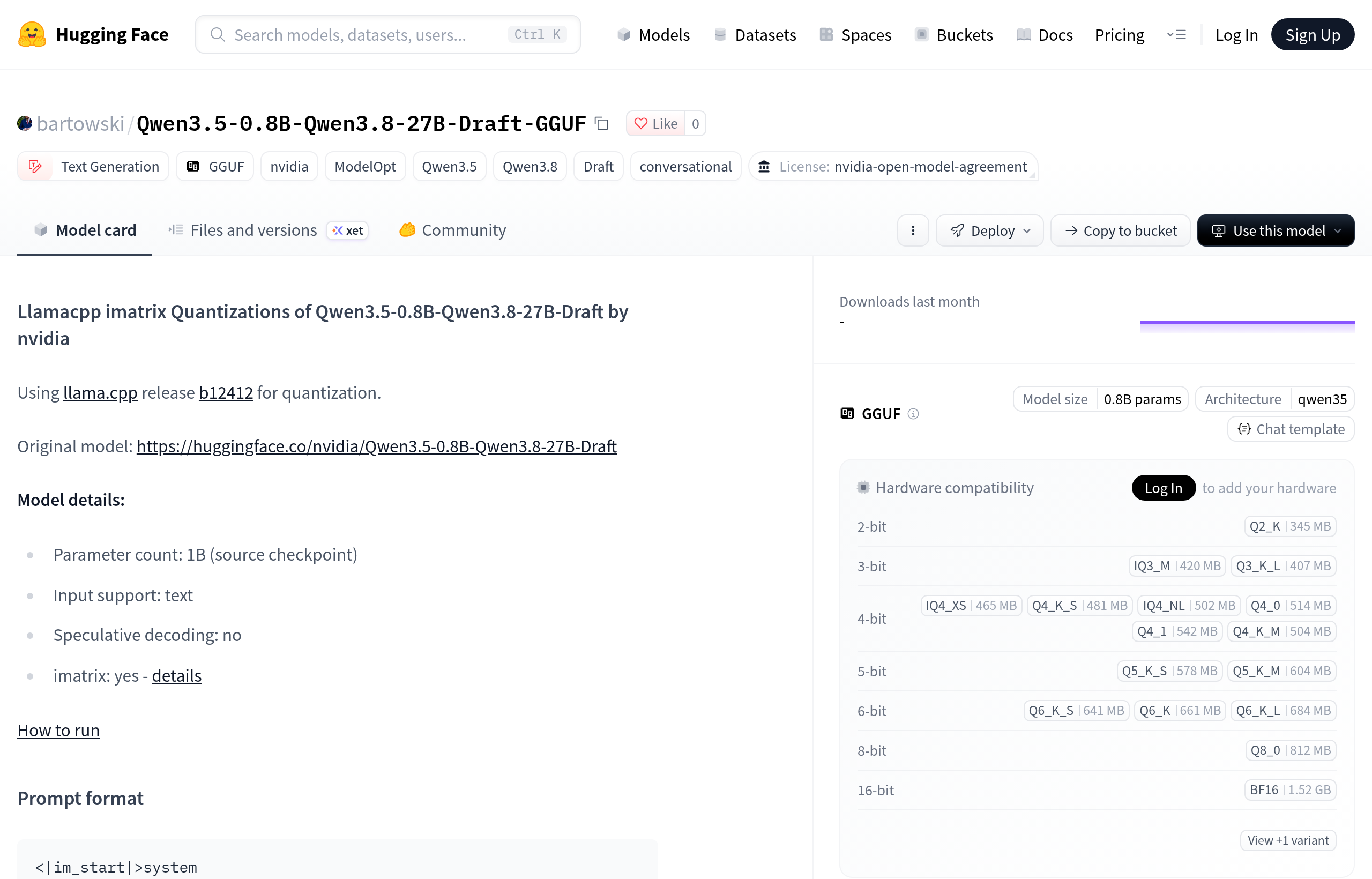
Never write long code on this 504 MB tiny guy alone—its purpose is to serve as a “speculative decoding drafter” for machines running Qwen3.8-27B locally. Running the 27B model on a computer with 32GB or 64GB of memory has sufficient logic but is often limited by memory bandwidth; Add an extra 0.8B draft model that only occupies half a GB of memory and shares a homogeneous terminology list to guess the word first, then have 27B perform a one-time parallel verification, which can speed up local generation without sacrificing 27B output quality.
Here’s another easily overlooked compliance detail: its license is nvidia-open-model-agreement, unlike the more lenient Apache-2.0 like KORMo. If you plan to package it into commercial software distribution, you first need to understand NVIDIA’s open model agreement.
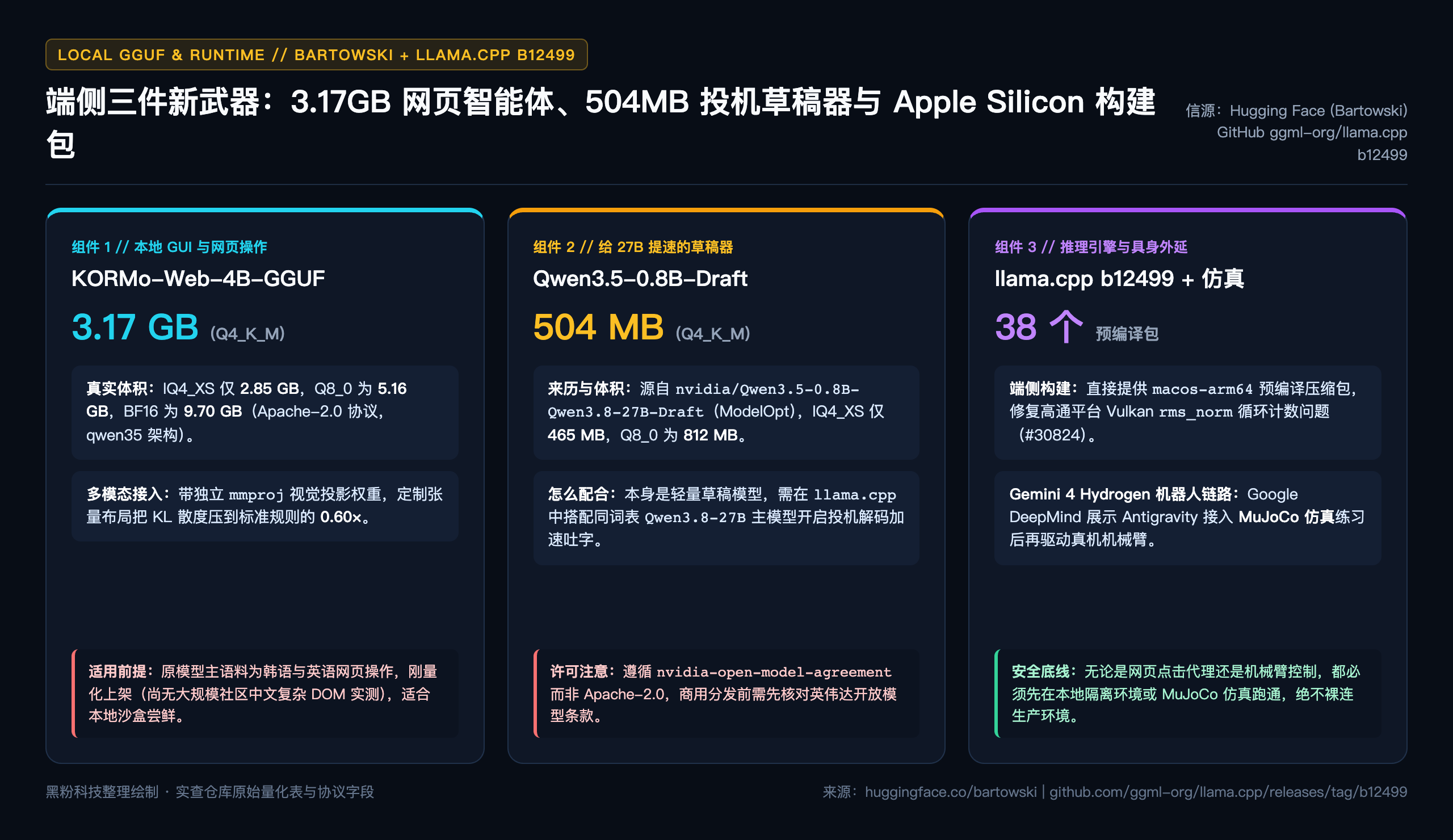
3. From llama.cpp new build packages to robot plugins: first practice in the quarantine field before deploying the real machine
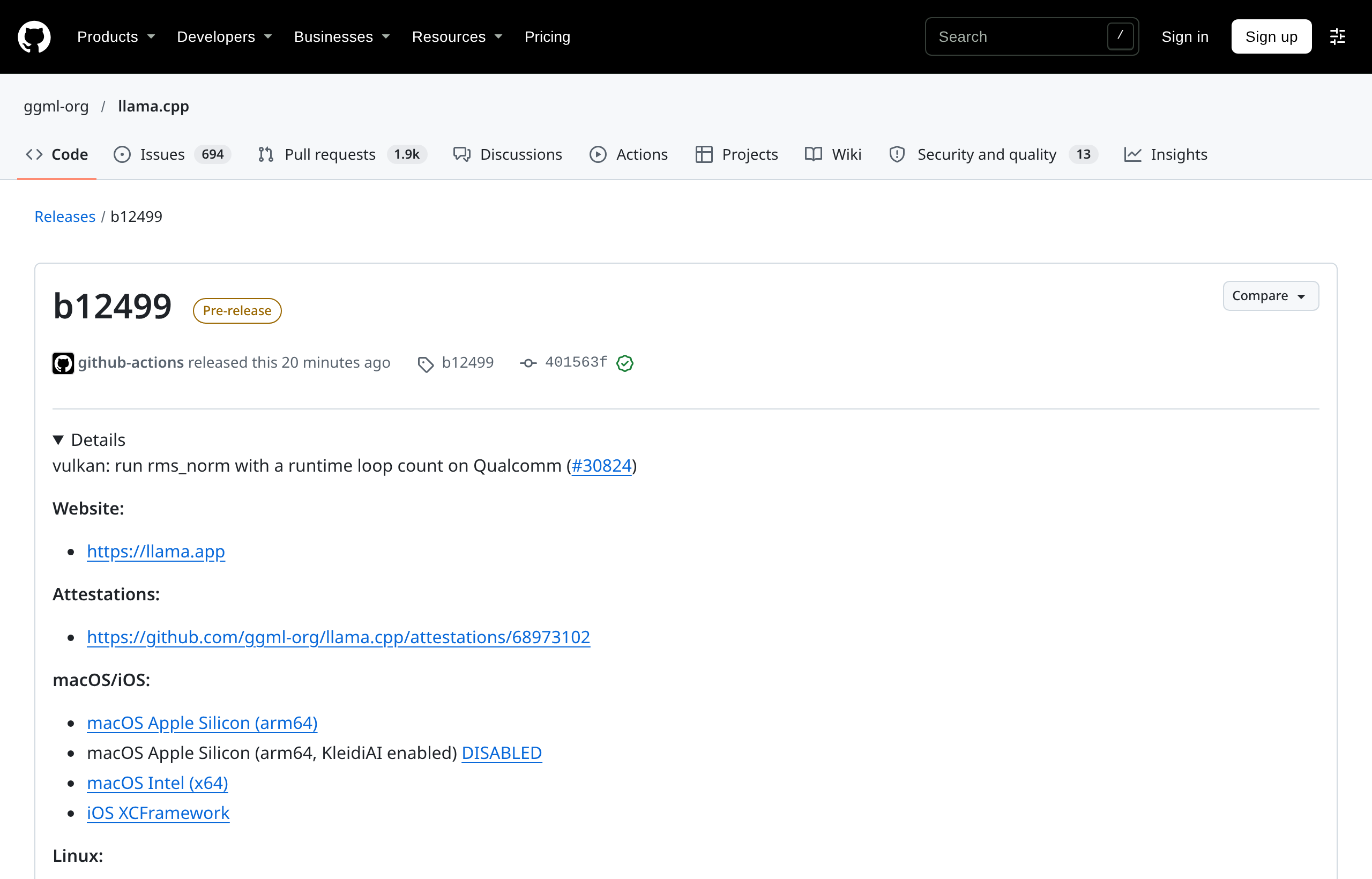
To truly run these two types of GGUF models smoothly, the underlying runtime is also making up for it. Today, ggml-org/llama.cpp just released the latest b12499 build, releasing 38 cross-platform precompiled packages at once, including out-of-the-box macOS Apple Silicon (arm64) binary compressed packages, and also fixed the runtime loop counting issue of Vulkan backend rms_norm on Qualcomm chips (#30824).
Just a quick reminder: the release page also truthfully states: the KleidiAI variant on Apple Silicon is still disabled due to historical compatibility issues (#23780), and Mac users can simply use the standard arm64 package for stability.
When the model moves from “chatting with you” to “clicking webpages for you, controlling devices for you,” the final hurdle is actually execution safety. Google DeepMind’s Gemini 4 Hydrogen robot plugin demo today sets an example for all agents working on it: even when connected to their own Google Antigravity environment and able to directly teach the robotic arm in natural language, the official standard process still first connects to the MuJoCo physical simulation environment for repeated practice and verification, confirms the actions are correct, then switches to the supported physical robotic arm for execution.
This rule of “simulate isolation first, then touch real assets” is exactly the same on our daily computers. Whether you’re testing with a free cloud channel, connecting a 3.17 GB web operation model into the local multimodal toolbox LocalBrain I usually maintain, or using HyphenBox to centrally schedule interfaces at different price tiers locally, any agent with click, write, or configuration permissions should first be run and accepted in a standalone browser Profile or local sandbox directory.
| Models / tools | Core specifications and costs | The work she is best at | Conditions you must check before use |
|---|---|---|---|
| Qwen4-Max | MoE + native vision + 1M window; Save up to about 50% tokens compared to 3.8-Max | Million-word multimodal long-form document analysis and cross-file programming agents | Terminal-Bench 4.0 (48.5) is lower than Kimi K3.1, with heavy command line matching as needed |
| Tencent Hunyuan Hy4 Flash | Cache $0.003 / Input $0.070 / Output $0.281; Single blind test ¥0.26 | High-frequency daily office work, batch cleaning, low-cost lightweight call-up | Blind tests with external models were all set to high settings; Satisfaction with complex tasks is still slightly lower than DeepSeek V4.1 Flash |
| KORMo-Web-4B-GGUF | Q4_K_M Only 3.17 GB (with mmproj); Apache-2.0 | 16GB Mac / 8GB dedicated graphics for local offline webpage recognition and click experiments | The main training materials are Korean and English; complex Chinese web pages must first be tested in an isolated browser |
| Qwen3.5-0.8B-Draft-GGUF | Q4_K_M only 504 MB; nvidia-open-model-agreement | Paired with local Qwen 3.8-27B to enable speculative decoding acceleration | It cannot be used alone as a main large model; Commercial distribution requires verification of the NVIDIA Open Agreement |
| llama.cpp b12499 | Open source and free; Includes 38 build packs including macOS arm64 | Locally loaded GGUF and dual-model speculative reasoning on Mac and multiple platforms | KleidiAI builds on macOS arm64 remain disabled; simply download the standard arm64 package directly |
Cloud data is clearly counted in small print, while the device side safeguards privacy and latency
Looking back at the initial question, cloud price cuts and local small models actually don’t overlap at all. Cloud relies on MoE sparse activation to reduce millions of contexts and daily batch processing to just a few cents, saving us the bills of general reasoning and long document throughput; On the device, a 3.17 GB visual web proxy and 504 MB speculative drafter protect screen privacy without leaving the local device, and the 27B local model experience is smooth and laggy.
When looking at the launch event poster, focus on the small print and sub-item weaknesses below, then on your own computer, configure tools according to actual quantification size, language boundaries, and sandbox rules. Only then does this wave of new model dividends truly enter your workflow.
Main sources of verification
- Alibaba Qwen Official X Announcement: Qwen4-Max MoE Native Vision and 1M Context Released
- Tencent Hunyuan Official X Announcement: Comparison of Hy4 flash API Pricing and Manual Blind Test Costs
- Tencent Hunyuan Research Page: Hy4 flash Technical Notes
- Hugging Face (Bartowski): KORMo-VL_KORMo-Web-4B-GGUF Quantitative Warehouse and Volume Table
- Hugging Face (Bartowski): Qwen3.5-0.8B-Qwen3.8-27B-Draft-GGUF Draft Model Repository
- GitHub: ggml-org/llama.cpp b12499 Precompiled Build Release Page
- Google DeepMind Official X Announcement: Gemini 4 Hydrogen Robot Plugin and MuJoCo Simulation
Self-made software
Versions, changes and supported installers all come from the same public release records.
HyphenAssistant
Continue your computer’s DeepSeek Harness session from a phone browser. The service, computer and network must stay online; model costs follow your existing setup.
View public downloads and updates ↗LocalBrain
A local AI toolbox for transcription, speech, images, video, and MCP tools. Features vary by platform version.
View public downloads and updates ↗HyphenBox
A free model API radar and local router, with ongoing availability checks and keys kept on your device.
View public downloads and updates ↗ScreenLex
Turn subtitles from your own films and shows into an English vocabulary library, entirely offline.
View public downloads and updates ↗HyphenScreen
Screen recording and editing with a Resolve-style timeline, automatic redaction and pre-export checks.
View public downloads and updates ↗Support HyphenTech
Late nights and burned API credits went in,a cup of tea comes back out — only if you feel like it.
Save the QR codeScan with WeChatPress and hold to save the image, then open it from your album in WeChat Scan

WeChat tips · Any amount welcome




Comments
Loading comments…