

Current public release
Versions, changes and supported installers all come from the same public release records.
LocalBrain
A local AI toolbox for transcription, speech, images, video, and MCP tools. Features vary by platform version.
View public downloads and updates ↗Info: Machine translation This post was machine-translated from the Chinese original. Wording may be rough in places — the Chinese version is authoritative.
Summary Permission lies in the program, investigation in the model: a six-layer architecture that never leaves the machine throughout List each item clearly how destructive it is and where the boundaries are HyphenTech · 2026-10-21
To start with the conclusion: last week I had the local model in LocalBrain perform a complete security check on an experimental store I had built. From authorization to report issuance, 10 minutes and 2 seconds, 25 rounds of dialogue, 32 tool calls, 9 system approval boxes popped up, and I didn’t write a single command for it. Finally, it found a real unauthorized abuse vulnerability—using account A’s login mode, it read account B’s order voucher—after repairing the mall, it retested and confirmed: unauthorized abuse was denied, normal business was not damaged.
This article answers three questions: How is this network security testing feature implemented? What role does the large model actually play within it? How much is its capability boundary and destructive power? All conclusions are backed by export files and independent verification scripts; the end explains how to verify them.
1. First, think about one thing: authority and investigation must be separated
When an AI runs security tests, the biggest worry isn’t that it’s not smart enough, but that it has too many privileges. So the first principle of the 2.0.7 architecture is to separate them: permissions belong to the program, investigations to the model.
For example: if you hire a temporary worker to inspect the warehouse, you wouldn’t give him the entire keychain of the building. You would give him an access card—he can only enter this one room in the warehouse, valid for the day, and expires automatically after work; The doors of other rooms are locked from the outside, and he can’t even touch the doorknobs. How he rummags through this room, what he finds, and what conclusions he draws is his specialty; But which door he can enter is always up to you.
In the architecture diagram, this is six layers:
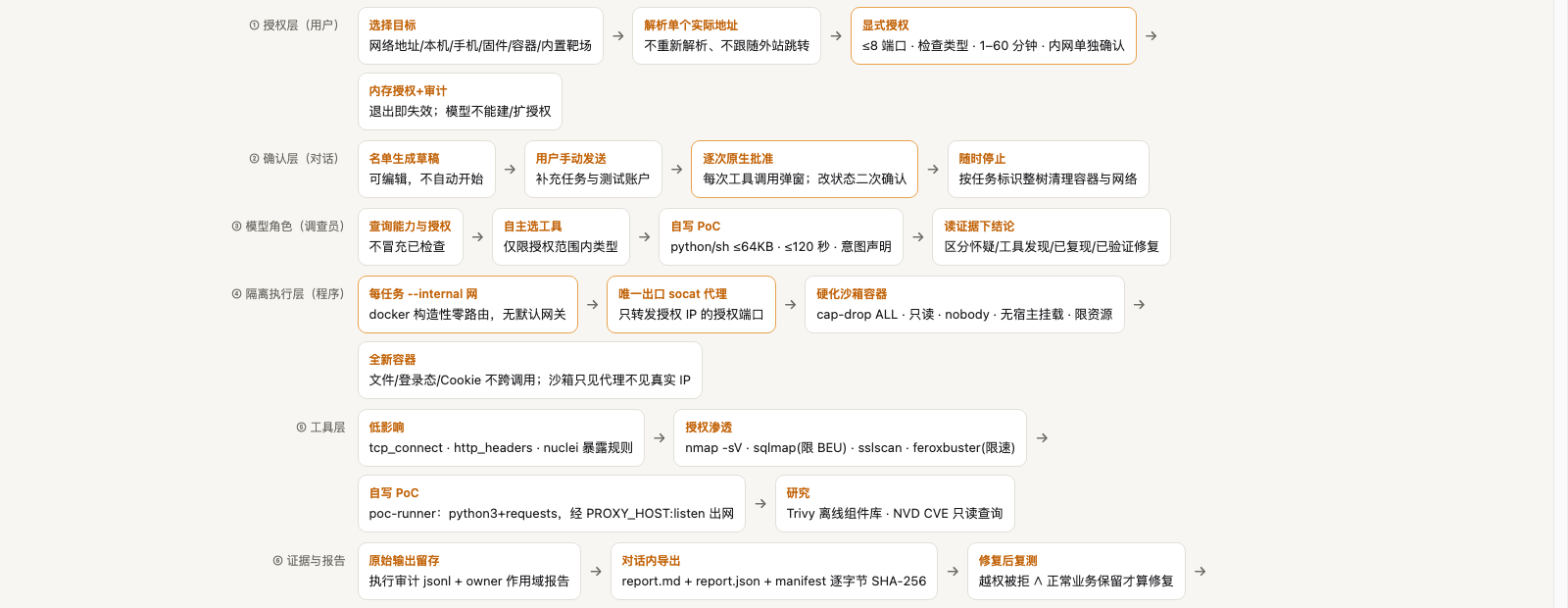
Looking from bottom to top:
- Authorization Layer (User): You select the target, resolve a definite actual address, explicitly check the scope—up to 8 ports, limit the type of check, validity period from 1 to 60 minutes, and confirm the intranet target separately again. Authorization only exists in memory; it becomes invalid when the program exits, and the model itself cannot be created or expanded.
- Confirmation Layer (Dialogue): The list is drafted by Mr. Rant, you can modify it; You manually send tasks; After that, every tool call pops up a native system approval box. If you want to stop, stop immediately. If you stop, the container and network will be cleared according to the task identifier.
- Model Role (Investigator): The model checks its own capabilities and authorization (impersonating checks is not allowed), selects tools independently, writes its own PoC (python/sh, 64KB limit, 120-second timeout, must state intent), reads evidence to draw conclusions—and distinguishes between four levels: “Suspicious,” “Tool Discovered,” “Reproduced,” and “Verified and Fixed.” Do not mix them up.
- Isolated execution layer (program): Each task has an independent Docker internal network, zero routing in construction, no default gateway; The only exit is a Socat proxy, which only forwards to the authorized IP port of the authorized IP; The container is hardened—full capability drop, file system read-only, nobody identity running, no host directories mounted, resource limits. Each task uses a brand-new container, with login mode and cookies not cross-task.
- Tool Layer: Low-impact tcp_connect, http_headers, nuclei exposure surface rules; Authorized penetration classes such as nmap, sqlmap (limited to Boolean/error/federated queries), SSLSCAN, and rate-limited feroxbuster; Self-written PoC using poc-runner; Research class Trivy offline component library and NVD CVE read-only queries.
- Evidence and Report: All original outputs are retained, and audit JSONL plus owner scope reports are performed; One-click export of report.md, report.json, and byte SHA-256 manifests in the conversation; After repairs, retesting is required; both ‘unauthorized denial’ and ‘normal business retention’ are both valid, and the issue is considered fixed.
There are two more annotations below the diagram, which I believe are the soul of the entire design:

The first rule is the fail-closed open gate: only if all three conditions are met—valid authorization, online isolation, and tool image in place—can the function be used; missing any one means the entire function is disabled. It’s better not to use security features at all than to run them half-dead. The second rule is the main topic of the next section.
2. The specific role of large models: investigators, not executioners
Many people’s first reaction was, “Isn’t this just running nmap in a shell?” I was skeptical at first, until I did that control experiment.
2.0.7 has a key change that sounds ordinary: the PoC interface description is now structured. The previous tool instructions were prose-based; after reading the model, you only knew about this thing, not knowing the outbound address was PROXY_HOST:listen, not knowing how to fill in port mapping arrays, not knowing that each task is a brand-new container without login state, and not knowing the 64KB and 120-second limits. After completing the details, this information was written directly into the tool description.
Same model (Qwen 3.8-27B, 4bit, local run), same task. Before completing the instructions: the 8.5-minute context budget was exhausted in 4 rounds, not even a valid voucher was obtained, and the investigation failed. After completing the task: 10 minutes and 2 seconds to run the entire link, investigate, independently verify, fix and retest, and pass on the first try.
If it’s a shell, the explanatory text shouldn’t have such a difference. The real division of labor is like this:
Model-Determined Matters: What to investigate, in what order, which tool to use, how to write PoCs, how to interpret evidence, and whether the final conclusion is accountable. You also have to control your mouth—once you get ‘suspicion,’ you can’t say ‘there is a loophole.’
Things the model cannot get: Authorization itself (user issued, memory saved, exit void), network exit (program locked, no path inside the container), real target address (both model and sandbox only see proxies), bypass confirmation (approval pop-up is natively popped up by the system, triggered by the program, does not go through the model).
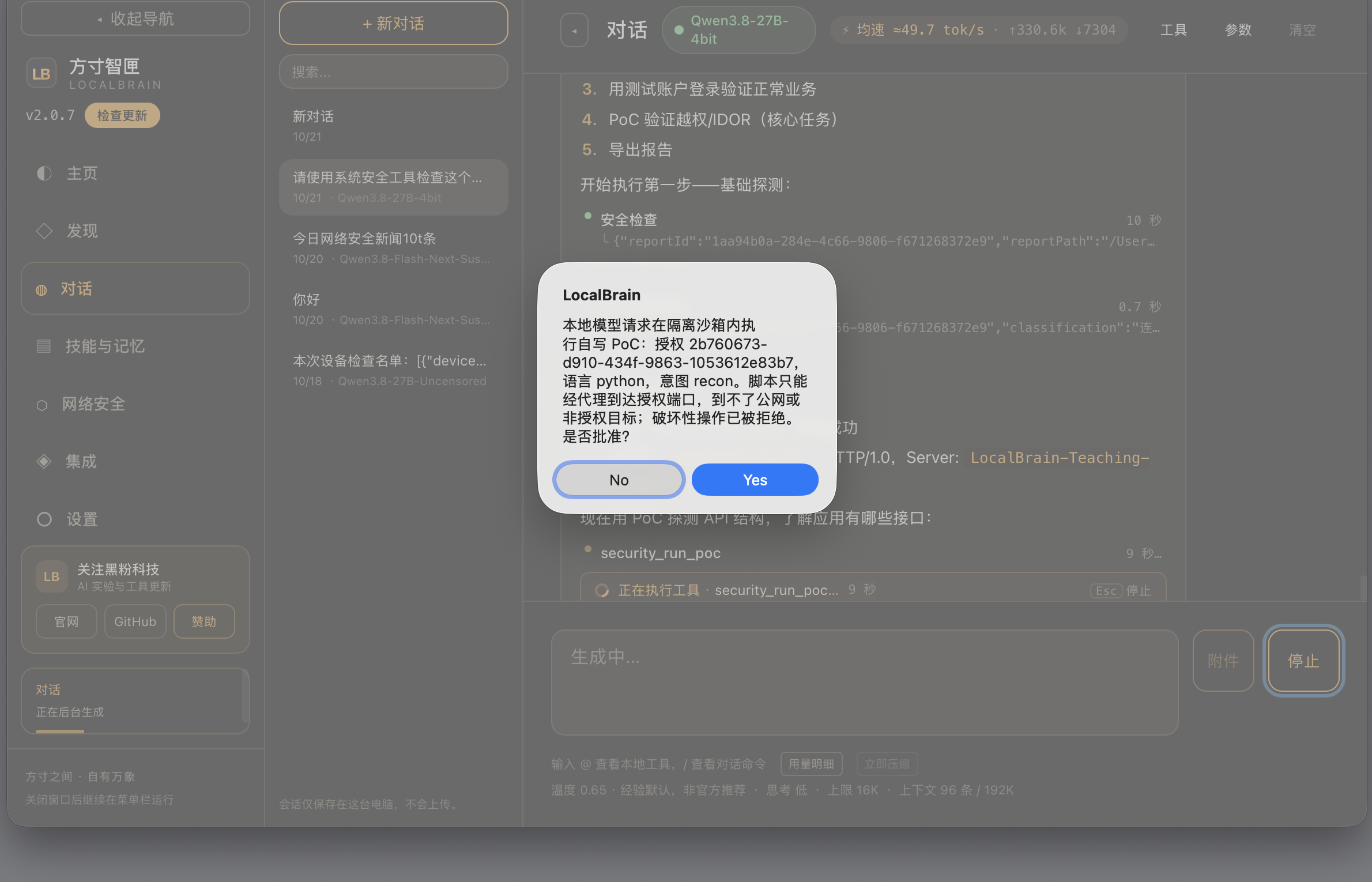
This was the first approval box popped up during the store visit. Note that it was very clear: authorization number, script language, intent was recon, and the sentence “Scripts can only reach the authorized port via a proxy, not public networks or unauthorized targets; Destructive operations have been denied.” This sentence is not a textbook to comfort users, but a fact about the isolation layer—even if the model writes a script that wants to connect elsewhere, it cannot physically reach it.
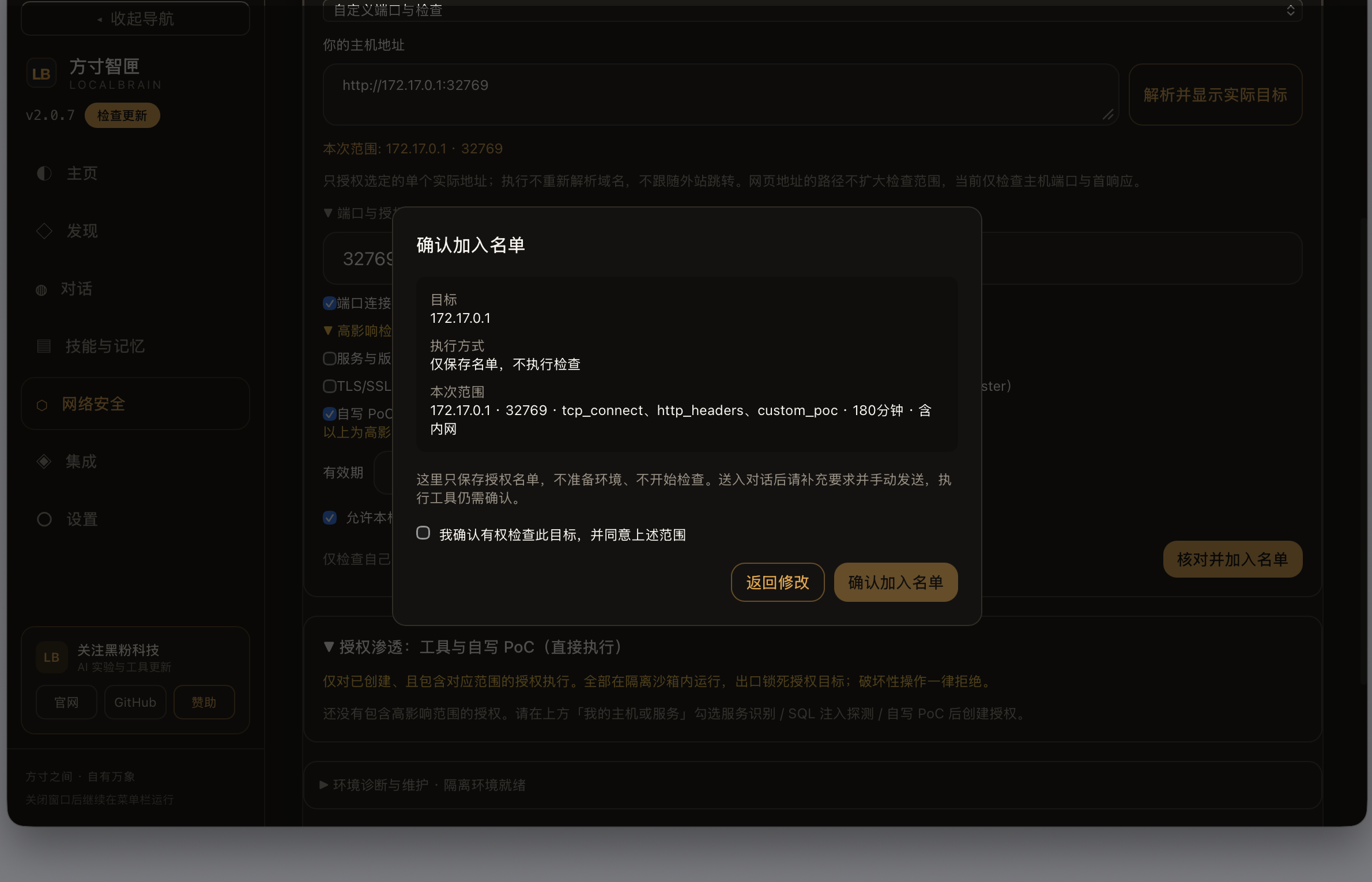
When joining the authorization list, users must check “I confirm I have the right to inspect this target.” No one can check this box for you.
3. Actual test: Identified the overreach vulnerability in 10 minutes and 2 seconds
The test subject was my own ‘Fangcun Experimental Mall.’ Running in an isolated network segment, the top of the page displayed ‘Independent Experimental Environment: All Fictional Data.’ It deliberately planted a classic vulnerability: IDOR, an unsafe direct object reference—after logging in, changing the order number from 1001 to 1002 would allow you to see someone else’s order.
The model’s workflow roughly is: first perform basic probing, then log in with a test account to verify normal business, then write a PoC to verify unauthorized access, and finally export the report. The 32 tool calls include port probing, HTTP header analysis, login, and cross-read between two accounts, with raw output retained at every step.
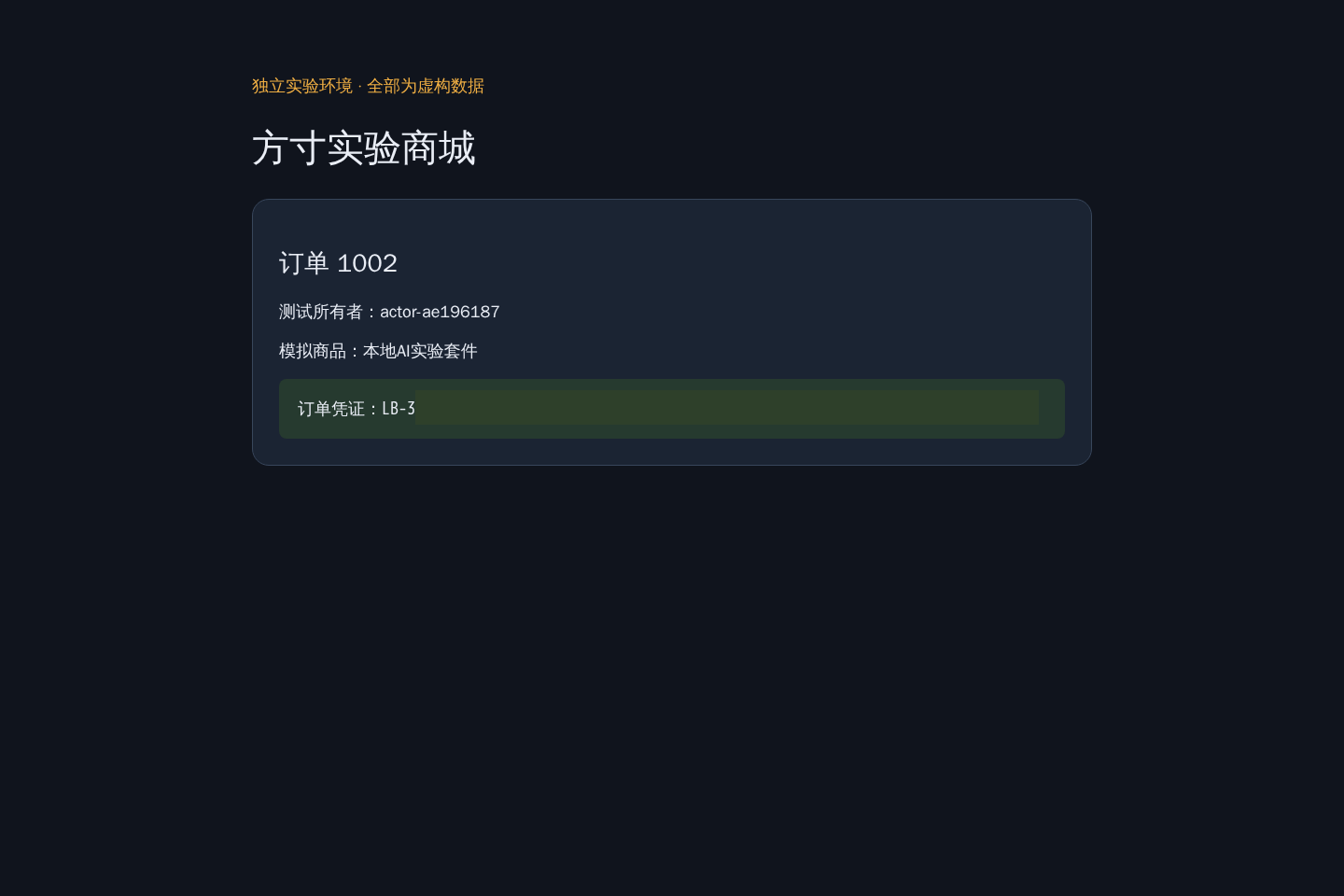
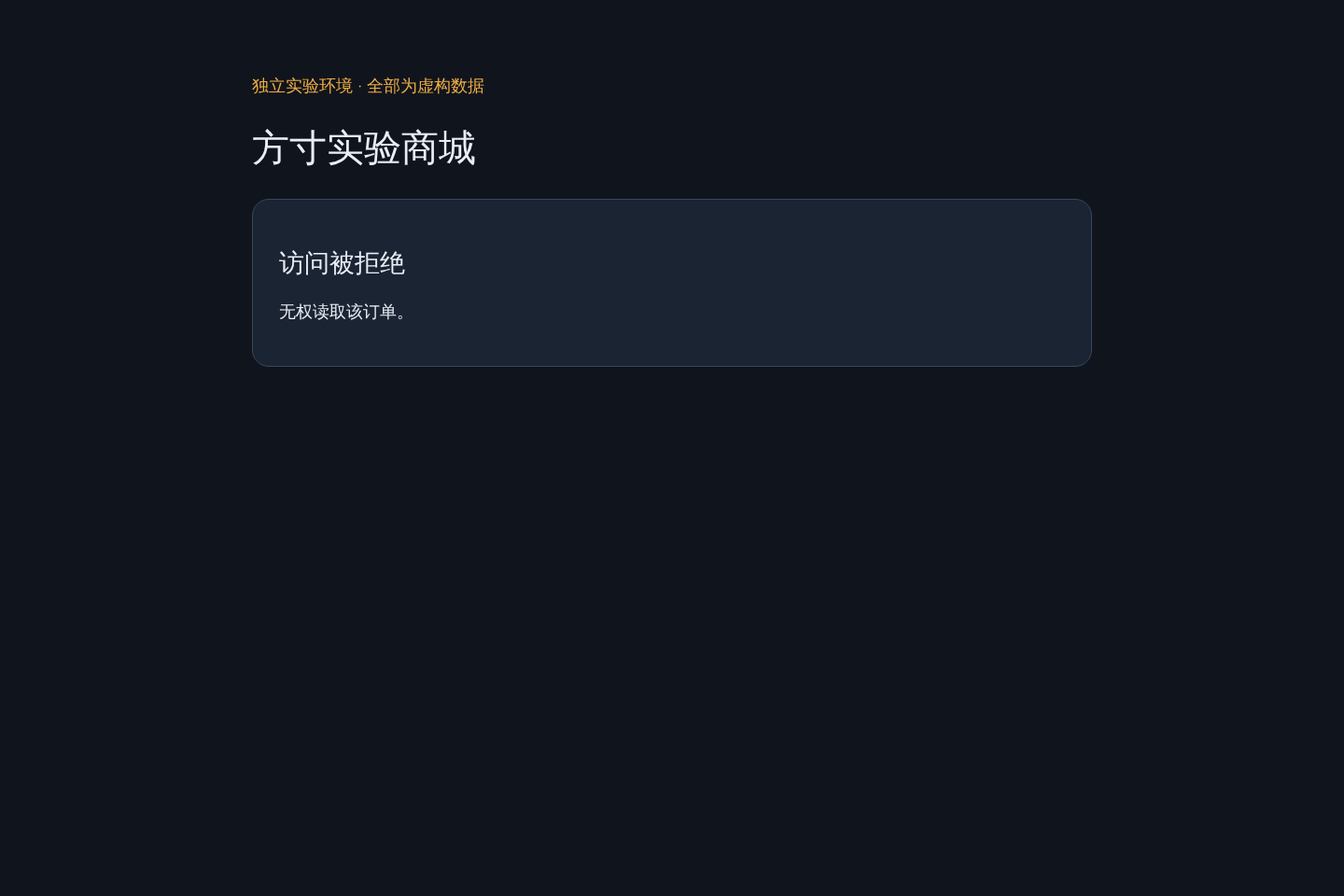
This is another person’s order read by the viewer account: order 1002, owner actor-ae196187, order voucher clearly listed (certificate anonymized). For comparison, anonymous access to the same interface returns 401—indicating the interface is not exposed, but authorization check missing the master validation.
But what really made me willing to include these numbers in my article wasn’t the model saying “I found it,” but the independent verification script. This script had no proof from the dialogue and was re-typed in the environment yourself:
Output of independent verification scripts (before and after fix):
// 修复前
{ "modelProofMatches": true,  "repairGoal": false,
  "ownStatus": 200, "foreignStatus": 200, "anonStatus": 401 }
// 修复后(商城修好属主校验,模型复测)
{ "foreignStatus": 403, "ownStatus": 200, "repairGoal": true }
If modelProofMatches is true, it means the model’s evidence matches the third-party re-call results—it’s not exaggerating. After the fix, the foreignStatus becomes 403 and ownStatus remains 200. If both conditions are met, the repairGoal is considered true. Only blocking unauthorized rights or blocking normal business is not considered a fix.
The exported report directory consists of 12 files: report.md, report.json, the original output of each tool, the JSONL for auditing, plus a manifest, and SHA-256 is calculated for each file. I checked it byte by byte and found it matches exactly with the originals on disk. This means the report is archivable and verifiable, not a screenshot of chat records.
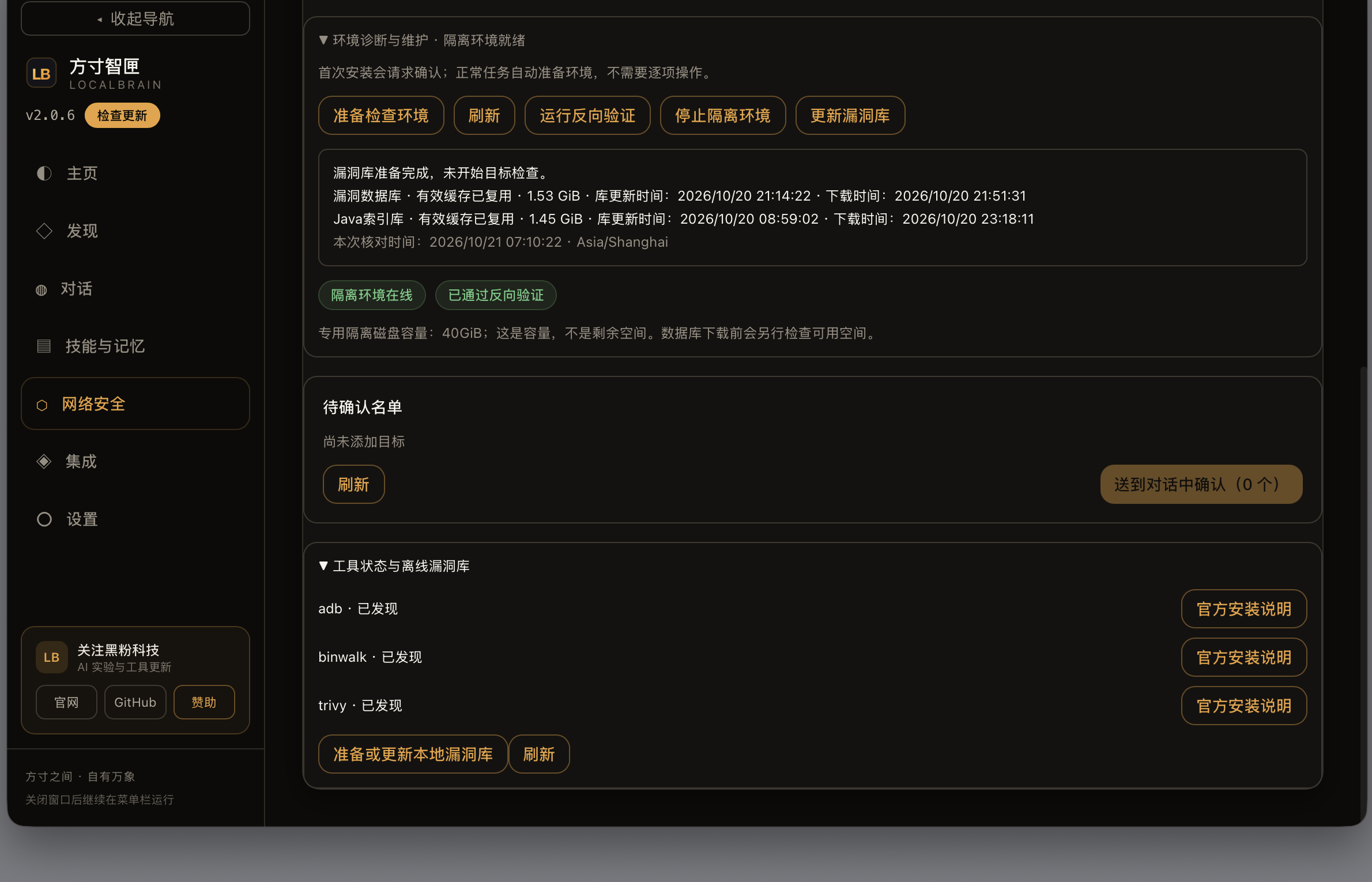
The vulnerability and component libraries used for inspection are also locally offline: the vulnerability database is 1.53 GiB, the Java index database is 1.45 GiB, with preparation time and validity period clearly specified. The entire inspection process does not require sending any target information to the cloud.
4. How destructive is it? Where are the boundaries?
Honest Verse. I separate “what can be done” and “what cannot be done.”
Things You Can Do Now (All tested): Perform black-box checks on your own or authorized-to-target sites—local, mobile, firmware, containers, built-in shooting ranges. Port and service identification, HTTP security configuration, exposed surface rule matching, component CVE comparison (offline library), SQL injection technical verification, POC reproduction of logic over-privileges like IDOR, and closed-loop retesting after fixes.
Technically impossible: Scripts cannot be granted permission within the scope. Containers have no default gateway; the only outbound proxy only recognizes the authorized port of the authorized IP, which cannot reach the public network or other machines on the same intranet. When tasks stop or timeout, the container and network are completely wiped out.
Direct program rejection: All damage categories are rejected by signature and intent declaration—DoS, data destruction, kill evasion, anti-forensics. sqlmap only allows three types of read-only techniques: Boolean, error reporting, and joint query; time blind and write operations are disabled. Exhaustive tools have speed limits.
Left for you: legal boundaries. Software can lock technology exports, but not human intent. The box “I confirm I have authority to inspect this target” is, in a legal sense, your signed authorization statement. Conducting security checks on unauthorized targets is clearly illegal in most jurisdictions and has nothing to do with the tools used. This article also does not constitute operational guidance for any unauthorized targets.
So the answer to the question of destructive power is: in the way it is designed to be used, its destructive power is close to zero—the attack surface is physically compressed by the isolation layer. The real risk has never been in the model, but in whether the user is authorized.
5. Who is it suitable for, and what is the next step?
If you’re an independent developer and want to perform a security check on your web application before listing without handing over source code and objectives to anyone, this feature is available today. A Mac that can run 27B 4bit models is enough.
Range capabilities like CTF and HackTheBox are the next steps; they are not currently on the tested list, so I won’t announce them in advance. What is lacking in architecture is longer, multi-step planning and finer toolchains; authorization, isolation, and evidence are ready-made.
2.0.7 has been released, and the capability boundaries are clearly written in the trilingual README and SECURITY-CAPABILITIES.md, and you can check them on the download page. As usual, all changes can be fully reverted—this security capability statement is no exception, with evidence documents attached.
Environment check: LocalBrain 2.0.7 / Mac / Qwen 3.8-27B 4-bit running locally. All screenshots in the article are from 2026-10-21 test sessions, export report manifest has been verified byte-byte; Vulnerability evidence confirmed by an independent script without credentials re-tapping. The experimental mall is a local fictitious environment, and the credentials in the text are desensitized.
Self-made software
Versions, changes and supported installers all come from the same public release records.
HyphenBox
A free model API radar and local router, with ongoing availability checks and keys kept on your device.
View public downloads and updates ↗ScreenLex
Turn subtitles from your own films and shows into an English vocabulary library, entirely offline.
View public downloads and updates ↗HyphenScreen
Screen recording and editing with a Resolve-style timeline, automatic redaction and pre-export checks.
View public downloads and updates ↗Late nights and burned API credits went in,a cup of tea comes back out — only if you feel like it.
Scan with WeChatPress and hold to save the image, then open it from your album in WeChat Scan






Comments
Loading comments…