Info: Machine translation This post was machine-translated from the Chinese original. Wording may be rough in places — the Chinese version is authoritative.
Note HyphenTech · Local deployment / Free free / Self-made software
DeepSeek Harness architecture analysis and integration with LocalBrain
The word ‘harness’ has lost half its meaning in Chinese translation; And it precisely explains why dsh can replace DeepSeek itself.
Note 2026-08-24·HyphenTech
- Disable LAN restrictions and do not start
dsh, using this line:
The day I connected the local model to DSH, I was stuck on one word: harness. Most Chinese sources translate it as “framework” or “outer shell,” but neither of these words explains why it makes the model adapter, tool registry, and even the agent loop itself replaceable plugins.
**After reading the architecture documentation, I understood: it’s not a shell, it’s a lever. **Now, let’s break it down into three parts—what exactly does ‘harness’ mean, what the DSH architecture looks like, and how to use LocalBrain to connect model calls locally.
🧭 ▍ Harness is not the outer shell, it is a harness
Let’s start with the word itself. In English, ‘harness’ refers to the set of harnesses attached to livestock: reins, yokes, or harnesses. They do not provide power; the power comes from the animals; Its function is to transfer power to the cart and allow people to control direction.
It’s easy to understand when you switch to a model. The model itself only generates the next token; it doesn’t know where your file is, can’t run commands on its own, and can’t remember what was said in the previous round. Harness does the job of a tool: it keeps the context, calls tools for it, runs errands between files and terminals until the whole thing is done.
It’s worth noting that the official glossary does not define harness separately—in DeepSeek’s documentation, it’s the framework’s self-designation, and the first sentence of the README readme reads ‘an open-source agent harness.’ **So you shouldn’t look up the definition of ‘what is harness’; you should look at what tasks it handles. **Just look at the architecture documentation: session logs, system prompt assembly, tool execution pipeline, permissions and sandbox, round scheduling—these are all tools, not horses.
This also explains why the repeatedly quoted saying holds true: the model can be changed, but the harness doesn’t need to be changed.
**// Power comes from the model, the steering wheel is harness. **
🔌 ▍ Core Architecture: Everything is plugins, not even the kernel is left
The official architecture documentation is straightforward: every part of the product is a plugin, including the model adapter, tool registry, session logs, and the agent loop itself, so each part can be replaced by configuration.
The real watershed comes right after the next sentence—There is no privileged kernel that needs to be patched. **Extending DSH isn’t about squeezing into the kernel, but about hanging plugins next to other plugins; Every registration is a reversible side effect, and plugins are reclaimed the way they were uninstalled.
The base is called Cordis, introduced by dsh as a vendor. It has only five concepts, and each one answers the same question: why can it be replaced?
| Concept | What is it | Why does this allow it to be replaced? |
|---|---|---|
| Plugin | An object with the apply function, or a Service subclass | Minimum substitution unit |
| Context | A service container, where a service occupies a stable ctx key | Search by key, not by importing specific implementations |
| inject | Specify which services you rely on and only start once they are ready | The loading order is derived from dependencies, not manual transmission startup sequences |
| Typified events | Four types of distribution: emit, waterfall, parallel, and serial distribution | Interception and rewriting occur during the event and do not require changing the source code |
| Reversible side effects | Registration is a side effect; revoke during reload and teardown | Unloading leaves no residue |
※ The concept and distribution model are taken from the official Cordis beginner documentation.
A plugin that can be loaded only needs this much—no base class, no registry, just export a name and an apply, and that’s all you need:
import type { Context } from '@deepseek-ai/cordis'

export const name = 'hello-plugin'

export function apply(ctx: Context) {
  // 声明的依赖会在 apply 执行前就绪
  console.log('[hello-plugin] plugin loaded!')
}
The “button lookup” convention is the physical basis for local models to connect: other plugins require the ctx.llm location, not a specific adapter. The official calls this interchangeability seam, and requires a SEAM to have three roles simultaneously—the Service Definition of the interface, the Provider implementing it, and the Consumer using it. **SEAM is exactly why replacing one provider can change the entire product. **
A running dsh is thus a stacked plugin tree: first stack the profile’s listed bundles in order, then the profile’s own cordis.patch.yml, then the home-level one, and finally the command-line --patch overlay. A patch finds a certain entry by ID, replacing its entire config or inserting a new entry.
**After this division of labor, you will keep using the plugin when connecting: settings.yaml changes the plugin’s configuration values, cordis.patch.yml changes the plugin tree itself. **
If you want to know what’s running on your machine, don’t guess:
$ 打印本机实际启动的完整配置树
dsh --profile web --dump-config

$ 不启动,只看默认组合
dsh --profile web --dump-default-config
**Any printed entry can be replaced by your own patch—this is the only thing in “Everything is a plugin” that needs to be verified by hand. **
This is also the difference from VS Code. VS Code’s extensions hang next to an editor kernel you can’t use; dsh spreads the kernel itself into a regular entry in the configuration tree. **The former lets you extend it, the latter lets you replace it—including replacing DeepSeek itself. **
**// What can be dumped out can be replaced. **
🎛 ▍ Choose one of four from two groups: one manages the process, the other controls the view
The most common mistake when getting started is treating two “choose one out of four” settings as the same setup. In the command line, dsh --profile can be followed by four names, and above the web session box, there’s a dropdown menu that also offers one of four. **The entry determines which bundles to mount, and the preset determines which tools and prompt paragraphs the session exposes to the model. **Both are orthogonal and can be freely combined.
Let’s first look at the entrance. Only three out of four actually run the agent:
| Entrance | It carries something | When to use it |
|---|---|---|
| dsh web | base + web-app: HTTP server, web runtime, browser client | For daily interactions, the default is 127.0.0.1:3080 |
| dsh – profile headless task text | base + headless: No server, no browser client, no listening port | Scripts and pipelines, print the final answer and exit |
| dsh --profile name | The assembled items you saved yourself are stored under $DSH_HOME/profiles/ | Replace the entire casing, for example, install a third-party TUI |
| dsh plugin --profile Name … | No agent running, pnpm transparent | Install, uninstall, and upgrade plugins for a specific profile |
※ For web and headless first-time uses, the included template will automatically initialize; other names must be created using the dsh plugin first.
The headless line is the most valuable for automation: its exit code is semantic—the ultimate reason is that if completed, it drops 0; otherwise, it returns 1. On success, stderr doesn’t write a word, so you can just insert cron and CI without parsing the logs to guess the result. But the dsh plugin is not a runtime at all; it just forwards parameters to pnpm as is, and after success, only changes the list on disk; The running profile still retains the set of packages from the moment of startup, and add/delete plugins must be rebooted to take effect, whereas changes to regular cordis.patch.yml are hotloaded.
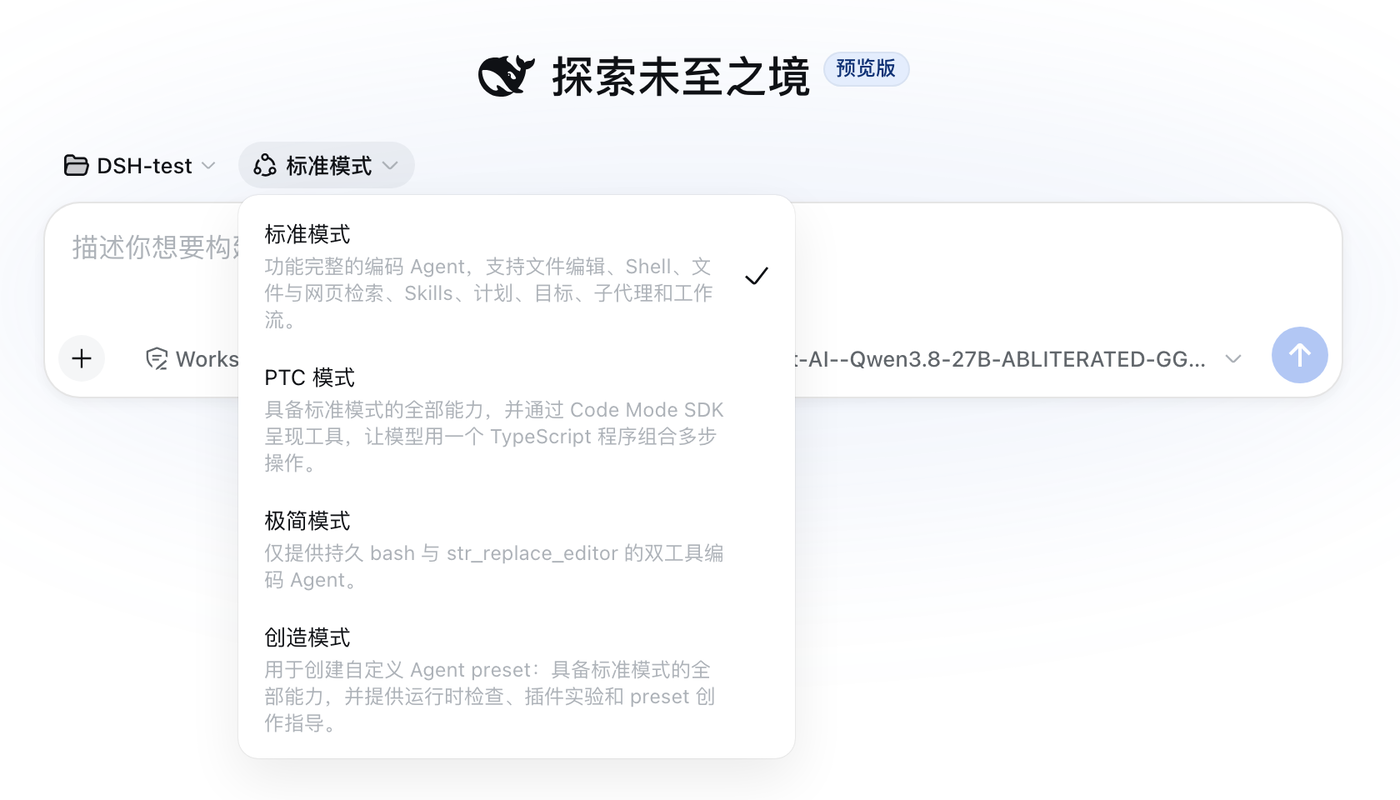
Now let’s look at preset. Attached are four. The correspondence between the Chinese name of the interface and the directory ID is as follows:
| Interface name | Directory id | Number of assembled rows | Differences from the standard model |
|---|---|---|---|
| Standard mode | standard | 252 | Benchmarks: File Editing, Shell, Search, Skills, Planning, Goals, Sub-agents, Workflow |
| PTC mode | code | 263 | Standard remains verbatim, with only one additional line of tools showing the configuration |
| Minimalist mode | minimal | 88 | Only the persistent shell and str_replace_editor are retained |
| Create patterns | cordis | 263 | On top of Standard, self-reflection tools, creative skills, and dedicated personas are added |
※ The number of rows is the actual agent.cordis.yml of each preset, taken from the four directories under the official repository apps/cli/config/agent-presets/.
PTC mode changes the tool presentation from native to code: The model only sees run_code tool, plus an automatically generated SDK prompt, then uses a TypeScript program to combine multiple operations, turning what should have been a five-round trip sequence into one. It requires the host to provide codeRuntime; if not, it fails to be named during mounting. Creative mode adds a set of tools that can read and write the runtime it runs—**The official file header explicitly states that it uses JavaScript written by the model to evaluate the live runtime, and the session on this preset should be treated as shell access. **
There is also a product-level lock: **Only blank sessions that have not yet produced any content can switch presets. **If you switch toolsets mid-conversation, the new assembly will leave a tool call in the logs that cannot be executed, so this lock is directly rejected by the gateway at the transport layer.
**// The entry determines how the process starts, while the preset determines what the model sees. **
🔗 ▍ Use LocalBrain to take over model calls
In the unboxing state, DSH’s default agent model points to deepseek-official, and the model is deepseek-v4-flash—meaning if you don’t change the configuration, requests go through DeepSeek’s own pay-as-you-go billing portal. **The framework is free and open source, the model can be replaced, but the default traffic first passes through its own door. **
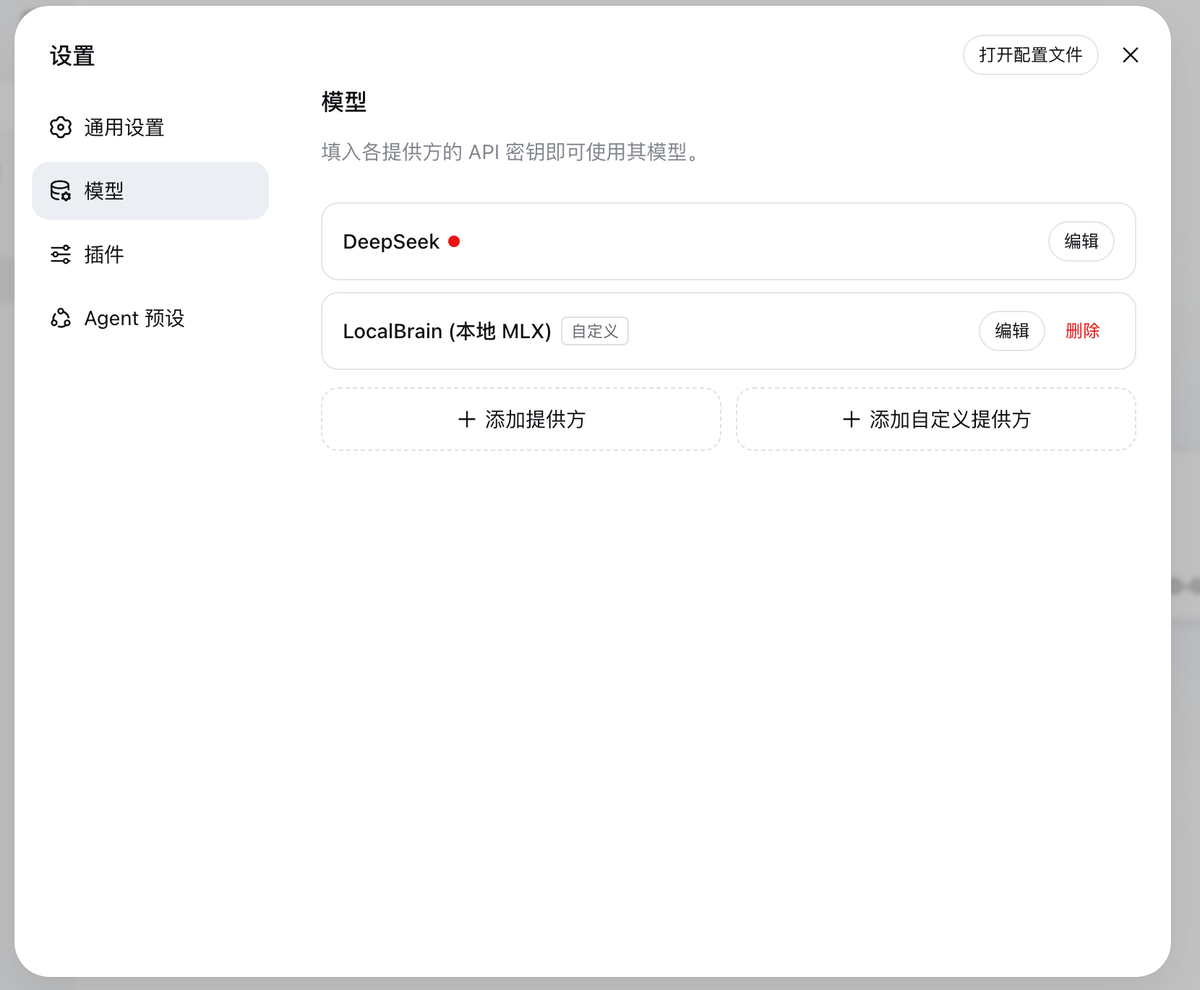
To move this door to the local machine, the landing point is two documents, each managing half and half with rules that are not interchangeable.
The first is settings.yaml, which changes the model routing. LocalBrain writes in a passage like this (credentials already desensitized):
llm-pi-ai:
  providers:
    localbrain:
      displayName: LocalBrain (本地 MLX)
      api: openai-completions
      baseURL: http://127.0.0.1:11434/v1
      headers:
        Authorization: <占位凭据>
      compat:
        supportsDeveloperRole: false
        maxTokensField: max_tokens
      defaultInput: [text, image]
      models:
        - id: /绝对路径/到/你的模型目录
          name: Qwen3.8-27B-...-GGUF
          input: [text, image]
          contextWindow: 81920
agent-default-model:
  provider: localbrain
  model: /绝对路径/到/你的模型目录
There are four parts in this configuration that were patched after many pitfalls; missing even one will cause the port to fail when actually called up:
| Field | What happens if I don’t write it? |
|---|---|
| compat.supportsDeveloperRole: false | The system prompt is sent by the developer role, but many local gateways directly reject it, manifesting as “only the inference model failed.” |
| compat.maxTokensField: max_tokens | The output limit is max_completion_tokens, and only the max_tokens server rejects every request |
| input / defaultInput contains image | Images were rejected before being sent, and models that were not supported were named |
| contextWindow | Using the adapter’s default 1,000,000, the pressure-sensitive plugin estimates it as one million, so long conversations might not fit the entire model in the entire sentence |
※ Image modality is a statement about the endpoint, not a check: writing multiple images also comes at a cost—images enter persistence history first, are rejected by the provider, and must start a new session to finish.
There are two more points that are easy to overlook. Local services without a real key still need to place a placeholder credential; otherwise, the request will fail with MISSING_CREDENTIAL; The model’s id will be passed as the model string in the protocol to the endpoint, so here you can directly enter the absolute path of the local model directory.
The second is cordis.patch.yml, which changes the plugin tree itself—six local MCPs are attached here. The official warning is not to overwrite existing patches, as there may be irrelevant user configurations inside; LocalBrain handles this by wrapping the parts it writes into a pair of comments:
# >>> LocalBrain managed block — 由 LocalBrain「一键写入」维护,请勿手工编辑块内内容
- insert:
    - id: 'localbrain-whisper'
      name: '@deepseek-ai/dsh-mcp-client'
      config:
        serverName: 'localbrain-whisper'
        transport: stdio
        command: '/…/LocalBrain/runtime/mlx-env/bin/python3'
        args: ['-m', 'localbrain_mcps.whisper']
        toolCallTimeoutMs: 600000
    # …tts / image / video / webminer / docfactory 同构
# <<< LocalBrain managed block
**The paired tag addresses the official warning: it only rewrites its own section, keeping the user configuration outside the block as is. **
There are also two details in this section that cannot be omitted. toolCallTimeoutMs must be explicitly increased: The default for MCP tool calls is only 60,000 milliseconds, while local voice, image, and video tasks often run out of time; here it says 600,000. Additionally, each service instance must have the name [A-Za-z0-9_-]{1,32}, because the final tool name the model sees is “mcp double underline service name double underline tool name.”
No need to restart after modification: settings.yaml will be monitored and hot-updated, and when writing back, a sibling lock file will be created. The lock acquisition time is 2 seconds. Even if a lock file looks old, it cannot be deleted casually — File age does not prove the writing process is dead.
📊 ▍ After connecting, what exactly does the model see?
Completing the configuration does not mean the connection is connected. The following numbers are taken from the logs of four real sessions on this machine (dsh 0.1.1-rc.2, all six LocalBrain MCPs online). The standard and minimalist columns are measured in actual tests, while the other two columns are estimated based on the same configuration.
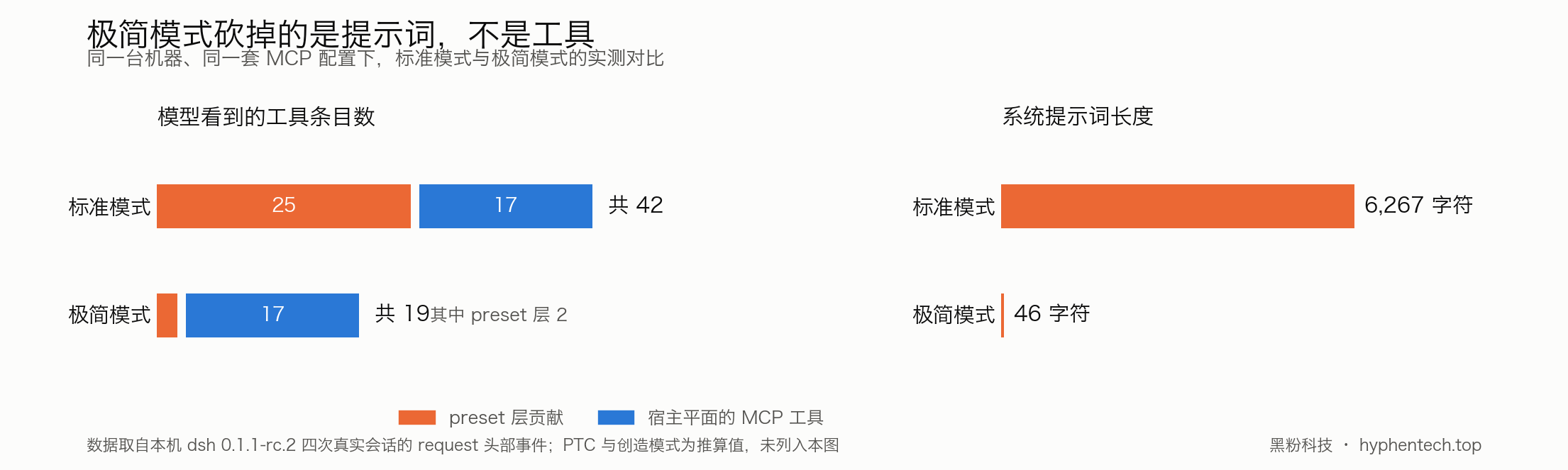
| Project | Standard mode | PTC mode | Minimalist mode | Create patterns |
|---|---|---|---|---|
| Number of tool entries in the protocol | 42 | 1 | 19 | 49 |
| The preset layer contributes | 25 | 25 | 2 | 32 |
| Among them is LocalBrain’s MCP tool | 17 | 17 | 17 | 17 |
| System prompt length | 6267 to 6355 characters | Longer and more SDK chapters | 46 characters | About 7,600 characters |
※ Six MCP services actually published 17 tools. Standard and minimalist are taken from the request/header events in session logs; PTC and Creation are calculated using the same configuration, no actual run.
There are two parts of this table that are easiest to read backwards.
**First: Minimalist mode doesn’t cut your tools down to just two. **What it cuts is only the preset layer; The MCP client hangs on the cordis.patch.yml of the host plane, so all 17 tools are missing in Minimalist mode—42 minimized to 19 instead of 2. In actual tests, it actually used it—a session labeled minimal still managed 1 bash, 2 web searches, and 4 web crawls, all from MCP. What it really cut was the prompt: 6267 characters versus 46 characters.
**Second: The PTC pattern doesn’t delete 41 tools, but moves them from the protocol’s tool array into the SDK section of the system prompt. **Not a single tool is lacking; the program still manages to access all visible tools, including those 17 MCPs; What is saved is the number of round-trips, not the volume of a single request.
There are two other things that only run to be encountered. First, the host plane’s built-in web_search and MCP search tools with the same name are listed simultaneously, with the model showing a 7:1 bias toward the latter; **Duplicate tools with similar names do not cause errors; they only let the model pick one each time. **Second, stability: a step must be retried five times in a row before it ends, with the failure code being TRANSPORT, meaning the connection is disconnected; The default retry strategy is used—up to 5 attempts, evading 500 to 10,000 milliseconds, jitter 0.1, and only responding to air responses, rate limiting, server errors, timeouts, and transmission failures—five types of retrys.
**When connecting a local model, your failure is usually not due to configuration errors, but because the connection is unstable. **
✅ ▍ How to choose, and the boundaries of this plan
Choose one of four from two groups, each managing half and half according to the table below:
| What you want to do | Choose which entrance | Choose which preset |
|---|---|---|
| When writing daily code, you need to see the process | dsh web | Standard mode |
| Insert cron or CI, and use exit codes to determine success or failure | dsh --profile headless | Standard or minimalist |
| I want to cut the expense of over 6,000 characters in prompt words | Arbitrary | Minimalist mode |
| Multi-step operation to create a single model round trip | Arbitrary | PTC mode, provided the TypeScript runtime is present |
| Let it read and write the runtime it is in | dsh web | Create patterns when shell privileges are treated |
※ The entry and preset do not affect each other and can be freely combined.
The boundaries must be clearly defined. This framework is still a developer preview; the official uppercase warning causes compatibility violations; The above tests come from a single machine and single run; PTC and Creation columns did not run in actual tests; This also does not verify the actual performance of DeepSeek’s official cloud model, so the success of local links cannot be used to endorse it.
**▍ ✅ How to share it with a local area network **
Assume your dsh installation directory is:
~/dsh
If installed in another directory, just modify the command beginning:
cd ~/dsh
The entire process is divided into three steps:
-
Removes the activation restriction on
dshon0.0.0.0. -
Fixed
crypto.randomUUIDerrors in LAN HTTP environments. -
Launch LAN services.
The first two steps only need to be executed once during the initial configuration; from then on, only the third step is performed for daily use.
Step 1: Remove the 0.0.0.0 LAN listening restriction
Although the newly installed dsh underlying server supports listening for 0.0.0.0, the startup program will proactively reject it and display:
error: --host 0.0.0.0 is intentionally not supported yet for safety
Execute the following whole line to remove the restriction:
cd ~/dsh && DSH_STARTUP_FILE="./node_modules/@deepseek-ai/dsh-web-app/lib/startup.js" && cp -n "$DSH_STARTUP_FILE" "$DSH_STARTUP_FILE.bak" && sed -i '' '/if (options\.host === "0\.0\.0\.0") program\.error/d' "$DSH_STARTUP_FILE" && echo "已解除 dsh 的 0.0.0.0 访问限制"
Normally, it will display:
已解除 dsh 的 0.0.0.0 访问限制
This command will:
-
Find the startup file for
dsh web. -
Back up the original file to
startup.js.bak. -
Remove the security check that prohibits
-host 0.0.0.0. -
Leave port checks and other configurations unchanged.
This command can be executed repeatedly. If the restriction has been removed, executing it again will not be modified.
Step 2: Fix crypto.randomUUID is not a function
When accessing via a Mac native address:
http://127.0.0.1:3080/
Browsers typically provide:
crypto.randomUUID()
However, when LAN devices access via a regular HTTP address:
http://192.168.x.x:3080/
Some browsers treat pages as insecure contexts and therefore do not provide crypto.randomUUID().
This can lead to the following issues when sending messages, calling interfaces, or opening file selectors:
crypto.randomUUID is not a function
Execute the following entire line to add compatibility processing to the browser client code:
cd ~/dsh && node -e 'const fs=require("fs"),p=require("path");const root="node_modules/@deepseek-ai",from="crypto.randomUUID()",replacement="(typeof crypto.randomUUID === \"function\" ? crypto.randomUUID.call(crypto) : \"10000000-1000-4000-8000-100000000000\".replace(/[018]/g, c => (c ^ crypto.getRandomValues(new Uint8Array(1)).at(0) & 15 >> c / 4).toString(16)))";let files=0,calls=0;function walk(dir){for(const entry of fs.readdirSync(dir,{withFileTypes:true})){const file=p.join(dir,entry.name);if(entry.isDirectory())walk(file);else if(entry.isFile()&&entry.name==="client.js"){const source=fs.readFileSync(file,"utf8");const count=source.split(from).length-1;if(count){const backup=file+".before-lan-uuid-fix";if(!fs.existsSync(backup))fs.copyFileSync(file,backup);fs.writeFileSync(file,source.split(from).join(replacement));files++;calls+=count;}}}}walk(root);console.log("局域网 UUID 修复完成:"+files+" 个客户端文件,共 "+calls+" 处");'
Normally, it will display something like:
局域网 UUID 修复完成:3 个客户端文件,共 4 处
The exact numbers may vary slightly depending on the dsh version.
This command will:
-
Only search for the
client.jsfile on the browser side. -
Find the
crypto.randomUUID()call among them. -
Create a
.before-lan-uuid-fixbackup before modification. -
If the browser supports
crypto.randomUUID(), the native implementation will continue to be used. -
If the browser does not support it, use
crypto.getRandomValues()to generate a compatible UUID. -
Do not modify regular server-side JavaScript files.
This command can also be executed repeatedly.
If it shows when executed again:
局域网 UUID 修复完成:0 个客户端文件,共 0 处
This means the corresponding code has been fixed, not a failure.
Step 3: Launch the dsh LAN service
From now on, every time you use it, execute the following whole line:
cd ~/dsh && LAN_IP=$(ifconfig | awk '/^[a-z0-9]+:/{i=$1; sub(":","",i)} $1=="inet" && $2 !~ /^(127\.|169\.254\.|198\.18\.)/ && i !~ /^(lo|utun|awdl|llw|bridge)/ {print $2; exit}') && test -n "$LAN_IP" && echo "局域网访问地址:http://$LAN_IP:3080/" && ./node_modules/.bin/dsh web --host 0.0.0.0 --port 3080 --trusted-host "$LAN_IP" --no-open
This command will automatically:
-
Enter
~/dsh. -
Find the current true LAN IP of your Mac.
-
Skip the
127.0.0.1local address. -
Skip
169.254.x.xInvalid automatic address assignment. -
Skip the common
198.18.x.xvirtual address in Clash. -
Skip virtual network interfaces such as
utunandawdl. -
Add the real LAN IP to
-trusted-host. -
Listen for all network interfaces on port
3080. -
Displays URLs that other devices should visit.
Normally, you’ll see something like:
局域网访问地址:http://192.168.3.61:3080/
dsh web: http://127.0.0.1:3080
192.168.3.61 is an example. Please refer to the actual output from your terminal.
If dsh displays it separately:
LAN: http://198.18.0.1:3080
This is because Clash, Surge, or other proxy software created virtual network cards. Do not use 198.18.0.1; instead, use the real address actively output before the command, for example:
http://192.168.3.61:3080/
Step 4: Access on other devices
Make sure your phone, tablet, or other computer and Mac are connected to the same router.
Open the address displayed by the terminal in a browser on another device, for example:
http://192.168.3.61:3080/
Do not use:
http://127.0.0.1:3080/
Because the 127.0.0.1 on other devices points to the other device itself, not the Mac running dsh.
Also, do not use:
http://198.18.0.1:3080/
Because it is usually the virtual address of proxy software.
What to do if your browser displays old pages or old errors?
After the first modification, the browser may still cache the old version of JavaScript.
You can add a version parameter after the URL:
http://192.168.3.61:3080/?v=1
If you encounter cache issues again in the future, increase the number:
http://192.168.3.61:3080/?v=2
Computer browsers can force a refresh:
macOS:Command + Shift + R
Windows/Linux:Ctrl + Shift + R
You can close the original tab in your mobile browser and then reopen the address with version parameters.
How to stop dsh
Return to the terminal running dsh and press:
Control + C
After the shutdown, other devices within the LAN will no longer be able to access it.
Handling after updating or reinstalling
The above modifications are located at:
~/dsh/node_modules/
If executed later:
npm install
Or upgrade or reinstall dsh, and modifications may be overridden.
Re-execute after upgrading:
第一步:解除 0.0.0.0 限制
第二步:修复 crypto.randomUUID
第三步:启动局域网服务
If you haven’t upgraded regularly, you only need to follow the third step.
Summary of daily usage process
First configuration:
执行第一步
执行第二步
执行第三步
Starting later:
只执行第三步
Service Stoppage:
在运行窗口按 Control + C
After upgrading or reinstalling:
重新执行第一步和第二步
然后执行第三步
⚠️ Safety reminders
dsh web Not an ordinary static webpage; it may have the ability to read files, call tools, and execute native commands.
Please be sure to comply with:
-
Only used on trusted home or office local area networks.
-
Do not open public Wi-Fi at airports, hotels, cafes, etc.
-
Do not map the
3080port to the public network on the router. -
Do not directly expose via public IP connections, DDNS, or internal network penetration.
-
Do not start up if there are untrusted devices in the local area network.
-
After use, press
Control + Cto stop the service.
Finally, back to that word. **The reason ‘harness’ is translated as ‘outer shell’ loses its meaning is that the shell implies there’s a core inside that can’t be moved; whereas dsh even spreads the agent loop into a regular entry in the configuration tree. **The moment you switch a model to a real machine, what you replace isn’t just one of its options, but the default decision it makes for you.
$ 框架与文档
https://github.com/deepseek-ai/deepseek-harness

方寸智匣下载页(一键写入模型路由与六个本地 MCP):
https://github.com/HackerChi-Hub/localbrain-releases/releases
🧰 Tools I build
I maintain all of these tools myself. Preview builds are clearly labeled; the release pages are the source of truth for downloads, updates and known limits.
Info: HyphenBox Status: Official releases
A radar for free LLM APIs: availability is re-tested continuously, one local interface for all of them, and keys stay on your machine
Info: LocalBrain Status: Official releases
A multimodal MCP toolbox for local models: TTS, Whisper and video generation in one place
Info: ScreenLex Status: Official releases
Learn new words while you watch shows. Free, for Mac and Windows
Info: HyphenScreen Status: Official releases
Screen recording and smart editing in one: a DaVinci-style timeline, automatic redaction and a check of the finished video before export. Free
Quote: HyphenTech Make AI your superpower Local deployment · Free resources · Self-made software https://hyphentech.top
Late nights and burned API credits went in,a cup of tea comes back out — only if you feel like it.
Scan with WeChatPress and hold to save the image, then open it from your album in WeChat Scan

Comments
Loading comments…