

Current public release
Versions, changes and supported installers all come from the same public release records.
LocalBrain
A local AI toolbox for transcription, speech, images, video, and MCP tools. Features vary by platform version.
View public downloads and updates ↗Info: Machine translation This post was machine-translated from the Chinese original. Wording may be rough in places — the Chinese version is authoritative.
Complete dynamic samples
Open or download the full video
Open or download the full video
Open or download the full video
Summary From 50 steps to 6 steps, from official capabilities to actual Mac operation November 1, 2026 · Let AI be your superpower
In a cup of coffee, rockets rise from the Milky Way; On a rainy night on the old street, blue whales swim across the rooftops; When the cardboard box on the table is opened, inside is a deep sea.


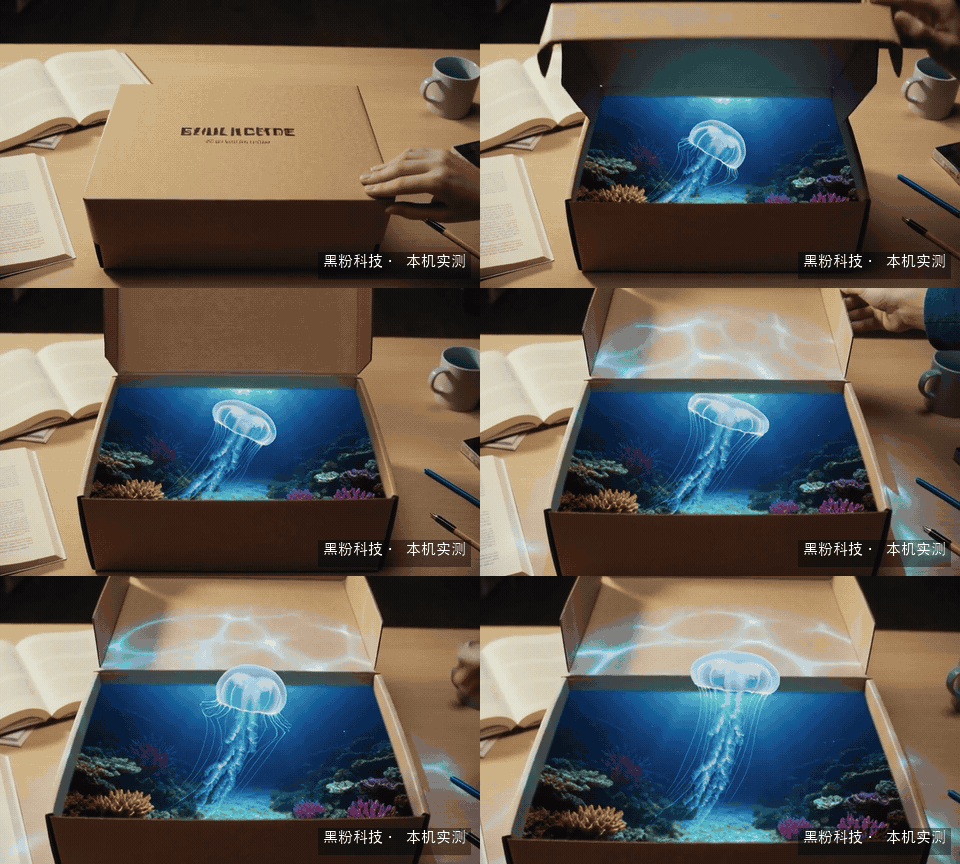
These three segments were generated by my M5 Pro, 64GB unified memory Mac. I used the Pika H3 Flex and called it through my own LocalBrain call. Each subject is generated only once, the original video has sound, resolution is 640×384, and each segment is about 5.17 seconds. The actual wait time is about three minutes.
The dynamic preview in the text has no sound; the official longer clips only preview the first 6 consecutive seconds; The original video preserves the full duration and sound. To judge whether the sound effect fits the visuals, you need to play the original MP4, not rely on GIFs.
The most noteworthy thing is the gap between “three minutes” and the official “seven seconds”: why do the same model family have such different numbers? Reducing 50 steps to 6—what exactly changed? More practically, what features can you actually use when you open LocalBrain now?
First, my judgment: Flex’s most attractive feature is that it connects generation, reference control, and subsequent modifications into a single creative process; This Mac test showed that the audio generation of short videos can now be integrated into my local tools. If you want to shoot ads, feature films, or want 4K finished products, you still need to clearly understand the actual support for each stage.
With this Pika update, whose shoulder is it taking over?

Pika will release the H3 Flex on October 29, 2026. Here, “H3” has a clear origin: it is a family of models trained after training on the MiniMax H3 base, not a rebranded Pika 2.5, nor a completely new base from scratch. The base provides basic audio and video generation capabilities, which Pika further refines around aesthetics, speed, and reference control.
You can think of this as a mature kitchen setup: the original chef already knows how to cook many dishes, then someone re-selects the recipe, trains the pace of the meal, and adjusts the flavor based on diner preferences. The kitchen foundation remains, but the experience delivered to the customer changes in the end. Corresponding to Flex, the base, post-training, inference services, and local software each take on different roles.
It aims to solve very specific problems. Generating the first video is usually just the beginning of creation. Next time, you might keep the character and change the scene; the next time, you have to stay still and swap clothes, and finally do high-resolution and mix. If every time the model is changed, you have to pull out a whole new footage, the creator will quickly spend time waiting and reworking.
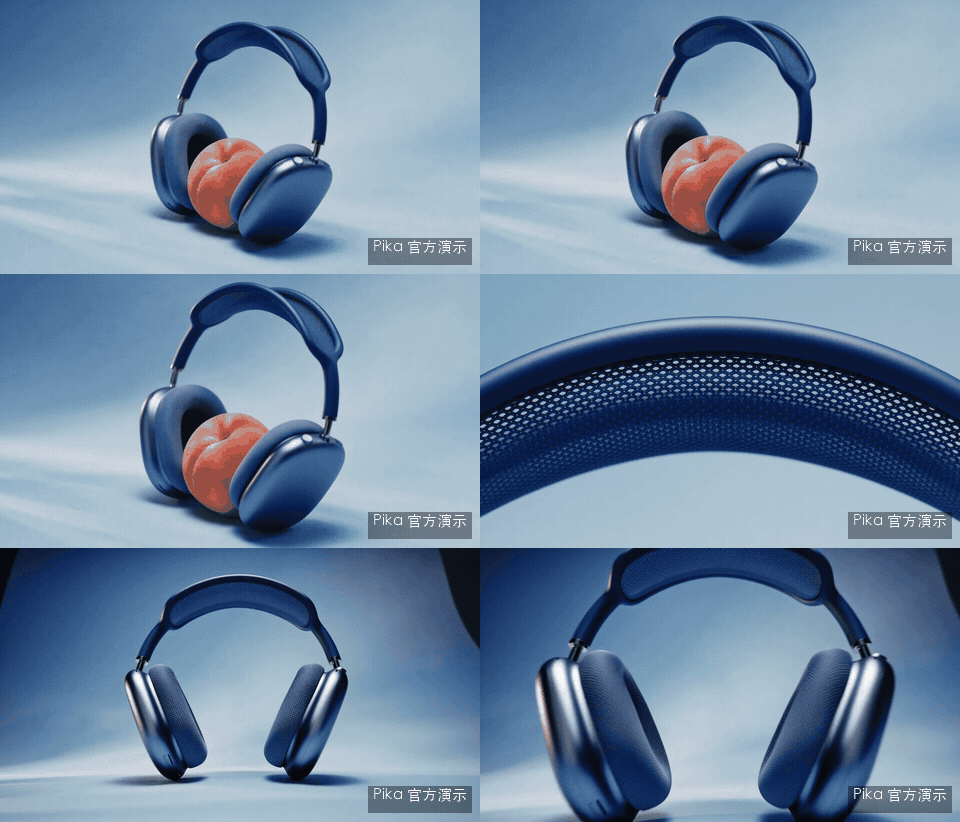

Headset ads and the world of knitted games are two directions proposed by Pika: the former organizes shots around a product, while the latter uses characters, scenes, and other references to build a continuous visual world. They come from the official source, not generated by my Mac. Looking at these examples, the question can be taken a step further from “is it beautiful?” — can the relationship between product appearance, character identity, and camera be maintained?
As of November 1, the release notes list the API as the already provided experience entry point, and state that Pika will be able to create products on November 2. If readers cannot find this model on the general web creation interface for now, please check the entry point and the opening date first. Check Pika’s release notes.
What does 50 steps become 6 steps?
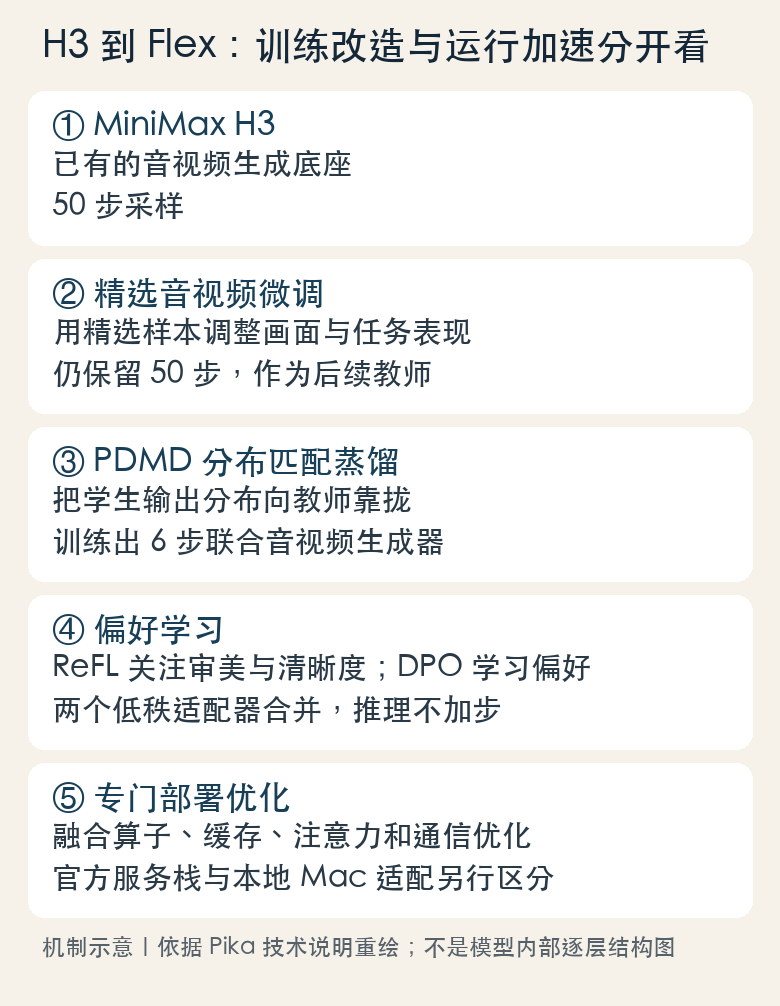
Let’s first clarify the “step.” The audio-video generation model repeatedly corrects the image and sound in compressed representations, gradually moving from noise to finished images—a process often called denoising. It’s like drawing a sketch: first determine the whole, then repeatedly adjust the shape and details. But here, each “step” is a model calculation, not a frame of video or a pixel.
So, 6 steps can generate 124 frames, which is completely uncontradictory. Frame count refers to how many consecutive frames are present in the final image; Step count refers to how many major updates the model has made to create this set of images and sounds. Mixing these two numbers together can mistakenly think 6 steps can only draw 6 images.
Choose the right teachers first, then teach students who can avoid detours
Pika’s publicly available method is divided into three training stages. First, internally selected audio and video are used for supervised fine-tuning to make the original 50-step model better meet the target in style and task performance; Next, distribution matching distillation is performed to reduce the generation process to 6 steps; Finally, reward and preference learning is used to improve the fast model’s output.
“Distillation” can be understood as learning to cook: a master chef might taste and revise many rounds as they go, while apprentices are specially trained to achieve results close to the target after fewer rounds. The teacher and students in the model are not people guiding frame by frame on site; Training should make the results produced by students with fewer steps be distributed closer to the teacher’s. It learns a shorter generation path, so you can’t change the standard H3 setting from 50 to 6 and declare Flex.
The technical page states that ordinary distributed matching distillation has training instability issues in their experiments, so PDMD, also known as projection distribution matching distillation, is adopted. This name doesn’t need to be memorized; readers should grasp: the six-step effect is trained, backed by specialized models and sampling schedules. Missing a few calculations is just the result; how to calculate less without obvious damage to the finished film is the real technical work.
After doing it quickly, you also need to teach it what results are worth keeping
After distillation, Pika continues training using two preference methods. ReFL focuses more on aesthetics and clarity, while DPO uses paired preference to learn instruction compliance, realism, and visual quality. It can be understood as the chef tasting the finished dish after the food is served faster: not just asking “Is the dish ready?” but also “Does it look good? Is it done according to the menu?”
These two parts are trained and merged in the form of a low-rank adapter, i.e., LoRA. LoRA is like adding a set of smaller tuning parts to an existing large machine, so you don’t have to rebuild the entire machine; But runtime still requires a base, and downloading the adapter itself doesn’t create a complete generator out of thin air. The official statement says that the merged preference adapter does not increase the number of generation steps.
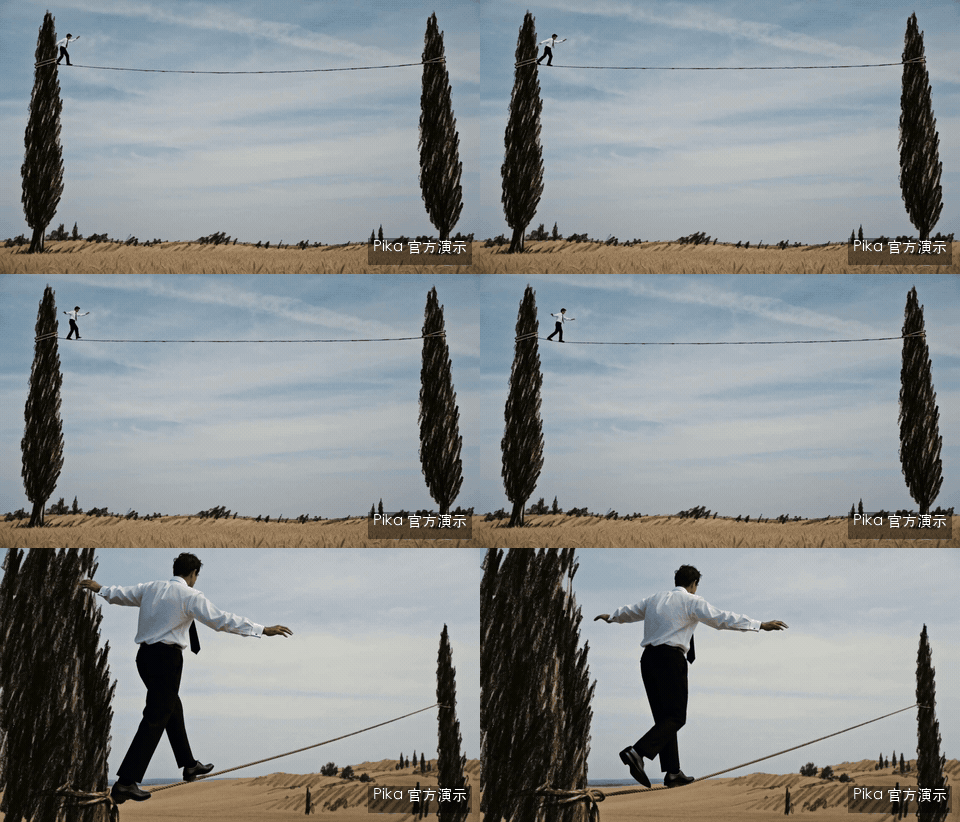

Charcoal wire and motion graphics are suitable for observing the “style + action” capabilities of fast models. When viewing the full original, you can check whether lines jump and change during movement, whether text shapes are continuous, and if the subject remains consistent after camera switches. A beautiful single frame cannot answer these questions.
50÷6 is about 8.33, meaning the main denoising rounds have been reduced to about one-eighth of the original; It cannot be directly treated as 8.33x acceleration across all devices. Text encoding, model loading, video decoding, audio decoding, and encapsulation all take time. On the server, there are operator fusion, caching, and attention optimization—these are yet another layer of work.
The advantage is “the ability to keep editing”: how do references, camera work, and sound work together?
Clearly explaining the specific roles is more useful than writing long prompts


For this dance example, we first looked at the original reference footage, then the new characters in the record store. The focus of the task was to borrow movement, rhythm, and shots, while other images determined the characters and scenes. Here, “multimodality” means the model can receive different types of inputs such as images, videos, and sounds, and use them in the same generation.
It’s like a division of labor list before a school art performance: look at the costume in this picture, dance moves in this video, and the stage background according to another image. Clearly state the division of labor, so people won’t copy the dance demonstrators’ clothes, faces, and backgrounds as well. The same principle applies to writing multiple reference prompts: each reference determines what, and it must be clearly explained.
The official reference workflow can receive up to 9 images, 3 videos, and 3 standalone audio clips. The total file limit remains 12, and you can’t directly add 15 to the three categories. You also need at least images or videos; A single audio video is usually 2~15 seconds, and the total video and standalone audio have each time limit. This constraint affects how you prepare your materials, so you can’t just remember a single “12 references.”
The camera can have its own requirements, and the story should have its own sequence



Frog ping pong and balcony camera movements are suitable for camera movement; Cake skits are better for showing how events develop across multiple shots. Camera movement requires camera positioning and movement relationships, while multi-shot storytelling must also consider event sequence, character continuity, dialogue, and action. They are interconnected, yet present different challenges.
If you want to make short ads for products in the store, the more feasible requirements are “first film the packaging, then get close to the material, and finally specify the usage scenario,” and arrange actions and timing for each shot. If you only write “high-end, blockbuster, cinematic feel,” the model receives aesthetic wishes and lacks specific shooting arrangements. The official sample clips are generally very detailed, which explains why copying only “same cinematic feel” often falls far short.
Why is it more practical to just alter clothes and keep movements?


This set of official original footage and editing results requires preserving character performances and shots, adjusting specific parts like clothing. It corresponds to the most common type of rework in creation: most are usable, but you only want to change one thing. Keeping existing results is often easier than creating a completely different beautiful video.
Of course, during recording, you should place two clips next to each other to check the sequence of actions, faces, hands, props, and background changes. If you only show a single edited video, it’s hard for viewers to tell what it actually saves. The official reference editing directions are listed. This time, I tested text and first frame on my Mac sample and haven’t tested local multi-reference editing.
Sound isn’t enough; it also needs to be easier for you to edit

Flex generates synchronized stereo. Pika hosting service also allows extraction of five types of audio tracks: dialogue, soundtrack, special effects, foley, and ambient sound. The difference can be understood when watching TV at home: when the entire sound is mixed together, if you want to lower the background music, the voice often becomes quieter as well; After track splitting, you can tune only the music, leaving only dialogue and live effects.
The most easily confused here are “synchronized audio” and “independent tracks.” This issue of the original Mac audio saves mixed stereo tracks that can be played or edited directly; The five types of independent tracks are official managed extensions, and currently the LocalBrain local access is not open. Using a sound MP4 cannot be directly considered as having already obtained five separate mixable materials.
Why did the gentleman become a grass film and then do 4K?
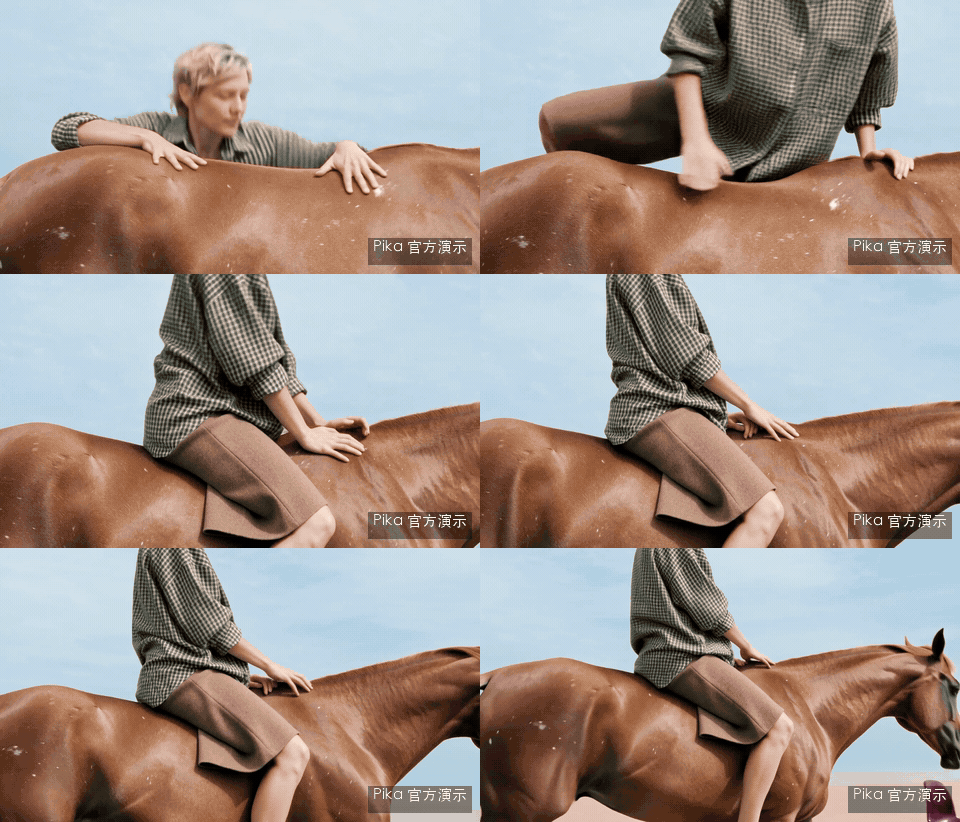
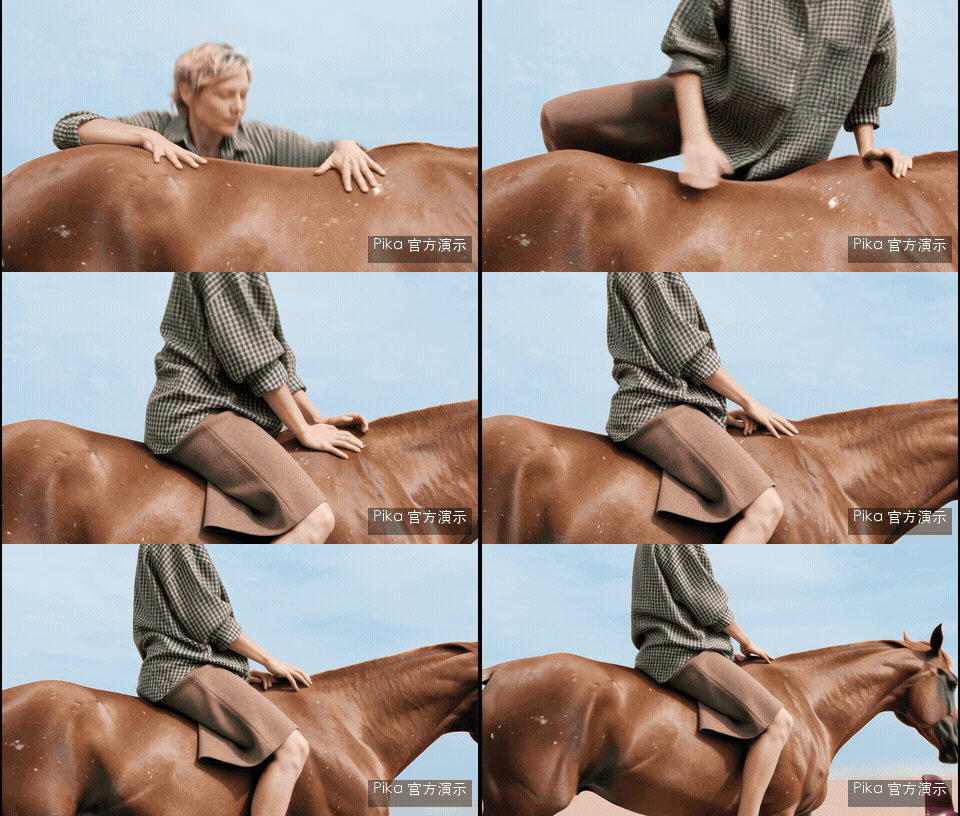
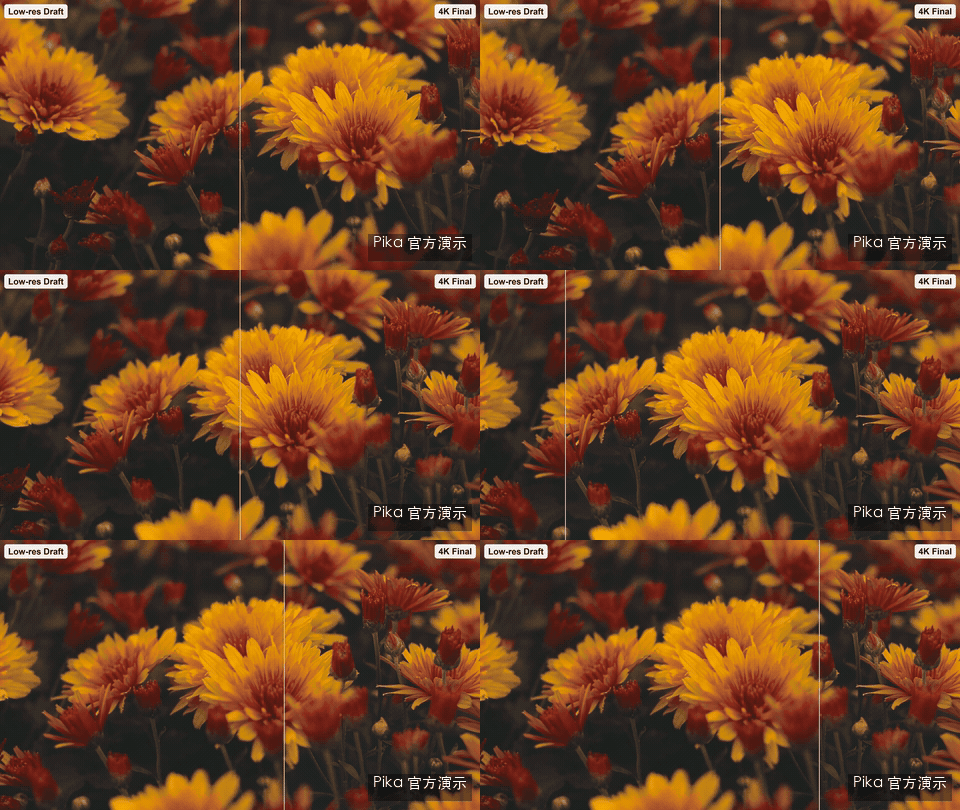
For official horse examples, you first generate 768p files, then do 2K or 4K retouching. This process is like reviewing renderings before renovation: the direction isn’t decided yet, so you don’t have to go to the highest specs every time you change your idea. Choose the characters, actions, and shots, then invest resources in high resolution, making rework costs easier to control.
“Upsampling” means upgrading existing videos to higher resolution and adding details. The output file has more pixels, but it still relies on the original generation composition and movement. When the subject is misaligned or camera relationships are unreasonable, simply increasing pixels won’t automatically solve the problem. It’s better to compare hair, fabric, edges, and motion details, not just look at the player as 4K.
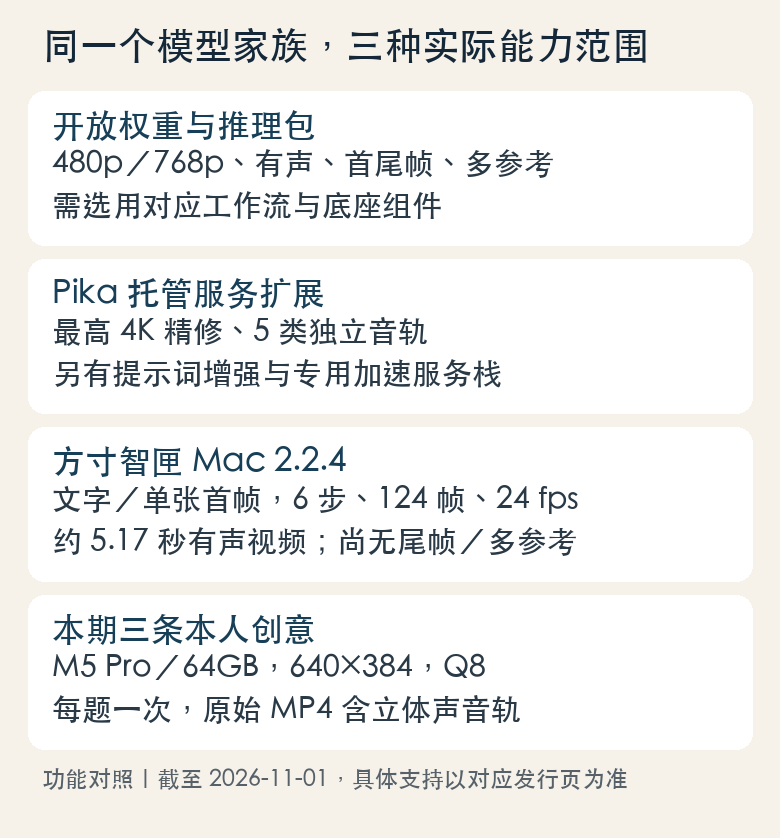
The open pack natively supports 480p and 768p; Official 1080p, 2K, 4K refined, standalone audio tracks, prompt enhancement, and dedicated acceleration service stacks are managed extensions. **After downloading open weights, these cloud bundles do not automatically enter the local version. ** LocalBrain’s 640×384 video in this issue also maintains its original size and has not been enlarged to HD.
Back to a 64GB Mac: Three Minutes, What Did It Actually Achieve?
| Theme | Total time consumed | Stage peak |
|---|---|---|
| Coffee Galaxy rocket | 191.22 seconds | 25.724 GiB |
| Rainy night streets and giant whales | 186.75 seconds | 25.717 GiB |
| The deep sea inside a cardboard box | 190.17 seconds | 25.730 GiB |
2026-10-31, M5 Pro/64GB, Q8, 6 steps, 640×384, 124 FPS, 24fps; Once per question. Peak values are observed during the engine phase, not total system usage.
The average time for three videos is about 189.38 seconds, and each generated video is about 5.17 seconds. It’s not yet the experience of typing and generating images in real time, but you can already have a clear idea locally and wait a few minutes to see the result with sound. For those making creative demos, opening cutscenes, or sci-fi inserts, this rhythm has practical use.
Coffee Galaxy Rocket: One main body, a continuous action

The goal of this line is very focused: starting with a cup of coffee, a miniature rocket flies upward, with the camera slowly following. The first, middle, and last frames show the ascent process, making it suitable for explaining how to write “subject, action, shot, and sound” within the same task. The difficulty is not cramming in more objects, but maintaining a continuous relationship between the cup, rocket, liquid surface, and camera.
A white ceramic cup rests on a wooden table, and inside the coffee is a miniature glowing galaxy. A silver rocket the size of a finger rises vertically from the liquid surface, steam swirling, and droplets fall back into the cup. The camera slowly follows upward, warm morning light, single continuous shot, no text. Sounds include the soft clinking of cups and dishes, engine noise, and bubbling noise.
Rainy Night Streets and the Giant Whale: The atmosphere is captivating, and you have to pay attention to the details

Rainy night, water reflections, and a translucent giant whale above the roof—these are surreal subjects inserted into real-life scenes. The original film preserves the scene of the giant whale sweeping through the street, and also includes store signs that aren’t required by the prompts. Using them as atmospheric shots is interesting; If you want to create brand visuals, you have to check the sign and text frame by frame, and can’t just use randomly generated words as the store name.
The fictional warm-lit old street, on a rainy night, water reflects the light on the ground. A giant translucent blue whale swims across the rooftop, its belly illuminating the raindrops, and its tail fin sweeping past nearby. The camera moves slowly down the middle of the street, a single continuous shot, without words. The sounds are the sound of rain, the deep cries of whales, and the sound of water.
The Deep Sea in a Cardboard: Creativity Achieved, Constraints Didn’t Fully Listen
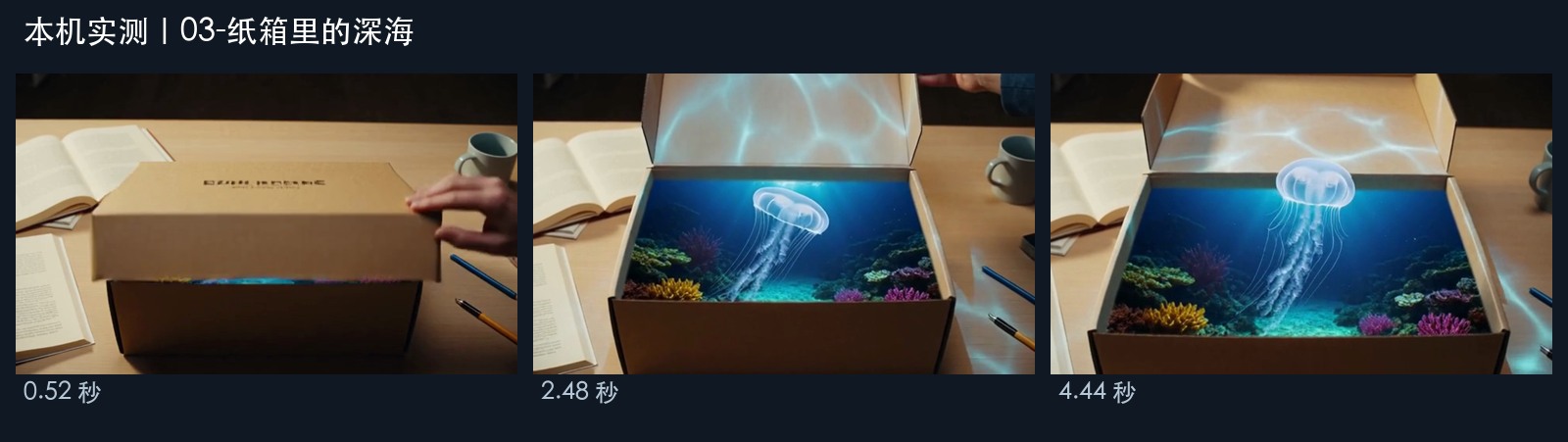
When the box was opened, the deep sea and jellyfish appeared, creating a contrast I imagined in the image. But the box also had words on the box that didn’t require the prompt. My request clearly said no text, but it still added a bit of “packaging design” to itself. This result is worth preserving: the same sample not only shows the idea realized but also reminds us to check specific constraints.

On the table is a kraft cardboard box; the handle outside the frame opens the lid, revealing the deep sea inside. The glowing little jellyfish slowly floats out, blue ripples illuminating the box and tabletop. The camera slowly advances in a single continuous shot without text. The sounds include cardboard friction, seawater bubbles, and ethereal bass.
The prompts here are organized according to the original Chinese meaning for this issue, and the complete original record is still preserved in the recording materials. All three have completed video and track decoding, non-mute checks, and the first, middle, and last frames have been verified; This round did not include a systematic human listening scoring system, so please listen to the original audio for the degree of sound.
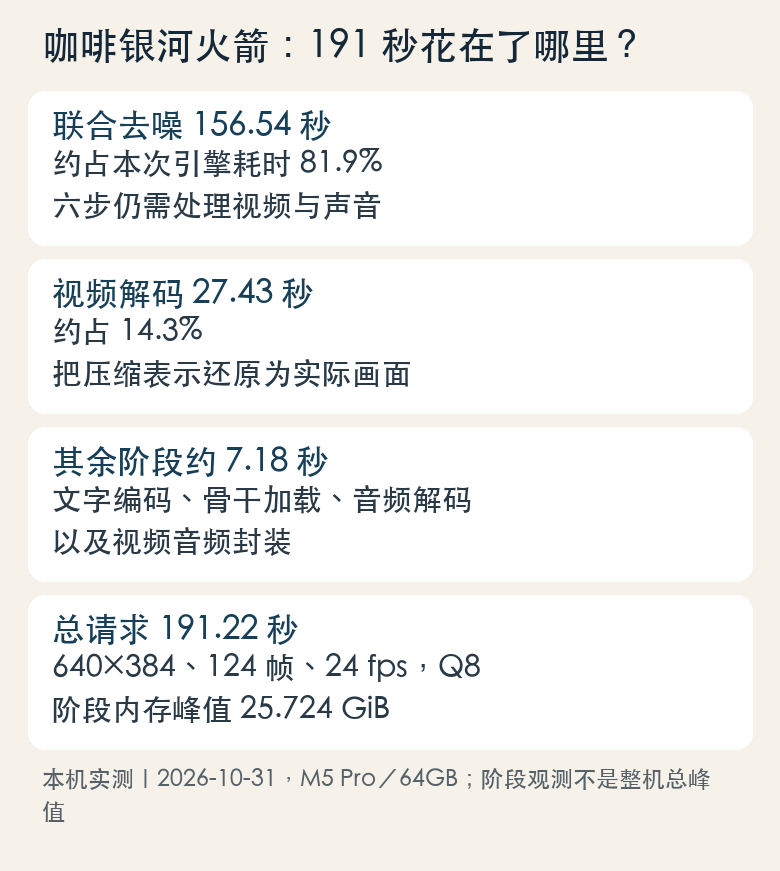
For coffee, combined denoising takes about 156.54 seconds, and video decoding takes about 27.43 seconds. In other words, most of the time is still spent on generating and restoring the image. The six steps save the main generation rounds, not turning the entire audio and video assembly line into six instant-completed small actions.
The official “15 seconds 768p minimum 7 seconds” measured server DiT, which is the core computation mainly responsible for denoising; This issue’s 191.22 seconds measured the total time spent on actual Mac requests. On the technical page, another 5-second 768p acceleration experiment used 8 B300 slides, reducing full inference from 3.409 seconds to 2.129 seconds. Hardware, resolution, duration, and timing range all differ; these numbers should be read separately and not pretended to be a fair speed leaderboard.
LocalBrain now supports Pika. How do you use it?
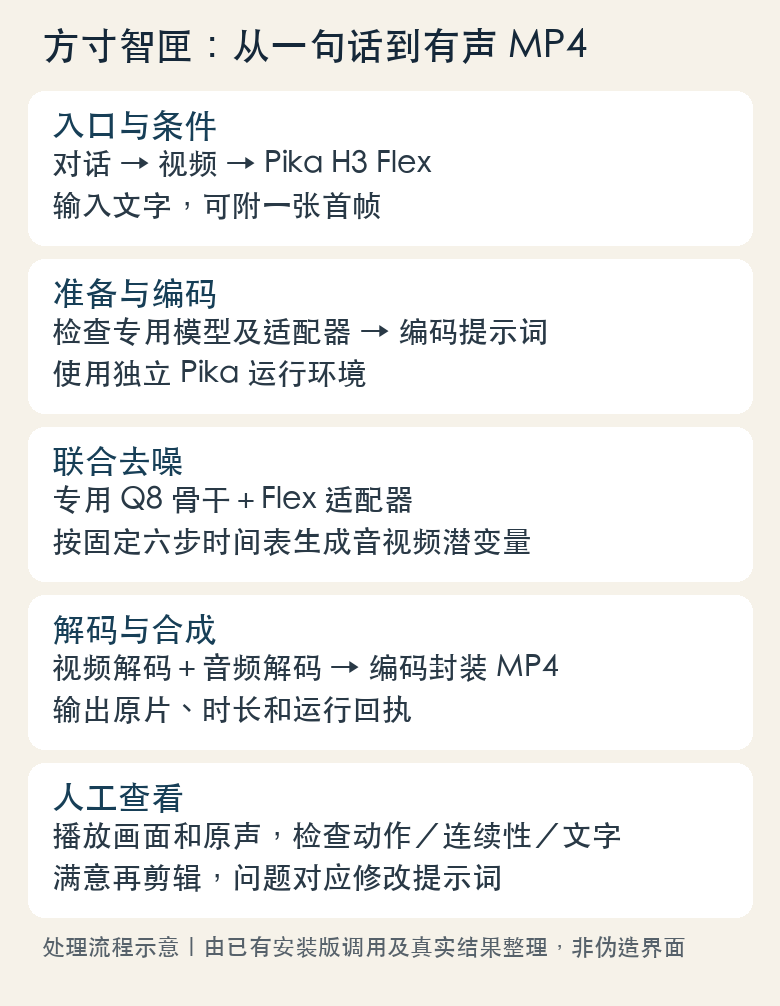
I did this integration to integrate the model, dedicated adapter, and invocation process into everyday software. Now, LocalBrainMac 2.2.4 has publicly integrated Pika H3 Flex. These three original ideas were actually called during the candidate phase of the October 31 installation of version 2.2.4; The official version was later repackaged and released, and this article did not run the official package again to claim a new achievement.
| Preparation items | Current requirements |
|---|---|
| System and chip | Apple Silicon, macOS 26 or newer systems |
| Memory | 64GB of unified memory is recommended; This issue uses M5 Pro/64GB |
| Disk | The managed original file is about 78.2GB, and about 23GB is needed for Q8 converter and adapter; Buffer and film space should also be reserved |
| Input is now open | Pure text, or text + single first frame |
| Fixed generation specifications | 6 steps, 124 frames, 24fps, about 5.17 seconds |
| Constraints on the painting space | The width and height should be at least 256, a multiple of 32, and the pixel area should not exceed 512×512; in this period, 640×384 is used |
| Not open yet | Final frames, multiple references, auto-resume, cloud-based 4K refinement, and five types of independent audio tracks |
| Other platforms | Windows/Linux 2.2.4 has already been released independently; the current Pika runtime is not applicable |
When downloading, please visit the Mac 2.2.4 exclusive release page. Don’t just look at the “latest release”: now Windows/Linux have separate tags, so mixing downloads can easily lead to the wrong platform. Download and update: LocalBrainMac 2.2.4.
After installation, first find “Pika H3 Flex · Mac Six-Step Audio Video” dedicated entry on the Discover page to complete the model preparation. It will retain the original weights, Q8 converters, and a dedicated adapter, and you can reuse the complete files and downloaded clips you already have. The package does not include the over 100 GB model file, and installing the application does not mean the model is ready.
Once the model is ready, enter the Video Feature in the conversation and select Pika H3 Flex. First, enter a prompt for a subject, an action, or a camera movement, and attach a first frame if needed. Currently, the set is fixed at 6 steps and 124 frames; do not copy the official parameters for 15-second, multi-reference, or final frame examples.



This set of basic records supplements the other half: text samples, samples based on the first frame, and previously installed MCP landscape generation. These are used to check input methods and actual call chains, respectively. Their resolution and time consumption differ from the three creative clips above and cannot be combined into a single “unified score.” The first frame serves as a setup for the artist to set up the first composition; subsequent actions still rely on prompts and models to unfold.
After generation, open the output MP4 and view the footage and original audio together: whether the subject is distorted, if the actions are connected, if camera movements match prompts, and if strange words are mixed in. The model has a dedicated standalone environment and will check its actual supported capabilities before calling; If a large model task currently occupies memory, wait until it finishes before scheduling video generation. Don’t interrupt the working instance just to test a single shot.
The installation package has been signed but not yet notarized by Apple; If the system prompts for source or security check, please refer to the actual description on the release page. The flowchart in this article comes from existing interfaces and call records, not fake client screenshots. Previously, native window capture failed, so the background was not successfully run and expanded to the full interface. Clicking Screen Recording has been accepted. For specific installation and support scope, see Mac 2.2.4 Acceptance Instructions.
Where exactly does the cost of local openness lie?
Pika discloses the adapter and inference code, which must be paired with the specified base. The official original sample is designed according to NVIDIA’s single SIM request, with acceptance environments including the H100 80GB; CPU uninstallation reduces GPU phase usage but incurs memory and handling costs. CPU uninstallation can be understood as insufficient kitchen countertops, placing some ingredients on the nearby shelves: the countertop is free, and retaking and retrieving is not free.
Some uninstall configurations in the official documentation show GPU phase about 29~32GiB, while host observations show about 94GiB including page cache. Therefore, “VRAM can be reduced to 32GB” and “a 32GB computer can run” are not the same statement. My Mac results come from another Apple chip MLX/Q8 adaptation, which cannot be directly copied from NVIDIA commands or directly applied to all Mac models.
The 8 in Q8 refers to the main weights represented by about 8 bits. You can think of it as reducing decimal places for a large number of measurements: file and storage load may decrease, errors may be introduced as a result, and the actual operation depends on which parts are converted and how they run. This time, we used a dedicated backbone and adapter combination for the receiver, not just changing the suffix of any H3 file.
| Path | The cost you actually pay | Suitable for use |
|---|---|---|
| LocalBrain | Already on Mac, about 100 GB of files with extra cache, power, and generation wait; This time, 3 non-paid generation APIs are used | Local short film experiments, private materials, and repeatedly creating creative demos |
| Pika Online API | Technical page pricing: text/image generation starts at $0.01 per output second, multiple references start at $0.03 per output second; Detailed pricing for refinement, track splitting, etc. will be determined separately | A more complete workflow for reference control and hosting capabilities is needed |
| Deploy the official package yourself | GPU, host memory, complete components, dependency maintenance and debugging time | Developers who already have the necessary hardware and deployment capabilities |
Based on the above “starting price,” here’s just one example: 15-second basic generation starts at $0.15, and multi-reference starts at $0.45. Actual cost depends on the specific interface, billing, and additional processing; you can’t use the base starting price to cover 4K and all features. This article does not create a new paid generation request for comparison.
Code examples using Apache 2.0 do not mean model weights are completely unrestricted: weights follow the MiniMax H3 Community License, and base components have their own licenses. When making commercial products or redistributing, you should read the terms separately. Official demo videos do not automatically become resellable materials just because inference code is open-sourced.
What do I think about it more, and what will I do with it first?
If the goal is to make a stable long animation episode today, I wouldn’t judge based solely on these three 5-second samples. Cross-scene character consistency, dialogue, lip movements, long stories, and repeated modifications all require more systematic tasks. Currently, LocalBrain’s local entry point is clearly limited to text and short video generation for single first frames.
But if you want to find a scene for an abstract concept, add a surreal cutscene to a video, or first look at the creative direction of the product ad, that’s already a practical starting point. For Coffee Galaxy, Rainy Night Whale, Cardboard Deep Sea, first write the main subject and continuous actions, then look at the model’s specific accomplishments. Keep what can be used, and note down odd and disobedient parts as usual.
Pika’s approach this time is also worth observing: first train H3 post-generation into a generator with fewer steps and better suited for creative control, then add high-resolution, track-splitting, and acceleration services, and open up adapters for developers to create their own tools. This layering gives local tools a chance to absorb some capabilities, while leaving commercial services to refinement and the complete production chain. Whether it can attract creators long-term depends on modification success rate, product stability, and total cost of the entire process.
Quote: My judgment The value of the Pika H3 Flex lies in the six-step audio generation through dedicated post-training, with continued creative control based on references and modifications. For my 64GB Mac, the actual results so far are: using LocalBrain, I got a 640×384 5-second creative video with original sound in about three minutes. I started with this already successful small task, then decided whether I needed cloud multi-reference, track splitting, and 4K.
Official information and download link
- Pika Release Notes and Official Video
- Pika Technical Method, Review Conditions, and Price Description
- Open Authority, Workflow, and License
- Official Inference Code and Installation Instructions
- Official hardware and uninstall requirements
- Prompts and Reference Division of Labor Guide
- Download and Update: LocalBrainMac 2.2.4
- LocalBrainMac 2.2.4 Actual Acceptance Scope
Self-made software
Versions, changes and supported installers all come from the same public release records.
HyphenAssistant
Continue your computer’s DeepSeek Harness session from a phone browser. The service, computer and network must stay online; model costs follow your existing setup.
View public downloads and updates ↗HyphenBox
A free model API radar and local router, with ongoing availability checks and keys kept on your device.
View public downloads and updates ↗ScreenLex
Turn subtitles from your own films and shows into an English vocabulary library, entirely offline.
View public downloads and updates ↗HyphenScreen
Screen recording and editing with a Resolve-style timeline, automatic redaction and pre-export checks.
View public downloads and updates ↗Support HyphenTech
Late nights and burned API credits went in,a cup of tea comes back out — only if you feel like it.
Save the QR codeScan with WeChatPress and hold to save the image, then open it from your album in WeChat Scan

WeChat tips · Any amount welcome






Comments
Loading comments…