
Turn your Mac into a private AI box
Not another chat web page: local models, media, documents and agent tools gathered into one Mac workbench.
提示 HyphenTech · LocalBrain 1.4.3 · 2026-09-28 · Also available in 简体中文 and 繁體中文 (switch below the title)
I did not build LocalBrain because local models now beat the cloud. On the same hard task, the top cloud models are usually still smarter and steadier. What wore me out was everything else: models in one folder, MLX in one terminal, GGUF needing another server, and transcription, voice-over, image, video and documents each running their own way.
So the goal has not changed: not a smarter brain, but a calmer master switch for local AI. This is version 1.4.3, a month after the 1.2.22 I last wrote about, and it adds three things: a fully visible task process, output and cache folders you can place anywhere and clean out completely, and three complete interface languages. Below is a walk through each page; every screenshot is the real 1.4.3 interface.
提示 LocalBrain is not meant to replace Codex, Claude Code or OpenCode. It gives them, and its own chat, a set of controllable models and tools that start on demand and stay on your machine as far as possible.
▍Home: this machine’s memory budget on one screen
The home screen answers three questions first: what this machine is, what is using memory right now, and what else you can start. Below is my M5 Pro (64 GB unified memory) running the Splash build of Qwen3.6-35B-A3B.
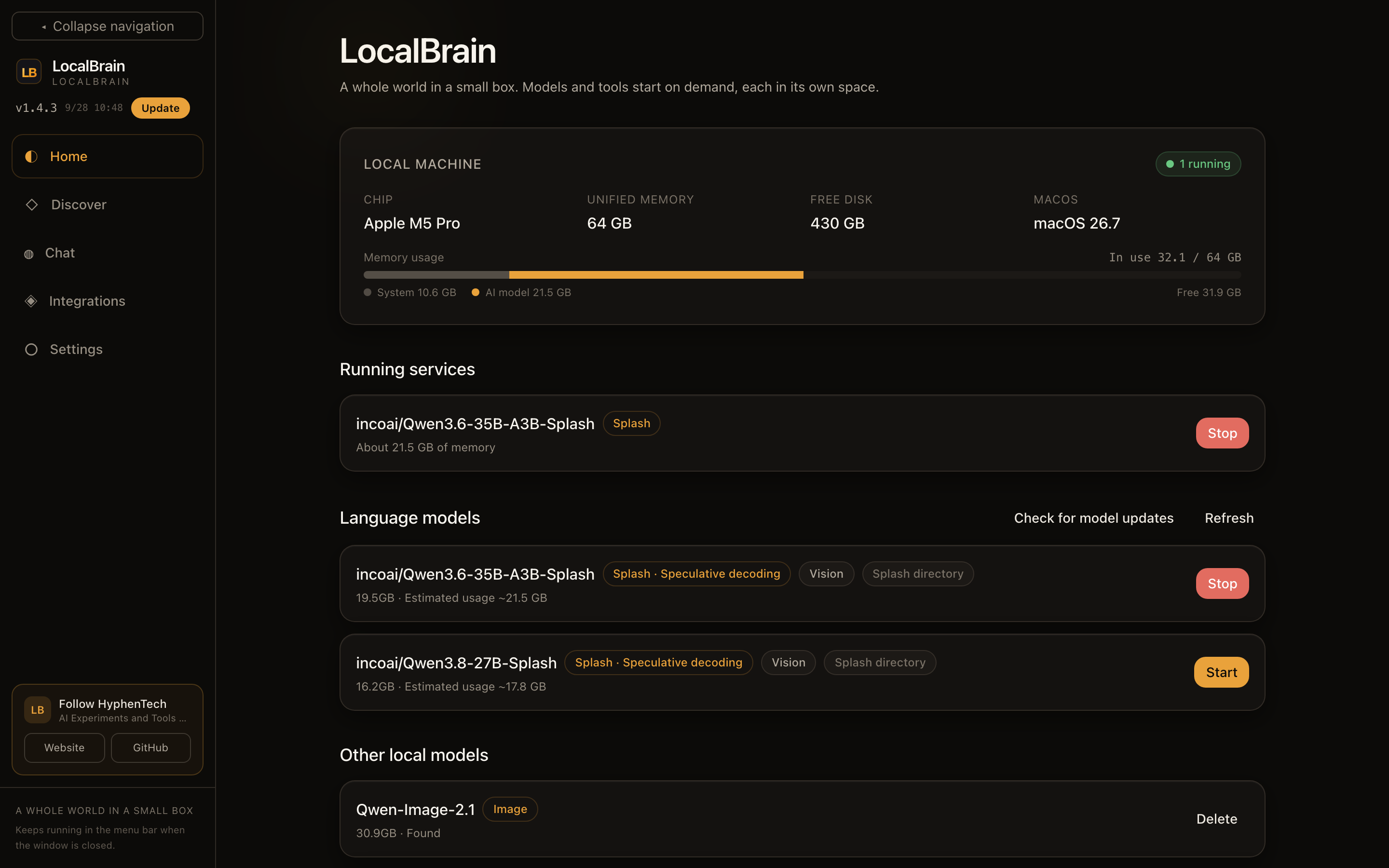
- A memory bar in two parts: how much the system uses, how much the AI models use and what is left, stated outright. The “estimated usage” on a model card comes from the model’s size; Splash is estimated at 1.1× its size.
- Arbitration before starting: the memory arbiter adds up the backends already running and the model about to start. If resources run short it refuses clearly, instead of letting the system swap itself to a standstill and failing afterwards.
- One switch for three engines: MLX, llama.cpp (GGUF) and Splash start and stop the same way. Splash brings its own draft model for speculative decoding, and models that can read images are marked.
- Media backends on demand: speech transcription, speech synthesis (with voice cloning), image generation, image editing, video generation and music generation each have a card, and are released automatically after idling or under memory pressure.
※ This is not a promise that more memory always means faster. Whether something can start, and how large, is decided by the numbers Home and Discover work out for this machine.
▍Discover: know whether it will run before you download
Large models weigh tens of gigabytes, and finding out after the download that one will not run is the most expensive way to experiment. Each Discover card moves that question up front.
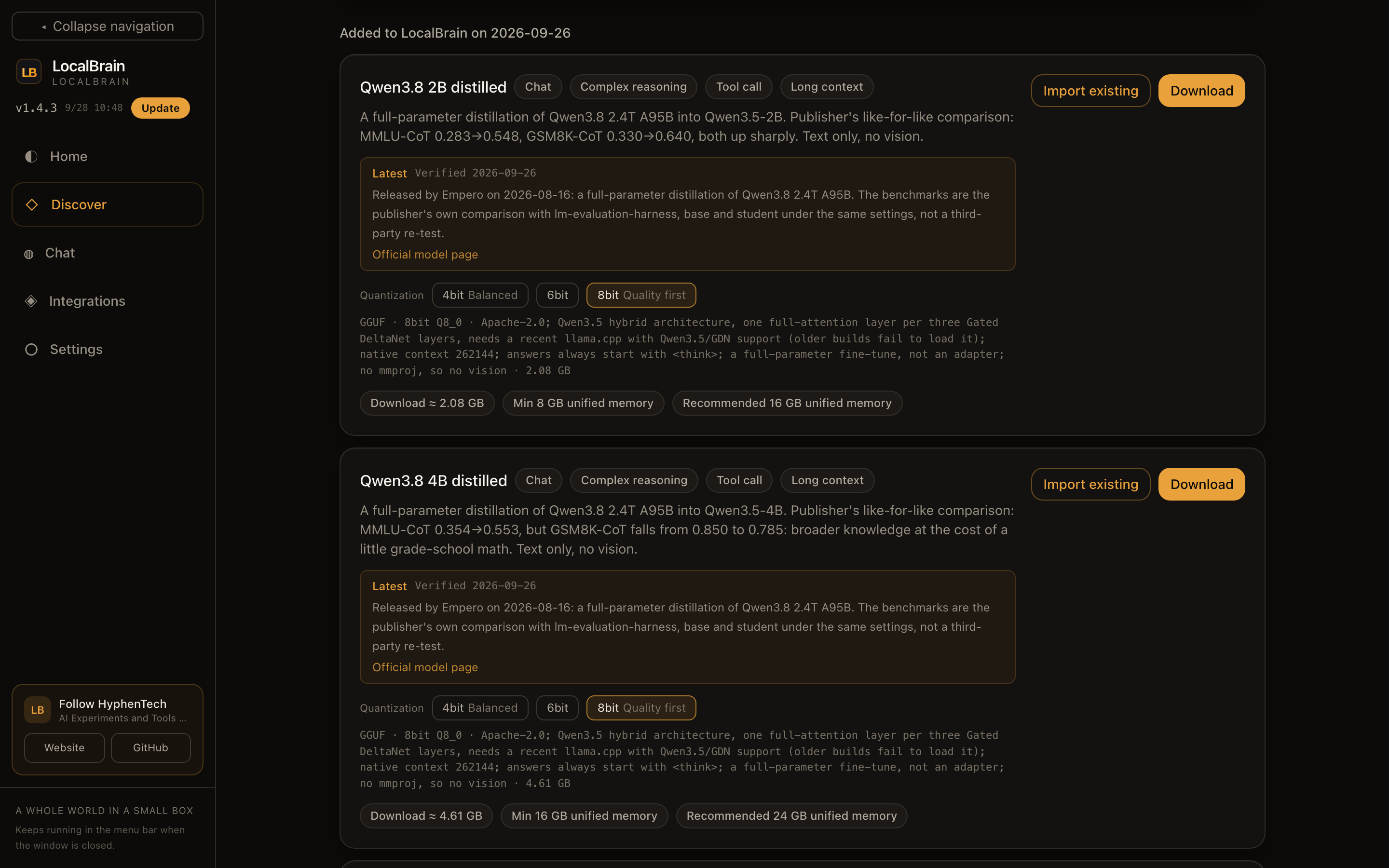
- More than 40 curated entries: language, vision, speech, image, video and music models, newest first. Each card lists ability tags, the publisher’s benchmark numbers and where they come from (in the screenshot, MMLU-CoT 0.283→0.548 for the distilled Qwen3.8 2B), and the size of each quantization.
- Memory worked out for this machine: the “minimum / recommended unified memory” is not copied from the model card; it is calculated from this machine’s memory and the model’s structure.
- Licenses before the download button: restrictions stricter than usual, such as no commercial use, are flagged up front with a link to the original text, not discovered after the download.
- Download source speed test: one click measures ModelScope, HF-Mirror and Hugging Face and picks the fastest at that moment; downloads are checked against SHA-256 at the end, so a file that merely has the right size but is damaged is never counted as a success.
- Existing models stay where they are: point at a model folder you already have and it is mounted, with the engine, category and context ability detected, without copying weights or touching the folder.
提示 Detected does not mean it will start. Format, architecture, vision projector files and the current runtime all affect compatibility; the app tries to give the concrete reason instead of dressing up “found it” as “it will definitely run”.
▍Chat: from answering a question to delivering a file
The built-in chat has streaming, attachments, stop, saved conversations and local tools. What I care about more: when you ask it to fix a web page or build a spreadsheet, does it actually deliver, and does the process hold up to inspection?
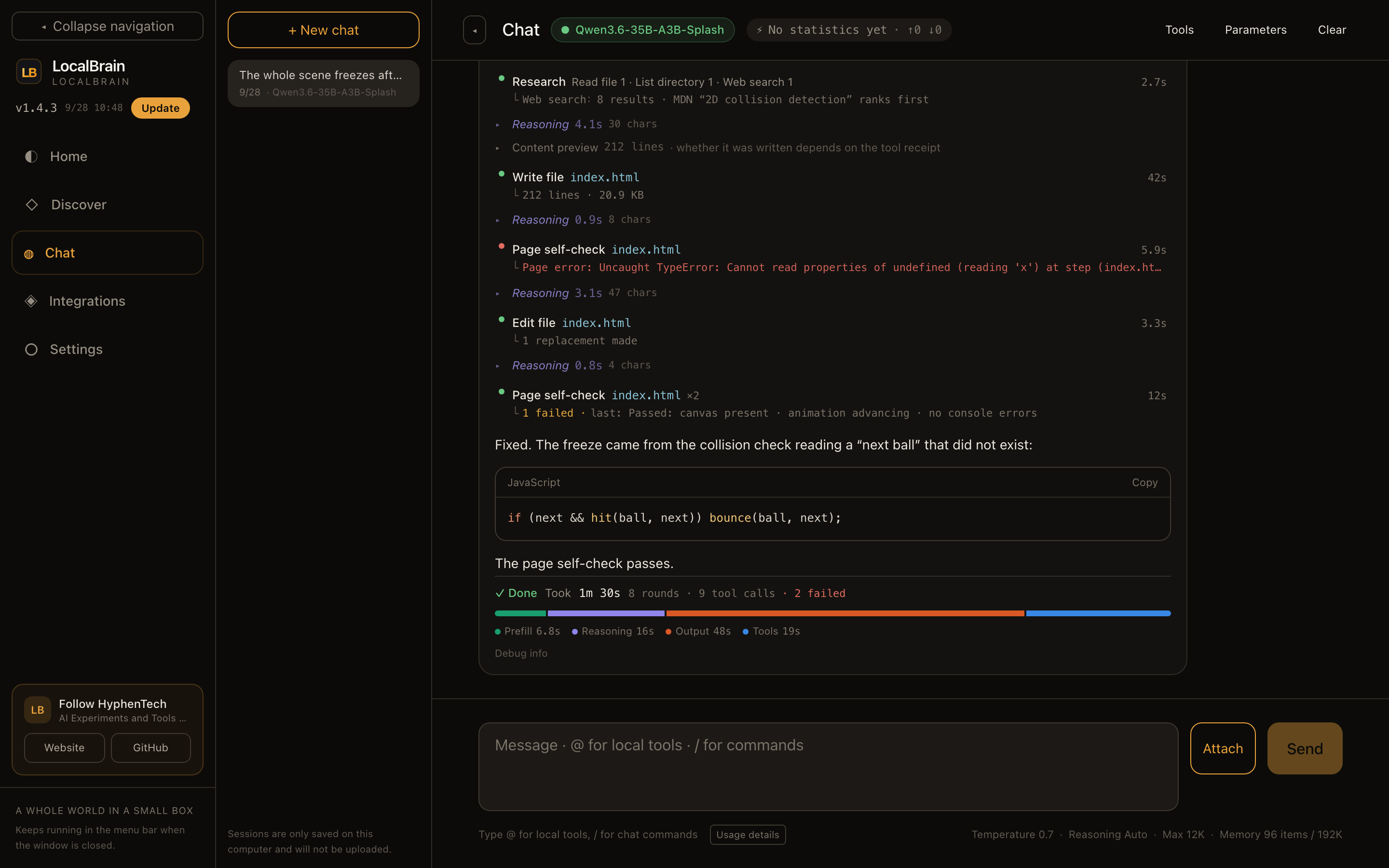
The conversation above is a demo, but every element on screen is the real 1.4.3 interface:
- Every step is shown: reading files, listing folders, web search, writing files, targeted edits and page self-checks each show their target and time; complex tasks start with a plan, and the plan card says it is “the model’s own record, not independent verification”.
- Failures stay visible: repeated calls to the same tool are grouped as “Page self-check ×2”, with “1 failed” right beside it. In the screenshot the model’s first self-check returned a page error; it changed a single line to add a null check, and only the next self-check passed.
- The self-check really runs: generated pages are checked in a headless browser for a canvas, advancing animation frames and console errors, instead of taking the model’s word that it checked.
- Where the time went: each task ends with total time, rounds, tool calls and failures, with the time split into prefill, reasoning, output and tools.
- Long tasks keep the interface responsive: 1.3.27 fixed the interface freezing on long, fast output by throttling the streaming refresh and the metrics.
Document tasks can also deliver DOCX, PPTX, XLSX or PDF directly. If no real file was produced, the zero-output gate refuses to report the task as done.
▍Storage & cleanup: the heart of 1.4
After a month of use my own machine had piled up plenty of things nobody could see: check screenshots, task checkpoints, logs, and images and voice-overs that early versions wrote into temporary folders. 1.4.0 puts all of it in Settings.
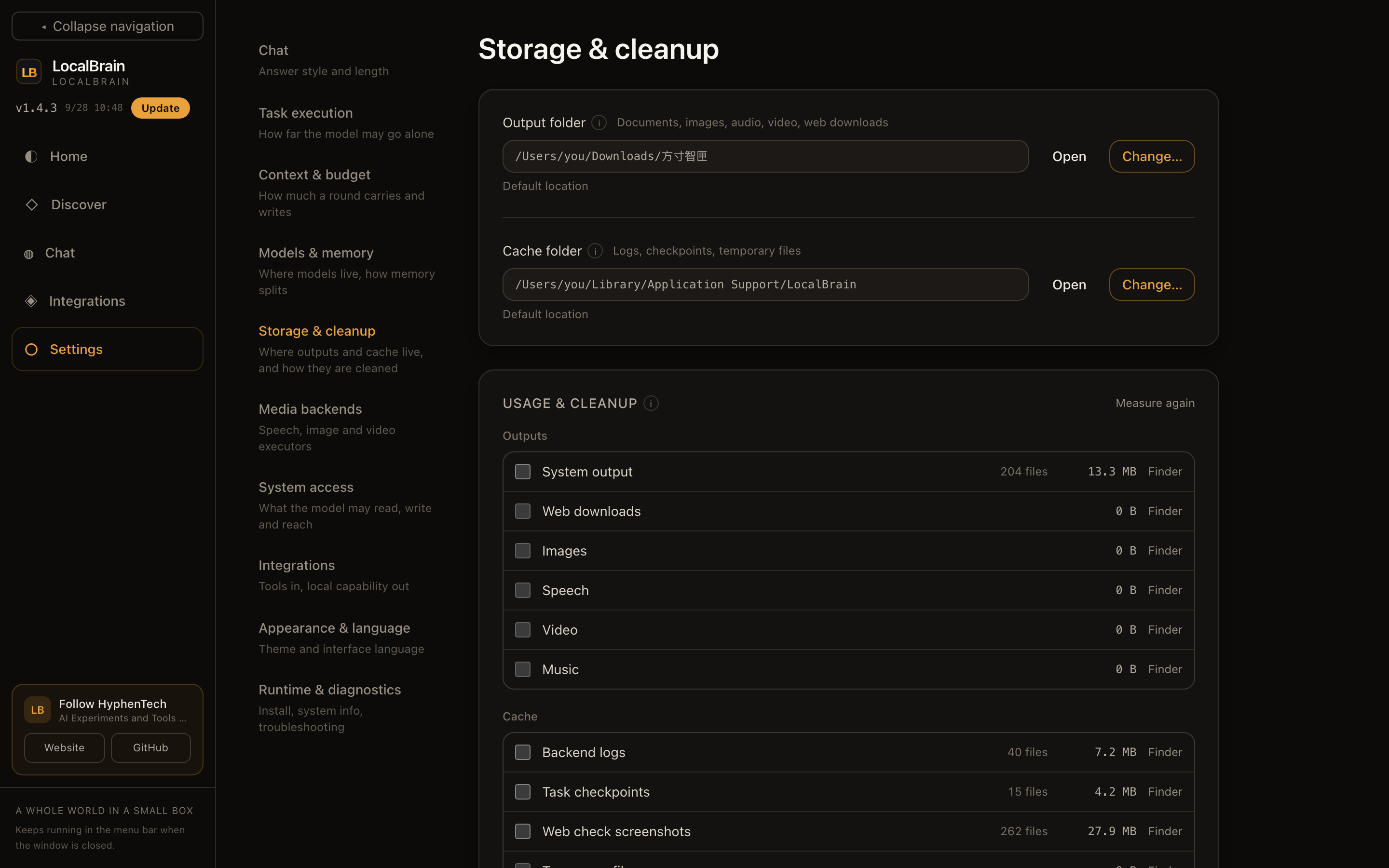
- Both folders can move: the output folder holds generated documents, images, speech, video, music and web downloads; the cache folder holds logs, task checkpoints, check screenshots and temporary files. Either can live on an external drive.
- Moving takes the files along: on the same drive they are moved directly; across drives they are copied and verified first, then the old copies go to the Trash.
- To the Trash by default: cleaning a category moves it to the Trash unless you choose permanent deletion; folders sent to the Trash carry the name of the folder they came from, so you can tell them apart at a glance.
- Automatic cleanup: total log size, checkpoint age and temporary file age each have a threshold, applied by the app on a background timer whether or not the window is open.
The numbers in the screenshot are measured on my machine: System output 13.3 MB in 204 files, web check screenshots 27.9 MB in 262 files. The first automatic cleanup after installing 1.4.0 moved 145 task checkpoints and 35 sets of old check screenshots to the Trash. I checked those 145 checkpoints one by one against the conversation list the app keeps: not one of them belonged to a conversation that still exists.
▍Integrations: hand local abilities to other agents
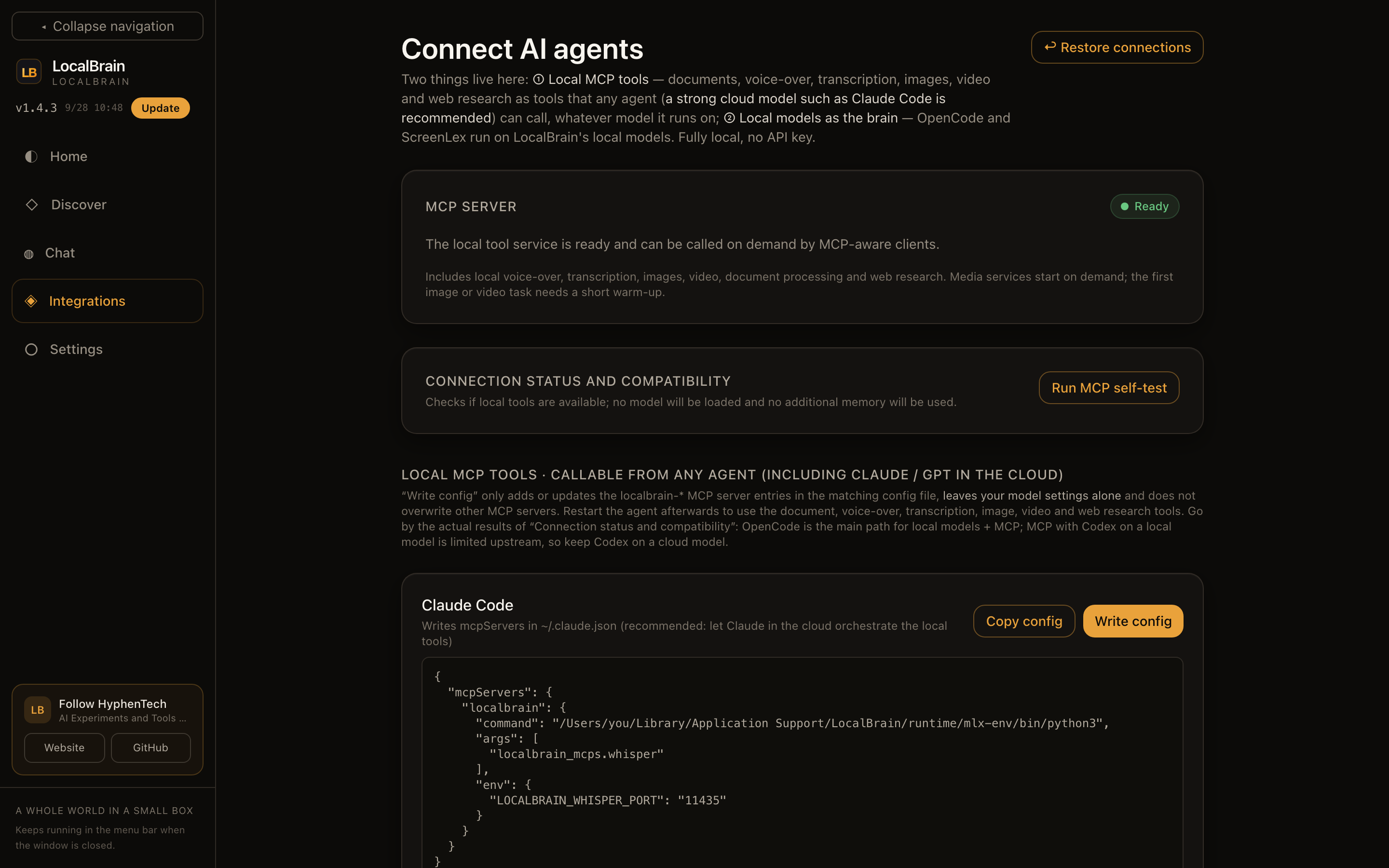
- Local MCP tools: document processing, speech transcription, speech synthesis, images, video and web research, written into the configuration of Claude Code, OpenCode, Codex or DeepSeek Harness with one click. Only the
localbrain-*entries are added or updated; your model settings and other MCP servers stay as they are, and one click restores the configuration from before. - Local models as the brain: OpenCode, ScreenLex and DeepSeek Harness can use local models directly through the OpenAI-compatible endpoint
127.0.0.1:11434/v1, no API key needed. - MCP self-test: checks that the protocol and tool discovery work, without loading a model or using extra memory.
The steadier setup for Codex and Claude Code is to keep their cloud reasoning models and call LocalBrain’s local tools through MCP. LocalBrain can provide endpoints and tools, but it cannot lift a third-party client’s own model or tool restrictions.
▍Three interface languages, complete this time
Simplified Chinese, Traditional Chinese and English have been there since 1.2.70. But while making these screenshots, I had the screenshot harness list every piece of Chinese that actually appeared on the English interface, and it turned up dozens of gaps: 26 catalog entries with no translation, plus confirmation dialogs and numbers glued to their units. The automated checks had all been green, because each of them only recognised one way of writing things.
1.4.3 fills those gaps and adds all three kinds of leaks to the tests. Switching language translates the interface only, never your conversations, model answers, code or file paths.
▍Where “private” ends: what stays on the Mac and what still goes online
Local inference, transcription and media generation can stay on the Mac, and conversations are saved only on this computer. But “local AI” does not mean “never online”: downloading a model contacts the model source, web search sends queries to a search engine, and if Codex or Claude Code use cloud models, their reasoning is not local either.
File tools can only read the folders you allow by default. Running project commands is off by default; when turned on, every run asks for confirmation first and says plainly that the working-directory limit is not a system sandbox. Private is not a label; it means you can see where data goes, which folders are allowed and how long each backend lives.
| If this is you | My suggestion |
|---|---|
| Several MLX, GGUF, speech or media models scattered across your Mac | A good fit: one place to reference, start, stop, budget and clean them |
| You want OpenCode or a cloud agent to call local media tools | A good fit: write or copy the configuration from Integrations |
| One or two Ollama models and the occasional question | You may not need another layer |
| You expect small local models to replace top cloud models everywhere | Not a fit: the local advantage is control, privacy and reuse, not being stronger at everything |
▍Four steps to start
-
Download the latest DMG from GitHub Releases and drag LocalBrain.app into Applications.
-
In Settings, install the runtimes you need and choose the interface language, model folder and download source.
-
In Discover, download a model that suits this machine, or mount a model folder you already have.
-
Start a model on Home and try the built-in chat; when you need an external agent, write its configuration under Integrations.
LocalBrain 1.4.3
LocalBrain gathers the local models, media, documents and MCP tools on your Mac into one workbench.
提示 Platform macOS 13.0+ / Apple Silicon · Windows remains at 1.3.8 · Installer LocalBrain_1.4.3_aarch64.dmg
Latest installer
https://github.com/HackerChi-Hub/localbrain-releases/releases/latest
Product page
https://hyphentech.top/localbrain
The SHA-256 of the current installer is 6b1fdd11c28b0e128daa6f81bcb97de95498c6a1ec3131dbba8311feaabf2dd3. It carries a development signature and is not yet notarized by Apple; if Gatekeeper blocks the first launch, confirm the download source and the hash, then remove the quarantine attribute with the command below.
xattr -dr com.apple.quarantine /Applications/LocalBrain.app
Only for an installer downloaded from the official Releases page whose hash you have checked.
// Cloud models think the hard problems through; local tools keep your files, models and workflow in your own hands. The two do not conflict.
提示 The choice is simple
If your local models and tools have multiplied to the point where they manage you, LocalBrain saves more than a few commands: it saves the time lost to every restart, model switch, task change and cache cleanup. If you only chat now and then, keep your simple tools.
🧰 我做的工具
这些工具都由我持续维护。预览版会明确标注,下载、更新和已知边界以发行页为准。
信息:黑粉盒子 HyphenBox 状态: 初步构建 · 预览版
免费大模型 API 雷达:持续复测可用性,本地统一接口,Key 只存本机
信息:方寸智匣 LocalBrain 状态: 正式迭代
本地模型的多模态 MCP 工具箱:TTS / Whisper / 视频生成一站接入
信息:ScreenLex 光影词库 状态: 正式迭代
看美剧顺手把生词背了,Mac/Windows 双平台,免费
信息:黑粉录屏 HyphenScreen 状态: 初步构建 · 预览版
录屏 + 智能剪辑一体:达芬奇式时间线、自动打码、导出前成片体检,免费
引用:黑粉科技 让AI成为你的超能力 本地部署 · 免费白嫖 · 自制软件 https://hyphentech.top
留言
正在加载留言…