
Info: Machine translation This post was machine-translated from the Chinese original. Wording may be rough in places — the Chinese version is authoritative.
To get straight to the point: a person can indeed finish an episode of cartoons now, but it’s definitely not about “writing a prompt and waiting fifteen seconds for the video to come out.”
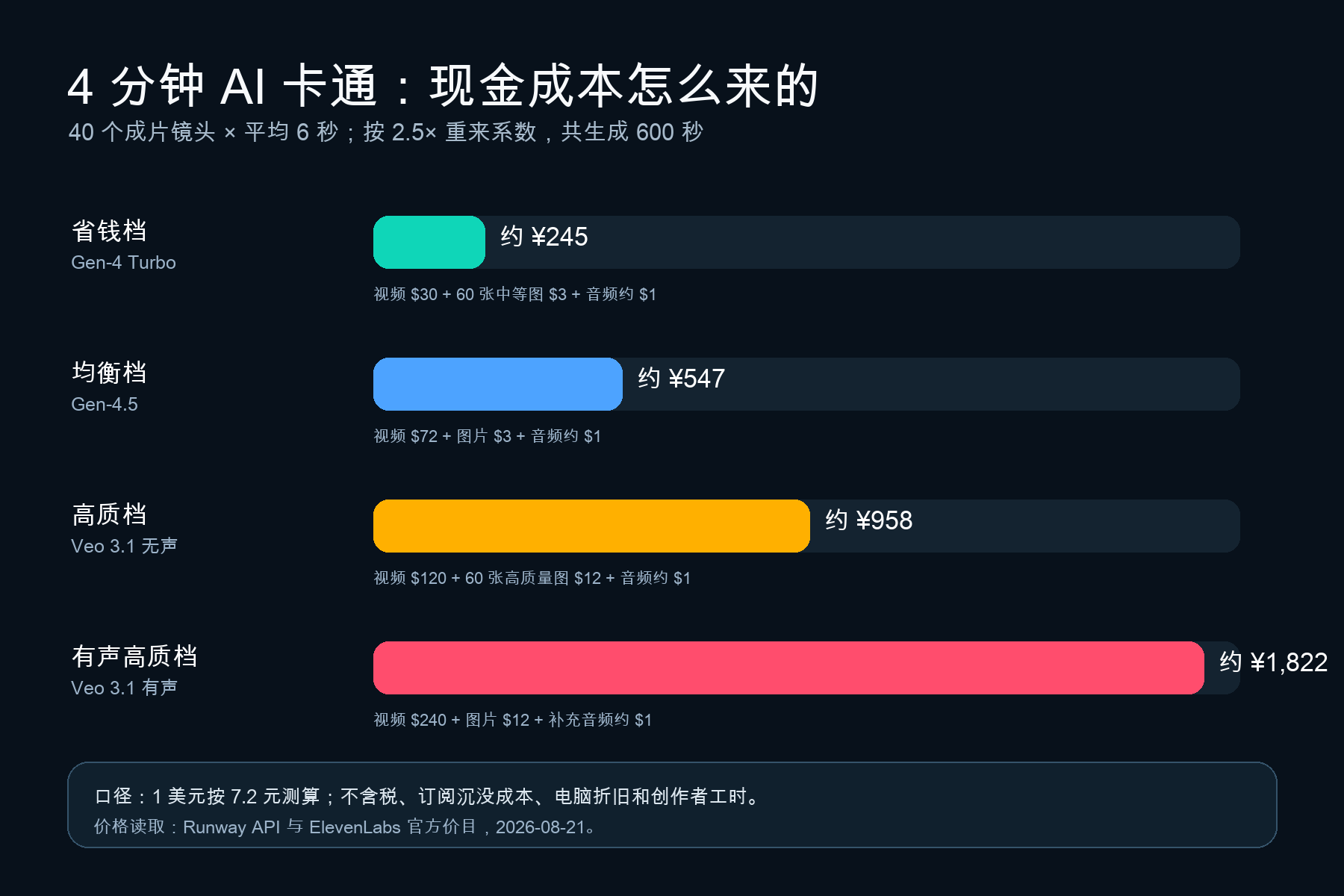
If the goal is a cartoon with 4 minutes per episode and 40 valid shots, I made a recalculable model according to the current official API price list: with a 2.5x replay factor, it would generate about 600 seconds of video in total. The cash cost for the money-saving mode is about 245 yuan, the balanced mode about 547 yuan, and the high-quality silent mode about 958 yuan; If you use a high-priced native audio model throughout, the upper limit approaches 1822 yuan. And that’s not even counting human time.
You can start working without buying a plan. ComfyUI, FLUX.1-schnell, LTX-Video/Wan2.2, Qwen3-TTS, Whisper, ACE-Step, and DaVinci Resolve can piece together a local open-source pipeline, reducing software and API cash outlays to nearly zero. But “no subscription” means “zero cost”: hardware, electricity, downloads, queues, screening, and rework don’t disappear automatically.
The real preparations for the first episode are characters, scenes, props, sounds, and a set of naming rules that allow repeating tasks. Based on workload, the first episode will take about 35–70 hours. If the same batch of assets is reused later, it may be pushed to 25–50 hours.
Here’s an important point: This is not a local test report. Part of the process comes from Sanji Nai-Chien’s original demo video released on August 11, 2026, with prices read on the official page dated August 21, 2026; Time and retry coefficients are public assumptions, designed so you can recalculate after changing models and durations, rather than pretending to have a “real unit price” for everyone.
This is not a prompt, but a micro-studio
There are plenty of tools for original video: design inspiration websites, image models, Higgsfield’s Cinema Studio, Claude Skill, sound generation, video generation. On the surface, it looks like a “model kit,” but what really works is a very old-school production logic: **Build assets first, then shoot shots. **
Before filming, a film must select casting, set makeup, and scout locations; Games must first prepare character models, scenes, and an action library. The same goes for AI animation. Every call from the generative model is a new sample. If you don’t pin down “Who is the main character, which living room is it, which voice is used?” it will perform on the spot for you.
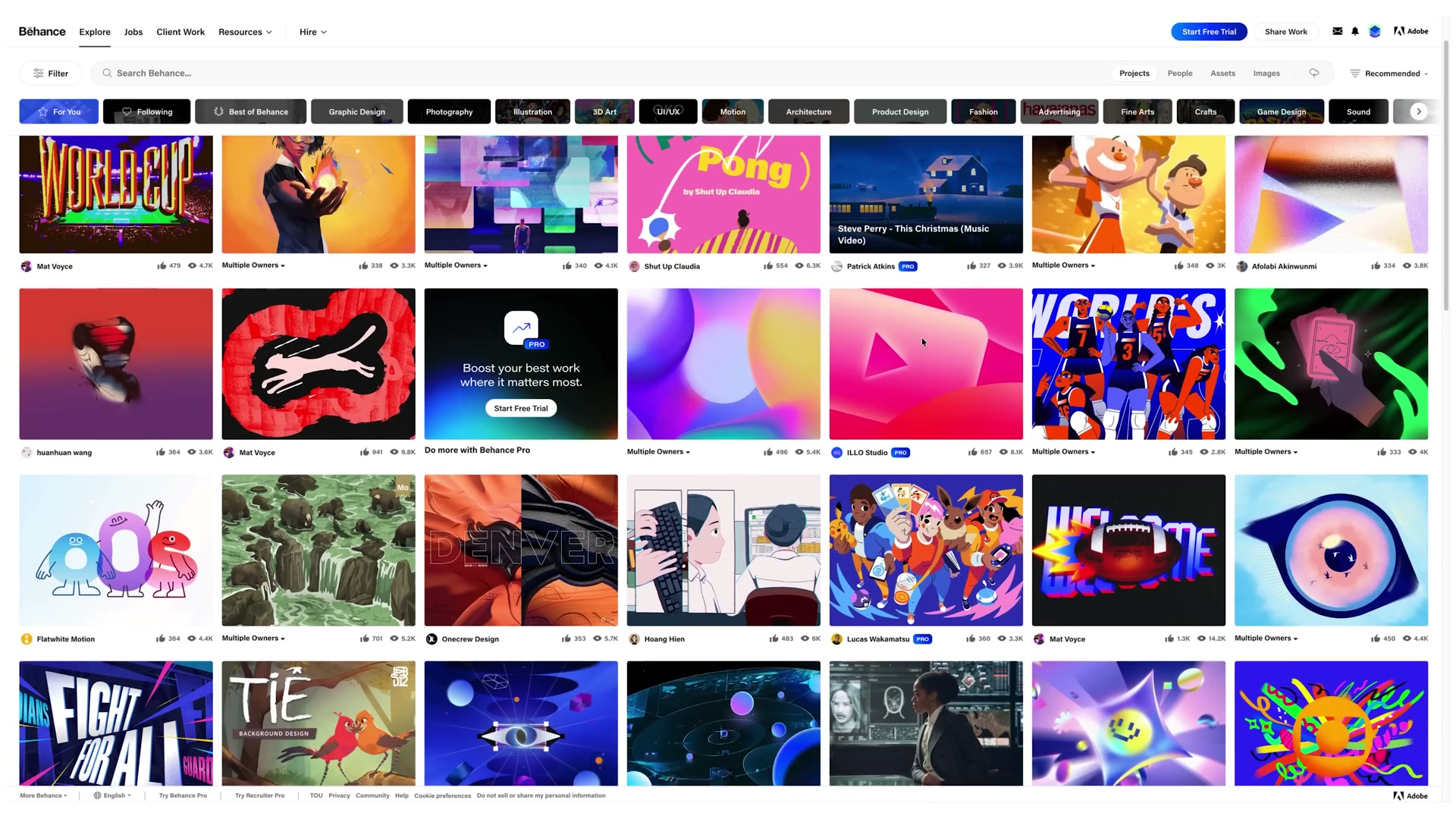
*01:45 · The original film starts with artistic direction and visual language. Screenshot source: Sanji Nai-Chien Original video. *
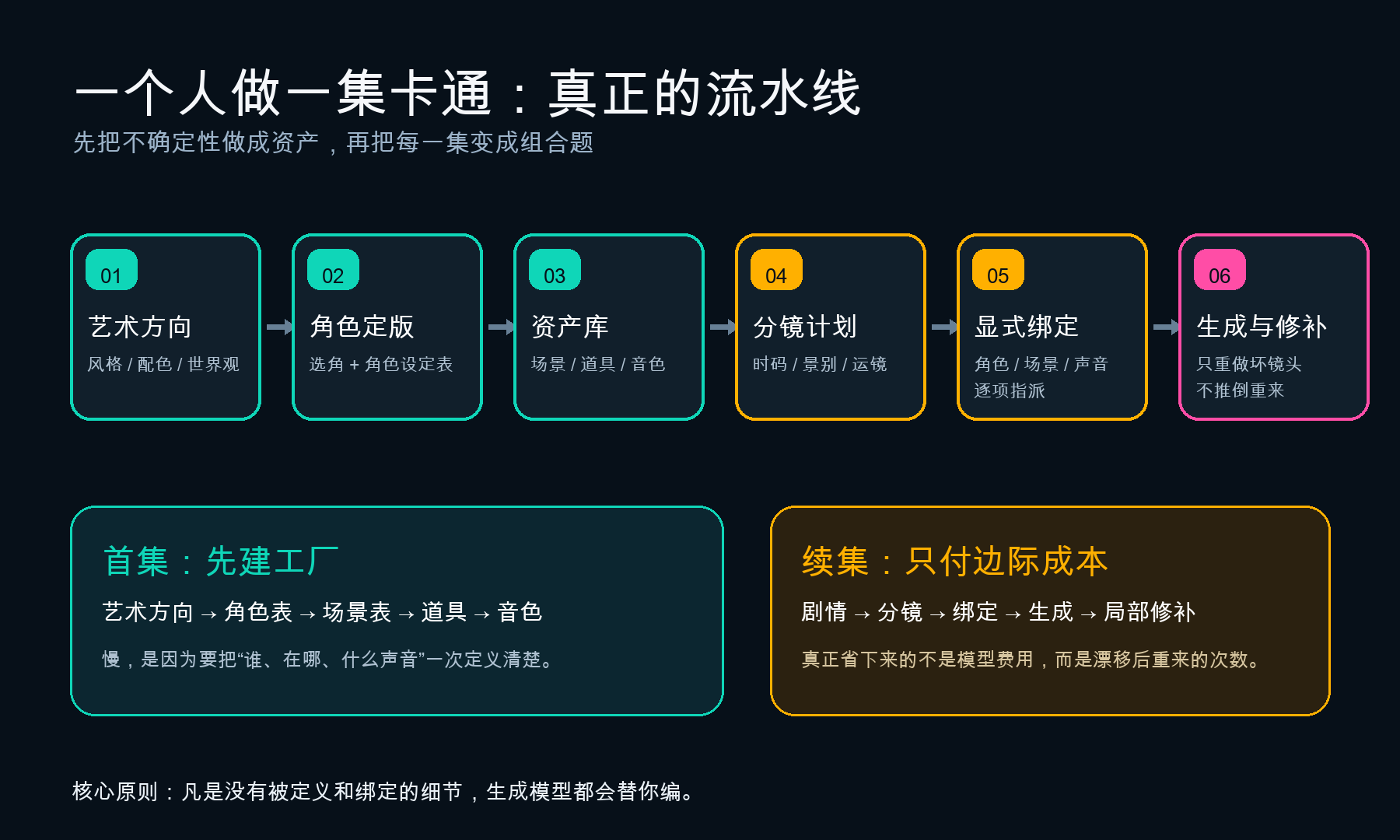
The original video actually demonstrates ten actions. After merging them, you can see them as six steps, but it’s best not to skip steps when actually starting work:
-
Collect artistic references, first deciding on the art style, color palette, and world texture.
-
Choose the lead role like casting, lock in hairstyle, clothing, accessories, and color.
-
Create a character design chart, placing front, side, back, and key expressions in the same image.
-
Derive supporting characters, props, and animals from the final drawing, and store satisfactory results in the asset library.
-
Generate main views and multiple camera angles for recurring scenes, eliminating the need for excessive database build.
-
Select voices for main characters and generate multiple versions of the same line for comparison.
-
Store the chosen tone in your asset vault and choose a name that won’t make your future self insult you.
-
Use Claude Skill to expand a story outline into a storyboard plan with timecodes, shot details, camera angles, actions, and dialogue.
-
Explicitly point each placeholder in the storyboard to the character list, scene, props, and sound.
-
Generation begins, and every broken shot is fixed, without redoing the entire scene.
Steps one to three are ‘building the factory’; Steps four to six are the marginal work for each episode. The first episode is slow, the sequel fast—that’s the reason.
The solution for character consistency is not to write prompts of 2,000 words
Many people make AI animation for the first time and write longer character descriptions: age, hairstyle, clothes, shoes, eye color, face shape—all crammed into every shot. As a result, the text gets longer, but people still drift.
Because text only defines the features, not “this person.” The character profile is the visual ID card across the camera: front, side, back, full-body proportions, several key expressions, ideally done in the same image.
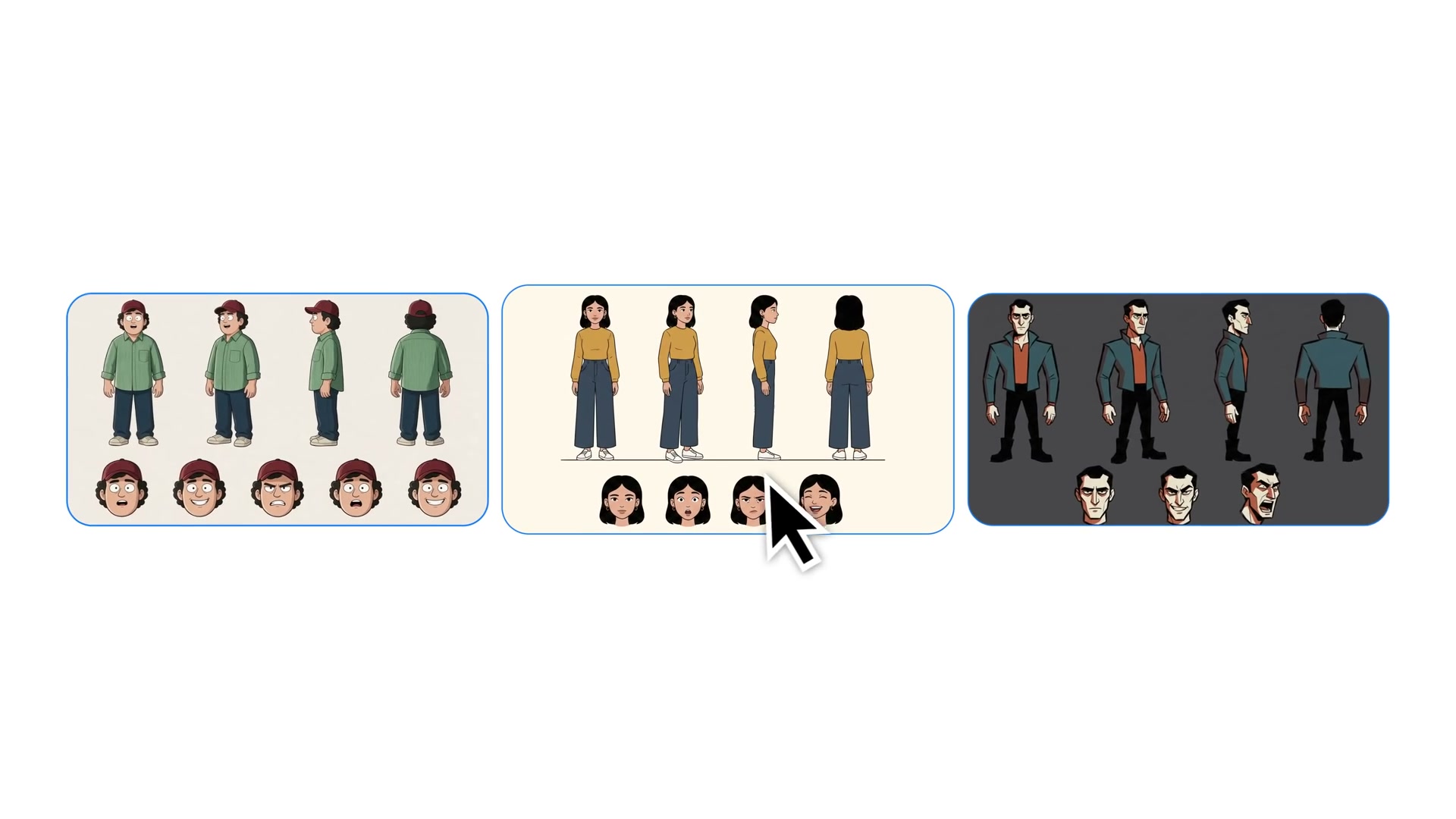
*02:15 · The original film shows the character design chart: multiple angles and expressions of the same character are placed together. *
The same applies to scenes. A living room that recurs cannot be created for every shot on the spot. Start with the front view, then focus on the sofa, window, overhead, and ground view. The original footage approach is pragmatic: only locations that are reused are worth building multiple cameras; don’t turn the asset vault into a palace with one-time transitions.
Props and voices should also be included in the asset library, and they must be names that people can read: MainCharacter\_Sheet, LivingRoom\_View1, TimeRemote, MainCharacter\_Voice. When choosing voice tones, it’s best to repeatedly generate the same line of dialogue; otherwise, you’re comparing not just the voice, but also the tone and text differences. Once you’ve finalized it, upload and name it. From then on, it’s like a character list—an asset that can be referenced by storyboards.
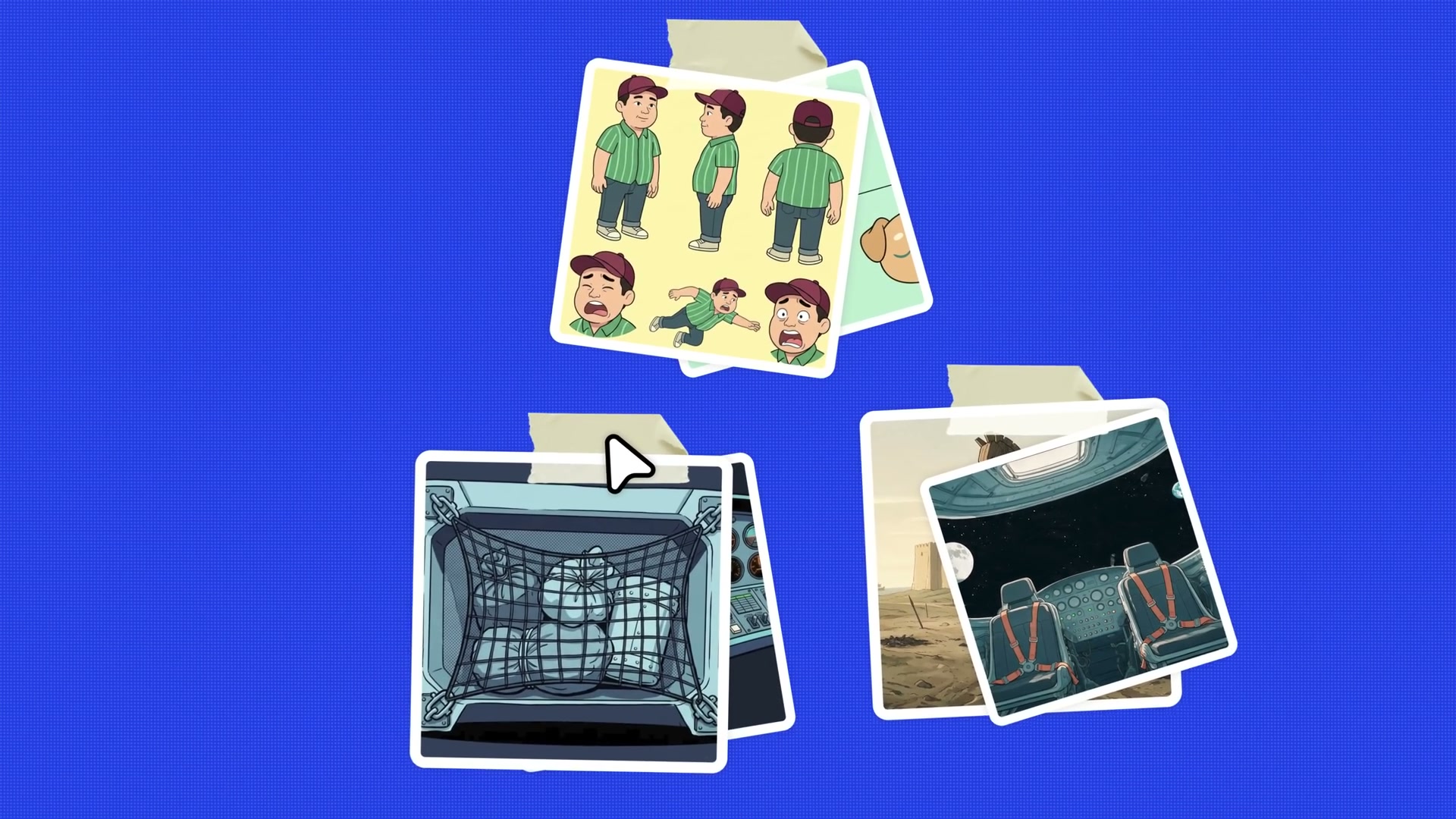
*09:15 · The original film organizes character lists, scenes, and key props into reusable assets. *
This step may seem the clumsiest, but it’s actually the most valuable. It’s similar to the history of desktop publishing and nonlinear editing: tools have lowered the threshold for ‘do it once,’ and new bottlenecks shift to selection, organization, and reuse. Generating cheaper doesn’t mean cheaper management.
Back then, desktop publishing didn’t eliminate editing—it just replaced lead type and plate-making with on-screen judgments; Digital editing didn’t eliminate editors either, just made ‘shooting a bit more’ too easy. AI animation is repeating the same shift: the labor that used to be spent on drawing every frame has shifted to definition, selection, naming, and elimination.
The only truly repeated episodes are storyboarding, binding, and local iterations
Once the assets are gathered, a new episode can start with a story summary. The original video handed Claude a cartoon-scene-builder.skill and asked it to expand “the character finding a time remote in the couch crack” into a 15-second production plan. Skill already knew the names of characters, scenes, and sounds, so it delivered not a “very visual” text but a production order that could be passed down.
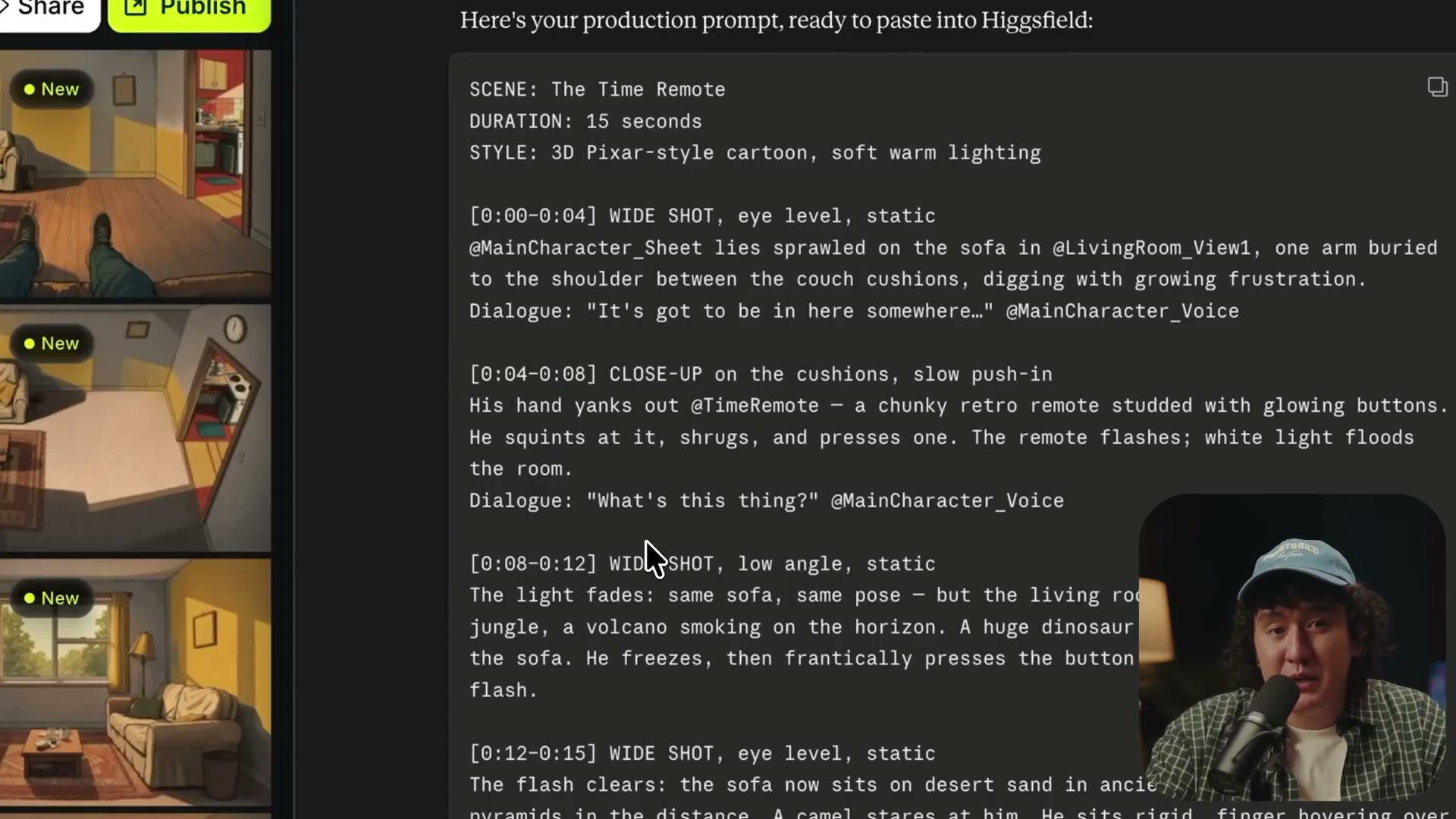
*10:15 · The output simultaneously displays time codes, scene types, camera positions, actions, lines, and asset placeholders. *
A usable storyboard—not literary description, but a list that both machines and humans can execute:
-
00:00—00:04: Wide-angle, head-up, fixed camera angle; The character searches through the sofa. -
00:04—00:08: Close-up, slow push; Hands take out the remote control. -
00:08—00:12: Low camera angle and wide angle; Switching to the living room to the prehistoric world. -
Each line ends with a character’s voice, and each specific object is reserved by asset name.
Then move on to the most easily overlooked step: **Rigging. ** Uploading reference images doesn’t mean the model knows what each image is. You need to clearly tell it which placeholder corresponds to the role list, which to the living room, which to the remote, and which audio is the main character’s voice.
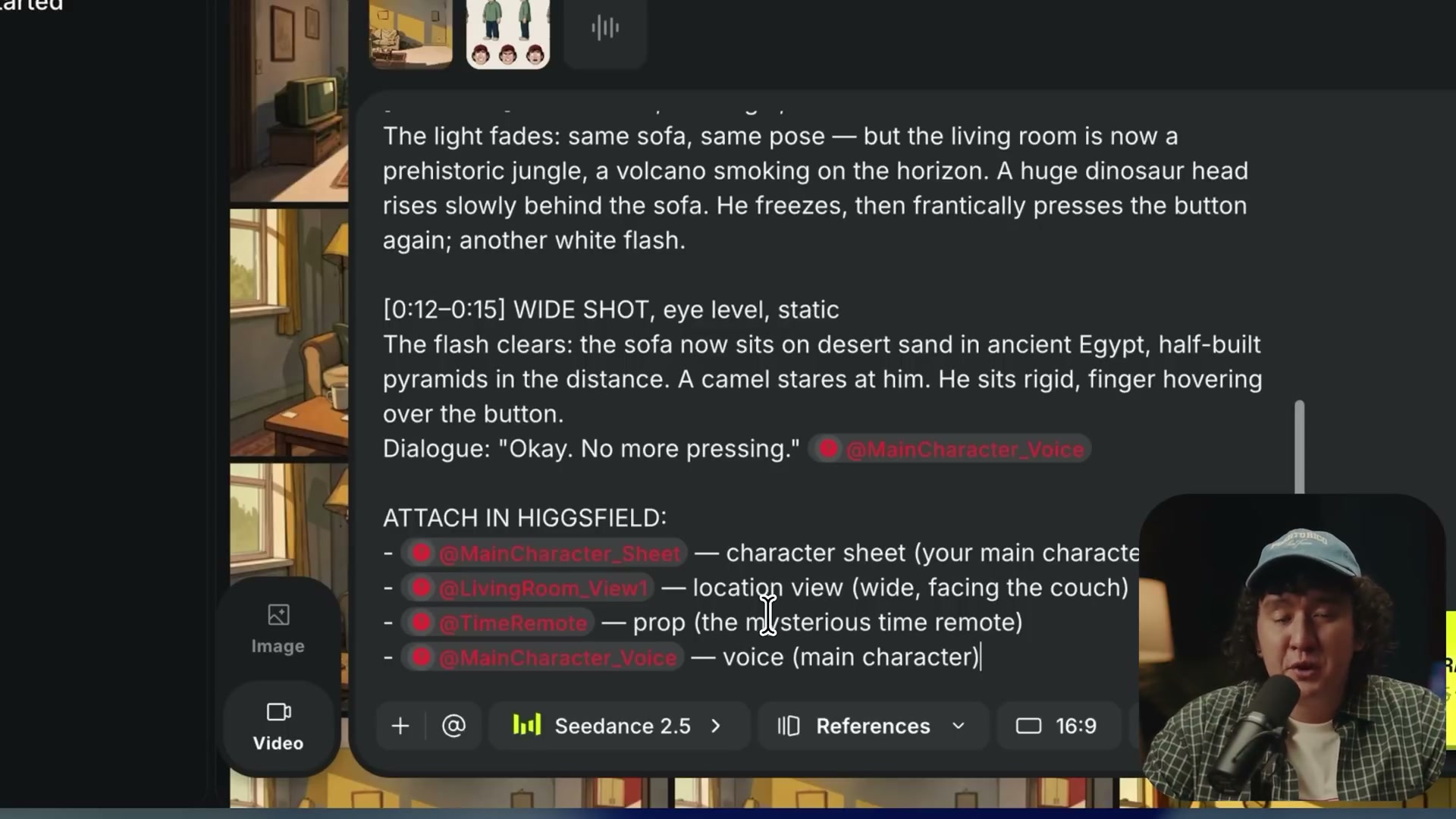
*10:45 · Characters, scenes, props, and tones are written item by item into the same production notice. *
Behind this, there is actually only one principle: **Any detail you haven’t defined or bound to be bound to, the model will create it for you. **
Don’t chase “one perfect time” during the generation phase. If an action is wrong, change it; if the composition is too complex, replace with simple keyframes; cut out small flaws at the beginning or end if possible. Once assets are locked, partial rework is cheaper; Starting from a blank page every time is like paying a new tuition fee.
Cash cost: The most expensive thing isn’t the picture, but the number of seconds of the failed video
To make the accounts reversed, I first fixed one episode:
-
Finished in 4 minutes, or 240 seconds.
-
40 effective shots, each averaging 6 seconds.
-
2.5 times retry coefficient, meaning total generation time is 600 seconds.
-
60 intermediate images for character sheets, scenes, props, and keyframes.
-
The narration and dialogue total about 1,000 characters.
-
The exchange rate is for convenience only, calculated at 1 USD = 7.2 yuan.
Runway API official price list shows 1 credit at $0.01; Gen-4 Turbo at 5 credits per second, Gen-4.5 at 12 credits per second, Veo 3.1 silent at 20 credits per second, and audio at 40 credits. GPT Image 2’s 1K/2K medium quality is 5 credits per image, and high quality is 20 credits.
From this, we get:
| Route | 600-second video | 60 images | Audio approximate number | Total in RMB |
|---|---|---|---|---|
| Save money: Gen-4 Turbo | $30 | $3 | $1 | About ¥245 |
| Balanced mode: Gen-4.5 | $72 | $3 | $1 | About ¥547 |
| High-quality mode: Veo 3.1 silent | $120 | $12 | $1 | About ¥958 |
| High-quality audio mode: Veo 3.1 with sound | $240 | $12 | $1 | About ¥1822 |
Sound is not the main factor. ElevenLabs official API price listThe reference price for Eleven v3 is $0.10 per 1000 characters, about $0.15 per minute for music, and $0.12 per minute for audio. Even with room for rework, it’s still a small fraction compared to video.
Editing doesn’t necessarily require software fees. Blackmagic Design official page shows that the free version of DaVinci Resolve can handle up to 60fps, Ultra HD 3840×2160, common 8-bit formats; Studio 21 is an optional one-time upgrade, priced at 2500 yuan on the domestic page. For these 4-minute cartoons, the free version is usually sufficient.
But the numbers above are just marginal usage, excluding taxes, unused subscription limits, computer depreciation, cloud drives, scripting tool subscriptions, and also people. More importantly, 2.5x is not a natural constant. Character hand slips, lip movements incorrectly, bloopers in actions, or reference binding failures can push it up to 4x; If assets are well managed, it can also be pushed to 1.5x.
On the same money-saving route, a 1.5x redo generates about 360 seconds and costs $18 for video; A 4x redo generates 960 seconds, and the video fee becomes $48. **The knob that truly controls your budget isn’t the package name, but the redo coefficient. **
After combining two old debts, how should the money be spent?
The original film demonstrates an integrated workbench like Higgsfield Cinema Studio: characters, scenes, sound, and generation interfaces are all in one place. The advantage is that bindings and asset management are convenient; The downside is that subscriptions, monthly quotas, and consumption for different models all change together. So it’s suitable for calculating “how many shots can be made this month,” not for the entire industry’s unit price.
The main table above switches to the Runway API to separate video seconds, images, and audio characters. It also clarifies another account: in the current official table, Seedance 2.5’s output at 480p, 720p, and 1080p is 20, 30, and 68 credits per second, respectively; Input and reference videos are charged at half the unit price of the corresponding output, while reference images and audio are free, generating a minimum of 80 credits each time. “The more references, the more stable” sometimes not only adds management workload but also directly goes into the bill.
If you really want to save money, a more practical approach is a hybrid approach: use low-cost or local image tools for character lists, keyframes, and trial and error; use local models for dubbing and transcription; leave editing to DaVinci Resolve’s free version; and only provide the truly difficult footage to high-end video models. But before jumping to conclusions, I need to clarify “how exactly do you get free tools?”
How to make it without buying a package: Three free alternative routes
First, the boundary: The “free” below means no software subscription or API call fees, excluding your existing computer, electricity, and labor hours. I didn’t run this combo continuously for 4 minutes to complete the video on my machine, so the capability and hardware thresholds below come from official documentation. The performance judgment is based on the control methods of each tool, not the same set of prompt evaluation data.
Route A: Local zero subscriptions, trading time for cash
| Link | Free tools | Minimal usage | What can you get, and where will you get stuck? |
|---|---|---|---|
| Story and storyboarding | Ollama + Qwen3 | Run ollama run qwen3, feed it a fixed ID for the character, scene, and prop, and output the timecode, scene type, action, dialogue, and asset name |
You can first get a structured production sheet; Rhythm, humor, and continuity still need to be revised; the first draft shouldn’t be treated as the final draft |
| Character list and keyframes | ComfyUI + FLUX.1-schnell | Install ComfyUI Desktop and import the official FLUX workflow; Create a character setup sheet, then fix reference images, prompt skeleton, and seed to generate scene frames | FLUX.1-schnell is a 4-step fast model licensed for Apache 2.0, suitable for artistic direction, props, and keyframes; Precise text, fingers, and subtle faces of the same character can still drift |
| Reference consistency | ComfyUI image reference node/IP-Adapter class workflow | Enter the same finalized character list for each shot; only change camera positions, poses, and expressions; Do not change the art style, costumes, and camera language all at once | It can make the contours, color schemes, and overall style more close, but not an “identity lock”; Hairstyles, accessories, and facial features still need to be examined frame by frame |
| Animation of the camera | LTX-Video or Wan2.2 | Give the checked keyframes to the image-to-video generation, each with only 3–5 seconds of action and one main action; First, test motion at low resolution, then zoom in on the final shot | LTX officially recommends ComfyUI, with macOS MPS support; Wan2.2 5B can run 720p at 24fps, with an official command-line route of about 24GB VRAM. Simple zooming, mirroring, and single-subject actions are easier to capture; Multiplayer, hand close-ups, and precise lip-syncing are high-risk areas |
| Dialogue and narration | Qwen3-TTS | Using the 0.6B/1.7B Base models to import authorized reference audio and corresponding text, generate WAV sentence-by-sentence, and always reuse the same clone prompt for the same role | The official model supports 3-second fast tone cloning, 10 main languages, and emotion/speech rate commands; Long lines should still be broken down and volume unified. Only the voice of the person or explicitly authorized can be cloneed |
| Music and ambient background noise | ACE-Step 1.5 | In the local interface, it creates a loop segment with no vocals and a short structure, then cuts and fades in and out in the editing software | The official project supports macOS, CUDA, AMD, Intel, and CPUs, with the base route running locally with less than 4GB of VRAM; It is suitable for theme drafts and ambient sounds, and does not replace pre-commercial similarity, copyright, and vocal checks |
| Subtitles and final films | Whisper + DaVinci Resolve Free Edition | Use whisper final.wav --model turbo --language Chinese --output\_format srt to generate subtitles, then import the shots, WAV, and SRT into Resolve, completing editing, mixing, and exporting |
Whisper’s code and weights are MIT licenses, and Turbo’s official reference memory is about 6GB; It can eliminate the need for first-round subtitle dictation, but names, onomatopoeia, and punctuation still need manual proofreading |
Don’t run this tool for 4 minutes right away. The smallest closed loop is the original film’s approach: one character, one living room, one prop, and a 15-second storyline. First, use Qwen3 to split into 4 shots, complete the character list and 4 keyframes in ComfyUI, then use LTX or Wan to move them one by one. At the same time, use Qwen3-TTS to produce dialogue, Whisper to create subtitles, and finally compose in Resolve. Only when hairstyles, costumes, props, and tones can be connected within those 15 seconds is it worth expanding to 40 shots.
Route B: Free cloud quota, only make 15-second samples
Runway’s current official package page gives free accounts a one-time 125 credits, which is directly converted to 25 seconds of Gen-4 Turbo. This isn’t a monthly recovery amount. The most reasonable use isn’t to spread it over 4 minutes, but to upload the locally made keyframes, generate 3 5-second shots, and reserve the remaining 10 seconds for the easiest bloopers to redo. It lets you see the motion effect of paid cloud models, but not enough to prove the cost, consistency, and success rate of a whole episode.
Hugging Face ZeroGPU is another trial-and-error entry point. Official documentation shows that all users can use existing ZeroGPU Spaces for free. After logging in, the free account has a daily 5-minute GPU quota and medium queue priority. These 5 minutes are effective hash time, not 5-minute video exports. You can find Wan/LTX’s official or author demo space and upload a desensitized keyframe to try a short shot. Queue, daily quota, and demo availability all change, and private character assets shouldn’t be uploaded, so it’s a learning ground, not a production backend.
Route C: Free priority mixed assembly line
What is truly suitable for one person long-term is usually not a choice between “all-local” or “all-cloud.” Story, character lists, scenes, most keyframes, voiceovers, music, subtitles, and editing remain local; Only multi-person interaction, complex body movements, high-speed camera work, and shots requiring precise lip-syncing are handed over to the cloud model. If cloud editing fails, it doesn’t start from scratch but returns to the finalized first, last, and audio frames for further revision.
This route isn’t absolutely cashless, but it’s the easiest way to spend money where the audience can truly see it. If 30 out of 40 shots are dialogue switching, prop close-ups, and simple push-and-pull, the local route can handle most of the trial and error; The cloud slot is reserved for the truly difficult shots. This is easier to control the redo coefficient than using the most expensive model from the very first second.
For the same project, how do you choose five different routes?
| Route | Cash and hardware | Expected results | The biggest problem | Who is best suited for you? |
|---|---|---|---|---|
| Higgsfield integrated workbench | Continuous subscriptions with low local hardware pressure | Manage assets, sound, and camera all in one place—get started fastest | Quotas, model unit prices, and migration costs are all controlled by the platform | Creators who don’t want to build nodes should be produced first |
| Runway all-cloud API | Pay based on generation volume, with low local hardware pressure | High ceiling for complex movements and high-quality shots, easy to scale | Failure seconds are also charged, and character and asset management still have to be handled by yourself | Projects with budgets and stable delivery |
| Full-process local open source | Software/API cash is nearly zero, and it depends heavily on hardware and time | Strong control over keyframes, style, and data; Simple short shots available | Installation, VRAM, speed, compatibility, and motion stability are all handled by the player | People who are willing to take care of things and value privacy and control |
| Free cloud credit | Zero or near-zero cash, almost no local graphics cards | Quickly determine whether a model is worth investing in | One-time or daily quotas, queues, and privacy boundaries cannot support 4 minutes of continuous production | A beginner who only makes 15-second concept samples |
| Free priority mixed routes | Most processes have zero API fees, making it difficult to pay small amounts | Local asset locking, cloud movement cap compensation, most balanced overall completion | You need to first determine which lenses are worth paying for; the process is one layer more than an integrated platform | Individual creators who want to keep series running without giving their budget to redo it |
If you only look at a single stunning shot, paid cloud models are more likely to win; If you look at whether characters and scenes can be changed continuously, and whether assets can continue to be reused, local node workflows are more controllable. For a 4-minute cartoon episode, victory often doesn’t depend on the strongest model’s line, but on whether you can redo the 37th shot when it breaks.
There is a hard barrier before commercial use: open-source licenses for the user interface do not automatically override terms such as model weights, LoRA, reference materials, or generated content. ComfyUI may be free, but a model loaded may not allow commercial use. Every time you change weights, you must review the model card and permissions again, not just the “open” page on the repository homepage.
Time cost: AI hasn’t eliminated labor; it has only moved labor into its home
The first episode of a 4-minute cartoon can be estimated as follows:
| Link | Estimated for the first episode |
|---|---|
| Story, script, storyboard planning | 3–6 hours |
| Artistic direction, character list, scenes, and prop assets | 8–14 hours |
| Keyframes, video generation, filtering, and redos | 12–26 hours |
| Dubbing, music, sound effects | 2–4 hours |
| Editing, patching, subcaptioning, exporting, and checking | 8–16 hours |
| Naming, backup, and project organization | 2–4 hours |
| Total | Approximately 35–70 hours |
The easiest thing to hide in promotional videos is “screening.” Nonlinear editing makes footage cheaper, so people shoot more and watch more; AI generation makes footage cheaper, which also encourages more attempts. Model providers charge based on the number of seconds generated, and failed shots are charged too. The less you want to define in advance, the more the platform prefers you to start over later.
Why are platforms now building asset workbenches? What is the goal? The answer is not just about generation performance. The gap between individual models narrows, and once creators put the entire series’ characters, scenes, voices, and storyboards into the platform, migration costs rise. Platforms earn both subscriptions and each generation; Creators can only regain some of this billing structure through reuse and reduced replay rates.
It’s actually clear who profits and who loses: creators who mass-produce continuously and platforms that charge by the second can both profit; Those who only do it once and lack asset discipline are the most likely to lose money. The silentest part is the “asset manager” — naming files, confirming versions, cleaning reference images, matching sounds, registering bad shots. No one cuts it into a cool demo, but it determines whether the project can make it to a second episode.
Therefore, the most important skill for a personal animation studio is not whether they can write a stunning prompt, but whether they can maintain a clean asset library, promptly eliminate bad shots, and fix satisfactory results as references for the next time. The gaming industry had already solved similar problems with character models, scenes, and action assets before this wave of generative AI; AI simply compressed this approach into one person’s desktop.
Back when digital audio workstations became widespread, recorded tracks were no longer expensive, creators could stack tracks endlessly, and in the end, what was truly scarce was the trade-off. The AI animation generation button is the new “one more track.” Cheap means more attempts, but the finished product still needs someone to say, “Enough, this shot is left.”
What kind of project is worth doing?
This assembly line is especially suitable for three types of projects:
-
Serialized Content: The same batch of characters and scenes will recur, so the investment in the first episode can be diluted by subsequent episodes.
-
Stylized Characters: The distinctiveness of cartoons, pixels, and paper collages mainly comes from outlines, color schemes, and limited features, making them easier to identify than realistic faces.
-
Short narrative with clear shot syncopation: 5–15 seconds per shot; partial breaks can be replaced separately.
It’s not suitable for one-time short films that use “one-shot generation” as a selling point, nor for highly realistic facial continuous performances and long continuous shots. When making only one episode, building character lists and scene libraries may be slower than shooting them outright; When preparing for a season, these assets start working like compound interest.
If you start working now, don’t buy the most expensive package first. Start with a character, a living room, a prop, and a 15-second scene as the minimum closed loop. Run the character list, scene view, tone, and naming rules thoroughly, then expand to 4 minutes. What you need to verify isn’t “whether the model can occasionally produce stunning images,” but whether the same set of assets can steadily serve the next episode.
AI has indeed lowered the threshold for animation devices. But it hasn’t eliminated director, producer, editor, and asset manager—it’s just that the work of these few people is all assigned to the same person.
This is the true meaning of “one person making an episode of cartoons.”
Sources and Calibers
-
Sanji Nai-Chien: AI Animation Pipeline: How I Make Cartoons 100% With AI, published on 2026-08-11, duration 15:05.
-
Bilibili Chinese reprint page, used for Chinese readers to cross-locate the original film.
-
Runway API Official Price List, accessed on 2026-08-21.
-
Higgsfield Official Pricing Page, used to verify the subscription and credit model of the integrated workbench used for original films.
-
ElevenLabs API Official Price List, accessed on 2026-08-21.
-
DaVinci Resolve Official Chinese Page, accessed on 2026-08-21.
-
ComfyUI official repository and FLUX.1 official workflow documentation, used to verify local installation, workflow, and FLUX.1-schnell usage.
-
FLUX.1-schnell Official Model Card, used to verify Apache 2.0 licenses.
-
LTX-Video official repository and Wan2.2 official repository, used to verify image generation video, ComfyUI/MPS support, and 5B model hardware references.
-
Qwen3-TTS official warehouse, used for verification of tone cloning, language, and command control.
-
OpenAI Whisper official warehouse, used to verify turbo models, reference memory, and MIT licenses.
-
ACE-Step 1.5 Official Repository, used to verify local music generation, platform support, and licensing boundaries.
-
Runway official package page and Hugging Face ZeroGPU official documentation are used to check the current boundaries of the free allowance.
-
Cost model assumptions: 4 minutes, 40 effective shots, average 6 seconds, 2.5x replays, 60 intermediate images, about 1000 characters of audio, $1 at 7.2 yuan. The time range is a production estimate and not a local test machine.
🧰 Tools I build
I maintain all of these tools myself. Preview builds are clearly labeled; the release pages are the source of truth for downloads, updates and known limits.
Info: HyphenBox Status: Official releases
A radar for free LLM APIs: availability is re-tested continuously, one local interface for all of them, and keys stay on your machine
Info: LocalBrain Status: Official releases
A multimodal MCP toolbox for local models: TTS, Whisper and video generation in one place
Info: ScreenLex Status: Official releases
Learn new words while you watch shows. Free, for Mac and Windows
Info: HyphenScreen Status: Official releases
Screen recording and smart editing in one: a DaVinci-style timeline, automatic redaction and a check of the finished video before export. Free
Quote: HyphenTech Make AI your superpower Local deployment · Free resources · Self-made software https://hyphentech.top
Late nights and burned API credits went in,a cup of tea comes back out — only if you feel like it.
Scan with WeChatPress and hold to save the image, then open it from your album in WeChat Scan

Comments
Loading comments…