Info: Machine translation This post was machine-translated from the Chinese original. Wording may be rough in places — the Chinese version is authoritative.
Note This article was first published on the HyphenTech official WeChat account
Muse vs. Qwen3.8: Is Faster Actually Slower?
Two newly updated 30B-level models, same machine and same batch of questions. The one that generated 30% faster delivered answers more than three times slower—the gap was hidden in a metric no one reported.
Note 2026-08-06·HyphenTech
🎯 ▍ The one that is 30% faster is 3.4 times slower
An M5 Pro, 64 GB of unified memory, the same Chinese Q&A question only switches sides. The Muse Glimmer 30B spits 16.7 tokens per second, while the Qwen 3.8 and 27B only 12.8 tokens per second—the former is nearly 30% faster. But when you hand over the full answer, the former takes 24.8 seconds, while the latter only takes 7.3 seconds.
The lengths of the two answers are almost the same: 171 words versus 166 words. **Same length: one waits 25 seconds, the other 7 seconds. **If you only look at the tok/s column on the scoresheet, you’ll pick the wrong one.
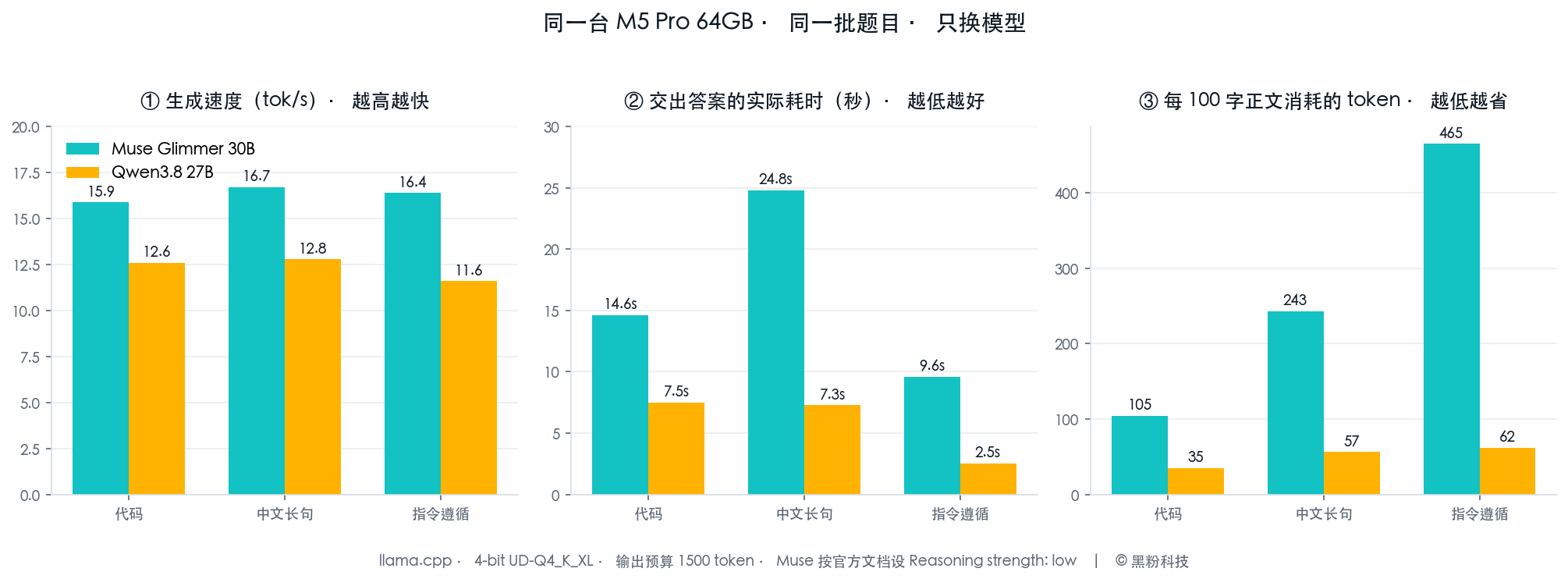
The difference is in the third image: Muse consumes 243 tokens per 100-word main text, while Qwen 3.8 only needs 57. The extra parts don’t disappear; they enter the thought chain—a piece of content users can’t see but still needs to spend time generating.
🧬 ▍ One is Meta’s agent dedicated unit, the other is Tongyi’s all-round new flagship
First, let’s clarify where these two come from. The Muse Glimmer 30B comes from Meta Superintelligence Lab, released in August 2026, and runs on the Apache 2.0 protocol.
It distills from the larger Muse Spark, with a clear goal: to run autonomous agents on consumer-grade hardware. The knowledge deadline is January 4, 2026.
Qwen3.8 27B is the compact version in Tongyi’s Qwen 3.8 series. According to official descriptions, it offers overall improvements over its predecessor in coding, professional work, research, and long-term agent tasks, with native support for image and video understanding, from STEM charts and documents to hour-level videos.
| Dimension | Muse Glimmer 30B | Qwen3.8 27B |
|---|---|---|
| Parameter count | 29.6B (including vision encoder) | 27B Dense |
| Hidden dimensions/floors | 6656 / 52 floors | 5120 / 64 floors |
| Attention structure | Local × 3 + Global Loop, sliding window 2048 | Gated DeltaNet + Gated Attention hybrid |
| Attention Head (Q/KV) | 32 / 2 (GQA 16:1) | 24/4, plus 48 linear attention heads |
| Visual module | ViT-G/14, about 1.8B, with a maximum of 4096 visual tokens per image | Native visuals, supporting images and videos |
| Context length | 131,072+ | 262,144 native, expandable to 1,000,000 |
| Word list | 202,048 | 248,320 |
| Think control | The system prompt says Reasoning strength: low/medium/high/xhigh | Enabled by default, can be turned off upon request |
※ Both sides of the numbers are taken from their respective official model pages. Parameter diameters differ: Muse’s 29.6B includes a vision encoder, while Qwen3.8’s 27B refers to the language model itself.
The context section is worth mentioning separately. Qwen 3.8 natively costs 260,000 tokens and can be expanded to 1,000,000, while Muse starts at 130,000. But a nominal window and a window you can use with peace of mind are two different things, and I’ll explain this with a specific number later.
📊 ▍ Official benchmark scores: one leans toward agent, the other leans toward versatility
Meta released a set of control data for Muse Glimmer, with Gemma4-31B and Qwen 3.6-27B as reference frames. Here are a few that best illustrate positioning:
| Benchmark | Muse Glimmer 30B | Gemma4-31B | Qwen3.6-27B |
|---|---|---|---|
| MCP Atlas (tool call) | 75.5 | 54.2 | 62.5 |
| DeepSearch QA | 74.6 | 61.7 | 71.1 |
| SWE-Bench Verified | 76.0 | 66.6 | 77.2 |
| SWE-Bench Pro | 51.2 | 36.9 | 50.2 |
| AIME 2026 | 94.7 | 89.2 | 94.1 |
| IFBench (Instruction Follower) | 77.0 | 76.0 | 70.8 |
| OSWorld-Verified | 65.9 | 58.5 | 75.6 |
※ Data is from the official Muse Glimmer model page; the Muse column is High Reasoning. The comparison is Qwen3.6, not the Qwen3.8 tested in this article.
MCP Atlas is twenty points apart, which measures tool calls. Conversely, it doesn’t lead on OSWorld and SWE-Bench Verified. Looking at the two sets of numbers together, the orientation is clear: It’s optimized for “getting a thing done with the tool,” not for “doing a good one-round answer”. And the chain of thought is the price of this approach.
🕳 ▍ A pit that devours the answer
In the first round of testing, I gave an output budget of 420 tokens—more than enough for a three-sentence Q&A. But for this question, it outputs zero characters in the main text, and spent all 420 tokens without a single one.
**// It’s not a wrong answer, it’s simply that it wasn’t even my turn to answer. **
After breaking down the complete structure returned by llama.cpp, you see: the token is all in the reasoning_content field, a full 1,222 characters of thought process, then the budget is exhausted, and not a single word is written in the main text. Switching to `Reasoning strength: low` and running again, the same problem, thinking down to 953 characters, the main text is 154 characters.
Note **This switch isn’t in the startup parameter, it’s in the system prompt. **Muse’s official documentation states: Think intensity is controlled by `Reasoning strength: low / medium / high / xhigh` in the system prompt. llama.cpp’s `–reasoning off` doesn’t work on it—in actual tests, with this parameter, the question text is still zero.
That’s why local agent runs often get the illusion that “it can’t set up the tool.” Tool calls require the model to output a JSON segment, and the thought chain squeezes the JSON out of the budget. This manifests as functional failures, rooted in budget allocation. This type of fault is the hardest to detect, because there are no errors in the logs.
🔌 ▍ Filling in these pits ahead of time is what tools should do
It took me four rounds of testing to figure out these conclusions. And for an ordinary user who downloads and clicks “Start,” they shouldn’t need to know what reasoning_content is. The threshold for local deployment has never been the model itself, but the parameter details that no one has written into documentation. That’s exactly why I made “LocalBrain,” a self-made software. The current version is 0.3.89, free to download.
It provides different context windows for different GGUF models: Muse gives 81,920, others 32,768; when the machine memory is below 48GB, it drops to 24,576, and below 24GB, to 12,288. It deliberately reserves only about 70% of the total window for chat history, with the rest for system prompts, attachments, tool results, and output.
Why not max out the nominal window? Because local unified memory is shared. KV cache, visual projection, and utility processes are all competing for the same block. The direct consequence of filling the nominal window isn’t slowness, but the entire service exits during the second round of requests. This is the exact opposite of the cloud’s intuitive belief that “the bigger the window, the better.”
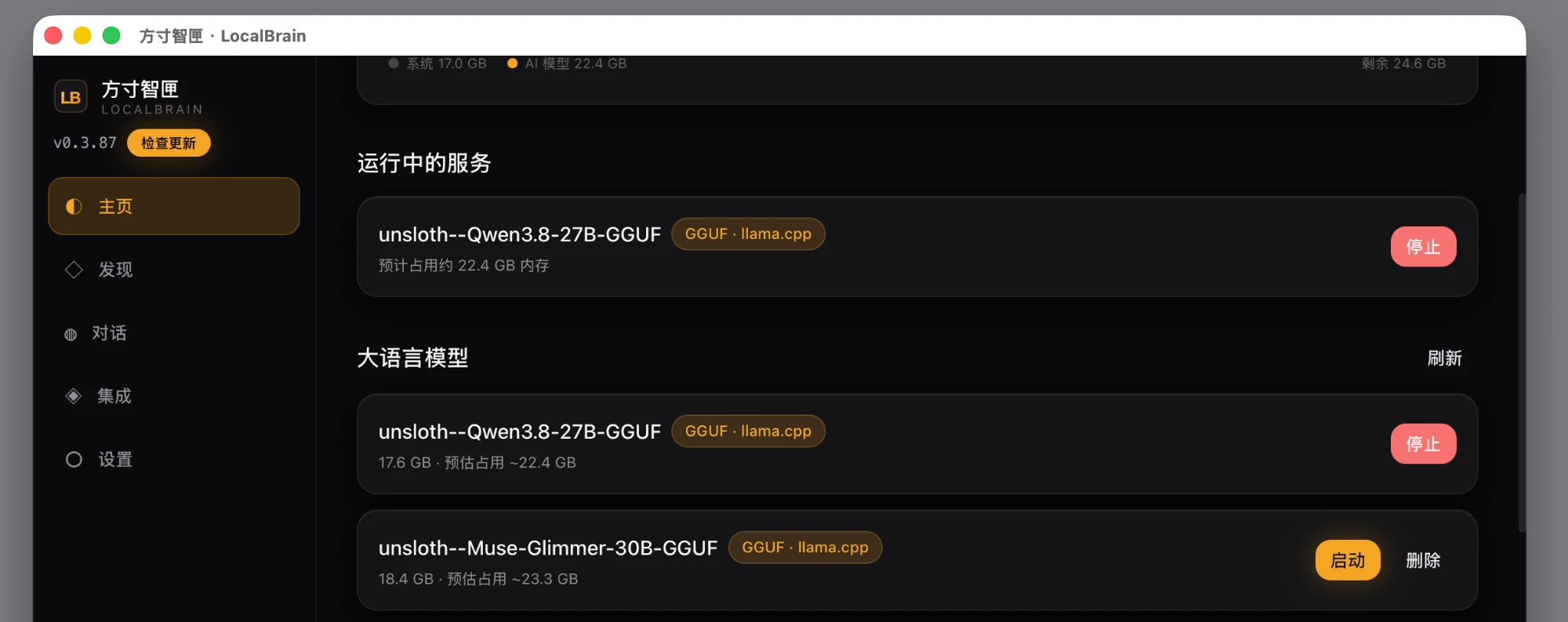
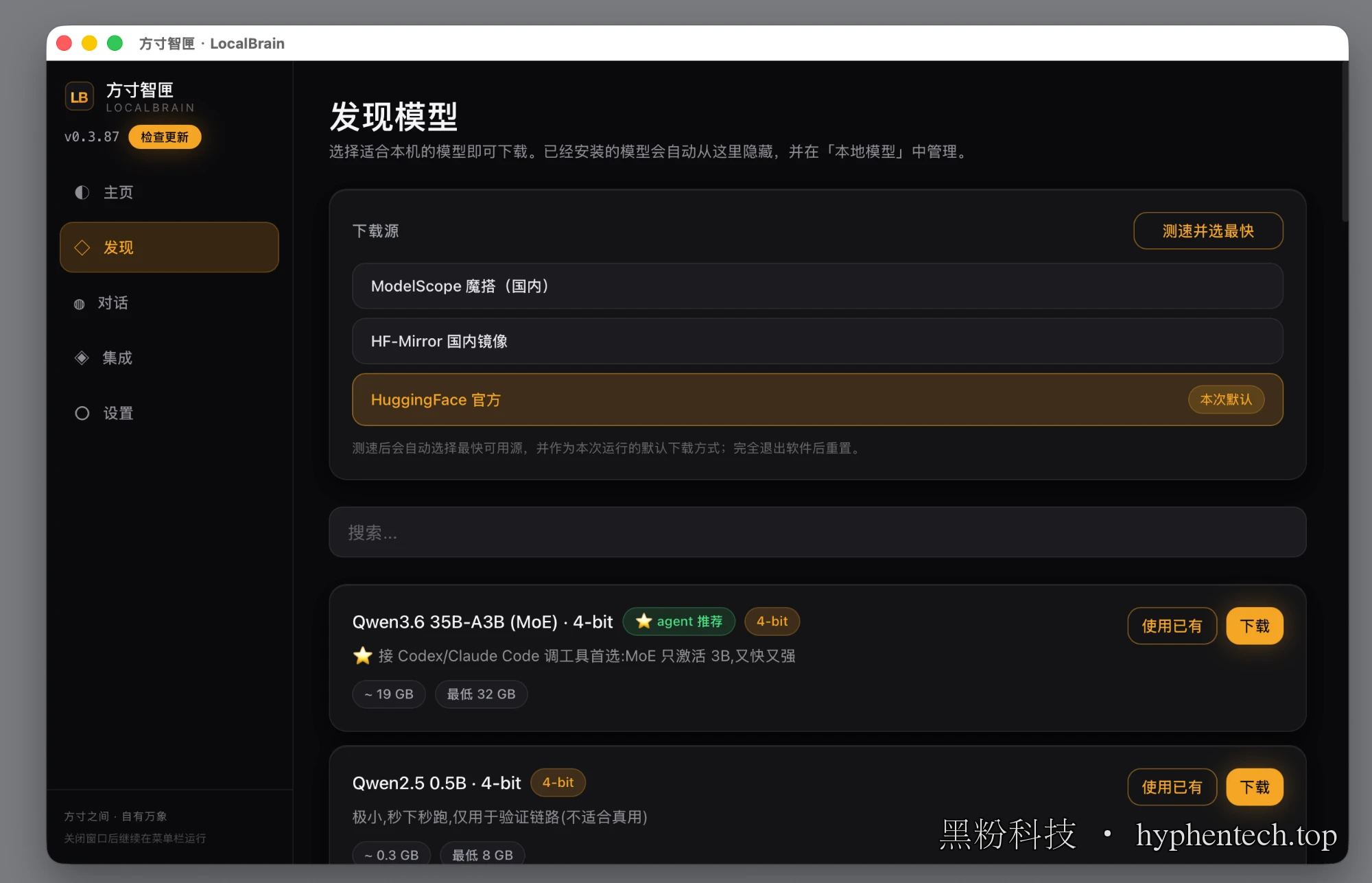
Downloading the model is a pitfall in China. It lists three sources—Moda, HF domestic image, and HuggingFace official source—and just tap speed test and automatically select the fastest one. For an 18GB file, the difference between choosing the wrong and correct source can be just a few dozen minutes.
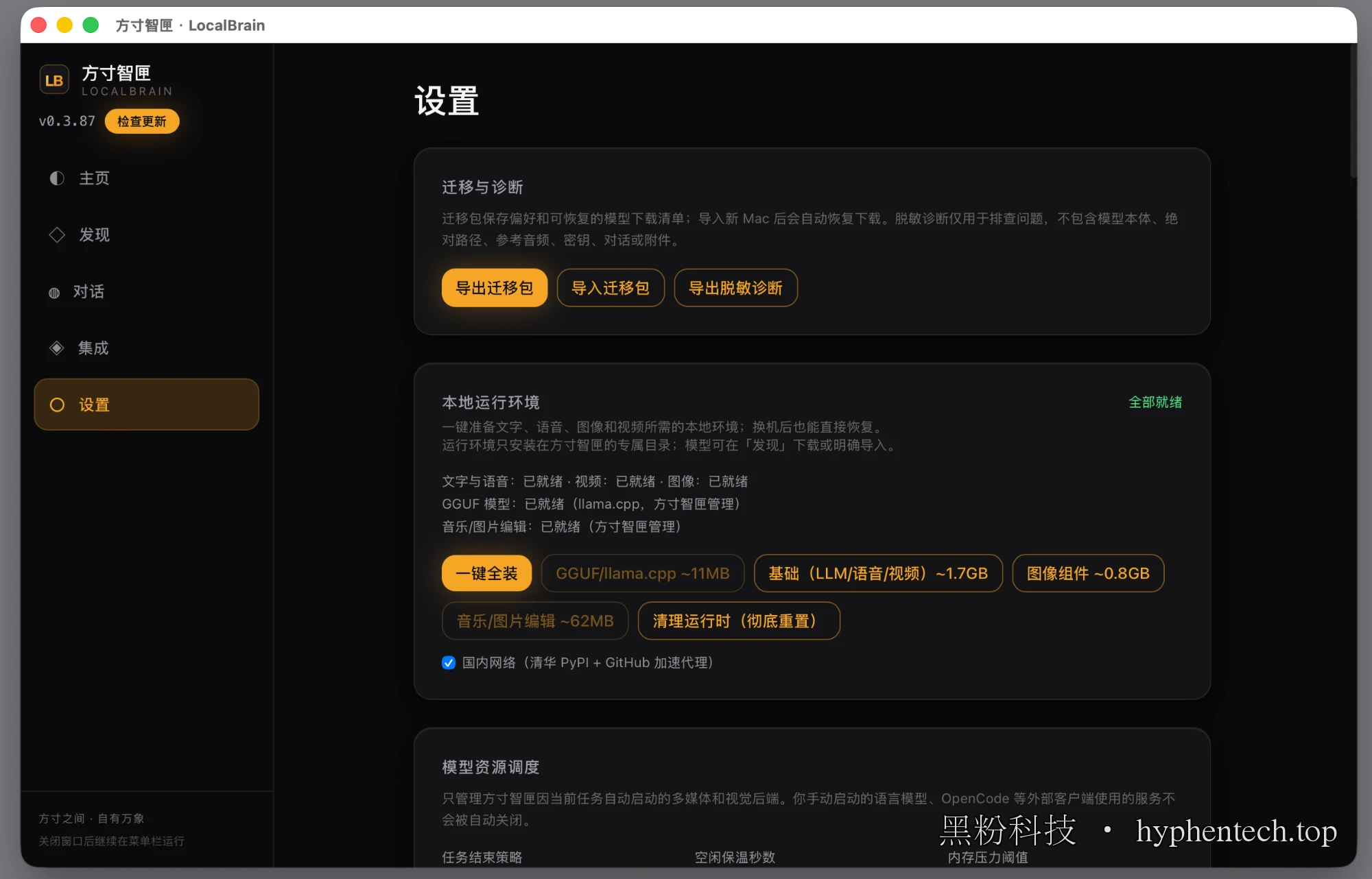
The runtime environment is also pre-installed with one click:llama.cpp about 11 MB, basic language/voice/video components about 1.7 GB, image components about 0.8 GB, all installed in the application’s own directory, without touching the system Python. When switching machines, export a migration package, and after importing the new machine, the download list will automatically resume.
🤖 ▍ What does a complete multi-step task look like?
Parameters and benchmark scores are ultimately indirect evidence. The direct evidence is this: give it a sentence like “Search for the latest three AI news articles and make a PPT,” then watch it finish on its own.
The execution log is written step by step. First, the product constraint—parsing “make a PPT” into only allowing PPTX generation; Then network search, two complementary queries with deduplication to get twelve results; Then source verification to batch read four of the source pages; Finally, content planning is done, with the local Qwen3.8 output structured JSON.
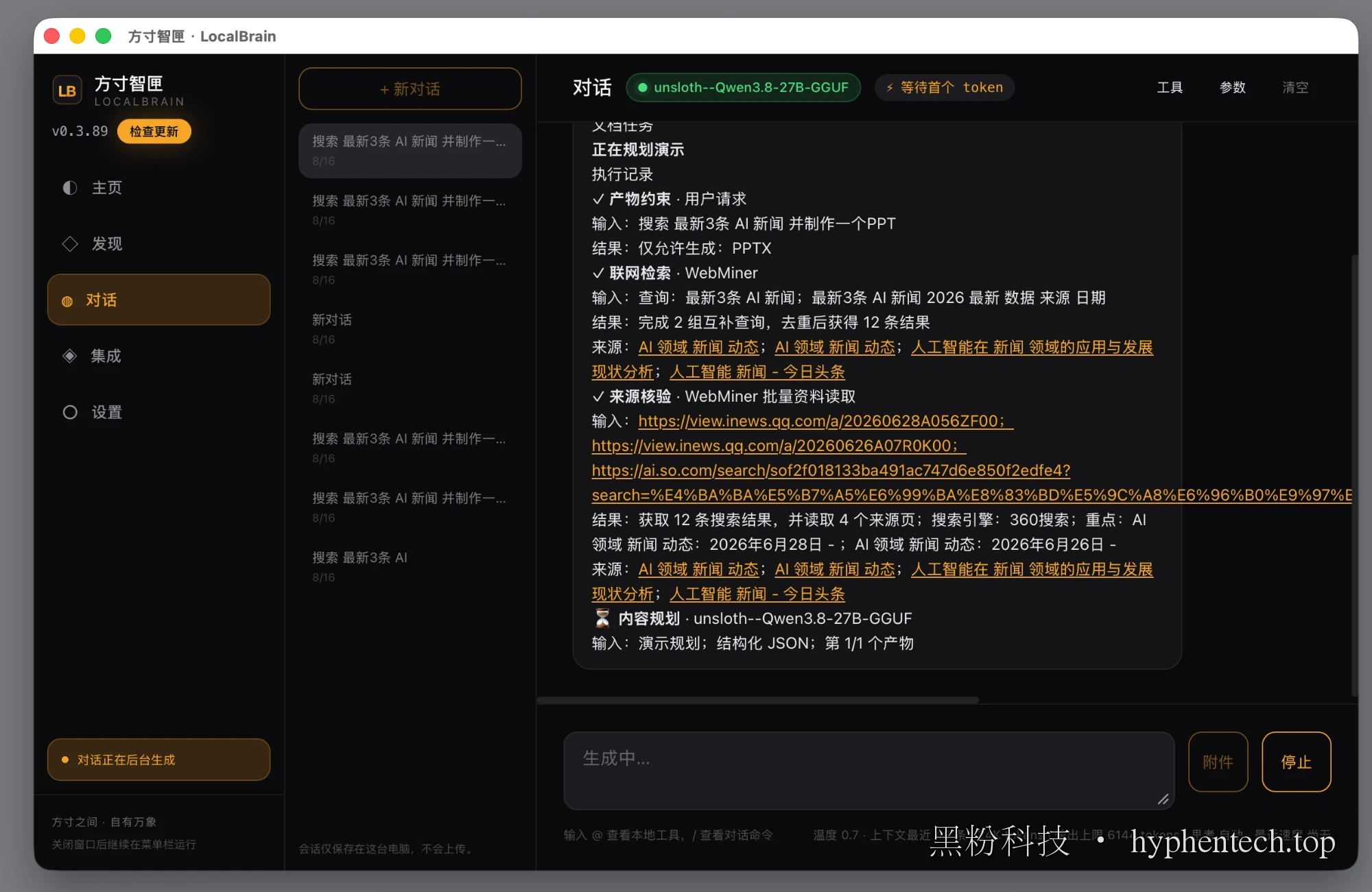
The bottom row is worth a look: temperature 0.7, context nearest 48, 24K tokens, output limit 6144, automatic thinking. These aren’t just default values, but calculated by machine memory and model type—all the pitfalls mentioned earlier have been preemptively addressed in this row.
There’s another sentence in the lower left corner: Sessions are only saved on this computer and will not be uploaded. This statement holds because from search to generation, there has never been a single step away from the machine.
🧭 ▍ So how should you choose between these two?
First, let’s talk about an easily overlooked reference. Meta officially lists the Apple M5 Max as a baseline speed of 26.6 tok/s, and after enabling DFlash speculative decoding, it reaches 50.2 tok/s—a 1.8x increase.
On the M5 Pro, using llama.cpp without that draft model, I measured 16.7 tok/s—the magnitude is accurate. **Indicates the gap comes from the configuration, not the slower itself. **
Back then, Intel pushed the Pentium 4’s clock speed to 3.8GHz, and later the Core architecture outperformed it at a lower clock speed, relying on doing more per cycle. The same misjudgment changed the unit: back then MHz, today it’s tok/s. The difference is that the clock speed is at least hardware-determined, while tok/s is affected by sampling parameters and thought switches, making it more prone to distortion.
-
Make it do the work itself: Muse. Twenty points higher in the MCP Atlas is not for free; multi-step tasks and failed retries are its main arena
-
├ Quick Answer: Qwen 3.8. The same word count saves three to seven times the token, but delivery time differs by an order of magnitude
-
├ Read images and videos: Qwen 3.8 natively supports video. Muse officially states that it is not optimized for video or processed by frame
-
├ Requires a very long context: Qwen 3.8 native starts at 260,000 yuan, but don’t overload it as advertised—local memory is shared
-
└ Both require a minimum of 32 GB: Actual tests show 18.8 GB and 18.2 GB of resident memory, plus KV cache for real usage
There’s another point not in the benchmark table: both models are 4-bit quantized. Meta’s quantization loss table shows that the accuracy drop for K-Quant-Dynamic is 0.2%, and for 17GB, it’s 1.0%. **The extra 0.8 percentage points paid to fit into a 24GB machine is a clear account. **
Note Don’t take your pronunciation speed as delivery speed
TOK/S is easy to measure, look at, and compare, so everyone reports it. But what users really perceive is “how soon it takes to get a usable answer,” and that number depends on where the model spends the budget. The thinking type isn’t slow; it’s about spending time where you can’t see it—if used correctly, it’s the confidence for multi-step tasks; if used wrong, it’s a blank slate. Before choosing, think carefully about whether you want someone who thinks or who can answer.
$ 两个模型的官方页在 HuggingFace 上搜 unsloth/Muse-Glimmer-30B-GGUF 和 unsloth/Qwen3.8-27B-GGUF 就能找到,都是 4-bit GGUF、约 18 GB。本文用的桌面应用「方寸智匣」在 https://hyphentech.top/localbrain ,macOS 13 以上的 Apple Silicon 机器可用。
🧰 Tools I build
I maintain all of these tools myself. Preview builds are clearly labeled; the release pages are the source of truth for downloads, updates and known limits.
Info: HyphenBox Status: Official releases
A radar for free LLM APIs: availability is re-tested continuously, one local interface for all of them, and keys stay on your machine
Info: LocalBrain Status: Official releases
A multimodal MCP toolbox for local models: TTS, Whisper and video generation in one place
Info: ScreenLex Status: Official releases
Learn new words while you watch shows. Free, for Mac and Windows
Info: HyphenScreen Status: Official releases
Screen recording and smart editing in one: a DaVinci-style timeline, automatic redaction and a check of the finished video before export. Free
Quote: HyphenTech Make AI your superpower Local deployment · Free resources · Self-made software https://hyphentech.top
Late nights and burned API credits went in,a cup of tea comes back out — only if you feel like it.
Scan with WeChatPress and hold to save the image, then open it from your album in WeChat Scan

Comments
Loading comments…