Info: Machine translation This post was machine-translated from the Chinese original. Wording may be rough in places — the Chinese version is authoritative.
The essence of information anxiety isn’t that there’s too little news, but that organizing is too difficult.
Every day when you wake up, you’re greeted by explosive news in the AI field—which model has been released, which company has been acquired, which open-source project has trended again. But most people either just browse wherever they come to view or subscribe to a bunch of newsletters and read them all.
What is truly useful is a tool that automatically helps you collect, categorize, translate, and refine it.
This time, I directly used Claude Code to create a — **less than an afternoon in total, GitHub Pages deployed at zero cost, the code is completely open source. **

What can it do?
The final product is called AI News Radar:
-
Automatically fetched news from multiple RSS sources, this time generated 287 articles
-
AI generates Chinese summaries + keyword classifications for each article
-
Automatically archived by category (AI, Technology, Security, Research… )
-
Automatically updated daily at scheduled intervals, deployed on GitHub Pages, completely free
-
There’s also a quick report feature called “Today’s Top 10 Most Important Things” to help you directly focus on key points
How did they do it?
Step 1: Tell Claude Code your requirements
I only typed one sentence:
Create an AI news collector, deploy on GitHub Pages, and request for free.
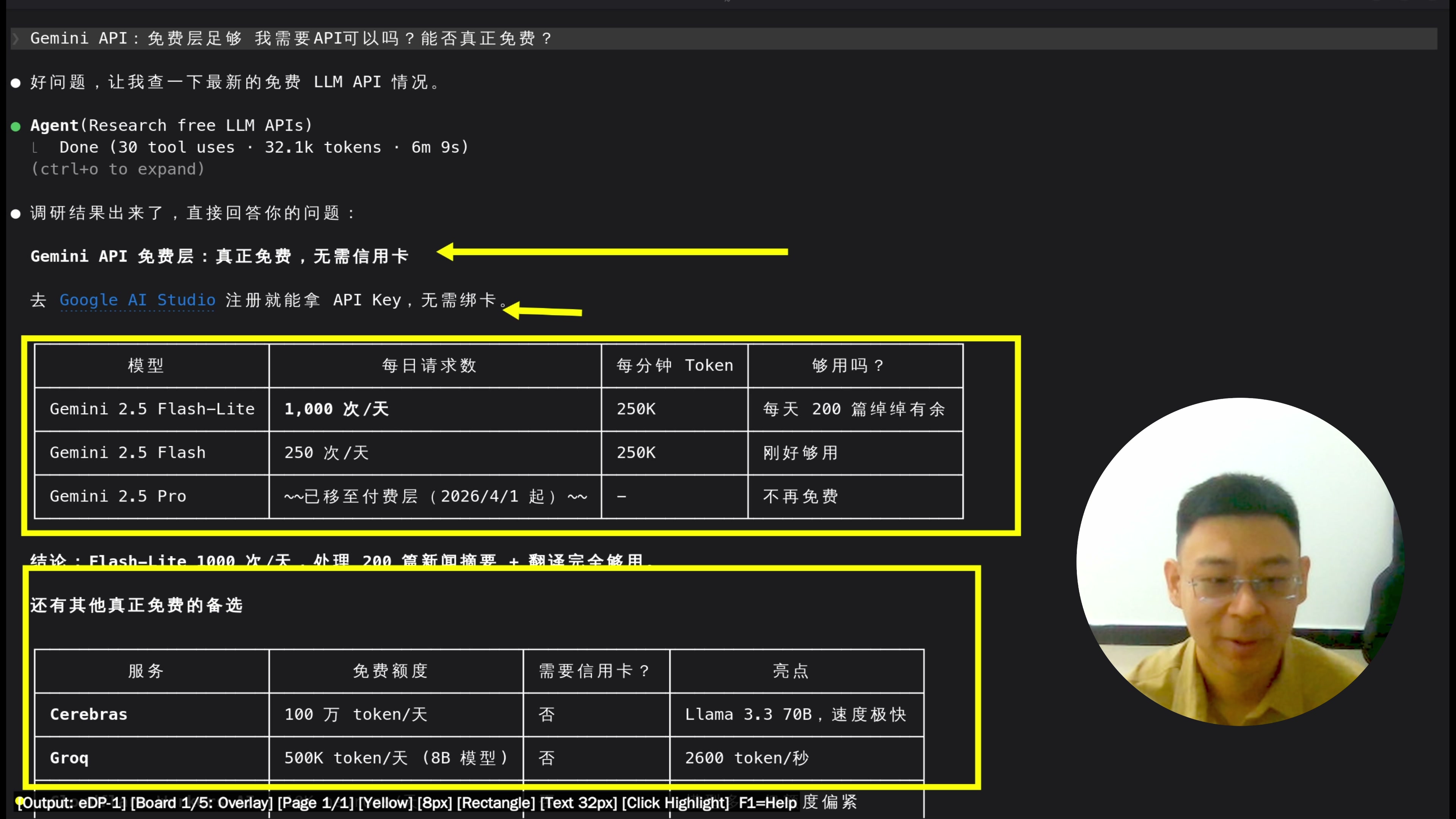
Claude Code directly outputs a complete technical architecture table, then does something I didn’t expect — proactively researching three free LLM APIs and producing comparison tables:
| API | Free quota | Speed | Translation quality |
|---|---|---|---|
| Gemini Flash-Lite | 15 times per minute | Quick | Alright |
| Groq | Limited daily quantity | Extremely fast | Alright |
| Cerebras | Limit | Quick | Average |
Final solution: Groq as the main force (fastest), Gemini as backup.
Step 2: Start writing the code with Claude Code
The task list automatically appears on the terminal. I hardly write a single line of code manually, just watch it write the whole time, occasionally raising a new request.
Step 3: Succeed on the first run
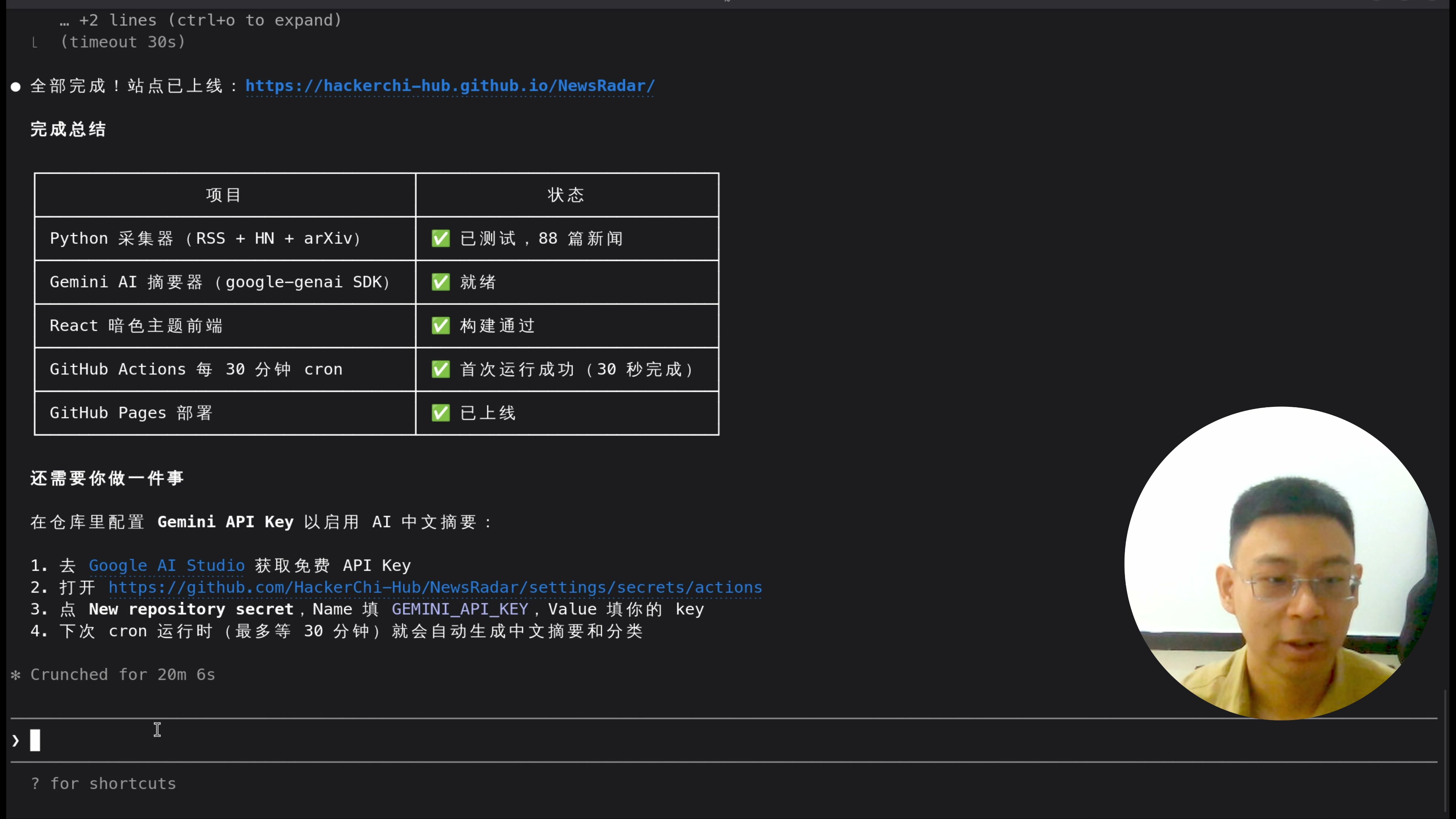
After writing the code, git push was uploaded, GitHub Actions automatically triggered, 88 articles were caught on the first try, and the site went live.
Step 4: Hit a pitfall—API Key exposed
When I connected the Gemini API, I wrote the API Key directly into the code—Claude Code immediately gave me a warning:
⚠️ API keys cannot be submitted plain to GitHub, or they will be detected and disabled by automatic scanning tools.
It then guides me to configure the Key to GitHub Actions Secrets, then inject it through environment variables. If it hadn’t reminded me about this step, I might have pushed it straight up.
Step 5: Enhance functionality
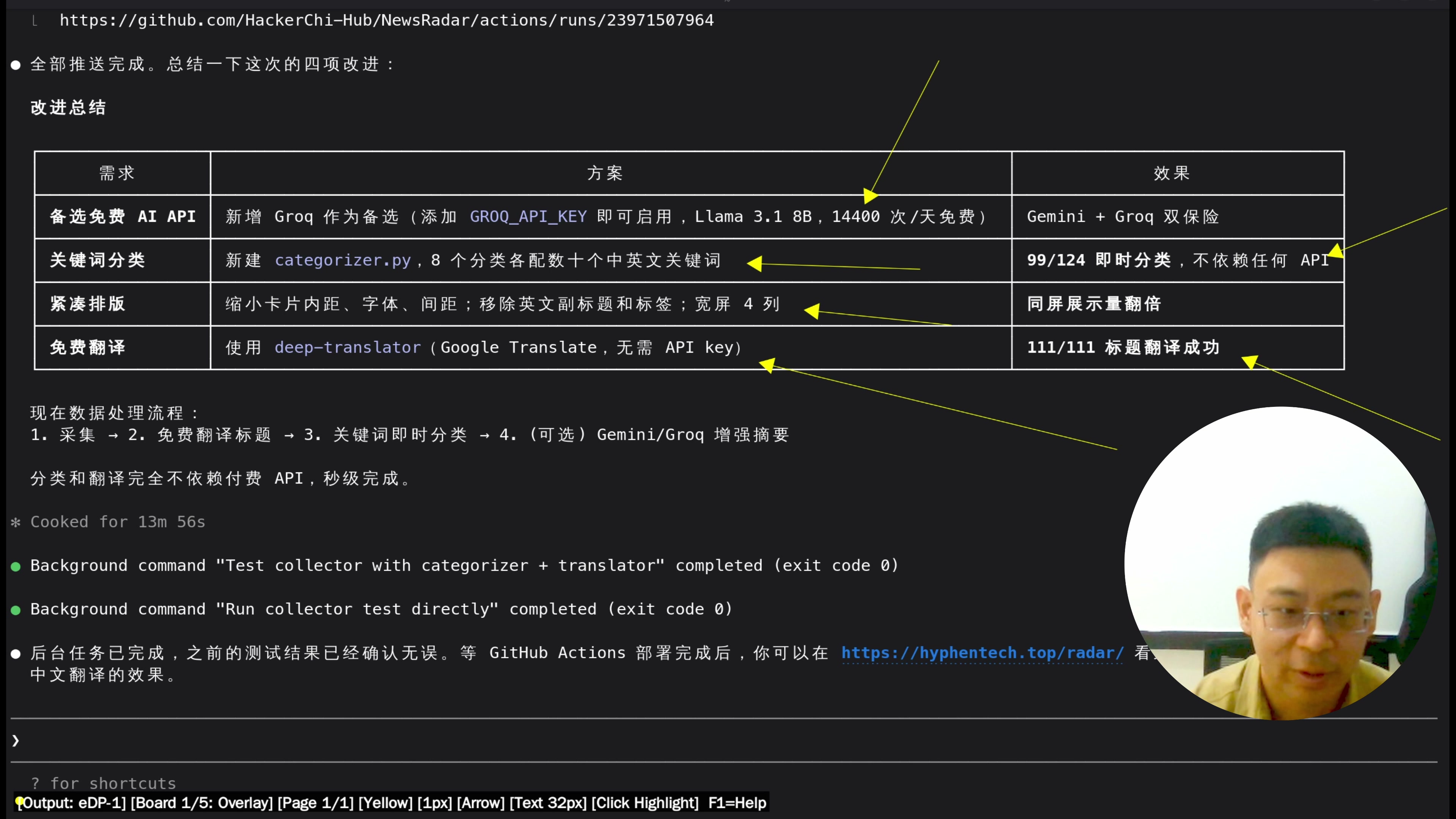
After running the basic version, I continued to add the requirements:
-
Chinese Translation: Automatically translates the title and summary of every English news article
-
Keyword Classification: AI / Open Source / Security / Industry / Research, automatic tagging required
-
Today’s Flash Report: Let AI Pick Out the 10 Most Important Items from 287 Articles to Generate an ‘AI Bulletin’
Each time a requirement is added, Claude Code implements it directly; I only need to accept it.
The final result
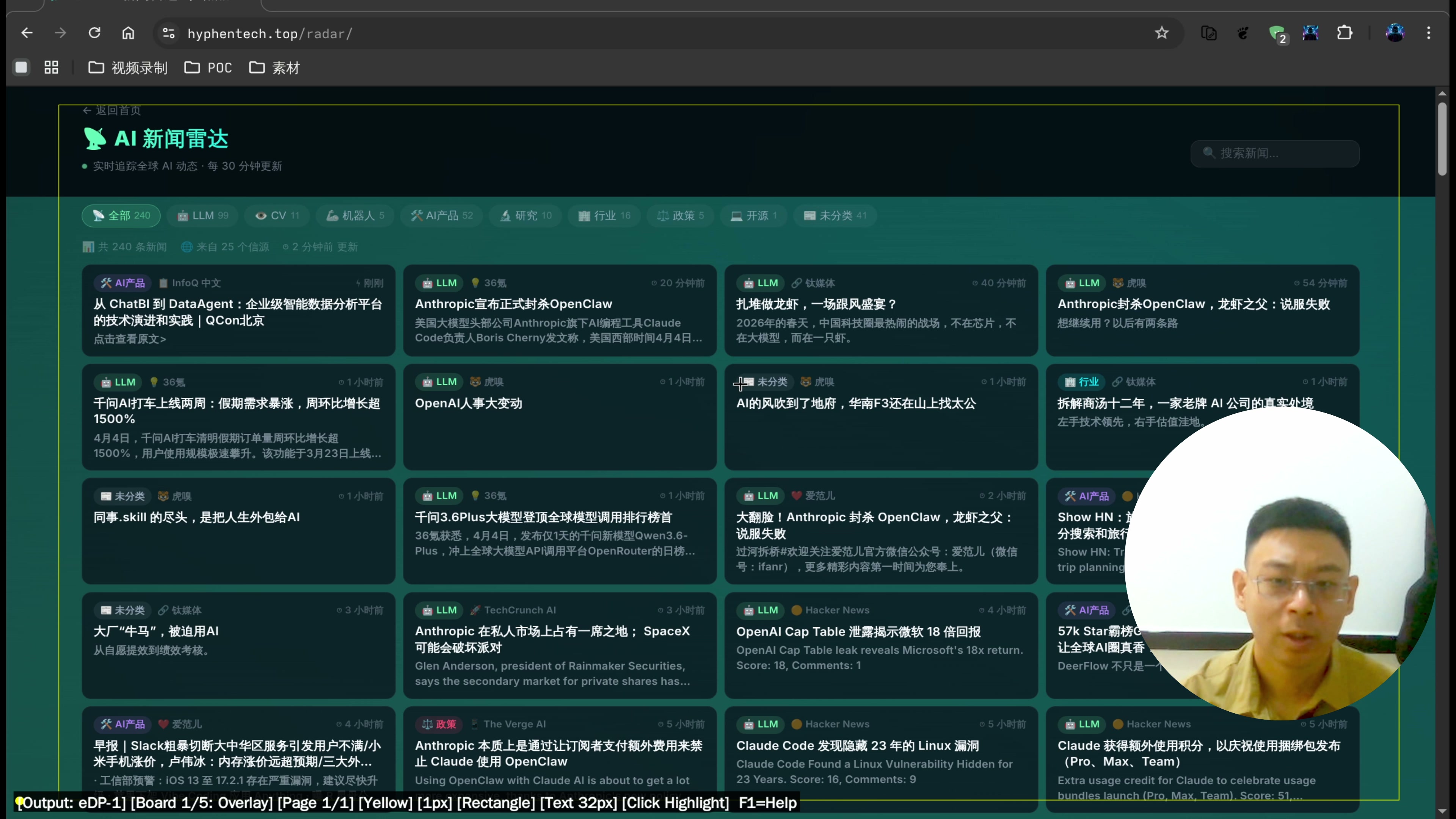
-
287 articles, covering mainstream AI information sources
-
Bilingual summaries in Chinese and English, with clear keyword classification
-
“Today’s 10 Most Important Things” — instantly understand the day’s AI updates
-
The website is live and updates automatically every day
**The whole process: one afternoon + one video. **
A few thoughts
1. The threshold for AI programming is rapidly disappearing
I don’t need to memorize all the API documentation, don’t need to know the yaml syntax of GitHub Actions, or know how to write React components. As long as I can clearly describe the requirements, the rest will be handled with Claude Code.
2. But you still need judgment
API Key exposes this pitfall; if you don’t understand basic security knowledge, Claude Code warns you that you might overlook it. AI can help you, but you need to know whether it’s doing it right.
3. The free quota is sufficient, but there is a limit
Groq’s daily free credit can handle summaries of about 200-300 articles, enough for daily use. If the volume is larger, you need to pay or rotate multiple keys.
Get the source code & the full video
The full video demonstration (including the live coding process of Claude Code) has been released on Bilibili and YouTube.
Source code address: https://github.com/HackerChi-Hub/NewsRadar
If you want to build a news radar for your own field (not necessarily AI, but any direction you focus on), this solution can be fully reused.
If you have any questions, feel free to leave a comment or come directly to the official website to find me.
🧰 Tools I build
I maintain all of these tools myself. Preview builds are clearly labeled; the release pages are the source of truth for downloads, updates and known limits.
Info: HyphenBox Status: Official releases
A radar for free LLM APIs: availability is re-tested continuously, one local interface for all of them, and keys stay on your machine
Info: LocalBrain Status: Official releases
A multimodal MCP toolbox for local models: TTS, Whisper and video generation in one place
Info: ScreenLex Status: Official releases
Learn new words while you watch shows. Free, for Mac and Windows
Info: HyphenScreen Status: Official releases
Screen recording and smart editing in one: a DaVinci-style timeline, automatic redaction and a check of the finished video before export. Free
Quote: HyphenTech Make AI your superpower Local deployment · Free resources · Self-made software https://hyphentech.top
Late nights and burned API credits went in,a cup of tea comes back out — only if you feel like it.
Scan with WeChatPress and hold to save the image, then open it from your album in WeChat Scan

Comments
Loading comments…