
Info: Machine translation This post was machine-translated from the Chinese original. Wording may be rough in places — the Chinese version is authoritative.
Summary Web, cross-origin, local interfaces: 127.0.0.1 blocks external machines, but may not block browsers. HyphenTech · 2026-09-09

Many local AI tools will be installed and say: the service only listens to 127.0.0.1, so it won’t be exposed to the public network, so it’s safe. The first half is usually true, but the second half misses the main character—the browser.
The webpage you visit runs on your own computer, sending requests to localhost, and also from your own computer. The router hasn’t been penetrated, the public port isn’t open, but local services may still receive requests. What the web page can do now isn’t just about listening addresses, but also about CORS, authentication, CSRF, firewalls, and how much permission the local interface itself has.
The localhost is the network reachability, not the complete trust boundary.
🎯 ▍Why AI Tools Are Especially Prone to Crossing This Line
Why are vendors now making local web services? Because browser interfaces are fast and cross-platform, and model downloads, file reading, and tool execution all share a single API, making it easiest to grab access to desktop agents. The problem is, the benefits brought by development efficiency go to vendors and developers, while the cost of losing control of permissions may fall on users’ data and machines.
This does not mean that local web technology is inherently sinful. The real benefit structure is: the sooner a product goes live, the sooner it benefits, while certification, permission splitting, and update maintenance are invisible costs; If release pace only rewards new features and not security boundaries, the parts that no one actively buys will be postponed for later.
🔍 ▍Why a low-risk vulnerability can be executed locally?
Microsoft’s official security bulletin for the WinML CLI, CVE-2026-84452, describes exactly this chain. Since local development servers became widespread, accessing localhost in browsers is no longer a new issue; The change is that today’s AI interfaces have greater power.
The affected version mistakenly allows cross-origin access, so as long as a user opens a malicious webpage, the page script may interact with the localhost interface; If this interface can trigger a high-privilege operation, the result can be remote code execution.
Here, the severity must be written accurately: GitHub’s official rating is Low, not High or Critical. It usually requires users to run local services first and then visit malicious websites.
But “low ratings” and “mechanisms that aren’t worth warning about” are not the same thing—AI tools increasingly cram downloading models, reading files, executing commands, and opening browsers into the same local API, and once permissions stack, the consequences are magnified.
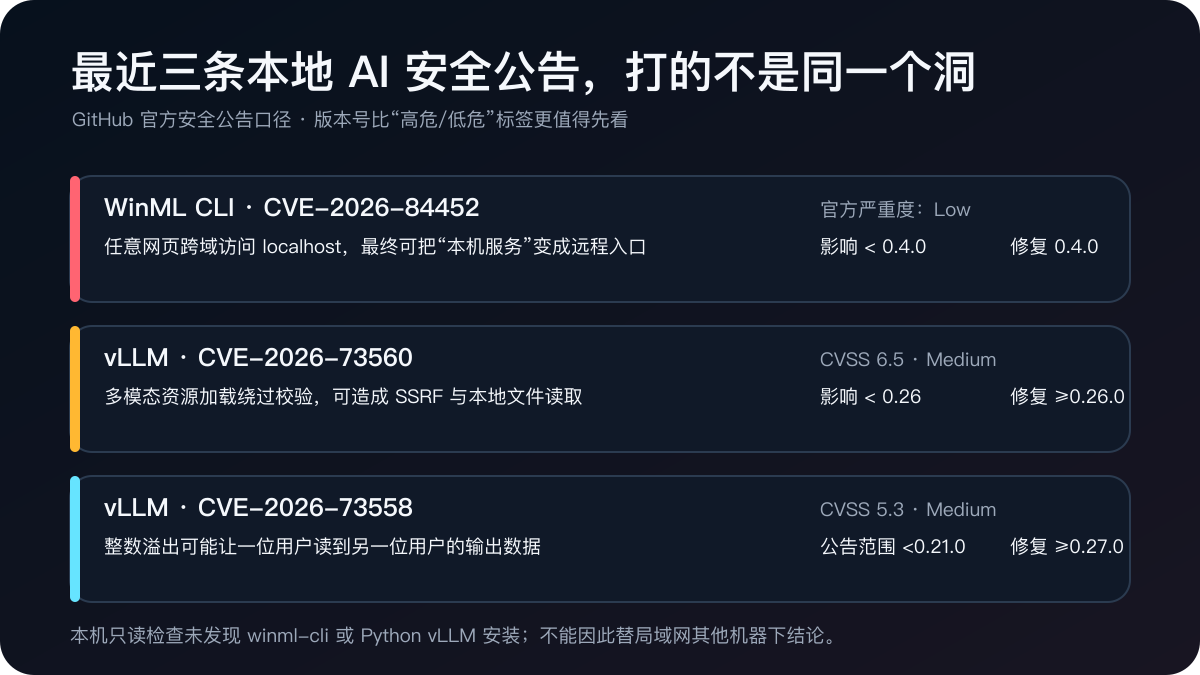
The announcement states that WinML CLI <0.4.0 is affected, and 0.4.0 has been fixed. It was released on August 28 and updated on September 2. The most valuable aspect of this example is not that a product “failed,” but that it sheds light on a common local AI misconception: a web API that seems to only serve itself must be designed with permissions based on real network services.
⚡ ▍I conducted an isolation experiment: No model needed, yet attack paths could be clearly seen
To avoid touching any real AI services, I temporarily activated three isolated ports: 18777 is a fake API that intentionally allows cross-origin permission, 18778 is a fake API that removes cross-origin permissions, and 18779 only displays test pages. Both sides only return a composite JSON, which does not read files, execute commands, or connect models.
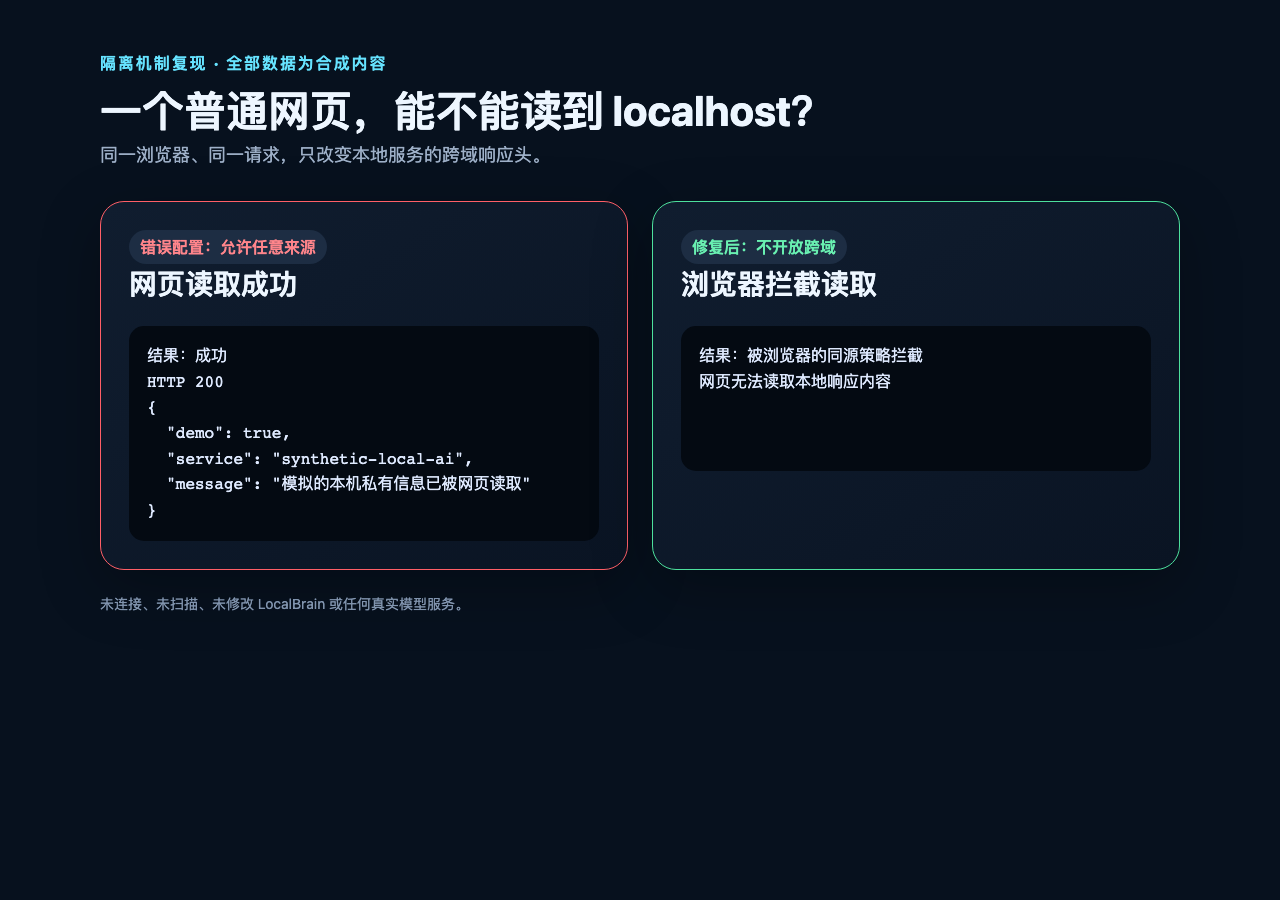
The results are very intuitive. When testing a webpage accessing 18777, the browser can display JSON content even if it has HTTP 200; When the same webpage accesses 18778, the browser’s same-origin policy prevents scripts from reading responses. The difference is not “one port is local, one port is on the public network,” but whether the service has access to read the webpage source.
After the experiment ended, all three temporary services had stopped and the ports were closed. This article does not provide code that can directly attack real products, because understanding mechanisms do not require packaging attack scripts as tutorials.
💰 ▍CORS can block reads, but it’s not a universal firewall
The second set of results just now can easily be misinterpreted as “Turn off CORS and it’s safe.” Last time in the web security community discussing CSRF, we repeatedly reminded us: blocking a browser to read doesn’t necessarily mean the request wasn’t sent. Some simple requests may still reach the service; If an interface can delete files with GET or write operations without authentication or CSRF protection, attackers may not need to see the return value.
Therefore, security design should be layered: CORS only allows explicit trusted Origin; Write operations must be authenticated; Tokens must be short-term, with minimal permission; Check Origin or Referer; Double-check high-risk actions; The ability to actually execute shells, read arbitrary files, or access cloud metadata is best separated from ordinary generative interfaces into different processes and permissions.
🧩 ▍The two vLLM announcements reveal two other boundaries
Recently, there have been two official announcements about vLLM that local deployment users should pay attention to. CVE-2026-73560 is a medium and vulnerable CVSS 6.5, involving SSRF and file read. The affected version <0.26.0 has been fixed since 0.26.0. It reminds us: when the server fetchs URLs for users or loads multimedia or templates, it must restrict protocols, address ranges, and local file access.
CVE-2026-73558 is a cross-user data leak, moderately critical, CVSS 5.3. The announcement metadata states affected <0.21.0 but marks the fixed version as >=0.27.0, with obvious gaps in the version description. A conservative approach is to at least upgrade to 0.27.0 and continue reading the official follow-up notes, rather than speculating that “0.21 to 0.26 will definitely be safe” for the announcement.
🚀 ▍Five things you can do right now
- First, check the version and upgrade: WinML CLI should be at least 0.4.0; vLLM should be upgraded according to the corresponding announcement, and for cross-user leaks, conservatively use at least 0.27.0.
- Check the listening address: 127.0.0.1, especially 0.0.0.0 and LAN IPs, which must have a firewall and authentication.
- Check browser boundaries: do not fill in
*for CORS; Only allow Origins that are truly needed, and add CSRF protection to write operations. - Narrowing local API permissions: Generation interfaces should not naturally have the capability to handle any shell, any file, or any system keychain.
- Turn updates into processes: dependency locking, announcement subscriptions, version counts, and minimal regression testing are as important as model updates.
I performed a read-only check on the current command environment and found no winml-cli commands, nor did I find vllm packets in the current Python environment. But this is not proof of security for the entire machine, all virtual environments, Docker, or LAN devices.
To avoid interrupting ongoing LocalBrain testing, this round did not check its processes, ports, or configurations, nor did these announcements apply directly to LocalBrain.
🧠 ▍Local priority does not automatically eliminate security issues
Local AI is still worth pursuing: less data outdoor, low latency, and offline availability—all tangible advantages. Historically, browser plugins and desktop automation have also undergone a shift from “convenient scripts” to “high-permission software”; Today, models have tools, files, browsers, and system operation capabilities, also shifting from “a weighted file” to “a high-permission service.” The greater the privacy advantage, the less likely permission design can be.
A truly reliable statement isn’t “I only opened localhost, so it’s fine,” but rather: I restricted who could access, restricted what it could do, all high-risk actions had to be authenticated and confirmed, and components remained in the repaired version. 127.0.0.1 is the first door, not the lock for the whole house.
Summary: Remember this article in one sentence External machines usually cannot directly connect to localhost, but web pages in browsers can request from local machines; CORS determines whether web pages can read cross-origin responses but cannot replace authentication, CSRF protection, or least privileges. Official announcements must be written according to original severity and version boundaries; This test was completely isolated, with no access to any real AI services, and temporary ports closed.
Tip Official Safety Announcement WinML CLI / CVE-2026-84452: https://github.com/microsoft/winml-cli/security/advisories/GHSA-96p9-rh4f-92cf vLLM SSRF / CVE-2026-73560: https://github.com/vllm-project/vllm/security/advisories/GHSA-4hhp-h66f-j5j7 vLLM Data Leak / CVE-2026-73558:https://github.com/vllm-project/vllm/security/advisories/GHSA-7m6h-x95x-82q5
🧰 Tools I build
I maintain all of these tools myself. Preview builds are clearly labeled; the release pages are the source of truth for downloads, updates and known limits.
Info: HyphenBox Status: Official releases
A radar for free LLM APIs: availability is re-tested continuously, one local interface for all of them, and keys stay on your machine
Info: LocalBrain Status: Official releases
A multimodal MCP toolbox for local models: TTS, Whisper and video generation in one place
Info: ScreenLex Status: Official releases
Learn new words while you watch shows. Free, for Mac and Windows
Info: HyphenScreen Status: Official releases
Screen recording and smart editing in one: a DaVinci-style timeline, automatic redaction and a check of the finished video before export. Free
Quote: HyphenTech Make AI your superpower Local deployment · Free resources · Self-made software https://hyphentech.top
Late nights and burned API credits went in,a cup of tea comes back out — only if you feel like it.
Scan with WeChatPress and hold to save the image, then open it from your album in WeChat Scan

Comments
Loading comments…