Info: Machine translation This post was machine-translated from the Chinese original. Wording may be rough in places — the Chinese version is authoritative.
No need to try every free API one by one: Windows and Mac automatically switch models

Update on 2026-10-02: HyphenBox has officially launched, starting from 1.0.0, with installation packages for Mac, Windows, and Linux all publicly available. Download the latest official version.
The main body of this article retains the development record dated 2026-09-04: screenshots, package size, and functional boundaries of 0.4.58 / 0.4.59 all belong to the version at that time. Currently, update lists for the three platforms already include the updater signature; Commercial code signing and updating user signature are not the same thing.
Yesterday, I installed HyphenBox from scratch on my Windows machine. The first thing I did after installing was click “One-Click Verification”—43 routes, but the number dropped by 1, and then it didn’t move.
First, the conclusion at the time: it wasn’t that the verification was broken; it was my own batch verification that stopped the entire batch when it hit the first throttle rate. After the fix, I also reviewed the current status of the three systems: **As of 2026-09-04, all three systems had preview installation packages, but only macOS had in-app automatic updates. **The troubleshooting process is kept below; The official version status is shown in the update notes above.
▍It doesn’t solve “collecting,” but four repetitive actions
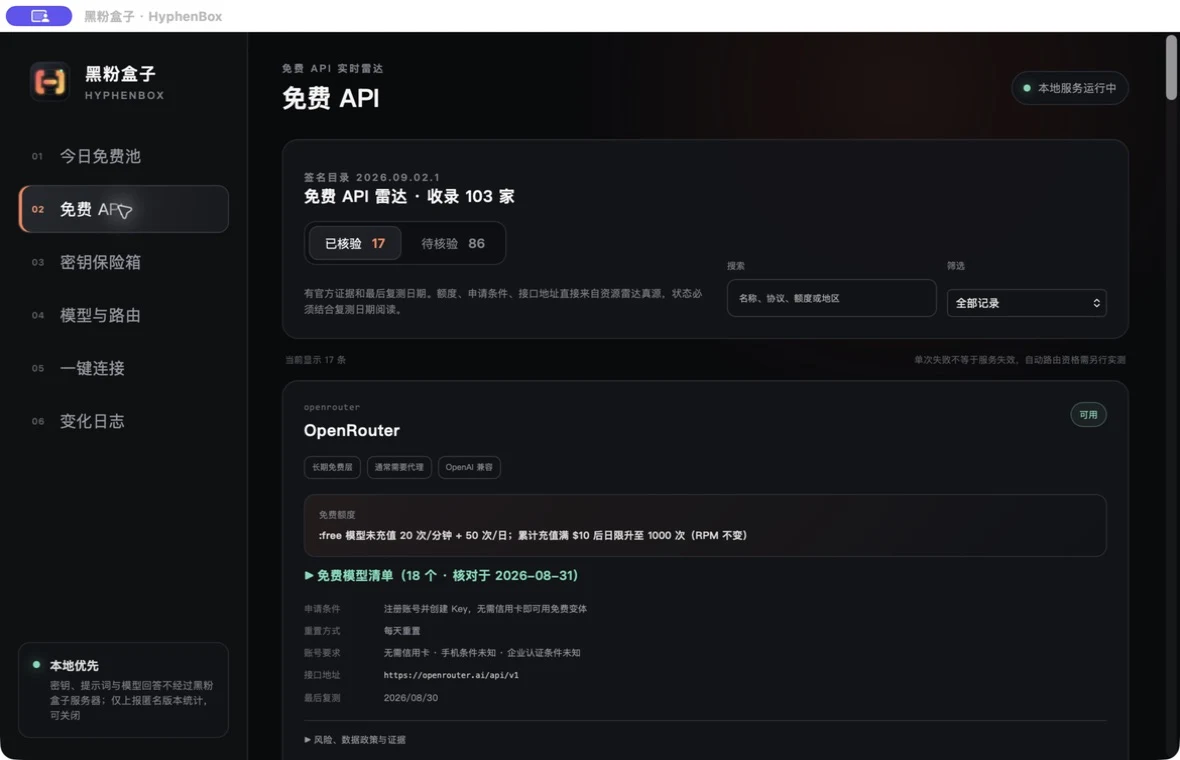
HyphenBox does a very narrow approach: you go to various platforms to apply for free API Keys, which store these keys in the system’s secure storage, then open an address http://127.0.0.1:17688/v1 locally on your machine. You enter this address into Cursor, Cline, or OpenCode, and it is responsible for selecting which providers and models are still usable.
Keys are not uploaded, prompts and model responses are directly connected from your computer to the provider, without any intermediary. This is the premise of the entire solution. It really eliminates four repetitive actions: checking free conditions, saving Keys, testing each test item by entry, and writing available models into the client.
▍What are the respective conditions of the three systems?
Let’s start with the facts. This is the installation package record from the 2026-09-04 preview version, and the package size is not the 1.0.0 version:
| System | Installation package | Volume |
|---|---|---|
| macOS 13+ | HyphenBox_x.y.z_universal.dmg |
9.8 MB |
| Windows 10/11 x64 | HyphenBox_x.y.z_x64-setup.exe |
3.5 MB |
| Windows 10/11 x64 | HyphenBox_x.y.z_x64_en-US.msi |
4.7 MB |
| Linux x64 | HyphenBox_x.y.z_amd64.AppImage |
76.9 MB |
| Linux x64 | HyphenBox_x.y.z_amd64.deb |
5.5 MB |
| Linux x64 | HyphenBox-x.y.z-1.x86_64.rpm |
5.5 MB |
The macOS package is universal, with Apple Silicon and Intel sharing one portion. AppImage is obviously bulky because it packs the runtime inside, and that’s where the cost of no installation is required.
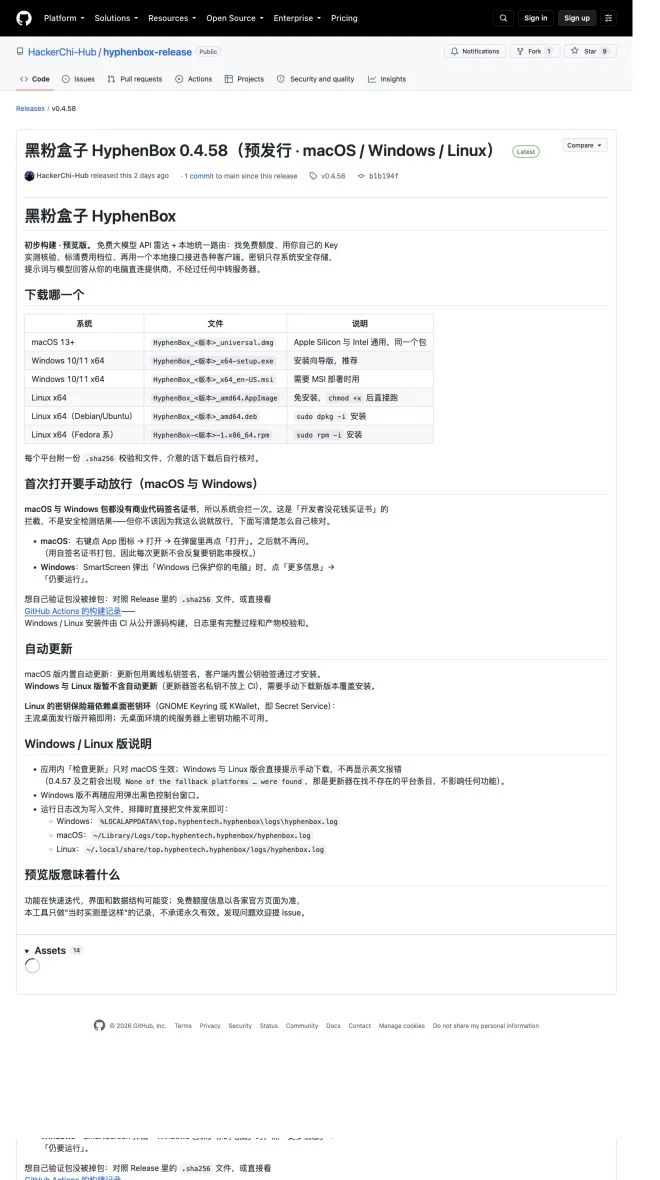
The three platform differences recorded at that time are as follows: This is not the current official version feature comparison table:
| Ability | macOS | Windows | Linux |
|---|---|---|---|
| Automatic updates within the app | Yes | None | None |
| Key storage | Keychain | Credential Manager | Desktop keychain |
| First time opening | Right-click → open and release once | SmartScreen Tap ‘Still Run’ | Just run away |
Linux slot needs a special note: The key safe depends on the Secret Service, which is GNOME Keyring or KWallet. Mainstream desktop distributions come with it right out of the box; But if you want to run it on a pure server without a desktop environment, the key function is unavailable. It’s not that they didn’t do it, it’s that this path was never feasible.
I tested the Windows-side credential storage in person: after saving two keys, the credential manager added two generic credentials, with service names top.hyphentech.hyphenbox and references in the database matching one-to-one. The local service also confirmed it only listened for loopbacks—the listener table only had 127.0.0.1:17688, so I accessed from the same machine’s LAN address 192.168.0.151 but couldn’t connect; Request /v1/models without a token returned 401.
▍Why was macOS the only one with automatic updates at the time?
The answer to this question is a bit roundabout, but it determines the pace of the release for a long time afterward.
Update packages must be signed with an offline private key, and the client must use the built-in public key to sign before installation. The rule for this private key is not CI—putting it in is like handing it over to a machine I don’t control. Tauri officially does not support cross-compiling Windows packages from macOS; Windows installation packages can only be run on Windows machines.
The distribution process at the time did not connect these two steps: signing the private key on the Mac, Windows packages on Windows machines, and Windows preview packages issued by CI had no updater signature, so they had to be manually overwritten and installed. The later approach was to bring the CI product back to Mac for signing, without needing to hand over the private key to the CI or move it to Windows.
**2026-10-02 Update: The three-platform update list for version 1.0.0 already includes signatures, but Mac still retains the right to sign. **Having complete checklists and signatures does not mean every machine has completed the upgrade test; installation and upgrade issues are still being collected in official iterations.
By the way, here’s a pitfall for those who also use Tauri: Tauri v2 doesn’t have a separate update package on Windows. I originally searched for .nsis.zip based on the impression of v1, but couldn’t find it; After running the package once, I saw that it directly signed the NSIS installer itself and generated ..._x64-setup.exe.sig, and the address in the update list pointed to that setup.exe. You can’t tell this just by looking at the documentation; you really have to run it once.
On the client side, I made a quick design change. Originally, I wrote ‘Which platforms support automatic updates’ in the code, but now it’s changed to downgrade by update list: If the list doesn’t have the current platform, it reverts to the ‘manual download’ section without errors; One day, Windows is added to the list, and a single line of code on the client takes effect automatically without any changes.
This scenario played out as early as 0.4.57: that version of the Windows homepage had a line of English red text None of the fallback platforms … were found, but it was just the updater looking for a platform entry in the list that didn’t exist. No functions were broken, but users saw the red text and thought the program was useless. The solution was to fix the platform as macOS—the red text was gone, leaving a sequential trap: whether you change the list or code first, it would be mistaken again.
▍0.4.59 Three Things Completed During Development (History Records)
The following three items are notes of changes made during the development of 0.4.59. They are kept to clarify the functional logic; If you download now, please select 1.0.0 or later official versions. Do not treat this section as a preview of the current version.
**First: Free models should be listed at the very top, and clearly explain why they are free. **
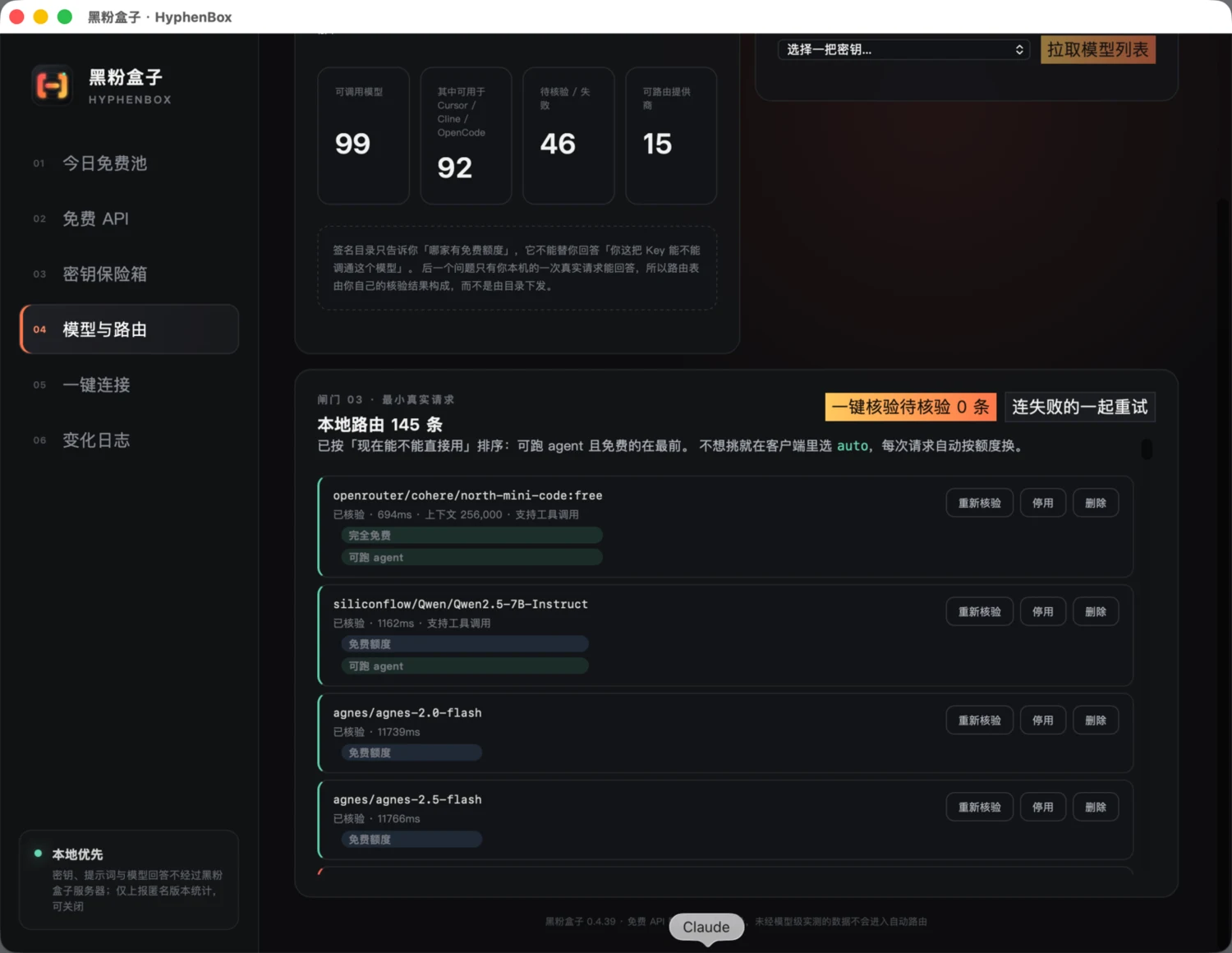
Previously, when pulling model lists, you only looked at the prices provided by the provider, but the problem was that most platforms’ interfaces didn’t return price fields at all. As a result, the 16 free models on Silicon Flow, which had been checked in the directory list, were all displayed as “price unmarked,” mixed alphabetically among hundreds of IDs, and labeled “free quota” in the routing table—the software was fighting against itself.
Now, the judgment is unified into three criteria, with the interface written separately:
- Whole-store free tier: This company’s free tier covers all models, such as Groq;
- Priced $0: The provider has marked zero price in the interface, such as OpenRouter with the
:freeextension; - Checked the Table of Contents and Checklist: I have checked the official document, the source information, and the check date item by item.
The three types of credibility are different, so they are not merged into a vague “free” statement. None of these endorsements still only label “price not specified”—not finding the price does not mean it’s free; writing “not specified” as “free” means users follow the choice and end up hitting their own wallet.
The list is sorted by free, unpriced, and paid categories, with a “See only free” switch and “One-click add all free.” Fixed an old bug: the original batch addition only used the 60 items displayed on the screen, and the excess was silently discarded, making users think they’d added everything.
**Second item: One-click verification of collision flow limiting will no longer be stopped in batch. **
This is the truth behind the ‘numbers not moving’ at the beginning. Originally, when you encountered the first 429, you got break, and didn’t touch any of the other 30-plus bars.
After the change, the response was: for rate limiting as per the provider’s Retry-After, try the same route again, then continue; For providers returning to 429, the rate is automatically slowed down to about 20 RPM; Only after the same provider still limits rate three times in a row does it give up on the remaining route, and other providers keep running.
Here’s an earlier lesson worth mentioning. In version 0.4.41, I used the same state string for “Purpose does not support automatic verification” and “Hit rate limit,” but the first image model in the queue was treated as rate limiting, the entire batch was stopped on the spot, and the subsequent queue vector models never got their turn. **One string carries two semantics, and that’s how it works. **The first thing in this rate limiting change is to completely separate the two.
The “give up after three consecutive times” limit is not set on a whim. OpenRouter’s official documentation clearly states: :free Model 20 RPM; When your account has less than $10 cumulatively recharged, there are only 50 requests per day, and after $10, you get 1,000 requests. I have 24 free OpenRouter routes, each verifying can send up to two probes—if there’s no limit, one round of batch verification can burn the entire daily quota on 429. **Throttling requests also count by count. **
**Third: Place the model ID at the front of the model name in the client. **
It turned out that the name written into the OpenCode configuration was “Provider/Model | Fee Profile,” which looked quite comprehensive. When I actually opened the dropdown box, I found that it only displayed the first twenty or so characters, with dozens of lines all “openrouter/…”—neither the model name nor the fee tier were visible. Now it has been changed to “Model ID | Tier · Provider.”
This change has no technical content, but it’s the one that should be done first in this revision—** when designing, you look at the data structure; when using it, you look at the limited-width dropdown box. **
The same location was previously messed up once: 0.4.48 I followed the instinct of “don’t write fields you don’t know,” so I only wrote context to the model specification without specifying the output limit. OpenCode’s specification requires both values to exist simultaneously, so the entire configuration is deemed illegal, and users can’t even select the model. When writing someone else’s configuration file, you have to follow their rules and not skip fields based on your own intuition.
▍Unfinished Items and Usage Boundaries at the Time
The following are the limitations recorded in the original text; Rate limiting wait is implemented at the time and does not constitute a specific test of the current version:
- **There’s another experience gap in the rate limiting section. **Now when you hit a rate limit, you have to wait for the upstream time, up to 60 seconds. In real scenarios, OpenRouter gives you 60 seconds, so the button says ‘Rate limit, wait 60 seconds before trying’ and then wait a minute. The correct approach is to skip directly, suspend this provider, verify with another provider, and then add it later—this hasn’t been written yet.
- **None of the three systems have commercial code signing. **macOS uses self-signed certificates, while Windows doesn’t sign at all, so the system blocks both sides the first time you open them. This is a ‘no paid certificate’ interception, not a security check result. But you shouldn’t let it go just because I said that—every package includes
.sha256, so check it yourself. - **The free quota will change. **Each free model in the directory has an official source and verification date, which is more important than the list itself. There’s another specific pitfall: when the account balance for Silicon Mobility reaches zero, even models marked as free will be rejected, returning insufficient balance. This only happens when you actually make one request, so the software insists ‘You must run it once to count.’
▍Who makes money on this chain
The flow of money in the free API business is actually not complicated.
Platforms offer free quotas to attract new users and capture entry points. Once you move your workflow over and fill in keys into a dozen clients, the migration costs speak for them. Aggregators earn a pay-as-you-go commission, so they have incentives to make you call more and worry less—you won’t see aggregators actively remind you, “Just make good use of free quotas.”
The ones truly silent are those who design free quotas as a funnel: **No one has the motivation to tell you which jobs actually don’t require a paid model. **This is also my motivation for making this software—not to save money for anyone, but to make the question of ‘which works and whether to spend money now’ stop relying on people to try one by one.
And HyphenBox doesn’t make money from it itself: it doesn’t touch your key, doesn’t do remediation, and has no pay-as-you-go slot to plug in. The trade-off is that all validation costs are tied to your own quota—each verification is a real request, and you’re spending your free quota. I think this exchange is worthwhile, but it really is an exchange.
▍Download and Get Started
| Your system | Download which |
|---|---|
| macOS 13+ | universal.dmg, Apple Silicon and Intel are universal |
| Windows 10/11 | x64-setup.exe (Recommended), use .msi when MSI deployment is needed |
| Linux desktop | AppImage No installation required; Debian/Ubuntu uses .deb, Fedora uses .rpm |
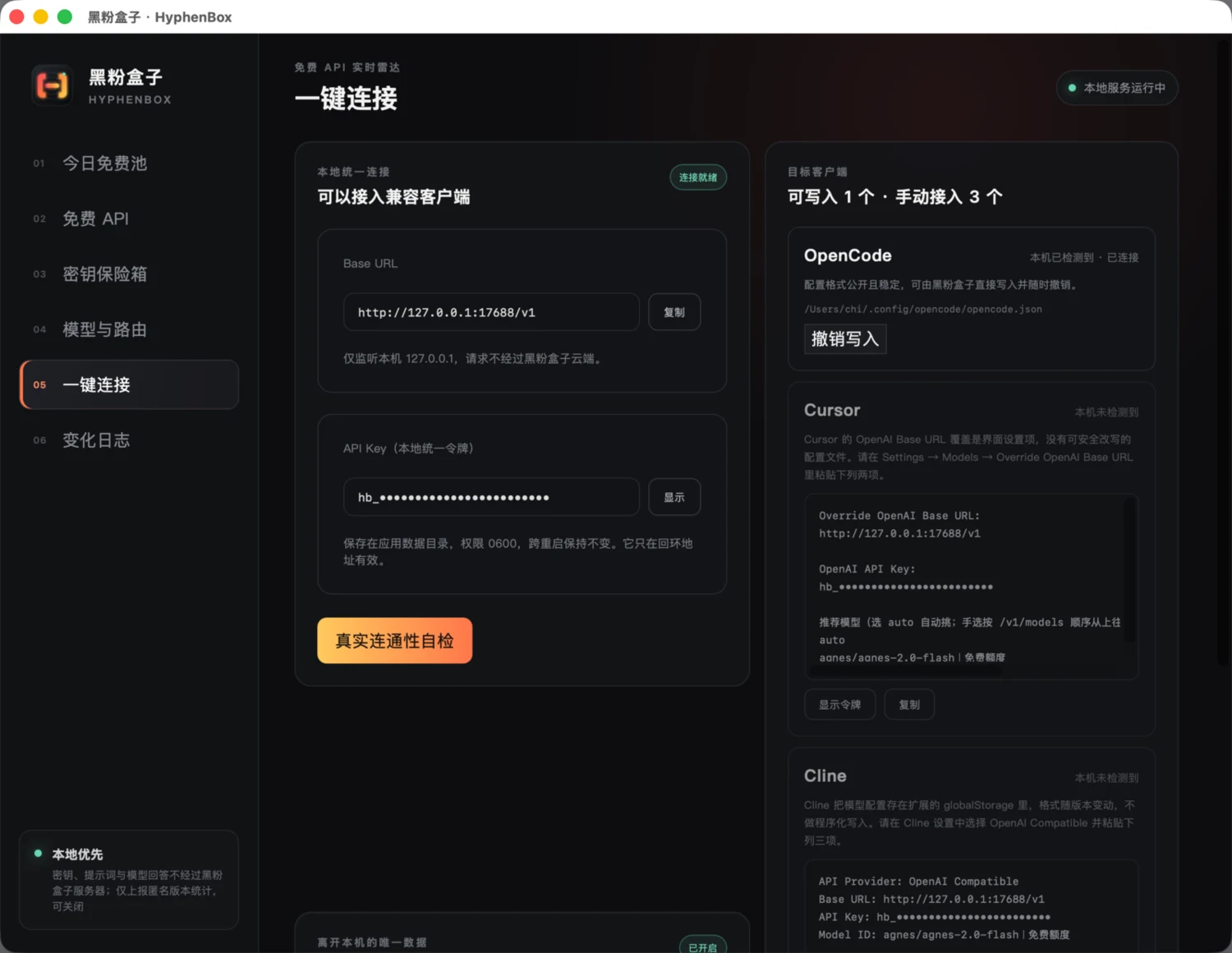
The four steps after installation:
- Go to any platform and apply for a free Key, enter it into the ‘Key Safe’;
- Go to ‘Models & Routing’ to pull up the model list, check ‘Only watch for free’, and click ‘One-click to add all for free’;
- Click ‘One-Click Verification’ and wait for it to run through each item one by one—it will slow down automatically when you hit the flow limit, so don’t worry;
- Go to ‘One-Click Connect’ and enter the address and token into your client.
If you just want to use it without being picky, select auto in the client, and each time you request it, it will change based on your quota and tool support.
The log is in these three locations. If you encounter a problem, just send the file directly:
- Windows:
%LOCALAPPDATA%\top.hyphentech.hyphenbox\logs\hyphenbox.log - macOS:
~/Library/Logs/top.hyphentech.hyphenbox/hyphenbox.log - Linux:
~/.local/share/top.hyphentech.hyphenbox/logs/hyphenbox.log
Back to the initial “numbers don’t move” problem: it does move now. But what’s even more worth mentioning is that this bug only gets exposed when the software is installed on a real machine and the real key is pressed once—on my own developer, the routing table only has two or three entries, and it never hits the throttle limit.
HyphenTech self-developed software
| Products | In a word | Status |
|---|---|---|
| HyphenBox | Free large model API radar + local unified routing | Official Updates (from version 1.0.0) |
| LocalBrain | Turn your computer into a private AI box: manage transcription/voiceover/raw images/video/MCP all in one place | Officially updated |
| ScreenLex ScreenLex | Local movie subtitles become a review English vocabulary, fully offline | Officially updated |
- HyphenBox: https://github.com/HackerChi-Hub/hyphenbox-release/releases
- LocalBrain: https://github.com/HackerChi-Hub/localbrain-releases/releases
- ScreenLex ScreenLex: https://github.com/HackerChi-Hub/screenlex-download/releases
🧰 Tools I build
I maintain all of these tools myself. Preview builds are clearly labeled; the release pages are the source of truth for downloads, updates and known limits.
Info: HyphenBox Status: Official releases
A radar for free LLM APIs: availability is re-tested continuously, one local interface for all of them, and keys stay on your machine
Info: LocalBrain Status: Official releases
A multimodal MCP toolbox for local models: TTS, Whisper and video generation in one place
Info: ScreenLex Status: Official releases
Learn new words while you watch shows. Free, for Mac and Windows
Info: HyphenScreen Status: Official releases
Screen recording and smart editing in one: a DaVinci-style timeline, automatic redaction and a check of the finished video before export. Free
Quote: HyphenTech Make AI your superpower Local deployment · Free resources · Self-made software https://hyphentech.top
Late nights and burned API credits went in,a cup of tea comes back out — only if you feel like it.
Scan with WeChatPress and hold to save the image, then open it from your album in WeChat Scan

Comments
Loading comments…