
Info: Machine translation This post was machine-translated from the Chinese original. Wording may be rough in places — the Chinese version is authoritative.
Note This article was first published on the HyphenTech official WeChat account
Completely free: Get access to 103 large model APIs for free
Update on 2026-10-02: HyphenBox has officially launched, starting from 1.0.0, with installation packages for Mac, Windows, and Linux all publicly available. The software is free to download, with free amounts subject to official conditions and your actual account calls.
The following screenshots and test records are from early v0.4.42, directory 2026.08.30.9, not the latest statistics. Candidate endpoints returning authentication prompts do not mean the request was successfully generated.
Note HyphenTech
Note In short: HyphenBox collects the free large model APIs scattered online into a local interface. You use the key you apply for, which verifies whether the model works, then converts it into an address and enters it into Cursor, Cline, or OpenCode. Early directory included 103 companies; Endpoint detection on candidate platforms only provides application leads; whether answers can actually be generated still requires verification with your own Key.
▍There are actually many free APIs, but the challenge is “which ones are still usable now?”
Anyone wanting to get a free large model API has done the same thing: search for a free list, click in one by one to apply, only to find half the links are already dead, the remaining half have long been changed, and the keys you finally got get get errors when entering them into the client—either they don’t support tool calls or the context doesn’t match. After two or three hours of all this hassle, very few are actually usable.
The problem isn’t the lack of free resources, but that no one keeps verifying for you. A list is something someone compiled on a certain day and then stops working; And free quotas do change.
▍What it does: Stores the free pool into a local interface
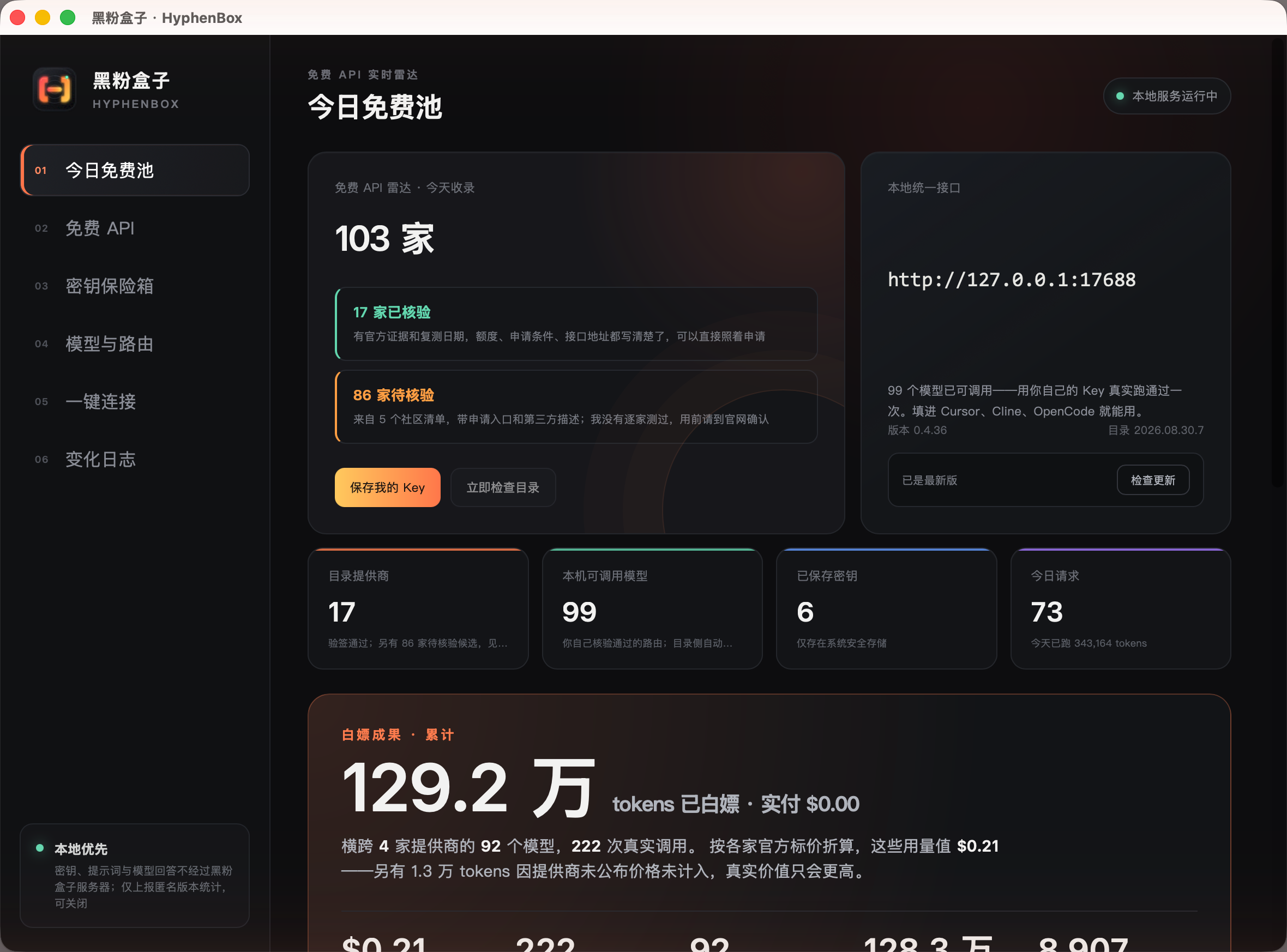
After installation, you’ll see two numbers: 17 verified and 86 pending verification. The verified batch has official evidence and the final retest date, with the quota, application requirements, and interface address all clearly written, so you can apply directly.
▍Each company’s credit limit, threshold, and address are all written out in detail
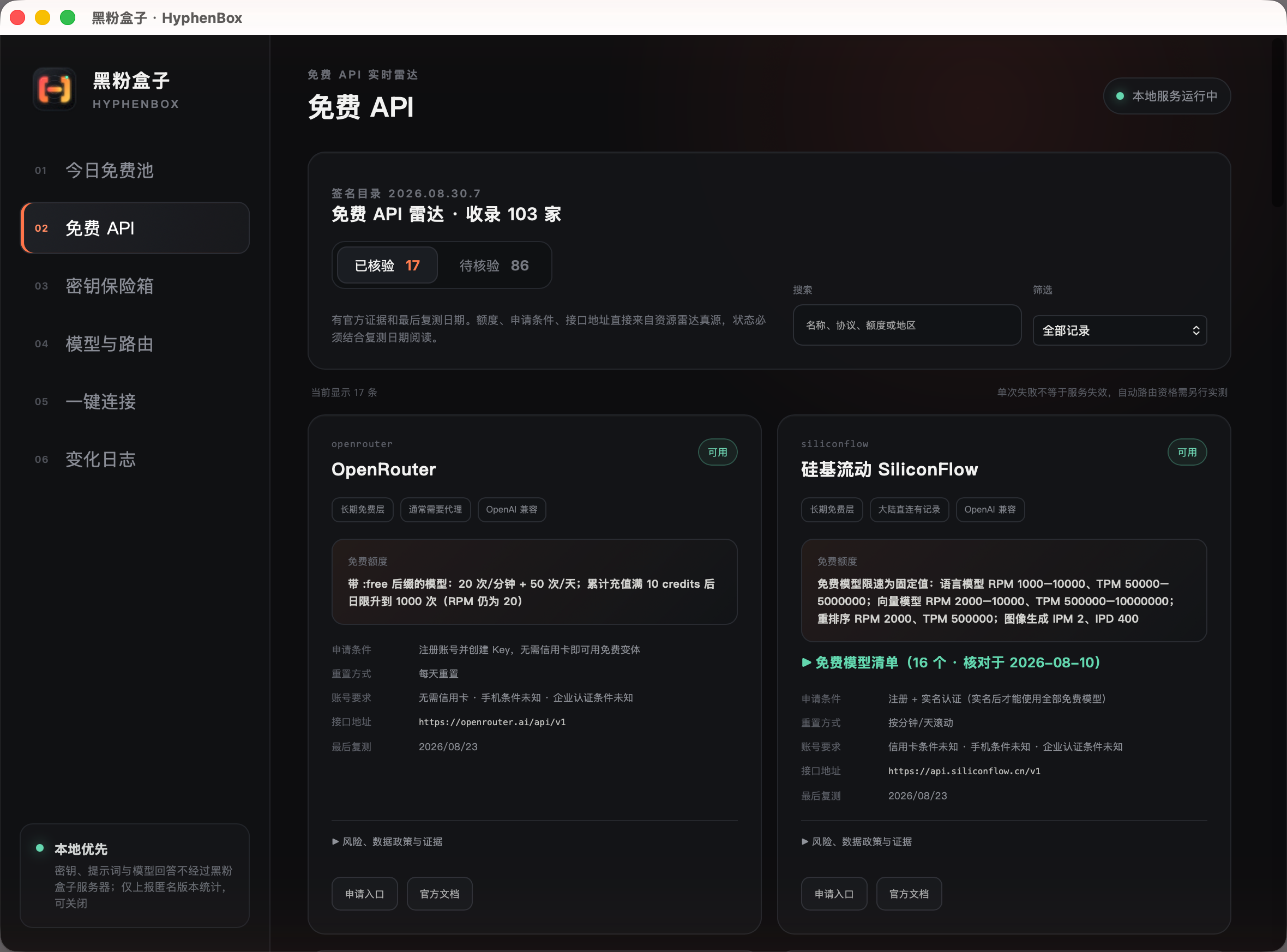
This page is the one I most want people to see first. It’s not the vague phrase “a certain company has a free quota,” but specifically: models with the :free suffix can do 20 times per minute, 50 times a day; Do you need a credit card; Do you need real-name realization? Does the limit reset daily or roll by minute? These are exactly the information that determines whether you should spend ten minutes registering.
This version takes it a step further: the cards can directly expand the free model list. For example, the official free L0 model for silicon-based mobile has 16 models—dialogue, inference, OCR, translation, vector, image, and voice—all listed, each with official speed limit (RPM/TPM). Each item has a verification date: the free file can change at any time, and the date is more important than the list itself. Currently, the list contains 22 items, only accepting two sources—official documentation pages or actual references I have used.
▍Early candidate records: Endpoint survival does not mean true callability
There are still many platforms on the community list, and I can’t apply for a Key to try each one. But without a Key, three things can be certain: is the domain still alive? Is there an OpenAI agreement? Is it just one Key needed?
| Conclusions from the actual test | The number of households | What does it mean to you? |
|---|---|---|
| Endpoint survival + OpenAI protocol + just one key away | 68 companies | It’s worth applying on the official website |
| No interface address can be found in public sources | 15 companies | Only a name, temporarily unusable |
| The path is wrong | 12 companies | Addresses expired or redesigned |
| but could not connect up | 6 companies | Timeout or domain name resolution failure |
| It can connect but doesn’t mention the OpenAI agreement | 1 | You need to write a dedicated adapter |
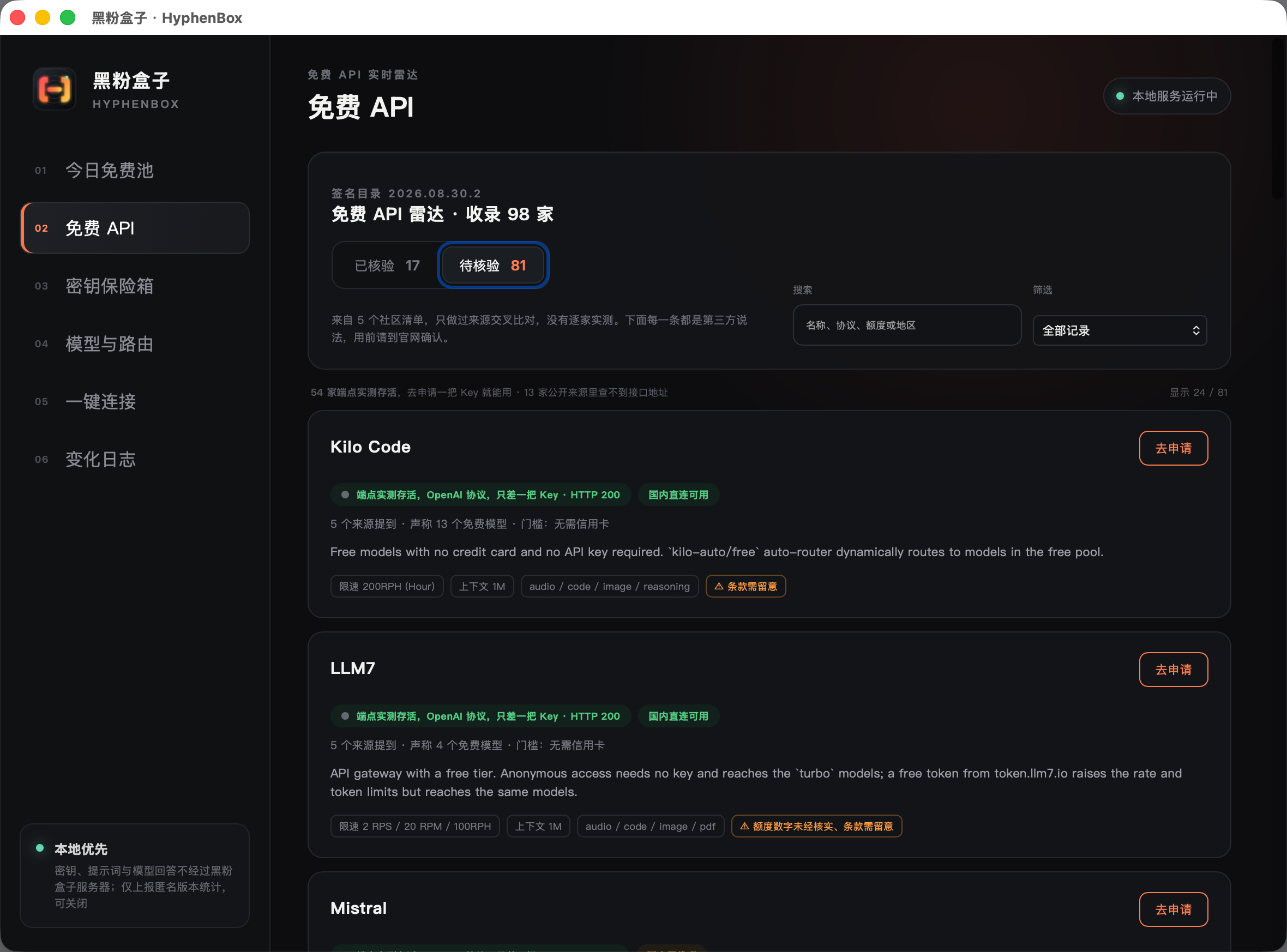
Note There’s another piece of information that’s especially useful for domestic users: this batch of tests is running every day on a Raspberry Pi, and it’s already on the domestic network. So you get the ‘proxy or not’ issue—this round, 51 domestic direct connections are available, 30 require proxies; Of the 68 available, only 3 require proxies.
▍Your Key is only stored on your own computer
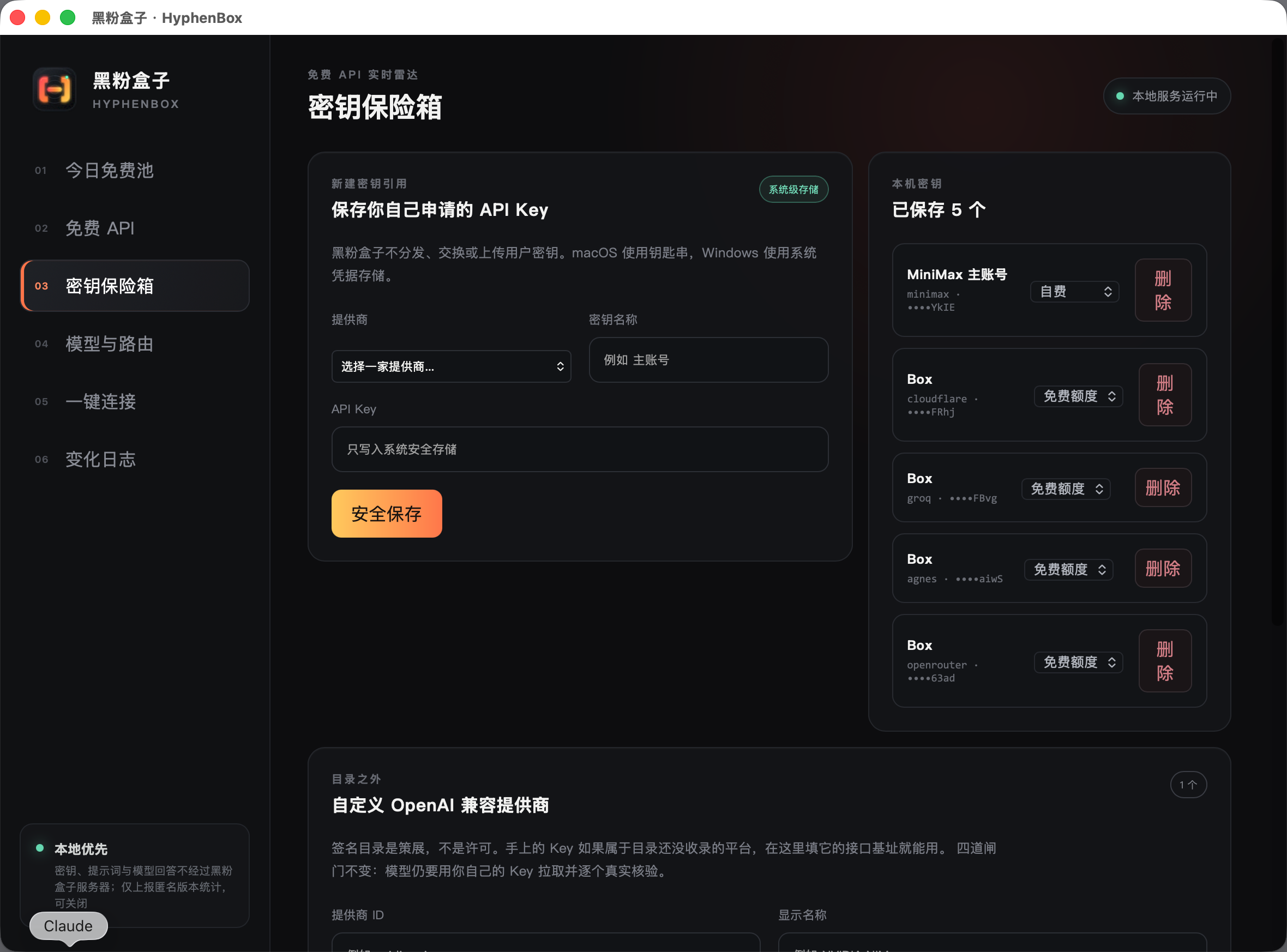
I want to make this clear: HyphenBox does not distribute, exchange, or upload anyone’s Keys. The keys you request are written into the macOS keychain, and prompts and model answers do not go through my server—it’s just a forwarding program running on your computer.
Platforms not included in the directory can also be used. At the bottom of the same page, enter the interface address and also enter the Key. It will go through “Save address → Save Key→ pull model list → verify the first few,” so you don’t have to jump back and forth between pages.
Note Here, the free Key only refers to proof you obtain from official channels. Leaking keys, sharing accounts, rotating key pools, circumventing quota transfer stations—none of these are included or tested.
▍Only models that have passed the actual run once will appear in the list
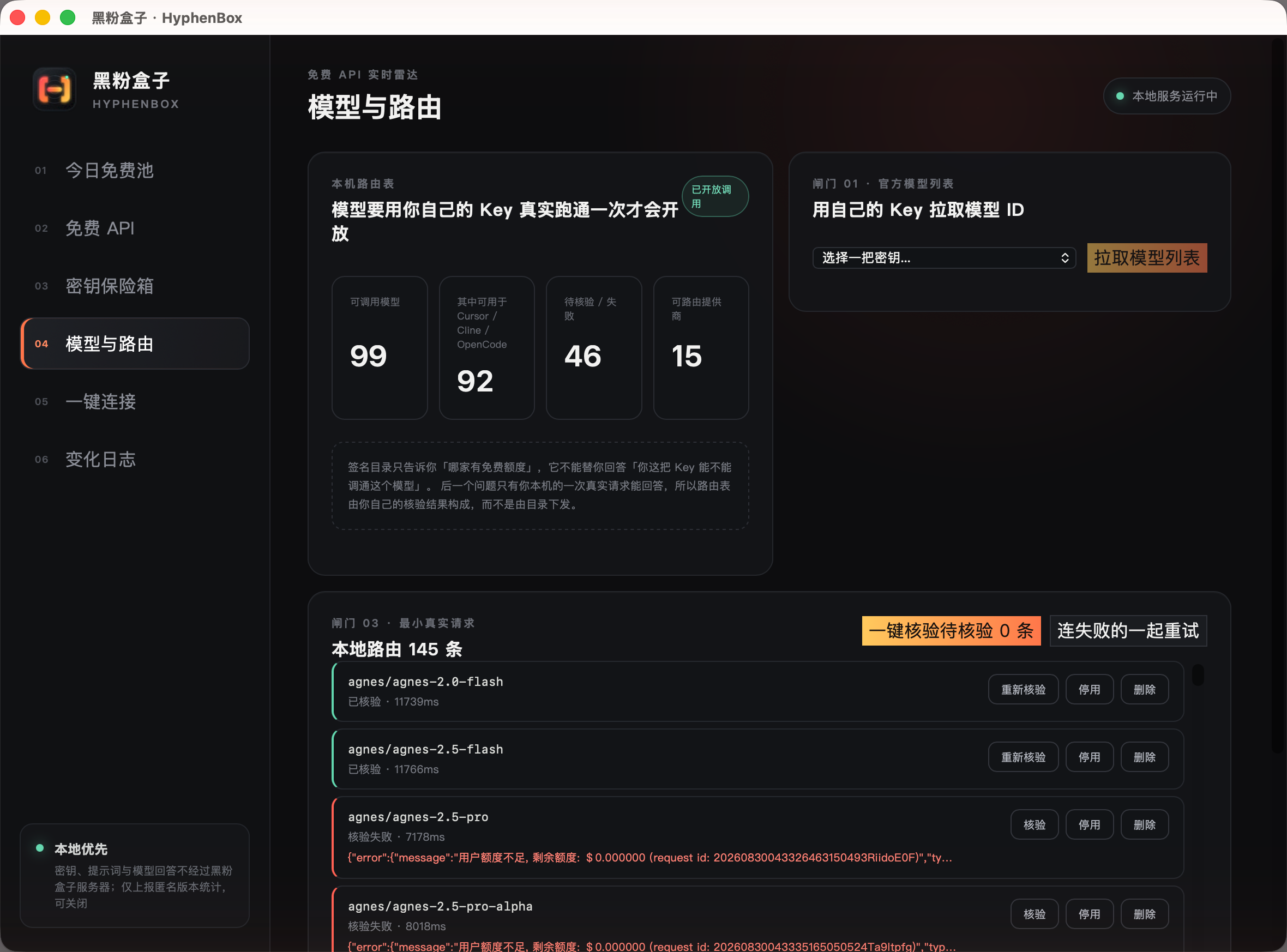
Pulling to the model list doesn’t mean it’s usable. So each model needs to use your own Key to send a request once, and only after passing can you enter the local interface. At this step, note two things: how big the context is, and whether tool calls are supported.
The second item is especially important. Clients like Cursor, Cline, and OpenCode always bring tools with their requests; if the model doesn’t support it, the first sentence fails. Out of 99 available models on my machine, 81 support tools—listed directly in the list so you don’t have to try them one by one.
▍One-click access to Cursor, Cline, OpenCode
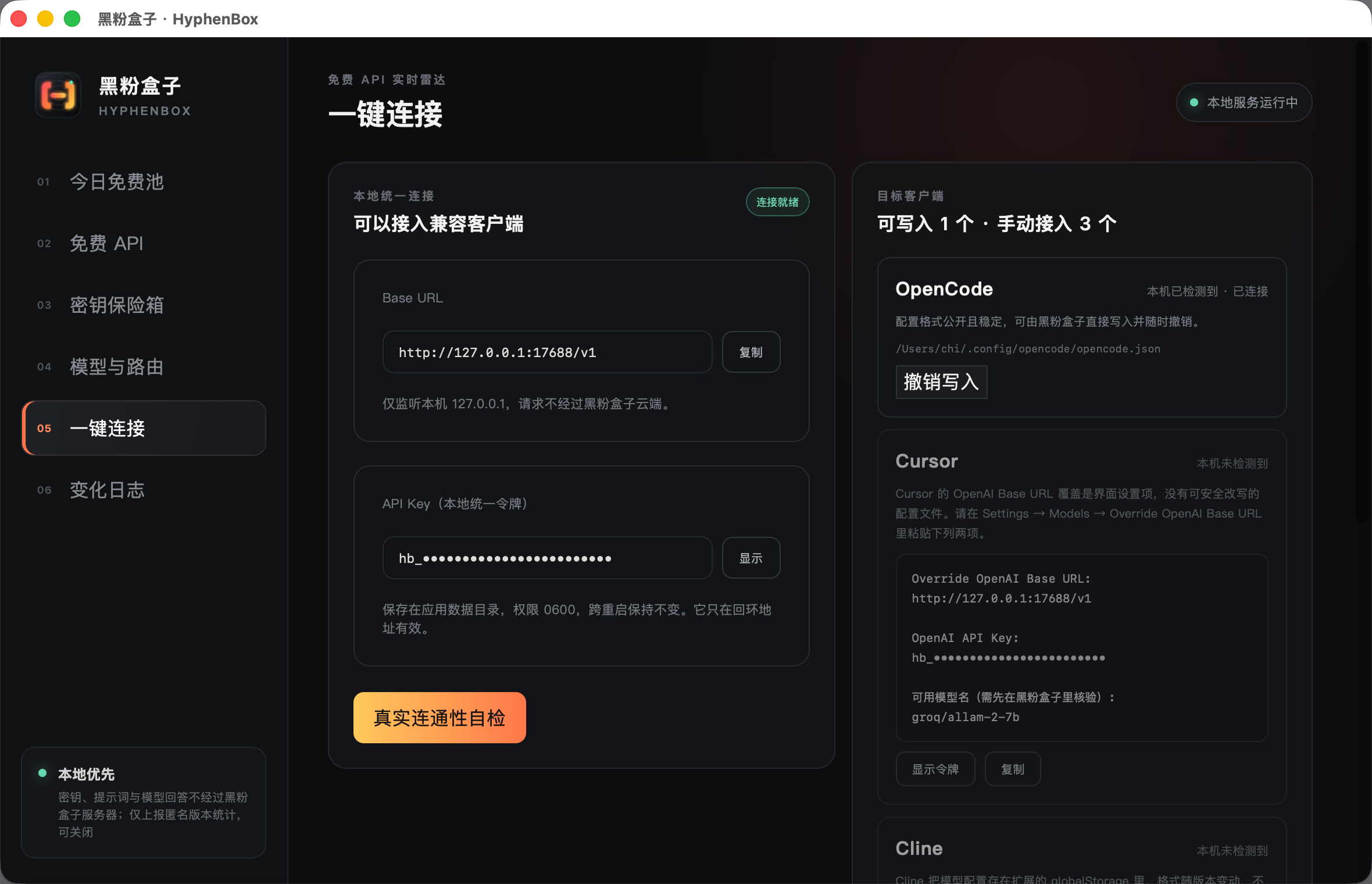
The last step is the simplest: just fill in these two lines into the client. All platform models are under the same address, so switching models doesn’t require changing the Base URL and Key.
Base URL: http://127.0.0.1:17688/v1
API Key:  在「一键连接」页点「显示令牌」取
▍Select auto, and you no longer have to guess which model is usable now
This is the most important new feature of this version. The reason is my own testing: for the same 62,959 token request, nova-lite runs directly, claude-3-haiku only allows 26,786 tokens, aion-2.0 only allows 7,228, and claude-opus-4.6 only allows 1,339. This number is “balance ÷ model unit price”—so “which can be used” is not a model attribute but the reciprocal of the price, and it changes daily.
Since the pattern is established, you shouldn’t let people try it one by one. The first item in the model list is now auto: for requests with tools, only models that support the tool are selected; The context must accommodate the prompt this time; Under equal conditions, the lower the price, the more prioritized; If you mark a self-paid Key, always be last—free tools shouldn’t be paid for by default. One-Click Connect When writing OpenCode configurations, the default model is also set to auto (you don’t change it yourself).
Note There’s also availability tiering: each route is rated in three tiers based on 'model capability × current key × actual workload (measured as the maximum tested single run: 52,075 tokens). My machine currently runs 28 agents, less than 57 quotas, less than 5 rate caps, and only 7 pure dialogues. Quotas and rate limits are learned from upstream error reports (for example, Groq explicitly says 8,000 tokens per minute), and I don’t hardcode any one.
▍Free Rewards: What exactly have you saved?
At the bottom of the homepage, there’s a cumulative panel. My own machine currently is: 93 models across 4 providers, 230 real calls, paying $0.00 in actual usage. Based on the official prices published by each provider, these usage values are $0.21.
$0.21 doesn’t look good, so I didn’t put it as the main point—I use cheap models, and the amount can’t be described in scale; only token quantity and model count can be described. Also, the conversion is only calculated based on the provider’s own published price; parts without price are clearly marked as “not included,” so it’s better to underestimate the results than to fill in the unit price guesses.
Note There’s another important point: Self-paid keys don’t count as free rewards. The software lets you fill in any key on any platform, including those you pay for yourself, so each key can be declared in the safe whether it’s free or self-paid. I have one bank that is self-paid (150,000 tokens, 18 times), and they’re listed separately at the bottom of the panel, clearly stating ‘Not counted towards free rewards.’ If you don’t distinguish between them, this panel will count your own spending as free, and the title says ‘actual payment $0.00’—that’s a dispromiscuous statement for you.
▍Download: Official version, three desktop platforms
-
macOS 13 and above:
HyphenBox_1.0.0_universal.dmg, compatible with Apple Silicon and Intel. -
Windows x64:
HyphenBox_1.0.0_x64-setup.exe; Use.msiwhen MSI is needed. -
Linux x64 desktop: provides
.AppImage,.deb, and.rpm. The key safe requires desktop key ring services. -
Free to download, no registration required, and no account system at all.
-
Official launch does not mean obtaining commercial code signing or store approval. The first opening and SHA-256 verification methods are subject to the release page description.
-
Subsequent official iterations will be based on the release page and in-app update notifications; The free resource directory will also update independently, so you don’t need to reinstall the software every time.
下载:https://github.com/HackerChi-Hub/hyphenbox-release/releases/latest
当前正式版本:1.0.0
文件校验:使用对应发行版本附带的 SHA-256 文件
▍Why did this, and the hardest part?
Qidian is practical: I switch free APIs between several clients every day, tired of repeatedly flipping through pricing pages and trial and error. Looking for a ready-made tool, I found it either just lists without verification, or I have to hand over the key to someone else — the former doesn’t solve problems, the latter I don’t trust instead.
The hardest part isn’t forwarding requests, but determining whether it’s ‘usable.’ At first, I thought an API of 200 would pass, but later I found that some platforms’ model lists are public, and you need a key to send a real conversation; Some ‘models’ aren’t even chat models—if you ask them to ‘explain what an API is in one sentence,’ the reply is a string of decimals, because that’s a content classifier. These things used to mix in the available list, fail only when you select them on the client, and the reasons for failure seemed irrelevant.
So the current criteria are hard work: you must actually send a dialogue request and reply in a human-like way to count. It sounds silly, but it’s the only way to make “models in a list click and use them.”
▍What data will be sent out?
By default, anonymous usage statistics are enabled, and you can report at most once per calendar day, which can be turned off anytime in the interface. A system that emphasizes ‘keys don’t leave the machine’ has no right to be vague about this, so to be clear:
-
Only five fields are reported: anonymous device hash, version number, operating system, CPU architecture, and date.
-
Do not report API Keys, prompts, model responses, usage numbers, file paths, usernames, or IPs.
Note Its current stage is Official Launch · Official Iteration, with the official version starting from 1.0.0, and installation packages for all three platforms already public. Each platform, model, and account still has its own limitations. The free quota changes at any time, and the software provides update clues and local verification. It cannot guarantee that the quota remains at registration, nor can every request be successful.
Note Free records can change, but records must not be lost
HyphenBox isn’t a seemingly full free list, but a continuously updated, verified local API radar. Early indexing and network detection data are kept as historical records; When choosing a model, look at the latest official conditions and your own account’s real verification results.
🧰 Tools I build
I maintain all of these tools myself. Preview builds are clearly labeled; the release pages are the source of truth for downloads, updates and known limits.
Info: HyphenBox Status: Official releases
A radar for free LLM APIs: availability is re-tested continuously, one local interface for all of them, and keys stay on your machine
Info: LocalBrain Status: Official releases
A multimodal MCP toolbox for local models: TTS, Whisper and video generation in one place
Info: ScreenLex Status: Official releases
Learn new words while you watch shows. Free, for Mac and Windows
Info: HyphenScreen Status: Official releases
Screen recording and smart editing in one: a DaVinci-style timeline, automatic redaction and a check of the finished video before export. Free
Quote: HyphenTech Make AI your superpower Local deployment · Free resources · Self-made software https://hyphentech.top
Late nights and burned API credits went in,a cup of tea comes back out — only if you feel like it.
Scan with WeChatPress and hold to save the image, then open it from your album in WeChat Scan

Comments
Loading comments…