
Info: Machine translation This post was machine-translated from the Chinese original. Wording may be rough in places — the Chinese version is authoritative.
Summary Multimodal Agent Practical · Fully Automatic Three-Channel Output Guide After watching reference videos, drawing character portraits, writing prompts, then directly adjusting the video model to produce the footage and taking 6 frames for acceptance—effectively turning the two free credit points hidden in Google AI membership into a closed loop HyphenTech · 2026-11-18
Many people haven’t realized one thing: Google Antigravity Official Agent Environment itself cannot directly generate videos. Previously, when using it to disassemble viral short videos, it could understand the original animations, reverse storyboard prompts, and casually draw character portraits; But when it comes to the final step of “producing the video,” users still have to switch to the browser to upload images, click generate, monitor the progress bar, download the finished video, and then drag it back to the local site for inspection.
In the past couple of days, I have completely connected the last piece of the puzzle. Now, in the same chat window, after watching the reference video, drawing character portraits, and writing prompts, it directly calls up the video model to produce footage, automatically completes downloads, restores the original audio track, and extracts 6 frames of the puzzle side by side for review—I just nod before the fee is charged and finalize the final view.
The entire plan runs 3 channels, with the first two spending Google One AI membership already free hidden credits, which can be used directly on Pro, Ultra 5x, and Ultra 20x. All quotas, pitfalls, and deduction details below are verified based on Pro member tests, with ready-made instructions at the end of each section. Just copy them to Antigravity and run directly.
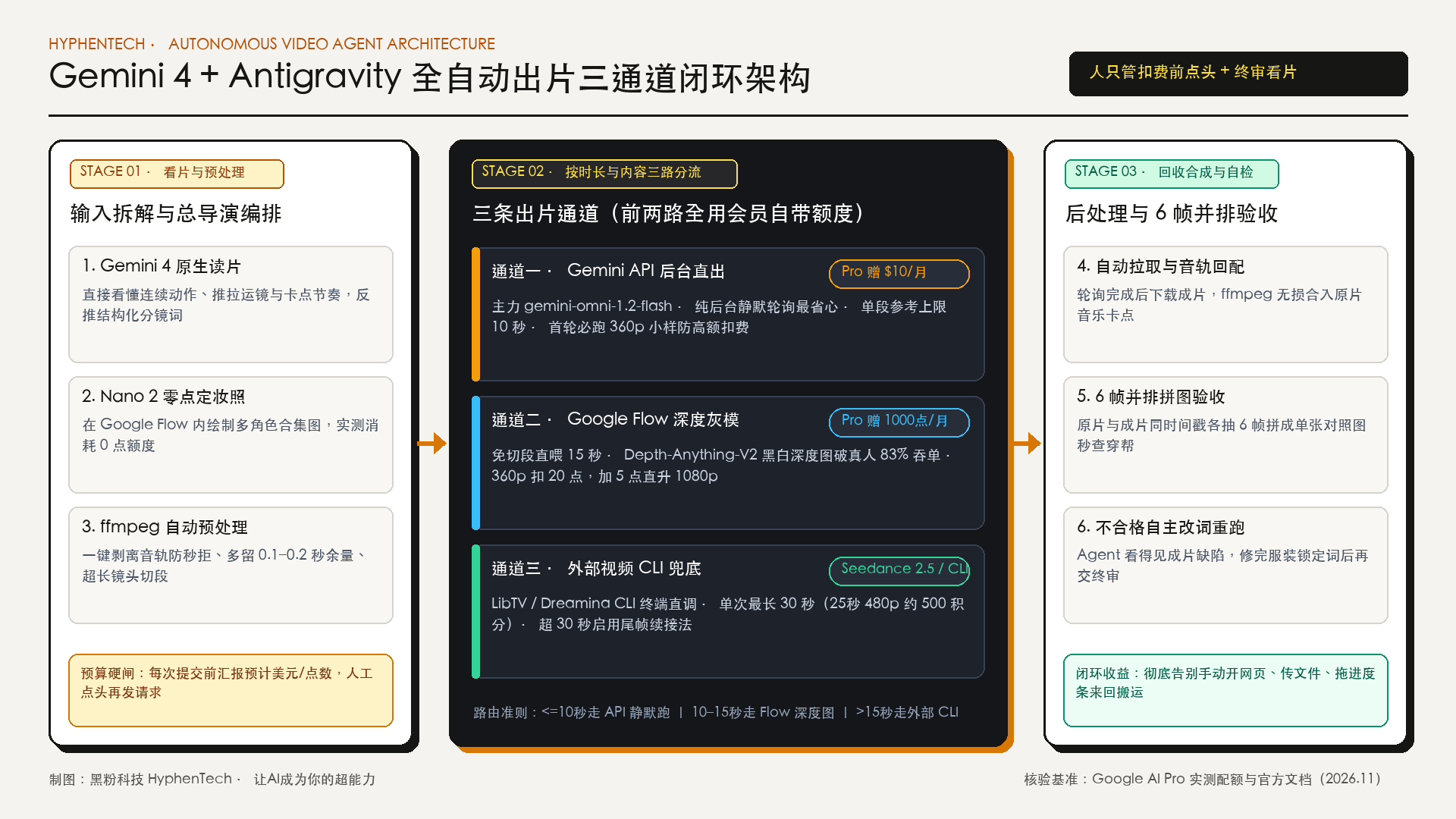
1. The missing part of Antigravity: Understandable, why must auto-output be connected?
Why do we have to leave the video production step to the agent? The core reason is that its underlying brain is Gemini. Ordinary multimodal models often just snatch a few static screenshots per second to guess the plot, but after upgrading to Gemini 4, it can natively understand continuous movements, camera movements, push-pull, and timing cuts.
But as long as it can’t produce the video itself, the workflow breaks in the last mile: the most frustrating thing isn’t clicking the mouse a few more times, but the feedback loop breaking. The agent can’t see what images the prompt it wrote appeared, so it can’t compare it to the original to pick out errors or rewrite the prompt and run another version; Every time files are moved back and forth, people have to wait in front of the screen as the courier.
Once the output channel is connected to the terminal, the human-machine division of labor becomes immediately smoother:
- Human actions: Clearly state which film to make, confirm the budget before each purchase, compare sample videos before making a decision.
- Antigravity actions: Disassemble the original footage, lock in character costume photos, write storyboard prompts, select channels to submit, poll downloads, use
ffmpegto re-dub the original soundtrack, draw 6 frames each from the original and final footage**, and perform side-by-side puzzle self-checks—if any bloopers are found, revise a version yourself before submitting the test.
2. Your membership already has two photo credits hidden inside
Many people subscribe to Google AI Pro or Ultra, but usually only chat on web pages and never claim the two video productivity credits that come with their accounts:
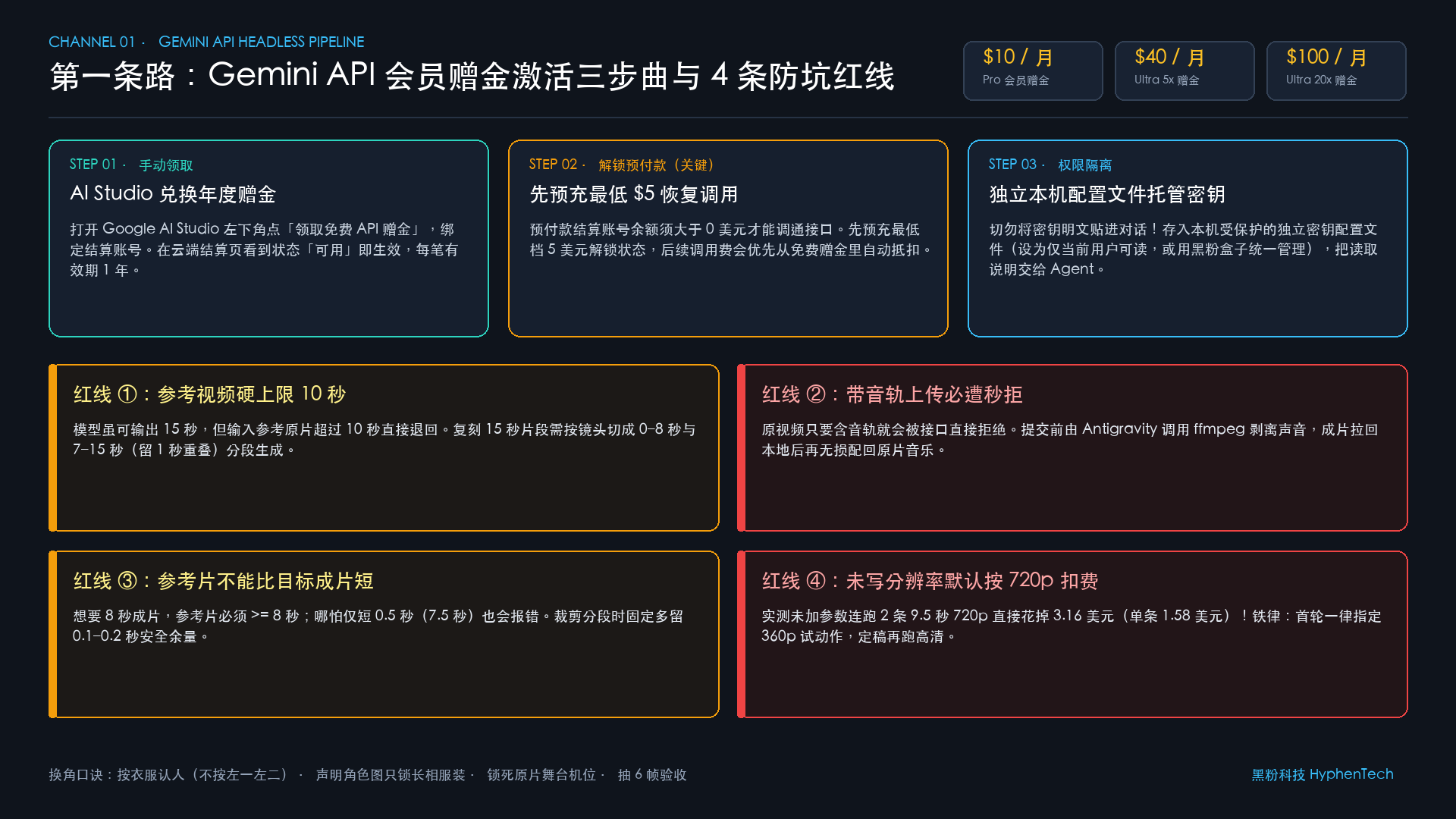
The first is the Gemini API Cloud Bonus (USD). Google has integrated Google Developer Program Developer Benefits into its AI subscription system. According to Google Developer Program Official Benefits Description and AI Studio Member Bonus Claim Guide, a monthly cloud grant that allows direct video model access is issued:
- Pro Member: $10 per month
- Ultra 5x Membership: $40/month
- Ultra 20x Membership: $100/month
This money will not be automatically added to the bill; you must manually click to claim it once. Once received, each transaction is valid for 1 year.
The second is Google Flow monthly points. Google Flow Official Video Workbench (for desktop rules, see Google Flow Official Help Documentation) can be understood as Google’s own multimodal production console: send reference images, send reference videos, and write a dispatch description to produce videos. Pro members receive 1000 points per month, with Ultra points even more; Videos are charged based on resolution, but using the built-in Nano Banana 2 (interface abbreviated as Nano 2) to draw character portraits consumes 0 points in actual tests.
Before we get started, let’s first identify the three core names that repeatedly appear below:
- Omni and Veo: Google’s two video model lines. Omni (mainly
gemini-omni-1.2-flashin this article) specializes in “simultaneously viewing reference video actions and character images to produce footage”; Veo leans toward purely cinematic rendering. - Nano Banana 2 (Nano 2): Google’s popular candid model, which can be used in Flow to create multi-angle character portraits without deducting points.
- Antigravity: Google’s official command line and desktop intelligent worker, capable of reading and writing local files, running terminal commands, and controlling browser launch (see Antigravity browser control documentation), serving as the chief director of this system.
| Channel scheme | Source of consumption quotas | Maximum number of videos per reference video | Core advantages and applicable scenarios | Main Limitations and Thresholds |
|---|---|---|---|---|
| The First Path: Gemini API | Monthly USD Bonus (Pro $10/month) |
Up to 10 seconds | Pure backend silent polling, the most worry-free and closest to fully automatic | Activation requires precharging $5; Cutting after 10 seconds requires cutting; Default 720p is more expensive |
| The Second Path: Google Flow | Monthly membership points (Pro 1000 点/month) |
Up to 15 seconds | No cutting segment feeds for 15 seconds; Download plus 5 点 Direct upgrade to 1080p |
No public API required, requires independent Chrome control; Real reference requires deep grayscale conversion |
| Third Way: External Video CLI | Third-party platform points | Up to 30 seconds (can continue at the end of the frame) | Google dual-channel card review or shooting over 30 seconds for complex multi-person positioning provides a reliable backup | Additional third-party CLI tools and corresponding platform credits are required |
3. The First Path · Gemini API: Uses member bonuses for direct backend output
1. Withdraw the bonus in three steps and connect to your local machine
The logic of the API channel is the cleanest: Antigravity packages and sends the “muted reference video + character portrait + prompt” to Google Cloud models in the background, polling the status every few seconds, then pulling it back locally after generation, with no pop-ups or screen occupying the entire process. Follow these three steps to connect:
- Withdraw Monthly Bonus: Open Google AI Studio console, click the “Claim Free API Bonus” card at the bottom left, link your settlement account in the pop-up window, and click “Redeem and Continue.” After redemption, on the Google Cloud “Settle → Bonus” page, you will see the status
Google Developer Program premium benefitshowing “Available,” indicating success. - Pre-recharge $5 to activate prepayment status (the easiest step to get stuck): Right after claiming the bonus, immediately open the interface. The checkout page often pops up a yellow bar indicating the account is in prepayment mode and the balance must be greater than $0 to restore service. In actual tests, preloading the lowest level of $5 unlocks. After restoration, all API bills will prioritize deducting the free bonus.
- Securely store keys and let the agent read: Create a new key bound to this project on the left side of AI Studio. Never paste the key plaintext directly into the chat box—it is recommended to store it in a locally protected independent key profile (set file read permissions to be readable only by current system users, or have the local tool centrally host), then inform Antigravity of the profile description.
2. Four API Hard Boundaries and Corner Swapping Methods You Only Learned After Stepping Into It
- (1) Reference video hard limit of 10 seconds: Although the model can output 15 seconds, the reference raw footage fed to it will be immediately returned if it exceeds 10 seconds. When replicating 15-second clips, have the agent cut into two segments of 0-8 seconds and 7-15 seconds (leaving 1 second overlapping buffer) and then reassemble.
- (2) Track must be stripped before uploading: Uploading the original video with audio track will be instantly rejected without providing detailed reasons. First, have the agent use
ffmpegto mute with one click, then restore the original music losslessly after the video is downloaded. - (3) The reference video must never be shorter than the target final video: for example, if you specify 8 seconds for the final video, the reference video must be at least 8 seconds; Even if it’s 0.5 seconds shorter (only 7.5 seconds), it will be returned with an error. Leaving 0.1-0.2 seconds extra when cropping is the safest option.
- (4) No resolution stated, default runs at 720p: The first time I wasn’t careful, running 2 streams in 9.5 seconds at 720p directly deducted $3.16 (single video $1.58), instantly taking nearly one-third of the Pro’s monthly $10 bonus. Be sure to set a rule: run 360p first to sample the action composition, get all correct, then run in HD.
When writing character change prompts, there are four strict rules: Identify people by clothing, not by positions on the left (clearly state ‘The person wearing black sleeves and white shirts is replaced with Character A’; cross-swapping positions among multiple people prevents cross-faces); Clarify that character images only lock appearance and costumes, and all movements must match the original (to prevent characters from standing in fixed makeup); Strictly preserve the original stage, lighting, and camera positions; Prompts are streamlined and clear, and after release, the agent is required to draw 6 frames to assemble into a comparison image for acceptance.
帮我调用 Gemini API 视频模型(先列出可用模型,优先使用 gemini-omni-1.2-flash)生成一段视频:
参考视频:<原视频本地路径>,角色定妆照:<角色图片路径列表>,密钥读取:<本机受保护密钥配置说明>。
执行规则:
1. 参考视频先用 ffmpeg 剥离音轨;若超过 10 秒,按镜头切分为不超过 10 秒的分段,且每段参考时长比目标生成时长多留 0.1-0.2 秒;
2. 第一轮一律先出 360p 小样,确认构图与动作无误后再询问我是否渲染高清版;
3. 提示词按服装特征绑定替换角色,明确写出「角色图只锁长相和服装,动作、机位与舞台背景完全照原片」;
4. 采用异步任务提交并轮询直到完成后下载;
5. 下载后把原视频音轨配回成片,并从原片与成片各抽 6 帧并排拼成验收图发我;
6. 每次发起扣费请求前,先估算本次预计消耗的美元金额并等我确认。
4. The Second Path · Google Flow: Use deep gray templates to pass review and spend membership points
1. Bypass the three hurdles of no interface, human-machine verification, and live stage performance—83% of order takedowns
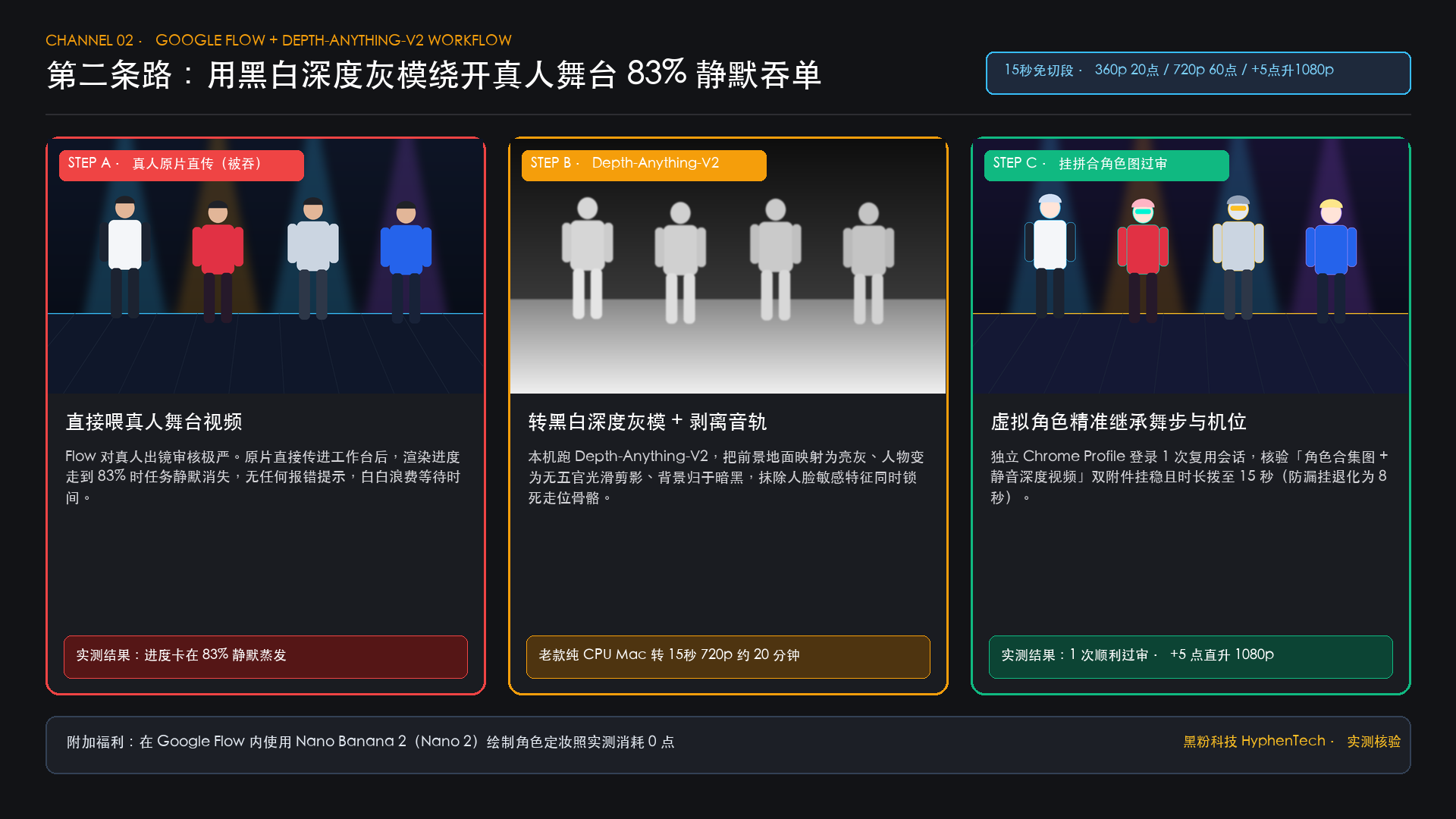
Compared to the API, Google Flow offers three real benefits: you can directly fit a whole 15-second reference video without cutting segments; it deducts 1000 membership points given for free each month (Omni 1.2 Flash runs a 15-second video, 360p deducts 20 points, 720p deducts 60 points, and concurrently sends **2 720p quotes for 120 points); and when downloading the finished video, you only need to add 5 points to directly outscore to 1080p (the community also offers process breakdowns like ffroliva/gflow-cli for reference, but be sure to read their account security boundary explanation).
To get Antigravity to smoothly navigate your flow, you have to overcome three hurdles in sequence:
- Independent Chrome Directory Bypass Headless Interception: Google blocks headless scripting browsers with obvious features. The solution is to have Antigravity open a real Chrome window with a dedicated user data directory. You only need to manually log in once to your Google account during the first popup, and subsequent sessions will be reused persistently.
- Depth-Anything-V2 Deep Grayscale Cracking Real Human Review Interception: Flow strictly reviews real human reference videos. In actual tests, a four-person live stage video was uploaded directly, and when the generation progress reached 83%, the task silently evaporated without any errors. The solution was to use the open-source monocular depth estimation model DepthAnything/Depth-Anything-V2 to convert the original into black-and-white deep grayscale video—the foreground stage was bright gray, the characters became smooth silhouettes without facial features or clothing folds, and the distant stage was dark. This completely erased the sensitive features of real faces while preserving the four members’ movement, bones, and spatial depth of field. Send the depth gray model on, and once it passed review and was released! (Note: Older Macs without dedicated graphics rely solely on the CPU to run a single video in 15 seconds 720p, and deep video takes about 20 minutes. Machines with Apple Silicon or RTX dedicated graphics are much faster.) )
- Check attachments and 15-second time slot before submission: Sometimes automated web-uploaded videos miss the input box. If they miss it, Flow will degrade to pure image-based video generation and default only output 8 seconds. Be sure to ask the agent in the command to check that the two attachments in the input box for “Composite character image + muted deep gray model video” are complete before submission, and that the duration is set to 15 seconds.
帮我通过 Google Flow(https://flow.google.com/)生成一段 15 秒换角视频:
参考视频:<原视频路径>,角色定妆照:<角色图片路径列表>。
执行规则:
1. 若原片包含真人出镜,先调用本机 Depth-Anything-V2 将原片转为黑白深度灰模视频,并用 ffmpeg 去掉音轨;若多张角色图需同台,先拼成一张带编号的角色合集图;
2. 使用独立用户目录启动真实 Chrome 窗口打开 Flow(若未登录先停下等我手动登录一次);
3. 上传角色合集图与静音深度视频,选用 Omni 1.2 Flash 模型,先设为 360p(20 点)与 15 秒时长;
4. 点击生成前必须截图或检查输入框 DOM,确认「图片 + 视频」两个附件均已挂稳且扣点预估正确,报我确认后再点生成;
5. 下载成片后配回原片音轨,抽 6 帧与原片并排对比;待我确认动作合格后,再花 5 点下载 1080p 超分终版。
5. The Third Path · External video command line: long takes and complex multi-person scenes as a backup
If you encounter Google using both channels to maintain traffic limits, or if you want to shoot a 25 seconds or even 30 seconds or more long take, you need a third backup — having Antigravity directly schedule command lines or MCP tools from external video platforms on the device. The ecosystem is already quite mature, such as the multi-model scheduling libtv-labs/libtv-skills, the official Dreamina CLI, overseas versions Pippit CLI, MiniMax official MCP, and Kling AI open platform (see access documentation in Keling API Quick Start).
Taking terminal testing of LibTV scheduling as an example, the temperament differences between different underlying models are very obvious:
- Seedance 2.5 (reference live video mode): Single session supports up to 30 seconds. In actual tests, 4 virtual characters frequently crossed positions on stage and still locked onto their costumes steadily. Running a single run in 25 seconds 480p consumes about 500 points (in early trials of 2.0, background characters occasionally appeared, but switching to 2.5 resolved cleanly).
- Wan 3.0 (Wanxiang 3.0): Mixed reference mode has a single-use limit of 15 seconds, with a more realistic light and shadow texture.
**How to connect over 30 seconds? Using the ‘final frame continuation method’: When testing a complete stage clip of 34.5 seconds, first split into two segments: the first 25 seconds and the last 9.5 seconds (about 10 seconds). Once the first 25 seconds finished running, Antigravity used ffmpeg to precisely extract the last 1 frame of 25 seconds, treating it as the reference image for the next segment, and fed it together with the last 9.5 seconds original footage—after the two segments were combined, the characters’ clothing, stage lighting, and action transitions were almost invisible to the naked eye.
帮我用本机已安装的外部视频 CLI(如 LibTV / Dreamina CLI)生成长镜头换角视频:
参考视频:<原视频路径>,角色图:<角色图片路径列表>。
执行规则:
1. 若目标时长在 30 秒以内且为多人走位,优先选 Seedance 2.5 参考生视频模式,先用 480p 试跑;
2. 若原片超过 30 秒(例如 34.5 秒),按镜头拆成前 25 秒与后续片段:跑完第一段后,用 ffmpeg 抽取第一段成片的最后 1 帧作为第二段的首帧参考,保证跨段衣服与站位严丝合缝;
3. 每次提交前先向我汇报预计扣除的平台积分,出片后自动配回原声并生成 6 帧并排验收图。
6. Is the Pro membership sufficient? The real deduction details after completing two complete projects
Many friends are most concerned about: Without upgrading to the expensive Ultra, is the monthly quota for the basic version Google AI Pro really manageable? I used this assembly line to fully grind out 2 projects (**1 four-person stage role-switching feature + 1 cat action replica short video). Including early exploration and pitfalls, I ran **over 10 ** generation times. The actual backend charges are as follows:
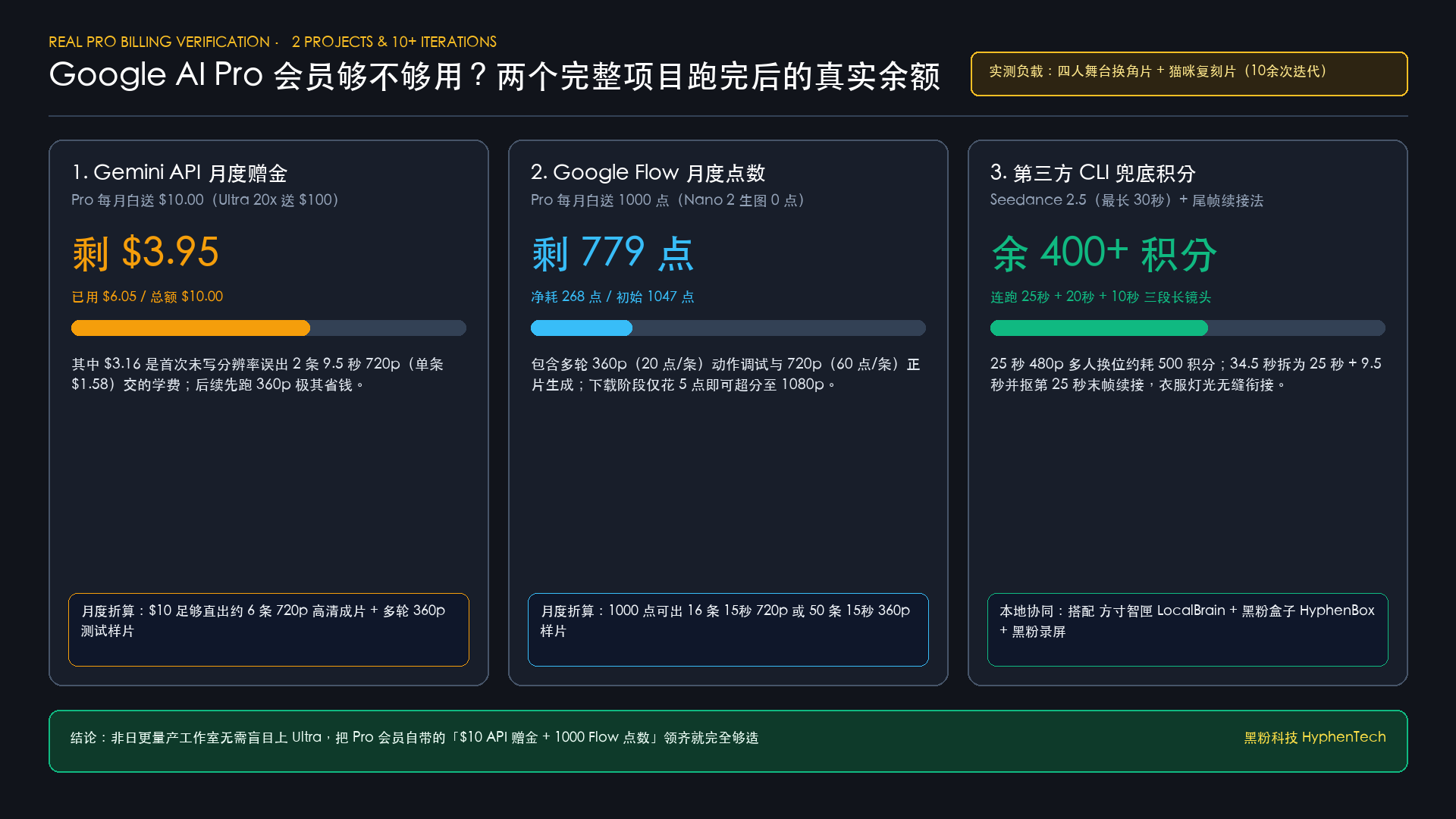
- Gemini API USD Bonus: Monthly bonus of $10, with $3.95 left after running, totaling $6.05 spent (half of that—$3.16—was the first time you produced 2 videos in 9.5 seconds** without resolution** and paid for 720p**; If you strictly run 360p samples first, $10 is enough to reliably deliver about 6 high-definition videos plus a dozen test samples).
- Google Flow monthly points: Initial 1047 points, 779 points** left after running, net consumption 268 points. Based on Pro monthly bonus of 1000 points, converting to 15 seconds all outputs 15 seconds 720p (**60 points **** per item) can produce 16 pips, running 360p samples (**20 pips ** per coupon) can run a full 50 pips, picking the satisfactory ones and spending 5 points to upgrade to 1080p is extremely cost-effective.
- Third-party guaranteed platform points: After running 25 seconds + 20 seconds + 10 seconds three long takes, the account still has over 400 points lying down.
As long as it’s not a daily studio-level batch throughput, Pro membership’s built-in dual portions stacked together is more than enough. Finally, here’s a segment called “Chief Director’s Auto-Routing Commands”—you don’t have to worry about which route to take; let Antigravity automatically select channels based on length and content; If you’re already using the LocalBrain tool I maintain to manage local voice and video MCP tools, use HyphenBox to centrally monitor local interface keys, or drag the finished video into HyphenScreen for DaVinci Resolve-style timeline refinement and final video checks, then the entire local creative workflow can be fully integrated:
你现在是我的视频总导演 Agent。请读取参考视频 <原视频路径> 与角色图 <角色图片路径列表>,按以下路由策略自动选通道并执行闭环:
1. 先分析原片时长、出镜人数与是否为真人实拍,给我一份选路方案与预算预估,等我点头再动手:
   - 时长 <= 10 秒且追求后台静默省心:走 Gemini API(gemini-omni-1.2-flash),先剥离音轨、留 0.1-0.2 秒时长余量,首轮必选 360p;
   - 时长 10-15 秒:走 Google Flow,若含真人先用 Depth-Anything-V2 转黑白深度灰模脱敏,挂稳图文视频双附件,首轮 360p(20 点),定稿后花 5 点升 1080p;
   - 时长 > 15 秒或谷歌通道受阻:走外部视频 CLI(Seedance 2.5),超 30 秒自动启用 ffmpeg 尾帧续接法;
2. 出片后一律自动配回原片音轨,并生成「原片 vs 成片」6 帧并排验收拼图发我审阅。
Limits and applicable boundaries
- The amount, validity period, and Google Flow points billing standards for the Cloud API bonus given monthly to Google AI members may change due to Google’s quarterly subscription policy adjustments. Before starting the practice, it is recommended to check your real-time monthly quota in the Google AI Studio console and Google Flow workspace.
- Accessing the web workbench via a standalone browser is limited to personal compliance creation assistance; avoid frequently posting fake orders to avoid triggering platform risk controls; When using reference videos for character replacement, please ensure you have legal authorization for the original film’s action choreography, background music, and character image replacement.
Main sources of verification
- Google Antigravity Official Website
- Google Antigravity Browser Sub-Agent Control Document
- Google AI Studio: Official Guide to Claiming the Google AI Member Monthly API Bonus
- Google Developer Program Membership Benefits and FAQs
- Google One AI Membership Plan Comparison Page
- Google Flow Official AI Video Workbench
- GitHub:DepthAnything/Depth-Anything-V2 Monocular Depth Estimation Open Source Repository
- GitHub: libtv-labs/libtv-skills Multi-model video generation command-line skill library
- Official Dreamina Tool: Dreamina CLI Command Line Documentation
- GitHub: MiniMax-AI/MiniMax-MCP Official Multimodal MCP Service
Self-made software
Versions, changes and supported installers all come from the same public release records.
HyphenAssistant
Continue your computer’s DeepSeek Harness session from a phone browser. The service, computer and network must stay online; model costs follow your existing setup.
View public downloads and updates ↗LocalBrain
A local AI toolbox for transcription, speech, images, video, and MCP tools. Features vary by platform version.
View public downloads and updates ↗HyphenBox
A free model API radar and local router, with ongoing availability checks and keys kept on your device.
View public downloads and updates ↗ScreenLex
Turn subtitles from your own films and shows into an English vocabulary library, entirely offline.
View public downloads and updates ↗HyphenScreen
Screen recording and editing with a Resolve-style timeline, automatic redaction and pre-export checks.
View public downloads and updates ↗Support HyphenTech
Late nights and burned API credits went in,a cup of tea comes back out — only if you feel like it.
Save the QR codeScan with WeChatPress and hold to save the image, then open it from your album in WeChat Scan

WeChat tips · Any amount welcome



Comments
Loading comments…