
Info: Machine translation This post was machine-translated from the Chinese original. Wording may be rough in places — the Chinese version is authoritative.
Summary First, look at the real images, then check the free conditions for the default trial version HyphenTech · Data and measurements from November 2, 2026
The most useful thing to connect raw images into your tools is a real image returned by the interface. I sent Agnes Image 2.5 Flash a task called “Robot Watering Seedlings,” and it took 15.688 seconds to collect all images. Let’s look at the original image first.
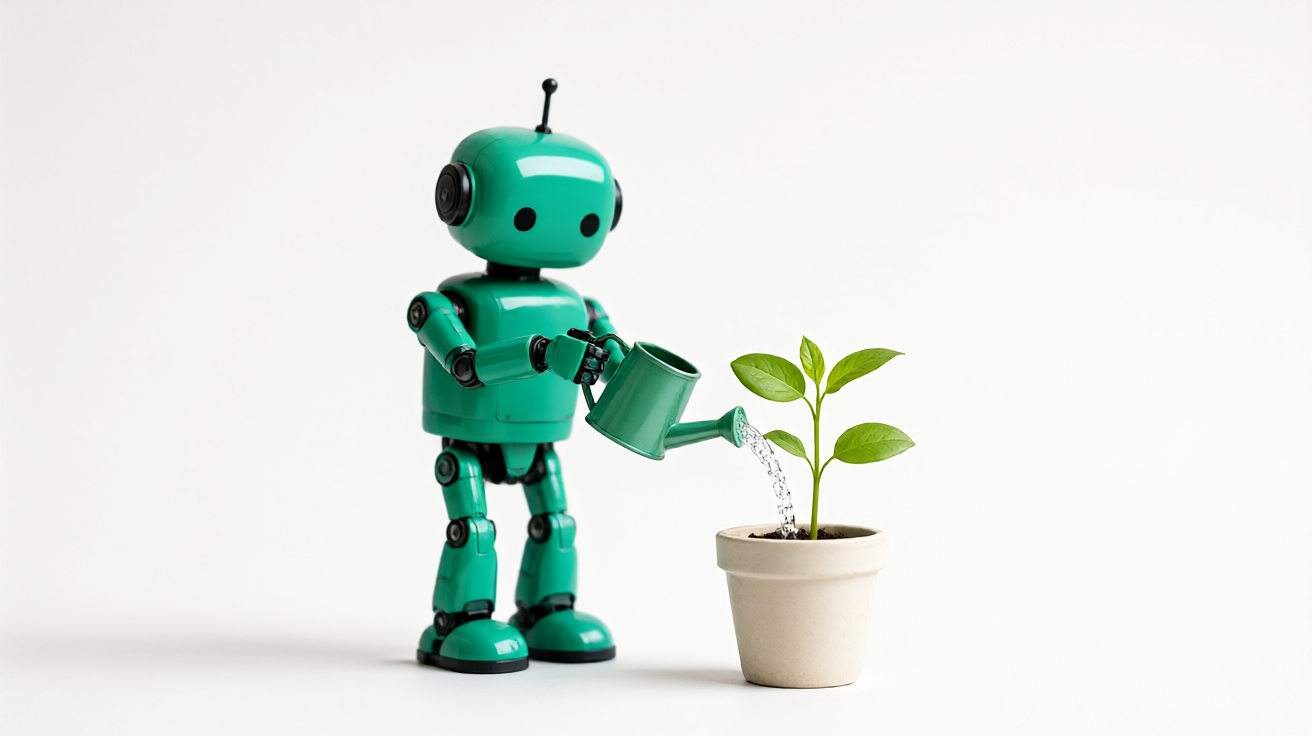
The images show a robot, a handheld water bottle, seedlings, and water flow—the main subjects and actions all match. This time, the request was made using agnes-image-2.5-flash, which requires 1K, 16:9, one photo at a time; The original file received was a PNG of 1312×736, not enlarged into a so-called 4K sample.
Who is it free to use? This sentence clarifies this first
On the official website pricing page collected on November 2, the trial price for this image model is listed as zero. **This is the default phase discount for the user trial version. **Explanation on the same page: Agent Plan credits points based on the standard price and does not participate in this free offer. Even if you have already purchased a package, you cannot simply interpret your pricing as “zero price.”
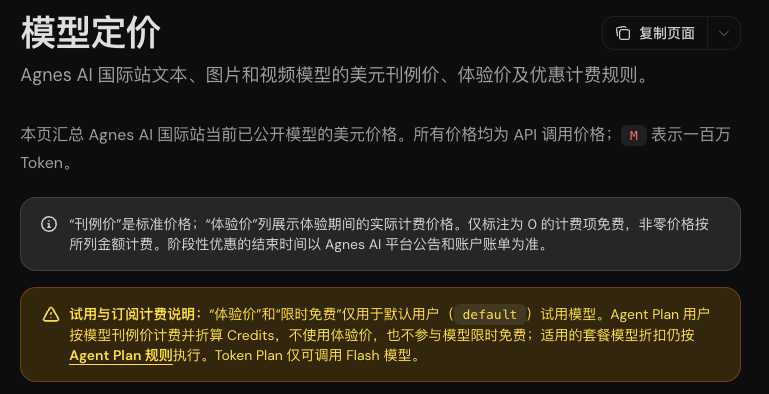
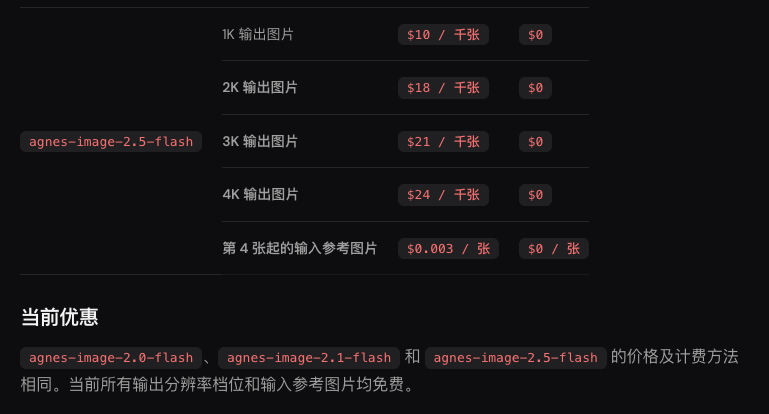
Before this submission, the program checked the official real-time price for the corresponding model, confirmed zero price, and only issued the request, and did not switch to the charging model when it failed. The final account bill has not yet been read, so I am showing the current policy and actual product, not writing it as a redemption zero invoice.
Enter from Agnes official website, create your own account and key; Then open Image Model Documentation. Check the pricing page for free conditions, check the model documentation for parameters—each manages one thing.
How to connect the interface and fill in the parameters
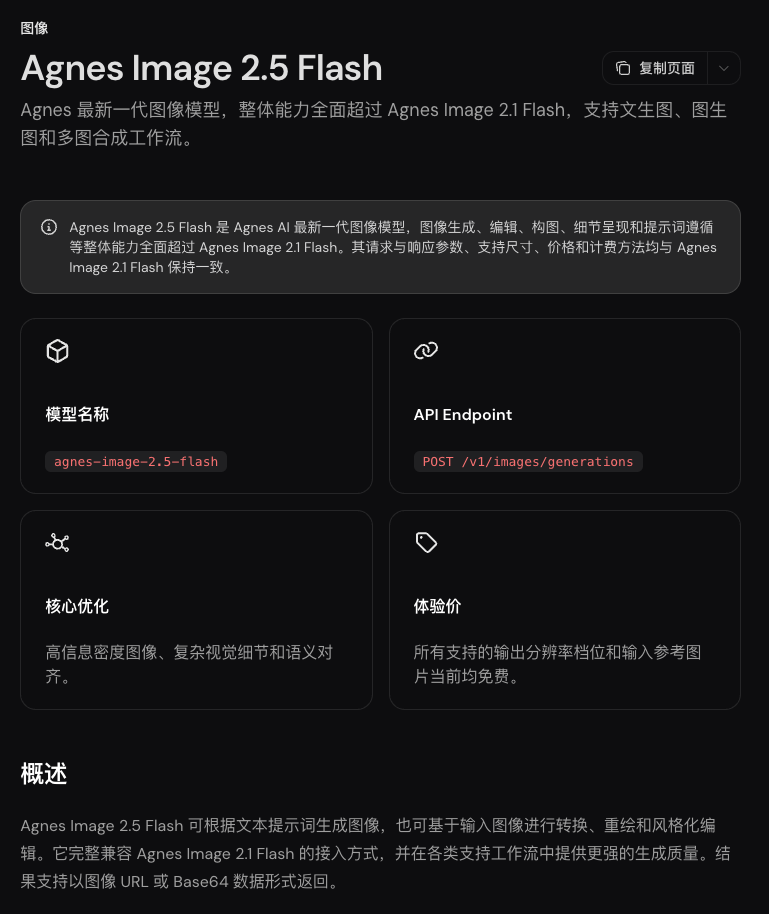
Text-to-image use POST /v1/images/generations. The interface address is https://apihub.agnes-ai.com/v1/images/generations. Below is the actual request body used in this round. For direct connection, configure your own key according to the official website; This round is forwarded by HyphenBox, with no additional repeated direct connection requests.
{
  "model": "agnes-image-2.5-flash",
  "prompt": "白色摄影棚里,一台青绿色的小机器人拿着浇水壶,正在给一盆绿色幼苗浇水。完整展示机器人、浇水壶和花盆,水流清楚可见,柔和自然光,没有人物,没有文字。",
  "size": "1K",
  "ratio": "16:9",
  "n": 1
}
size is the output level, ratio is the image size. For example, when ordering, you first select large or small cups, then choose hot drinks. Only when these two options combine can you determine the specifications you want. 1K is not “precise width 1000 pixels”; This time, 1312×736 shows that you still need to check the original file size in the end.
Documents also support image-to-image, multi-image compositing, and higher resolutions. These operations are different from this one text-to-image; this article does not use text-to-image results to guarantee their effect. When you need to reference images, place them in extra_body.image according to the document; Do not casually transfer private original images to the image bed just for a public link.
Is this picture sufficient, and how to verify acceptance
I first look at the nouns and verbs in the task, then look at the details of the image: whether the robot is actually holding the pot, whether the water flows to the seedling, and whether the hand, pot handle, and water flow are interwoven incorrectly. Checking only “downloaded to a picture” will miss the parts that truly affect usability.
| This project | Actual records |
|---|---|
| Request the model | agnes-image-2.5-flash |
| Output settings/frame size | 1K/16:9 |
| Original file | PNG, 1312×736 |
| Complete upstream takes time | 15.688 seconds, excluding local queuing |
| Execute model returns | The service did not return this field |
| Times | One time the text-to-image was created, with no batch stability testing |
Another password-free drawing entry point, Pollinations, I also sent a robot watering task. It returned an image, but the subject became a person. This failed image will be saved in the free drawing directory: interface returns 200 and the task is correct, two layers of acceptance.
Quote: My judgment If you want to add a text-to-image entry point for your personal tool, you can first use this set of parameters to run your own task. The zero-price phase of the default trial is attractive; Package differences, actual size, and task compliance are the three things that determine whether you can continue using it.
Main sources of verification
Self-made software
Versions, changes and supported installers all come from the same public release records.
HyphenAssistant
Continue your computer’s DeepSeek Harness session from a phone browser. The service, computer and network must stay online; model costs follow your existing setup.
View public downloads and updates ↗LocalBrain
A local AI toolbox for transcription, speech, images, video, and MCP tools. Features vary by platform version.
View public downloads and updates ↗HyphenBox
A free model API radar and local router, with ongoing availability checks and keys kept on your device.
View public downloads and updates ↗ScreenLex
Turn subtitles from your own films and shows into an English vocabulary library, entirely offline.
View public downloads and updates ↗HyphenScreen
Screen recording and editing with a Resolve-style timeline, automatic redaction and pre-export checks.
View public downloads and updates ↗Support HyphenTech
Late nights and burned API credits went in,a cup of tea comes back out — only if you feel like it.
Save the QR codeScan with WeChatPress and hold to save the image, then open it from your album in WeChat Scan

WeChat tips · Any amount welcome



Comments
Loading comments…